
Serveur MCP ActionProxy
Commit 4 nov. 2026Agit comme une passerelle d'approbation pour les appels d'outils des agents IA en évaluant les politiques et en exigeant une intervention humaine pour les actions sensibles.
Aussi connu sous ActionProxy/actionproxy
- Étoiles
- 1
- Outils
- —
- Téléchargements, 30 jours
- —
- Dernière version
- —
- Dernier commit
- 4 nov. 2026
- Licence
- Apache-2.0
Qu'est-ce que ActionProxy MCP ?
ActionProxy est un serveur MCP. Agit comme une passerelle d'approbation pour les appels d'outils des agents IA en évaluant les politiques et en exigeant une intervention humaine pour les actions sensibles.
Résumé généré à partir du README du projet
À propos du MCP server ActionProxy
Les développeurs qui conçoivent des agents IA nécessitant une supervision peuvent utiliser ActionProxy pour implémenter une passerelle d'approbation pour les appels d'outils. Il s'interpose entre un agent et ses outils disponibles pour évaluer chaque requête par rapport à des politiques YAML déterministes. En fonction de ces règles, le système peut autoriser l'exécution immédiate d'une commande, la refuser entièrement ou mettre le processus en pause pour exiger une intervention humaine. Cela garantit que les actions sensibles, telles que l'envoi d'e-mails, la mise à jour d'un CRM ou l'émission de remboursements, ne sont jamais effectuées sans autorisation explicite.
Les utilisateurs peuvent exécuter la passerelle localement en utilisant Docker Desktop et Node.js 22–24 sur macOS. Pour ceux qui utilisent ChatGPT, le serveur propose une connexion expérimentale via l'OpenAI Secure MCP Tunnel, qui expose un wrapper MCP via une connexion loopback. Le système enregistre tous les résultats et les preuves d'audit dans un volume SQLite local, fournissant un historique clair du cycle de vie de chaque interaction avec les outils. Il est conçu pour être intégré dans des projets existants via des SDK spécifiques ou des wrappers MCP, permettant une autorité contrôlée et ponctuelle pour les actions approuvées de l'agent.
Ce que vous pouvez faire avec
- 1Prévenir les actions sensibles non autoriséesUn agent IA doit être empêché d'exécuter des commandes dangereuses, comme la suppression de données clients, sans permission.
- 2Exiger une supervision humaine pour les communicationsUn développeur peut s'assurer qu'un agent ne peut pas envoyer d'e-mails tant qu'un humain n'a pas examiné et approuvé la requête.
- 3Tester les politiques d'agent avec des mocksLes développeurs peuvent vérifier leur logique de politique en utilisant des outils mocks déterministes qui ne nécessitent aucun identifiant réel.
Extrait du README du projet. Chaque cas d'utilisation est vérifié par rapport à une citation du document.
Configuration
ACTIONPROXY_STORAGEDATABASE_URL
| Nom | Description | Type |
|---|---|---|
| ACTIONPROXY_STORAGE | — | |
| DATABASE_URL | — |
Vérifications automatisées
Exécuté le 15 nov. 2026Rapport complet →Pas encore vérifié. Un serveur nécessite un score de 80, aucune faille sérieuse et suffisamment de données pour que nous puissions effectuer les vérifications. Fonctionnement des vérifications · Ce qu'il faut corriger pour gagner des points

- Dépôt source lié et accessibleactionproxy/actionproxy is public and reachablegithub.com/actionproxy/actionproxy ↗Réussi
- Le nom du package correspond au dépôt sourceNon vérifié
- Provenance du build (attestation Sigstore)Non vérifié
- Licence open source (OSI)Apache-2.0spdx.org/licenses/Apache-2.0.html ↗Réussi
- Commit ou version publiée au cours de l'année écouléeLast commit or release 2026-11-04github.com/actionproxy/actionproxy ↗Réussi
- OpenSSF ScorecardNon vérifié
- Nom du package non proche d'un package populaireNon vérifié
- Aucun avis critique dans le package ou ses dépendancesNon vérifié
- Aucune instruction cachée destinée au modèle0 tool descriptions and the README read; no override phrases, credential paths or hidden charactersRéussi
- Les outils destructifs sont étiquetésNon vérifié
- Le point de terminaison distant répond à la poignée de main MCPNon vérifié
README
Voir sur GitHubActionProxy
Open-source approval gates for AI agent tool calls.
./actionproxy
That is the fresh-download first run. It guides you through a local lifecycle proof or an experimental ChatGPT connection; details and prerequisites follow below.
ActionProxy sits between an AI agent and the tools it wants to use. Calls routed through an ActionProxy adapter are evaluated against deterministic policy, allowed, denied, or paused for human approval, and recorded as lifecycle evidence.
Use it when an agent can send email, update a CRM, change a ticket, issue a refund, call an internal API, or invoke an MCP tool—but should not receive broad authority to do so unattended.
agent proposes a tool call
        ↓
ActionProxy evaluates policy
        ↓
allow · deny · require approval
        ↓
approved calls receive exact, one-time authority
        ↓
runner executes the tool
        ↓
ActionProxy records the outcome and audit evidence
First run
From a fresh source download, start with one command:
./actionproxy
The guided path is supported on macOS and requires Node.js 22–24 and
Docker Desktop. Node.js 24 is recommended. It checks prerequisites before
changing anything, builds the Community container, lets Docker assign a free
loopback port, verifies the exact mock-tool inventory, and opens Quickstart.
No host-side pnpm install, account, SaaS credential, or real business system
is needed for the local proof. A cold Docker build can still download its base
image and install dependencies inside the image.
Cold-build time varies with network and host performance. Warm reruns reuse the local Docker cache and the retained SQLite volume.
Choose one of two journeys, or invoke it directly:
./actionproxy local
./actionproxy chatgpt
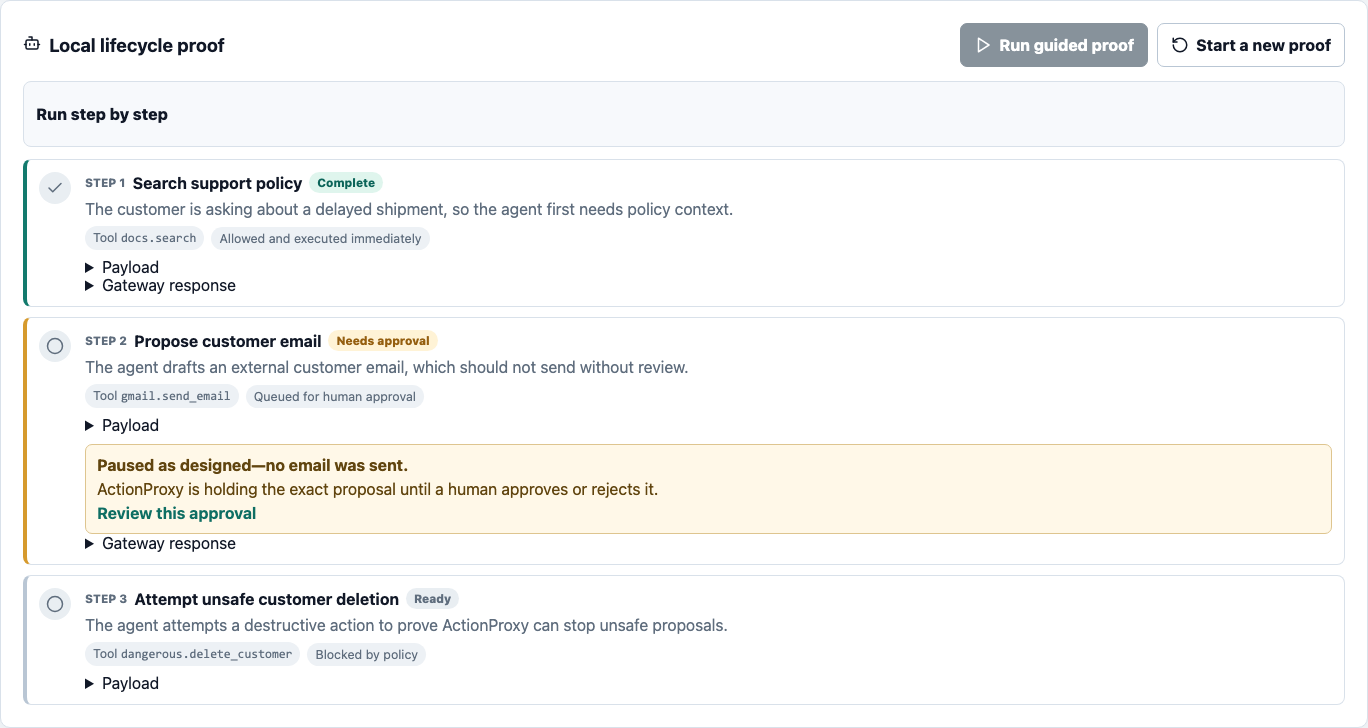
The local journey proves all three policy outcomes:
docs.searchis allowed and executes immediately;gmail.send_emailpauses with zero effects until a human decides; anddangerous.delete_customeris denied without downstream dispatch.
All three tools are deterministic mocks. The container stores lifecycle and
audit evidence in a checkout-specific SQLite volume, so stop and a later
restart retain it:
./actionproxy status
./actionproxy stop
Start a new proof clears only browser guidance. To delete the concierge-owned
container state and audit volume, run ./actionproxy reset and type the exact
confirmation phrase it displays. The concierge never targets unrelated Docker
projects or volumes.
Connect ChatGPT
The ChatGPT journey keeps the gateway on loopback and exposes only its stdio MCP wrapper through OpenAI Secure MCP Tunnel:
ChatGPT → OpenAI Secure MCP Tunnel → ActionProxy MCP wrapper
        → local ActionProxy gateway → deterministic mock tools
This journey is experimental in v0.1. Its local lifecycle, launcher, secret handling, and simulated tunnel states have automated coverage, but the mandatory clean-Mac live ChatGPT acceptance has not yet been recorded. Treat the steps as guided evaluation, not as a claim of release-proven live ChatGPT support.
ChatGPT developer-mode access, Platform Tunnels Read + Use, and tunnel association with the target ChatGPT workspace are separate prerequisites. The concierge checks the local pieces and guides the workspace steps; it cannot grant access or change administrator settings.
Run ./actionproxy chatgpt even if you have not prepared the tunnel yet. In
the same terminal, the concierge:
- checks Mac, Node, Docker Desktop, and Compose first;
- explains the separate Platform and ChatGPT access boundaries;
- can open the official tunnel, developer-mode, and access-request guidance;
- accepts and validates the tunnel ID when you have it;
- detects
tunnel-client; when it is absent, offers an explicitIchoice to install ActionProxy's reviewed, pinned copy of the official OpenAIv0.0.10asset locally, while retaining the exact manual release/checksum procedure; and - builds and verifies the local gateway before asking for the runtime key with hidden input.
You can pause safely at every external-access step and rerun the same command.
Once the gateway is ready, the browser Quickstart opens alongside the remaining
tunnel setup and shows the matching live state. Passing
--tunnel-id tunnel_0123456789abcdef0123456789abcdef remains available for
automation or experienced users.
ActionProxy downloads tunnel-client only after you choose I in the
interactive missing-client flow or explicitly run the install command. It
installs the ActionProxy-reviewed, pinned official OpenAI v0.0.10 asset at
.actionproxy/bin/tunnel-client; the checked-in SHA-256 is the trust anchor.
The upstream binary is ad-hoc signed, not Developer ID-signed or notarized, so
ActionProxy does not claim that Apple has verified it. The installer never runs
sudo, changes PATH, removes quarantine metadata, or bypasses Gatekeeper.
This describes the optional host-side tunnel helper; a cold Docker build can
separately download images and image-local dependencies.
Inspect or manage only this checkout-local installation with:
./actionproxy tunnel-client status
./actionproxy tunnel-client install
./actionproxy tunnel-client remove
Each command also accepts --json. A verified local install is reusable
offline. remove deletes only an unchanged client bound to ActionProxy's own
install receipt; it refuses a live launcher, a modified file, and manually
placed clients. stop and reset retain the client. The downloaded optional
binary is not part of the repository release or its SBOM.
The runtime key is supplied to tunnel-client through a private, temporary
file and is removed when the tunnel ends; never put the key in a command
argument, browser, profile, or checked-in configuration.
For noninteractive automation, point
ACTIONPROXY_CONTROL_PLANE_KEY_FILE at an absolute, caller-owned regular file
with mode 0600. The concierge reads it only after the non-secret checks and
build, copies the value into an OS-temporary 0700 session, and leaves the
caller file untouched. Legacy CONTROL_PLANE_API_KEY input is accepted only
when invoking ./actionproxy directly; the root shim immediately moves it to
an unlinked private file descriptor before starting Node. Environment secrets
still have an unavoidable pre-start process-listing window, so do not put the
raw variable in front of corepack pnpm, node scripts/first-run.mjs, or the
compatibility adapter. Use the file input whenever strict process-list secrecy
matters.
The external OpenAI links in this first-run guidance were last reviewed on 2026-08-03; use the linked canonical pages rather than relying on a copied menu path.
The existing automation-compatible command remains available and delegates to the same implementation:
corepack pnpm demo:chatgpt:tunnel -- --tunnel-id tunnel_0123456789abcdef0123456789abcdef
See the complete Secure MCP Tunnel manual fallback and troubleshooting guide. For an advanced public HTTPS resource-server integration, see OAuth-protected Streamable HTTP MCP; that adapter is experimental and requires an external OAuth 2.1 authorization server.
Adopt in another project
If a developer or AI coding agent is adding ActionProxy to an existing application, start with the third-party adoption guide, not the contribution workflow. The SDK and MCP wrapper are published to npm with verified provenance. Verify both coordinated records, then install only the exact package needed by the consumer:
npm view @actionproxy/sdk-js@0.1.1 version dist.integrity repository.url dist.attestations
npm view @actionproxy/mcp-wrapper@0.1.1 version dist.integrity repository.url dist.attestations

npm install --save-exact @actionproxy/sdk-js@0.1.1
# or
npm install --save-exact @actionproxy/mcp-wrapper@0.1.1
ActionProxy does not publish a registry container image. Run the separate gateway from its reviewed source checkout. For a credential-free, source-bound starter, invoke the generator from the consumer project's directory:
/absolute/path/to/actionproxy/actionproxy integrate --mode sdk --json
# or: --mode mcp
# or: --mode http
The default directory is actionproxy-<mode>-integration. Use
--output NAME for another single-directory name. Generation creates a new
directory only, refuses to overwrite any existing entry, targets a loopback
gateway, and includes a machine-readable descriptor plus a mode-specific proof
checklist. SDK and MCP starters build a versioned local package tarball from the
reviewed checkout. This is an intentional source-bound selection even though
the exact registry packages are available; the generated starter does not
probe npm or switch dependency sources. The HTTP starter has no runtime
dependency. The generated descriptor records the package and source-binding
contract. A private actionproxy-source.json stores the reviewed checkout's
local path so the starter can find it after cd; its contents and absolute
path are omitted from command output. --json reports generated filenames,
hashes, and next commands without credentials or absolute paths. The starter's
.gitignore excludes that binding, local package tarballs, and installed
dependencies.
Each starter rechecks ./actionproxy status --json immediately before it runs,
requires a healthy loopback-only gateway, and uses the live Docker-assigned
port. Its generated policy is clearly marked as a sample; ./actionproxy local
continues to enforce the bundled deterministic demo policy unless an operator
starts the server separately with an explicit policy path.
The guide provides a single decision tree for the three supported integration boundaries:
- put the stdio wrapper in front of an existing MCP server;
- use
runExternalActionwhen a JavaScript or TypeScript runner owns the downstream function; or - implement the documented HTTP grant lifecycle from another runtime.
The exact published packages are @actionproxy/sdk-js@0.1.1 and
@actionproxy/mcp-wrapper@0.1.1. The guide includes the source-tarball fallback,
machine-readable OpenAPI and JSON Schema contracts, a mock-first completion
contract, and a prompt developers can give directly to a coding agent. Do not
let an agent invent another package or dist-tag, bypass grant consumption, or
replace an unknown downstream outcome with an automatic retry.
Develop from source
Use the Node/Corepack workflow when changing ActionProxy itself:
In the public checkout, coding agents and automated contributors should first read the repository-wide AGENTS.md.
If you already use nvm, run nvm use first. Otherwise select Node 22–24 with
your existing Node installation or version manager; Node 24 is recommended.
node --version
corepack enable
corepack pnpm install --frozen-lockfile
corepack pnpm dev
Open http://127.0.0.1:5173/#/demo. The checked-in .node-version also works
with tools such as asdf and mise.
These development commands are alternatives; run each process you need in its own terminal:
corepack pnpm dev:server  # gateway only, with local mock execution
corepack pnpm dev:web     # Vite console only
corepack pnpm dev:proxy   # external-runner mode; no local execution
For a manual Docker run, use docker compose up --build and open
http://127.0.0.1:8787/app#/demo. Set ACTIONPROXY_DOCKER_PORT=18787 when an
explicit alternate host port is useful. The Compose default uses SQLite and
publishes only to 127.0.0.1.
What ships
- Local HTTP approval gateway and web console
- YAML policy with allow, deny, and approval decisions
- Deterministic mock tools for a zero-credential demo
- Approval review with original and edited payload evidence
- Append-only, hash-chained audit events and verification
- Exact, expiring, single-use grants for external runners
- Memory, SQLite, and Postgres storage adapters
- JavaScript SDK and external-runner helper
- Stdio MCP wrapper and bounded tool-discovery doctor
- Experimental OAuth-protected Streamable HTTP
/mcp - Source-aware content-influence consequence controls
- Slack, Telegram, email-outbox, and SMTP approval notifications
- API-key and OIDC JWT authentication modes for self-hosted deployments
See Community capabilities for the precise boundary, and OSS test status for what is automated, what still needs live validation, and what remains before release.
What ActionProxy is not
ActionProxy is not an LLM gateway, chatbot, browser, agent framework, workflow builder, connector marketplace, or hosted control plane. It cannot intercept tools, networking, shell access, credentials, or model memory that bypass its configured adapters.
Source labels and content-influence policy contain consequences after content is read; they do not detect prompt injection, make retrieved text trustworthy, or turn data into instructions.
Curl lifecycle
With the server running:
examples/local-curl-demo/create-doc-search.sh
examples/local-curl-demo/create-email-approval.sh
examples/local-curl-demo/list-pending.sh
examples/local-curl-demo/approve-first-pending.sh
examples/local-curl-demo/create-denied-action.sh
curl -s http://127.0.0.1:8787/v1/audit | jq
curl -s http://127.0.0.1:8787/v1/audit/verify | jq
The expected behavior is:
docs.searchexecutes immediately;gmail.send_emailhas no effect before approval and one mock effect after;dangerous.delete_customeris denied without downstream execution;- the audit API records proposal, decision, approval, authority, execution, and denial evidence.
SDK and external runners
The JavaScript SDK is published as @actionproxy/sdk-js@0.1.1. It contains the
HTTP client, polling helper, gated-tool helper, and external-runner authority
flow. Verify its exact registry metadata with the commands above before
installing it, or use the source-tarball fallback in
the adoption guide.
Start ActionProxy without local tool execution before testing an external runner:
Terminal 1 — gateway:
corepack pnpm dev:proxy
Terminal 2 — external runner:
node examples/external-runner/run-external-action.mjs
MCP wrapper
The stdio wrapper in packages/mcp-wrapper/ lets an MCP host expose downstream
tools only through ActionProxy policy and approval. It is published as
@actionproxy/mcp-wrapper@0.1.1; the same exact registry-verification rule and
source-tarball fallback apply.
corepack pnpm dev:proxy
In a second terminal:
corepack pnpm demo:mcp
Use corepack pnpm demo:mcp:manual to approve through the web console, or
corepack pnpm demo:mcp:hosts to print local Codex, Claude Code, and generic
stdio host configurations. Discovery starts reviewed child commands and is not
a sandbox.
Real Google Workspace reference
Community also includes an opt-in, downstream Google Workspace MCP reference. It demonstrates a real Gmail search followed by a draft that remains paused until an ActionProxy approval is granted:
local scripted host → ActionProxy MCP wrapper → operator-owned workspace-mcp
                    → Google Workspace
This is not the bundled gmail.send_email mock and it is not an
ActionProxy-native Google connector. The third-party MCP process owns Google
OAuth and runs with the local user's ordinary process and network authority;
ActionProxy does not vendor it or take custody of its OAuth tokens. Use a
dedicated test account, review the external dependency before invocation, and
keep the example's .env.local and .actionproxy/ state untracked. The
documented first proof can search Gmail and create a draft after review; it
does not send email. The reference pins the third-party
workspace-mcp 1.22.0 README,
v1.22.0 license,
and official PyPI 1.22.0 record.
Its Python transitive dependencies remain outside ActionProxy's pnpm lock and
SBOM. No live Google-account acceptance has been recorded for this release
candidate, so this is not a claim of verified native or live connector support.
Storage
The default memory mode resets tool-call and approval state on restart. Use SQLite for a durable local instance or Postgres for a self-hosted server:
ACTIONPROXY_STORAGE=sqlite corepack pnpm dev:server
docker compose --profile postgres up -d postgres
ACTIONPROXY_STORAGE=postgres \
DATABASE_URL=postgres://actionproxy:actionproxy@127.0.0.1:54329/actionproxy \
corepack pnpm dev:server
SQLite requires the sqlite3 command-line tool; the Docker image includes it.
See Storage.
Approval channels
The local console is always available for approval review. Optional Slack, Telegram, email-outbox, and SMTP notifications call the same approval service; a delivery failure never removes the pending approval. See Approval channels.
Security posture
Implemented controls include hashed API keys, RS256 OIDC verification, route-level scopes, server-derived actors, approval groups, separation of duties, exact execution grants, response redaction, CORS/body/rate controls, and hash-chained audit verification.
Important developer-preview limitations:
- Stored tool-call, receipt, and audit payloads can contain sensitive raw data. Response redaction does not encrypt, truncate, or delete the stored payload.
- The local unauthenticated mode is for loopback demonstrations only.
- Audit chains are locally verifiable but are not anchored to an independent transparency service.
- ActionProxy is not by itself a complete production authorization or compliance boundary.
- Operators must ensure agents cannot bypass ActionProxy through other tools, credentials, networking, or shell access.
Read Security, the security model, and the threat model before using real data or tools.
Development and validation
corepack pnpm test
corepack pnpm lint
corepack pnpm build
corepack pnpm openapi:check
node scripts/generate-config-schemas.mjs --check
corepack pnpm test:e2e:community
corepack pnpm docker:smoke:community
The release process also validates Node 22/24, Postgres without skips, the generated Community tree, dependency advisories, runtime licenses, a CycloneDX SBOM, secret scanning, workflow references, and Docker restart behavior.
If setup fails, start with Troubleshooting.
Repository map
apps/server/              Community gateway
apps/web/                 Local operator console
packages/sdk-js/          JavaScript SDK workspace component
packages/mcp-wrapper/     Stdio MCP wrapper workspace component
examples/                 Runnable local examples
docs/                     API, policy, security, storage, and operating docs
Contributing
ActionProxy is licensed under Apache-2.0. Read CONTRIBUTING.md, the Code of Conduct, and Support. Good starter work is listed in First issues.
The public repository is generated from a reviewed Community boundary. Accepted public contributions retain the original contributor attribution.
Questions sur ActionProxy MCP
Que fait ActionProxy ?
Il s'interpose entre un agent IA et ses outils pour évaluer les appels d'outils par rapport à des politiques déterministes, permettant de les autoriser, de les refuser ou de les mettre en pause pour une approbation humaine.
Puis-je utiliser ActionProxy avec ChatGPT ?
Oui, il existe un parcours expérimental utilisant un OpenAI Secure MCP Tunnel pour connecter ChatGPT au wrapper MCP d'ActionProxy.
Comment sont gérées les preuves d'audit ?
ActionProxy enregistre le résultat et les preuves d'audit des appels d'outils, en stockant le cycle de vie et les preuves d'audit dans un volume SQLite.
Quels sont les prérequis système pour une exécution locale ?
Une exécution locale sur macOS nécessite Node.js 22–24 et Docker Desktop.