
Traduit localement des pages web, des PDF, des EPUB et des sous-titres YouTube en utilisant le moteur intégré de Chrome ou Ollama pour garantir votre confidentialité.
Aussi connu sous 0Smallcat0/OpenRead
- Étoiles
- 0
- Outils
- —
- Téléchargements, 30 jours
- —
- Dernière version
- —
- Dernier commit
- 10 nov. 2026
- Licence
- MIT
Qu'est-ce que OpenRead MCP ?
OpenRead est un serveur MCP. Traduit localement des pages web, des PDF, des EPUB et des sous-titres YouTube en utilisant le moteur intégré de Chrome ou Ollama pour garantir votre confidentialité.
Résumé généré à partir du README du projet
À propos du MCP server OpenRead
La traduction locale de pages web, de PDF, d'EPUB et de sous-titres YouTube est ce qu'OpenRead permet aux utilisateurs qui privilégient la confidentialité et l'économie de coûts. Il fonctionne comme une extension de navigateur pour Chrome et Edge, utilisant le moteur de traduction intégré déjà présent dans le navigateur pour garantir qu'aucune donnée ne quitte votre machine et qu'aucun abonnement ne soit requis. Pour les utilisateurs nécessitant des capacités linguistiques plus avancées, le système prend en charge Ollama pour l'exécution de modèles locaux ou vous permet de fournir votre propre clé API pour un accès à des modèles externes.
Les développeurs peuvent intégrer ces capacités de traduction dans des workflows automatisés en utilisant le OpenRead MCP server ou l'interface en ligne de commande. Bien que le moteur Chrome par défaut soit rapide et gratuit, l'utilisation d'Ollama ou d'une clé API personnalisée permet une meilleure compréhension du contexte et des scores de qualité plus élevés. L'outil est conçu pour fournir des vues bilingues, en plaçant les traductions directement sous le texte original afin de maintenir la lisibilité et la précision sur divers types de supports, y compris les articles techniques et les livres numériques.
Ce que vous pouvez faire avec
- 1Traduire des documents locaux en toute confidentialitéUn développeur peut traduire des fichiers PDF ou EPUB sensibles sur sa propre machine sans les télécharger vers un service cloud.
- 2Automatiser la traduction via MCPUn agent IA peut utiliser le OpenRead MCP server pour traduire des chaînes de caractères ou des fichiers directement dans un environnement de développement.
Extrait du README du projet. Chaque cas d'utilisation est vérifié par rapport à une citation du document.
Comment installer OpenRead MCP
Formats vérifiés le 10 nov. 2026Ajouter à CursorAjouter à GooseInstaller OpenRead MCP dans Claude Code
$ claude mcp add openread -- npx -y openreadInstaller OpenRead MCP dans Cursor
~/.cursor/mcp.json
{
  "mcpServers": {
    "openread": {
      "command": "npx",
      "args": [
        "-y",
        "openread"
      ]
    }
  }
}Installer OpenRead MCP dans VS Code
.vscode/mcp.json
{
  "servers": {
    "openread": {
      "type": "stdio",
      "command": "npx",
      "args": [
        "-y",
        "openread"
      ]
    }
  }
}Installer OpenRead MCP dans VS Code CLI
$ code --add-mcp '{"name":"openread","type":"stdio","command":"npx","args":["-y","openread"]}'Installer OpenRead MCP dans Claude Desktop
claude_desktop_config.json
{
  "mcpServers": {
    "openread": {
      "command": "npx",
      "args": [
        "-y",
        "openread"
      ]
    }
  }
}Installer OpenRead MCP dans Codex
$ codex mcp add openread -- npx -y openreadInstaller OpenRead MCP dans Codex config.toml
~/.codex/config.toml
[mcp_servers.openread]
command = "npx"
args = ["-y", "openread"]
Installer OpenRead MCP dans Gemini CLI
$ gemini mcp add -s user openread npx -- -y openreadInstaller OpenRead MCP dans Gemini settings.json
~/.gemini/settings.json
{
  "mcpServers": {
    "openread": {
      "command": "npx",
      "args": [
        "-y",
        "openread"
      ]
    }
  }
}Vérifications automatisées
Exécuté le 15 nov. 2026Rapport complet →A passé nos vérifications automatisées. Il ne s'agit pas d'un audit de sécurité : lisez le code et donnez au serveur l'accès le plus restreint dont il a besoin. Fonctionnement des vérifications

- Dépôt source lié et accessible0smallcat0/openread is public and reachablegithub.com/0smallcat0/openread ↗Réussi
- Le nom du package correspond au dépôt sourceopenread names 0smallcat0/openread as sourcenpmjs.com/package/openread ↗Réussi
- Provenance du build (attestation Sigstore)Sigstore attestation for openreadnpmjs.com/package/openread/v/2.24.0#provenance ↗Réussi
- Licence open source (OSI)MITspdx.org/licenses/MIT.html ↗Réussi
- Commit ou version publiée au cours de l'année écouléeLast commit or release 2026-11-10github.com/0smallcat0/openread ↗Réussi
- OpenSSF ScorecardNon vérifié
- Nom du package non proche d'un package populaireNo popular package one edit away from openreadRéussi
- Aucun avis critique dans le package ou ses dépendancesNon vérifié
- Aucune instruction cachée destinée au modèle0 tool descriptions and the README read; no override phrases, credential paths or hidden charactersRéussi
- Les outils destructifs sont étiquetésNon vérifié
- Le point de terminaison distant répond à la poignée de main MCPNon vérifié
README
Voir sur GitHubOpenRead
Bilingual translation for web pages, PDFs, books and YouTube captions — free, with no account and no quota. The default engine is the translator Chrome already ships, running on your own machine, so there is no key to get and nothing to pay. Bring your own API key if you want a stronger model.
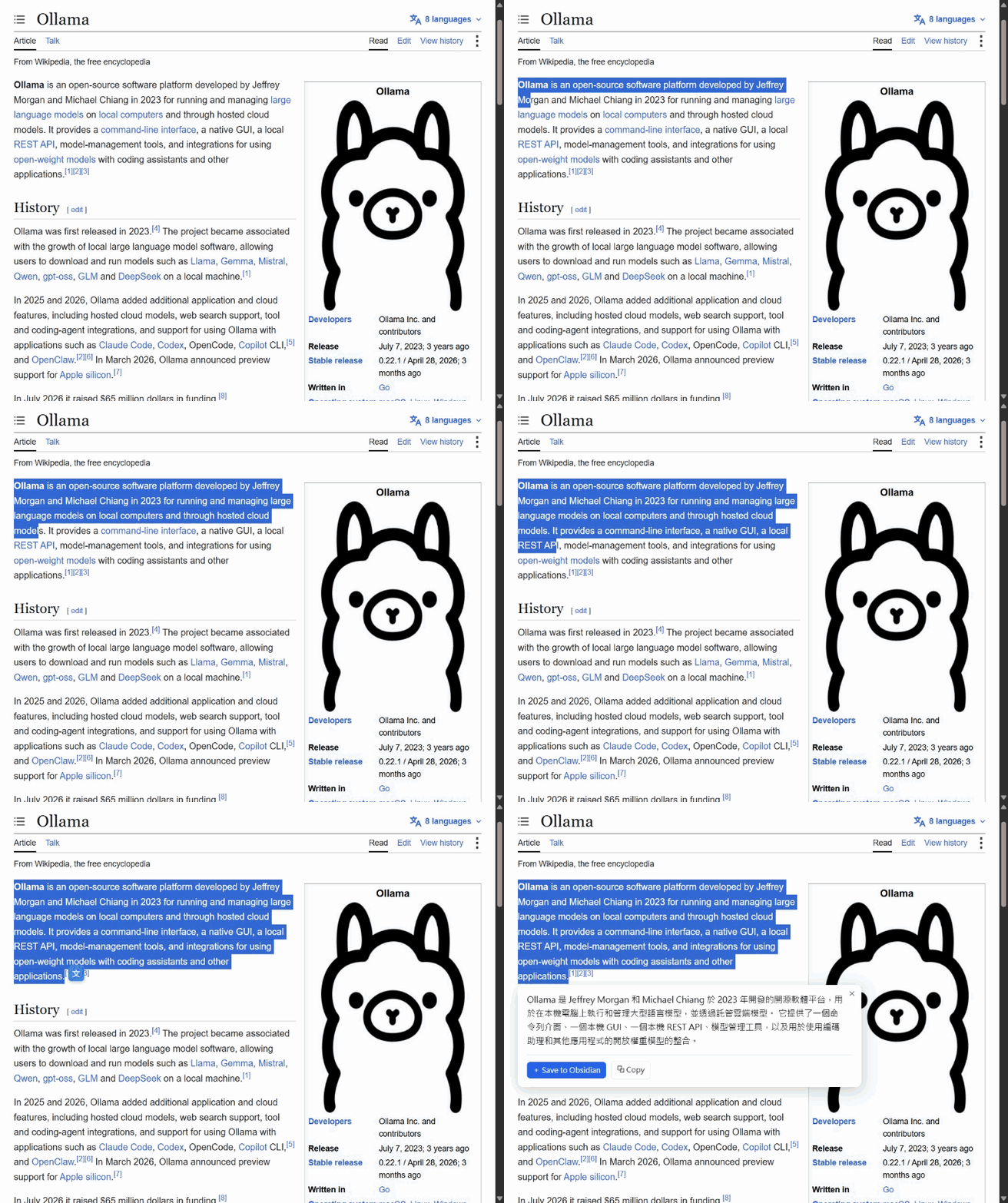
Real time, unedited, on the default engine — nothing installed.


Why
- Free, and it stays free. No sign-in, no daily limit, no paid tier. The default engine costs nothing to run because it runs on your computer, not on a server someone has to pay for.
- Some things cannot go in a cloud translator. Unpublished drafts, contracts, medical records, anything under NDA. The built-in engine and Ollama both run on your own machine; your own API key, if you add one, sends text only to the address you name.
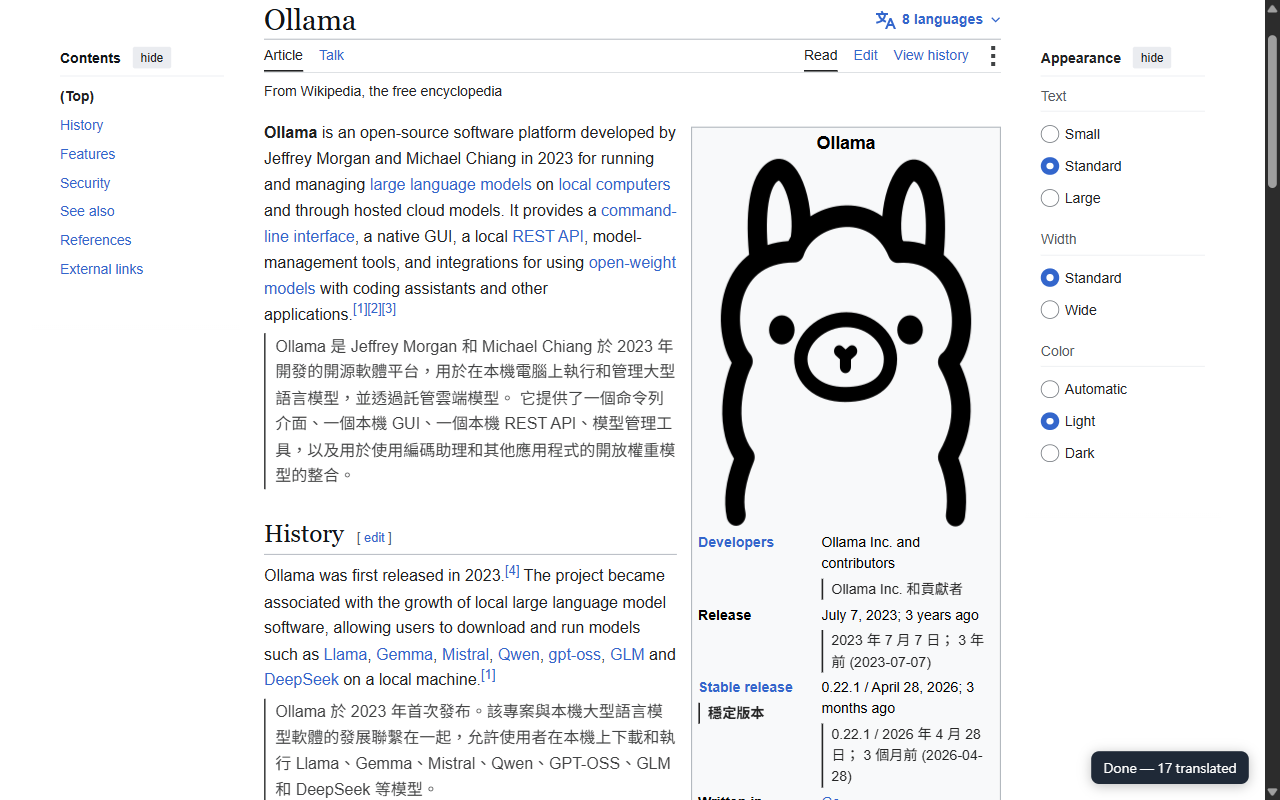
- Bilingual, not replaced. The translation goes under each paragraph, so a sentence that looks wrong can be checked against the original instead of taken on faith.
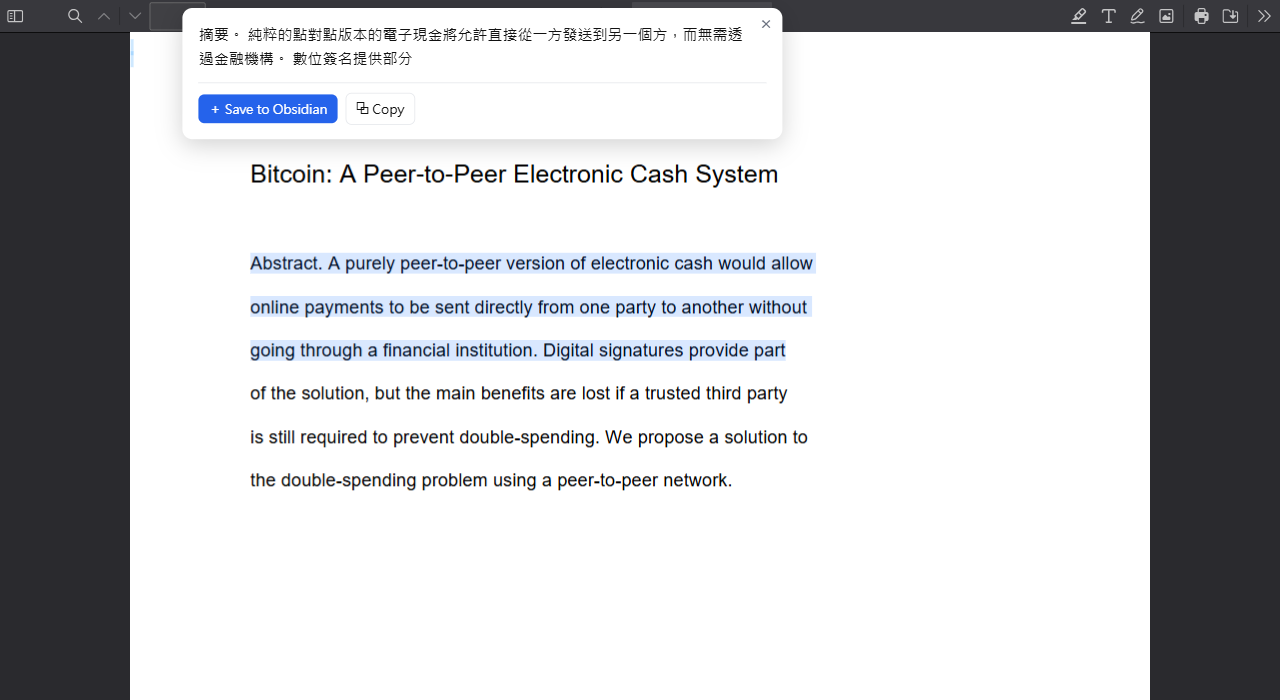
- PDFs too. Papers and specs open in a bundled viewer where selecting text works the same as on a web page — and a whole paper translates page by page, with the layout left alone.
- And EPUBs. A book opens in a reader of its own, with its contents, its pictures and your place in it kept. Ask for a translation once and it follows you from chapter to chapter.
- And YouTube. Turn on CC and every caption line shows with its translation under it. Auto-generated captions are joined back into sentences before they are translated.
- Traditional Chinese that reads like Taiwan. Most tools translate into
Simplified and convert character by character, which produces
界面,公裡,數據庫where a Taiwanese reader expects介面,公里,資料庫. OpenRead converts at the phrase level and corrects the vocabulary on the way out.
Install
⬇ Add to Chrome from the Chrome Web Store. One click, and it updates itself.
If you would rather not install from the store,
download the latest release,
unzip it, open chrome://extensions, turn on Developer mode, click
Load unpacked, and pick the unzipped folder. The same package works in
Edge, from edge://extensions.
Either way, that is the whole setup. OpenRead uses Chrome's own on-device translator, whose language pack Chrome downloads once per language pair — about 350 MB, measured at 82 seconds on a 4 MB/s connection. That download starts the moment the extension is installed rather than the first time you press translate, and the extension holds it open until it lands: Chrome does not resume an interrupted one, it waits three minutes and then starts over. The popup says whether yours is ready. After it arrives, a page takes about two seconds.
What it needs, and where it stops
- Chrome 138 or later, on desktop. The built-in translator is Chrome's, not
this extension's, so a browser without it has nothing to run on. Edge
works — measured on Edge 151, where the translator is there and a cold
first translation takes about twenty seconds — with one difference: Edge has
already claimed the three suggested shortcuts for itself, so it registers
them unbound. Everything is still reachable from the right-click menu and the
popup, and the keys can be assigned by hand at
edge://extensions/shortcuts. Firefox is not supported, and the honest reason is that it has no equivalent API: the only engine left there is Ollama, which means a server and a five-gigabyte model — the opposite of what this is for. - Thirty-nine target languages, every one probed against a real Chrome rather than taken from documentation. It starts on your browser's own language; change it in the popup. The source language is whatever the page is in — that side is not a list.
- Three settings for how it looks: the original beside the translation or the translation alone; a line, nothing, a dashed underline or a tinted background; smaller, the same, or larger. They apply to a page you are already looking at, without re-translating it.
- Chrome decides which pairs exist. It downloads packs per language pair, and a pair it has no pack for is one the built-in engine cannot do. When that happens OpenRead falls back to Ollama if you run it; if you do not, it says so and points you at Your own API key in the popup, which has no pairs to run out of.
Use it
- Whole page — right-click → Translate this page with OpenRead, or the button in the popup. What you can see is translated first, and the page keeps up on its own as you scroll and as it loads more, so an article or a feed needs one press rather than one per screen. Content inside an iframe — an embedded document, a comment thread — is translated too; an ad slot in one is not, on the strength of what is in the frame rather than where it sits. A badge counts progress and offers Stop. Do it again to put the page back.
- Without asking — in the popup, set Translate automatically to Pages in another language and they translate themselves as they load. Off by default, and any site can be excluded with one checkbox.
- One paragraph — hold Alt and point at it. The paragraph that stopped you, without a drag and without rewriting the page. Remappable to Ctrl or Shift, or off, in the popup.
- What you are writing — press
Ctrl+Shift+Kin any text box and it is replaced with its translation. Its own output language in the popup, English by default.Ctrl+Ztakes it back. - One selection — select text, click the floating 文, or press
Ctrl+Shift+Y. Escape closes the panel. - Names it keeps getting wrong — list them in the popup, one a line.
OpenReadon its own keeps the name as written;bug = 瑕疵pins how a term is translated. The built-in engine takes no prompt, so the term is held out of the sentence and put back after. - A paper — open any
.pdfand it lands in the bundled viewer, where selecting text works exactly as it does on a web page. Press translate and each page's translation is placed under the page itself, so the layout, the figures and the equations stay as the author set them. For a PDF already on your disk, turn on Allow access to file URLs inchrome://extensions→ Details first; Chrome withholdsfile://from every extension until you do. - A book — press Open an EPUB… in the popup, then choose the file or drop it onto the page. Contents down the side, Next and Previous in the toolbar, and your place kept per book, so closing the tab is not losing it. Press Translate once and every chapter after it arrives translated. The book is read out of the file in your hands: nothing is uploaded, and nothing inside it is fetched from anywhere — a picture comes from the archive, and a chapter that points at a remote image simply does not get one.
- A video — on YouTube, turn captions on with CC and each line shows with its translation under it, inside the player. Auto-generated captions, which arrive one word at a time with no punctuation, are put back into sentences at the speaker's pauses first, so what gets translated is a sentence rather than a fragment. Only the next minute and a half is translated, as the video plays — on your own API key, a two-hour lecture costs what you watch of it. Captions already in your language, YouTube's own translation included, are left as they are. Bilingual YouTube captions in the popup turns it off.
| The whole page, bilingual | A paper, in the bundled PDF viewer |
|---|---|
 |
 |
Save to Obsidian
Any translation can go into your Obsidian vault as
Markdown, in one tap, through an obsidian://new URI — no extra permissions
and no server:
---
title: 'Ollama'
source: 'Wikipedia'
url: https://en.wikipedia.org/wiki/Ollama
captured: 2026-08-06T03:41:00.000Z
from: en
to: 'Traditional Chinese'
status: raw
tags: [openread]
---

## Original

> Ollama is an open-source software platform…

## Translation

Ollama 是 Jeffrey Morgan 和 Michael Chiang 於 2023 年開發的開源軟體平台…
status: raw is a deliberate handoff: a stronger downstream model can pick up
the unprocessed captures, synthesize them, and flip the flag. OpenRead does the
cheap, reliable part on-device and leaves the expensive part to something whose
job it is.
Without a browser
The same pipeline as a command and as an MCP server, so a script or an agent
can translate locally too. Outside the browser there is no built-in
translator, so these run on Ollama — ollama pull qwen3
first:
npx openread "The quick brown fox jumps over the lazy dog."
cat paper.txt | npx openread --to Japanese
claude mcp add openread -- npx -y openread mcp
Not a reimplementation — src/node/translate.ts calls the identical function
the extension calls, and a test pins the CLI's defaults against the
extension's.
Three engines
| Chrome built-in (default) | Ollama | Your own API | |
|---|---|---|---|
| To install | nothing | a server + a 5.2 GB model | nothing — a key |
| A 44-block article | ~2 s | 54 s | depends on provider |
| Quality (chrF, 27 texts) | 36.5 | 46.4 | depends on the model |
| Reads surrounding context | no | yes | yes |
| Choose the model | no | yes | yes |
| Capture enrichment | no | yes | no |
| Text leaves your machine | no | no | yes, to that API |
chrF is a standard translation-quality score: how closely the output matches a
human translation, higher is better. The first two engines run entirely on your
machine, and their numbers come from the same 27 texts against the same
Taiwanese references — the built-in engine's
are in eval/BUILTIN-RESULTS.md, the model's in
eval/BENCHMARK-RESULTS.md. Ten chrF is the price
of installing nothing; a whole segment finishes on the built-in engine in about
the time Ollama takes to paint its first character.
Switch in the popup; ollama pull qwen3 and ollama serve is the whole Ollama
setup, with no OLLAMA_ORIGINS step — here is why.
Your own API is any server that speaks OpenAI's chat-completions protocol: OpenAI, DeepSeek, OpenRouter, Groq, Google Gemini's compatibility endpoint, or LM Studio on your own computer. Pick the address from the list, paste a key, and the popup checks it and offers the models it can reach. It is for the language pair Chrome has no pack for, on a computer that cannot run a model worth reading. The key is kept in this browser's local storage and is never synced; the text you translate goes to that provider and is billed to your key.
Privacy
No account, no analytics, and no endpoint of the developer's anywhere in the
code. On the default engine the extension makes no network request at all; on
the Ollama engine, only to the server URL you configured, on your own machine;
on your own API, only to the address you entered, with your key.
Permissions are access to the sites you visit (<all_urls>), which is what
lets it translate whatever page or PDF you are on, plus storage,
activeTab, contextMenus and declarativeNetRequest — the last one strips
the Origin header from this extension's own requests to your Ollama server,
scoped so a web page's requests can never match it. Full policy.
That is the author of the extension telling you the extension is safe, which is worth very little. So it is also a test you can run:
pnpm build && pnpm e2e:egress
It loads the built extension into a real Chrome, translates a page served from
127.0.0.1, and records every request every part of the extension makes. It
fails if one left the machine, if one went to Ollama — which would mean the
default engine was not what served the run — or if nothing was translated at
all, since that is the easy way to send nothing and prove nothing.
Development
pnpm install
pnpm build        # -> .output/chrome-mv3, load it unpacked
pnpm test         # unit tests
pnpm eval         # offline reliability eval -> eval/RESULTS.md
pnpm eval:builtin # score the default engine in a real Chrome -> eval/BUILTIN-RESULTS.md
pnpm bench        # live model benchmark (needs Ollama)
pnpm shoot        # re-shoot every screenshot and the clip on this page
pnpm e2e:page     # whole-page translation in a real Chrome, end to end
pnpm e2e:stress   # hostile pages: infinite feeds, route swaps, rapid toggling
pnpm e2e:egress   # prove the default engine sends nothing, in a real Chrome
pnpm e2e:byok     # your own API key, against a stand-in provider on 127.0.0.1
pnpm e2e:youtube  # bilingual captions on a real YouTube video, CC off and on again
pnpm e2e:epub     # a real .epub opened, read and translated in a real Chrome
pnpm e2e:first-run # what a brand-new install does on a brand-new profile
pnpm e2e:prefetch  # prove installing it starts the language-pack download
pnpm e2e:page-pack # prove opening a foreign page starts its pack too
pnpm e2e:selection # select text, click the 文 icon, read what comes back
How it is built → — the reliability layer, the
streaming assembler, the evals, the model benchmark, and the bugs that produced
each of them. docs/ARCHITECTURE.md has the module map;
CONTRIBUTING.md has the workflow.
TypeScript (strict) · WXT · Vitest · OpenCC · Ollama
License
Questions sur OpenRead MCP
Comment ajouter OpenRead MCP à Claude Code ?
Exécutez claude mcp add openread -- npx -y openread dans votre terminal. Ajoutez --scope user pour le rendre disponible dans tous les projets.
Comment ajouter OpenRead MCP à Cursor ?
Ouvrez ~/.cursor/mcp.json et ajoutez le serveur sous mcpServers, avec la configuration Cursor indiquée dans la section d'installation ci-dessus.
OpenRead nécessite-t-il un compte ou un abonnement ?
Non, c'est gratuit et ne nécessite ni compte ni quota.
Comment OpenRead gère-t-il la confidentialité ?
Il utilise des moteurs locaux comme le traducteur intégré de Chrome ou Ollama afin que le texte reste sur votre machine.
Peut-il traduire des vidéos YouTube ?
Oui, il peut traduire les sous-titres YouTube, y compris ceux générés automatiquement, en plaçant la traduction sous chaque ligne.
Puis-je l'utiliser comme un MCP server ?
Oui, vous pouvez l'ajouter à Claude via MCP pour permettre aux agents de traduire du texte localement.