
Ermöglicht es einem AI-Client, Git-Identitäten, SSH-Keys und Repository-Konfigurationen zu prüfen, um korrekte Commit-Signaturen und Benutzerdetails sicherzustellen.
Auch bekannt als Yantrakar/gitpro
- Stars
- 0
- Tools
- —
- Downloads, 30 Tage
- —
- Neueste Version
- 0.4.6
- Letzter Commit
- 6. Nov. 2026
- Lizenz
- MIT
Was ist gitpro MCP?
gitpro ist ein MCP server. Ermöglicht es einem AI-Client, Git-Identitäten, SSH-Keys und Repository-Konfigurationen zu prüfen, um korrekte Commit-Signaturen und Benutzerdetails sicherzustellen.
Zusammenfassung generiert aus dem README des Projekts
Über gitpro MCP server
Gitpro bietet AI-Clients und Entwicklern eine Möglichkeit, mehrere Git-Identitäten, SSH-Keys und Commit-Signaturen über verschiedene Repositories hinweg zu verwalten. Es funktioniert durch die Analyse von Remote-URLs, um zu entscheiden, ob Arbeits- oder private Zugangsdaten verwendet werden sollen, wodurch sichergestellt wird, dass bei jedem Projekt die korrekte E-Mail und die richtigen Signing-Keys angewendet werden. Dieses Tool ist für Nutzer gedacht, die separate GitHub- oder GitLab-Accounts verwalten und versehentliche Commits mit falschen Benutzerdetails vermeiden wollen.
Der Server läuft lokal auf Linux oder macOS und benötigt Git 2.36+, Python 3.9+ und OpenSSH. Er arbeitet, indem er bestehende Git- und SSH-Konfigurationen, Repository-Einstellungen und SSH-Keys prüft. Nutzer können die Umgebung mit dem Befehl gitpro setup einrichten, der basierend auf einem Scan der vorhandenen Repositories Identitäten vorschlägt. Einmal konfiguriert, kann ein AI-Agent den MCP server nutzen, um Identitäten und Repository-Konfigurationen zu prüfen und eine strikte Trennung zwischen beruflicher und privater Arbeit aufrechtzuerhalten.
Was du damit machen kannst
- 1Repository-Identität verifizierenFrage die AI, warum ein bestimmtes Repository eine bestimmte E-Mail oder einen bestimmten SSH-Key verwendet.
- 2Konfigurationsfehler identifizierenFordere eine Liste aller Repositories an, die aktuell falsche Identitäts-Einstellungen haben.
- 3Fehlerhafte Commits verhindernNutze einen Sicherheitsmechanismus, um Commits zu blockieren, die für einen spezifischen Host die falsche Identität verwenden.
Geschrieben aus dem README des Projekts. Jeder Use Case wurde gegen ein Zitat daraus geprüft.
So installierst du gitpro MCP
Formate geprüft am 10. Nov. 2026Zu Cursor hinzufügenZu Goose hinzufügengitpro MCP in Claude Code installieren
$ claude mcp add gitpro -- uvx gitprogitpro MCP in Cursor installieren
~/.cursor/mcp.json
{
  "mcpServers": {
    "gitpro": {
      "command": "uvx",
      "args": [
        "gitpro"
      ]
    }
  }
}gitpro MCP in VS Code installieren
.vscode/mcp.json
{
  "servers": {
    "gitpro": {
      "type": "stdio",
      "command": "uvx",
      "args": [
        "gitpro"
      ]
    }
  }
}gitpro MCP in VS Code CLI installieren
$ code --add-mcp '{"name":"gitpro","type":"stdio","command":"uvx","args":["gitpro"]}'gitpro MCP in Claude Desktop installieren
claude_desktop_config.json
{
  "mcpServers": {
    "gitpro": {
      "command": "uvx",
      "args": [
        "gitpro"
      ]
    }
  }
}gitpro MCP in Codex installieren
$ codex mcp add gitpro -- uvx gitprogitpro MCP in Codex config.toml installieren
~/.codex/config.toml
[mcp_servers.gitpro]
command = "uvx"
args = ["gitpro"]
gitpro MCP in Gemini CLI installieren
$ gemini mcp add -s user gitpro uvx -- gitprogitpro MCP in Gemini settings.json installieren
~/.gemini/settings.json
{
  "mcpServers": {
    "gitpro": {
      "command": "uvx",
      "args": [
        "gitpro"
      ]
    }
  }
}Automatisierte Checks
Geluften am 14. Nov. 2026Vollständiger Bericht →Unsere automatisierten Checks bestanden. Das ist kein Security-Audit: Lies den Code und gib dem Server nur den minimal notwendigen Zugriff. Wie die Checks funktionieren

- Source Repository verknüpft und erreichbaryantrakar/gitpro is public and reachablegithub.com/yantrakar/gitpro ↗Bestanden
- Paket nennt dieses Repository als Quellegitpro names yantrakar/gitpro as sourcepypi.org/project/gitpro/ ↗Bestanden
- Build-Provenienz (Sigstore-Attestierung)Sigstore attestation for gitpropypi.org/project/gitpro/ ↗Bestanden
- Open Source Lizenz (OSI)MITspdx.org/licenses/MIT.html ↗Bestanden
- Commit oder Release im letzten JahrLast commit or release 2026-11-06github.com/yantrakar/gitpro ↗Bestanden
- OpenSSF ScorecardNicht geprüft
- Package-Name ähnelt keinem populären PackageNo popular package one edit away from gitproBestanden
- Keine kritischen Advisories im Paket oder seinen Abhängigkeiten5 resolved dependencies checked; no critical advisoryosv.dev ↗Bestanden
- Keine versteckten Anweisungen an das Modell0 tool descriptions and the README read; no override phrases, credential paths or hidden charactersBestanden
- Destruktive Tools sind markiertNicht geprüft
- Remote-Endpoint beantwortet den MCP-HandshakeNicht geprüft
README
Auf GitHub ansehengitpro
The right Git identity, SSH key and signature for every repository.
gitpro.dev · PyPI · VS Code · made by Yantrakar
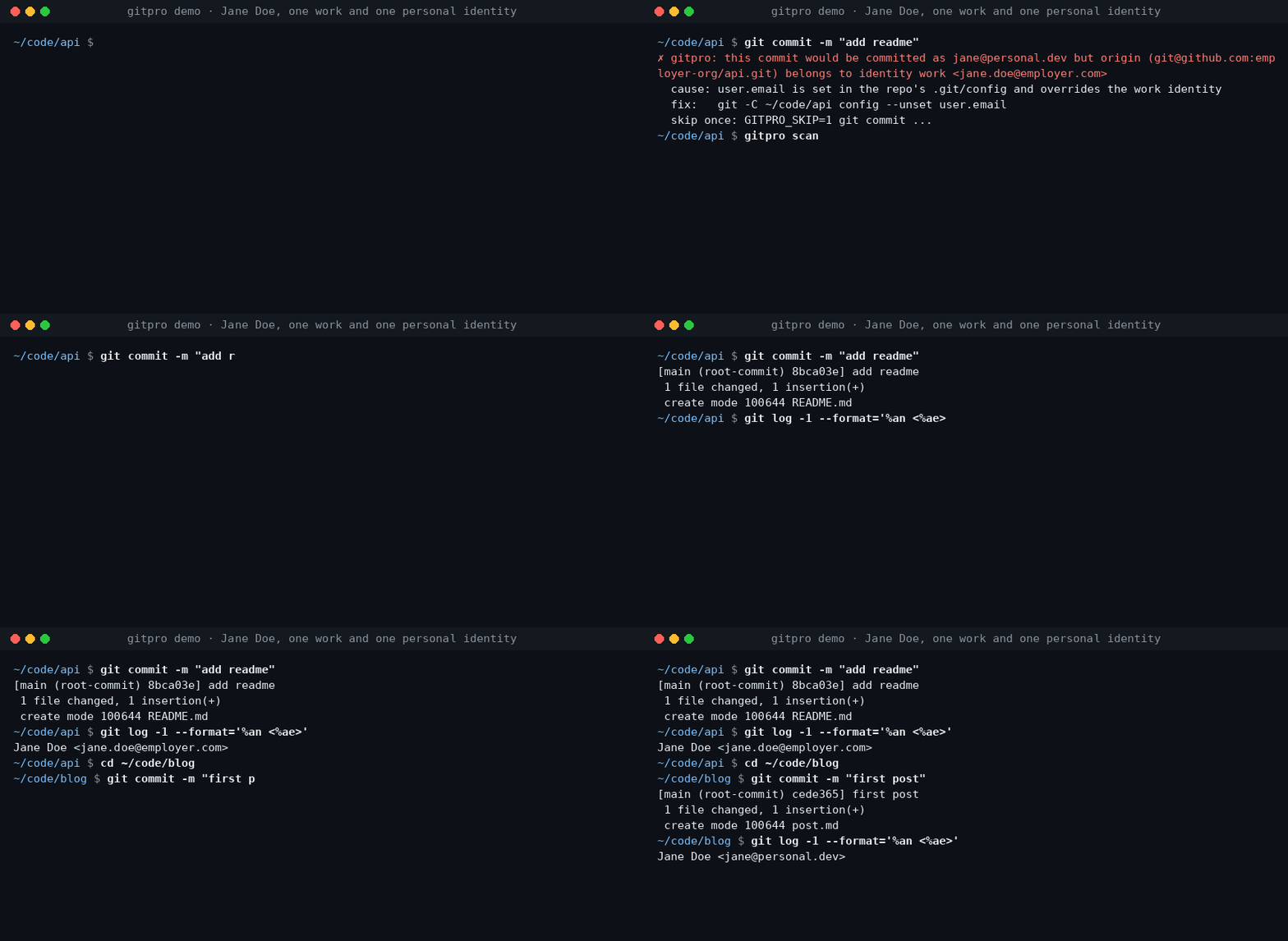
Work on a company repository, commit with your work email. Switch to a personal project, use your personal identity. Gitpro chooses by remote URL, not by where you happened to clone the repository.
Useful when you have more than one GitHub/GitLab account, separate work and personal keys, or keep finding the wrong email on your commits.
Try it
Requires Linux or macOS, Git 2.36+, Python 3.9+ and OpenSSH. Install from PyPI with pipx.
pipx install gitpro
gitpro setup
Setup offers to look through your repos and proposes your identities. Accept, edit or answer the questions yourself; no TOML editing is needed. One preview shows everything, including the commit guard and, with Claude Code, its hook and MCP server. One yes applies it all. Setup never changes your repos.
flowchart LR
  S["gitpro setup"] --> HC{"Config <br/>exists?"}
  HC -->|no| L["Read your repos, <br/>SSH config and <br/>editor recents, <br/>if you agree"]
  L --> Q["Propose <br/>identities; you <br/>accept or edit"]
  Q --> I
  HC -->|yes| I["Inspect config, <br/>Git and SSH files, <br/>keys, guard, <br/>agent hook, MCP"]
  I -->|all current| OK["Nothing <br/>to do"]
  I -->|something to do| PV["One preview, <br/>each part with <br/>its undo"]
  PV --> ASK{"Apply <br/>all?"}
  ASK -->|no| NONE["Nothing <br/>written"]
  ASK -->|yes| AP["Write it, print <br/>the public keys <br/>to register"]
  AP --> NX["Next: <br/>gitpro scan"]
Then:
gitpro why               # inside a repository: the expected identity and anything overriding it
gitpro scan              # repos that need a fix, with the command for each
Already have a config? gitpro setup brings this machine up to date with it.
gitpro setup -n only shows what is left to do. Prefer editing files? The
user guide covers the full TOML format.
What you get
- Work/personal separation: names, emails, SSH keys and signing per host/owner.
- Answers, not guesswork:
gitpro whyexplains mismatches and suggests a fix. - A safety net: optional hooks can block wrong-identity commits and pushes.
- Editor and container support: see your identity in VS Code and carry it into dev containers.
Gitpro generates ordinary Git and SSH configuration; it needs no background service. Changes can be previewed, existing hand-written files are backed up, and key uploads are never part of setup.
Using VS Code?
The extension shows the current identity and helps find repository-level overrides. It runs the same commands as the terminal. Install the extension.
Go further when you need to
AI agents get the same answers through the MCP server and the Claude Code hook: see agent workflows.
| I want to… | Start here |
|---|---|
| Understand matching, SSH keys or signing | Configuration |
| Find wrong identities or forgotten work | Daily use · Finding things |
| Use dev containers | Container setup |
| Configure team policy, CI or AI assistants | Teams and CI · AI assistants |
| Look up a command or undo changes | Command reference · Undo |
| Troubleshoot or contribute | Troubleshooting · Development |
Problems and questions
Run gitpro report to draft an issue with the versions and a redacted gitpro why; it shows
you the draft and opens nothing until you say yes. Or open an issue at github.com/Yantrakar/gitpro/issues.
Report a security problem privately with gitpro report --security, as the
security policy describes, not in a public issue.
License
gitpro MCP Fragen
Wie füge ich gitpro MCP zu Claude Code hinzu?
Führe claude mcp add gitpro -- uvx gitpro in deinem Terminal aus. Füge --scope user hinzu, damit der Server in jedem Projekt verfügbar ist.
Wie füge ich gitpro MCP zu Cursor hinzu?
Öffne ~/.cursor/mcp.json und füge den Server unter mcpServers hinzu, mit der Cursor-Config aus dem Installationsabschnitt oben.
Wie entscheidet gitpro, welche Identität verwendet werden soll?
Gitpro wählt Identitäten basierend auf der Remote-URL aus, anstatt auf dem lokalen Verzeichnis, in dem das Repository geklont wurde.
Kann gitpro verhindern, dass ich Commits mit der falschen E-Mail-Adresse mache?
Ja, es bietet ein optionales Sicherheitsnetz über Hooks, die Commits und Pushes mit der falschen Identität blockieren können.
Benötigt gitpro einen Hintergrunddienst?
Nein, es generiert Standard-Git- und SSH-Konfigurationen und benötigt keinen laufenden Hintergrundprozess.