
Worktable MCP server
Commit 14. Nov. 2026Ermöglicht es AI-Agents, Dokumente, Zeichnungen, strukturierte Datensätze und interaktive HTML-Tools in einem kollaborativen Workspace zu erstellen und zu überarbeiten.
Auch bekannt als worktable/worktable-dev, worktable-dev
- Stars
- 8
- Tools
- —
- Downloads, 30 Tage
- —
- Neueste Version
- 0.1.49
- Letzter Commit
- 14. Nov. 2026
- Lizenz
- AGPL-3.0
Was ist Worktable MCP?
Worktable ist ein MCP server. Ermöglicht es AI-Agents, Dokumente, Zeichnungen, strukturierte Datensätze und interaktive HTML-Tools in einem kollaborativen Workspace zu erstellen und zu überarbeiten.
Zusammenfassung generiert aus dem README des Projekts
Über Worktable MCP server
Durch Worktable ist die Zusammenarbeit mit AI-Agents beim Erstellen von Dokumenten, Zeichnungen und interaktiven Tools möglich. Dieser Workspace erlaubt es dir, einen MCP-kompatiblen Agent mit einem Workspace zu verbinden, um strukturierte Datensätze oder HTML-basierte Tools wie Rechner und Dashboards zu erstellen und zu überarbeiten. Du kannst deine Arbeit über einen Browser, eine Desktop-App für macOS oder eine Terminal-Installation auf macOS und Linux verwalten.
Nutzer können zwischen einer lokalen Instanz mit Dateien unter eigener Kontrolle, dem Self-Hosting der eigenen Umgebung oder der Nutzung von Worktable Cloud wählen. Lokale Setups benötigen kein Konto, während die Cloud-Optionen das Hosting für dich übernehmen. Wenn du einen Agent nutzt, musst du dein eigenes Abonnement oder deine API-Credentials bereitstellen, wie es vom jeweiligen Agent-Provider gefordert wird.
Diese Umgebung unterstützt Kontinuität, indem sie es verschiedenen Agents ermöglicht, auf dieselben gespeicherten Recherchen und Daten zuzugreifen. Du kannst Ergebnisse manuell bearbeiten oder Kommentare hinterlassen, denen ein Agent folgen kann. Das System unterstützt das Verschieben von Workspaces durch Export- und Importfunktionen zwischen lokalen, selbst gehosteten und Cloud-Versionen.
Was du damit machen kannst
- 1Organisation von ForschungsergebnissenBitte einen Agent darum, Informationen zu sammeln und die Ergebnisse in verknüpften Dokumenten innerhalb des Workspaces zu speichern.
- 2Erstellen visueller DiagrammeLass einen Agent ein Layout oder eine visuelle Erklärung skizzieren, die du später überarbeiten kannst.
- 3Entwicklung maßgeschneiderter RechnerAnweise einen Agent, ein interaktives Tool wie ein Dashboard oder einen Cost Explorer unter Verwendung spezifischer Daten zu bauen.
- 4Verwaltung strukturierter DatensätzeNutze den Agent, um Aufgaben und Feedback mithilfe von gemeinsamen Feldern in organisierten Datensätzen zu verwalten.
Geschrieben aus dem README des Projekts. Jeder Use Case wurde gegen ein Zitat daraus geprüft.
So installierst du Worktable MCP
Formate geprüft am 10. Nov. 2026Worktable MCP in Claude Code installieren
$ claude mcp add --transport http worktable-dev https://app.worktable.cloud/api/mcpWorktable MCP in Cursor installieren
~/.cursor/mcp.json
{
  "mcpServers": {
    "worktable-dev": {
      "url": "https://app.worktable.cloud/api/mcp"
    }
  }
}Worktable MCP in VS Code installieren
.vscode/mcp.json
{
  "servers": {
    "worktable-dev": {
      "type": "http",
      "url": "https://app.worktable.cloud/api/mcp"
    }
  }
}Worktable MCP in Codex installieren
~/.codex/config.toml
[mcp_servers.worktable-dev]
url = "https://app.worktable.cloud/api/mcp"
Worktable MCP in Gemini CLI installieren
~/.gemini/settings.json
{
  "mcpServers": {
    "worktable-dev": {
      "httpUrl": "https://app.worktable.cloud/api/mcp"
    }
  }
}Automatisierte Checks
Geluften am 14. Nov. 2026Vollständiger Bericht →Noch nicht verifiziert. Ein Server benötigt einen Score von 80, keine kritischen Befunde und genug Daten für unsere Prüfung. Wie die Checks funktionieren

- Source Repository verknüpft und erreichbarworktable/worktable-dev is public and reachablegithub.com/worktable/worktable-dev ↗Bestanden
- Paket nennt dieses Repository als QuelleNicht geprüft
- Build-Herkunft (Sigstore-Attestierung)Nicht geprüft
- Open Source Lizenz (OSI)AGPL-3.0spdx.org/licenses/AGPL-3.0.html ↗Bestanden
- Commit oder Release im letzten JahrLast commit or release 2026-11-14github.com/worktable/worktable-dev ↗Bestanden
- OpenSSF ScorecardNicht geprüft
- Package-Name ähnelt keinem populären PackageNicht geprüft
- Kein kritischer Hinweis im Paket oder seinen AbhängigkeitenNicht geprüft
- Keine versteckten Anweisungen an das Modell0 tool descriptions and the README read; no override phrases, credential paths or hidden charactersBestanden
- Destruktive Tools sind markiertNicht geprüft
- Remote-Endpoint beantwortet den MCP-HandshakeHTTPS endpoint answered 401 (sign-in required)Bestanden
README
Auf GitHub ansehenWorktable
Worktable is an open-source workspace where you and your agents create and revise documents, drawings, structured records, and interactive tools. Connect an agent through MCP, then work together in the browser or Desktop app.
Run it locally with files you control, self-host it, or use Worktable Cloud.
Get started · Documentation · Worktable Cloud · Releases
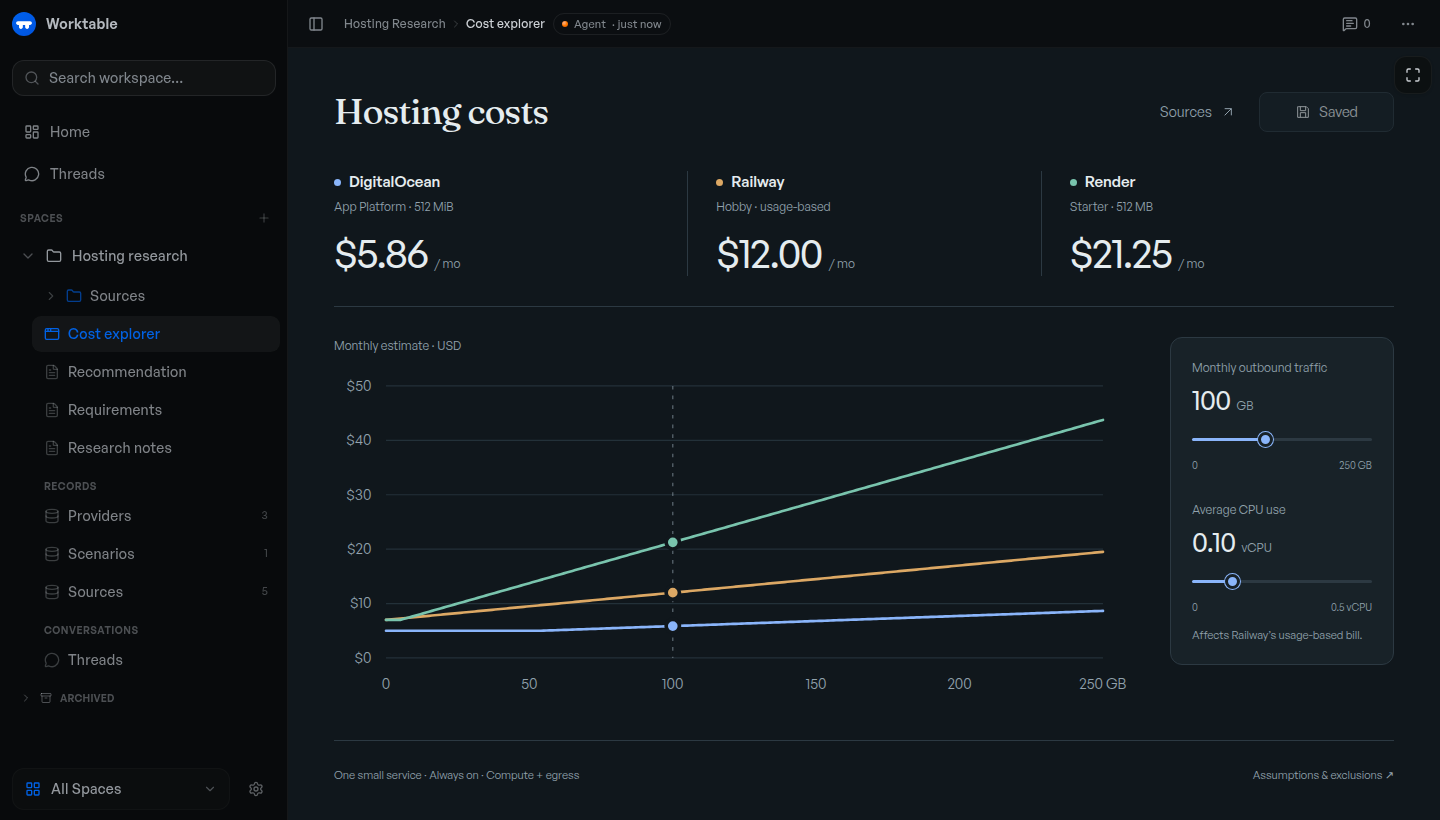
Example cost explorer backed by saved research and records. The displayed prices illustrate the tool; they are not current provider quotes.
Get started
Use an MCP-compatible agent, with its own subscription or API credentials where required.
macOS app: Download Worktable for Mac for Apple Silicon, macOS 13 or newer. Install and open the app, then choose This Mac.
Terminal: macOS or Linux, arm64 or x64. No separate runtime or source checkout needed.
curl -fsSL https://worktable.dev/install | sh
Open the browser address printed by the installer. Run worktable to open
it again later.
In either version, open Settings → Agents and connect your agent. Ask it to save research, organize records, or build a tool in Worktable.
Inspect the installer · Installation guide · First task
Cloud: Worktable Cloud manages hosting for you. For other setups, see self-hosting.
What to make
- Save your research. Keep findings, plans, and decisions in linked documents.
- Organize your data. Maintain tasks, sources, feedback, and other records with shared fields.
- Draw a plan. Sketch a layout, diagram, or visual explanation and revise it with an agent.
- Build interactive tools. Create a calculator, dashboard, or explorer. Use supplied data, or connect the tool to workspace records when needed.
For example, ask an agent to research hosting options, save the sources and pricing, and build a cost explorer for your expected usage. Recheck the rates or change the assumptions later; the research, data, and tool stay together.
Continue your work
Connected agents work with the same saved documents, records, and tools. Ask another agent to continue from what's already there. You can edit the results yourself or leave comments for an agent to act on.
Your data
- Keep work local. Local and self-hosted workspaces are backed by files you can inspect and back up. Local Worktable requires no account.
- Move your workspace. Export and import between Local, self-hosted Worktable, and Cloud.
Connected agent providers may process the content you give them under their own terms. See workspace storage for storage and portability details.
Documentation
Workflows · CLI and MCP reference · Changelog
Report a bug or ask a question. Remove private information from attachments. Report vulnerabilities privately through the security policy.
Contributing
Fixes and documentation improvements are welcome. Please discuss substantial features first. Read CONTRIBUTING.md for the contribution process, development to run from source, or building to create release artifacts.
License
The Worktable application is AGPL-3.0-only, copyright Reva Labs. See LICENSE. Some shared components and agent plugins have MIT licenses; NOTICE and the relevant package notices identify the exact exceptions and third-party terms.
Worktable MCP Fragen
Wie füge ich Worktable MCP zu Claude Code hinzu?
Führe claude mcp add --transport http worktable-dev https://app.worktable.cloud/api/mcp in deinem Terminal aus. Füge --scope user hinzu, damit der Server in jedem Projekt verfügbar ist.
Wie füge ich Worktable MCP zu Cursor hinzu?
Öffne ~/.cursor/mcp.json und füge den Server unter mcpServers hinzu, mit der Cursor-Config aus dem Installationsabschnitt oben.
Was für Tools kann ein Agent in Worktable bauen?
Agents können interaktive Tools wie Rechner, Dashboards oder Explorer mithilfe von Workspace-Daten erstellen.
Benötige ich ein Konto, um die lokale Version zu nutzen?
Nein, für die lokale Version von Worktable ist kein Konto erforderlich.