
uidx MCP server
Commit 14. Nov. 2026Ermöglicht es KI-Agenten und Menschen, gemeinsam visuelle Workspaces mithilfe von diffbaren JSX-Dateien zu entwerfen und zu bearbeiten, die direkt in einem Projekt-Repository gespeichert sind.
Auch bekannt als uidxkit/uidx
- Stars
- 13
- Tools
- —
- Downloads, 30 Tage
- —
- Neueste Version
- —
- Letzter Commit
- 14. Nov. 2026
- Lizenz
- MIT
Was ist uidx MCP?
Ermöglicht es KI-Agenten und Menschen, gemeinsam visuelle Workspaces mithilfe von diffbaren JSX-Dateien zu entwerfen und zu bearbeiten, die direkt in einem Projekt-Repository gespeichert sind.
Zusammenfassung generiert aus dem README des Projekts
Über uidx MCP server
uidx ermöglicht es Entwicklern und KI-Agenten, visuelle Workspaces direkt innerhalb deines Anwendungs-Repositories zu entwerfen. Durch die Installation von @uidxkit/uidx als lokale Development-Dependency kannst du Designs über diffbare JSX-Dateien verwalten, die in einem .uidx Ordner gespeichert sind. Dieser Ansatz erlaubt es dir, deine Design-Assets, Fonts und Layouts zusammen mit deinem Anwendungscode über Git zu versionieren.
Nutzer interagieren mit dem System über einen lokalen Viewer und einen Canvas, der mit den Dateien im Projekt synchronisiert. Das Setup läuft auf deiner Maschine und benötigt keinen gehosteten Design-Service oder ein LLM für die Canvas-Synchronisierung. Um einen KI-Client anzubinden, nutzt du die generierte .mcp.json Datei, um das uidx:mcp Script zu starten, das als stdio Bridge zum laufenden Project Server fungiert. Dieses Setup erlaubt es externen Tools, dieselben Design-Dateien zu inspizieren und zu bearbeiten, die Menschen im visuellen Inspector verwenden.
Was du damit machen kannst
- 1Kollaborative Design-BearbeitungEin KI-Agent kann Design-Dateien in deinem Repository modifizieren, um Layouts oder Styles zu aktualisieren.
- 2Versionierte Design-SystemeEntwickler können Komponenten, Varianten und Design Tokens mit standardmäßigen Git-Workflows verwalten.
- 3Management visueller WorkspacesDu kannst neue Seiten erstellen und Layouts mithilfe eines visuellen Canvas und Inspectors anpassen.
Geschrieben aus dem README des Projekts. Jeder Use Case wurde gegen ein Zitat daraus geprüft.
Automatisierte Checks
Geluften am 14. Nov. 2026Vollständiger Bericht →Noch nicht verifiziert. Ein Server benötigt einen Score von 80, keine kritischen Befunde und genug Daten für unsere Prüfung. Wie die Checks funktionieren · Was du für mehr Punkte verbessern kannst

- Source Repository verknüpft und erreichbaruidxkit/uidx is public and reachablegithub.com/uidxkit/uidx ↗Bestanden
- Paket nennt dieses Repository als QuelleNicht geprüft
- Build-Provenienz (Sigstore-Attestierung)Nicht geprüft
- Open Source Lizenz (OSI)MITspdx.org/licenses/MIT.html ↗Bestanden
- Commit oder Release im letzten JahrLast commit or release 2026-11-14github.com/uidxkit/uidx ↗Bestanden
- OpenSSF ScorecardNicht geprüft
- Package-Name ähnelt keinem populären PackageNicht geprüft
- Keine kritischen Advisories im Paket oder seinen AbhängigkeitenNicht geprüft
- Keine versteckten Anweisungen an das Modell0 tool descriptions and the README read; no override phrases, credential paths or hidden charactersBestanden
- Destruktive Tools sind markiertNicht geprüft
- Remote-Endpoint beantwortet den MCP-HandshakeNicht geprüft
README
Auf GitHub ansehen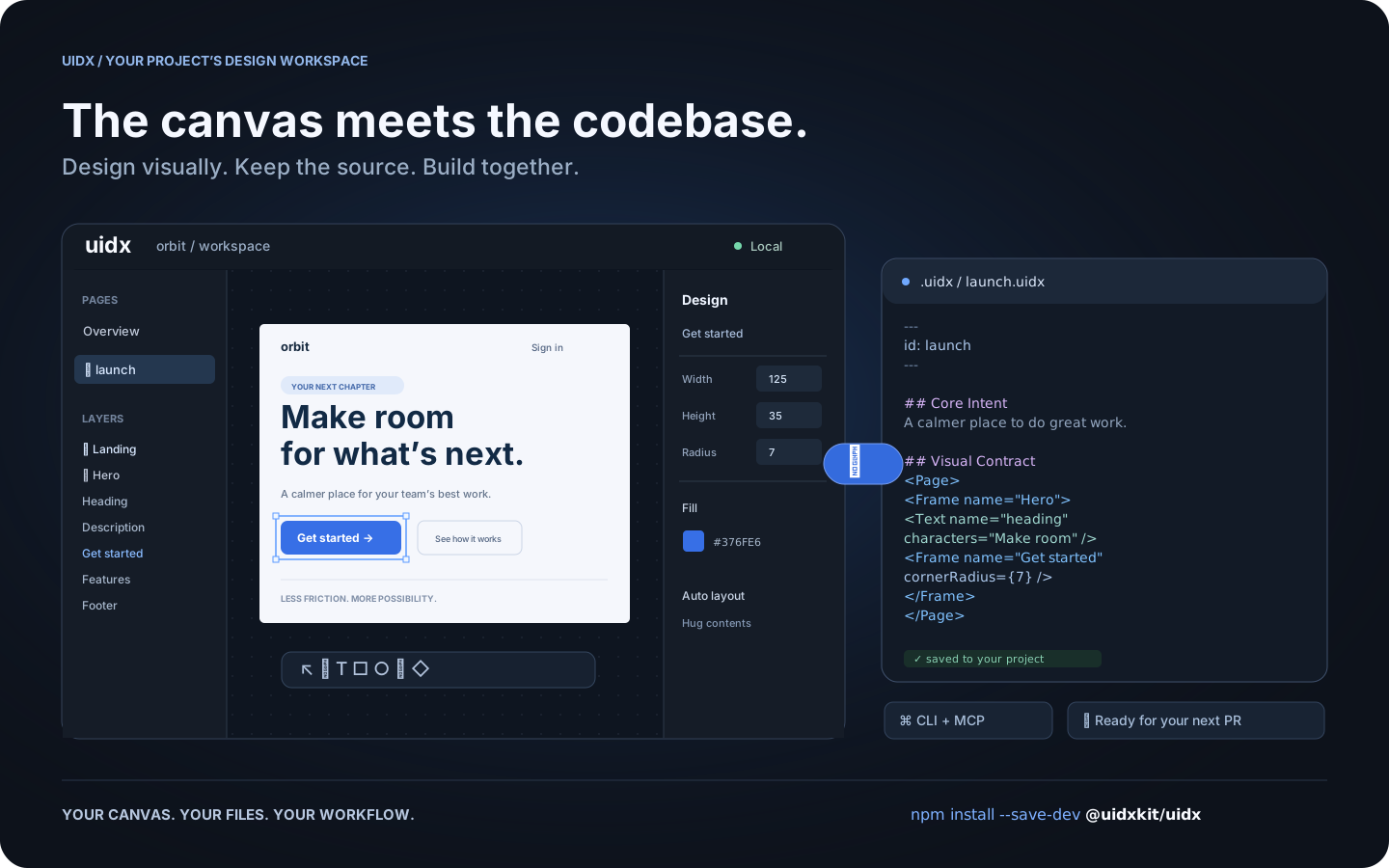
Workflow illustration: one design, shared by the canvas, your files, and your tools.
What is UIDX?
UIDX brings a design canvas into your application's repository. Install
@uidxkit/uidx as a local development dependency, run npm run uidx, and
work on designs stored in your project's .uidx/ folder.
A .uidx file combines Markdown describing a design's purpose with a declarative
node tree describing its appearance. Edit the canvas and the file updates. Edit
the file and the canvas follows. Changes produce focused text diffs you can
review in a pull request.
- A visual workspace. Create pages, draw shapes, edit text, and adjust layout and styling from the canvas and inspector.
- Reusable design systems. Components, instances, variants, slots, and design tokens share a document namespace.
- Your project owns the files. Keep designs, assets, and fonts next to your application and version them with Git.
- A shared workflow for people and agents. The CLI and MCP bridge let external tools inspect and edit the same files the viewer uses.
- Local by default. The viewer and project server run on your machine. Canvas synchronization does not require an LLM or a hosted design service.
UIDX is an early release. The file format and APIs may change before 1.0. It is a design workspace; it does not render your application's existing UI components as Storybook stories.
Install
Requires Node.js 22.19 or newer. Node 24 is recommended.
Run these commands inside your application's repository:
npm install --save-dev @uidxkit/uidx
npm run uidx
Installation adds the uidx and uidx:mcp scripts and creates .uidx/ when it
doesn't exist. Existing scripts, configuration, and designs are preserved.
The CLI, server, viewer, WASM, and bundled fonts live in your project's
node_modules; a global UIDX installation is not required.
Recent npm versions do not run a package's install script until you approve
it, and warn with install scripts not yet covered by allowScripts. Nothing is
lost: the first npx uidx dev performs the same setup itself and says so, or
approve the script with npm install-scripts approve @uidxkit/uidx and
reinstall. To set up explicitly, run npx --no-install uidx init. If your
project already uses a script named uidx, choose another with
npx --no-install uidx init --script design, then run npm run design.
Your design workspace
your-project/
├── package.json          # @uidxkit/uidx devDependency and npm scripts
├── .mcp.json             # connection for MCP clients
├── src/
└── .uidx/
    ├── config.json       # project settings
    ├── uidx.json         # document name, page patterns, and asset patterns
    ├── welcome.uidx      # initial page for a new workspace
    ├── assets/
    └── fonts/
Open the viewer, click New page, give it a name, and start designing. New
pages are saved in your design folder and appear in the overview. Commit your
project's .uidx/ files alongside application code.
Configuration
Set the shared viewer and MCP port in .uidx/config.json:
{
  "port": 4400
}
Restart npm run uidx after changing it. Use npm run uidx -- --port 4500 for a
one-time override. If the requested port is busy, UIDX tries the next available
one and reports its actual address. Configuration currently uses JSON.
The separate .uidx/uidx.json manifest controls which files belong to the document:
{
  "id": "my-project",
  "files": ["**/*.uidx"],
  "assets": ["assets/**"]
}
CLI and MCP
npm run uidx starts the local viewer, file synchronization server, and MCP HTTP
endpoint on one port. MCP clients use the generated .mcp.json to launch
npm run --silent uidx:mcp, a stdio bridge to that running project server.
npx --no-install uidx status
npx --no-install uidx check
npx --no-install uidx fmt --check
The CLI also supports reading, creating, editing, and rendering pages. See the CLI guide and agent architecture.
Documentation
- Drawing icons and custom graphics
- Fonts
- Property vocabulary
- Architecture decisions
- Release guide
- Changelog
Contributing and license
Bug reports, documentation improvements, and pull requests are welcome.
See Contributing for development setup and checks.
Follow the Code of Conduct and report vulnerabilities through
the security policy. Changes to main are merged by the owner.
UIDX is MIT licensed. Third-party code and fonts retain their respective licenses.
uidx MCP Fragen
Wie installiere ich UIDX in meinem Projekt?
Installiere es als lokale Development-Dependency mit npm install --save-dev @uidxkit/uidx und führe anschließend npm run uidx aus.
Benötigt UIDX einen gehosteten Design-Service oder ein LLM für die Synchronisierung?
Nein, der Viewer und der Project Server laufen lokal auf deiner Maschine und benötigen kein LLM oder einen gehosteten Service für die Canvas-Synchronisierung.
Kann ich UIDX mit KI-Agenten nutzen?
Ja, die MCP Bridge ermöglicht es externen Tools und Agenten, dieselben Design-Dateien zu inspizieren und zu bearbeiten, die auch im visuellen Canvas verwendet werden.
Was sind die Systemanforderungen für UIDX?
Du benötigst Node.js Version 22.19 oder neuer, wobei Node 24 empfohlen wird.