
shadowclone MCP server
Commit 14. Nov. 2026Synchronisiert Engineering-Präferenzen und Skills über mehrere Coding-Agents hinweg und bietet einen GitHub Actions Bot für die automatisierte Entwicklung.
Auch bekannt als theonly1me/shadowclone
- Stars
- 26
- Tools
- —
- Downloads, 30 Tage
- —
- Neueste Version
- —
- Letzter Commit
- 14. Nov. 2026
- Lizenz
- MIT
Was ist shadowclone MCP?
Synchronisiert Engineering-Präferenzen und Skills über mehrere Coding-Agents hinweg und bietet einen GitHub Actions Bot für die automatisierte Entwicklung.
Zusammenfassung generiert aus dem README des Projekts
Über shadowclone MCP server
shadowclone synchronisiert Engineering-Präferenzen und technische Skills über mehrere Coding-Agents hinweg, darunter Claude Code, Codex, Cursor, Pi, Antigravity und OpenCode. Anstatt Regeln manuell zwischen den Tools hin- und herzukopieren, pflegt dieses System einen einzigen Satz an Anweisungen, der sich während deiner Arbeit weiterentwickelt. Es funktioniert dadurch, dass es die Agents ausstattet, die du bereits nutzt, anstatt selbst als eigenständiger Agent zu agieren.
Nutzer können Clones bereitstellen, die in frischen Docker-Containern auf ihren eigenen Maschinen laufen und dabei ihre bestehenden Abonnements oder API-Keys verwenden. Diese Clones können Aufgaben wie das Fixen von Tests oder das Erstellen von Draft Pull Requests in deinem Namen übernehmen. Für Team-Umgebungen kann ein GitHub Actions Bot konfiguriert werden, der mit Provider-Keys von Anthropic, OpenAI oder Cursor an Issues und Pull Requests arbeitet. Das System enthält außerdem einen Skill Wizard zur Konfiguration von persönlichen, privaten oder geteilten Builds sowie ein lokales Review-Tool, um Code gegen Repository-Standards zu analysieren.
Was du damit machen kannst
- 1Repetitive Bugfixes automatisierenWeise einen Agent an, einen Clone zu starten, um einen spezifischen fehlerhaften Test zu beheben, während du nicht am Platz bist.
- 2Coding-Styles über Tools hinweg synchronisierenHalte einen konsistenten Satz an Engineering-Regeln über verschiedene KI-Coding-Assistenten hinweg ein.
- 3Lokale Pull Request Reviews durchführenFühre eine lokale Code-Analyse durch, die Repository-Standards mit mechanischen Checks kombiniert.
- 4Einen kollaborativen Team-Bot bereitstellenRichte einen GitHub Actions Bot ein, der Team-Skills nutzt, um Issues und Pull Requests zu bearbeiten.
Geschrieben aus dem README des Projekts. Jeder Use Case wurde gegen ein Zitat daraus geprüft.
Automatisierte Checks
Geluften am 14. Nov. 2026Vollständiger Bericht →Noch nicht verifiziert. Ein Server benötigt einen Score von 80, keine kritischen Befunde und genug Daten für unsere Prüfung. Wie die Checks funktionieren · Was du für mehr Punkte verbessern kannst

- Source Repository verknüpft und erreichbartheonly1me/shadowclone is public and reachablegithub.com/theonly1me/shadowclone ↗Bestanden
- Paket nennt dieses Repository als QuelleNicht geprüft
- Build-Provenienz (Sigstore-Attestierung)Nicht geprüft
- Open Source Lizenz (OSI)MITspdx.org/licenses/MIT.html ↗Bestanden
- Commit oder Release im letzten JahrLast commit or release 2026-11-11github.com/theonly1me/shadowclone ↗Bestanden
- OpenSSF ScorecardNicht geprüft
- Package-Name ähnelt keinem populären PackageNicht geprüft
- Keine kritischen Advisories im Paket oder seinen AbhängigkeitenNicht geprüft
- Keine versteckten Anweisungen an das Modell0 tool descriptions and the README read; no override phrases, credential paths or hidden charactersBestanden
- Destruktive Tools sind markiertNicht geprüft
- Remote-Endpoint beantwortet den MCP-HandshakeNicht geprüft
README
Auf GitHub ansehen


Quick start · Clones · What shadowclone offers · Compare · How it works · Eval and Results · Docs
shadowclone keeps your engineering preferences the same in every coding agent. It maintains one set of skills and instructions for Claude Code, Codex, Cursor, Pi, Antigravity, and OpenCode. You do not copy rules from one tool to the next. shadowclone can also learn new preferences from the sessions that you allow.
It works as you while you are away. Ask your agent to start a clone. Claude Code or Codex works with your skills, on your own subscription, in Docker on your own machine. It opens a draft pull request as you. shadowclone is not a separate agent. It equips the agent that you already use. See how it compares to other tools.
Quick start
Paste this into Claude Code, Codex, Cursor, Pi, Antigravity, or OpenCode:
Set up shadowclone: https://raw.githubusercontent.com/theonly1me/shadowclone/main/plugins/shadowclone/skills/setup-shadowclone/SKILL.md
The agent handles installation and configuration in about 5 minutes. You answer the consent questions and pick skills in the browser:
- It installs the CLI, and the plugin in Claude Code or Codex.
- It asks if shadowclone can learn from your past sessions, keep skills in sync, and keep learning in the background.
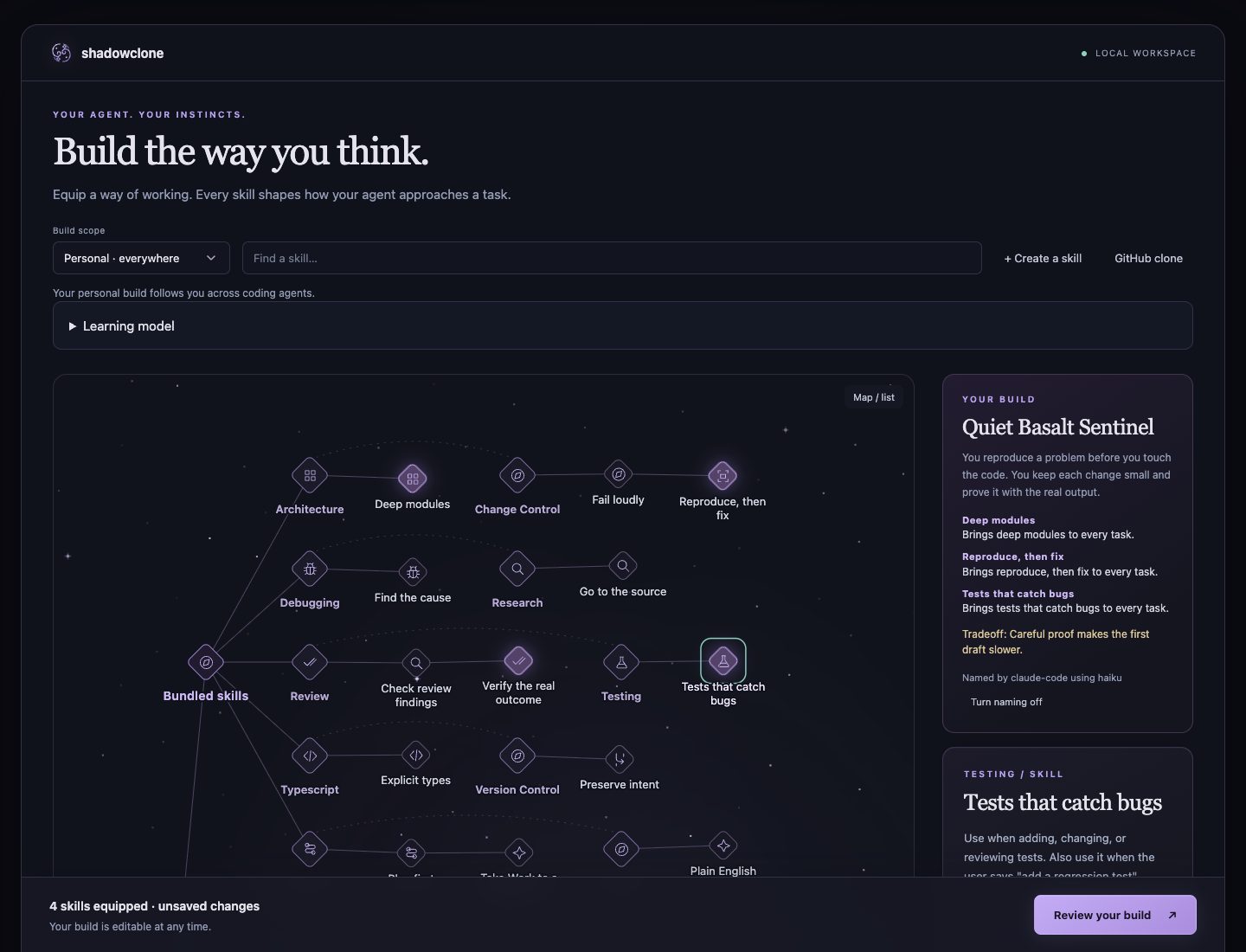
- It opens the skill wizard, where you pick skills and select Equip.
- It learns from your past sessions while you pick skills, if you agreed.
npm install -g @shadowclone/cli
shadowclone init
shadowclone wizard
To add the plugin, run /plugin install shadowclone@shadowclone after /plugin marketplace add theonly1me/shadowclone in Claude Code. In Codex, run codex plugin marketplace add theonly1me/shadowclone and then codex plugin add shadowclone@shadowclone.
What shadowclone offers
Your clone works while you are away
Ask, and it works as you. Tell your agent "start a clone to fix the flaky date parser test", or run shadowclone clone start. Claude Code or Codex works with your skills, on your Claude or ChatGPT plan or a key. It stops when its draft pull request has green CI. The pull request shows your name.
$ shadowclone clone start --repo you/app "fix the flaky date parser test"
Queued clone k3x9m2qa for you/app: fix the flaky date parser test
$ shadowclone clone list
k3x9m2qa done you/app shadowclone/k3x9m2qa #43 2026-10-18T14:02:11Z fix the flaky date parser test
Runs on your machine. Each clone runs in a fresh Docker container on a machine that you own. There is no shadowclone server, and your tokens stay in a file on that machine. Clones never push to the default branch, and each commit names the agent.
Set it up with one sentence. Ask your agent to "set up shadowclone clones for this repository." You approve your skills and paste two tokens. See the clones guide.
Reach them from your phone. The hub puts your clones behind Tailscale Funnel as an MCP connector. Ask Claude on your phone what your clones are doing, and answer their questions there. See the hub guide.
Preferences that evolve with your work
Learn from corrections. shadowclone reads the sessions you allow and turns reusable instructions into skills and short native guidance. It keeps repository-specific rules in their scope. Rules remain readable, editable, and reversible.
Keep guidance current. Background learning reviews new rules after each session. It applies durable guidance when automatic maintenance is on and discards rules that existing guidance covers. You can review and undo each change. See the learning guide.
Skills and builds you can configure
Start with a build. shadowclone includes 15 workflow skills for planning, debugging, implementation, verification, and review. New users can pick skills immediately. Learning from past sessions is optional. Browse the skills in skills/, or install them without the CLI.
Choose where skills apply. The browser wizard supports a personal build, a private build for one repository, or a shared build that a team commits. The same skills reach all six agents. Pi can use any model it supports. See Agent builds.
Reviews on your machine and on GitHub
Review a pull request. Run a local review with your Claude subscription:
shadowclone review 123
The reviewer combines repository standards, mechanical checks, and code analysis. Findings include evidence checked against the source. The result stays in a local file. Run shadowclone review --base main to review committed branch changes before opening a PR.
Read a guided review. Equip guided-pr-review and shadowclone-review, then ask your agent:
Use guided-pr-review to review PRs 1, 2, and 3.
The agent creates an HTML guide with actual diffs, behavior traces, and a reading order across the PRs. It supports inline notes and lets the reader reveal agent findings after forming a review. The guide stays local. See reviews.
Review in the cloud. Comment @<bot> review on a pull request, also on one from a fork. The Actions bot posts its findings on GitHub under its own identity. See cloud review.
An Actions bot for your team
Share an agent with your team. A bot runs in GitHub Actions with your selected skills and one provider API key: Anthropic, OpenAI, an OpenAI-compatible endpoint, or Cursor. Anyone with write access can tag it. It works on issues, opens pull requests, and follows checks and review feedback. You decide when to merge.
Ask the agent to configure it. After local setup, ask:
Set up the shadowclone Actions bot here with the account octo-shadow.
The agent prepares the skills repository and workflows. Then it gives you one link where you add the bot token and the API key on GitHub. Merge the setup PR, and the agent runs a check. The Actions bot guide covers providers, setup, and pausing work to continue locally.
Keep your key on GitHub. The bot reads the API key from a GitHub environment, and shadowclone never sees it. Anyone with write access can tag the bot, so set a spending limit in your provider console.
How shadowclone compares to other tools
shadowclone gives one set of skills to the agents that you already use, on your machine and on GitHub. The table uses each project's own pages, checked on 12 October 2026. "Not stated" means that those pages do not answer the question.
| Tool | What it is | Agents | Learns from your sessions | Same guidance in the cloud | Reviews pull requests |
|---|---|---|---|---|---|
| shadowclone | Skills, instructions, learning, and a GitHub Actions bot for the agents that you already use | Claude Code, Codex, Cursor, Pi, Antigravity, OpenCode | Yes, from the sessions that you allow | Yes, clones and a bot | Yes, locally, guided, and on GitHub |
| pstack | A skill and principle pack | Cursor | No. You run /reflect to edit a skill |
Not stated | Yes, /interrogate and Comment Sicko |
| Hermes Agent | Its own agent with a learning loop | Hermes only | Yes, it writes skills after tasks | Yes, on a server with chat apps | Not stated |
| Claude Code auto memory | Built-in notes from corrections | Claude Code | Yes, notes from your corrections | No. Memory stays on one machine | No |
| Claude Subconscious | A background Letta agent | Claude Code | Yes, through a Letta agent | Not stated | No |
| imprint | A plugin that trains one profile | Claude Code | Yes, when you run /imprint:train |
Not stated | No |
Claude Code loads its auto memory beside shadowclone skills, so you can use both. See the comparison guide for each tool and its sources.
How it works
flowchart LR
  A[Consented sessions] --> B[Learning]
  B --> C[Skills and native instructions]
  C --> D[Agents on your machine]
  C --> E[Clones that work as you]
  C --> F[Actions bot on GitHub]
shadowclone indexes references to enabled sessions and copies no transcript. It redacts text and learns rules. One session can give an explicit rule, and an inferred pattern needs three independent sessions. Rules become skills that you can read, edit, and undo. shadowclone changes the guidance, not the model. See the architecture.
Eval and Results
Across 24 fixed tasks, shadowclone learning scored above existing user skills on all four models. Scores measure preference adherence on synthetic tasks. See setups, methods, and limits.
| Setup | GPT 6.1 Sol | GPT 6 Luna | Claude Sonnet 5.5 | Claude Opus 5.5 |
|---|---|---|---|---|
| Agent alone | 77.3% | 59.0% | 56.5% | 53.2% |
| Existing user skills | 85.2% | 80.6% | 76.4% | 73.6% |
| Existing skills + shadowclone learning | 89.4% | 83.3% | 90.0% | 82.9% |
Privacy
- No collection service. No telemetry. Model work uses the agent CLI that you choose.
- Consent. Every source is off by default and has its own setting.
- Redaction. Tool results, tool-returned file contents, and thinking blocks never enter learning.
- Removal. Run
shadowclone learning disable,shadowclone skills automatic off, orshadowclone forget --all.
Read the privacy policy and data handling.
Docs
| Guide | Use it to |
|---|---|
| Agent builds | Pick skills and scope |
| Learning | Learn from sessions |
| Skill maintenance | Review updates, undo |
| Repository setup | Share checks |
| Pi setup | Use Pi models |
| OpenCode setup | Use OpenCode |
| Delegated work | Ready a pull request |
| Actions bot | Set up the GitHub bot |
| Clones | Work as you, anywhere |
| Hub | Reach your clones |
| Reviews | Review a pull request |
| MCP server | Give agents the tools |
| Command reference | Find every command |
| Enterprise controls | Set scope and policy |
| Comparison | Compare related tools |
More: documentation index, motivation, design records, security.
Contributing
Read CONTRIBUTING.md before you open a pull request. shadowclone uses the MIT license. If shadowclone saves you a correction, star the repository.
shadowclone MCP Fragen
Läuft shadowclone auf einem eigenen Server?
Nein, jeder Clone läuft in einem frischen Docker-Container auf einer Maschine, die dir gehört, und es gibt keinen shadowclone-Server.
Welche Coding-Agents können shadowclone Skills nutzen?
Es unterstützt Claude Code, Codex, Cursor, Pi, Antigravity und OpenCode.
Kann shadowclone aus meinen Coding-Sessions lernen?
Ja, es kann neue Präferenzen aus den Sessions lernen, die du erlaubst, und wandelt wiederverwendbare Anweisungen in Skills um.
Wie funktioniert der GitHub Actions Bot?
Ein Bot läuft in GitHub Actions unter Verwendung deiner ausgewählten Skills und eines API-Keys von einem Provider wie Anthropic oder OpenAI, um an Issues und Pull Requests zu arbeiten.