
Ternimal MCP server
Commit 14. Nov. 2026Bietet ein sicheres Remote-Terminal, mit dem KI-Agenten über das Model Context Protocol Befehle ausführen und Dateien auf Remote-Hosts verwalten können.
Auch bekannt als ternimal/tern
- Stars
- 1
- Tools
- —
- Downloads, 30 Tage
- —
- Neueste Version
- —
- Letzter Commit
- 14. Nov. 2026
- Lizenz
- AGPL-3.0
Was ist Ternimal MCP?
Ternimal ist ein MCP server. Bietet ein sicheres Remote-Terminal, mit dem KI-Agenten über das Model Context Protocol Befehle ausführen und Dateien auf Remote-Hosts verwalten können.
Zusammenfassung generiert aus dem README des Projekts
Über Ternimal MCP server
Mit Ternimal ist es möglich, Remote-Server über eine KI-Schnittstelle zu verwalten. Dieses Tool bietet ein sicheres Remote-Terminal, das es KI-Agenten ermöglicht, Befehle auszuführen und Dateien auf Remote-Hosts unter Verwendung des Model Context Protocol zu verwalten. Es wurde für Administratoren entwickelt, die KI-Clients wie Claude Desktop, Claude Code oder Cursor kontrollierten Zugriff auf ihre Systeme gewähren möchten.
Das Setup sieht vor, dass der ternd agent auf dem Remote-Host läuft und die Verbindung über den tern client hergestellt wird. Nutzer können direkt über ein lokales Netzwerk verbinden oder einen ternr relay nutzen, um NAT zu durchqueren, ohne eingehende Ports öffnen zu müssen. Die Sicherheit wird durch End-to-End TLS-Verschlüsselung und eine obligatorische Authentifizierung mittels OpenSSH-Keys oder Shared Tokens gewährleistet.
Um unbefugte Aktionen zu verhindern, arbeitet der MCP server nach einer spezifischen Policy und ist standardmäßig read-only. Er führt ein Audit-Log über jeden Aufruf und erfordert eine manuelle Freigabe, bevor gewählte Aktionen ausgeführt werden. Dies stellt sicher, dass der menschliche Nutzer die Kontrolle über die Remote-Umgebung behält, auch wenn ein KI-Agent mit den Tools für Shell, exec, Port Forwarding und File Copy interagieren kann.
Was du damit machen kannst
- 1Remote-Befehle via KI ausführenFordere einen KI-Agenten auf, spezifische Shell-Befehle auf einem Remote-Host über die MCP-Schnittstelle auszuführen.
- 2KI-Admin-Aktionen auditierenÜberprüfe ein vollständiges Log aller Befehle und Interaktionen, die ein KI-Agent auf deinem System durchgeführt hat.
Geschrieben aus dem README des Projekts. Jeder Use Case wurde gegen ein Zitat daraus geprüft.
Konfiguration
TERN_TOKEN
| Name | Beschreibung | Typ |
|---|---|---|
| TERN_TOKEN | — |
Automatisierte Checks
Geluften am 15. Nov. 2026Vollständiger Bericht →Noch nicht verifiziert. Ein Server benötigt einen Score von 80, keine kritischen Befunde und genug Daten für unsere Prüfung. Wie die Checks funktionieren · Was du für mehr Punkte verbessern kannst

- Source Repository verknüpft und erreichbarternimal/tern is public and reachablegithub.com/ternimal/tern ↗Bestanden
- Paket nennt dieses Repository als QuelleNicht geprüft
- Build-Provenienz (Sigstore-Attestierung)Nicht geprüft
- Open Source Lizenz (OSI)AGPL-3.0spdx.org/licenses/AGPL-3.0.html ↗Bestanden
- Commit oder Release im letzten JahrLast commit or release 2026-11-14github.com/ternimal/tern ↗Bestanden
- OpenSSF ScorecardNicht geprüft
- Package-Name ähnelt keinem populären PackageNicht geprüft
- Keine kritischen Advisories im Paket oder seinen AbhängigkeitenNicht geprüft
- Keine versteckten Anweisungen an das Modell0 tool descriptions and the README read; no override phrases, credential paths or hidden charactersBestanden
- Destruktive Tools sind markiertNicht geprüft
- Remote-Endpoint beantwortet den MCP-HandshakeNicht geprüft
README
Auf GitHub ansehenTernimal
+------------------------------------------------------------------+
| \\\_\                                                            |
| \\\( ^>     t e r n                                              |
|  \\\=/      A minimal, portable, secure remote terminal with MCP |
|  ~~~~~                                                           |
+------------------------------------------------------------------+


Ternimal (terminal + minimal) is a minimal, portable, secure remote terminal: SSH-style shells, command exec, port forwarding and file copy over end-to-end TLS, reached directly or through a relay for NAT traversal. One project, four small binaries:
| binary | role |
|---|---|
tern |
client: shells, exec, port forwarding, file copy, REST gateway, MCP server for AI agents |
ternd |
agent: hosts sessions for authenticated clients; listens directly or dials a relay |
ternr |
relay: bridges clients to agents behind NAT; a public rendezvous that only forwards opaque bytes |
rtern |
combined relay + client: catches an agent that dials in and drops you into its shell; one process instead of ternr + tern |
Client-to-agent traffic is end-to-end TLS (clients pin the agent's certificate) and authentication to the agent is mandatory. This is an administration tool, not a stealth tool: connections are logged and the agent has no unauthenticated mode. Only use it on systems you own or are authorized to access.
Installation
Download the zip for your OS and architecture from the
latest release, check it
against SHA256SUMS and, with the GitHub CLI, its
build provenance attestation, and put the four binaries on your PATH:
curl -LO https://github.com/ternimal/tern/releases/latest/download/ternimal-linux-amd64.zip
curl -LO https://github.com/ternimal/tern/releases/latest/download/SHA256SUMS
sha256sum --ignore-missing -c SHA256SUMS
gh attestation verify ternimal-linux-amd64.zip -R ternimal/tern
mkdir -p ~/.local/bin
unzip ternimal-linux-amd64.zip tern ternd ternr rtern -d ~/.local/bin
Or build them with Go 1.21 or later:
go install github.com/ternimal/tern/cmd/...@latest
Notes for macOS and Windows, building from source and the supported platforms are in docs/install.md.
Quick start
# agent: zero-config, listens on port 2222 on every IPv4 and IPv6 address,
# mints a token, prints its fingerprint
ternd

# client: connect by IP with the agent's fingerprint and token
TERN_TOKEN=<token> tern connect -a AGENT_IP:2222 -f <agent-fp>
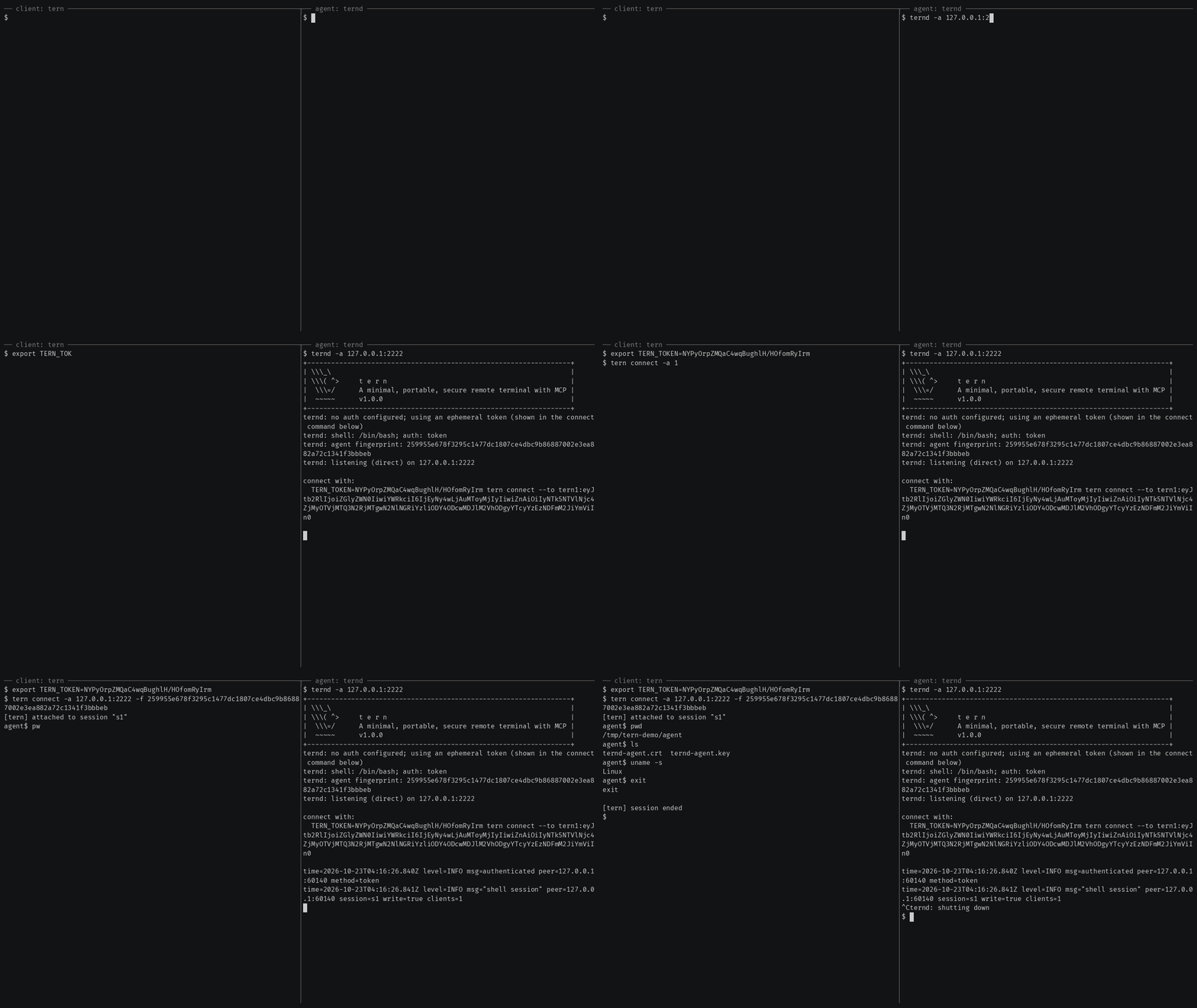
Getting started also covers reaching an agent
behind NAT through a relay, catching one with rtern and logging in with
OpenSSH keys instead of a token.
AI agents (tern mcp)
tern mcp lets an AI client such as Claude Code, Claude Desktop or Cursor work
on your agents through the
Model Context Protocol, under a policy you
set and with an audit log of every call. It is read-only by default, and asks
you before the actions you choose.
In Claude Code, install tern first, then the Ternimal plugin:
claude plugin marketplace add ternimal/tern
claude plugin install ternimal@ternimal
The plugin starts tern from your PATH and reads your hosts from a config
file, ~/.config/tern/mcp.json by default; its ternimal:setup skill walks
you through writing one. plugin/README.md says what it
runs and what it sends. Other clients, a one-line setup without a config
file, the tools and the safety model are in docs/mcp.md.
Features
- Direct or relay: reach an agent on your LAN directly, or reach one behind NAT through a relay, so that agent needs no inbound port.
- End-to-end encryption: TLS and authentication run between client and agent, so a relay only forwards ciphertext.
- Keys or tokens: OpenSSH public keys in
authorized_keysformat, or a shared token. - Resumable sessions:
tern connectreconnects on its own after a drop and resumes the session with scrollback replay; others can join it as read-only viewers. - One connection, many channels: one authenticated connection can carry a
shell,
exec, port forwards and file copy at once. - REST gateway and MCP server: run commands over HTTP, or let AI agents work under a policy.
- Recording: with
ternd --record-dir, the agent saves each session as an asciicast, playable withasciinema play. - Zero-config: run
terndwith no flags on a terminal and it mints a token and prints the line to connect with. - Portable: Linux, macOS, Windows and Android on amd64 and arm64.
All of them in detail: docs/features.md.
Documentation
- Getting started: direct, through a relay, with
rtern, with OpenSSH keys and the insecure flags for testing - Commands: every
terncommand, sharing and resuming sessions, copying files, port forwards - REST gateway: run commands on an agent over HTTP
- AI agents over MCP: the config file, profiles, tools, approvals and the audit log
- Install and build: checking a release, building from source, supported platforms
- Keys, tokens and files: the rules for the files tern reads
- Operating notes: listeners, shutdown, recordings and other details
- Security: the threat model, the dangerous flags and how to report a vulnerability
- Contributing: license terms, the CLA, development and the code layout
License
Ternimal is licensed under the GNU Affero General Public License v3.0 only (AGPL-3.0-only); see LICENSE. Running a modified version to provide a network service requires offering that version's source to its users.
A separate commercial license is available for uses that cannot comply with the AGPL, for example embedding Ternimal in a proprietary or hosted service; see NOTICE. Contributions are welcome; see CONTRIBUTING for the license terms and the CLA.
"Ternimal", the binary names (tern, ternd, ternr, rtern) and the
project logo are project trademarks and are not licensed under the AGPL; see
NOTICE.
Ternimal MCP Fragen
Wie können KI-Agenten Ternimal nutzen?
KI-Clients wie Claude Code oder Cursor können mit deinen Agenten über das Model Context Protocol (MCP) via tern mcp Befehl arbeiten.
Ist die Verbindung sicher?
Ja, der Datenverkehr zwischen Client und Agent nutzt End-to-End TLS mit obligatorischer Authentifizierung, sodass Relays nur verschlüsselten Ciphertext weiterleiten.
Kann ich Ternimal nutzen, um eine Maschine hinter einem NAT zu erreichen?
Ja, du kannst einen Agenten hinter einem NAT erreichen, indem du einen Relay nutzt, um die Verbindung zu überbrücken.
Was sind die Standardberechtigungen für KI-Agenten?
Standardmäßig ist der MCP server schreibgeschützt und wird vor der Ausführung ausgewählter Aktionen deine Zustimmung einholen.