
SaaStacular MCP server
Commit 14. Nov. 2026Bietet eine Multi-Tenant-Security-Basis für den Bau von AI Operating Systems mit integrierter Autorisierung, Identität und Tenant-gebundenen MCP-Verbindungen.
Auch bekannt als technicallypete/saastacular
- Stars
- 1
- Tools
- —
- Downloads, 30 Tage
- —
- Neueste Version
- —
- Letzter Commit
- 14. Nov. 2026
- Lizenz
- Apache-2.0
Was ist SaaStacular MCP?
SaaStacular ist ein MCP server. Bietet eine Multi-Tenant-Security-Basis für den Bau von AI Operating Systems mit integrierter Autorisierung, Identität und Tenant-gebundenen MCP-Verbindungen.
Zusammenfassung generiert aus dem README des Projekts
Über SaaStacular MCP server
Entwickler, die AI Operating Systems bauen, können dieses Repository-Template nutzen, um eine sichere Multi-Tenant-Basis zu etablieren. Es bietet einen kompletten Stack, bestehend aus einem Go-Core für Authority und Policy, einer Next.js Web-Oberfläche und einem optionalen Python Intelligence Service. Das System ist so konzipiert, dass es vollständig innerhalb von Docker läuft, was bedeutet, dass du kein Go, Python oder Node auf deinem Host installiert haben musst, um loszulegen.
Die Sicherheit wird durch einen Deny-by-Default Policy Evaluator im Core-Service und PostgreSQL Row-Level Security für Defense in Depth gehandhabt. Die Architektur unterstützt sowohl Single-Tenant- als auch Multi-Tenant-Konfigurationen, wobei Organizations als primäre Tenant-Grenze dienen. Es enthält außerdem Tenant-gebundene MCP-Verbindungen, globale Identität via WorkOS AuthKit und S3-kompatiblen Object Storage über MinIO. Dieses Setup ist als gepflegter Startpunkt für die Konfiguration und den Bau eigener Anwendungen gedacht und nicht als fertiges, gehostetes Produkt.
Was du damit machen kannst
- 1Multi-Tenant-Grenzen etablierenKonfiguriere ein System, in dem Organizations als primäre Isolationsebene für verschiedene Nutzer fungieren.
- 2Sichere AI-Verbindungen implementierenStelle sicher, dass Model Context Protocol Verbindungen strikt an spezifische Tenants gebunden sind.
- 3Strikte Zugriffskontrolle erzwingenNutze einen zentralisierten Policy Evaluator, um Berechtigungen nach dem Default-Deny-Prinzip zu verwalten.
Geschrieben aus dem README des Projekts. Jeder Use Case wurde gegen ein Zitat daraus geprüft.
Konfiguration
DEFAULT_TENANT_SLUGPLATFORM_ROOT_PAGE
| Name | Beschreibung | Typ |
|---|---|---|
| DEFAULT_TENANT_SLUG | — | |
| PLATFORM_ROOT_PAGE | — |
Automatisierte Checks
Geluften am 15. Nov. 2026Vollständiger Bericht →Noch nicht verifiziert. Ein Server benötigt einen Score von 80, keine kritischen Befunde und genug Daten für unsere Prüfung. Wie die Checks funktionieren · Was du für mehr Punkte verbessern kannst

- Source Repository verknüpft und erreichbartechnicallypete/saastacular is public and reachablegithub.com/technicallypete/saastacular ↗Bestanden
- Paket nennt dieses Repository als QuelleNicht geprüft
- Build-Provenienz (Sigstore-Attestierung)Nicht geprüft
- Open Source Lizenz (OSI)Apache-2.0spdx.org/licenses/Apache-2.0.html ↗Bestanden
- Commit oder Release im letzten JahrLast commit or release 2026-11-14github.com/technicallypete/saastacular ↗Bestanden
- OpenSSF ScorecardNicht geprüft
- Package-Name ähnelt keinem populären PackageNicht geprüft
- Keine kritischen Advisories im Paket oder seinen AbhängigkeitenNicht geprüft
- Keine versteckten Anweisungen an das Modell0 tool descriptions and the README read; no override phrases, credential paths or hidden charactersBestanden
- Destruktive Tools sind markiertNicht geprüft
- Remote-Endpoint beantwortet den MCP-HandshakeNicht geprüft
README
Auf GitHub ansehenSaaStacular
A single-tenant and multi-tenant security foundation for building AI operating systems.
Project domain: saastacular.dev (reserved; site not yet published).
SaaStacular is a ready-to-run repository template: a Go core (facts, authority, policy, MCP), a Next.js web surface, an optional internal Python intelligence service, PostgreSQL, Redis and S3-compatible object storage, with the migrations, Docker configuration, CI definition and tests that exercise them. Everything runs in Docker. Its value is the reviewed security boundaries it ships and the repeatable checks behind them; see docs/SECURITY.md.
- Multi-tenant by default, single-tenant by configuration: the Organization is the tenant boundary, and one optional setting serves a single existing Organization at the platform root (Root host configuration).
- Authorization plus row-level security: one shared, deny-by-default policy evaluator in
coredecides access, with PostgreSQL row-level security as defense in depth (Security foundation). - See it, then run it: screenshots of the shipped UI with synthetic data are in What it looks like; the Quick start needs Docker and bash, with no host Go, Python or Node.
- Read the limits first: What it is, and what it is not says what has not been executed and is not claimed.
Product name, domains and database name are configuration, not code. They live only in .env (created from .env.example); PRODUCT_NAME defaults to SaaStacular in .env.example and is yours to change. Changing the product name or domains and restarting renames the stack without a rebuild. A new DATABASE_NAME applies only to a fresh database volume (see Reset below). The default product mark (web/public/brand/mark.png, shown beside the product name in the default header) and favicon (web/app/icon.png) are files, not configuration: replace them with your own or delete them (without the mark the header shows the product name alone), then rebuild web, since both ship in its image; an Organization's own branding label or logo replaces the mark on its tenant hosts, and THIRD_PARTY_NOTICES.md states the mark's terms.
What it is, and what it is not
It is a maintained starting point you configure and build on:
- Global identity with core-owned sessions behind WorkOS AuthKit; Organizations as the tenant boundary, Groups as collaboration scopes and reusable BusinessProfiles; one RoleBinding store with a closed, deny-by-default policy evaluator.
- PostgreSQL row-level security as defense in depth, least-privilege database roles, tenant-aware object storage with signed URLs, a durable append-only audit trail, guarded backup/restore/retention tooling, tenant-bound MCP connections, verified custom domains, Organization branding, Group onboarding, membership, invitations, enrollment, platform root signup and administrative labels.
- An accessible web shell with Light, Dark and System appearance, scoped design tokens and per-Organization branding.
- One deployment can serve one Organization (an existing Organization as the platform root, see Root host configuration) or many.
It is not a finished product, a hosted service or a compliance attestation. There is no product feature, no production deployment and no SOC 2, ISO 27001 or GDPR claim. The production-readiness evaluator currently reports blocked (verified TLS to PostgreSQL and Redis, internal-hop TLS, at-rest evidence and an operator deprovisioning entry point are open; docs/SECURITY.md). Application generation is not the adopter workflow: you configure this implementation rather than regenerate authentication, tenancy or authorization.
Not executed for this repository, and not claimed: live identity-provider qualification of the signup flow (real WorkOS wildcard, DNS and HTTPS behaviour on tenant hosts) has not been executed; live custom-domain qualification has not been executed; no end-to-end acceptance of the foundation as a whole is claimed; and no hosted CI pipeline or provider deployment has been run for this copy.
What it looks like
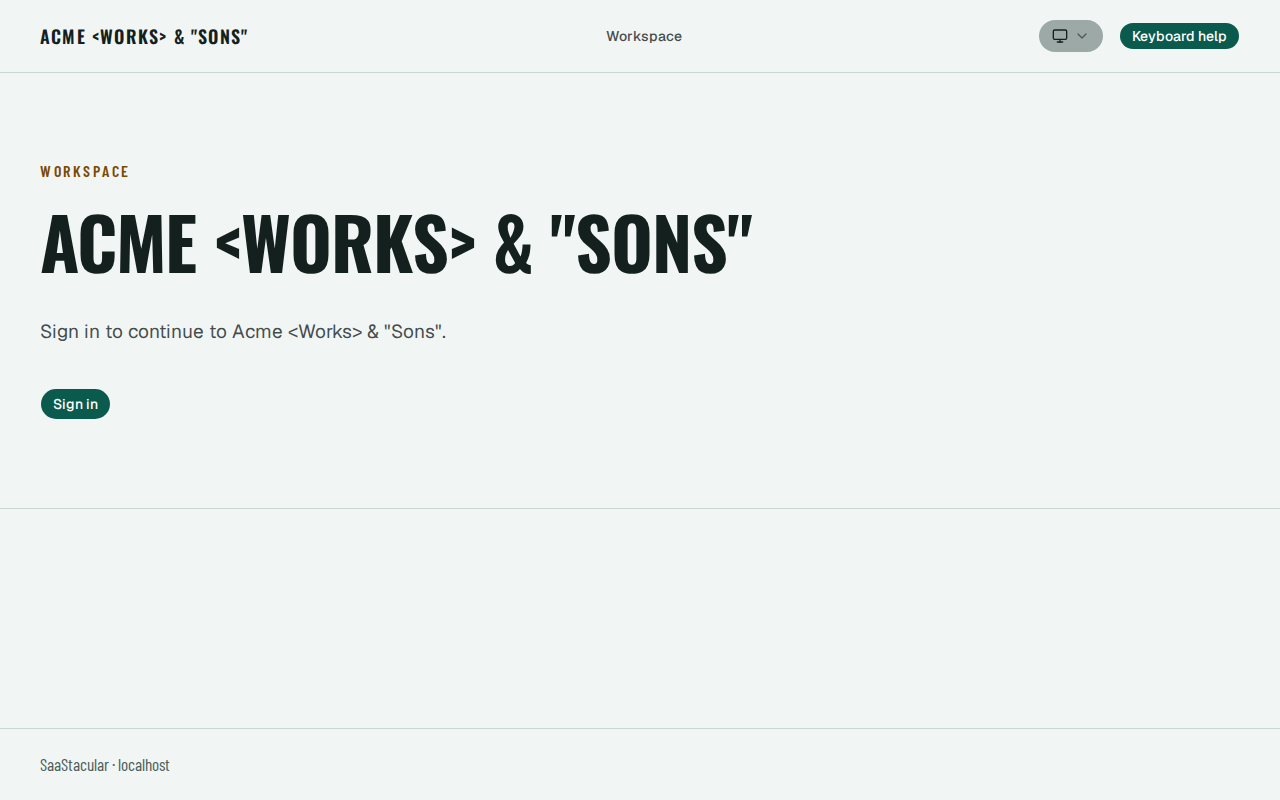
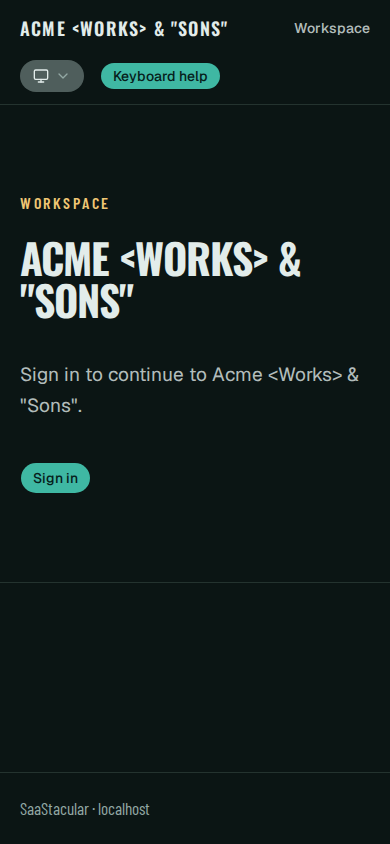
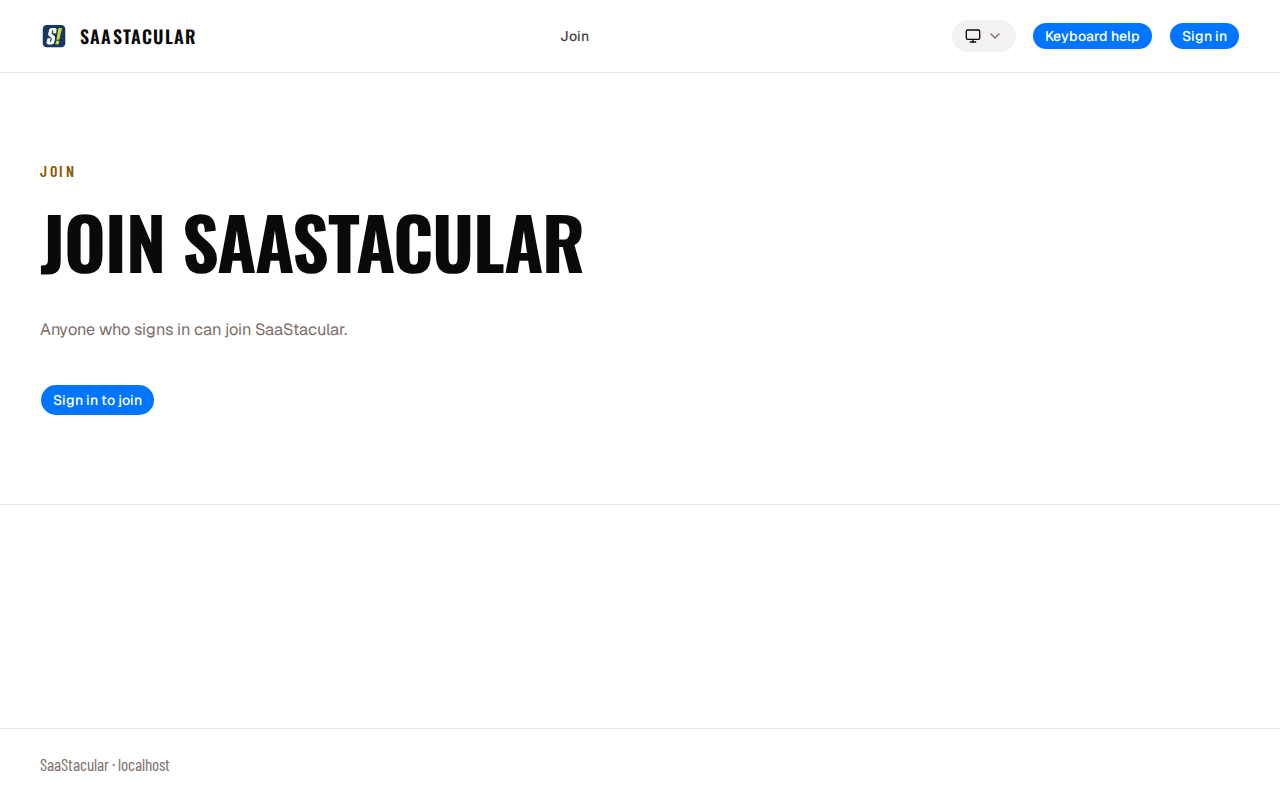
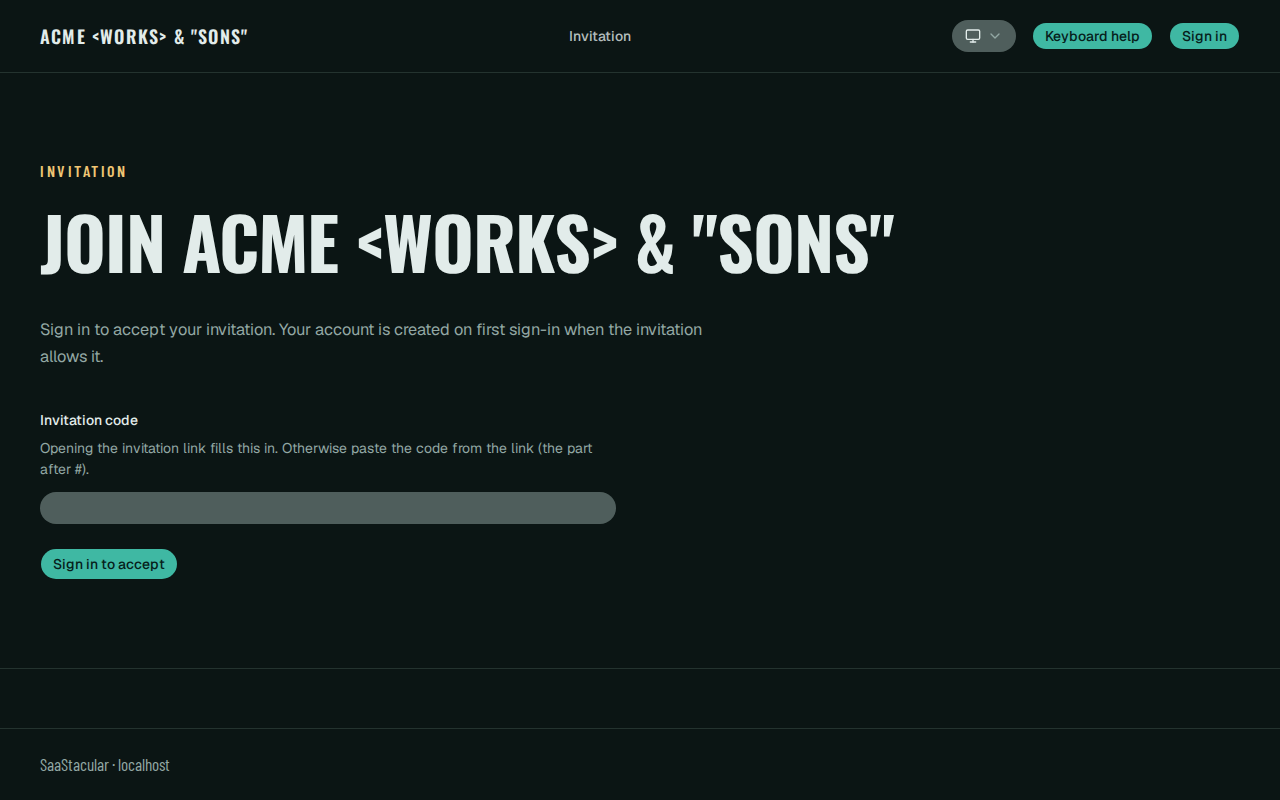
These screenshots show the shipped web UI, unedited, running in the repository's local identity test environment: the WorkOS emulator with seeded synthetic Organizations, people and Groups (IDENTITY.md). Every name in them is test data. They illustrate the interface; they are not security tests.
Tenant entry (Light, desktop). A tenant host's signed-out entry: the Organization's brand label, the workspace name, one Sign in action and the appearance control.
Tenant entry (Dark, phone width). The same entry in the Dark appearance at a 390-pixel phone width.
Enrollment, open mode. The join page of a synthetic Organization whose owner selected open enrollment. New Organizations start invite-only; an owner can switch to request-access (a manager approves each request) or open enrollment (TENANCY.md, SECURITY.md).
Invitation landing (Dark). The workspace invitation page: the code field is empty here; a real invitation link fills it from its URL fragment in the browser, which never reaches the server. Invitations are scoped, expire within 30 days and are consumed once; the token is shown once and only its digest is stored (TENANCY.md).
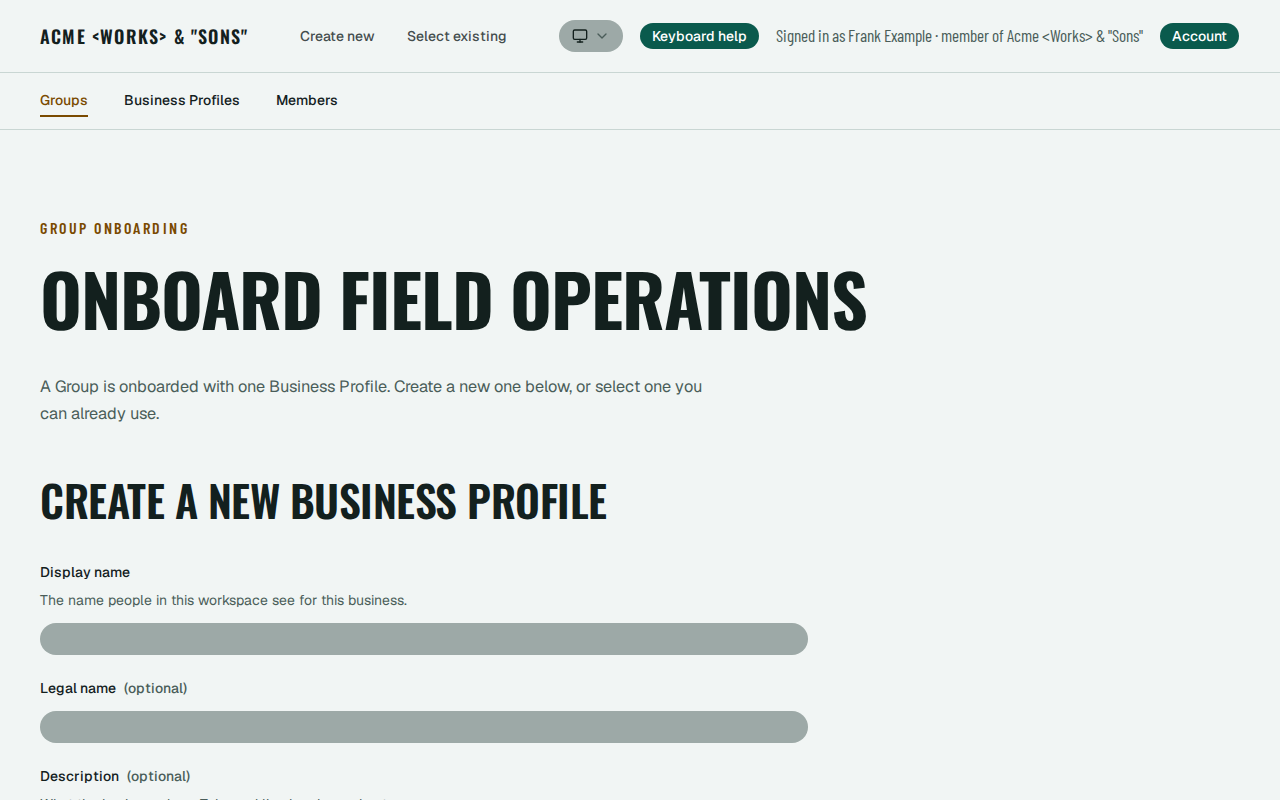
Group onboarding (Light). The member who created a Group becomes its owner and completes onboarding by creating a new Business Profile or selecting an existing one they may use (TENANCY.md).
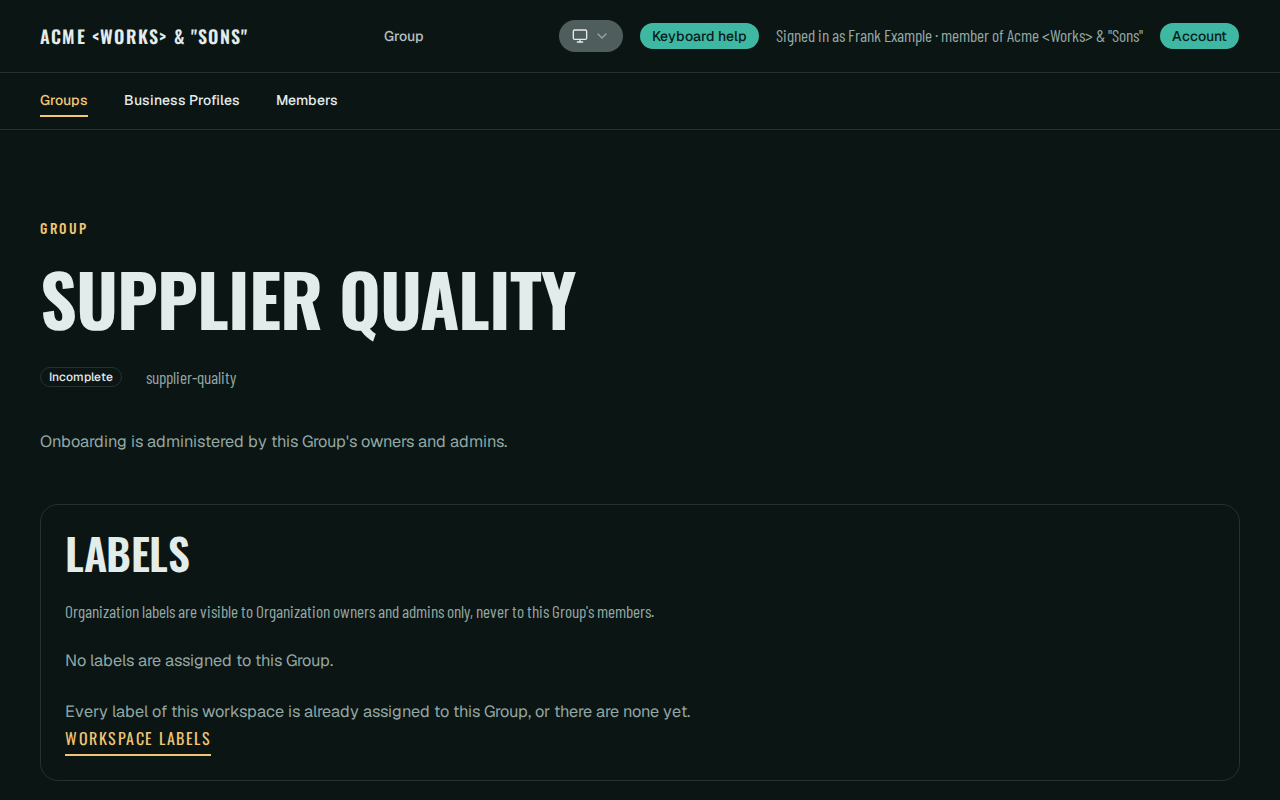
Group metadata, read-only (Dark). Organization staff without Group management read an incomplete Group's metadata and onboarding state; instead of onboarding controls the page says onboarding is administered by the Group's owners and admins (WEB-SHELL.md).
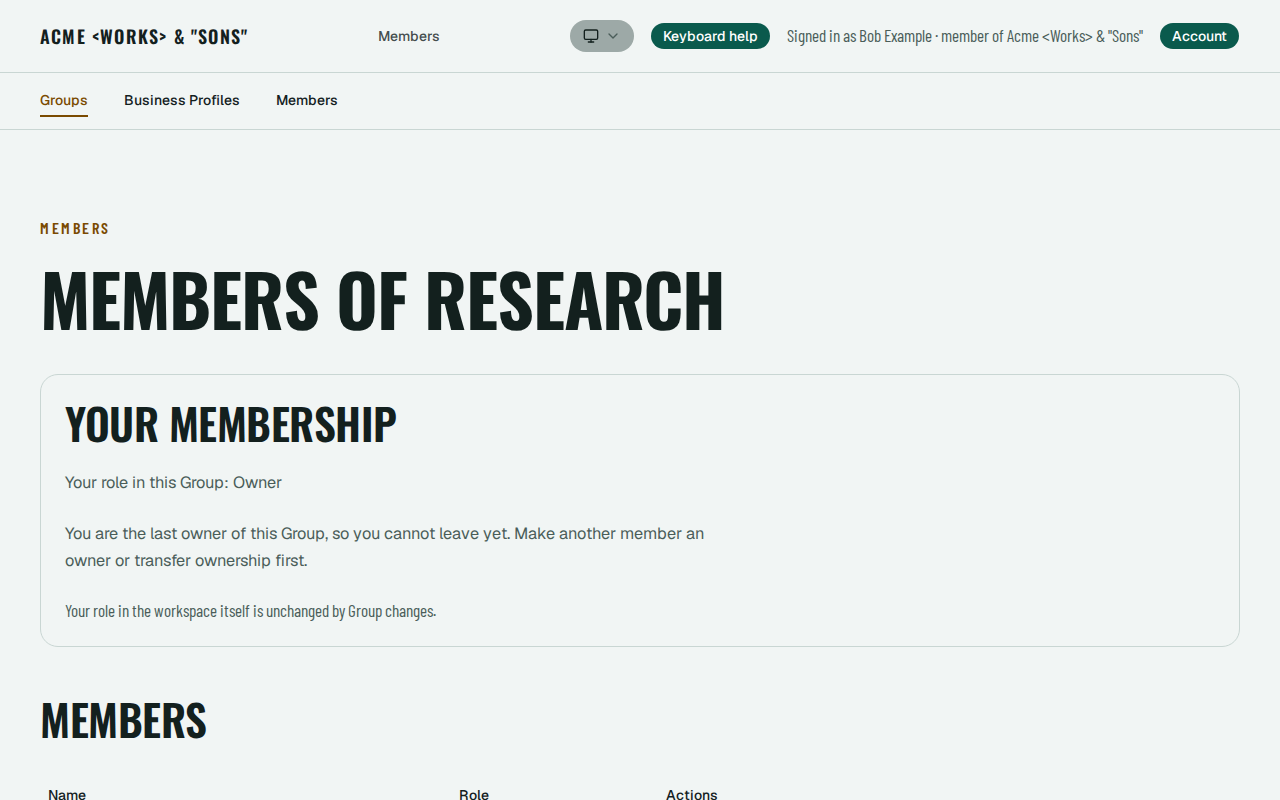
Group members (Light). The members page as the Group's owner: the last owner is told why they cannot leave yet, above the members table (TENANCY.md).
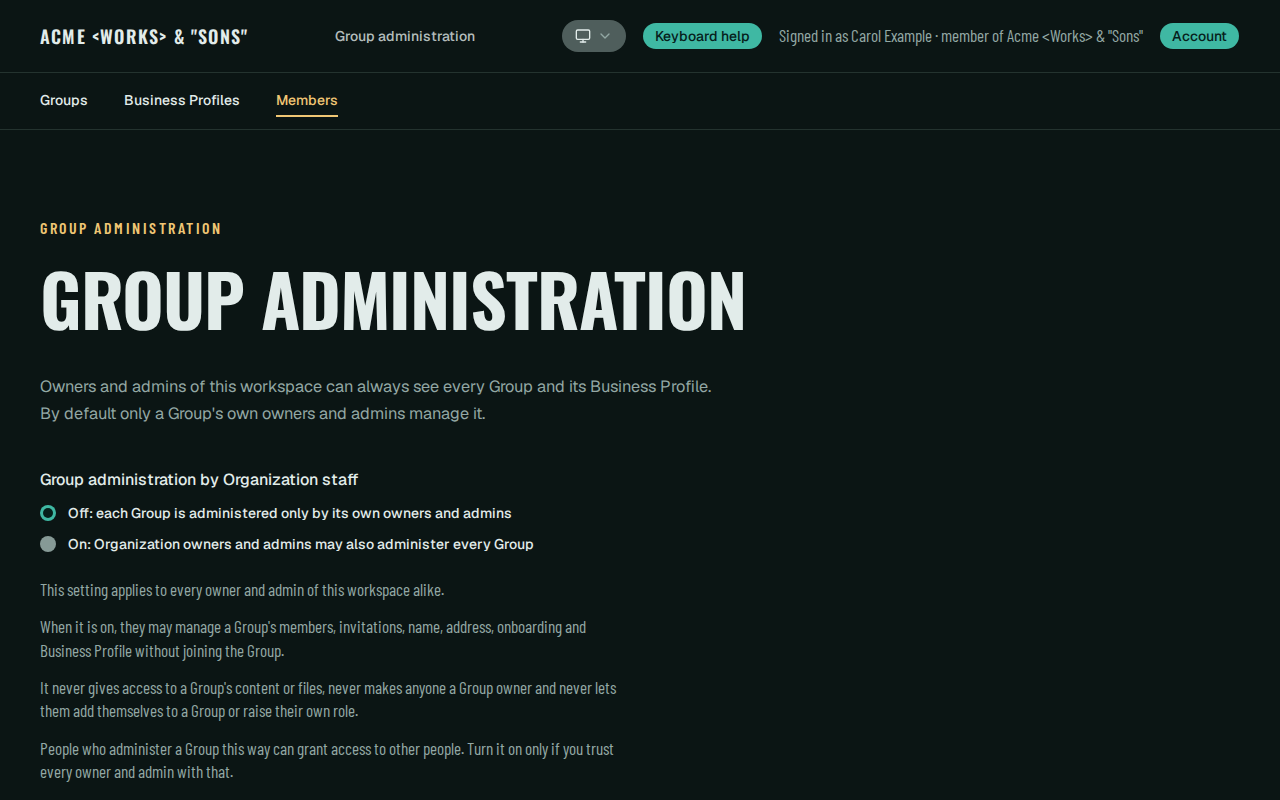
Group-management override (Dark). Only the Organization owner turns this default-off setting on or off. With it on, Organization owners and admins administer ordinary members, invitations and onboarding of any Group without joining it; it never grants Group content or ownership (TENANCY.md).
A GitHub copy of this repository is set up as a repository template, so you can start a repository of your own from it with Use this template while this GitLab project remains the canonical source.
Architecture at a glance
| Path | Responsibility |
|---|---|
web/ |
Browser surface and thin server-side bridge (BFF) to core: no authority, policy or domain rules, no NEXT_PUBLIC_* backend URLs |
core/ |
Domain authority: identity and sessions, tenancy, authorization, audit, storage, domains, MCP and migrations (core/migrations) |
intelligence/ |
Optional internal AI execution (no data-store access, not browser-reachable) behind a model-gateway boundary |
contracts/ |
Cross-service schemas and the MCP contracts |
infra/ |
Compose, images, database and storage initialization, local tooling, validation, CI scripts, recovery and the optional staging tooling |
docs/ |
Security, deployment, privacy and CI notes, and the foundation guides (docs/foundation/) |
.agents/skills/restruct-sdlc/ |
The pinned GitHub Restruct SDLC development submodule; Claude discovers it through .claude/skills/restruct-sdlc (Development workflow) |
PostgreSQL holds durable state; Redis is ephemeral; MinIO provides local S3-compatible storage. External providers stay behind owned adapters. Identity is global; the Organization is the tenant boundary, resolved on the server from the authenticated session and the request host, never from client-supplied or model-supplied identifiers.
Prerequisites
- Docker Engine or Docker Desktop with Compose 2.24 or later (with WSL integration on Windows).
- bash with coreutils and
flockavailable onPATH(flockis required for validation-harness resource locking). - Git for the developer checks (see Developer checks need a Git repository).
- No host Go, Python, Node, PostgreSQL, Redis or MinIO is needed. Every build, check, migration and test runs in containers.
Quick start
Run these from the repository root (for example a checkout in a directory named saastacular). The blocks below are executed verbatim by infra/validation/run.sh. Configure, start, migrate, stop and reset need no Git repository, GitLab account or network service of your own.
1. Configure. This creates .env from .env.example, with locally generated secrets and mode 600. It never overwrites an existing .env.
infra/local/configure-env.sh
2. Start. The first start downloads images and compiles MinIO from source, which takes several minutes.
docker compose --env-file .env -f infra/compose/local.yml up -d --build --wait
3. Migrate. The commands run as the migrator role in a one-shot container. See MIGRATIONS.md.
docker compose --env-file .env -f infra/compose/local.yml -f infra/compose/migrate.yml run --rm --build migrate status
docker compose --env-file .env -f infra/compose/local.yml -f infra/compose/migrate.yml run --rm --build migrate up
docker compose --env-file .env -f infra/compose/local.yml -f infra/compose/migrate.yml run --rm --build migrate status
4. Check. Formatting, vet, unit tests, lint, type checks and secret scanning, all in containers without network access. The secret scan covers exactly the submitted files (tracked plus untracked, non-ignored), listed by host Git and streamed into the scanner, so it needs a Git repository; a submitted file under a local-only scanner exemption such as .env fails the check (SECURITY.md).
docker compose --env-file .env -f infra/compose/local.yml --profile checks run --rm --build core-check
docker compose --env-file .env -f infra/compose/local.yml --profile checks run --rm --build web-check
docker compose --env-file .env -f infra/compose/local.yml --profile checks run --rm --build intelligence-check
bash infra/security/secret-scan.sh --env-file .env secret-scan
Browser tests. With the stack running, the web shell's browser suite (accessibility, keyboard, appearance modes, design tokens and the BFF boundary) runs in the pinned Playwright image, inside the web container's network namespace. Nothing is published, and no test needs network access. See WEB-SHELL.md.
docker compose --env-file .env -f infra/compose/local.yml -f infra/compose/browser.yml --profile browser run --rm --build --no-deps web-browser
Contract conformance. The cross-service contract corpus is validated by an independent Go validator (below) and by the Python validator inside intelligence-check (step 4). Both run without network access; the harness's contracts suite runs the same validators. See OPERATIONS.md.
docker build -q -f infra/docker/validation-tools.Dockerfile --target runtime -t platform-validation-tools infra/validation/tools
docker run --rm --network none -v "$PWD/contracts:/contracts:ro" platform-validation-tools contractcheck corpus --schemas /contracts/intelligence --corpus /contracts/conformance/intelligence --out /dev/null
docker run --rm --network none -v "$PWD/contracts:/contracts:ro" platform-validation-tools contractcheck schema-negative --schemas /contracts/intelligence --corpus /contracts/conformance/intelligence --out /dev/null
Validation profiles. infra/ci/validate.sh is the single validation entry point, locally and in CI. Locally it runs a chosen profile with evidence scanning and owned-resource cleanup, and fails closed when the host does not meet that profile's capacity. The full profile (it invokes infra/validation/run.sh ... all) is the broadest check:
bash infra/ci/validate.sh --profile full
The fast profile (lint, provenance, contracts and the stack-free checks) and the integration profile (fast plus the root stack and the disposable variant copies) are the quicker local loops:
bash infra/ci/validate.sh --profile fast
bash infra/ci/validate.sh --profile integration
For a committed change against the remote integration branch (named staging in this configuration), the affected profile selects only the obligations the changed paths require (registered feature areas, their dependents and consumers); any other path, an unresolved dependency or an unusable base selects full:
bash infra/ci/validate.sh --profile affected --base "$(git merge-base HEAD origin/staging)"
5. Stop. PostgreSQL and MinIO data are kept.
docker compose --env-file .env -f infra/compose/local.yml down
Reset. This destroys the local PostgreSQL data (including migration history) and MinIO data. Redis is always empty after a restart. .env is kept. To change role passwords or DATABASE_NAME, reset and then start again, because they apply only to a new database volume.
docker compose --env-file .env -f infra/compose/local.yml down -v
Developer checks need a Git repository
Configure, start, migrate, stop and reset work in a plain copy without Git metadata. The developer checks do not: the secret scan in step 4 lists submitted files with Git, infra/validation/run.sh compares protected files and the change scope against a --base commit, and the affected profile needs a merge base. If your copy has no Git metadata, initialize a fresh local repository and commit the tree once before running them:
git init -q && git add -A && git commit -qm "initial import"
No remote, hosted runner or GitLab account is needed for any local command.
Local ports
Host ports bind to BIND_ADDRESS (loopback by default) and are configurable in .env. Containers talk to each other by service name on the internal ports.
| Service | Internal port | Default host port | Variable |
|---|---|---|---|
| Web | 3000 | 3100 | WEB_PORT |
| Core | 8180 | 8180 | CORE_PORT |
| Intelligence | 8000 | 8100 | INTELLIGENCE_PORT |
| PostgreSQL | 5432 | 5532 | POSTGRES_PORT |
| Redis | 6379 | 6479 | REDIS_PORT |
| MinIO API | 9000 | 9100 | MINIO_API_PORT |
| MinIO console | 9001 | 9101 | MINIO_CONSOLE_PORT |
Health: core GET /healthz and GET /readyz; web GET /api/health and GET /api/ready; intelligence GET /healthz and GET /readyz. Every health response carries Cache-Control: no-store and an X-Request-Id; diagnostic context, logs and limits are described in OPERATIONS.md. The intelligence service is optional; with it disabled, core reports readiness without an intelligence entry.
Identity, enrollment and signup configuration
Identity uses WorkOS AuthKit through core's provider adapter; the identity values are listed, commented out, in .env.example and described in IDENTITY.md, including the local emulator-based identity test environment. New Organizations start invite-only; owners can switch to request-access or open enrollment (TENANCY.md). Platform root signup creates a new Organization with its creator as owner and gives it a generated platform address such as gusty-flowerpot-2643 under PLATFORM_BASE_DOMAIN; these friendly addresses are public routing identifiers, not credentials (DOMAINS.md). Real WorkOS behaviour on your domains needs your own provider configuration and qualification.
Root host configuration (optional)
Two optional core settings decide what the exact platform root host (PLATFORM_BASE_DOMAIN, for example example.com) serves. Neither is a secret. They are listed, commented out, in .env.example ("Hostnames and custom domains"), and DOMAINS.md ("Default-tenant root alias and root presentation") is the authoritative description.
DEFAULT_TENANT_SLUG=<slug>
PLATFORM_ROOT_PAGE=signup_redirect
DEFAULT_TENANT_SLUG=<slug>makes the exact root host (notwww.example.com, tenant, custom or auth hosts) serve the normal tenant entry, branding, sign-in,/joinand account pages of the Organization holding that slug, at the root's own address. The Organization must already exist (create it through the normal signup first): the setting aliases it and creates, seeds or converts nothing, and changes neither the multi-tenant data model, other tenant hosts nor the Organization provisioning APIs.- Set or remove. Core reads both settings once at startup from its deployment environment. Edit that environment, then restart or redeploy core (web needs no change); an env-file edit alone changes nothing. Removing the line or leaving it empty restores multi-tenant operation. Another slug also needs a restart, and root sessions of the previous Organization stop working (members sign in again).
- Unknown or malformed slug. Core logs one warning (
default_tenantoutcome=inactive,reason=unknown_slugorinvalid_slug; a malformed value is never logged) and continues in multi-tenant mode with thePLATFORM_ROOT_PAGEpresentation. A database or permission failure during the lookup is not an unknown slug: core stops withcore.exitdefault_tenant_unavailable. - Root
/signupwhile the alias is active. Every root/signupand/signup/*path is the fixed 404 (GET and POST);/joinfollows the selected Organization's enrollment policy.www.example.comkeeps its landing, whose Sign Up then reaches that 404. To create a new Organization, unset the alias and restart (the provisioning APIs are unchanged). PLATFORM_ROOT_PAGEselects the multi-tenant root:signup_redirect(the default, also when unset or empty) answers GET and HEAD of exact/with a temporary 307 to/signup;landingserves the existing landing. An invalid value logs a warning and uses the default. The setting is ignored while a valid alias is active.- Scope. Both take effect on deployments using the
httpscookie profile (and in the identity test overlay). The quick-start stack above uses the loopback profile, passes neither variable to core and keeps its generic page; the deployment overlay carries them.
Security foundation
docs/SECURITY.md is the entry point: the credential inventory and least-privilege matrix, secret resolution, dependency-vulnerability policy, rotation and deprovisioning, transport and at-rest readiness, recorded findings and the implemented tenant, domain and identity boundaries. The mechanisms and their checks are detailed in TENANCY.md, AUTHORIZATION.md, DATABASE-ISOLATION.md, IDENTITY.md, DOMAINS.md, OBJECT-STORAGE.md, AUDIT.md, RECOVERY.md and MCP.md. Security statements are scoped to the tested configuration and the checks named there.
Privacy and data protection
The repository ships generic secret, least-privilege, audit, storage, retention/deletion and recovery mechanisms. It does not decide your legal obligations. Before real personal data is used, resolve at least:
- a personal-data inventory and the purposes of processing;
- the applicable jurisdictions and your controller/processor role;
- subject-rights procedures for your application;
- lawful retention periods and legal holds (the retention tooling enforces a policy you declare);
- backup and restoration treatment of personal data;
- processor and subprocessor agreements and international-transfer review;
- incident ownership and notification;
- AI-provider data-use and retention terms, if you enable the intelligence service.
docs/PRIVACY-CHECKLIST.md expands this list and adds what to review before making a fork or deployment public. Nothing here claims GDPR applicability or compliance.
SaaStacular MCP Fragen
Was ist SaaStacular?
Es ist ein einsatzbereites Repository-Template, das eine Sicherheitsbasis für den Bau von AI Operating Systems bietet, einschließlich Identität, Tenancy und Autorisierung.
Wird Multi-Tenancy unterstützt?
Ja, es ist standardmäßig Multi-Tenant und nutzt die Organization als Tenant-Grenze.
Welche Technologien werden zum Ausführen benötigt?
Du benötigst nur Docker und bash; eine Installation von Go, Python oder Node auf dem Host ist nicht erforderlich.
Ist es ein fertiges, produktionsreifes Produkt?
Nein, es ist ein gepflegter Startpunkt und kein fertiges Produkt, kein Hosted Service und keine Compliance-Zertifizierung.