
tty-table MCP server
Commit 13. Okt. 2026Ermöglicht es einem AI-Client, Daten als ASCII- oder Unicode-Terminaltabellen für die Verwendung in READMEs und anderen Textdateien darzustellen.
Auch bekannt als tecfu/tty-table
- Stars
- 311
- Tools
- 4
- Downloads, 30 Tage
- —
- Neueste Version
- —
- Letzter Commit
- 13. Okt. 2026
- Lizenz
- MIT
Was ist tty-table MCP?
tty-table ist ein MCP server. Ermöglicht es einem AI-Client, Daten als ASCII- oder Unicode-Terminaltabellen für die Verwendung in READMEs und anderen Textdateien darzustellen. Er stellt 4 Tools bereit, etwa render_table, header, rows.
Zusammenfassung generiert aus dem README des Projekts
Über tty-table MCP server
tty-table ermöglicht es AI-Clients, Rohdaten in formatierte ASCII- oder Unicode-Terminaltabellen umzuwandeln. Entwickler, die Claude, Cursor oder andere IDE-Agents nutzen, können diesen Server via stdio mit npx verbinden, um strukturierte Informationen in lesbare Textlayouts zu transformieren. Das ist besonders nützlich, um saubere Dokumentationen, README-Dateien oder terminal-freundliche Reports direkt aus einem AI-Chat zu generieren.
Das render_table Tool dient als primäre Schnittstelle und erlaubt es dir, Header, Zeilen und spezifische Config-Optionen wie width, borderStyle, align oder compact mode zu übergeben. Der Server übernimmt die komplexe Formatierungslogik, einschließlich Unicode-Breitenmessung und Text Wrapping, um sicherzustellen, dass die Tabellen in einer Terminal-Umgebung korrekt aussehen. Für den Betrieb der MCP-Implementierung ist Node.js 22 oder neuer erforderlich.
Geschrieben aus dem README des Projekts. Jeder Use Case wurde gegen ein Zitat daraus geprüft.
tty-table MCP tools 4
Erkannt aus dem READMErender_tableheaderrowsoptions
| render_table | — | |
| header | — | |
| rows | — | |
| options | — |
Automatisierte Checks
Geluften am 13. Nov. 2026Vollständiger Bericht →Noch nicht verifiziert. Ein Server benötigt einen Score von 80, keine kritischen Befunde und genug Daten für unsere Prüfung. Wie die Checks funktionieren · Was du für mehr Punkte verbessern kannst

- Source Repository verknüpft und erreichbartecfu/tty-table is public and reachablegithub.com/tecfu/tty-table ↗Bestanden
- Paket nennt dieses Repository als QuelleNicht geprüft
- Build-Provenienz (Sigstore-Attestierung)Nicht geprüft
- Open Source Lizenz (OSI)MITspdx.org/licenses/MIT.html ↗Bestanden
- Commit oder Release im letzten JahrLast commit or release 2026-10-13github.com/tecfu/tty-table ↗Bestanden
- OpenSSF ScorecardOpenSSF Scorecard 4.8 / 10; weakest: Code-Review 0, Pinned-Dependencies 0, CII-Best-Practices 0scorecard.dev/viewer/?uri=github.com/tecfu/tty-table ↗Teilweise 7/15
- Package-Name ähnelt keinem populären PackageNicht geprüft
- Keine kritischen Advisories im Paket oder seinen AbhängigkeitenNicht geprüft
- Keine versteckten Anweisungen an das Modell4 tool descriptions and the README read; no override phrases, credential paths or hidden charactersBestanden
- Destruktive Tools sind markiertNo tool named like delete, drop or execBestanden
- Remote-Endpoint beantwortet den MCP-HandshakeNicht geprüft
README
Auf GitHub ansehentty-table
A TypeScript-first terminal table renderer with a compatibility-oriented factory API.
Examples
See here for complete example list
To view all example output:
$ git clone https://github.com/tecfu/tty-table && cd tty-table && npm i
$ npm run view-examples
Terminal (Static)
examples/styles-and-formatting.js

Terminal (Streaming)
$ node examples/data/fake-stream.js | tty-table --format json --header examples/config/header.js
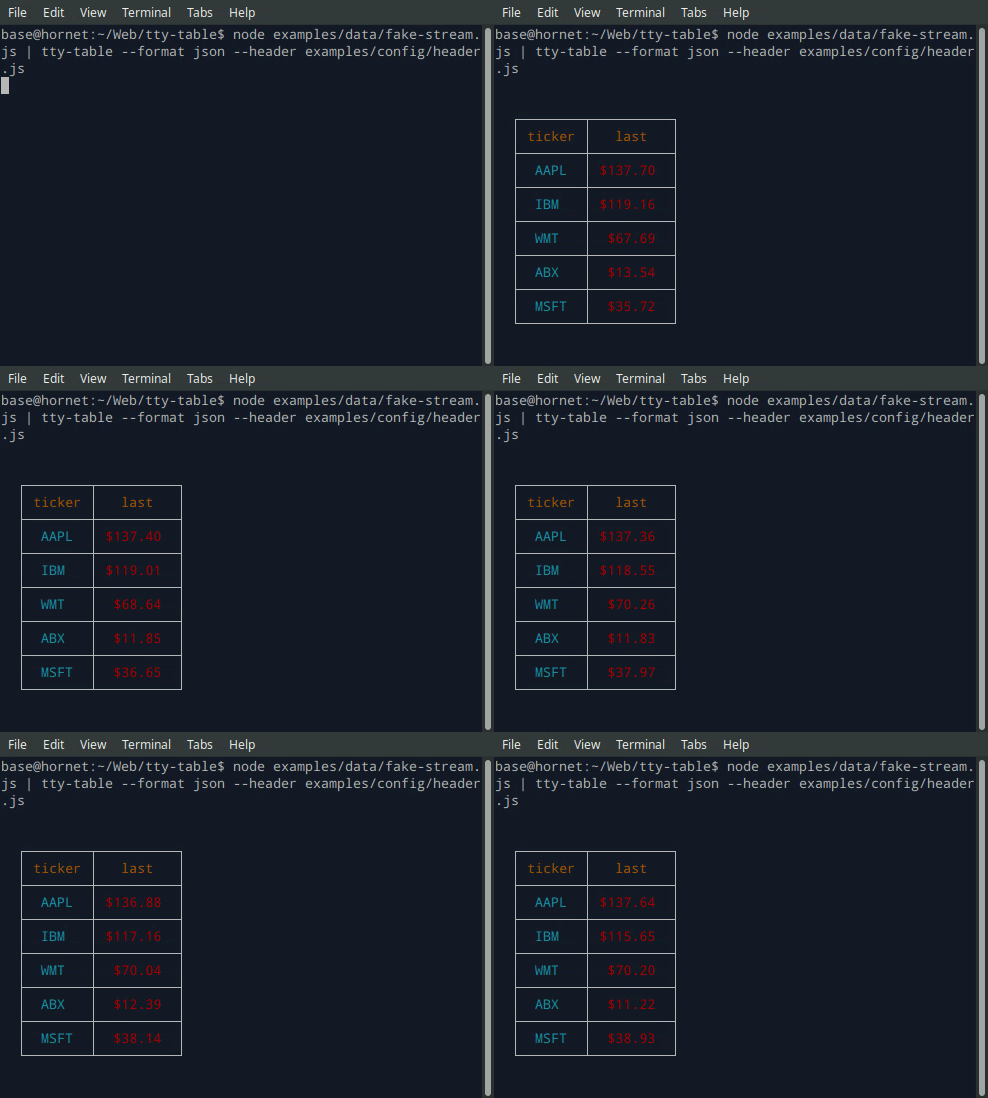
- See the built-in help for the terminal version of tty-table with:
$ tty-table -h
MCP server
Expose tty-table to MCP clients (Claude, IDE agents, Cursor, etc.) over stdio.
Client configuration
{
  "mcpServers": {
    "tty-table": {
      "command": "npx",
      "args": ["-y", "--package=tty-table", "tty-table-mcp"]
    }
  }
}
Tools
| Tool | Description |
|---|---|
render_table |
Render data as an ASCII/Unicode terminal table. Accepts header, rows, and any tty-table options; returns the rendered table as text. |
Arguments for render_table:
| Name | Type | Required | Description |
|---|---|---|---|
header |
(string | {value, align?, width?})[] |
no | Column definitions |
rows |
(unknown[] | Record<string, unknown>)[] |
yes | Row data (arrays of cells, or objects keyed by column name) |
options |
object |
no | Any tty-table option (e.g. width, borderStyle, align, compact) |
Example tool call:
{
  "header": [{ "value": "name" }, { "value": "score", "align": "right" }],
  "rows": [["Ada", 100], ["Grace", 98]],
  "options": { "width": 40 }
}
Rendered result:
  ┌───────┬───────┐
  │ name  │ score │
  ├───────┼───────┤
  │  Ada  │   100 │
  ├───────┼───────┤
  │ Grace │    98 │
  └───────┴───────┘
Additional tools may be added in future releases under the same MCP server.
Browser & Browser Console
The published package ships a standalone IIFE bundle that exposes a TtyTable global. Load it directly from a CDN — no install or build step required:
<script src="https://cdn.jsdelivr.net/npm/tty-table@7/dist/browser/tty-table.global.js"></script>
<script>
  const Table = TtyTable.default
  console.log(Table([{ value: "name" }, { value: "score" }], [["Ada", 100]], null).render())
</script>
- Try it online before installing: live example on JSFiddle
- View the full example locally in Chrome or Chromium by opening examples/browser-example.html (e.g. served with
npx serve .or any static file server). - source: examples/browser-example.html

Compatibility
Node.js
Current releases require Node.js 22 or newer. This is a breaking change from the Node 20 baseline used by early v6 releases (and from the v5 line, which supported older Node.js releases). The floor was raised to match smartwrap@4 / breakword@2.1.0. If your application must remain on Node 20, stay on a prior tty-table release until you can upgrade.
The published package provides both ESM and CommonJS entry points for Node.js. The CLI requires Node.js 22+ as well.
API
import Table from "tty-table"

const table = Table(
  [{ value: "name" }, { value: "score", align: "right" }],
  [
    { name: "Ada", score: 100 },
    { name: "Grace", score: 98 }
  ],
  { borderStyle: "solid" }
)

console.log(table.render())
Legacy Table(header, rows, footer, options) and Table(rows, options) construction remains supported.
Formatter context
New code can use the explicit context form:
const formatter = (value: unknown) => String(value).toUpperCase()
The compatibility callback signature is still accepted. New integrations should prefer a formatter that accepts the documented context object and avoid relying on dynamic this mutation.
Width semantics
Widths are measured in terminal display columns, not JavaScript string length. ANSI escape sequences are ignored for measurement; Unicode code points are counted using breakword.width() (Unicode 18.0.0 East Asian Width + UAX #51 Emoji_Presentation). Wrapping and truncation operate on the same display-width semantics.
Compared with older releases that used wcwidth, some symbols that were previously treated as 1 cell are now 2 cells (for example ⚡ U+26A1). Tables containing those characters may reflow slightly; measurement is now aligned with the same library used for wrapping.
Development
npm install
npm run typecheck
npm run build
npm test
npm run test:unit
npm run lint
tty-table MCP Fragen
Welche Tools bietet tty-table MCP?
Er stellt 4 Tools bereit, darunter render_table, header, rows, options.
Wie kann ich tty-table mit Claude oder Cursor nutzen?
Du kannst es über stdio an MCP-Clients wie Claude, IDE-Agents oder Cursor anbinden, indem du die mcpServers in deiner Client-Konfiguration konfigurierst.
Welche Tools sind im MCP server verfügbar?
Der Server stellt das render_table Tool bereit, das Header, Zeilen und verschiedene tty-table Optionen akzeptiert, um eine gerenderte ASCII/Unicode-Tabelle zurückzugeben.
Welche Node.js Version wird benötigt?
Aktuelle Releases erfordern Node.js 22 oder neuer.