
Ermöglicht es einem AI-Client, ein selbst gehostetes Team-Wiki aus Seiten und Tabellen mit einem integrierten Review-Workflow zu schreiben, zu aktualisieren und abzufragen.
Auch bekannt als stuga-dev/stuga, @stuga/mcp
- Stars
- 6
- Tools
- —
- Downloads, 30 Tage
- —
- Neueste Version
- 0.2.1
- Letzter Commit
- 12. Nov. 2026
- Lizenz
- AGPL-3.0
Was ist Stuga MCP?
Stuga ist ein MCP server. Ermöglicht es einem AI-Client, ein selbst gehostetes Team-Wiki aus Seiten und Tabellen mit einem integrierten Review-Workflow zu schreiben, zu aktualisieren und abzufragen.
Zusammenfassung generiert aus dem README des Projekts
Über Stuga MCP server
Stuga ermöglicht es, ein Team-Wiki über einen AI-Client zu verwalten, indem Agents Seiten und Tabellen schreiben, aktualisieren und abfragen können. Diese selbst gehostete Lösung läuft auf einem Mac mit Apple Silicon oder via Docker auf einem Server. Sie verbindet sich mit verschiedenen MCP-Clients wie Claude Desktop, Cursor und VS Code und nutzt das eigene Modell des Agents, sodass für den Node selbst keine separaten AI-Keys erforderlich sind.
Nutzer können über drei verschiedene Review-Level steuern, wie Informationen aktualisiert werden. Änderungen können von der Person, die sie angefordert hat, überprüft werden, erfordern die Zustimmung eines Kollegen oder werden direkt im Wiki angewendet. Das System nutzt Tools wie Save to Stuga zum Ablegen von Informationen, Ask Stuga zum Abfragen von genehmigten Inhalten und Check Stuga, um veraltete Seiten oder defekte Links zu identifizieren. Die Daten werden lokal mit Postgres und SQLite gespeichert, sodass die Dokumentation deines Teams unter deiner Kontrolle bleibt.
Was du damit machen kannst
- 1Automatisierte Wiki-DokumentationEin AI-Agent kann automatisch Meeting-Notizen oder E-Mail-Punkte in die richtigen Wiki-Seiten oder Tabellenzeilen einpflegen.
- 2Kollaborative InhaltsverifizierungTeams können einen Workflow einrichten, bei dem die von einer KI vorgeschlagenen Änderungen von einem anderen Teammitglied genehmigt werden müssen.
- 3Abfrage von verifiziertem WissenEntwickler können eine KI fragen, um Fragen ausschließlich auf Basis von Informationen zu beantworten, die offiziell genehmigt wurden.
- 4Wiki-Wartung und CleanupEine KI kann die Dokumentation scannen, um verwaiste Seiten oder defekte Links zu finden und Korrekturvorschläge zu machen.
Geschrieben aus dem README des Projekts. Jeder Use Case wurde gegen ein Zitat daraus geprüft.
So installierst du Stuga MCP
Formate geprüft am 10. Nov. 2026Zu Cursor hinzufügenZu Goose hinzufügenStuga MCP in Claude Code installieren
$ claude mcp add --env 'STUGA_URL=<STUGA_URL>' stuga -- npx -y @stuga/mcpStuga MCP in Cursor installieren
~/.cursor/mcp.json
{
  "mcpServers": {
    "stuga": {
      "command": "npx",
      "args": [
        "-y",
        "@stuga/mcp"
      ],
      "env": {
        "STUGA_URL": "<STUGA_URL>"
      }
    }
  }
}Stuga MCP in VS Code installieren
.vscode/mcp.json
{
  "servers": {
    "stuga": {
      "type": "stdio",
      "command": "npx",
      "args": [
        "-y",
        "@stuga/mcp"
      ],
      "env": {
        "STUGA_URL": "<STUGA_URL>"
      }
    }
  }
}Stuga MCP in VS Code CLI installieren
$ code --add-mcp '{"name":"stuga","type":"stdio","command":"npx","args":["-y","@stuga/mcp"],"env":{"STUGA_URL":"<STUGA_URL>"}}'Stuga MCP in Claude Desktop installieren
claude_desktop_config.json
{
  "mcpServers": {
    "stuga": {
      "command": "npx",
      "args": [
        "-y",
        "@stuga/mcp"
      ],
      "env": {
        "STUGA_URL": "<STUGA_URL>"
      }
    }
  }
}Stuga MCP in Codex installieren
$ codex mcp add stuga --env 'STUGA_URL=<STUGA_URL>' -- npx -y @stuga/mcpStuga MCP in Codex config.toml installieren
~/.codex/config.toml
[mcp_servers.stuga]
command = "npx"
args = ["-y", "@stuga/mcp"]

[mcp_servers.stuga.env]
STUGA_URL = "<STUGA_URL>"
Stuga MCP in Gemini CLI installieren
$ gemini mcp add -s user -e 'STUGA_URL=<STUGA_URL>' stuga npx -- -y @stuga/mcpStuga MCP in Gemini settings.json installieren
~/.gemini/settings.json
{
  "mcpServers": {
    "stuga": {
      "command": "npx",
      "args": [
        "-y",
        "@stuga/mcp"
      ],
      "env": {
        "STUGA_URL": "<STUGA_URL>"
      }
    }
  }
}Konfiguration
STUGA_URLErforderlichThe address you open Stuga at.
| Name | Beschreibung | Typ |
|---|---|---|
| STUGA_URL | The address you open Stuga at. | Erforderlich |
Automatisierte Checks
Geluften am 12. Nov. 2026Vollständiger Bericht →Unsere automatisierten Checks bestanden. Das ist kein Security-Audit: Lies den Code und gib dem Server nur den minimal notwendigen Zugriff. Wie die Checks funktionieren

- Source Repository verknüpft und erreichbarBestanden
- Open Source Lizenz (OSI)Bestanden
- Commit oder Release im letzten JahrBestanden
- Package-Name ähnelt keinem populären PackageBestanden
- Remote Endpoint nutzt HTTPSBestanden
- Destruktive Tools sind markiertNicht geprüft
- Keine versteckten Anweisungen an das ModellBestanden
- Keine kritischen Advisories im Paket oder seinen AbhängigkeitenBestanden
README
Auf GitHub ansehenStuga
Your AI writes the team wiki. A colleague approves.
A team wiki of pages and tables, on a Mac or server you run. Say Save to Stuga to Claude, Codex or any MCP client, and it files each point on the right page or in the right table row. By default a change to the wiki waits for whoever asked the AI; set a folder to Reviewed by a colleague and someone else approves it. Ask Stuga answers from what is approved, and says what still waits.
Download for Mac (Apple silicon, macOS 15+) · Install with Docker
Install, then create your account and workspace and connect your AI. Help for people using Stuga: stuga.dev/docs.
How the wiki stays right
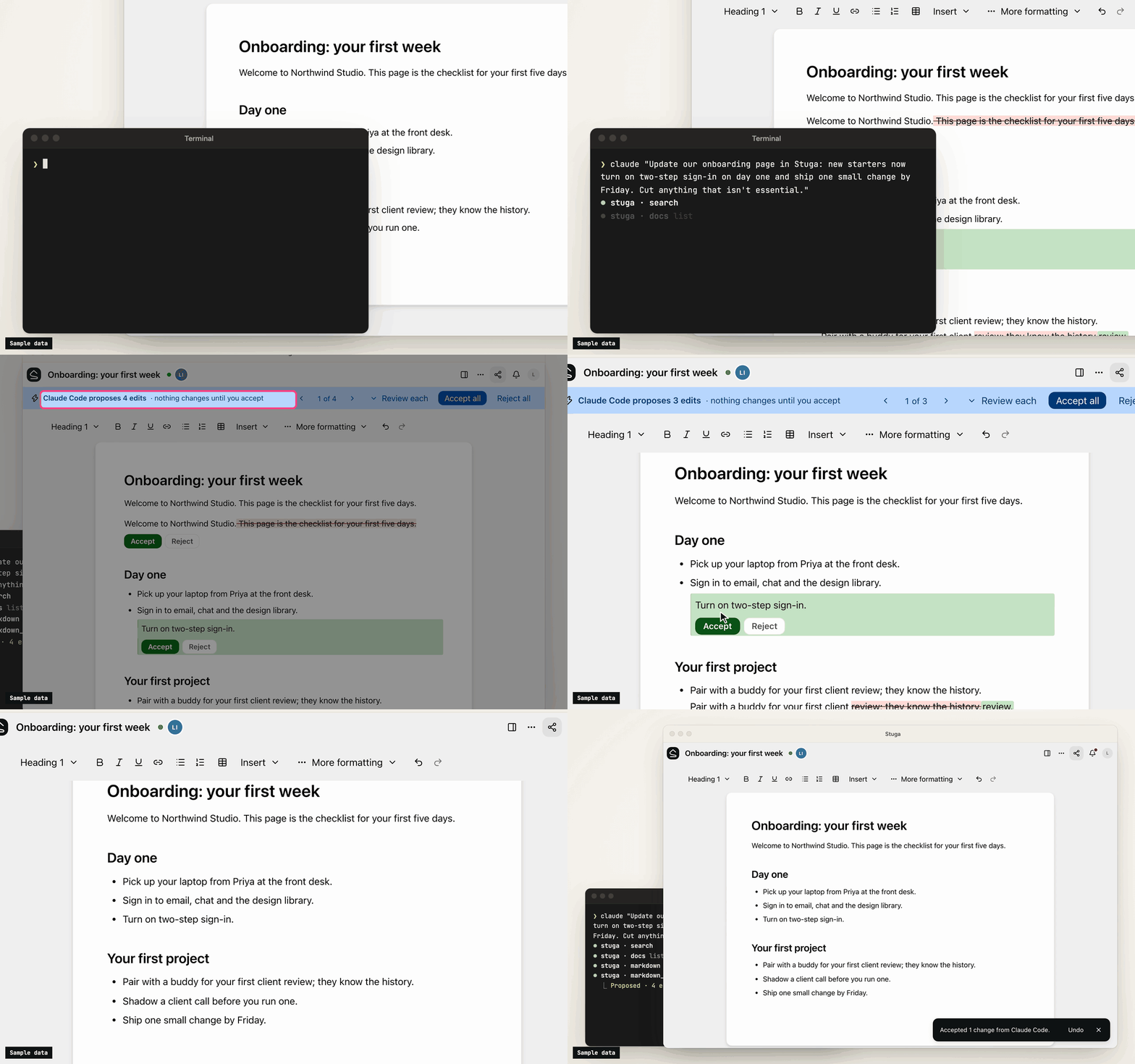
- Save to Stuga. Your AI finds the page and section a point belongs in, or the row a fact fills, and corrects the sentence it changes rather than adding another. It cites the meeting or email a point came from, and tells you what it saved where and what waits. A point no page is about starts a page in the folder it belongs in, or goes in your own My notes.
- Three review levels. In Who reviews AI edits…, a folder, page or database is Reviewed by whoever asked the AI (the default), Reviewed by a colleague (someone else who can edit it, from the folder's approver group if it names one, never the person who asked), or AI edits apply directly (recorded, attributed and revertible). People's own edits go straight in.
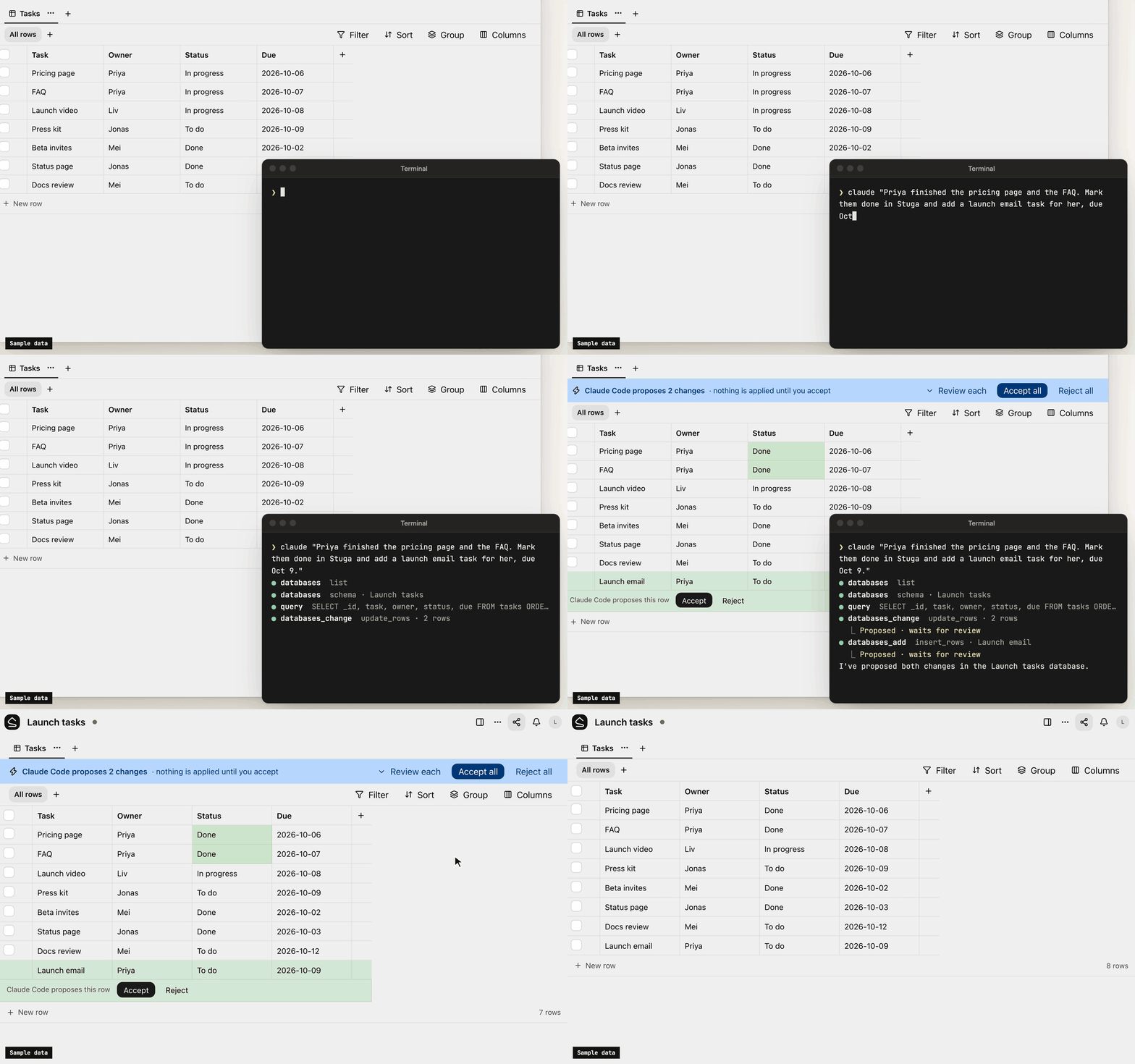
- One card per change. Filing a meeting across several pages is one change, reviewed on one card laid out for a phone: each edit in its paragraph, with the sources it cites. Approve all, Ask for changes… or Decline… with a note the AI reads. A folder can post each change that waits for a colleague to a Slack channel.
- Ask Stuga. Your AI answers from the pages and tables, with who last changed each one and when, and what waits: "the page says 14 days; a change to 30 days waits for a colleague".
- Check Stuga. Linked from under each page, Needs checking when a page it cites changes, and Wiki → Index and Wiki → Log. Say Check Stuga and your AI finds stale pages, orphans and broken links, and proposes the fixes as one change.
- Instructions that stack. The workspace, folders, pages and databases can each tell agents what goes where. They advise the model; permissions and review decide what a write does.
What's in it
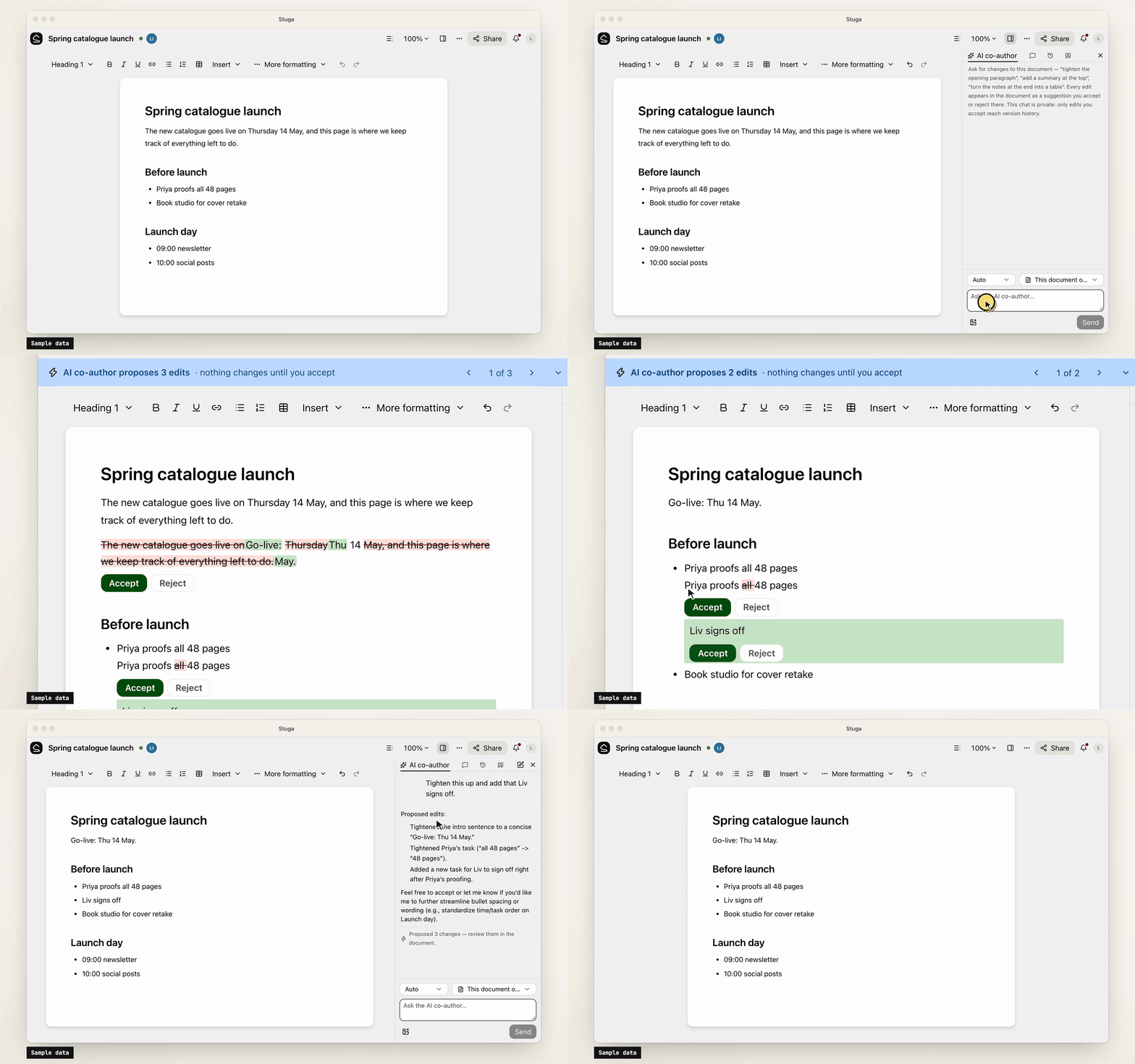
- Pages written together. Real-time editing (Tiptap over a Yjs CRDT) with presence, comments, @mentions and version history.
- Tables beside the pages. Typed tables, each database its own SQLite file, with saved views, row pages and CSV import. Agents, Ask and the REST API run read-only SQL on them.
- Search that follows permissions. Keyword (BM25 over Postgres full-text search) and semantic (pgvector) search in one SQL statement, with access checked inside it. Chinese, Japanese, Korean and Thai work without setup.
- Built-in AI, off until set up. A co-author and a table assistant, whose edits are reviewed like an agent's, and Ask, which cites sources. OpenAI, Anthropic, Gemini, DeepSeek and more, or Ollama.
- Sharing and sign-in. Workspaces, folders, per-page sharing, groups and guests. People join by invite link and sign in with a password or your OpenID Connect provider.
- Import and export. A Notion export, or a zipped Obsidian vault or folder of Markdown, becomes a
workspace; a workspace exports as one
.stuga.zipof Markdown, JSON Lines and its files.
Connect your AI
Agents connect over MCP. Settings → Your AI agents gives the setup for Claude Code, Claude Desktop, Codex, Antigravity, Cursor, VS Code, Kiro, Goose, LM Studio, DeepSeek Harness and Pi, with your node's address filled in, and the URL any other MCP client needs (docs/agents.md). Each agent brings its own model, so the node needs no AI key.
- Scoped sign-in. Most clients sign in through the browser, where you tick the workspaces an app may use and choose Read only or Read and suggest changes. Revoke ends its access.
- Narrow keys. A client without sign-in uses an API key, which can be confined to folders, made read-only or given an expiry.
- Content only. Agents change documents and databases. Renaming, moving, deleting, sharing and the review setting stay with people.
- Full audit. Every MCP call, reads included, is in the workspace's audit log. An event feed and signed webhooks report what changed.
Your data
Stuga sends no telemetry, and nothing reaches us unless a node admin turns on remote access. The node makes outbound requests only for features in use, such as an AI provider, and asks GitHub once a day for the list of releases unless a node admin turns that off. docs/privacy.md lists what the node sends and stores.
Install
-
A Mac with Apple silicon, on macOS 15 or later: open the package, or
Stuga-<version>.pkgfrom the latest release. It carries its own Postgres and Node.js (docs/install/macos.md). -
Docker on x86-64 or arm64, such as a Linux server or a NAS:
install.shstarts Postgres and the node with Compose (docs/install/docker.md):curl -fsSL https://github.com/stuga-dev/stuga/releases/latest/download/install.sh | bash
A node is one Node.js process and Postgres with pgvector; people open it in a browser. It backs itself up every day by default and before every upgrade (docs/operations.md). docs/getting-started.md walks through the first hour.
Questions and feedback
Ask a question or share an idea in Discussions; report a bug as an issue.
Contributing
Issues and pull requests are welcome. CONTRIBUTING.md covers running Stuga from source, the tests and the conventions, and RELEASING.md how a release is cut. Contributions are accepted under a Contributor License Agreement (CLA.md); a bot asks on your first pull request. Report a vulnerability privately, as SECURITY.md describes.
License
AGPL-3.0-only, except integrations/, which is MIT; copyright notice in NOTICE. If you modify Stuga and offer it to others over a network, you share your changes under the same terms. The name and logo are not covered by the license: TRADEMARKS.md says how you may use them.
Stuga MCP Fragen
Wie füge ich Stuga MCP zu Claude Code hinzu?
Führe claude mcp add --env 'STUGA_URL=<STUGA_URL>' stuga -- npx -y @stuga/mcp in deinem Terminal aus. Füge --scope user hinzu, damit der Server in jedem Projekt verfügbar ist.
Wie füge ich Stuga MCP zu Cursor hinzu?
Öffne ~/.cursor/mcp.json und füge den Server unter mcpServers hinzu, mit der Cursor-Config aus dem Installationsabschnitt oben.
Wie aktualisiert die KI das Wiki?
Die KI findet die richtige Seite, den richtigen Abschnitt oder die richtige Tabellenzeile zum Aktualisieren und korrigiert bestehende Sätze, anstatt nur neue hinzuzufügen.
Benötigt der Server einen eigenen AI-Key?
Nein, da jeder Agent sein eigenes Modell mitbringt, benötigt der Node keinen eigenen AI-Key.
Wie kann ich meine bestehenden Notizen importieren?
Du kannst einen Notion-Export oder einen gezippten Obsidian-Vault bzw. einen Markdown-Ordner in einen Workspace importieren.