
ArchScript MCP server
Commit 11. Nov. 2026Ermöglicht es einem AI-Client, Software-Architekturdiagramme mithilfe von Architecture-as-Code in der ArchScript for Mac Anwendung zu planen, zu bearbeiten und zu überprüfen.
Auch bekannt als schlummer13/archscript-mcp, archscript-mcp
- Stars
- 0
- Tools
- —
- Downloads, 30 Tage
- —
- Neueste Version
- 1.0.0
- Letzter Commit
- 11. Nov. 2026
- Lizenz
- MIT
Was ist ArchScript MCP?
ArchScript ist ein MCP server. Ermöglicht es einem AI-Client, Software-Architekturdiagramme mithilfe von Architecture-as-Code in der ArchScript for Mac Anwendung zu planen, zu bearbeiten und zu überprüfen.
Zusammenfassung generiert aus dem README des Projekts
Über ArchScript MCP server
ArchScript MCP verbindet AI-Clients wie Claude Desktop und Claude Code mit der ArchScript for Mac Anwendung. Es ermöglicht einem AI-Assistenten, Software-Architekturen über einen Architecture-as-Code-Ansatz zu verwalten. Anstatt ganze Dateien neu zu schreiben, nutzt der Assistent strukturierte Operationen, um Elemente wie Cluster, Server und Container hinzuzufügen, umzubenennen oder zu verschieben. Diese Methode bewahrt deine bestehenden Kommentare und Formatierungen, während das gerenderte Diagramm live aktualisiert wird.
Nutzer müssen ArchScript for Mac auf macOS 14+ installiert haben, um diesen rein lokalen Server zu verwenden. Für das Setup muss die AI-Assistent-Einstellung innerhalb der App aktiviert werden, um einen persönlichen Access Token für die Authentifizierung zu generieren. Der Server läuft auf localhost und sammelt keine Telemetrie, sodass deine Architekturdaten privat bleiben. Das Toolset enthält spezifische Funktionen zur Validierung von Modellen gegen Regeln, zur Überprüfung von Architektur-Scores und zum Export von Designs in Formate wie Terraform, Mermaid oder PlantUML.
Was du damit machen kannst
- 1Automatisierte Architektur-ReviewBitte die AI, dein aktuelles Systemdesign zu analysieren, um Verstöße gegen etablierte Architekturregeln zu identifizieren.
- 2Iterative System-ErweiterungAnweise den Assistenten, neue Komponenten wie Background Worker oder spezifische Container zu deiner bestehenden Infrastruktur hinzuzufügen.
- 3Generierung von Infrastructure CodeFordere die Konvertierung deines visuellen Architekturmodells in funktionalen Terraform-Code für das Cloud-Deployment an.
- 4Schnelles PrototypingLass die AI eine vollständige eventgesteuerte Architektur oder Microservices-Architektur aus einer einfachen Textbeschreibung generieren.
Geschrieben aus dem README des Projekts. Jeder Use Case wurde gegen ein Zitat daraus geprüft.
Konfiguration
ARCHSCRIPT_TOKENErforderlichSecretAccess token from ArchScript → Settings → AI
| Name | Beschreibung | Typ |
|---|---|---|
| ARCHSCRIPT_TOKEN | Access token from ArchScript → Settings → AI | ErforderlichSecret |
Automatisierte Checks
Geluften am 14. Nov. 2026Vollständiger Bericht →Noch nicht verifiziert. Ein Server benötigt einen Score von 80, keine kritischen Befunde und genug Daten für unsere Prüfung. Wie die Checks funktionieren

- Source Repository verknüpft und erreichbarschlummer13/archscript-mcp is public and reachablegithub.com/schlummer13/archscript-mcp ↗Bestanden
- Paket nennt dieses Repository als QuelleNicht geprüft
- Build-Herkunft (Sigstore-Attestierung)Nicht geprüft
- Open Source Lizenz (OSI)MITspdx.org/licenses/MIT.html ↗Bestanden
- Commit oder Release im letzten JahrLast commit or release 2026-11-11github.com/schlummer13/archscript-mcp ↗Bestanden
- OpenSSF ScorecardNicht geprüft
- Package-Name ähnelt keinem populären PackageNicht geprüft
- Kein kritischer Hinweis im Paket oder seinen AbhängigkeitenNicht geprüft
- Keine versteckten Anweisungen an das Modell0 tool descriptions and the README read; no override phrases, credential paths or hidden charactersBestanden
- Destruktive Tools sind markiertNicht geprüft
- Remote-Endpoint beantwortet den MCP-HandshakeNicht geprüft
README
Auf GitHub ansehen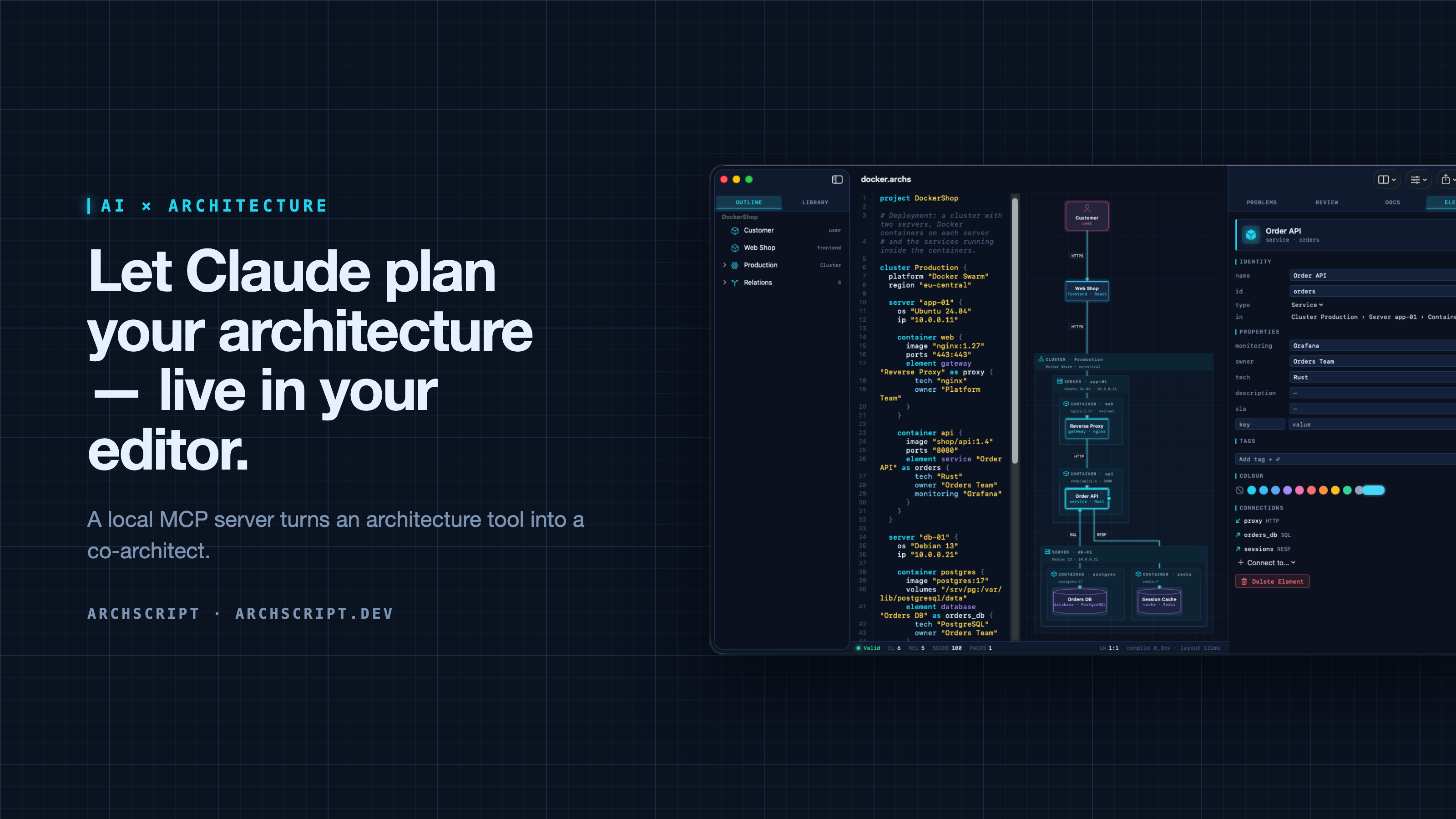
ArchScript is an architecture-as-code tool. You describe a system — domains, services, databases, queues, and deployments as cluster → server → Docker container — in a small language. ArchScript draws the diagram, checks the model against architecture rules and exports documentation, a PDF report, Mermaid, PlantUML and Terraform.
ArchScript for Mac includes an MCP server. Claude Desktop, Claude Code and other MCP clients can read the architectures you have open, change them with precise, structured edits, validate them and look at the rendered diagram. Every change appears live in the window and can be undone.
This repository contains the documentation, configuration examples, example models and a small open-source stdio bridge (
server/) for the ArchScript MCP server. ArchScript itself is a closed-source app, available on the Mac App Store. The browser Playground is free.
What Claude can do
| Tool | What it does |
|---|---|
archscript_guide |
Learns the language, element types and rules |
list_documents |
Lists the open documents (id, name, validity) |
get_document |
Reads a document with line numbers and a structure outline |
create_document |
Creates a new architecture from ArchScript source |
set_document_source |
Replaces a document's source |
edit_document |
Structured edits: add, rename, move and delete elements, relations and containers, and set properties, tags and colours |
validate |
Returns diagnostics |
review |
Returns the review score, grade and rule findings |
render_diagram |
Returns the diagram as an image, so the assistant can see the result |
export |
Exports Mermaid, PlantUML, Markdown, JSON or Terraform |
The assistant doesn't rewrite your file. It sends small operations (for example
add_element into cluster:Production/server:app-01/container:api). The
ArchScript core turns those into minimal text edits, so comments and formatting
stay intact. After each change the assistant gets the validation result and
review score back, the same feedback loop a human architect uses.
Example prompts
- "Read my architecture and tell me which rules it violates."
- "Add a background worker that sends order emails. Put it in its own container on app-01 and connect the Order API to it."
- "Create an event-driven architecture for a ticket shop with a payment provider and a read model."
- "Export the current model as Terraform for AWS and list what wasn't mapped."
Setup
Requirements: ArchScript for Mac (macOS 14+) with ArchScript Pro (14-day free trial).
- Open ArchScript → Settings → AI and turn on Allow AI assistants (MCP).
- Copy the snippet for your client from that screen. It already contains your personal access token.
Claude Desktop: one-click install (recommended)
- Download archscript.mcpb from the latest release.
- Double-click it, or drag it into Claude Desktop → Settings → Extensions.
- Paste the access token from ArchScript → Settings → AI.
The extension contains no ArchScript code. It holds a manifest and a small
launcher script (mcpb/server/archscript-mcp)
that finds ArchScript for Mac and starts its bundled helper.
Claude Code
claude mcp add --transport http archscript http://127.0.0.1:47621/mcp \
  --header "Authorization: Bearer <token from Settings → AI>"
Claude Desktop (manual)
Add the snippet to claude_desktop_config.json, then restart Claude:
{
  "mcpServers": {
    "archscript": {
      "command": "/Applications/ArchScript.app/Contents/MacOS/archscript-mcp",
      "args": ["--token", "<token from Settings → AI>", "--port", "47621"]
    }
  }
}
The bundled archscript-mcp helper bridges stdio to the app and starts
ArchScript when Claude needs it.
Other MCP clients
Any client that supports Streamable HTTP can connect to
http://127.0.0.1:47621/mcp with the header Authorization: Bearer <token>.
Clients that only support stdio can use the helper as shown above, or the
open-source Node bridge in server/ (Node 18+, no dependencies):
{
  "mcpServers": {
    "archscript": {
      "command": "node",
      "args": ["/path/to/archscript-mcp/server/index.js"],
      "env": { "ARCHSCRIPT_TOKEN": "<token from Settings → AI>" }
    }
  }
}
Privacy and security
- Local only. The server listens on
127.0.0.1and is never reachable from the network. - Token required. Every request needs your access token. You can regenerate it at any time in Settings → AI.
- Off by default. Nothing runs until you turn it on.
- No telemetry. ArchScript collects no data and sends nothing anywhere. Your AI client only sees what it reads through the tools.
- The helper is sandboxed and only forwards stdio to the local server.
Screenshots
| Visual editing | Review and rules |
|---|---|
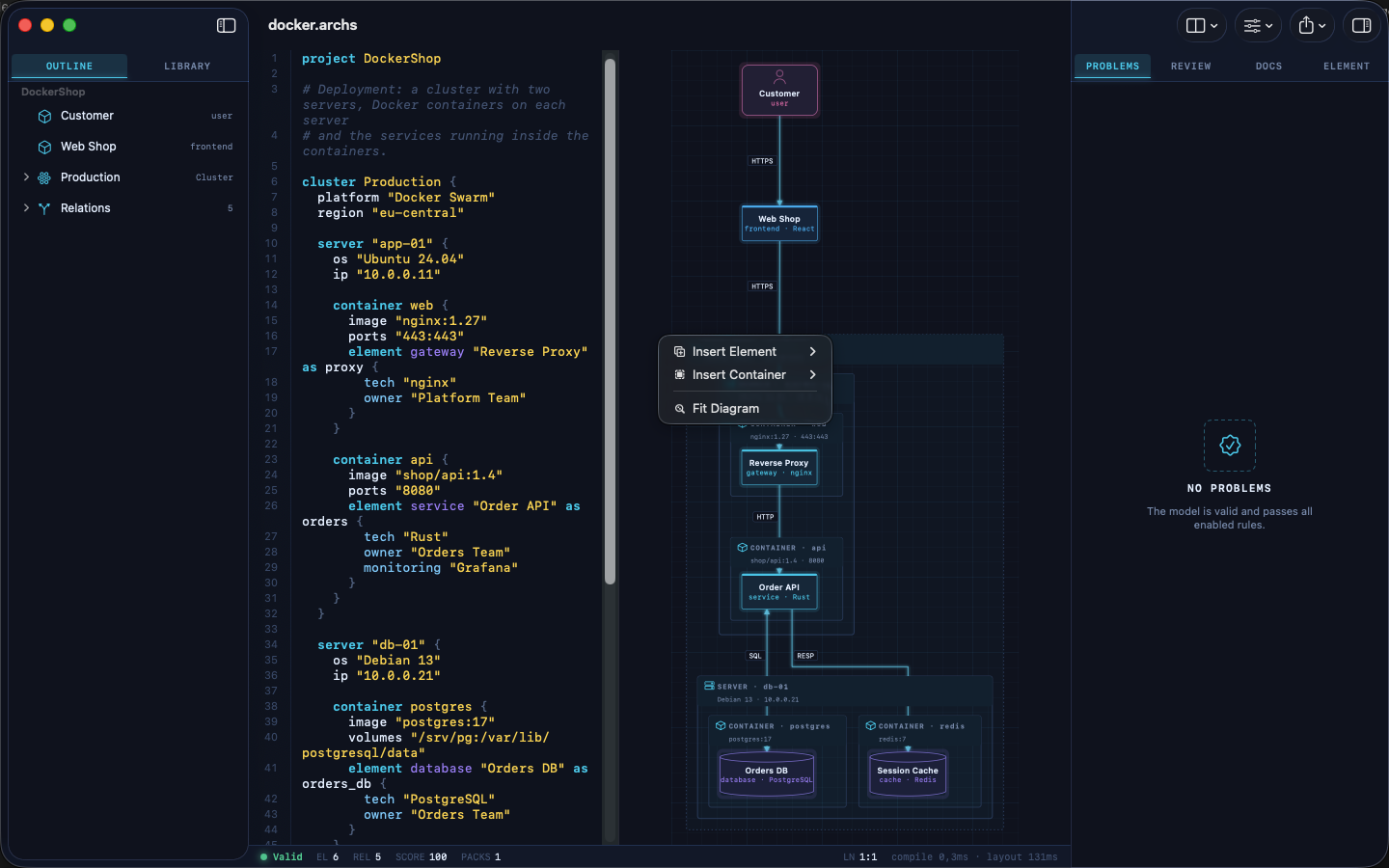 |
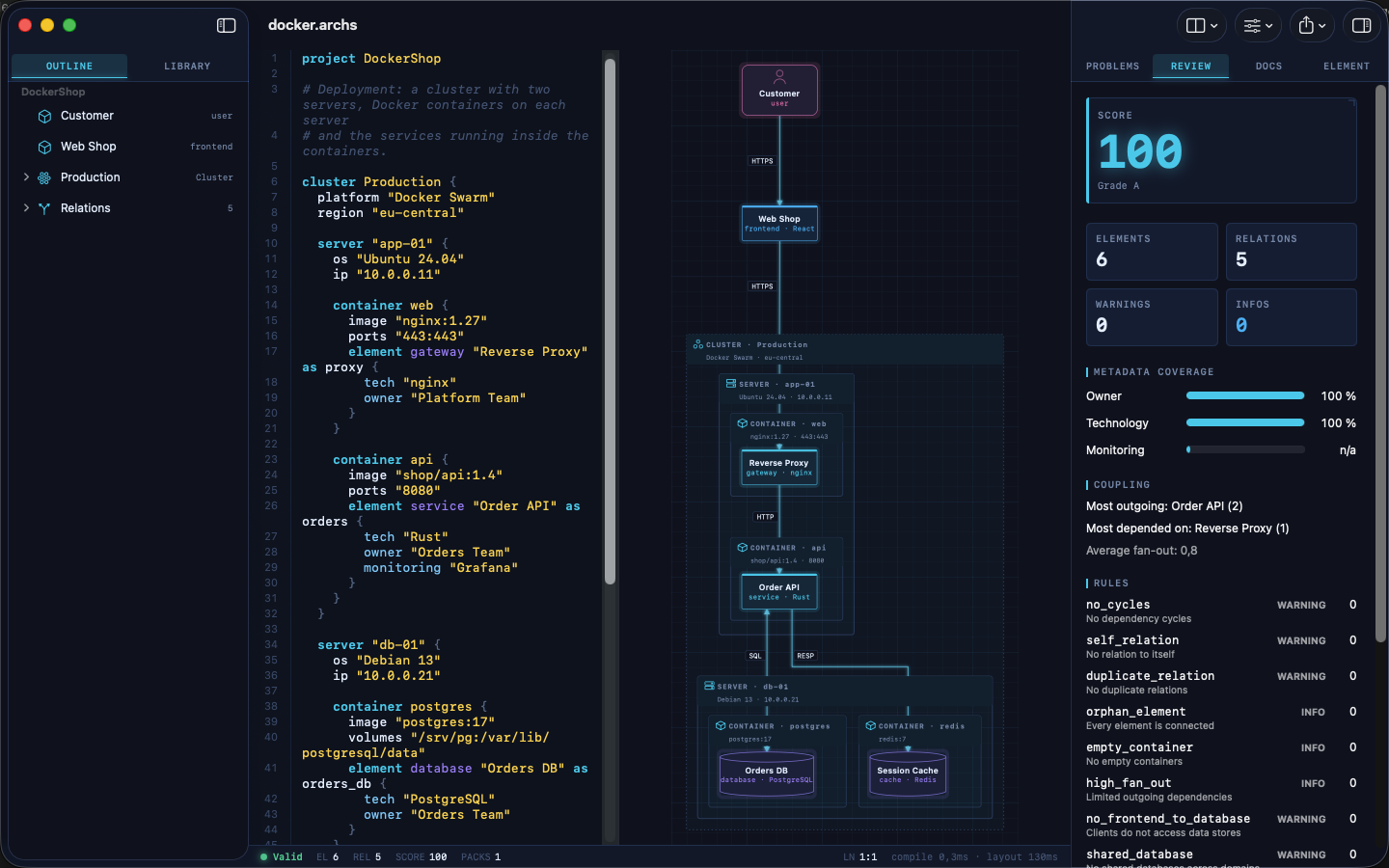 |
| Inspector | Element library |
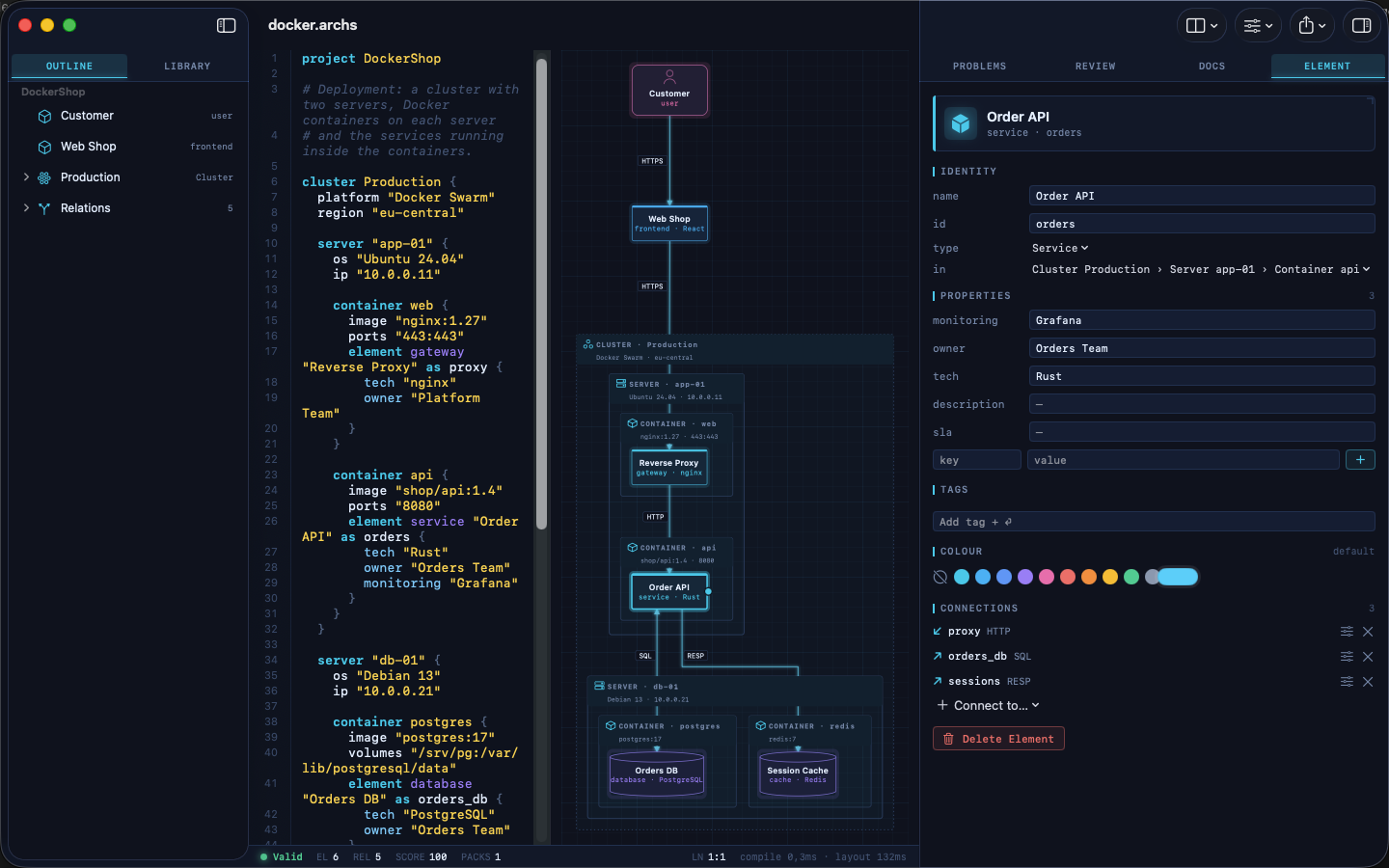 |
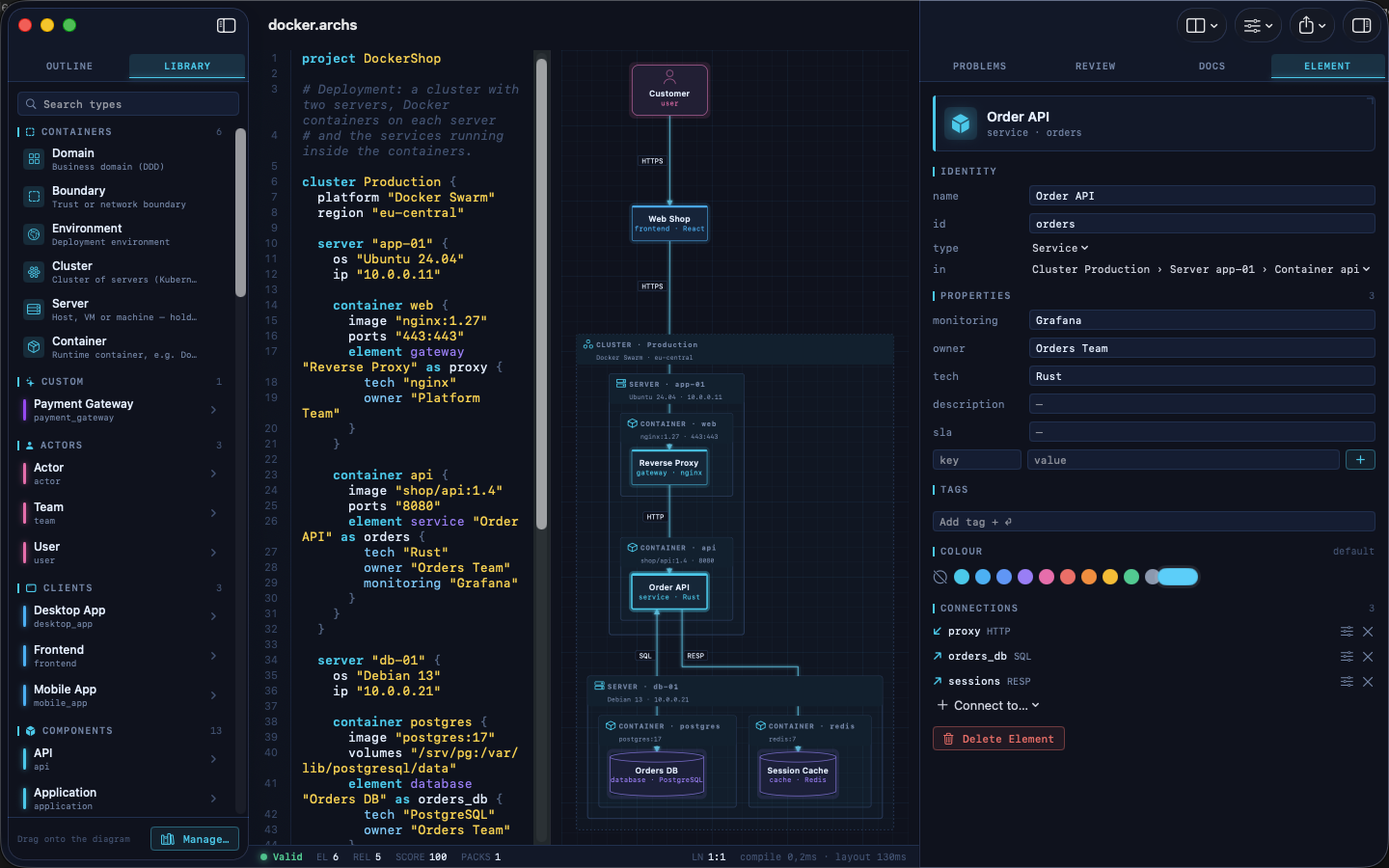 |
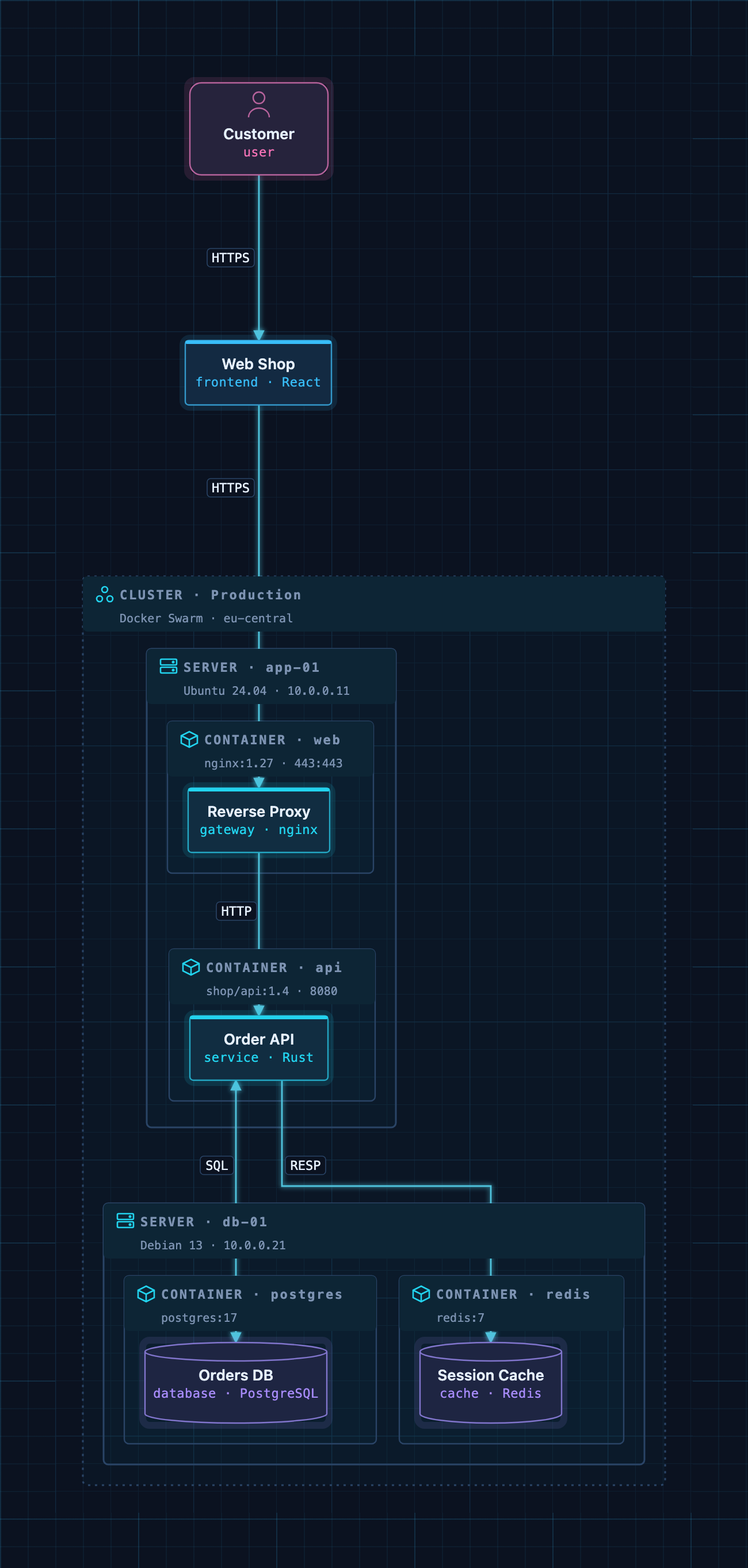
A Docker deployment as code: cluster → servers → containers → services.
Example models
The examples/ folder contains ready-to-use architectures. Open one
in ArchScript for Mac, or paste it into the
Playground:
| File | Architecture |
|---|---|
basic.archs |
The smallest useful model |
customer-management.archs |
One domain with web app, API and database |
webapp.archs |
Classic web application with boundaries |
microservices.archs |
Services with their own databases and an event bus |
ddd.archs |
Bounded contexts (domain-driven design) |
event.archs |
Event-driven, CQRS-style flow |
saas.archs |
Production SaaS with gateway and identity provider |
docker.archs |
Docker Swarm cluster, servers and containers |
A taste of the language:
project DockerShop

cluster Production {
  platform "Docker Swarm"

  server "app-01" {
    container api {
      image "shop/api:1.4"
      element service "Order API" as orders { tech "Rust"; owner "Orders Team" }
    }
  }
}

element frontend "Web Shop" as shop
relation shop -> orders : HTTPS
The full language reference is at archscript.dev/docs.
Feedback
Found a bug in the MCP integration or have an idea for a tool? Please open an issue. Feature requests for ArchScript itself are welcome too.
License
The documentation, configuration snippets, example models and the bridge in
server/ are available under the MIT License. ArchScript for Mac and the
ArchScript core are proprietary software.
ArchScript MCP Fragen
Was kann Claude mit ArchScript machen?
Claude kann offene Architekturen lesen, strukturierte Bearbeitungen wie das Hinzufügen oder Umbenennen von Elementen durchführen, Modelle gegen Regeln validieren, Architektur-Scores überprüfen und Diagramme in Formate wie Terraform oder Mermaid exportieren.
Sind meine Daten privat, wenn ich den ArchScript MCP server nutze?
Ja, der Server läuft rein lokal, lauscht auf 127.0.0.1 und sammelt keine Telemetrie oder sendet Daten an andere Orte.
Was sind die Systemvoraussetzungen für das Setup?
Du benötigst ArchScript for Mac auf macOS 14+ mit ArchScript Pro.