
Ermöglicht es einem AI-Client, Text aus PDF-Dokumenten zu extrahieren, Dateien zu splitten, zu schwärzen, mit Wasserzeichen zu versehen, zu annotieren und Formulare über eine selbst gehostete Document Engine auszufüllen.
Auch bekannt als PSPDFKit/nutrient-document-engine-mcp-server, nutrient-document-engine-mcp-server, @nutrient-sdk/document-engine-mcp-server
- Stars
- 62
- Tools
- —
- Downloads, 30 Tage
- —
- Neueste Version
- 0.0.3
- Letzter Commit
- 4. Nov. 2026
- Lizenz
- MIT
Was ist Nutrient Document Engine MCP?
Nutrient Document Engine ist ein MCP server. Ermöglicht es einem AI-Client, Text aus PDF-Dokumenten zu extrahieren, Dateien zu splitten, zu schwärzen, mit Wasserzeichen zu versehen, zu annotieren und Formulare über eine selbst gehostete Document Engine auszufüllen.
Zusammenfassung generiert aus dem README des Projekts
Über Nutrient Document Engine MCP server
Die Verarbeitung von PDF-Dokumenten durch natürliche Sprache ist das, was dieser Server Entwicklern ermöglicht, die private Dokumenten-Workflows aufbauen. Er verbindet AI-Agenten mit einer selbst gehosteten Document Engine und erlaubt so ein lokales oder On-Premise-Deployment, um die strikte Datenresidenz zu gewährleisten. Nutzer können über Claude Desktop, LangGraph oder andere MCP-kompatible Plattformen mit ihren Dateien interagieren, indem sie die Engine via Docker Compose ausführen.
Der Server bietet eine Suite an Tools für den Zugriff auf Inhalte, die Bearbeitung und die Sicherheit. Er ermöglicht es einer AI, Text zu extrahieren, Dateien zu durchsuchen und Seiten als Bilder zu rendern. Zur Dokumentenbearbeitung unterstützt er das Splitten von Dateien, das Hinzufügen von Wasserzeichen und das Ausfüllen von PDF-Formularen. Sicherheitsfunktionen umfassen das Schwärzen sensibler Informationen wie Sozialversicherungsnummern oder Kreditkartendaten mithilfe vordefinierter Muster oder benutzerdefinierter Regex.
Das Setup erfordert Node.js und eine Verbindung zu einer lokalen Instanz über eine Base URL und Authentication Tokens. Während er standardmäßig mit einer Evaluation-Lizenz läuft, können Nutzer Einschränkungen aufheben, indem sie einen Aktivierungsschlüssel angeben. Dieses Setup ist speziell für diejenigen konzipiert, die die volle Kontrolle über ihre Infrastruktur zur Dokumentenverarbeitung benötigen.
Was du damit machen kannst
- 1Kontaktinformationen extrahierenLass einen AI-Agenten spezifische Details wie Namen und Telefonnummern aus einer Sammlung von Rechnungen finden.
- 2Sensible Daten schwärzenAutomatisiere das Entfernen privater Informationen wie Sozialversicherungsnummern aus Steuerdokumenten.
- 3Große Dateien splittenWeise einen Agenten an, einen langen Vertrag in kleinere, handhabbare Abschnitte zu unterteilen.
Geschrieben aus dem README des Projekts. Jeder Use Case wurde gegen ein Zitat daraus geprüft.
So installierst du Nutrient Document Engine MCP
Formate geprüft am 10. Nov. 2026Zu Cursor hinzufügenZu Goose hinzufügenNutrient Document Engine MCP in Claude Code installieren
$ claude mcp add --env 'DOCUMENT_ENGINE_API_AUTH_TOKEN=<YOUR_DOCUMENT_ENGINE_API_AUTH_TOKEN>' --env 'DOCUMENT_ENGINE_BASE_URL=<DOCUMENT_ENGINE_BASE_URL>' --env 'DASHBOARD_PASSWORD=<YOUR_DASHBOARD_PASSWORD>' nutrient-document-engine-mcp-server -- npx -y @nutrient-sdk/document-engine-mcp-serverNutrient Document Engine MCP in Cursor installieren
~/.cursor/mcp.json
{
  "mcpServers": {
    "nutrient-document-engine-mcp-server": {
      "command": "npx",
      "args": [
        "-y",
        "@nutrient-sdk/document-engine-mcp-server"
      ],
      "env": {
        "DOCUMENT_ENGINE_API_AUTH_TOKEN": "<YOUR_DOCUMENT_ENGINE_API_AUTH_TOKEN>",
        "DOCUMENT_ENGINE_BASE_URL": "<DOCUMENT_ENGINE_BASE_URL>",
        "DASHBOARD_PASSWORD": "<YOUR_DASHBOARD_PASSWORD>"
      }
    }
  }
}Nutrient Document Engine MCP in VS Code installieren
.vscode/mcp.json
{
  "servers": {
    "nutrient-document-engine-mcp-server": {
      "type": "stdio",
      "command": "npx",
      "args": [
        "-y",
        "@nutrient-sdk/document-engine-mcp-server"
      ],
      "env": {
        "DOCUMENT_ENGINE_API_AUTH_TOKEN": "<YOUR_DOCUMENT_ENGINE_API_AUTH_TOKEN>",
        "DOCUMENT_ENGINE_BASE_URL": "<DOCUMENT_ENGINE_BASE_URL>",
        "DASHBOARD_PASSWORD": "<YOUR_DASHBOARD_PASSWORD>"
      }
    }
  }
}Nutrient Document Engine MCP in VS Code CLI installieren
$ code --add-mcp '{"name":"nutrient-document-engine-mcp-server","type":"stdio","command":"npx","args":["-y","@nutrient-sdk/document-engine-mcp-server"],"env":{"DOCUMENT_ENGINE_API_AUTH_TOKEN":"<YOUR_DOCUMENT_ENGINE_API_AUTH_TOKEN>","DOCUMENT_ENGINE_BASE_URL":"<DOCUMENT_ENGINE_BASE_URL>","DASHBOARD_PASSWORD":"<YOUR_DASHBOARD_PASSWORD>"}}'Nutrient Document Engine MCP in Claude Desktop installieren
claude_desktop_config.json
{
  "mcpServers": {
    "nutrient-document-engine-mcp-server": {
      "command": "npx",
      "args": [
        "-y",
        "@nutrient-sdk/document-engine-mcp-server"
      ],
      "env": {
        "DOCUMENT_ENGINE_API_AUTH_TOKEN": "<YOUR_DOCUMENT_ENGINE_API_AUTH_TOKEN>",
        "DOCUMENT_ENGINE_BASE_URL": "<DOCUMENT_ENGINE_BASE_URL>",
        "DASHBOARD_PASSWORD": "<YOUR_DASHBOARD_PASSWORD>"
      }
    }
  }
}Nutrient Document Engine MCP in Codex installieren
$ codex mcp add nutrient-document-engine-mcp-server --env 'DOCUMENT_ENGINE_API_AUTH_TOKEN=<YOUR_DOCUMENT_ENGINE_API_AUTH_TOKEN>' --env 'DOCUMENT_ENGINE_BASE_URL=<DOCUMENT_ENGINE_BASE_URL>' --env 'DASHBOARD_PASSWORD=<YOUR_DASHBOARD_PASSWORD>' -- npx -y @nutrient-sdk/document-engine-mcp-serverNutrient Document Engine MCP in Codex config.toml installieren
~/.codex/config.toml
[mcp_servers.nutrient-document-engine-mcp-server]
command = "npx"
args = ["-y", "@nutrient-sdk/document-engine-mcp-server"]

[mcp_servers.nutrient-document-engine-mcp-server.env]
DOCUMENT_ENGINE_API_AUTH_TOKEN = "<YOUR_DOCUMENT_ENGINE_API_AUTH_TOKEN>"
DOCUMENT_ENGINE_BASE_URL = "<DOCUMENT_ENGINE_BASE_URL>"
DASHBOARD_PASSWORD = "<YOUR_DASHBOARD_PASSWORD>"
Nutrient Document Engine MCP in Gemini CLI installieren
$ gemini mcp add -s user -e 'DOCUMENT_ENGINE_API_AUTH_TOKEN=<YOUR_DOCUMENT_ENGINE_API_AUTH_TOKEN>' -e 'DOCUMENT_ENGINE_BASE_URL=<DOCUMENT_ENGINE_BASE_URL>' -e 'DASHBOARD_PASSWORD=<YOUR_DASHBOARD_PASSWORD>' nutrient-document-engine-mcp-server npx -- -y @nutrient-sdk/document-engine-mcp-serverNutrient Document Engine MCP in Gemini settings.json installieren
~/.gemini/settings.json
{
  "mcpServers": {
    "nutrient-document-engine-mcp-server": {
      "command": "npx",
      "args": [
        "-y",
        "@nutrient-sdk/document-engine-mcp-server"
      ],
      "env": {
        "DOCUMENT_ENGINE_API_AUTH_TOKEN": "<YOUR_DOCUMENT_ENGINE_API_AUTH_TOKEN>",
        "DOCUMENT_ENGINE_BASE_URL": "<DOCUMENT_ENGINE_BASE_URL>",
        "DASHBOARD_PASSWORD": "<YOUR_DASHBOARD_PASSWORD>"
      }
    }
  }
}Konfiguration
DOCUMENT_ENGINE_API_AUTH_TOKENErforderlichSecretAPI auth token for your Document Engine instance.
DOCUMENT_ENGINE_BASE_URLErforderlichBase URL of your Nutrient Document Engine instance (e.g. http://localhost:5000).
DASHBOARD_PASSWORDSecretOptional: local status dashboard password.
DASHBOARD_PASSWORDDASHBOARD_USERNAMEDASHBOARD_USERNAMEOptional: enables the local status dashboard (Basic auth username).
DOCUMENT_ENGINE_API_AUTH_TOKENDOCUMENT_ENGINE_BASE_URLLOG_LEVELOptional log level (default info).
MCP_TRANSPORT
| Name | Beschreibung | Typ |
|---|---|---|
| DOCUMENT_ENGINE_API_AUTH_TOKEN | API auth token for your Document Engine instance. | ErforderlichSecret |
| DOCUMENT_ENGINE_BASE_URL | Base URL of your Nutrient Document Engine instance (e.g. http://localhost:5000). | Erforderlich |
| DASHBOARD_PASSWORD | Optional: local status dashboard password. | Secret |
| DASHBOARD_PASSWORD | — | |
| DASHBOARD_USERNAME | — | |
| DASHBOARD_USERNAME | Optional: enables the local status dashboard (Basic auth username). | |
| DOCUMENT_ENGINE_API_AUTH_TOKEN | — | |
| DOCUMENT_ENGINE_BASE_URL | — | |
| LOG_LEVEL | Optional log level (default info). | |
| MCP_TRANSPORT | — |
Automatisierte Checks
Geluften am 13. Nov. 2026Vollständiger Bericht →Unsere automatisierten Checks bestanden. Das ist kein Security-Audit: Lies den Code und gib dem Server nur den minimal notwendigen Zugriff. Wie die Checks funktionieren

- Source Repository verknüpft und erreichbarpspdfkit/nutrient-document-engine-mcp-server is public and reachablegithub.com/pspdfkit/nutrient-document-engine-mcp-server ↗Bestanden
- Paket nennt dieses Repository als Quelle@nutrient-sdk/document-engine-mcp-server names pspdfkit/nutrient-document-engine-mcp-server as sourcenpmjs.com/package/@nutrient-sdk/document-engine-mcp-server ↗Bestanden
- Build-Provenienz (Sigstore-Attestierung)No build attestation published for this releaseNicht geprüft
- Open Source Lizenz (OSI)MITspdx.org/licenses/MIT.html ↗Bestanden
- Commit oder Release im letzten JahrLast commit or release 2026-11-04github.com/pspdfkit/nutrient-document-engine-mcp-server ↗Bestanden
- OpenSSF ScorecardNicht geprüft
- Package-Name ähnelt keinem populären PackageNo popular package one edit away from @nutrient-sdk/document-engine-mcp-serverBestanden
- Keine kritischen Advisories im Paket oder seinen Abhängigkeiten128 resolved dependencies checked; no critical advisoryosv.dev ↗Bestanden
- Keine versteckten Anweisungen an das Modell0 tool descriptions and the README read; no override phrases, credential paths or hidden charactersBestanden
- Destruktive Tools sind markiertNicht geprüft
- Remote-Endpoint beantwortet den MCP-HandshakeNicht geprüft
README
Auf GitHub ansehenNutrient Document Engine MCP Server
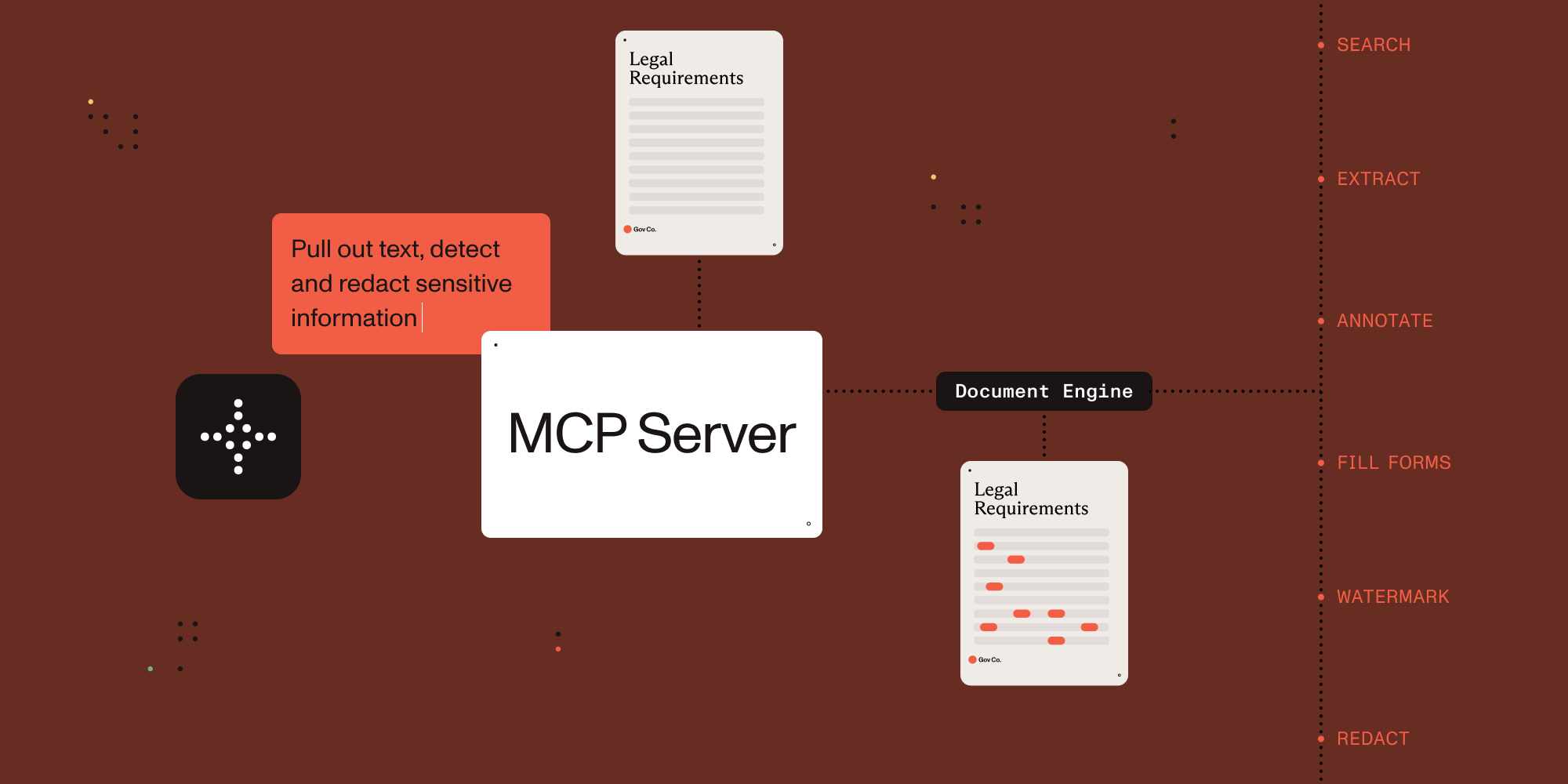

Connect AI agents to document processing.
This MCP server exposes document processing capabilities through natural language, supporting both direct human interaction and AI agent tool calling.
Which MCP Server Should I Use?
| Server | Best for | Deployment | Core capabilities |
|---|---|---|---|
| Nutrient DWS MCP Server | Cloud document workflows | Nutrient-hosted API (API key) | Convert, OCR, redact, sign, extract, watermark, automation |
| Nutrient Document Engine MCP Server | Self-hosted document workflows | On-prem/private cloud | Document processing with deployment control and data residency |
You are in the Document Engine MCP Server repo. Choose this when you need self-hosted/on-prem document workflows and deployment control.
- Ecosystem overview: Nutrient AI Infrastructure
- Product landing page: Nutrient MCP Server
Example Conversations
Once configured, you (or your agent) can interact with documents through natural language:
You: "What documents do I have available?"
AI: "I can see you have 3 documents: annual-report.pdf, contract-draft.pdf, and tax-form-2023.pdf. Would you like me to analyze any of these?"
You: "Extract all the names and phone numbers from these invoices"
AI: "I found 12 contacts: John Smith (555-0123), Sarah Johnson (555-0456)..."
You: "Redact all social security numbers from these tax forms"
AI: "I've identified and redacted 3 SSNs across 2 documents. The redacted versions are ready."
You: "Split this 50-page contract into separate sections"
AI: "I've split the contract into 5 sections: Terms (pages 1-8), Payment (pages 9-15)..."
Setup with Claude Desktop
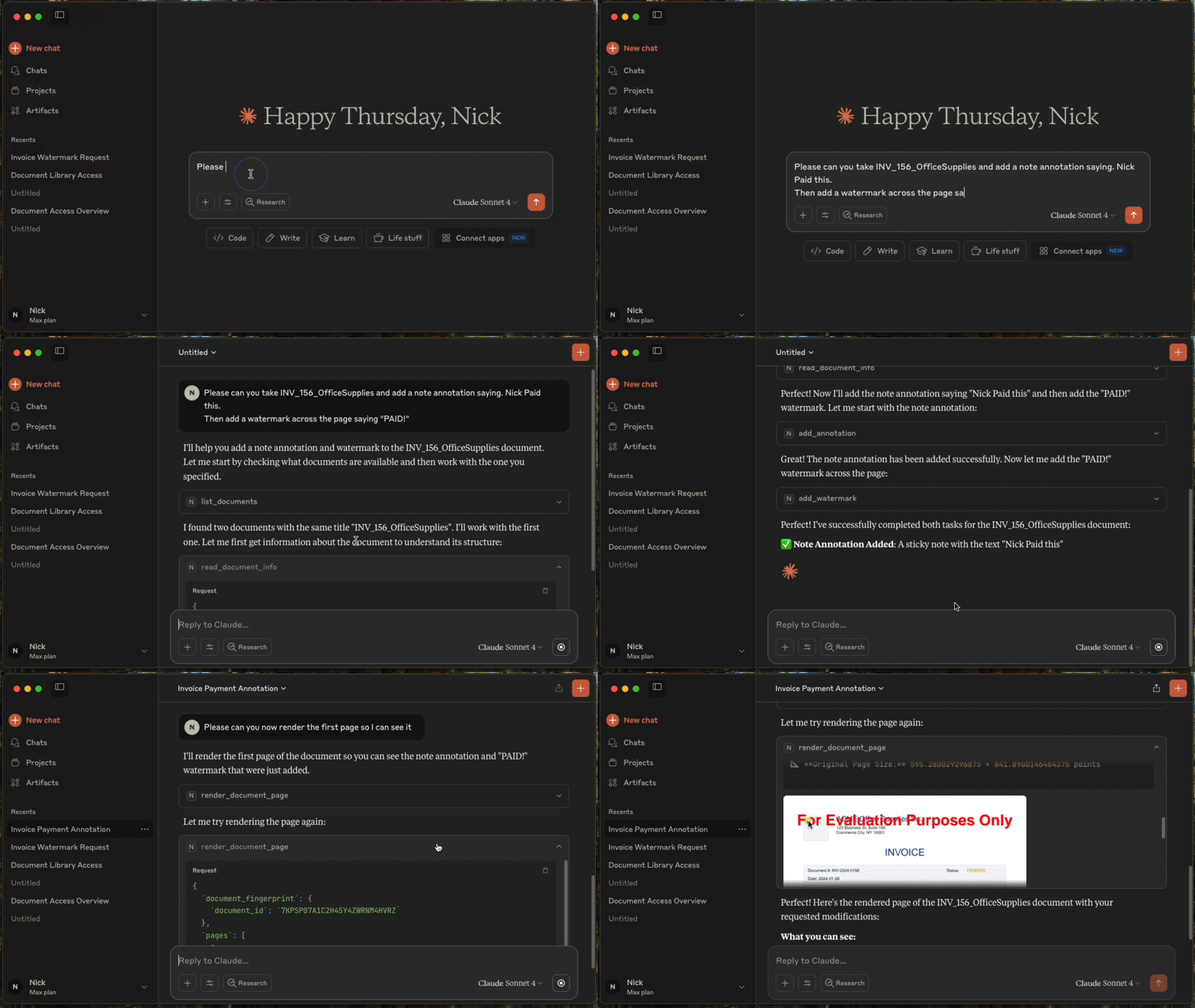
Prerequisites
- Claude Desktop - Download from Anthropic.
- Docker Compose - Download from Docker. For running Nutrient Document Engine locally.
- Node.js 22.x (22.23.4+), 24.x (24.22.1+), or 26.x (26.12.1+) - This MCP server runs via
npx.
Licensing
Nutrient Document Engine runs with an evaluation license by default. Please see Removing Evaluation Limitations section on how to remove the evaluation limitations.
1. Start Nutrient Document Engine
Open a terminal window, then run:
git clone https://github.com/PSPDFKit/nutrient-document-engine-mcp-server.git
cd nutrient-document-engine-mcp-server
docker-compose up -d
2. Connect Claude Desktop
Add this to your Claude Desktop config (Settings → Developer → Edit Config):
{
  "mcpServers": {
    "nutrient-document-engine": {
      "command": "npx",
      "args": ["-y", "@nutrient-sdk/document-engine-mcp-server"],
      "env": {
        "DASHBOARD_USERNAME": "admin",
        "DASHBOARD_PASSWORD": "password",
        "DOCUMENT_ENGINE_BASE_URL": "http://localhost:5000",
        "DOCUMENT_ENGINE_API_AUTH_TOKEN": "secret"
      }
    }
  }
}
3. Restart Claude Desktop
4. Upload and Process Documents
- Open your web browser and go to http://localhost:5100/dashboard.
- Upload the documents you want to work with by using the drag-and-drop interface.
- Switch back to Claude Desktop and ask questions like: "List my documents and extract text from the contract"
HTTP Transport Security
The optional HTTP transport binds to 127.0.0.1 by default. A non-loopback MCP_HOST requires
MCP_HTTP_AUTH_TOKEN; the server refuses to start without a nonempty token. Clients must send the
token on every /mcp request as Authorization: Bearer <token>. If a token is set for a loopback
HTTP server, /mcp requires it there too. This token does not protect /health or /dashboard;
dashboard access uses DASHBOARD_USERNAME and DASHBOARD_PASSWORD.
# Local-only HTTP transport; no MCP bearer token required.
MCP_TRANSPORT=http npx @nutrient-sdk/document-engine-mcp-server

# Network-accessible HTTP transport; bearer authentication is required.
MCP_TRANSPORT=http MCP_HOST=0.0.0.0 MCP_HTTP_AUTH_TOKEN=replace-with-a-secret \
  npx @nutrient-sdk/document-engine-mcp-server
The default stdio transport is unchanged and never requires MCP_HTTP_AUTH_TOKEN.
Features
This MCP server provides document processing tools in these areas:
Content Access: Extract text, search documents, render pages as images, extract form data and table structures.
Document Editing: Split documents, add watermarks, duplicate documents, fill PDF forms.
Security: Create and apply redactions for sensitive data using preset patterns (SSNs, credit cards, etc.) or custom regex.
Annotations: Add, read, and delete document annotations including highlights, notes, and stamps.
System: Document discovery, metadata retrieval, and health monitoring.
Use with Other AI Platforms
This MCP server works with any AI platform that supports the Model Context Protocol:
- Claude Desktop - Quick setup with the configuration above.
- LangGraph - Integrate with LangGraph agents for complex workflows.
- OpenAI APIs - Connect through MCP-compatible frameworks.
- Custom agents - Any MCP-compatible AI system.
Examples and Documentation
Examples
- LangGraph Document Processing - Workflow examples for contract processing, form filling, and report generation.
- OpenAI Agents SDK Document Processing - Workflow examples for contract processing, form filling, and report generation.
- Document Chat Interface - Web application with React and LangGraph.
- Procurement AI Agent - An AI Agent written with Langgraph.js, that classifies and collates POs, invoices, and payment documents into groups and flags for human review
Documentation
- Configuration Guide - Environment variables, transport modes, dashboard.
- Features Reference - Detailed description of all document processing tools.
- Evaluation Framework - Testing and benchmarking tools.
Removing Evaluation Watermarks and Limitations
Document Engine runs in evaluation mode with limitations by default. To remove them:
- Contact Sales to purchase a license from Nutrient
- Configure your license by setting the
ACTIVATION_KEYenvironment variable in your Docker Compose configuration or Document Engine setup - Restart Document Engine to apply the license
For detailed licensing configuration, see the Document Engine licensing guide.
Server Based Document Engine Setups
On-Premise Installation: Follow the Nutrient Document Engine installation guide.
Managed Cloud: Use a hosted Document Engine instance - setup guide.
Contributing
We welcome contributions! See CONTRIBUTING.md for development setup, testing guidelines, and how to submit pull requests.
License
MIT License - see LICENSE file for details.
Nutrient Document Engine MCP Fragen
Wie füge ich Nutrient Document Engine MCP zu Claude Code hinzu?
Führe claude mcp add --env 'DOCUMENT_ENGINE_API_AUTH_TOKEN=<YOUR_DOCUMENT_ENGINE_API_AUTH_TOKEN>' --env 'DOCUMENT_ENGINE_BASE_URL=<DOCUMENT_ENGINE_BASE_URL>' --env 'DASHBOARD_PASSWORD=<YOUR_DASHBOARD_PASSWORD>' nutrient-document-engine-mcp-server -- npx -y @nutrient-sdk/document-engine-mcp-server in deinem Terminal aus. Füge --scope user hinzu, damit der Server in jedem Projekt verfügbar ist.
Wie füge ich Nutrient Document Engine MCP zu Cursor hinzu?
Öffne ~/.cursor/mcp.json und füge den Server unter mcpServers hinzu, mit der Cursor-Config aus dem Installationsabschnitt oben.
Wie installiere ich den Nutrient Document Engine MCP server?
Klone das Repository, starte die Document Engine mit Docker Compose und verweise dann in deiner Claude Desktop Config auf den npx-Befehl inklusive deiner Document Engine URL und der Zugangsdaten. Starte den Client neu, um die Verbindung herzustellen.
Kann ich mit diesem Server sensible Daten wie Sozialversicherungsnummern schwärzen?
Ja, der Server kann Schwärzungen mithilfe vordefinierter Muster wie SSNs und Kreditkartennummern oder über benutzerdefinierte Regex erstellen und anwenden.
Funktioniert der Nutrient Document Engine MCP server auch mit anderen AI-Plattformen außer Claude Desktop?
Ja, er funktioniert mit jeder MCP-kompatiblen Plattform, einschließlich LangGraph, OpenAI APIs und benutzerdefinierten Agenten.
Ist ein MCP HTTP Authentication Token erforderlich?
Nur für HTTP-Hosts, die nicht über den Loopback laufen; in diesem Fall verweigert der Server den Start ohne Token. Der Standard stdio Transport benötigt niemals einen.