
Dive MCP server
Dive ist eine Desktop-MCP-Host-App, die LLMs wie ChatGPT, Anthropic und Ollama mit lokalen und Cloud-basierten Modell-Integrationen verbindet.
Auch bekannt als OpenAgentPlatform/Dive
- Stars
- 1.824
- Tools
- —
- Downloads, 30 Tage
- —
- Neueste Version
- —
- Letzter Commit
- 31. Juli 2026
- Lizenz
- MIT
Was ist Dive MCP?
Dive ist ein MCP server. Dive ist eine Desktop-MCP-Host-App, die LLMs wie ChatGPT, Anthropic und Ollama mit lokalen und Cloud-basierten Modell-Integrationen verbindet.
Zusammenfassung generiert aus dem README des Projekts
Über Dive MCP server
Dive ermöglicht es Entwicklern und KI-Enthusiasten, Large Language Models über eine einzige Desktop-Oberfläche mit lokalen und Cloud-basierten Tools zu verbinden. Diese Open-Source-Host-Applikation läuft auf Windows, macOS und Linux und erlaubt es Nutzern, Modelle von ChatGPT, Anthropic und Ollama mit verschiedenen Model Context Protocol Integrationen zu verknüpfen. Sie unterstützt sowohl stdio als auch SSE-Modi, um die Kompatibilität mit unterschiedlichen Server-Architekturen zu gewährleisten.
Nutzer können ihr Setup über eine dedizierte model_settings.json verwalten, um mehrere API-Keys zu handhaben und zwischen Modellen zu wechseln. Die Anwendung bietet integrierte Tools wie einen File Manager, Bash zur Befehlsausführung und Fetch für Web-Requests. Für alle, die eine einfachere Erfahrung suchen, bietet die OAP Cloud-Integration den One-Click-Zugriff auf verwaltete Server, wodurch manuelle Python- oder Docker-Installationen entfallen. Die Software ist sowohl in Electron- als auch in Tauri-Versionen verfügbar, was je nach Betriebssystem und Nutzerpräferenz unterschiedliche Performance-Profile bietet.
Geschrieben aus dem README des Projekts. Jeder Use Case wurde gegen ein Zitat daraus geprüft.
Automatisierte Checks
Geluften am 14. Nov. 2026Vollständiger Bericht →Noch nicht verifiziert. Ein Server benötigt einen Score von 80, keine kritischen Befunde und genug Daten für unsere Prüfung. Wie die Checks funktionieren · Was du für mehr Punkte verbessern kannst

- Source Repository verknüpft und erreichbaropenagentplatform/dive is public and reachablegithub.com/openagentplatform/dive ↗Bestanden
- Paket nennt dieses Repository als QuelleNicht geprüft
- Build-Provenienz (Sigstore-Attestierung)Nicht geprüft
- Open Source Lizenz (OSI)MITspdx.org/licenses/MIT.html ↗Bestanden
- Commit oder Release im letzten JahrLast commit or release 2026-07-31github.com/openagentplatform/dive ↗Bestanden
- OpenSSF ScorecardNicht geprüft
- Package-Name ähnelt keinem populären PackageNicht geprüft
- Keine kritischen Advisories im Paket oder seinen AbhängigkeitenNicht geprüft
- Keine versteckten Anweisungen an das Modell0 tool descriptions and the README read; no override phrases, credential paths or hidden charactersBestanden
- Destruktive Tools sind markiertNicht geprüft
- Remote-Endpoint beantwortet den MCP-HandshakeNicht geprüft
README
Auf GitHub ansehen








Dive is an open-source MCP Host Desktop Application that seamlessly integrates with any LLMs supporting function calling capabilities. ✨
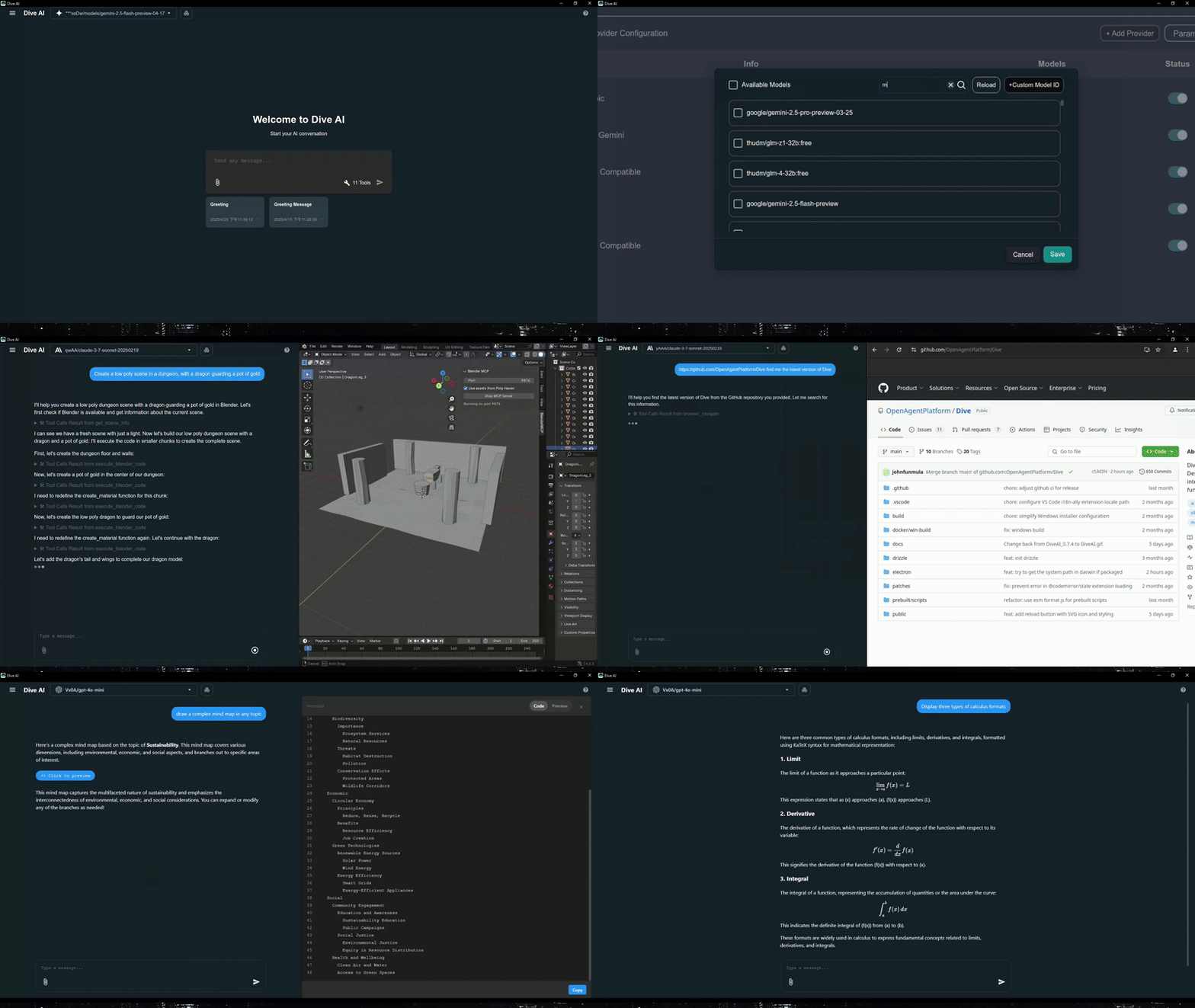
Features 🎯
- 🌐 Universal LLM Support: Compatible with ChatGPT, Anthropic, Ollama and OpenAI-compatible models
- 💻 Cross-Platform: Available for Windows, MacOS, and Linux
- 🔄 Model Context Protocol: Enabling seamless MCP AI agent integration on both stdio and SSE mode
- ☁️ OAP Cloud Integration: One-click access to managed MCP servers via OAPHub.ai - eliminates complex local deployments
- 🏗️ Dual Architecture: Modern Tauri version alongside traditional Electron version for optimal performance
- 🌍 Multi-Language Support: Supports 24+ languages including English, Traditional Chinese, Simplified Chinese, Spanish, Japanese, Korean, German, French, Italian, Portuguese, Russian, Thai, Vietnamese, Filipino, Indonesian, Polish, Turkish, Ukrainian, Swedish, Norwegian, Finnish, and Lao
- ⚙️ Advanced API Management: Multiple API keys and model switching support with
model_settings.json - 🛠️ Granular Tool Control: Enable/disable individual MCP tools for precise customization
- 💡 Custom Instructions: Personalized system prompts for tailored AI behavior
- ⌨️ Keyboard Shortcuts: Comprehensive hotkey support for efficient navigation and operations (rename, settings, reload, new chat, etc.)
- 📝 Chat Draft Saving: Automatically saves chat input drafts to prevent data loss
- 🔄 Auto-Update Mechanism: Automatically checks for and installs the latest application updates
- 🔐 MCP Server Authentication: Added support for MCP server authentication
⚠️ Note: This feature is currently unstable and may require frequent re-authorization
- 🛠️ Built-in Local Tools: Pre-configured tools available out of the box - Fetch (web requests), File Manager (read/write files), and Bash (command execution)
- 🤖 MCP Server Installer Agent: Intelligent agent that helps you install and configure MCP servers automatically
- 🔔 Multiple Elicitation Support: Handle multiple MCP elicitation requests simultaneously in the UI
- 📁 @ File Path Search: Extended @ keyword in chat input to search file paths
Recent updates(2026/02/26) - v0.14.0+ 🎉
- 🛠️ Skills & Slash Commands: Support skills and more slash commands
- 🔍 Chat History Search: Support chat history search
Platform Availability
| Platform | Electron | Tauri |
|---|---|---|
| Windows | ✅ | ✅ |
| macOS | ✅ | 🔜 |
| Linux | ✅ | ✅ |
Migration Note: Existing local MCP/LLM configurations remain fully supported. OAP integration is additive and does not affect current workflows.
Download and Install ⬇️
Get the latest version of Dive:

Windows users: 🪟
Choose between two architectures:
- Tauri Version (Recommended): Smaller installer (<30MB), modern architecture
- Electron Version: Traditional architecture, fully stable
- Python and Node.js environments will be downloaded automatically after launching
MacOS users: 🍎
- Electron Version: Download the .dmg version
- You need to install Python and Node.js (with npx uvx) environments yourself
- Follow the installation prompts to complete setup
Linux users: 🐧
Choose between two architectures:
- Tauri Version: Modern architecture with smaller installer size
- Electron Version (Recommended): Traditional architecture with .AppImage format
- You need to install Python and Node.js (with npx uvx) environments yourself
- For Ubuntu/Debian users:
- You may need to add
--no-sandboxparameter - Or modify system settings to allow sandbox
- Run
chmod +xto make the AppImage executable
- You may need to add
- For Arch users:
- If you are using Arch Linux, you can install dive using an AUR helper. For example:
paru -S dive-ai
- If you are using Arch Linux, you can install dive using an AUR helper. For example:
MCP Setup Options
For more detailed instructions, please see MCP Servers Setup.
The easiest way to get started! Access enterprise-grade MCP tools instantly:
- Sign up at OAPHub.ai
- Connect to Dive using one-click deep links or configuration files
- Enjoy managed MCP servers with zero setup - no Python, Docker, or complex dependencies required
Benefits:
- ✅ Zero configuration needed
- ✅ Cross-platform compatibility
- ✅ Enterprise-grade reliability
- ✅ Automatic updates and maintenance
Build 🛠️
See BUILD.md for more details.
Contributing 🤝
We welcome contributions from the community! Here's how you can help:
Development Setup
- Fork the repository
- Clone your fork:
git clone https://github.com/YOUR_USERNAME/Dive.git - Install dependencies:
npm install - Start development:
npm run dev(Electron) orcargo tauri dev(Tauri) - Make your changes and test thoroughly
- Submit a pull request
License 📄
Dive is open-source software licensed under the MIT License.
Connect With Us 🌐
- 💬 Join our Discord
- 🐦 Follow us on Twitter/X Reddit Thread
- ⭐ Star us on GitHub
- 🐛 Report issues on our Issue Tracker
Dive MCP Fragen
Welche LLMs werden von Dive unterstützt?
Dive funktioniert mit ChatGPT, Anthropic, Ollama und anderen OpenAI-kompatiblen Modellen, die Function Calling unterstützen.
Auf welchen Plattformen kann ich Dive ausführen?
Dive läuft auf Windows, macOS und Linux, sowohl als Electron- als auch als Tauri-Build.
Unterstützt Dive die Authentifizierung von MCP servern?
Ja, Dive fügt eine MCP server Authentifizierung hinzu, wobei dieses Feature aktuell als instabil markiert ist und häufige Re-Autorisierungen erfordern kann.
Welche integrierten Tools sind in Dive enthalten?
Dive wird mit lokalen Tools für Web-Requests, Dateiverwaltung und das Ausführen von Bash-Commands ausgeliefert.