
Ermöglicht es AI-Agents, GitHub-Repositories zu recherchieren, Issues zu analysieren, Code-Kontext zu prüfen und Änderungen mithilfe eines lokalen SQLite-Research-Corpus zu validieren.
Auch bekannt als morluto/gitcontribute
- Stars
- 36
- Tools
- —
- Downloads, 30 Tage
- —
- Neueste Version
- 3.0.2
- Letzter Commit
- 14. Sept. 2026
- Lizenz
- MIT
Was ist GitContribute MCP?
GitContribute ist ein MCP server. Ermöglicht es AI-Agents, GitHub-Repositories zu recherchieren, Issues zu analysieren, Code-Kontext zu prüfen und Änderungen mithilfe eines lokalen SQLite-Research-Corpus zu validieren.
Zusammenfassung generiert aus dem README des Projekts
Über GitContribute MCP server
GitContribute bietet eine Research-Workbench für Coding-Agents, um hochwertige Contributions für GitHub-Repositories vorzubereiten. Es fungiert als MCP server, CLI oder Terminal-UI, das Entwickler und AI-Agents dabei unterstützt, den Weg von der Identifizierung eines Issues bis zur Vorbereitung eines validierten Pull Requests zu meistern. Das System funktioniert, indem es Repository-Guidance, Diskussionen und Code-Kontext in einen lokalen SQLite-Corpus synchronisiert, was eine Offline-Recherche und Inspektion ohne ständige Netzwerkaufrufe ermöglicht.
Nutzer richten die Umgebung mit Node.js oder Go ein, und das Tool kann für die Authentifizierung mit der GitHub CLI integriert werden. Im Gegensatz zu vielen Automatisierungstools schreibt es nie direkt nach GitHub. Stattdessen konzentriert es sich darauf, Belege zu sammeln, nach bereits bestehender Arbeit zu suchen und lokale Validierungsbefehle wie Tests oder Benchmarks auszuführen. Dies stellt sicher, dass alle vorgeschlagenen Änderungen durch aufgezeichnete Beobachtungen gestützt und gegen einen Baseline geprüft werden, bevor ein Mensch den finalen Entwurf überprüft.
Was du damit machen kannst
- 1Geeignete Contribution-Tasks identifizierenLass den Agenten offene Issues in einem spezifischen Repository basierend auf deren Scope und Koordinationsrisiko finden und ranken.
- 2Tiefgehende Issue-Recherche durchführenAnweise den Agenten, ein spezifisches Issue zu untersuchen, um das Problem und den relevanten Code-Kontext zusammenzufassen.
- 3Auf Duplikate prüfenFordere eine Prüfung an, um festzustellen, ob ein Issue bereits durch andere Pull Requests oder Reports bearbeitet wurde.
- 4Code-Änderungen lokal validierenLass den Agenten freigegebene Test-Commands ausführen, um eine potenzielle Änderung gegen den bestehenden Baseline zu vergleichen.
Geschrieben aus dem README des Projekts. Jeder Use Case wurde gegen ein Zitat daraus geprüft.
So installierst du GitContribute MCP
Formate geprüft am 10. Nov. 2026Zu Cursor hinzufügenZu Goose hinzufügenGitContribute MCP in Claude Code installieren
$ claude mcp add gitcontribute -- npx -y gitcontributeGitContribute MCP in Cursor installieren
~/.cursor/mcp.json
{
  "mcpServers": {
    "gitcontribute": {
      "command": "npx",
      "args": [
        "-y",
        "gitcontribute"
      ]
    }
  }
}GitContribute MCP in VS Code installieren
.vscode/mcp.json
{
  "servers": {
    "gitcontribute": {
      "type": "stdio",
      "command": "npx",
      "args": [
        "-y",
        "gitcontribute"
      ]
    }
  }
}GitContribute MCP in VS Code CLI installieren
$ code --add-mcp '{"name":"gitcontribute","type":"stdio","command":"npx","args":["-y","gitcontribute"]}'GitContribute MCP in Claude Desktop installieren
claude_desktop_config.json
{
  "mcpServers": {
    "gitcontribute": {
      "command": "npx",
      "args": [
        "-y",
        "gitcontribute"
      ]
    }
  }
}GitContribute MCP in Codex installieren
$ codex mcp add gitcontribute -- npx -y gitcontributeGitContribute MCP in Codex config.toml installieren
~/.codex/config.toml
[mcp_servers.gitcontribute]
command = "npx"
args = ["-y", "gitcontribute"]
GitContribute MCP in Gemini CLI installieren
$ gemini mcp add -s user gitcontribute npx -- -y gitcontributeGitContribute MCP in Gemini settings.json installieren
~/.gemini/settings.json
{
  "mcpServers": {
    "gitcontribute": {
      "command": "npx",
      "args": [
        "-y",
        "gitcontribute"
      ]
    }
  }
}Automatisierte Checks
Geluften am 14. Nov. 2026Vollständiger Bericht →Unsere automatisierten Checks bestanden. Das ist kein Security-Audit: Lies den Code und gib dem Server nur den minimal notwendigen Zugriff. Wie die Checks funktionieren

- Source Repository verknüpft und erreichbarmorluto/gitcontribute is public and reachablegithub.com/morluto/gitcontribute ↗Bestanden
- Paket nennt dieses Repository als Quellegitcontribute names morluto/gitcontribute as sourcenpmjs.com/package/gitcontribute ↗Bestanden
- Build-Provenienz (Sigstore-Attestierung)Sigstore attestation for gitcontributenpmjs.com/package/gitcontribute/v/3.0.2#provenance ↗Bestanden
- Open Source Lizenz (OSI)MITspdx.org/licenses/MIT.html ↗Bestanden
- Commit oder Release im letzten JahrLast commit or release 2026-09-14github.com/morluto/gitcontribute ↗Bestanden
- OpenSSF ScorecardNicht geprüft
- Package-Name ähnelt keinem populären PackageNo popular package one edit away from gitcontributeBestanden
- Keine kritischen Advisories im Paket oder seinen Abhängigkeiten1 resolved dependencies checked; no critical advisoryosv.dev ↗Bestanden
- Keine versteckten Anweisungen an das Modell0 tool descriptions and the README read; no override phrases, credential paths or hidden charactersBestanden
- Destruktive Tools sind markiertNicht geprüft
- Remote-Endpoint beantwortet den MCP-HandshakeNicht geprüft
README
Auf GitHub ansehenGitContribute
Contribution research for agents: check repository guidance, related work, code context, and validation before writing a patch.



Quick start · Workflow · CLI · MCP · Safety · Documentation
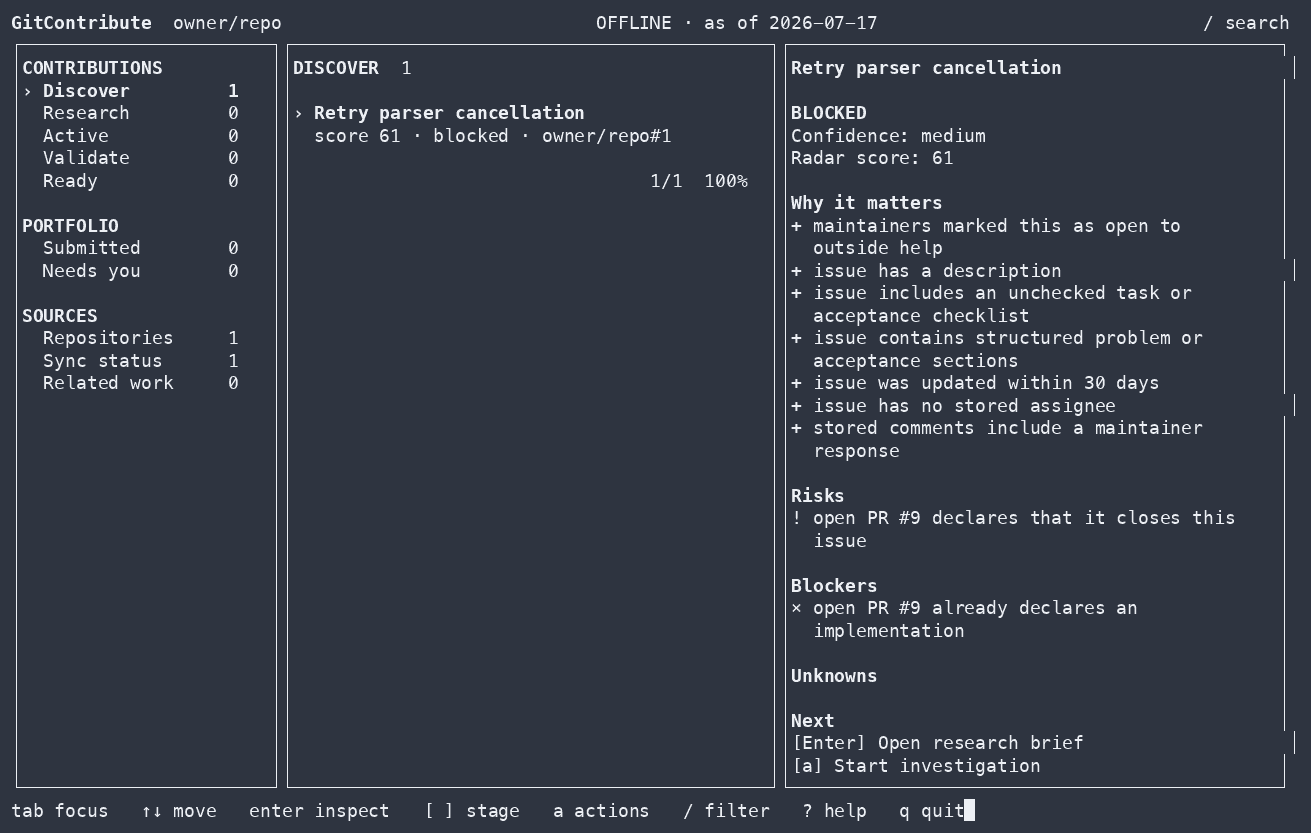
gitcontribute is available as a CLI, terminal UI, and MCP server for coding
agents.
GitHub can show you open issues. It cannot tell you whether an issue is still relevant, already being implemented, appropriate for an outside contributor, or supported by enough evidence to work on safely.
GitContribute collects repository guidance, related issues and pull requests, code context, accepted contribution patterns, and validation results in a local SQLite corpus. Results identify missing or stale coverage.
find work -> understand it -> check competing work -> prove the change -> prepare the handoff
[!IMPORTANT] GitContribute never writes to GitHub. It prepares local research and drafts for you to review.
Quick start
Run the guided setup with Node.js 18 or newer:
npx --yes gitcontribute@latest setup
Choose MCP to use GitContribute from a supported coding agent, CLI for the terminal and TUI, or Both. The wizard shows every planned change before applying it. Adding a repository during setup does not contact GitHub or start a sync.
After setup, start with a repository or an exact issue:
| Task | Coding agent | CLI |
|---|---|---|
| Find candidates | Find contribution candidates in owner/repo. Rank them by contribution fit, evidence, scope, and coordination risk. |
gitcontribute archive sync owner/repogitcontribute radar owner/repo --limit 10 |
| Research an issue | Investigate owner/repo#42. Check guidance, discussion, code, prior fixes, competing work, and missing evidence. |
gitcontribute archive sync owner/repo --numbers 42gitcontribute research brief issue:owner/repo#42 |
Results include source references, coverage gaps, and suggested next steps.
Install a persistent command:
npm install --global gitcontribute@latest
gitcontribute setup
Pin GitContribute to a project:
npm install --save-dev gitcontribute
npm exec -- gitcontribute setup --mode mcp --codex --token-source none --yes
Build from source with Go 1.26 or newer:
go install github.com/morluto/gitcontribute/cmd/gitcontribute@latest
Native npm binaries are included for macOS ARM64/x64, Linux ARM64/x64, and
Windows x64. You also need git. The gh CLI is optional and can provide
authentication through gh auth token.
Contribution workflow
1. Find a candidate
Search a repository or rank its open issues by available evidence, scope, risks, blockers, and signs that maintainer coordination is needed.
Find contribution candidates in golang/go. Exclude issues with active
implementation work and explain why each remaining candidate is worth
investigating.
The ranking only covers stored observations. Results report incomplete coverage.
2. Research an issue
Build a research brief from the issue, repository guidance, discussion, linked work, indexed code, and historical contributions. Extracted maintainer text and checkboxes are not presented as complete acceptance criteria.
Investigate issue owner/repo#42. Summarize the confirmed problem, likely scope,
relevant code, maintainer guidance, and open questions.
3. Check related work
Look for duplicate reports, linked pull requests, closing relationships, and semantically overlapping work before investing in an implementation.
Check whether owner/repo#42 has duplicate reports or competing implementation
work. Tell me what you checked and identify any missing coverage.
Incomplete coverage is reported instead of being treated as proof that no competing work exists. In the MCP workflow, follow the returned typed recovery action, poll the durable job, and reread the affected exact thread or repository before drawing that conclusion.
4. Validate a change
Record a reproduction, test, benchmark, or other validation and compare the unmodified baseline with a candidate. Validation commands run only after explicit approval.
Validate my candidate change against the baseline. Run the approved checks,
record both results, and explain whether the evidence supports the change.
Stored runs include the command, outcome, timing, and available process metrics.
5. Prepare a draft
Create a local issue, pull-request, or review draft tied to the research and validation evidence already collected.
Prepare a pull-request draft for this contribution. Tie its claims to the
recorded evidence, include the validation results, and do not post anything.
Draft revisions retain their exact rendered bytes and provenance.
Interfaces and storage
GitContribute stores repositories, threads, code snapshots, investigations, evidence, validation results, and contribution outcomes in SQLite. Network access is explicit; once information has been synced, corpus search and inspection work offline.
 GitHub read APIs                  Local checkout
       |                                |
       | explicit sync / hydrate        | explicit index / acquire
       v                                v
  +------------------------------------------------+
  |              Local SQLite corpus               |
  | observations · coverage · evidence · outcomes  |
  +------------------------+-----------------------+
                           | offline reads
                 +---------+---------+
                 v                   v
              CLI / TUI          Coding agents
The CLI and MCP server use the same application services and side-effect boundaries.
CLI
The CLI exposes the same workflow without requiring an MCP client:
# Sync repository context and current threads
gitcontribute archive sync-context owner/repo
gitcontribute archive sync owner/repo

# Find and inspect contribution candidates
gitcontribute radar owner/repo --limit 10
gitcontribute research brief issue:owner/repo#42

# Search stored threads and indexed code
gitcontribute search threads "connection timeout" --repo owner/repo
gitcontribute search code "context.WithTimeout" --repo owner/repo
For implementation work:
gitcontribute investigation start-thread issue:owner/repo#42 --json
gitcontribute workspace create <investigation-id>
gitcontribute validation define --kind=test --command="go test ./..." \
  --working-dir=/path/to/workspace <investigation-id>
gitcontribute validation run <validation-id> --kind=base --execute
gitcontribute validation run <validation-id> --kind=candidate --execute
gitcontribute validation compare <base-run-id> <candidate-run-id>
gitcontribute readiness opportunity <opportunity-id>
gitcontribute prepare pr --approach="Bound retries with context" \
  --workspace <workspace-id> <opportunity-id>
Run gitcontribute --help or gitcontribute <command> --help for the complete
command and flag reference. Most non-interactive commands accept --json;
machine-readable output goes to stdout and progress goes to stderr.
Launch the local TUI with:
gitcontribute tui
MCP
The MCP server advertises one unified catalog. Hosts such as Codex and Claude Code can discover large MCP catalogs with native tool search, so setup does not ask users to choose permanent capability profiles.
gitcontribute setup --mode mcp --codex --token-source none --yes
gitcontribute setup --mode mcp --all-clients --token-source none --yes
To start the stdio server directly:
gitcontribute mcp serve --transport=stdio
Add --read-only to remove tools that permit network access, local writes, or
execution. See MCP catalog and composition for capability
boundaries, snapshot recovery, resource handoffs, and common tool sequences.
GitHub users are stored as first-class actors. Live discovery records identity only; profile, social-account, organization, pinned-item, repository, and contribution facts are synchronized independently. See the actor corpus for the data and freshness model.
Side-effect boundaries
GitContribute separates corpus reads, GitHub reads, local writes, process execution, and external mutation.
| Operation | Network | Local write | Runs a process | GitHub write |
|---|---|---|---|---|
| Search and inspect stored research | No | No | No | No |
| Record investigations and evidence | No | Yes | No | No |
| Sync or hydrate GitHub context | Yes | Yes | No | No |
| Acquire and index code | Yes | Yes | git only |
No |
| Run an explicitly approved validation | No by default | Yes | Yes | No |
- Corpus reads never fetch data.
- Crawling and indexing never execute repository-controlled code.
- Explicit validation commands run on your host with your user permissions.
- GitContribute has no GitHub mutation capability.
- There is no hosted corpus or product telemetry.
See Architecture for the complete boundary definitions.
Documentation
- Onboarding and configuration
- MCP catalog and composition
- Actor corpus
- Architecture and side-effect boundaries
- Operational runbooks
- Security policy
- Contributing
Storage
GitContribute follows platform conventions:
| Platform | Configuration | Data |
|---|---|---|
| Linux | $XDG_CONFIG_HOME/gitcontribute or ~/.config/gitcontribute |
$XDG_DATA_HOME/gitcontribute or ~/.local/share/gitcontribute |
| macOS | ~/Library/Application Support/gitcontribute |
~/Library/Application Support/gitcontribute/Data |
| Windows | %APPDATA%\gitcontribute |
%LOCALAPPDATA%\gitcontribute\Data |
The default corpus is gitcontribute.db in the data directory. Run
gitcontribute metadata or gitcontribute doctor --json to inspect the local
setup.
Platform support
Linux and macOS are the primary development and test targets. Windows builds
are tested in CI and use the standard %APPDATA% and %LOCALAPPDATA%
locations.
Development
make verify
go run ./cmd/gitcontribute --help
Before changing package boundaries or side effects, read docs/architecture.md. See CONTRIBUTING.md for the repository workflow.
GitContribute MCP Fragen
Wie füge ich GitContribute MCP zu Claude Code hinzu?
Führe claude mcp add gitcontribute -- npx -y gitcontribute in deinem Terminal aus. Füge --scope user hinzu, damit der Server in jedem Projekt verfügbar ist.
Wie füge ich GitContribute MCP zu Cursor hinzu?
Öffne ~/.cursor/mcp.json und füge den Server unter mcpServers hinzu, mit der Cursor-Config aus dem Installationsabschnitt oben.
Schreibt GitContribute Daten nach GitHub?
Nein, GitContribute schreibt niemals nach GitHub; es bereitet lediglich lokale Recherchen und Entwürfe für deine Überprüfung vor.
Wie werden die Forschungsdaten gespeichert?
Alle Repository-Daten, Untersuchungen und Validierungsergebnisse werden in einem lokalen SQLite-Corpus gespeichert.
Kann ich GitContribute offline nutzen?
Ja, sobald die Informationen in den lokalen Corpus synchronisiert wurden, funktionieren die Suche und die Inspektion der Daten offline.