
Ermöglicht es AI Coding Agents, Aufgaben-Ziele, Entscheidungen und Checkpoints direkt im Repo zu speichern, damit spätere Sessions genau dort ansetzen können, wo die Arbeit unterbrochen wurde.
Auch bekannt als ihorponom/agentpack, agentpack-cli
- Stars
- 19
- Tools
- —
- Downloads, 30 Tage
- 1.337
- Neueste Version
- 1.11.1
- Letzter Commit
- 25. Okt. 2026
- Lizenz
- MIT
Was ist Agentpack MCP?
Ermöglicht es AI Coding Agents, Aufgaben-Ziele, Entscheidungen und Checkpoints direkt im Repo zu speichern, damit spätere Sessions genau dort ansetzen können, wo die Arbeit unterbrochen wurde.
Zusammenfassung generiert aus dem README des Projekts
Über Agentpack MCP server
Agentpack ermöglicht es AI Coding Agents, die Kontinuität von Aufgaben zu wahren, indem der Fortschritt direkt in deinem Repository gespeichert wird. Anstatt den Fortschritt zu verlieren, wenn Chat-Historien gelöscht oder Kontexte komprimiert werden, nutzen Agents dieses Tool, um Ziele, Entscheidungen, Sackgassen und Verifizierungsnachweise in einem lokalen .agentpack Verzeichnis zu protokollieren. Dieser Ansatz erlaubt es verschiedenen Clients wie Claude Code, Cursor, Codex oder Claude Desktop, exakt dort weiterzumachen, wo eine vorherige Session aufgehört hat.
Diese Local-first-Lösung arbeitet ohne Cloud-Speicher oder Telemetrie und hält den gesamten Task-Status als einfache Dateien in deinem Repo bereit. Entwickler können diese Aufzeichnungen über ein CLI verwalten, um den Status zu inspizieren, Checkpoints zu erstellen oder Task-Bundles zu exportieren. Das System nutzt einen Task Passport, um den Lebenszyklus eines spezifischen Ziels zu verfolgen, einschließlich seiner Constraints und der nächsten Schritte. Zudem verfügt es über einen Task Gate, der warnen oder Edits blockieren kann, um sicherzustellen, dass Agents innerhalb ihres definierten Write-Scopes bleiben.
Was du damit machen kannst
- 1Unterbrochene Coding-Sessions fortsetzenEin Agent kann das spezifische Ziel und die letzten Entscheidungen nach einer Kontext-Kompression oder dem Start einer neuen Chat-Session einfach neu laden.
- 2Zwischen verschiedenen AI Clients wechselnDu kannst eine Aufgabe von Claude Code zu Cursor verschieben, ohne den Verlauf der Untersuchung zu verlieren.
- 3Task-Grenzen erzwingenVerhindere, dass ein Agent unbefugte Änderungen vornimmt, indem du einen Task Gate nutzt, um den Write-Scope zu überwachen.
- 4Dateispezifische Schlussfolgerungen trackenProtokolliere Notizen darüber, was eine bestimmte Datei macht, und erhalte eine Warnung, falls diese Datei später modifiziert wird.
Geschrieben aus dem README des Projekts. Jeder Use Case wurde gegen ein Zitat daraus geprüft.
So installierst du Agentpack MCP
Formate geprüft am 10. Nov. 2026Zu Cursor hinzufügenZu Goose hinzufügenAgentpack MCP in Claude Code installieren
$ claude mcp add agentpack -- npx -y agentpack-cliAgentpack MCP in Cursor installieren
~/.cursor/mcp.json
{
  "mcpServers": {
    "agentpack": {
      "command": "npx",
      "args": [
        "-y",
        "agentpack-cli"
      ]
    }
  }
}Agentpack MCP in VS Code installieren
.vscode/mcp.json
{
  "servers": {
    "agentpack": {
      "type": "stdio",
      "command": "npx",
      "args": [
        "-y",
        "agentpack-cli"
      ]
    }
  }
}Agentpack MCP in VS Code CLI installieren
$ code --add-mcp '{"name":"agentpack","type":"stdio","command":"npx","args":["-y","agentpack-cli"]}'Agentpack MCP in Claude Desktop installieren
claude_desktop_config.json
{
  "mcpServers": {
    "agentpack": {
      "command": "npx",
      "args": [
        "-y",
        "agentpack-cli"
      ]
    }
  }
}Agentpack MCP in Codex installieren
$ codex mcp add agentpack -- npx -y agentpack-cliAgentpack MCP in Codex config.toml installieren
~/.codex/config.toml
[mcp_servers.agentpack]
command = "npx"
args = ["-y", "agentpack-cli"]
Agentpack MCP in Gemini CLI installieren
$ gemini mcp add -s user agentpack npx -- -y agentpack-cliAgentpack MCP in Gemini settings.json installieren
~/.gemini/settings.json
{
  "mcpServers": {
    "agentpack": {
      "command": "npx",
      "args": [
        "-y",
        "agentpack-cli"
      ]
    }
  }
}Automatisierte Checks
Geluften am 12. Nov. 2026Vollständiger Bericht →Unsere automatisierten Checks bestanden. Das ist kein Security-Audit: Lies den Code und gib dem Server nur den minimal notwendigen Zugriff. Wie die Checks funktionieren

- Source Repository verknüpft und erreichbarBestanden
- Open Source Lizenz (OSI)Bestanden
- Commit oder Release im letzten JahrBestanden
- Package-Name ähnelt keinem populären PackageBestanden
- Remote Endpoint nutzt HTTPSNicht geprüft
- Destruktive Tools sind markiertNicht geprüft
- Keine versteckten Anweisungen an das ModellBestanden
- Keine kritischen Advisories im Paket oder seinen AbhängigkeitenBestanden
README
Auf GitHub ansehenAgentpack


Repo-native task continuity for AI coding agents.
Agent memory remembers how you work. Agentpack remembers where the task stands.
Your agent spent an hour on a task. It found the cause, rejected two approaches, and wrote down the next step. Then the context was compacted, or the chat closed. The next session starts from zero and does the same investigation again.
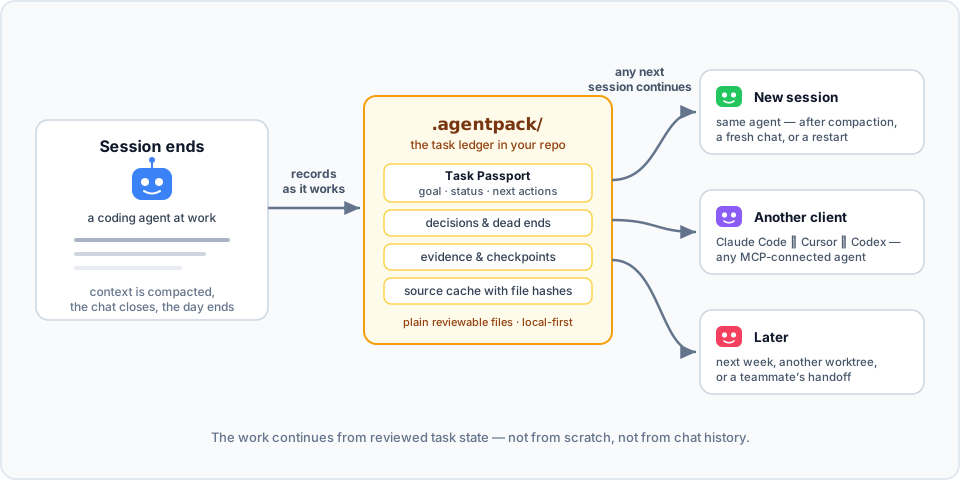
Agentpack keeps the task state in your repo. Connected agents record the goal, decisions, dead ends, verification evidence, and checkpoints in .agentpack/ while they work. Then the next session loads that state and continues: the same agent after compaction, a different client, or you next week.
Here it is in action. In session 1, an agent works on a flaky test and records a decision, a dead end, and a checkpoint through the Agentpack MCP tools. In session 2, the next day with an empty context, one load_context call brings the task back:

▶ Watch the 80-second explainer, with sound
To try the same flow by hand from the CLI, see docs/DEMOS.md.
- Local-first. Plain files in your repo. No cloud, no telemetry, no network calls.
- Made for agents. A local MCP server and generated project instructions (
AGENTS.md,CLAUDE.md, Cursor rules) tell agents when to load and record state. - Open to people. The CLI shows the same state, so you can inspect it, fix it, or hand it off yourself.
How is this different from agent memory?
Claude Code memory, Codex memories, and CLAUDE.md or AGENTS.md keep how to work: your preferences, project conventions, and facts that stay true. Agentpack keeps where the work is: the goal of the current task, its constraints, decisions, dead ends, next actions, and verification result.
| Agent memory | Agentpack | |
|---|---|---|
| Holds | Preferences, conventions, long-lived facts | The state of one task |
| Lives in | The profile or account of one client | .agentpack/ in the repo, local by default, portable with task bundles |
| Read by | That client only | Any MCP client: Claude Code, Codex, Cursor, Claude Desktop |
| Shape | Free-form notes, recalled by relevance | A Task Passport per task: goal, lifecycle, the paths it may change, and verification bound to a commit |
| Staleness | Not tied to file changes | Notes about files store the file hash, so Agentpack flags a note when its file changes |
Use both. Memory keeps how you like to work. Agentpack keeps what the task needs next.
Quick start
Agentpack needs Node.js 20 or later.
npm install -g agentpack-cli

cd path/to/your/repo
agentpack init                     # once per repo
agentpack install claude --write   # per client: codex | claude | cursor | claude-desktop
agentpack install git-hooks --write  # optional: task gate check before each commit
Restart or reconnect your coding agent, and approve the Agentpack server or hooks when the client asks. From then on, the agent loads the task state when a session starts, records decisions and evidence while it works, and creates checkpoints at meaningful points.
To check the setup, run agentpack doctor. To see the task state yourself, run agentpack resume --preset agent --query "<topic>".
In a Git repository, init adds the local Agentpack files to .git/info/exclude. The list includes .agentpack/, .mcp.json, .claude, .codex, .cursor, AGENTS.md, and CLAUDE.md. Agentpack does not change your .gitignore. Files that Git already tracks stay tracked.
For each client, docs/INTEGRATIONS.md shows what the installer writes and why.
How it works
- When a session starts, the agent loads a compact summary: the current Task Passport, recent checkpoints, decisions, and source conclusions.
- While it works, the agent records what is worth keeping: decisions, failed approaches, and verification evidence. It can also record a source conclusion: a short note about what a file does, stored with the file hash. If the file changes later, Agentpack flags the conclusion. A matching hash shows that the file is unchanged, not that the conclusion is correct.
- At a natural stop, the agent creates a checkpoint with the status, the next actions, and the Git state.
- The next session, in any MCP client, continues from that state. It does not rebuild the task from chat history.
Each task has a Task Passport: the goal, status, constraints, write scope (the paths the task may change), next actions, and verification. You can start, park, switch, and finalize tasks, so each handoff is explicit.
The task gate checks edits against the current Passport. The client installers add native hooks for Claude Code, Codex, and Cursor. install git-hooks adds a pre-commit check. By default, the gate only warns. Set "gateMode" in .agentpack/config.json to "block" to stop edits outside the write scope or outside an active task, or to "off" to turn the gate off. Hooks are a guardrail, not a sandbox. See docs/CLI.md.
The summary stays inside a token budget. The agent gets the useful state back, not the full history.
More features
- Task bundles. Export a task to one JSON file, and import it in a fresh clone or on another machine. See docs/TASK-PASSPORT.md.
- Tasks across repositories. One Passport can cover changes in several repositories, each with its own write scope.
- Monorepo focus. Give each part of a monorepo (
api/,frontend/,cron/) short tasks with their own write scope. The task gate warns when the agent leaves that part. - Usage reports.
agentpack usage reportreads local Claude Code and Codex transcripts and shows the token use of a task, including the Agentpack share. Nothing leaves your machine. - Read-only inspector.
agentpack tuishows tasks, evidence, and checkpoints in the terminal. See docs/TUI.md. - Builder subagent. Codex, Claude Code, and Cursor installs include an optional builder for larger implementation work. The main agent says what it will hand off before it uses the builder. Small tasks stay with the main agent.
When it helps
- The context is compacted in the middle of a task, and the next turn needs the state back.
- You start a new chat on a task that is still open.
- You change between Claude Code, Cursor, Codex, or another MCP client.
- You come back to a refactor or a bug fix days later.
- Another agent continues from your checkpoint.
Agentpack context also uses tokens. The compact output keeps the task state available without the full ledger history.
Security posture
- Zero runtime dependencies, exact dev dependencies, a committed lockfile, and
ignore-scripts=true. - No telemetry and no network calls in normal CLI or MCP operation.
- Best-effort redaction of values that look like secrets in stored context and handoff output.
- GitHub Actions publishes each release with npm provenance (Trusted Publisher, no long-lived tokens). To verify, run
npm audit signatures.
See SECURITY.md for the full policy, including what Agentpack reads outside the repo.
Documentation
- docs/INTEGRATIONS.md: setup for Codex, Claude Code, Cursor, Claude Desktop, and Git hooks
- docs/TASK-PASSPORT.md: task lifecycle, handoffs, additional repositories, and task bundles
- docs/CLI.md: full CLI reference, budgets, and manual workflows
- docs/MCP.md: MCP server contract and tools
- docs/DEMOS.md: short continuity demos to run yourself
- docs/TUI.md: the read-only terminal inspector
- docs/LEDGER-HYGIENE.md: keep the ledger small and useful
Contributing
Clone the repo and use Node.js 20 or later:
npm ci --ignore-scripts
npm test
npm run mcp:smoke
node dist/src/agentpack.js --help
See docs/SETUP.md for the development setup and docs/RELEASING.md for the release steps.
Mirror: Codeberg. Issues, releases, and npm provenance stay on GitHub.
Agentpack MCP Fragen
Wie füge ich Agentpack MCP zu Claude Code hinzu?
Führe claude mcp add agentpack -- npx -y agentpack-cli in deinem Terminal aus. Füge --scope user hinzu, damit der Server in jedem Projekt verfügbar ist.
Wie füge ich Agentpack MCP zu Cursor hinzu?
Öffne ~/.cursor/mcp.json und füge den Server unter mcpServers hinzu, mit der Cursor-Config aus dem Installationsabschnitt oben.
Wo speichert Agentpack den Task-Status?
Der Task-Status wird als einfache Dateien in einem .agentpack/ Verzeichnis innerhalb deines Repositories gespeichert, ohne Cloud- oder Netzwerkaufrufe zu tätigen.
Mit welchen MCP Clients funktioniert Agentpack?
Es funktioniert mit Claude Code, Codex, Cursor, Claude Desktop und anderen MCP Clients.
Was ist der Unterschied zwischen Agentpack und Agent Memory?
Agent Memory speichert Präferenzen und langfristige Konventionen, während Agentpack den Status der aktuellen Aufgabe verwaltet: Ziele, Entscheidungen, Sackgassen, nächste Schritte und Verifizierungen.
Wie installiere ich Agentpack?
Installiere das agentpack-cli npm Package (Node.js 20 oder neuer), führe agentpack init in deinem Repo aus und installiere anschließend die Integration für deinen Client.
Sendet Agentpack Daten in die Cloud?
Nein. Es gibt keine Telemetrie und es werden während des normalen CLI- oder MCP-Betriebs keine Netzwerkaufrufe getätigt.