
Rigor MCP server
Commit 13. Nov. 2026Ermöglicht QA-Teams deterministisches Testing von MCP tools, resources, prompts und contracts in natürlicher Sprache, ohne Testcode schreiben zu müssen.
Auch bekannt als FusionOnePlatform/mcprigor
- Stars
- 3
- Tools
- —
- Downloads, 30 Tage
- —
- Neueste Version
- —
- Letzter Commit
- 13. Nov. 2026
- Lizenz
- Apache-2.0
Was ist Rigor MCP?
Ermöglicht QA-Teams deterministisches Testing von MCP tools, resources, prompts und contracts in natürlicher Sprache, ohne Testcode schreiben zu müssen.
Zusammenfassung generiert aus dem README des Projekts
Über Rigor MCP server
QA-Teams können deterministisches Testing von MCP tools, resources, prompts und contracts in natürlicher Sprache durchführen, ohne traditionellen Testcode schreiben zu müssen. Durch die Verwendung einer spezialisierten Syntax können Tester Erwartungen für tool calls, resource reads und prompt outputs definieren. Dieser Ansatz stellt sicher, dass Tests vorhersehbar bleiben, da kein KI-Modell zur Interpretation der Testformulierung verwendet wird.
Nutzer können Tests gegen lokale stdio Server, Python Server oder remote HTTP Server ausführen, wobei Umgebungsvariablen für die Authentifizierung genutzt werden. Das System unterstützt verschiedene Workflows, darunter einen lokalen browserbasierten QA-Workspace, ein CLI für die CI-Integration und einen interaktiven Author Mode, um Tests direkt von Live-Servern zu generieren. Zudem bietet es einen parity command, um das Verhalten zwischen lokalen und bereitgestellten Umgebungen zu vergleichen.
Entwickler können komplexe Testanforderungen durch data-driven Szenarien mittels CSV, JSON oder SQL Adaptern verwalten. Das Tool enthält fortgeschrittene Features wie Security Audits, Performance Budgeting mit Percentile Limits und Composition Checks für Multi-Server-Flotten. Es lässt sich über eine VS Code Extension in Development-Workflows integrieren und liefert detaillierte HTML-Reports mit interaktiven Evidence Timelines.
Was du damit machen kannst
- 1Genauigkeit von Tool-Outputs verifizierenEin Entwickler kann das System anweisen, ein spezifisches Tool mit definierten Argumenten aufzurufen und zu prüfen, ob der zurückgegebene strukturierte Inhalt einem erwarteten Wert entspricht.
- 2Lokale und remote Umgebungen vergleichenTeams können dieselben Test-Szenarien sowohl gegen einen lokalen Development-Server als auch gegen einen bereitgestellten QA-Server laufen lassen, um semantische Unterschiede zu identifizieren.
- 3Testing mit externen Daten automatisierenTester können denselben tool call über mehrere Datenzeilen hinweg ausführen, die aus Dateien wie Excel oder SQL-Datenbanken importiert wurden.
- 4Tests von Live-Servern generierenAnstatt Dateien manuell zu schreiben, können Nutzer einen geführten Prozess verwenden, um Operationen zu entdecken und automatisch prüfbare Testdateien zu erstellen.
Geschrieben aus dem README des Projekts. Jeder Use Case wurde gegen ein Zitat daraus geprüft.
Konfiguration
MCP_TOKEN
| Name | Beschreibung | Typ |
|---|---|---|
| MCP_TOKEN | — |
Automatisierte Checks
Geluften am 14. Nov. 2026Vollständiger Bericht →Noch nicht verifiziert. Ein Server benötigt einen Score von 80, keine kritischen Befunde und genug Daten für unsere Prüfung. Wie die Checks funktionieren · Was du für mehr Punkte verbessern kannst

- Source Repository verknüpft und erreichbarfusiononeplatform/mcprigor is public and reachablegithub.com/fusiononeplatform/mcprigor ↗Bestanden
- Paket nennt dieses Repository als QuelleNicht geprüft
- Build-Provenienz (Sigstore-Attestierung)Nicht geprüft
- Open Source Lizenz (OSI)Apache-2.0spdx.org/licenses/Apache-2.0.html ↗Bestanden
- Commit oder Release im letzten JahrLast commit or release 2026-11-13github.com/fusiononeplatform/mcprigor ↗Bestanden
- OpenSSF ScorecardNicht geprüft
- Package-Name ähnelt keinem populären PackageNicht geprüft
- Keine kritischen Advisories im Paket oder seinen AbhängigkeitenNicht geprüft
- Keine versteckten Anweisungen an das Modell0 tool descriptions and the README read; no override phrases, credential paths or hidden charactersBestanden
- Destruktive Tools sind markiertNicht geprüft
- Remote-Endpoint beantwortet den MCP-HandshakeNicht geprüft
README
Auf GitHub ansehenMCP Rigor







Natural-language testing for Model Context Protocol servers.
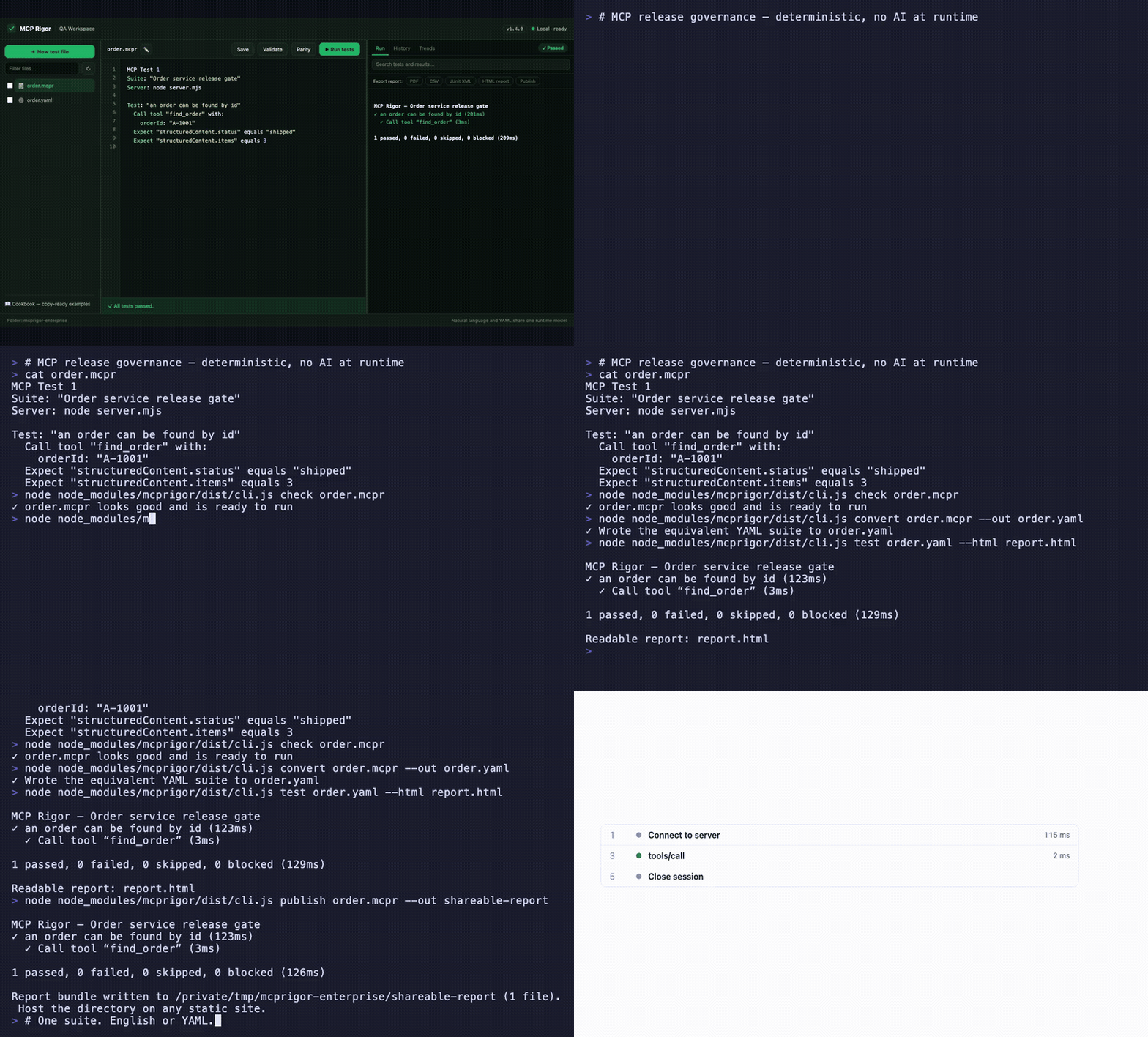
Visual QA workspace · English ⇄ YAML parity · interactive evidence timeline · CLI, CI, and shareable reports — watch the MP4
MCP Rigor lets QA teams test MCP tools, resources, prompts, contracts, and transports without writing test code. Tests are deterministic: no AI model interprets the wording.
Status:
1.5.0stable. Node.js 20 or 22 is required.
Install
MCP Rigor is published on npm as mcprigor. The package ships compiled code, ready to run:
npm install mcprigor
Or try it instantly without installing:
npx mcprigor@latest init tests/acceptance.mcpr
Use npx mcprigor in commands below, or install globally (npm install -g mcprigor) to use mcprigor directly. In a project where tests run only during development or CI, npm install --save-dev mcprigor keeps it out of production dependencies.
Install from source
Only needed if you want to modify MCP Rigor itself:
git clone https://github.com/FusionOnePlatform/mcprigor.git
cd mcprigor
npm ci
npm run check   # build + full test suite
npm link        # optional: use your local build as the global `mcprigor`
Write your first test
Create calculator.mcpr:
MCP Test 1

Suite: "Calculator acceptance tests"
Server: node dist/server.js

Test: "Adding 20 and 22 gives 42"
  Call tool "add" with:
    a: 20
    b: 22

  Expect "structuredContent.sum" equals 42
Check the wording, then run it:
npx mcprigor check calculator.mcpr
npx mcprigor test calculator.mcpr
Create a browser report:
npx mcprigor test calculator.mcpr --html report.html
Expected summary:
✓ Adding 20 and 22 gives 42

1 passed, 0 failed, 0 skipped, 0 blocked
Use the QA workspace
Start the local browser interface:
npx mcprigor workspace .
Or expose MCP Rigor to AI coding agents as an MCP server (docs):
npx mcprigor serve .
Open the printed http://127.0.0.1:... URL. You can select a suite, edit it, validate the wording, run tests, run transport parity, and review results.
The workspace is loopback-only and does not accept arbitrary commands from the browser.
Connect to an MCP server
Local stdio server:
Server: node dist/server.js
Python server:
Server: python -m my_mcp_server
Streamable HTTP server:
MCP URL: https://qa.example.com/mcp

Server options:
  headers:
    Authorization: "Bearer ${env.MCP_TOKEN}"
Run with an environment variable:
MCP_TOKEN="your-token" npx mcprigor test customer.mcpr
Do not place reusable credentials directly in test files.
Common test actions
Call tool "search" with:
  query: "red shoes"

Read resource "catalog://status"

Get prompt "write_summary" with:
  topic: "Release quality"

Expect it succeeds
Expect an error
Expect "structuredContent.total" equals 2
Expect "content[0].text" contains "complete"
Expect "items" has 3 items
See the natural-language cookbook for copy-ready examples.
Compare local and deployed behavior
MCP Test 1
Suite: "Calculator parity"

Compare target "Local": node dist/server.js
Compare target "QA": https://qa.example.com/mcp

Test: "Addition is consistent"
  Call tool "add" with:
    a: 20
    b: 22
  Expect "structuredContent.sum" equals 42
npx mcprigor parity calculator-parity.mcpr
MCP Rigor runs every scenario against both targets and reports semantic differences.
Create a test from a live server
Provide a small .mcpr file containing the target, then run:
npx mcprigor author server.mcpr --out search-customer.mcpr
The guided author discovers operations, asks for inputs, previews a response, and writes a reviewable natural-language test.
Use data-driven tests
Test: "Calculator examples"
  For each row:
    | caseId | a  | b  | expected |
    | basic  | 2  | 3  | 5        |
    | larger | 20 | 22 | 42       |

  Call tool "add" with:
    a: "${row.a}"
    b: "${row.b}"

  Expect "structuredContent.sum" equals "${row.expected}"
CSV, JSON, YAML, Excel, REST, Google Sheets, SQL adapters, typed columns, filters, joins, and deterministic sampling are also supported.
Use in CI
- uses: actions/setup-node@v4
  with:
    node-version: 20
- run: npm ci
- run: npx mcprigor check tests/acceptance.mcpr
- run: npx mcprigor test tests/acceptance.mcpr --junit reports/mcp.xml --evidence .mcprigor/ci-run
Exit codes:
| Code | Meaning |
|---|---|
0 |
Tests passed |
1 |
A test or comparison failed |
2 |
Usage, language, or configuration problem |
3 |
Server, transport, or internal failure |
Main commands
mcprigor workspace [DIRECTORY]        Start the local QA interface
mcprigor init FILE                    Create an example test
mcprigor check FILE                   Validate without connecting
mcprigor test FILE                    Run natural-language or YAML tests
mcprigor author TARGET --out FILE     Build a test interactively
mcprigor parity FILE                  Compare named targets
mcprigor audit FILE                   Run deterministic security probes
mcprigor composition-check FILE       Check a mounted server fleet
mcprigor composition-discover FILE    Save a combined fleet contract
mcprigor composition-drift FILE       Gate fleet contract drift
mcprigor discover FILE                Save the live MCP contract
mcprigor contract-check LOCK --target FILE
mcprigor evidence-show DIRECTORY
Performance and governance features new in 1.5.0:
Expect the call to finish within 800ms, percentile budgets, and--fail-on-regressionmcprigor auditdeterministic security probes with scored PDF/CSV/JSON reports- Multi-server test routing, collision checks, combined fleet locks, and composition drift
- GitHub Action with rich PR reports
- Live MCP surface and schema coverage with
--fail-under - Scheduled HTTP monitoring with failure/recovery webhooks
- Clickable HAR-style session timeline in HTML reports
- Contract drift markdown as a downloadable Action artifact
mcprigor publish— shareable static report URLs
See the complete CLI reference.
Editor support
The VS Code extension in editors/vscode adds syntax highlighting and inline mcprigor check diagnostics for .mcpr files. Package it with npx @vscode/vsce package from that directory, or install a release .vsix with code --install-extension.
Choose your next guide
- New QA user: Getting started
- Writing scenarios: Natural-language cookbook
- Using the browser UI: QA workspace
- Setting up targets and CI: Engineer setup
- Fixing failures: Troubleshooting
- All documentation: Documentation index
Scope and safety
MCP Rigor performs black-box behavior and contract testing. It complements MCP Inspector and official MCP Conformance; it does not provide certification.
Remote data and custom extensions are disabled unless explicitly enabled. Reports and evidence are sanitized, but business response data may still be sensitive. Review security and retention before storing CI artifacts.
Contributing
See CONTRIBUTING.md, then run:
npm ci
npm run check
Apache-2.0 licensed.
Rigor MCP Fragen
Kann ich MCP Rigor nutzen, um verschiedene Server-Umgebungen zu vergleichen?
Ja, der parity command ermöglicht es dir, ein lokales Target mit einem QA-Target zu vergleichen, um semantische Unterschiede zu melden.
Wird Data-driven Testing unterstützt?
Ja, es unterstützt data-driven Tests über verschiedene Adapter wie CSV, JSON, YAML, Excel, REST, Google Sheets und SQL.