
Ermöglicht es AI-Agents, JSON-Formulardefinitionen für React-, Vue-, Swift- und Kotlin-Anwendungen zu schreiben, zu validieren und zu reparieren.
Auch bekannt als formhaus-dev/formhaus, @formhaus/mcp
- Stars
- 8
- Tools
- —
- Downloads, 30 Tage
- 8.002
- Neueste Version
- —
- Letzter Commit
- 8. Nov. 2026
- Lizenz
- MIT
Was ist formhaus MCP?
formhaus ist ein MCP server. Ermöglicht es AI-Agents, JSON-Formulardefinitionen für React-, Vue-, Swift- und Kotlin-Anwendungen zu schreiben, zu validieren und zu reparieren.
Zusammenfassung generiert aus dem README des Projekts
Über formhaus MCP server
Formhaus bietet ein System zur Erstellung einzelner JSON-Definitionen, die Felder, Validierung und Verzweigungslogik für Formulare verwalten. Dieser Ansatz erlaubt es Entwicklern, ein Formular einmal zu schreiben und es auf verschiedenen Plattformen wie React, Vue, Swift und Kotlin zu rendern. Die Core Engine ist framework-agnostisch und kann auch in Svelte- oder Vanilla-JavaScript-Umgebungen genutzt werden.
Entwickler können den MCP server lokal via npx nutzen, um AI-Agents wie Claude Desktop, Cursor oder Claude Code zu ermöglichen, diese JSON-Definitionen zu schreiben, zu validieren und zu reparieren. Für diejenigen, die eine gehostete Lösung benötigen, bietet Formhaus Cloud einen Remote MCP server an, der es Agents erlaubt, Formulare zu veröffentlichen und Antworten direkt zu lesen. Das System unterstützt komplexe Features wie mehrstufige Verzweigungen, bedingte Felder und Internationalisierung über Translation Catalogs.
Was du damit machen kannst
- 1JSON-Definitionen validieren und fixenEntwickler können den MCP server nutzen, um sicherzustellen, dass ihr Formular-JSON syntaktisch korrekt und logisch konsistent ist.
- 2Formular-Prototypen in Design-Tools erstellenDesigner können JSON-Definitionen in interaktive Prototypen oder Flow-Maps innerhalb von Figma verwandeln.
Geschrieben aus dem README des Projekts. Jeder Use Case wurde gegen ein Zitat daraus geprüft.
So installierst du formhaus MCP
Formate geprüft am 10. Nov. 2026Zu Cursor hinzufügenZu Goose hinzufügenformhaus MCP in Claude Code installieren
$ claude mcp add formhaus -- npx -y @formhaus/mcpformhaus MCP in Cursor installieren
~/.cursor/mcp.json
{
  "mcpServers": {
    "formhaus": {
      "command": "npx",
      "args": [
        "-y",
        "@formhaus/mcp"
      ]
    }
  }
}formhaus MCP in VS Code installieren
.vscode/mcp.json
{
  "servers": {
    "formhaus": {
      "type": "stdio",
      "command": "npx",
      "args": [
        "-y",
        "@formhaus/mcp"
      ]
    }
  }
}formhaus MCP in VS Code CLI installieren
$ code --add-mcp '{"name":"formhaus","type":"stdio","command":"npx","args":["-y","@formhaus/mcp"]}'formhaus MCP in Claude Desktop installieren
claude_desktop_config.json
{
  "mcpServers": {
    "formhaus": {
      "command": "npx",
      "args": [
        "-y",
        "@formhaus/mcp"
      ]
    }
  }
}formhaus MCP in Codex installieren
$ codex mcp add formhaus -- npx -y @formhaus/mcpformhaus MCP in Codex config.toml installieren
~/.codex/config.toml
[mcp_servers.formhaus]
command = "npx"
args = ["-y", "@formhaus/mcp"]
formhaus MCP in Gemini CLI installieren
$ gemini mcp add -s user formhaus npx -- -y @formhaus/mcpformhaus MCP in Gemini settings.json installieren
~/.gemini/settings.json
{
  "mcpServers": {
    "formhaus": {
      "command": "npx",
      "args": [
        "-y",
        "@formhaus/mcp"
      ]
    }
  }
}Automatisierte Checks
Geluften am 14. Nov. 2026Vollständiger Bericht →Unsere automatisierten Checks bestanden. Das ist kein Security-Audit: Lies den Code und gib dem Server nur den minimal notwendigen Zugriff. Wie die Checks funktionieren

- Source Repository verknüpft und erreichbarformhaus-dev/formhaus is public and reachablegithub.com/formhaus-dev/formhaus ↗Bestanden
- Paket nennt dieses Repository als Quelle@formhaus/mcp names formhaus-dev/formhaus as sourcenpmjs.com/package/@formhaus/mcp ↗Bestanden
- Build-Provenienz (Sigstore-Attestierung)Sigstore attestation for @formhaus/mcpnpmjs.com/package/@formhaus/mcp/v/0.15.3#provenance ↗Bestanden
- Open Source Lizenz (OSI)MITspdx.org/licenses/MIT.html ↗Bestanden
- Commit oder Release im letzten JahrLast commit or release 2026-11-08github.com/formhaus-dev/formhaus ↗Bestanden
- OpenSSF ScorecardNicht geprüft
- Package-Name ähnelt keinem populären PackageNo popular package one edit away from @formhaus/mcpBestanden
- Keine kritischen Advisories im Paket oder seinen AbhängigkeitenNicht geprüft
- Keine versteckten Anweisungen an das Modell0 tool descriptions and the README read; no override phrases, credential paths or hidden charactersBestanden
- Destruktive Tools sind markiertNicht geprüft
- Remote-Endpoint beantwortet den MCP-HandshakeNicht geprüft
README
Auf GitHub ansehenAdd Formhaus to your coding agent
npx formhaus
Adds the Formhaus MCP server to Claude Code, Codex, Cursor and Claude Desktop. Writes, checks and repairs definitions locally, with no account · Setup for each client
Two independent ways to use it:
-
Use the library. MIT, no account, no key. The core is framework-agnostic and runs the form in any app; React and Vue renderers are ready to use. Your submit handler sends the data wherever you want. CI tests React 18 and 19, and Vue 3.3 and 3.5.
npm install @formhaus/core # plus @formhaus/react or @formhaus/vue -
Use Formhaus Cloud. A hosted form backend: a submission endpoint with server validation, a dashboard and webhooks, plus hosted links, embeds and a visual builder. The first form needs no account.
Build in the browser at app.formhaus.dev, or add the remote MCP server and ask your agent: "Make me a waitlist form and give me the link."
claude mcp add --transport http formhaus https://api.formhaus.dev/mcp

What you get
| Feature | |
|---|---|
| One definition | Fields, validation, conditional fields, steps, branching routes, sections and repeatable groups in one JSON file you keep in git |
| React and Vue | Native renderers with accessible defaults, or your own components through components |
| Validation | Built-in rules and custom validators. validateSubmission() checks the same definition on the server |
| Agents | The MCP server writes, validates and fixes definitions. Remote MCP publishes forms and reads responses |
| i18n | Translation catalogs and keys for labels, messages and options |
| Accessibility | Labels, error summary, focus management and live regions built in |
| Small core | Zero dependencies, tree-shakable ESM |
| Figma | The plugin renders mockups, flow maps and prototypes from the same definition |
| Cloud, optional | Hosted links, embeds, a submission endpoint, CSV export and webhooks |
What it's for
- Multi-step forms with branching in React or Vue.
- Rendering a form from JSON with your own components.
- Designing the form in Figma from the same file.
- Generating and checking definitions with AI agents: Claude Code skills, the MCP server (
claude plugin marketplace add formhaus-dev/formhaus && claude plugin install formhaus@formhaus), the JSON Schema and the format specification. - Translated forms with your own catalogs, or with i18next, vue-i18n and Lokalise keys.
- A headless engine for Svelte or vanilla JS.
Example
Business accounts get a company step; everyone converges on review.
{
  "$schema": "https://formhaus.dev/schema/form-definition.json",
  "id": "signup",
  "title": "Sign up",
  "submit": { "label": "Create account" },
  "steps": [
    {
      "id": "account",
      "title": "Account",
      "fields": [
        { "key": "email", "type": "email", "label": "Email", "validation": { "required": true } },
        { "key": "kind", "type": "radio", "label": "Account type", "autoAdvance": true,
          "options": [{ "value": "personal", "label": "Personal" }, { "value": "business", "label": "Business" }] }
      ],
      "routes": [
        { "to": "company", "show": [{ "field": "kind", "eq": "business" }] },
        { "to": "review" }
      ]
    },
    { "id": "company", "title": "Company", "routes": [{ "to": "review" }],
      "fields": [{ "key": "company", "type": "text", "label": "Company name", "validation": { "required": true } }] },
    { "id": "review", "title": "Review",
      "fields": [{ "key": "terms", "type": "checkbox", "label": "I accept the terms", "validation": { "required": true } }] }
  ]
}
import { FormRenderer } from '@formhaus/react';
import definition from './signup.json';

<FormRenderer definition={definition} onSubmit={save} />;
Compare with react-hook-form, react-jsonschema-form, JSON Forms and SurveyJS →
Packages
| Package | Description | npm |
|---|---|---|
@formhaus/core |
Zero-dependency form engine: types, validation, visibility, multi-step | npm i @formhaus/core |
@formhaus/react |
React adapter with native HTML defaults and custom component support | npm i @formhaus/core @formhaus/react |
@formhaus/vue |
Vue 3 adapter with native HTML defaults and custom component support | npm i @formhaus/core @formhaus/vue |
@formhaus/mcp |
MCP server: validate definitions and simulate paths from AI agents | claude mcp add formhaus -- npx -y @formhaus/mcp |
@formhaus/figma generates form mockups on the Figma canvas. It is not on Figma Community yet; build it locally, then import packages/figma/manifest.json.
Svelte, Solid, or anything else: use @formhaus/core directly. See the Svelte recipe.
Install
npm install @formhaus/core
If you need a framework adapter:
npm install @formhaus/core @formhaus/react   # React
npm install @formhaus/core @formhaus/vue     # Vue
Or use @formhaus/core directly with any framework. See the Svelte recipe.
Quick start
Define a form
Write the JSON by hand, or use the /formhaus:formhaus-create-form Claude Code skill to generate it from a text description, a CSV table, or a screenshot of an existing form.
{
  "$schema": "https://formhaus.dev/schema/form-definition.json",
  "id": "contact",
  "title": "Contact Us",
  "submit": { "label": "Send" },
  "fields": [
    {
      "key": "name",
      "type": "text",
      "label": "Name",
      "placeholder": "Your name",
      "validation": { "required": true, "minLength": 2 }
    },
    {
      "key": "email",
      "type": "email",
      "label": "Email",
      "placeholder": "you@example.com",
      "validation": {
        "required": true,
        "pattern": "^[^\\s@]+@[^\\s@]+\\.[^\\s@]+$",
        "patternMessage": "Please enter a valid email address"
      }
    },
    {
      "key": "message",
      "type": "textarea",
      "label": "Message",
      "placeholder": "How can we help?",
      "rows": 4,
      "validation": { "required": true }
    }
  ]
}
React
npm install @formhaus/core @formhaus/react
import { FormRenderer } from '@formhaus/react';
import definition from './contact-form.json';

function ContactPage() {
  async function handleSubmit(values: Record<string, unknown>) {
    await fetch('/api/contact', {
      method: 'POST',
      body: JSON.stringify(values),
    });
  }

  return <FormRenderer definition={definition} onSubmit={handleSubmit} />;
}
Vue
npm install @formhaus/core @formhaus/vue
<script setup lang="ts">
import { FormRenderer } from '@formhaus/vue';
import definition from './contact-form.json';

async function handleSubmit(values: Record<string, unknown>) {
  await fetch('/api/contact', {
    method: 'POST',
    body: JSON.stringify(values),
  });
}
</script>

<template>
  <FormRenderer :definition="definition" @submit="handleSubmit" />
</template>
By default, both adapters render native HTML inputs. A step can hide Next with next: false, and cancellable async hooks run before and after navigation and submission. See lifecycle hooks.
Custom components
Both adapters accept a components prop (a FieldComponentMap) that lets you swap native HTML inputs for your own UI kit.
import type { FieldComponentMap, FieldComponentProps } from '@formhaus/react';

function MyTextInput({ field, value, error, onChange, onBlur }: FieldComponentProps) {
  return (
    <div>
      <label>{field.label}</label>
      <input
        type={field.type}
        value={(value as string) ?? ''}
        placeholder={field.placeholder}
        onChange={(e) => onChange(e.target.value)}
        onBlur={onBlur}
      />
      {error && <span className="error">{error}</span>}
    </div>
  );
}

const components: FieldComponentMap = {
  text: MyTextInput,
  email: MyTextInput,
};

<FormRenderer definition={definition} onSubmit={handleSubmit} components={components} />;
<!-- MyTextInput.vue -->
<script setup lang="ts">
import type { FieldComponentProps } from '@formhaus/vue';

const props = defineProps<FieldComponentProps>();
const emit = defineEmits<{ (e: 'update:modelValue', value: unknown): void }>();
</script>

<template>
  <label>{{ props.field.label }}</label>
  <input
    :value="(props.modelValue as string) ?? ''"
    @input="emit('update:modelValue', ($event.target as HTMLInputElement).value)"
  />
</template>
<!-- Usage -->
<script setup>
import { FormRenderer } from '@formhaus/vue';
import MyTextInput from './MyTextInput.vue';
</script>

<template>
  <FormRenderer
    :definition="definition"
    :components="{ text: MyTextInput, email: MyTextInput }"
    @submit="handleSubmit"
  />
</template>
Each field component receives the full FormField descriptor, the current value, and any validation error. Implement as many or as few field types as you need. Unmapped types fall back to native HTML.
Figma plugin
@formhaus/figma renders form definitions in Figma with built-in Material 3 and iOS-like kits or with your own components. Branching forms get a flow map, multi-step forms a clickable prototype, and a generated form can be selected, edited and updated in place.
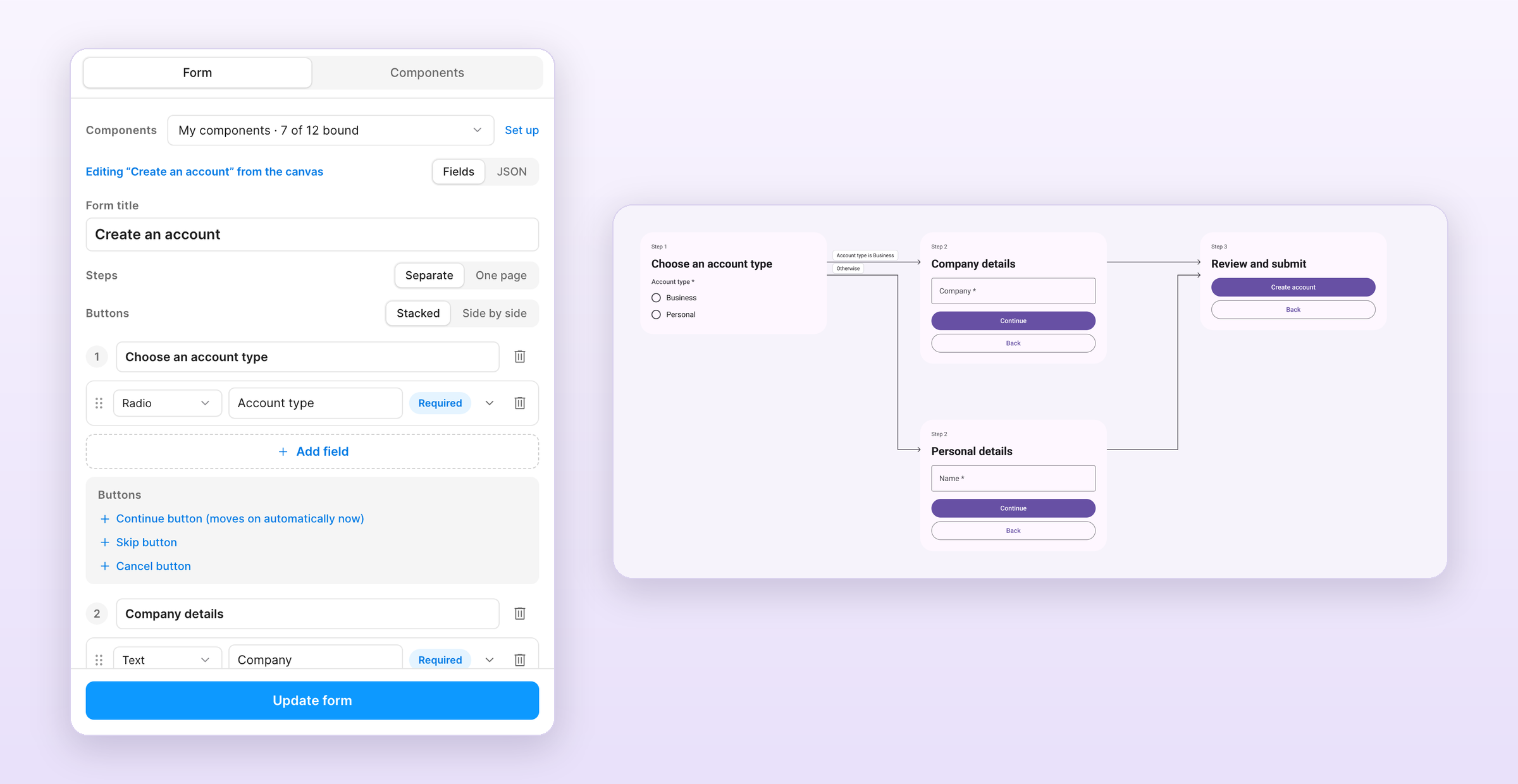
The /formhaus:formhaus-figma-connect Claude Code skill binds your library's components to the plugin. See the plugin guide for local installation.
Contributing
See CONTRIBUTING.md.
License
formhaus MCP Fragen
Wie füge ich formhaus MCP zu Claude Code hinzu?
Führe claude mcp add formhaus -- npx -y @formhaus/mcp in deinem Terminal aus. Füge --scope user hinzu, damit der Server in jedem Projekt verfügbar ist.
Wie füge ich formhaus MCP zu Cursor hinzu?
Öffne ~/.cursor/mcp.json und füge den Server unter mcpServers hinzu, mit der Cursor-Config aus dem Installationsabschnitt oben.
Was kann der Formhaus MCP server können?
Der MCP server ermöglicht es AI-Agents, Formulardefinitionen lokal zu schreiben, zu prüfen und zu reparieren, ohne dass ein Account erforderlich ist.
Kann ich Formhaus mit meinen eigenen UI-Komponenten nutzen?
Ja, sowohl die React- als auch die Vue-Adapter erlauben es dir, native HTML-Inputs über ein components prop gegen deine eigenen Custom Components auszutauschen.
Unterstützt Formhaus mehrstufige Formulare?
Ja, die JSON-Definition unterstützt mehrstufige Formulare inklusive Felder, Validierung, bedingten Feldern, Schritten und Verzweigungen.