
Agent Lighthouse MCP server
Commit 13. Nov. 2026Prüft Websites darauf, ob AI Agents, LLM-Crawler und MCP-Clients Inhalte effektiv finden, parsen, zitieren und darauf agieren können.
Auch bekannt als ForkPoint/agent-lighthouse, @forkpoint/agent-lighthouse, @forkpoint/agent-lighthouse-core, @forkpoint/agent-lighthouse-mcp
- Stars
- 17
- Tools
- —
- Downloads, 30 Tage
- 10.490
- Neueste Version
- —
- Letzter Commit
- 13. Nov. 2026
- Lizenz
- Apache-2.0
Was ist Agent Lighthouse MCP?
Agent Lighthouse ist ein MCP server. Prüft Websites darauf, ob AI Agents, LLM-Crawler und MCP-Clients Inhalte effektiv finden, parsen, zitieren und darauf agieren können.
Zusammenfassung generiert aus dem README des Projekts
Über Agent Lighthouse MCP server
Agent Lighthouse bietet ein spezialisiertes Auditing-Framework für Entwickler und Website-Betreiber, um zu bewerten, wie gut ihre Websites mit künstlicher Intelligenz interagieren. Es prüft, ob LLM-Crawler, agentic Browser und MCP-Clients Inhalte erfolgreich finden, parsen und darauf agieren können. Das Tool untersucht kritische Elemente wie robots.txt-Policies für Bots wie GPTBot und ClaudeBot, Machine-Discovery-Files wie llms.txt sowie strukturierte Daten via Schema.org.
Nutzer können Audits über ein Command Line Interface mittels npx durchführen oder die Funktionalität via MCP server in ihre Development-Workflows integrieren. Dies ermöglicht es Clients wie Claude Desktop oder Cursor, das tool audit_website direkt auszuführen. Das System generiert verschiedene Outputs, darunter Zusammenfassungen im Terminal, HTML-Reports und JSON-Dateien. Zudem gibt es eine GitHub Action, um Tests in Continuous-Integration-Pipelines zu automatisieren, indem Builds fehlschlagen, wenn eine Website einen festgelegten Mindestscore unterschreitet.
Was du damit machen kannst
- 1KI-Readiness-Tests automatisierenRichte einen Continuous-Integration-Check ein, um sicherzustellen, dass Website-Änderungen den Score für KI-Erreichbarkeit nicht unter einen bestimmten Schwellenwert senken.
- 2Agentic Commerce Fähigkeiten prüfenVerifiziere, dass deine Website die notwendigen Schnittstellen bietet, damit AI Agents Produktangebote, Verfügbarkeiten und Checkout-Prozesse abwickeln können.
- 3Direkt über die IDE auditierenFühre Website-Scans über einen MCP client wie Cursor durch, um die Einhaltung von Machine Discovery und Interface-Standards zu prüfen.
Geschrieben aus dem README des Projekts. Jeder Use Case wurde gegen ein Zitat daraus geprüft.
So installierst du Agent Lighthouse MCP
Formate geprüft am 10. Nov. 2026Zu Cursor hinzufügenZu Goose hinzufügenAgent Lighthouse MCP in Claude Code installieren
$ claude mcp add agent-lighthouse -- npx -y @forkpoint/agent-lighthouseAgent Lighthouse MCP in Cursor installieren
~/.cursor/mcp.json
{
  "mcpServers": {
    "agent-lighthouse": {
      "command": "npx",
      "args": [
        "-y",
        "@forkpoint/agent-lighthouse"
      ]
    }
  }
}Agent Lighthouse MCP in VS Code installieren
.vscode/mcp.json
{
  "servers": {
    "agent-lighthouse": {
      "type": "stdio",
      "command": "npx",
      "args": [
        "-y",
        "@forkpoint/agent-lighthouse"
      ]
    }
  }
}Agent Lighthouse MCP in VS Code CLI installieren
$ code --add-mcp '{"name":"agent-lighthouse","type":"stdio","command":"npx","args":["-y","@forkpoint/agent-lighthouse"]}'Agent Lighthouse MCP in Claude Desktop installieren
claude_desktop_config.json
{
  "mcpServers": {
    "agent-lighthouse": {
      "command": "npx",
      "args": [
        "-y",
        "@forkpoint/agent-lighthouse"
      ]
    }
  }
}Agent Lighthouse MCP in Codex installieren
$ codex mcp add agent-lighthouse -- npx -y @forkpoint/agent-lighthouseAgent Lighthouse MCP in Codex config.toml installieren
~/.codex/config.toml
[mcp_servers.agent-lighthouse]
command = "npx"
args = ["-y", "@forkpoint/agent-lighthouse"]
Agent Lighthouse MCP in Gemini CLI installieren
$ gemini mcp add -s user agent-lighthouse npx -- -y @forkpoint/agent-lighthouseAgent Lighthouse MCP in Gemini settings.json installieren
~/.gemini/settings.json
{
  "mcpServers": {
    "agent-lighthouse": {
      "command": "npx",
      "args": [
        "-y",
        "@forkpoint/agent-lighthouse"
      ]
    }
  }
}Automatisierte Checks
Geluften am 14. Nov. 2026Vollständiger Bericht →Noch nicht verifiziert. Ein Server benötigt einen Score von 80, keine kritischen Befunde und genug Daten für unsere Prüfung. Wie die Checks funktionieren · Was du für mehr Punkte verbessern kannst

- Source Repository verknüpft und erreichbarforkpoint/agent-lighthouse is public and reachablegithub.com/forkpoint/agent-lighthouse ↗Bestanden
- Paket nennt dieses Repository als Quelle@forkpoint/agent-lighthouse, @forkpoint/agent-lighthouse-core name forkpoint/agent-lighthouse as sourcenpmjs.com/package/@forkpoint/agent-lighthouse ↗Bestanden
- Build-Provenienz (Sigstore-Attestierung)No build attestation published for this releaseNicht geprüft
- Open Source Lizenz (OSI)Apache-2.0spdx.org/licenses/Apache-2.0.html ↗Bestanden
- Commit oder Release im letzten JahrLast commit or release 2026-11-11github.com/forkpoint/agent-lighthouse ↗Bestanden
- OpenSSF ScorecardNicht geprüft
- Package-Name ähnelt keinem populären PackageNo popular package one edit away from @forkpoint/agent-lighthouse, @forkpoint/agent-lighthouse-core, @forkpoint/agent-lighthouse-mcpBestanden
- Keine kritischen Advisories im Paket oder seinen AbhängigkeitenNicht geprüft
- Keine versteckten Anweisungen an das Modell0 tool descriptions and the README read; no override phrases, credential paths or hidden charactersBestanden
- Destruktive Tools sind markiertNicht geprüft
- Remote-Endpoint beantwortet den MCP-HandshakeNicht geprüft
README
Auf GitHub ansehen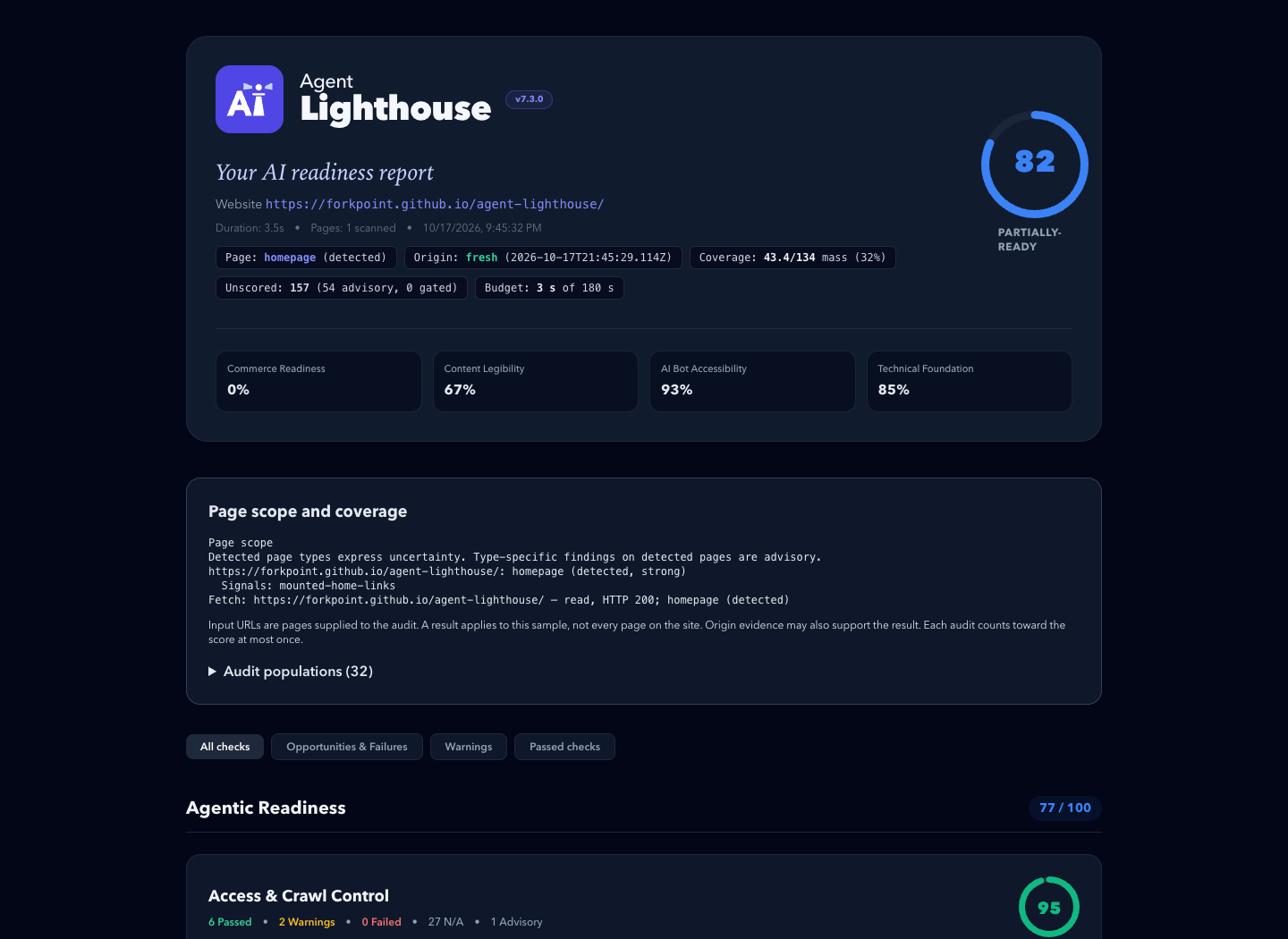
An example report. Its scores describe one past scan, not the site's current state.
⚡ Quickstart
Requires Node.js 22.22.2+ (22.x), 24.15.0+ (24.x), or 26+.
# Terminal report, plus HTML and JSON reports in ./reports
npx @forkpoint/agent-lighthouse https://example.com

# Open the HTML report in your browser
npx @forkpoint/agent-lighthouse https://example.com --view

# Fail (exit 1) below a score, for CI
npx @forkpoint/agent-lighthouse https://staging.example.com --min-score 85
Agentic readiness skill
The agent-lighthouse skill lets a coding agent turn a report into verified fixes, on any website stack. It traces findings through source files and hosting settings, and keeps local fixes apart from deployed scan results.
Install it from this repository's marketplace. In Claude Code:
claude plugin marketplace add ForkPoint/agent-lighthouse
claude plugin install agent-lighthouse@agent-lighthouse
In Codex:
codex plugin marketplace add ForkPoint/agent-lighthouse
codex plugin add agent-lighthouse@agent-lighthouse
From a local checkout, pass /absolute/path/to/agent-lighthouse to marketplace add. Start a new chat after installing. The CLI and MCP npm packages are separate. See the installation and workflow guide.
🎯 What Agent Lighthouse Checks
Agent Lighthouse evaluates websites across 8 agent-journey categories grouped into 3 readiness pillars:
├── 1. Agentic Readiness
│   ├── Access & Crawl Control (robots.txt rules for GPTBot, ClaudeBot, PerplexityBot, blocks, status codes)
│   ├── Machine Discovery (llms.txt, llms-full.txt, sitemaps, feeds, .well-known surfaces)
│   ├── Agent Interfaces (WebMCP manifests, OpenAPI specs, agents.json, search actions)
│   └── Agentic Commerce (product offers, availability, checkout and payment surfaces)
│
├── 2. AI Search Optimization
│   ├── Content Extraction (clean main content, semantic structure, render and response cost)
│   ├── Structured Data (Schema.org Product, Offer, SKU, GTIN, Organization, JSON-LD validity)
│   └── Answer Readiness (direct answerability, step lists, tables, unique data, citations)
│
└── 3. Technical Foundation
    └── Agent Operability & Safety (HTTPS, security.txt, tdmrep, stability, broken agent endpoints)
📦 Packages & Architecture
A pnpm monorepo published under the @forkpoint scope:
| Package | npm Package | Description |
|---|---|---|
packages/cli |
@forkpoint/agent-lighthouse |
Main CLI binary (npx @forkpoint/agent-lighthouse <url>). |
packages/core |
@forkpoint/agent-lighthouse-core |
Core gatherer-audit engine, scoring algorithms, and types. |
packages/report |
@forkpoint/agent-lighthouse-report |
Standalone HTML, Markdown, and unified report view-model. |
packages/mcp |
@forkpoint/agent-lighthouse-mcp |
Model Context Protocol (MCP) server for Claude / Cursor / IDEs. |
🛡️ GitHub Actions CI
- uses: ForkPoint/agent-lighthouse@main
  with:
    url: https://staging.example.com
    min-score: "85"
    github-token: ${{ secrets.GITHUB_TOKEN }}
The action writes terminal, HTML, JSON, and Markdown reports. With github-token it comments the Markdown summary on the pull request. Inputs and pinning are in the GitHub Action guide.
💻 Programmatic Node.js / TypeScript SDK
import { runScan } from "@forkpoint/agent-lighthouse-core";
import {
  buildReportView,
  generateHtmlReport,
} from "@forkpoint/agent-lighthouse-report";

const report = await runScan("https://example.com");
const view = buildReportView(report);

// overallScore is null when the scan saw too little to judge the site
console.log(`Overall Score: ${view.overallScore}/100 (${view.scoreTier})`);

const html = generateHtmlReport(report); // standalone HTML report
Options are in programmatic options.
🤖 Model Context Protocol (MCP) Server
Let Claude Desktop, Cursor or another MCP client run scans through the audit_website tool:
{
  "mcpServers": {
    "agent-lighthouse": {
      "command": "npx",
      "args": ["-y", "@forkpoint/agent-lighthouse-mcp"]
    }
  }
}
📣 Share Your Score
Reports are standalone files: attach them to pull requests, send them to clients, or publish a before/after. Put the score in a README with a badge. Share a public site's result through the site score template.
More: media kit (boilerplate, screenshots, logos) · brand guide · brand kit download
🛠️ Development
git clone https://github.com/ForkPoint/agent-lighthouse.git
cd agent-lighthouse
pnpm install
pnpm build
pnpm test   # deterministic tests with fixed inputs
Contributor rules, including how to add an audit, are in CLAUDE.md.
📄 License
Apache-2.0 © ForkPoint
Agent Lighthouse MCP Fragen
Wie füge ich Agent Lighthouse MCP zu Claude Code hinzu?
Führe claude mcp add agent-lighthouse -- npx -y @forkpoint/agent-lighthouse in deinem Terminal aus. Füge --scope user hinzu, damit der Server in jedem Projekt verfügbar ist.
Wie füge ich Agent Lighthouse MCP zu Cursor hinzu?
Öffne ~/.cursor/mcp.json und füge den Server unter mcpServers hinzu, mit der Cursor-Config aus dem Installationsabschnitt oben.
Was prüft Agent Lighthouse?
Es bewertet Websites in acht Kategorien der Agent-Journey, darunter Access Control, Machine Discovery, Agent Interfaces, Agentic Commerce, Content Extraction, Structured Data, Answer Readiness und die technische Basis.
Kann ich das in meiner CI/CD-Pipeline nutzen?
Ja, du kannst das CLI nutzen, um Builds bei einem Score unter einem bestimmten Wert scheitern zu lassen, oder die offizielle GitHub Action verwenden, um Markdown-Zusammenfassungen als Kommentare in Pull Requests zu posten.
Wie kann ich das mit Claude Desktop oder Cursor nutzen?
Du kannst es als MCP server über das @forkpoint/agent-lighthouse-mcp Package via npx anbinden.