
glass MCP server
Commit 13. Nov. 2026Ermöglicht es AI Coding Agents, native GUI-Anwendungen auf Desktop- und Mobilplattformen über einen Accessibility-basierten Loop zu starten, zu steuern und zu debuggen.
Auch bekannt als fixed-width/glass
- Stars
- 21
- Tools
- —
- Downloads, 30 Tage
- —
- Neueste Version
- 1.9.0
- Letzter Commit
- 13. Nov. 2026
- Lizenz
- Apache-2.0
Was ist glass MCP?
glass ist ein MCP server. Ermöglicht es AI Coding Agents, native GUI-Anwendungen auf Desktop- und Mobilplattformen über einen Accessibility-basierten Loop zu starten, zu steuern und zu debuggen.
Zusammenfassung generiert aus dem README des Projekts
Über glass MCP server
Glass bietet AI Coding Agents eine Möglichkeit, mit nativen GUI-Anwendungen durch einen geschlossenen Loop aus Bauen, Sehen, Interagieren und Debuggen zu interagieren. Anstatt sich nur auf Screenshots zu verlassen, nutzt der MCP server Accessibility Trees, damit Agents benannte Controls identifizieren und UI-Änderungen via Text verifizieren können. Das ermöglicht einen autonomen Workflow, bei dem ein Agent eine Anwendung starten, einen Bug reproduzieren, den Quellcode fixen und die Lösung ohne menschliches Eingreifen bestätigen kann.
Der Server unterstützt mehrere Plattformen, darunter Windows, macOS, Linux mit X11 oder Wayland sowie Mobile-Umgebungen via Android AVD Emulatoren oder iOS Simulatoren. Er arbeitet als Black Box, was bedeutet, dass keine spezielle Integration innerhalb der zu testenden Anwendung erforderlich ist. Nutzer können ihn über stdio oder Netzwerk-HTTP-Transport mit jedem MCP host verbinden. Die Setup-Anforderungen variieren je nach Plattform, wie etwa die Nutzung von Sandboxie unter Windows oder spezifische Enrollment- und Permission-Grants unter macOS zur Verwaltung von Development-Accounts.
Was du damit machen kannst
- 1Automatisierte UI-Bug-ReproduktionEin Agent kann den Accessibility Tree nutzen, um einen spezifischen Button zu finden und einen Fehler auszulösen, um einen Bug zu identifizieren.
- 2Plattformübergreifendes Mobile TestingEntwickler können einen Agenten einen Android Emulator oder einen iOS Simulator steuern lassen, um mobile Interfaces zu testen.
- 3Visuelles Regression TestingFür Apps ohne Accessibility-Support kann ein Agent Pixel-Änderungen vergleichen, um UI-Updates zu erkennen.
- 4Headless Linux EntwicklungEin Agent kann GUI-Anwendungen auf Linux unter Verwendung privater Displays ausführen und testen, um Interferenzen mit dem Desktop des Nutzers zu vermeiden.
Geschrieben aus dem README des Projekts. Jeder Use Case wurde gegen ein Zitat daraus geprüft.
Automatisierte Checks
Geluften am 14. Nov. 2026Vollständiger Bericht →Noch nicht verifiziert. Ein Server benötigt einen Score von 80, keine kritischen Befunde und genug Daten für unsere Prüfung. Wie die Checks funktionieren · Was du für mehr Punkte verbessern kannst

- Source Repository verknüpft und erreichbarfixed-width/glass is public and reachablegithub.com/fixed-width/glass ↗Bestanden
- Paket nennt dieses Repository als QuelleNicht geprüft
- Build-Provenienz (Sigstore-Attestierung)Nicht geprüft
- Open Source Lizenz (OSI)Apache-2.0spdx.org/licenses/Apache-2.0.html ↗Bestanden
- Commit oder Release im letzten JahrLast commit or release 2026-11-13github.com/fixed-width/glass ↗Bestanden
- OpenSSF ScorecardNicht geprüft
- Package-Name ähnelt keinem populären PackageNicht geprüft
- Keine kritischen Advisories im Paket oder seinen AbhängigkeitenNicht geprüft
- Keine versteckten Anweisungen an das Modell0 tool descriptions and the README read; no override phrases, credential paths or hidden charactersBestanden
- Destruktive Tools sind markiertNicht geprüft
- Remote-Endpoint beantwortet den MCP-HandshakeNicht geprüft
README
Auf GitHub ansehenglass


Give your coding agent hands for the app it's building — launch it, drive it, and verify the result, without burning a screenshot on every step.
A Rust MCP server that gives an AI coding agent a closed build → see → interact → debug loop over external native GUI applications.
glass lets an agent launch a GUI app, capture what is on screen, inject mouse and keyboard input, read the app's logs, and detect visual changes — so a coding agent can build and debug UI applications independently instead of asking the user "does this look right?".
glass drives apps as an external black box, so it works with any native GUI app regardless of toolkit
or language. It has two Linux backends (X11 and Wayland), a Windows backend, an
Android backend (an AVD emulator, driven over adb from any host), an iOS backend (native
apps in the Simulator over xcrun simctl, with input and the accessibility tree via idb_companion,
including a two-finger pinch), and a macOS backend, behind a platform-agnostic core.
The same input tools work across backends. Default Linux displays and mobile emulators keep input
separate from your desktop. Windows shares it; macOS adds a preview of separate-account setup for
apps off your desktop, alongside its existing shared-desktop setup. glass_capabilities with
scope: "session" reports click, scroll and text support and whether each can affect your desktop.
The macOS account setup uses the normal
MCP tools and one Glass installation. Application setup… guides enrollment, permission handoff and
live readiness checks, including creating a standard development account with a locally chosen
password. It needs a real login and Glass privacy grants in that account,
retained between runs. Enrollment applies to your macOS user; glass-mcp unenroll returns to
shared-desktop use while retaining the app, development account and MCP startup integration.
Development loops have been tested on an Apple Silicon Mac mini without a physical monitor.
These runtime checks used an initialized development account and include physical keyboard/mouse
coexistence, recovery after an interrupted client, and starting its development desktop after a real
reboot with existing permissions. New-account onboarding has also reached Ready and passed ordinary
app interaction on that Mac. Initial macOS login and any missing privacy grants require user action;
setup on a clean macOS installation without prior Glass grants has not been tested. Application setup includes
Start environment… for a missing development desktop, using local account credentials and an
already enabled macOS Screen Sharing service. This guided post-reboot flow and ordinary
build/interact/rebuild/stop loops in an indexed workspace have been tested without repeating
enrollment or permission setup. Unattended development-desktop startup is not implemented.
See it
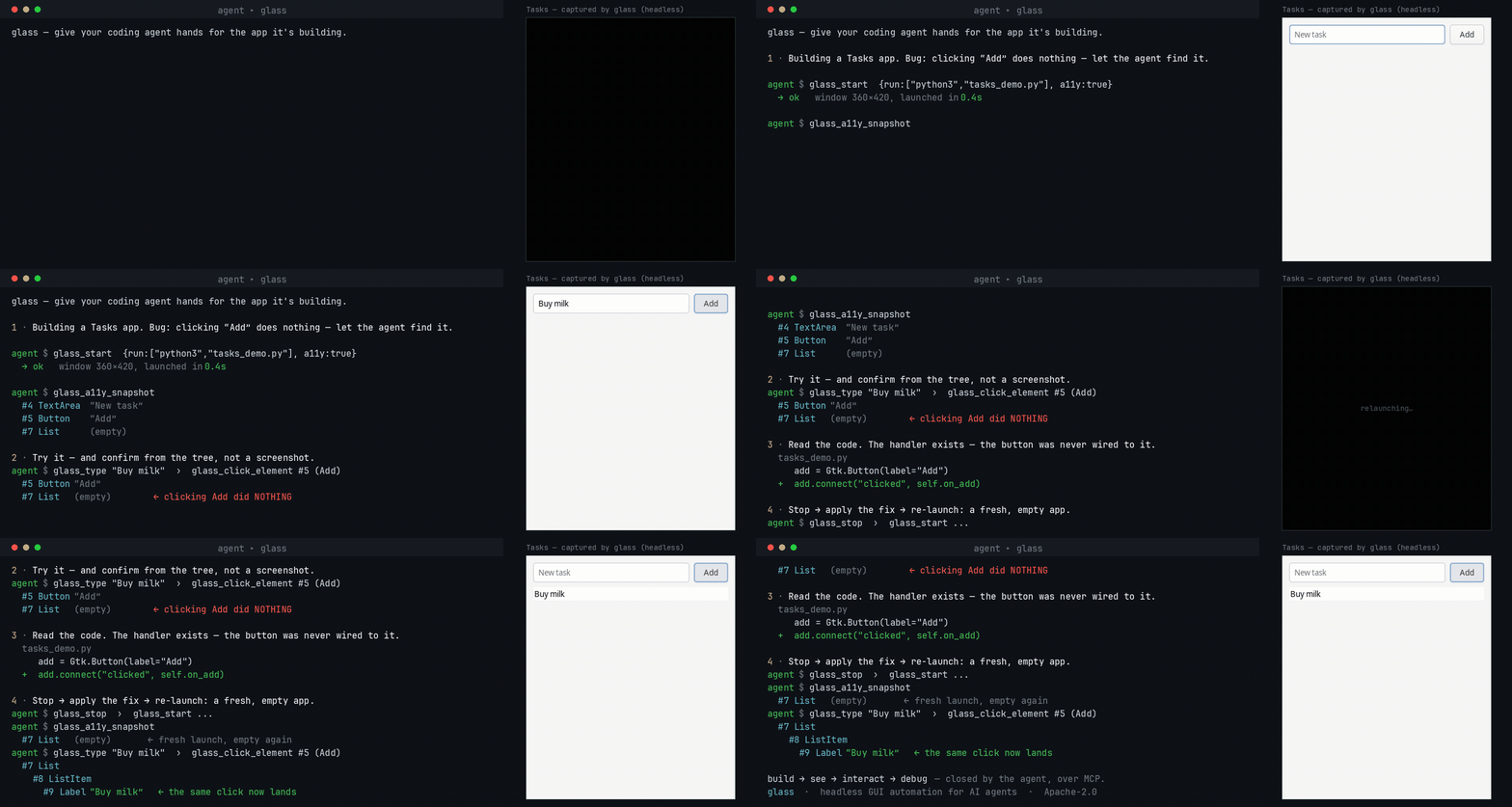
An agent building a GUI app runs it under glass, reproduces a bug from the accessibility tree (no screenshots), fixes the code, and re-verifies — the loop it otherwise can't close on its own. Try it yourself.
Try it in 60 seconds
-
Download glass for your platform from the Releases page and connect it to your agent — glass works with any MCP host (see which are verified).
-
Get the example app — clone this repo, or download
examples/tasks-demo/tasks_demo.py(on Linux it needssudo apt install python3-gi gir1.2-gtk-4.0). -
Paste this to your agent:
Use glass to run
examples/tasks-demo/tasks_demo.pywith accessibility on. There's a bug: clicking Add doesn't add the typed task. Reproduce it by driving the UI and checking the accessibility tree (don't just screenshot), then find and fix the bug in the code and verify a task actually appears.
Your agent launches the app, reproduces the bug from the accessibility tree, fixes the one-line
wiring bug, and confirms the task appears — the whole build → see → interact → debug loop, start to
finish. (glass-mcp doctor checks your environment if anything's off.)
The loop in practice
An agent can fill in a form, click Save, and check that the app reports success. When the app exposes an accessibility tree, the agent works with named controls and verifies changes from text:
glass_start { "run": ["python3", "app.py"] }
glass_do { "actions": [
  { "action": "set_value",
    "target": { "query": "account", "role": "TextField", "states": ["enabled"] },
    "text": "hello" },
  { "action": "click_element",
    "target": { "query": "Save", "role": "Button", "states": ["enabled"] },
    "mode": "auto" },
  { "action": "wait_for_element", "name": "Saved" }
] }
glass_logs
Use glass_find_elements to inspect candidates when the intended target is not unique or known well
enough to act on directly. Use glass_a11y_snapshot to explore the app's controls. See the
tool reference for click modes and platform behavior.
For a canvas or custom-rendered app with no accessibility tree, drive it by pixels instead —
glass_screenshot, glass_click {x,y}, and glass_diff, which returns changed_pct + a bbox as
text, so routine checks between screenshots cost no vision tokens. Why the loop is shaped this way:
the build → see → interact → debug loop.
To review a run after the app stops, opt into session evidence recording
with --trace-dir. Glass retains tool inputs and requested results in bounded storage, then
glass-mcp trace inspect and trace export validate the trace and package its evidence in a ZIP.
Recording is off by default; retained app content can contain sensitive data.
Install at a glance
Download the latest build for your platform from the Releases page, then set up your host:
- Linux — docs/how-to/setup-linux.md (X11 or Wayland;
Xvfb/sway+ bubblewrap) - Windows — docs/how-to/setup-windows.md (a prebuilt
.exe+ Sandboxie) - macOS — docs/how-to/setup-macos.md (install the notarized
.dmg; no build needed) - Android — docs/how-to/setup-android.md (an AVD emulator, from any host)
- iOS — docs/how-to/setup-ios.md (the Simulator, macOS host only)
Every asset is listed in docs/reference/platforms.md.
Prefer to compile, or on an architecture with no published asset? See
docs/how-to/build-from-source.md — it is a single cargo build.
Then connect glass to your agent and run glass-mcp doctor to check
the environment. New here? Follow the tutorial for a guaranteed first
success.
For new agent configurations, use glass-mcp --tool-profile lean for 17 tools, with actions through
glass_do, annotated screenshots and optional log waits. The full toolbox remains the compatible
binary default. Inspect either inventory without
starting a session using glass-mcp tools --json; see tool profiles.
Drive it well — the glass-drive skill
glass needs no app integration and no skill to run, but an agent drives it far more reliably with the open glass-drive Agent Skill — it stops the agent spending its first turns rediscovering the verify-cheaply-then-look loop. Installing it is the single highest-leverage thing you can add when pointing an agent at glass.
Platform support
✓ supported · ◑ partial · – not supported · 🚧 planned.
| Capability | Linux (X11 + Wayland) | Windows | Android (AVD) | iOS (Simulator) | macOS |
|---|---|---|---|---|---|
| Capture · input · windows · clipboard · logs | ✓ | ✓ | ✓ | ✓ | ✓ |
| Accessibility (semantic addressing) | ✓ AT-SPI | ✓ UI Automation | ✓ UIAutomator | ✓ idb | ✓ AX |
| Containment / sandboxing | ✓ bubblewrap | ✓ Sandboxie | ✓ the emulator VM | ✓ the Simulator | ✓ Seatbelt |
| Input without desktop interference | ✓ private display | – shared desktop | ✓ emulator | ✓ Simulator | ◑ separate account (preview) |
| Display isolation (app off your desktop) | ✓ headless Xvfb / sway | – VM needed | ✓ headless emulator | ✓ headless simctl boot | ◑ separate account (preview) |
Full matrix, per-capability detail, and system requirements: docs/reference/platforms.md. Transport is MCP over stdio (default) or network HTTP.
Documentation
The full docs — tutorial, how-to guides, reference, and explanations — are under
docs/. See CHANGELOG.md for release notes, and
Stability and versioning for what a 1.0 release guarantees.
Contributing? CONTRIBUTING.md has the gates a PR has to pass, and
Verify a change covers platform code your own host cannot run.
License
glass is open core, licensed Apache-2.0 — see LICENSE-APACHE.
glass MCP Fragen
Wie interagiert der Agent mit Anwendungen?
Der Agent kann den Accessibility Tree nutzen, um mit benannten Controls zu arbeiten, oder die App via Screenshots und koordinatenbasierten Klicks auf Pixelebene steuern.
Kann Glass Apps ausführen, ohne meinen Desktop zu stören?
Ja, Standard-Linux-Displays und Mobile Emulatoren halten den Input von deinem Desktop getrennt, während macOS eine Vorschau über ein separates Account anbietet, um Apps außerhalb deines Desktops zu halten.