
EximAgent MCP server
Commit 13. Okt. 2026Ermöglicht KI-Clients die Durchführung von Outbound-Prospecting, Handelsdatenanalysen und Compliance-Checks für die Import-Export-Branche.
Auch bekannt als EximAgent/cursor-plugin, cursor-plugin
- Stars
- 1
- Tools
- —
- Downloads, 30 Tage
- —
- Neueste Version
- 0.1.1
- Letzter Commit
- 13. Okt. 2026
- Lizenz
- MIT
Was ist EximAgent MCP?
EximAgent ist ein MCP server. Ermöglicht KI-Clients die Durchführung von Outbound-Prospecting, Handelsdatenanalysen und Compliance-Checks für die Import-Export-Branche.
Zusammenfassung generiert aus dem README des Projekts
Über EximAgent MCP server
EximAgent bietet ein spezialisiertes Team von KI-Agenten, die für Profis in der Import-Export-Branche entwickelt wurden. Es verbindet sich mit Clients wie Claude, Cursor und Claude Code über einen gehosteten MCP Connector oder ein Command-Line Tool. Nutzer können den Service integrieren, indem sie sich via OAuth mit einem Google-Konto anmelden. Das System arbeitet mit drei verschiedenen Agenten-Rollen: Outbound zum Finden von Käufern und Schreiben von Outreach-Mails, Analyst zur Untersuchung von Handelsströmen und Markttrends sowie Compliance für die Verwaltung regulatorischer Anforderungen.
Entwickler und Handelsexperten nutzen diesen Server, um auf echte Zolllieferdaten und Handelsdaten zuzugreifen. Das Toolset umfasst spezifische Funktionen für die HS-Klassifizierung, Tarif-Abfragen und OFAC-Sanctions-Screening. Während der Connector die Daten über eine streamable HTTP-Verbindung verarbeitet, können Assistenten mit Terminal-Zugriff auch das eximagent CLI für Skripte oder lange Listen nutzen. Der Service ist kostenlos startbar und erfordert ein EximAgent-Konto für den vollen Zugriff.
Was du damit machen kannst
- 1Neue Käufer identifizieren und kontaktierenFinde Importeure bestimmter Waren aus Zolldaten und erstelle personalisierte Outreach-E-Mails.
- 2Globale Handelstrends analysierenRecherchiere Marktgrößen, Preistrends und primäre Handelsrouten für spezifische Rohstoffe.
- 3Regulatorische Compliance prüfenÜberprüfe Firmennamen gegen Sanktionslisten und ermittle die anwendbaren Zölle für bestimmte Handelsrouten.
- 4Produktklassifizierungen bestimmenIdentifiziere die korrekten HS-Codes und die dazugehörigen Tarife für den Versand von Waren zwischen Ländern.
Geschrieben aus dem README des Projekts. Jeder Use Case wurde gegen ein Zitat daraus geprüft.
So installierst du EximAgent MCP
Formate geprüft am 10. Nov. 2026Zu Cursor hinzufügenZu Goose hinzufügenEximAgent MCP in Claude Code installieren
$ claude mcp add --transport http cursor-plugin https://mcp.eximagent.ai/mcpEximAgent MCP in Cursor installieren
~/.cursor/mcp.json
{
  "mcpServers": {
    "cursor-plugin": {
      "url": "https://mcp.eximagent.ai/mcp"
    }
  }
}EximAgent MCP in VS Code installieren
.vscode/mcp.json
{
  "servers": {
    "cursor-plugin": {
      "type": "http",
      "url": "https://mcp.eximagent.ai/mcp"
    }
  }
}EximAgent MCP in VS Code CLI installieren
$ code --add-mcp '{"name":"cursor-plugin","type":"http","url":"https://mcp.eximagent.ai/mcp"}'EximAgent MCP in Codex installieren
$ codex mcp add cursor-plugin --url https://mcp.eximagent.ai/mcpEximAgent MCP in Codex config.toml installieren
~/.codex/config.toml
[mcp_servers.cursor-plugin]
url = "https://mcp.eximagent.ai/mcp"
EximAgent MCP in Gemini CLI installieren
$ gemini mcp add -s user --transport http cursor-plugin https://mcp.eximagent.ai/mcpEximAgent MCP in Gemini settings.json installieren
~/.gemini/settings.json
{
  "mcpServers": {
    "cursor-plugin": {
      "url": "https://mcp.eximagent.ai/mcp",
      "type": "http"
    }
  }
}Automatisierte Checks
Geluften am 14. Nov. 2026Vollständiger Bericht →Noch nicht verifiziert. Ein Server benötigt einen Score von 80, keine kritischen Befunde und genug Daten für unsere Prüfung. Wie die Checks funktionieren · Was du für mehr Punkte verbessern kannst

- Source Repository verknüpft und erreichbareximagent/cursor-plugin is public and reachablegithub.com/eximagent/cursor-plugin ↗Bestanden
- Paket nennt dieses Repository als QuelleNicht geprüft
- Build-Provenienz (Sigstore-Attestierung)Nicht geprüft
- Open Source Lizenz (OSI)MITspdx.org/licenses/MIT.html ↗Bestanden
- Commit oder Release im letzten JahrLast commit or release 2026-10-13github.com/eximagent/cursor-plugin ↗Bestanden
- OpenSSF ScorecardNicht geprüft
- Package-Name ähnelt keinem populären PackageNicht geprüft
- Keine kritischen Advisories im Paket oder seinen AbhängigkeitenNicht geprüft
- Keine versteckten Anweisungen an das Modell0 tool descriptions and the README read; no override phrases, credential paths or hidden charactersBestanden
- Destruktive Tools sind markiertNicht geprüft
- Remote-Endpoint beantwortet den MCP-HandshakeHTTPS endpoint answered 401 (sign-in required)Bestanden
README
Auf GitHub ansehenEximAgent plugin
EximAgent is a team of AI agents for the export-import industry, connected to Claude, Cursor and other AI clients through one MCP connector. Outbound finds importers and buyers and writes personalized outreach. Analyst digs into trade data: market size, price trends, trade flows and company profiles. Compliance handles HS classification, tariffs, landed cost and OFAC screening.
An AI sales team for export-import: Outbound, Analyst and Compliance, in Claude Code, Cursor and other AI clients. Free to start.
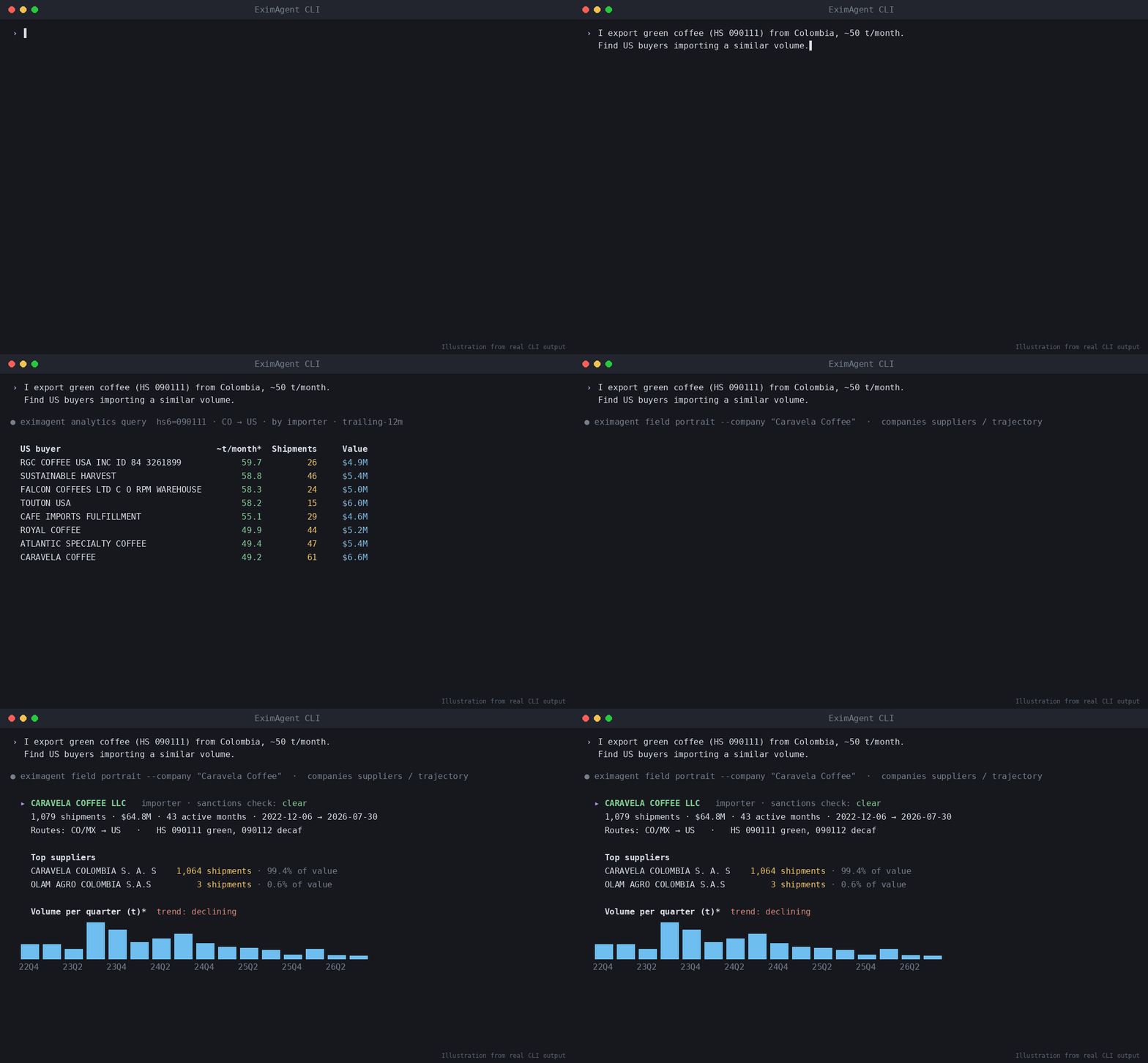
▶ Watch the demo video on YouTube
Ask in plain words, and your assistant uses EximAgent to:
- find importers, buyers and distributors from real customs shipment records
- look up HS codes, tariffs and duties for a trade lane
- screen company or person names against the OFAC sanctions list
- research a company from its website
- write personalized outreach emails to the buyers it finds
What's inside
| Part | What it does |
|---|---|
mcp.json |
Connects to the hosted EximAgent connector at https://mcp.eximagent.ai/mcp (streamable HTTP, OAuth sign-in) |
skills/eximagent |
Teaches the assistant to use the EximAgent connector: which agent and tool to use for prospecting, trade data analysis and compliance checks |
skills/eximagent-cli |
Teaches assistants that have a terminal to install and use the eximagent command-line tool |
Set up (about 2 minutes)
You need an EximAgent account. See pricing.
Cursor
Add the hosted connector to ~/.cursor/mcp.json:
{ "mcpServers": { "eximagent": { "url": "https://mcp.eximagent.ai/mcp" } } }
Then open Cursor's MCP settings, choose Connect on eximagent, and sign in with Google in the browser window that opens.
If you already use the eximagent CLI and are signed in, eximagent connect cursor writes this config for you.
Claude Code
claude mcp add --transport http eximagent https://mcp.eximagent.ai/mcp --scope user
Then run /mcp in Claude Code and sign in with Google. (CLI users who are signed in can run eximagent connect claude-code instead.)
Other assistants
- Grok Bot: open Connect Apps, find EximAgent, choose Add, then sign in with Google.
- Codex:
codex mcp add eximagent --url https://mcp.eximagent.ai/mcp, thencodex mcp login eximagent. - Claude desktop or web: Settings → Connectors → Add custom connector →
https://mcp.eximagent.ai/mcp.
Skills only (any agent that supports Agent Skills)
Add the two EximAgent skills to Claude Code, Codex, Cursor and other agents with the open-source skills CLI:
npx skills add EximAgent/cursor-plugin
To add one skill only, use --skill eximagent (for the connector) or --skill eximagent-cli (for the command-line tool). The skills work together with the EximAgent connector or the eximagent CLI.
Full connector guide: https://eximagent.ai/connectors
What you can ask
Outbound:
- "Find importers of green coffee in Germany from customs shipment records and shortlist the best five."
- "Research this buyer's website and write a personalized first email."
Analyst:
- "How big is the US market for frozen shrimp imports, and who are the top importers?"
- "Show the price trend and main trade routes for cashew nuts shipped into the Netherlands."
Compliance:
- "What HS code fits frozen shrimp, and what duty applies shipping it from Vietnam to Germany?"
- "Screen these three company names against the OFAC sanctions list."
Access
- Lookups (HS codes, tariffs, sanctions, trade questions) only read data.
- The connector reads the account you sign in with and the EximAgent trade data. It does not read your files, your mail or your other connectors.
Use the command-line tool
If your assistant can run terminal commands (for example Grok Bot, Cursor's terminal, Claude Code or Codex), it can also use
the eximagent command-line tool. This helps when the connector isn't set up, or for scripts and long lists. The
eximagent-cli skill tells the assistant how to install it with the official installer,
let you sign in yourself, and run the main commands. You sign in
in your own browser. Never paste a password or token into the chat.
Help
- Docs: https://eximagent.ai/docs
- Contact: brickai@eximagent.ai
- Command-line tool (for developers): https://github.com/EximAgent/cli
If this is useful, a star helps others find it. ⭐
License
The files in this repository (manifest, MCP config, skills and README) are released under the MIT License. See LICENSE. Using the EximAgent service is governed by the EximAgent Terms and Privacy Policy.
EximAgent MCP Fragen
Wie füge ich EximAgent MCP zu Claude Code hinzu?
Führe claude mcp add --transport http cursor-plugin https://mcp.eximagent.ai/mcp in deinem Terminal aus. Füge --scope user hinzu, damit der Server in jedem Projekt verfügbar ist.
Wie füge ich EximAgent MCP zu Cursor hinzu?
Öffne ~/.cursor/mcp.json und füge den Server unter mcpServers hinzu, mit der Cursor-Config aus dem Installationsabschnitt oben.
Greift der Connector auf meine privaten Dateien zu?
Nein, der Connector greift nur auf dein angemeldetes Konto und die EximAgent Handelsdaten zu, nicht auf deine Dateien oder E-Mails.