
Ermöglicht es KI-Assistenten, Dev Proxy Configs zu erstellen, Dokumentationen abzurufen und installierte Versionen per natürlicher Sprache zu prüfen.
Auch bekannt als dev-proxy-tools/mcp, @devproxy/mcp
- Stars
- 4
- Tools
- —
- Downloads, 30 Tage
- 710
- Neueste Version
- 0.3.1
- Letzter Commit
- 12. Nov. 2026
- Lizenz
- MIT
Was ist Dev Proxy MCP?
Dev Proxy ist ein MCP server. Ermöglicht es KI-Assistenten, Dev Proxy Configs zu erstellen, Dokumentationen abzurufen und installierte Versionen per natürlicher Sprache zu prüfen.
Zusammenfassung generiert aus dem README des Projekts
Über Dev Proxy MCP server
Dieser Server ermöglicht es Entwicklern, die Einstellungen der API-Simulation über natürliche Sprache zu verwalten, wenn sie KI-Assistenten nutzen. Er schlägt eine Brücke zwischen MCP-kompatiblen Clients wie Visual Studio Code und dem Dev Proxy API-Simulator. Durch die Verbindung via stdio über npx kann eine KI dir dabei helfen, Konfigurationen zu erstellen, um Error Handling, Rate Limits und langsame Netzwerkantworten zu testen, ohne deinen Anwendungscode ändern zu müssen.
Nutzer interagieren über spezifische Tools mit dem Server, um ihre Test-Workflows zu optimieren. Das Tool GetBestPractices bietet Unterstützung bei der Konfiguration, während FindDocs es ermöglicht, relevante Dokumentationen per natürlicher Sprache zu finden. Du kannst auch GetVersion nutzen, um sicherzustellen, dass deine aktuelle Dev Proxy Installation mit den generierten Konfigurationen kompatibel ist. Dieses Setup erfordert Node.js LTS und eine globale Installation von Dev Proxy auf deinem lokalen Rechner.
Was du damit machen kannst
- 1API-Error-Simulationen generierenFrag die KI nach einer Konfiguration, die API-Fehler nachahmt, um zu testen, wie deine Anwendung darauf reagiert.
- 2Technische Dokumentation abrufenFrage den Assistenten nach spezifischen Anweisungen, wie du verschiedene Netzwerkbedingungen simulieren kannst.
- 3Best Practices für die Konfiguration anwendenFordere eine Liste mit empfohlenen Einstellungen für dein API-Simulator-Setup an.
Geschrieben aus dem README des Projekts. Jeder Use Case wurde gegen ein Zitat daraus geprüft.
So installierst du Dev Proxy MCP
Formate geprüft am 10. Nov. 2026Zu Cursor hinzufügenZu Goose hinzufügenDev Proxy MCP in Claude Code installieren
$ claude mcp add mcp -- npx -y @devproxy/mcpDev Proxy MCP in Cursor installieren
~/.cursor/mcp.json
{
  "mcpServers": {
    "mcp": {
      "command": "npx",
      "args": [
        "-y",
        "@devproxy/mcp"
      ]
    }
  }
}Dev Proxy MCP in VS Code installieren
.vscode/mcp.json
{
  "servers": {
    "mcp": {
      "type": "stdio",
      "command": "npx",
      "args": [
        "-y",
        "@devproxy/mcp"
      ]
    }
  }
}Dev Proxy MCP in VS Code CLI installieren
$ code --add-mcp '{"name":"mcp","type":"stdio","command":"npx","args":["-y","@devproxy/mcp"]}'Dev Proxy MCP in Claude Desktop installieren
claude_desktop_config.json
{
  "mcpServers": {
    "mcp": {
      "command": "npx",
      "args": [
        "-y",
        "@devproxy/mcp"
      ]
    }
  }
}Dev Proxy MCP in Codex installieren
$ codex mcp add mcp -- npx -y @devproxy/mcpDev Proxy MCP in Codex config.toml installieren
~/.codex/config.toml
[mcp_servers.mcp]
command = "npx"
args = ["-y", "@devproxy/mcp"]
Dev Proxy MCP in Gemini CLI installieren
$ gemini mcp add -s user mcp npx -- -y @devproxy/mcpDev Proxy MCP in Gemini settings.json installieren
~/.gemini/settings.json
{
  "mcpServers": {
    "mcp": {
      "command": "npx",
      "args": [
        "-y",
        "@devproxy/mcp"
      ]
    }
  }
}Automatisierte Checks
Geluften am 14. Nov. 2026Vollständiger Bericht →Unsere automatisierten Checks bestanden. Das ist kein Security-Audit: Lies den Code und gib dem Server nur den minimal notwendigen Zugriff. Wie die Checks funktionieren

- Source Repository verknüpft und erreichbardev-proxy-tools/mcp is public and reachablegithub.com/dev-proxy-tools/mcp ↗Bestanden
- Paket nennt dieses Repository als Quelle@devproxy/mcp names dev-proxy-tools/mcp as sourcenpmjs.com/package/@devproxy/mcp ↗Bestanden
- Build-Provenienz (Sigstore-Attestierung)Sigstore attestation for @devproxy/mcpnpmjs.com/package/@devproxy/mcp/v/0.3.1#provenance ↗Bestanden
- Open Source Lizenz (OSI)MITspdx.org/licenses/MIT.html ↗Bestanden
- Commit oder Release im letzten JahrLast commit or release 2026-11-12github.com/dev-proxy-tools/mcp ↗Bestanden
- OpenSSF ScorecardNicht geprüft
- Package-Name ähnelt keinem populären PackageNo popular package one edit away from @devproxy/mcpBestanden
- Keine kritischen Advisories im Paket oder seinen Abhängigkeiten99 resolved dependencies checked; no critical advisoryosv.dev ↗Bestanden
- Keine versteckten Anweisungen an das Modell0 tool descriptions and the README read; no override phrases, credential paths or hidden charactersBestanden
- Destruktive Tools sind markiertNicht geprüft
- Remote-Endpoint beantwortet den MCP-HandshakeNicht geprüft
README
Auf GitHub ansehenDev Proxy MCP Server


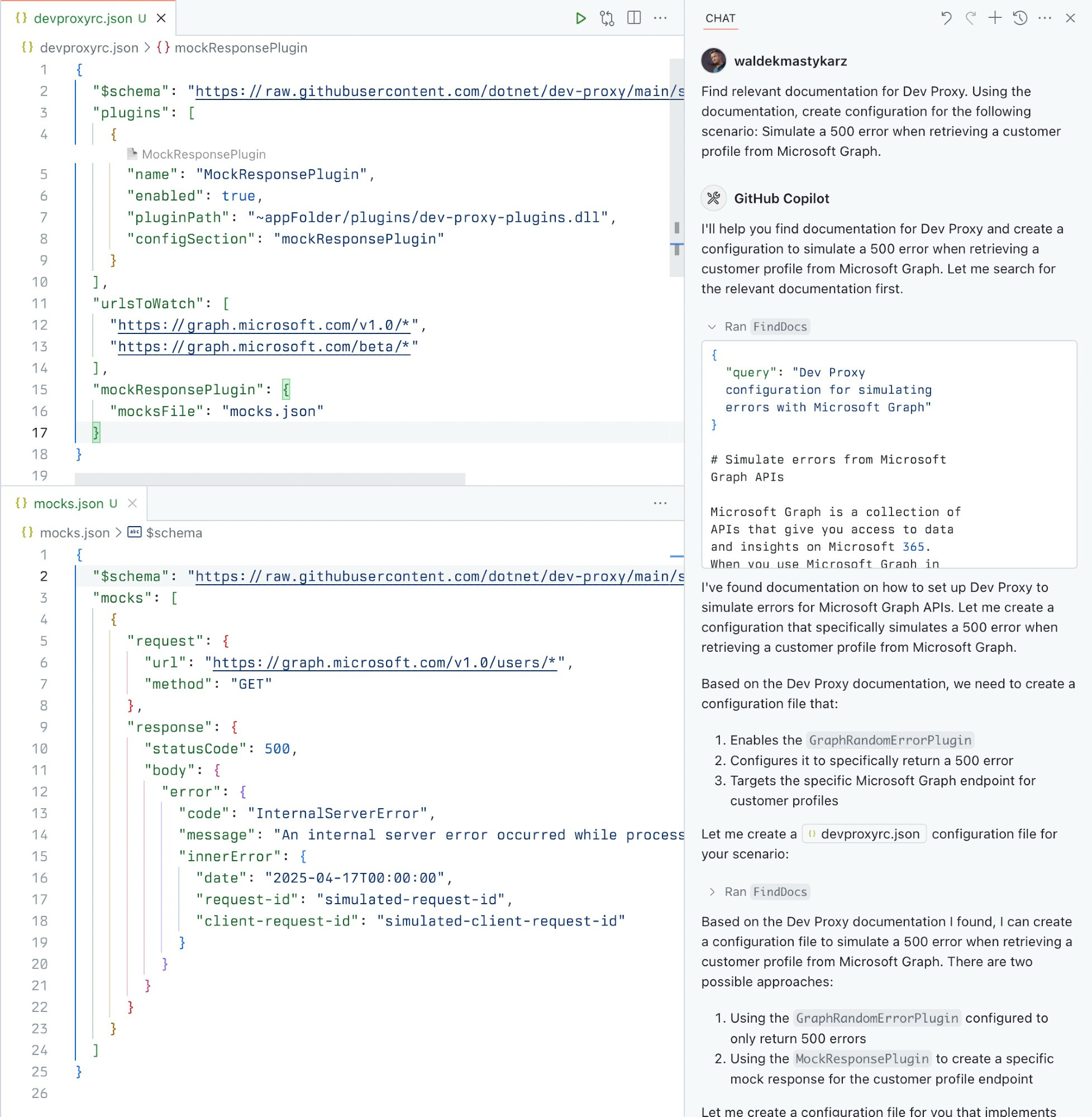
A Model Context Protocol (MCP) server for Dev Proxy that enables AI assistants to interact with Dev Proxy capabilities using the MCP standard. Use this server to:
- Create Dev Proxy configurations using natural language
- Get contextual help for working with Dev Proxy
- Discover Dev Proxy features and capabilities
What is Dev Proxy?
Dev Proxy is an API simulator that helps you effortlessly test your app beyond the happy path. It allows you to:
- Test API error handling: See how your app responds to API errors without changing your code
- Verify rate limit handling: Simulate API rate limits to improve user experience
- Test slow API responses: See how your app handles slow APIs to implement necessary affordances
- Create mock APIs: Quickly stand up mock APIs without writing code you won't ship
Dev Proxy works with any type of app and tech stack as it intercepts network requests at the proxy level.
What This Package Does
This package provides a Model Context Protocol (MCP) server interface to Dev Proxy. It allows AI assistants and other MCP-compatible clients to:
- Find Dev Proxy documentation using natural language queries
- Get the installed Dev Proxy version
Prerequisites
Usage
To set up and use the MCP server, refer to the instructions for your MCP host, such as Visual Studio Code. The Dev Proxy MCP server is published on npm under @devproxy/mcp.
Use the following values:
- Type:
stdio - Command:
npx - Arguments:
-y@devproxy/mcp
- Environment: none
[!TIP] If you want to test the preview version of the server using
@devproxy/mcp@next.
Connect with an MCP Client
This MCP server exposes the following tools:
GetBestPractices
Gets a list of best practices for configuring and using Dev Proxy. Call it for any code generation or operation involving Dev Proxy. These best practices do not change so once it has been called during the current session, you do not need to invoke it again.
_Best practices in markdown_
FindDocs
Finds relevant Dev Proxy documentation related to a specific query.
{
  "query": "How to simulate API errors"
}
GetVersion
Gets the currently installed Dev Proxy version. This is useful to ensure that the generated configuration is compatible with the installed version of Dev Proxy.
{}
Development
# Clone the repository
git clone https://github.com/waldekmastykarz/dev-proxy-mcp.git
cd dev-proxy-mcp

# Install dependencies
npm install

# Build the project
npm run build

# Run the server
npm start

# Run with MCP inspector for debugging
npm run inspect
Contributing
Contributions are welcome! Please feel free to submit a Pull Request.
- Fork the repository
- Create your feature branch (
git checkout -b feature/amazing-feature) - Commit your changes (
git commit -m 'Add some amazing feature') - Push to the branch (
git push origin feature/amazing-feature) - Open a Pull Request
License
This project is licensed under the MIT License - see the LICENSE file for details.
Related Projects
- Dev Proxy - The core Dev Proxy tool
- Model Context Protocol (MCP) - Protocol specification for AI assistant tools
Dev Proxy MCP Fragen
Wie füge ich Dev Proxy MCP zu Claude Code hinzu?
Führe claude mcp add mcp -- npx -y @devproxy/mcp in deinem Terminal aus. Füge --scope user hinzu, damit der Server in jedem Projekt verfügbar ist.
Wie füge ich Dev Proxy MCP zu Cursor hinzu?
Öffne ~/.cursor/mcp.json und füge den Server unter mcpServers hinzu, mit der Cursor-Config aus dem Installationsabschnitt oben.
Was kann Dev Proxy?
Dev Proxy ist ein API-Simulator, mit dem du das Error Handling von APIs testen, Rate Limits verifizieren, langsame API-Antworten simulieren und Mock-APIs erstellen kannst.