
Scraper MCP server
Commit 12. Nov. 2026Reduziert den LLM-Tokenverbrauch, indem Webinhalte in Markdown umgewandelt und serverseitiges CSS-Filtering für optimiertes Web Scraping angewendet wird.
Auch bekannt als cotdp/scraper-mcp
- Stars
- 8
- Tools
- 6
- Downloads, 30 Tage
- —
- Neueste Version
- —
- Letzter Commit
- 12. Nov. 2026
- Lizenz
- MIT
Was ist Scraper MCP?
Scraper ist ein MCP server. Reduziert den LLM-Tokenverbrauch, indem Webinhalte in Markdown umgewandelt und serverseitiges CSS-Filtering für optimiertes Web Scraping angewendet wird. Er stellt 6 Tools bereit, etwa scrape_url, scrape_url_html, scrape_url_text.
Zusammenfassung generiert aus dem README des Projekts
Über Scraper MCP server
scraper-mcp ermöglicht das Extrahieren sauberer Webinhalte für KI-Modelle, indem HTML in optimiertes Markdown umgewandelt wird. Dieser Server reduziert den Tokenverbrauch durch serverseitiges CSS-Filtering und gezielte Inhaltsextraktion um 70-90%. Er wurde für Entwickler konzipiert, die Clients wie Claude Code oder Claude Desktop nutzen und den Server lokal via Docker oder als Remote-Service betreiben.
Nutzer können zwischen vier Scraping-Modi wählen, darunter Roh-HTML, Markdown, Plain Text und Link-Extraktion. Für Single-Page-Applications oder Seiten mit dynamischen Inhalten nutzt der Server Playwright, um JavaScript-Rendering durchzuführen. Das System enthält zudem integrierte Perplexity AI Tools für Websuche und komplexes Reasoning, die einen Perplexity- oder OpenRouter API-Key erfordern.
Ein integriertes Monitoring-Dashboard bietet Echtzeit-Statistiken, Cache-Metriken und einen interaktiven Playground zum Testen der Tools. Um die Sicherheit zu gewährleisten, ist der MCP-Endpoint für vertrauenswürdige Clients gedacht und sollte auf einer Loopback-Adresse oder hinter einem authentifizierten Gateway betrieben werden. Administrationsfunktionen sind durch ein Token-basiertes Authentifizierungssystem geschützt.
Was du damit machen kannst
- 1LLM-Tokenkosten senkenKonvertiere Webseiten in Markdown und nutze CSS-Selector, um unnötige HTML-Elemente zu entfernen.
- 2Dynamische Single-Page-Applications scrapenRendere Inhalte von React- oder Vue-Anwendungen, die JavaScript-Execution benötigen, um Daten anzuzeigen.
- 3KI-gestützte Webrecherche durchführenFühre komplexe Suchen und Reasoning-Aufgaben mit den integrierten Perplexity AI Capabilities durch.
- 4Scraping-Performance überwachenVerfolge Request-Statistiken und Cache-Hit-Rates über eine visuelle Oberfläche.
Geschrieben aus dem README des Projekts. Jeder Use Case wurde gegen ein Zitat daraus geprüft.
Scraper MCP tools 6
Erkannt aus dem READMEscrape_urlscrape_url_htmlscrape_url_textscrape_extract_linksperplexityperplexity_reason
| scrape_url | — | |
| scrape_url_html | — | |
| scrape_url_text | — | |
| scrape_extract_links | — | |
| perplexity | — | |
| perplexity_reason | — |
Konfiguration
ENABLE_PROMPTSENABLE_RESOURCESOPENROUTER_API_KEYPERPLEXITY_API_KEYPERPLEXITY_PROVIDERPLAYWRIGHT_DISABLE_GPUPLAYWRIGHT_MAX_CONTEXTSPLAYWRIGHT_TIMEOUTSCRAPEOPS_API_KEYSCRAPEOPS_RENDER_JS
| Name | Beschreibung | Typ |
|---|---|---|
| ENABLE_PROMPTS | — | |
| ENABLE_RESOURCES | — | |
| OPENROUTER_API_KEY | — | |
| PERPLEXITY_API_KEY | — | |
| PERPLEXITY_PROVIDER | — | |
| PLAYWRIGHT_DISABLE_GPU | — | |
| PLAYWRIGHT_MAX_CONTEXTS | — | |
| PLAYWRIGHT_TIMEOUT | — | |
| SCRAPEOPS_API_KEY | — | |
| SCRAPEOPS_RENDER_JS | — |
Automatisierte Checks
Geluften am 14. Nov. 2026Vollständiger Bericht →Noch nicht verifiziert. Ein Server benötigt einen Score von 80, keine kritischen Befunde und genug Daten für unsere Prüfung. Wie die Checks funktionieren · Was du für mehr Punkte verbessern kannst

- Source Repository verknüpft und erreichbarcotdp/scraper-mcp is public and reachablegithub.com/cotdp/scraper-mcp ↗Bestanden
- Paket nennt dieses Repository als QuelleNicht geprüft
- Build-Provenienz (Sigstore-Attestierung)Nicht geprüft
- Open Source Lizenz (OSI)MITspdx.org/licenses/MIT.html ↗Bestanden
- Commit oder Release im letzten JahrLast commit or release 2026-11-12github.com/cotdp/scraper-mcp ↗Bestanden
- OpenSSF ScorecardNicht geprüft
- Package-Name ähnelt keinem populären PackageNicht geprüft
- Keine kritischen Advisories im Paket oder seinen AbhängigkeitenNicht geprüft
- Keine versteckten Anweisungen an das Modell6 tool descriptions and the README read; no override phrases, credential paths or hidden charactersBestanden
- Destruktive Tools sind markiertNo tool named like delete, drop or execBestanden
- Remote-Endpoint beantwortet den MCP-HandshakeNicht geprüft
README
Auf GitHub ansehenScraper MCP



A context-optimized MCP server for web scraping. Reduces LLM token usage by 70-90% through server-side HTML filtering, markdown conversion, and CSS selector targeting.
The latest Docker image updates on version tags or a manual Docker publish run.
Quick Start
# Run with Docker (GitHub Container Registry)
docker run -d -p 127.0.0.1:8000:8000 --name scraper-mcp ghcr.io/cotdp/scraper-mcp:latest

# Add to Claude Code
claude mcp add --transport http scraper http://localhost:8000/mcp --scope user
Try it:
> scrape https://example.com
> scrape and filter .article-content from https://blog.example.com/post
Endpoints:
- MCP:
http://localhost:8000/mcp - Dashboard:
http://localhost:8000/
The MCP endpoint is for trusted clients and can scrape private network addresses.
Keep it on loopback or behind an authenticated gateway. To enable the dashboard,
inject SCRAPER_ADMIN_TOKEN into the container (for example, add
-e SCRAPER_ADMIN_TOKEN when the value is already exported) and sign in with
username admin and the token as the password. Administration is disabled without
a token; /healthz remains public. See Security and the
0.5.0 migration notes before upgrading.
Features
Web Scraping
- 4 scraping modes: Raw HTML, markdown, plain text, link extraction
- JavaScript rendering: Optional Playwright-based rendering for SPAs and dynamic content
- CSS selector filtering: Extract only relevant content server-side
- Batch operations: Process multiple URLs concurrently
- Smart caching: Three-tier cache system (realtime/default/static)
- Retry logic: Exponential backoff for transient failures
Perplexity AI Integration
- Web search: AI-powered search with citations (
perplexitytool) - Reasoning: Complex analysis with step-by-step reasoning (
perplexity_reasontool) - Requires
PERPLEXITY_API_KEYand/orOPENROUTER_API_KEY(overridable at runtime) - OpenRouter backend: serve the same Sonar models via OpenRouter — set
PERPLEXITY_PROVIDER=openrouter(or leave onautoto fall back when only an OpenRouter key is present) - Model allowlist (opt-in): only
sonaris enabled by default;sonar-pro,sonar-reasoning,sonar-reasoning-pro, andsonar-deep-researchmust be enabled explicitly to control cost (see docs/CONFIGURATION.md)
Monitoring Dashboard
- Real-time request statistics and cache metrics
- Interactive API playground for testing tools
- Runtime configuration without restarts
- Token authentication and credential-safe configuration responses
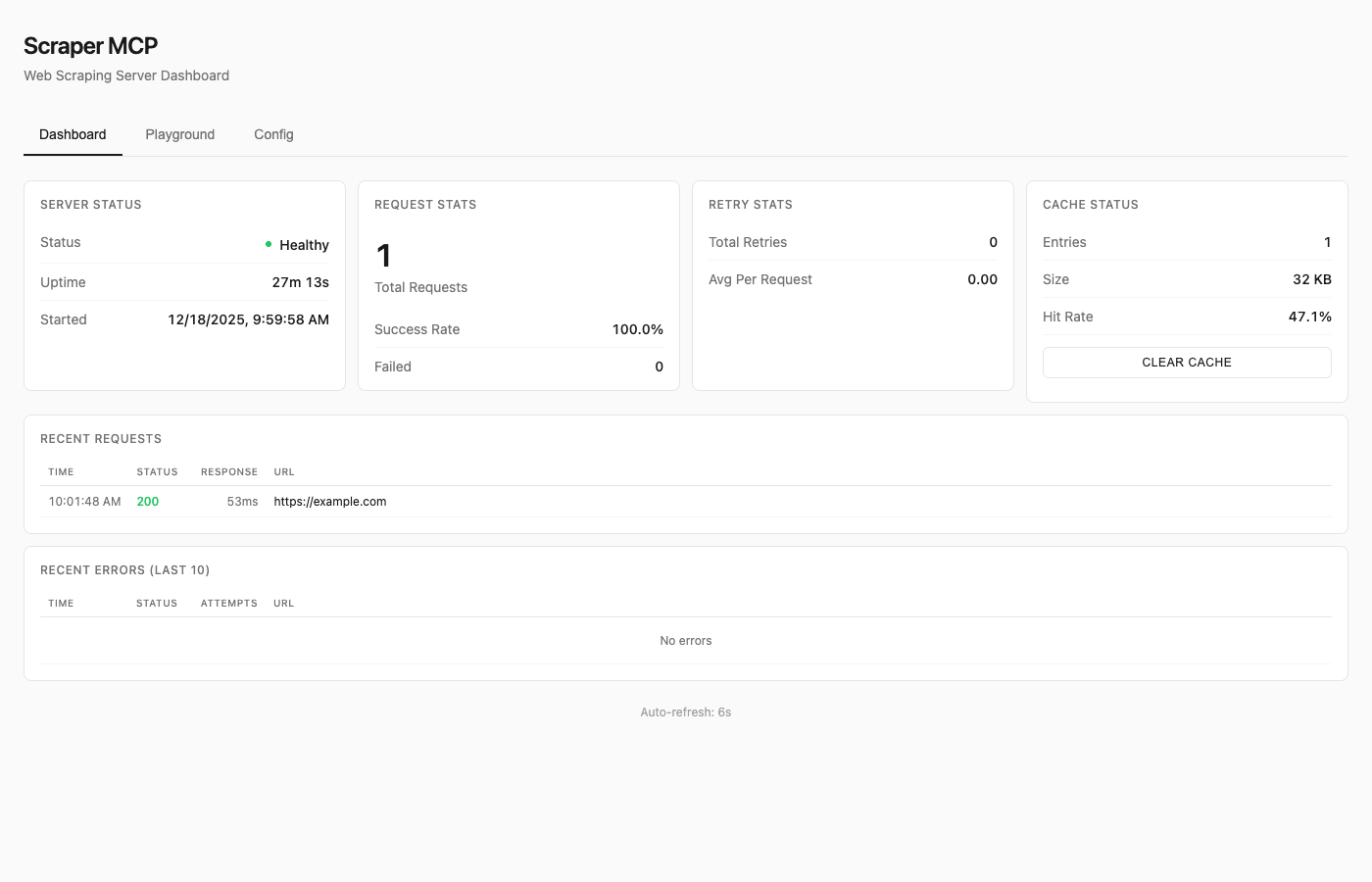
See Dashboard Guide for details.
Available Tools
| Tool | Description |
|---|---|
scrape_url |
HTML converted to markdown (best for LLMs) |
scrape_url_html |
Raw HTML content |
scrape_url_text |
Plain text extraction |
scrape_extract_links |
Extract all links with metadata |
perplexity |
AI web search with citations |
perplexity_reason |
Complex reasoning tasks |
All tools support:
- Single URL or batch operations (pass array)
timeoutandmax_retriesparameterscss_selectorfor targeted extractionrender_jsfor JavaScript rendering (SPAs, dynamic content)
Resources
Note: Resources are disabled by default to reduce context overhead. Enable with
--enable-resourcesflag orENABLE_RESOURCES=trueenvironment variable.
MCP resources provide read-only data access via URI-based addressing:
| URI | Description |
|---|---|
cache://stats |
Cache hit rate, size, entry counts |
cache://requests |
List of recent request IDs |
cache://request/{id} |
Retrieve cached result by ID |
config://current |
Current runtime configuration |
config://scraping |
Timeout, retries, concurrency |
server://info |
Version, uptime, capabilities |
server://metrics |
Request counts, success rates |
Prompts
Note: Prompts are disabled by default to reduce context overhead. Enable with
--enable-promptsflag orENABLE_PROMPTS=trueenvironment variable.
MCP prompts provide reusable workflow templates:
| Prompt | Description |
|---|---|
analyze_webpage |
Structured webpage analysis |
summarize_content |
Generate content summaries |
extract_data |
Extract specific data types |
seo_audit |
Comprehensive SEO check |
link_audit |
Analyze internal/external links |
research_topic |
Multi-source research |
fact_check |
Verify claims across sources |
See API Reference for complete documentation.
JavaScript Rendering
For SPAs (React, Vue, Angular) and pages with dynamic content, enable JavaScript rendering:
# Enable JS rendering with render_js=True
scrape_url(["https://spa-example.com"], render_js=True)

# Combine with CSS selector for targeted extraction
scrape_url(["https://react-app.com"], render_js=True, css_selector=".main-content")
When to use render_js=True:
- Single-page applications (SPAs) - React, Vue, Angular, etc.
- Sites with lazy-loaded content
- Pages requiring JavaScript execution
- Dynamic content loaded via AJAX/fetch
When NOT needed:
- Static HTML pages (most blogs, news sites, documentation)
- Server-rendered content
- Simple websites without JavaScript dependencies
How it works:
- Uses Playwright with headless Chromium
- Single browser instance with pooled contexts (~300MB base + 10-20MB per context)
- Lazy initialization (browser only starts when first JS render is requested)
- Semaphore-controlled concurrency (default: 5 concurrent contexts)
Memory considerations:
- Base requests provider: ~50MB
- With Playwright active: ~300-500MB depending on concurrent contexts
- Recommend minimum 1GB container memory when using JS rendering
Testing JS rendering:
Use the dashboard playground at http://localhost:8000/ to test JavaScript rendering interactively with the toggle switch.
Docker Deployment
Quick Run
# Using GitHub Container Registry (recommended)
docker run -d -p 127.0.0.1:8000:8000 --name scraper-mcp ghcr.io/cotdp/scraper-mcp:latest

# With JavaScript rendering (requires more memory)
docker run -d -p 127.0.0.1:8000:8000 --memory=1g --name scraper-mcp ghcr.io/cotdp/scraper-mcp:latest

# With Perplexity AI (direct API)
docker run -d -p 127.0.0.1:8000:8000 -e PERPLEXITY_API_KEY=your_key ghcr.io/cotdp/scraper-mcp:latest

# With Perplexity via OpenRouter
docker run -d -p 127.0.0.1:8000:8000 -e OPENROUTER_API_KEY=your_key ghcr.io/cotdp/scraper-mcp:latest
Docker Compose
For persistent storage and custom configuration:
# docker-compose.yml
services:
  scraper-mcp:
    image: ghcr.io/cotdp/scraper-mcp:latest
    ports:
      - "127.0.0.1:8000:8000"
    volumes:
      - cache:/app/cache
    environment:
      - PERPLEXITY_API_KEY=${PERPLEXITY_API_KEY:-}
      - PLAYWRIGHT_MAX_CONTEXTS=5
    deploy:
      resources:
        limits:
          memory: 1G  # Recommended for JS rendering
    restart: unless-stopped

volumes:
  cache:
docker-compose up -d
Production deployment (pre-built image from GHCR):
docker-compose -f docker-compose.prod.yml up -d
Upgrading
To upgrade an existing deployment to the latest version:
# Pull the latest image
docker pull ghcr.io/cotdp/scraper-mcp:latest

# Restart with new image (docker-compose)
docker-compose down && docker-compose up -d

# Or for production deployments
docker-compose -f docker-compose.prod.yml pull
docker-compose -f docker-compose.prod.yml up -d

# Or restart a standalone container
docker stop scraper-mcp && docker rm scraper-mcp
docker run -d -p 127.0.0.1:8000:8000 --name scraper-mcp ghcr.io/cotdp/scraper-mcp:latest
Your cache data persists in the named volume across upgrades.
Available Tags
| Tag | Description |
|---|---|
latest |
Latest stable release |
0.5.0 |
Specific version, after the release is published |
Configuration
Create a .env file for custom settings:
# Perplexity AI (optional; either key enables the AI tools)
PERPLEXITY_API_KEY=your_key_here
# ...or via OpenRouter
OPENROUTER_API_KEY=your_key_here
PERPLEXITY_PROVIDER=openrouter  # auto | perplexity | openrouter (default: auto)

# JavaScript rendering (optional, requires Playwright)
PLAYWRIGHT_MAX_CONTEXTS=5       # Max concurrent browser contexts
PLAYWRIGHT_TIMEOUT=30000        # Page load timeout in ms
PLAYWRIGHT_DISABLE_GPU=true     # Reduce memory in containers

# MCP features (disabled by default to reduce context overhead)
ENABLE_RESOURCES=true           # Enable MCP resources
ENABLE_PROMPTS=true             # Enable MCP prompts

# Proxy (optional)
HTTP_PROXY=http://proxy.example.com:8080
HTTPS_PROXY=http://proxy.example.com:8080

# ScrapeOps proxy service (optional)
SCRAPEOPS_API_KEY=your_key_here
SCRAPEOPS_RENDER_JS=true
See Configuration Guide for all options.
Claude Desktop
Add to your MCP settings:
{
  "mcpServers": {
    "scraper": {
      "url": "http://localhost:8000/mcp"
    }
  }
}
Claude Code Skills
This project includes Agent Skills that provide Claude Code with specialized knowledge for using the scraper tools effectively.
| Skill | Description |
|---|---|
| web-scraping | CSS selectors, batch operations, retry configuration |
| perplexity | AI search, reasoning tasks, conversation patterns |
Install Skills
Copy the skills to your Claude Code skills directory:
# Clone or download this repo, then:
cp -r .claude/skills/web-scraping ~/.claude/skills/
cp -r .claude/skills/perplexity ~/.claude/skills/
Or install directly:
# web-scraping skill
mkdir -p ~/.claude/skills/web-scraping
curl -o ~/.claude/skills/web-scraping/SKILL.md \
  https://raw.githubusercontent.com/cotdp/scraper-mcp/main/.claude/skills/web-scraping/SKILL.md

# perplexity skill
mkdir -p ~/.claude/skills/perplexity
curl -o ~/.claude/skills/perplexity/SKILL.md \
  https://raw.githubusercontent.com/cotdp/scraper-mcp/main/.claude/skills/perplexity/SKILL.md
Once installed, Claude Code will automatically use these skills when performing web scraping or Perplexity AI tasks.
Documentation
| Document | Description |
|---|---|
| API Reference | Complete tool documentation, parameters, CSS selectors |
| Configuration | Environment variables, proxy setup, ScrapeOps |
| Dashboard | Monitoring UI, playground, runtime config |
| Development | Local setup, architecture, contributing |
| Testing | Test suite, coverage, adding tests |
Local Development
# Install
uv pip install -e ".[dev]"

# Run
python -m scraper_mcp

# Test
pytest

# Lint
ruff check . && mypy src/
See Development Guide for details.
License
MIT License
Last updated: December 23, 2025
Scraper MCP Fragen
Welche Tools bietet Scraper MCP?
Er stellt 6 Tools bereit, darunter scrape_url, scrape_url_html, scrape_url_text, scrape_extract_links, perplexity.
Wie reduziert dieser Server den LLM-Tokenverbrauch?
Er nutzt serverseitiges HTML-Filtering, Markdown-Konvertierung und CSS-Selector-Targeting, um unnötige Daten zu entfernen.
Kann ich Websites scrapen, die JavaScript zum Laden von Inhalten benötigen?
Ja, du kannst über den Parameter render_js ein optionales Playwright-basiertes Rendering für SPAs und dynamische Inhalte aktivieren.