
Onlyboxes MCP server
Commit 26. Okt. 2026Ermöglicht es einem AI-Client, Python-Code auszuführen, stateful Terminal-Sessions zu nutzen und generierte Bilder in einer selbst gehosteten Sandbox zu lesen.
Auch bekannt als Coooolfan/onlyboxes
- Stars
- 54
- Tools
- —
- Downloads, 30 Tage
- —
- Neueste Version
- —
- Letzter Commit
- 26. Okt. 2026
- Lizenz
- AGPL-3.0
Was ist Onlyboxes MCP?
Onlyboxes ist ein MCP server. Ermöglicht es einem AI-Client, Python-Code auszuführen, stateful Terminal-Sessions zu nutzen und generierte Bilder in einer selbst gehosteten Sandbox zu lesen.
Zusammenfassung generiert aus dem README des Projekts
Über Onlyboxes MCP server
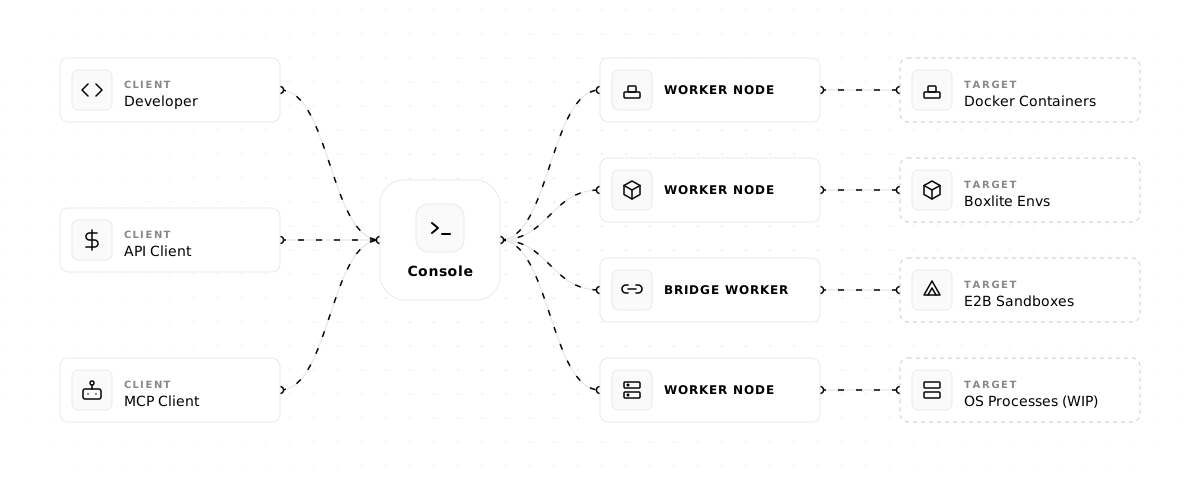
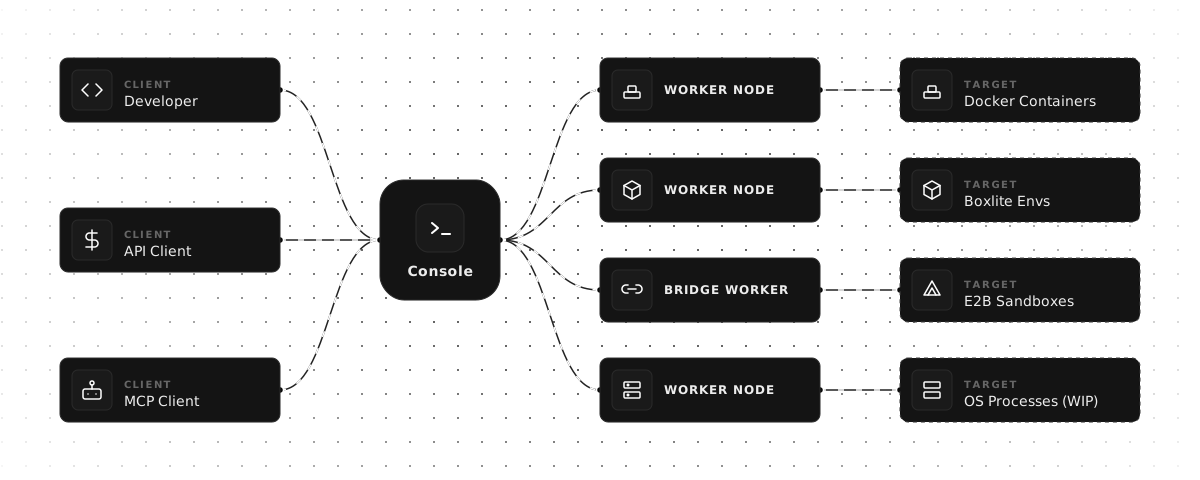
Onlyboxes ermöglicht es Einzelpersonen und kleinen Teams, eine selbst gehostete Sandbox für die Codeausführung bereitzustellen. Es nutzt eine Split-Architektur, die aus einer Control-Plane Console und skalierbaren Worker-Nodes besteht, um Aufgaben zu verwalten. Nutzer können das System unter Linux mittels Docker und systemd bereitstellen und einen AI-Client mit dem MCP-Endpoint verbinden, um komplexe Rechenaufgaben durchzuführen.
Entwickler nutzen die spezifischen MCP Tools pythonExec zum Ausführen von Python-Code, terminalExec zur Verwaltung von stateful Terminal-Sessions und readImage, damit Modelle generierte visuelle Outputs betrachten können. Die Plattform gewährleistet die Ressourcenisolation zwischen verschiedenen Accounts durch stateful Container. Da das System selbst gehostet wird, behältst du die volle Kontrolle über die Ausführungsumgebung und die Daten, die in den Worker-Nodes verarbeitet werden.
Die Einrichtung der Umgebung erfordert einen Console-Node und mindestens einen Worker-Node, wie zum Beispiel die worker-docker Implementierung. Um einen LLM-Chat-Client zu verbinden, musst du ein Access Token über das Web-Dashboard generieren und die MCP-Endpoint-URL angeben. Aus Sicherheitsgründen wird empfohlen, die HTTP- und gRPC-Ports hinter einen Reverse Proxy zu schalten, um TLS zu erzwingen.
Was du damit machen kannst
- 1Ausführungsressourcen skalierenTeams können ihre Rechenkapazität erweitern, indem sie weitere Worker-Nodes zur Architektur hinzufügen.
Geschrieben aus dem README des Projekts. Jeder Use Case wurde gegen ein Zitat daraus geprüft.
Konfiguration
WORKER_CONSOLE_GRPC_TARGETWORKER_CONSOLE_INSECUREWORKER_IDWORKER_SECRET
| Name | Beschreibung | Typ |
|---|---|---|
| WORKER_CONSOLE_GRPC_TARGET | — | |
| WORKER_CONSOLE_INSECURE | — | |
| WORKER_ID | — | |
| WORKER_SECRET | — |
Automatisierte Checks
Geluften am 14. Nov. 2026Vollständiger Bericht →Noch nicht verifiziert. Ein Server benötigt einen Score von 80, keine kritischen Befunde und genug Daten für unsere Prüfung. Wie die Checks funktionieren · Was du für mehr Punkte verbessern kannst

- Source Repository verknüpft und erreichbarcoooolfan/onlyboxes is public and reachablegithub.com/coooolfan/onlyboxes ↗Bestanden
- Paket nennt dieses Repository als QuelleNicht geprüft
- Build-Provenienz (Sigstore-Attestierung)Nicht geprüft
- Open Source Lizenz (OSI)AGPL-3.0spdx.org/licenses/AGPL-3.0.html ↗Bestanden
- Commit oder Release im letzten JahrLast commit or release 2026-10-26github.com/coooolfan/onlyboxes ↗Bestanden
- OpenSSF ScorecardNicht geprüft
- Package-Name ähnelt keinem populären PackageNicht geprüft
- Keine kritischen Advisories im Paket oder seinen AbhängigkeitenNicht geprüft
- Keine versteckten Anweisungen an das Modell0 tool descriptions and the README read; no override phrases, credential paths or hidden charactersBestanden
- Destruktive Tools sind markiertNicht geprüft
- Remote-Endpoint beantwortet den MCP-HandshakeNicht geprüft
README
Auf GitHub ansehenOnlyboxes
Onlyboxes is a self-hosted code execution sandbox platform for individuals and small teams.
It uses a control-plane (console) and execution-plane (worker) architecture, and exposes both REST APIs and MCP tools.
Key Features
- Self-hosted all components: control node (
console) + worker nodes (worker) - Separated control and execution planes:
- Workers support horizontal scaling
- Workers support multi-language heterogeneous implementations
- Workers support multiple runtimes
- Full account system: resource isolation (stateful containers, sessions) between accounts
- MCP tools:
pythonExec: Python code executionterminalExec: stateful terminal sessionsreadImage: model-readable images
- REST API: all MCP tools also available via HTTP + async task API
[!WARNING]
In the current release, console (gRPC + HTTP) does not provide built-in TLS/mTLS.
workerrejects insecure console endpoints by default; plaintext is allowed only whenWORKER_CONSOLE_INSECURE=trueis explicitly set.Put both console HTTP (
:8089) and gRPC (:50051) endpoints behind your reverse proxy/gateway and enforce TLS for external traffic.
Architecture
One-Click Installer (Linux)
For a single-machine deployment of console + worker-docker, run:
curl -fsSL https://onlybox.es/install.sh | bash
The installer will:
- Check the environment (Linux, Docker, Docker Compose v2, systemd)
- Download and render the compose template with auto-generated credentials
- Start the console via
docker compose up -d - Create a
normalworker - Download the architecture-matched
worker-dockerrelease binary for the default latest version, or your--tagoverride - Generate and enable a systemd service for the worker
- Poll until the worker comes online and print a result summary
Available options:
| Flag | Default | Description |
|---|---|---|
--tag |
latest published release | Optional release version override |
--workdir |
$PWD/onlyboxes |
Working directory |
--yes / -y |
false |
Non-interactive mode, skip confirmations |
--console-http-port |
8089 |
Console HTTP port (host side) |
--console-grpc-port |
50051 |
Console gRPC port (host side) |
--service-name |
onlyboxes-worker-docker |
systemd service name |
Requirements: Linux, systemd, Docker Engine, Docker Compose v2, Python 3.
Quick Start (Manual)
1) Prerequisites
- Control node:
- Docker Engine (binaries are also available in releases — no Docker needed if deploying via binary)
- Worker node:
- Docker Engine (required by
worker-docker)
- Docker Engine (required by
2) Start the console service
-
Create a working directory and a
docker-compose.ymlfile in it:mkdir -p onlyboxes-console && cd onlyboxes-consoleservices: console: image: coolfan1024/onlyboxes:latest container_name: onlyboxes-console restart: unless-stopped environment: CONSOLE_HASH_KEY: "replace-with-long-random-key" CONSOLE_ENABLE_REGISTRATION: "true" CONSOLE_DASHBOARD_USERNAME: "admin" # only for first run CONSOLE_DASHBOARD_PASSWORD: "change-me" # only for first run ports: - "8089:8089" - "50051:50051" volumes: - ./db:/app/db -
Replace at least:
CONSOLE_HASH_KEYCONSOLE_DASHBOARD_PASSWORD
-
Start console:
docker compose up -d
Default endpoints:
- Console Web UI / HTTP REST API / MCP endpoint:
http://127.0.0.1:8089 - gRPC:
127.0.0.1:50051
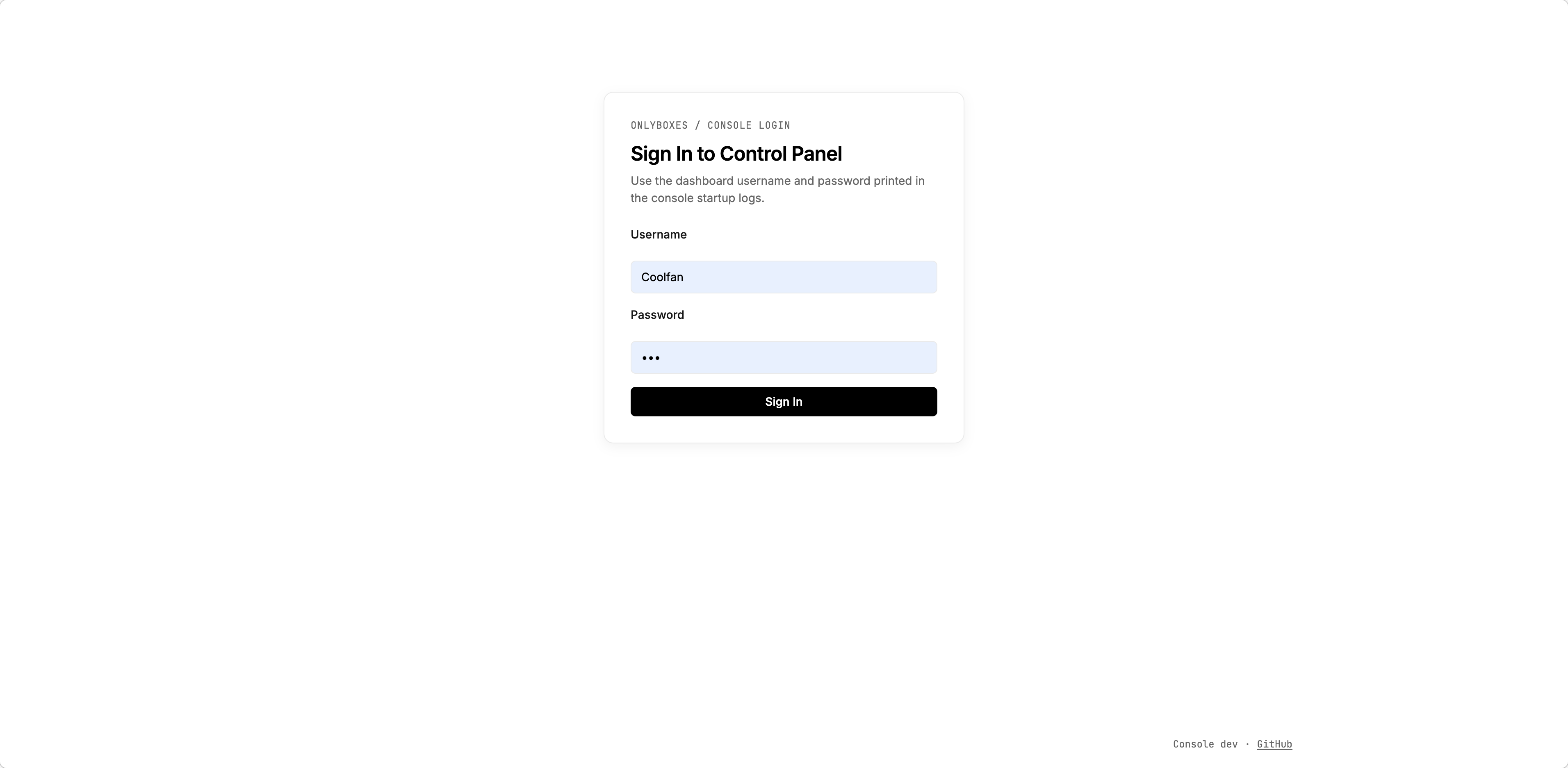
3) Sign in and create an access token
- Open
http://127.0.0.1:8089in your browser. - Sign in with the initialized admin account.
- Go to the token management page and create an access token.
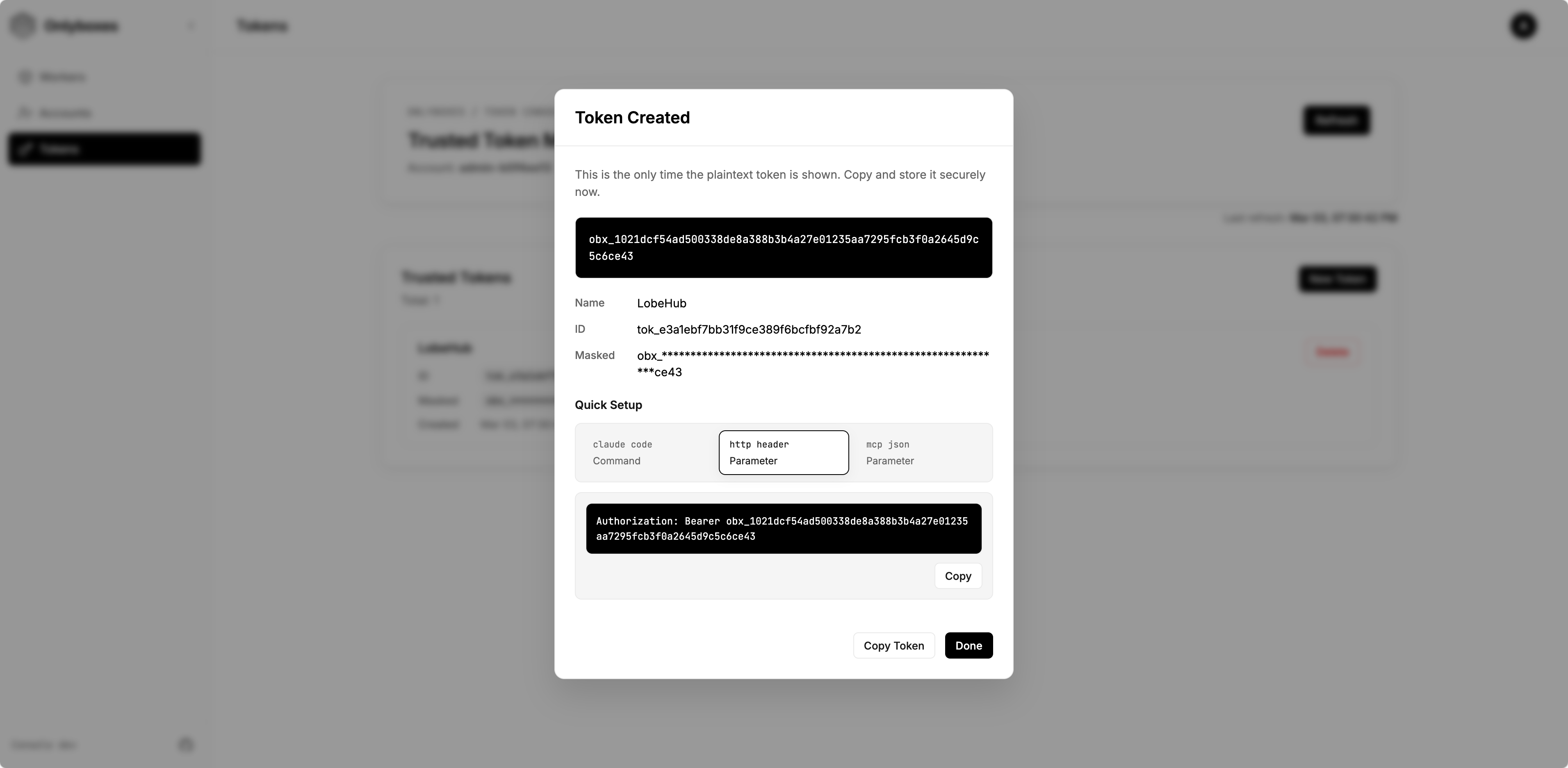
- Save the plaintext token immediately (it is returned only once).
4) Create a worker
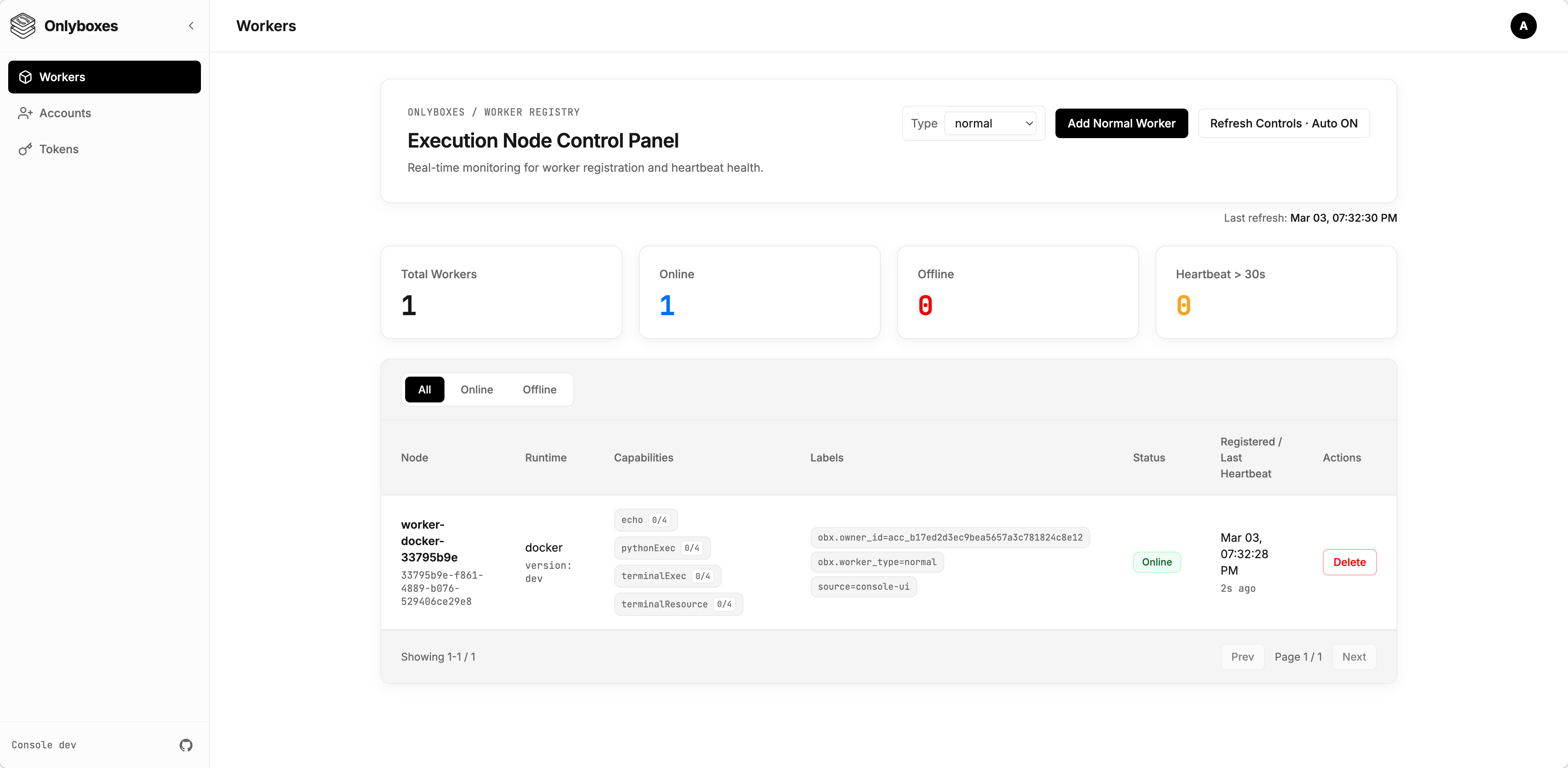
- Go to Workers page and create a worker.
- Copy and securely store the startup command from the creation dialog (
WORKER_SECRETis one-time visible).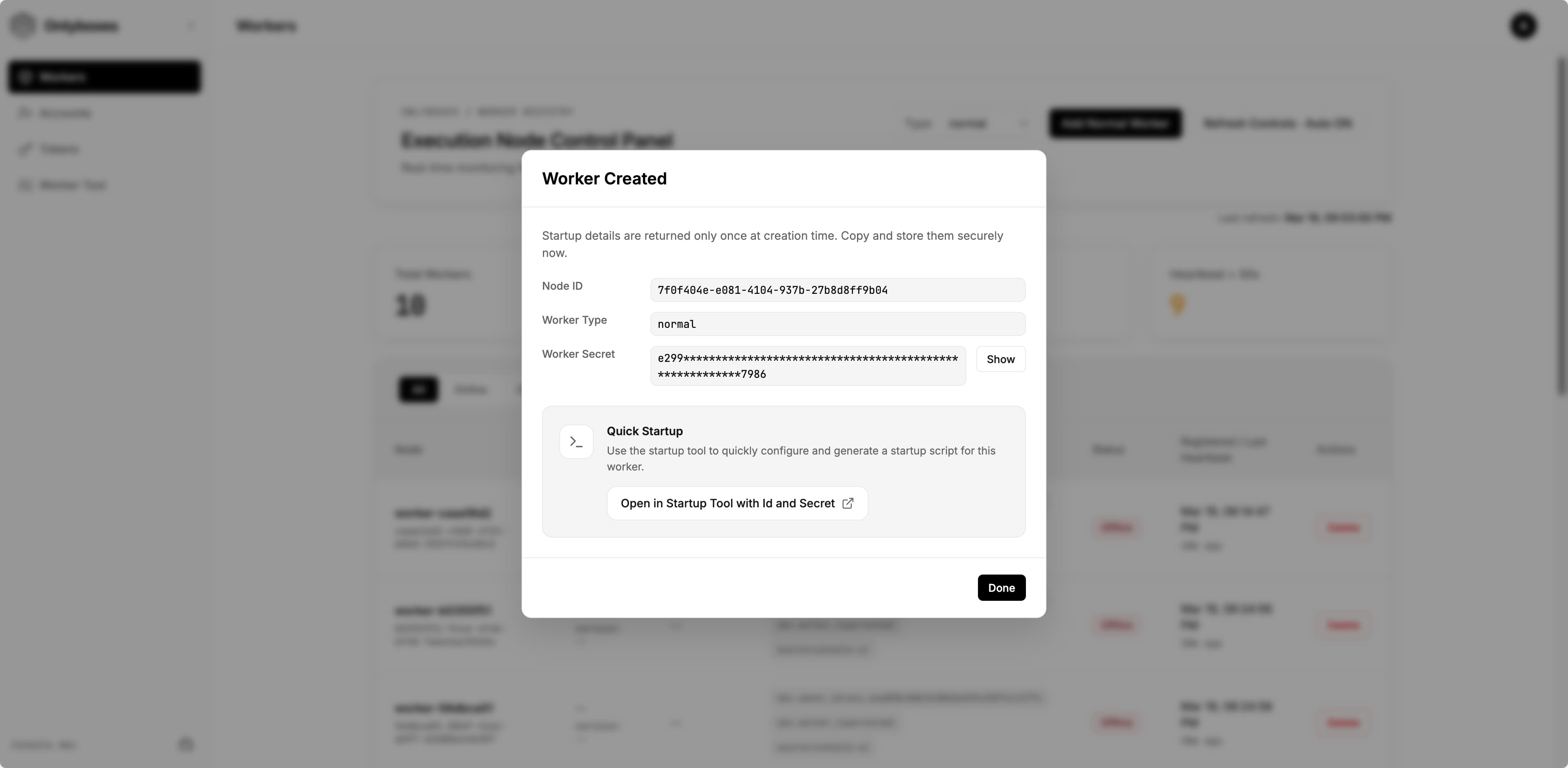
- (Optional) Click
Open in Startup Tool with Id and Secretto open the startup command builder with the worker id and secret pre-filled.- On the opened page, you can edit all available options. The generated startup command appears at the bottom of the page — copy and save it.
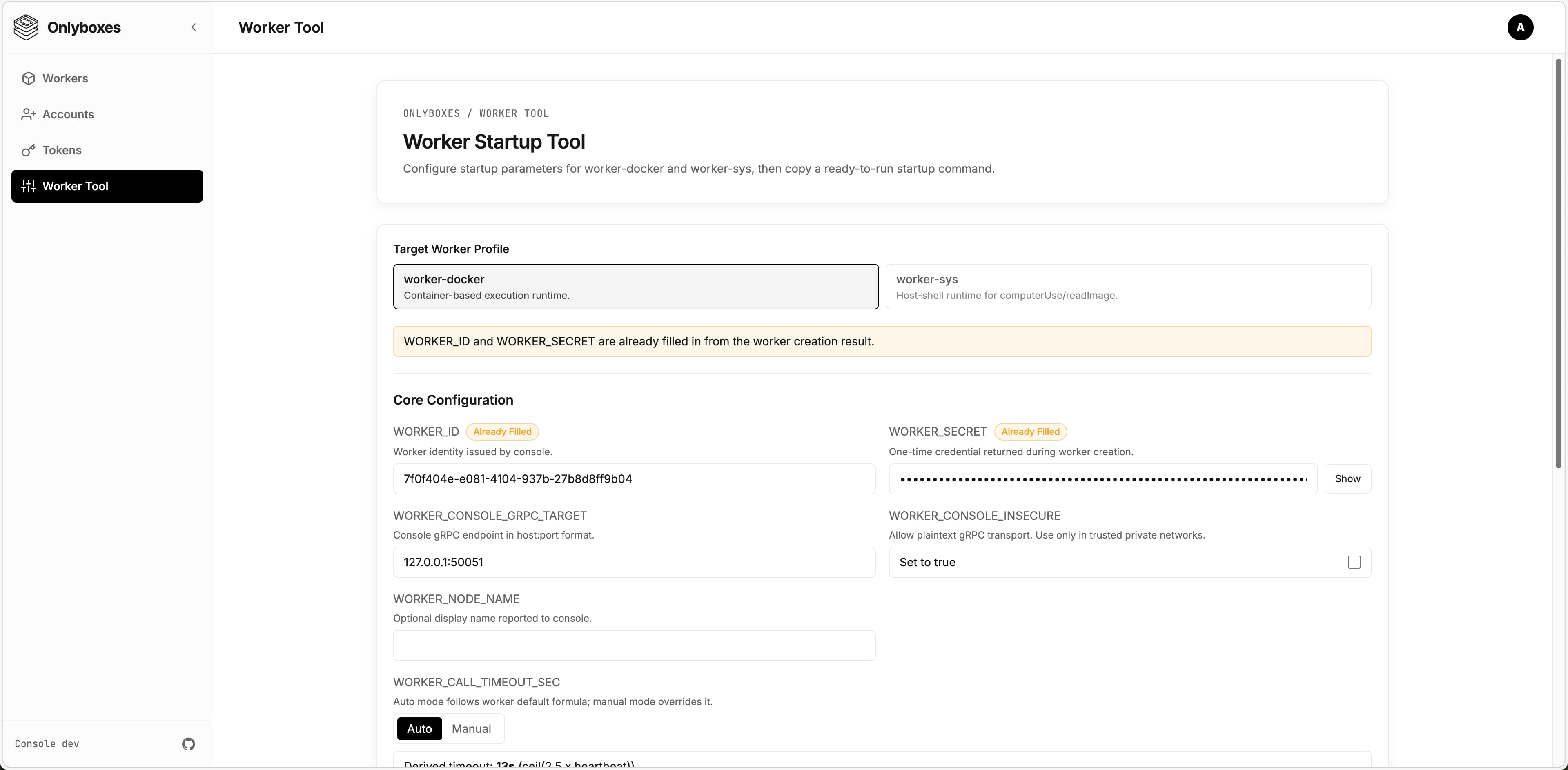
- On the opened page, you can edit all available options. The generated startup command appears at the bottom of the page — copy and save it.
5) Run worker
[!WARNING] Workers support different runtimes and environments. The current release only provides
worker-docker. This section uses the Docker runtime as an example.
-
Log in to the machine where the worker will be deployed.
- Ensure Docker Engine is installed.
- Ensure the worker can reach the console gRPC endpoint.
-
Download the latest
worker-dockerbinary from GitHub Releases:https://github.com/onlyboxes/onlyboxes/releases/latest
-
Use the startup command values from the dashboard, and replace the executable path on the last line with your downloaded binary.
- Workers reject insecure console endpoints by default; set
WORKER_CONSOLE_INSECURE=trueonly to allow plaintext connections.
# Example WORKER_CONSOLE_INSECURE=true \ WORKER_CONSOLE_GRPC_TARGET=127.0.0.1:50051 \ WORKER_ID=<worker_id> \ WORKER_SECRET=<worker_secret> \ /path/to/onlyboxes-worker-docker - Workers reject insecure console endpoints by default; set
6) Verify readiness
- Confirm the worker is
onlineon the dashboard Workers page. - For REST API request examples, see
docs/API.md. - If no tokens are configured,
/mcpand execution APIs return401by design. - Add the MCP endpoint
http://127.0.0.1:8089/mcpin any LLM Chat Client, set the token, and verify it works correctly.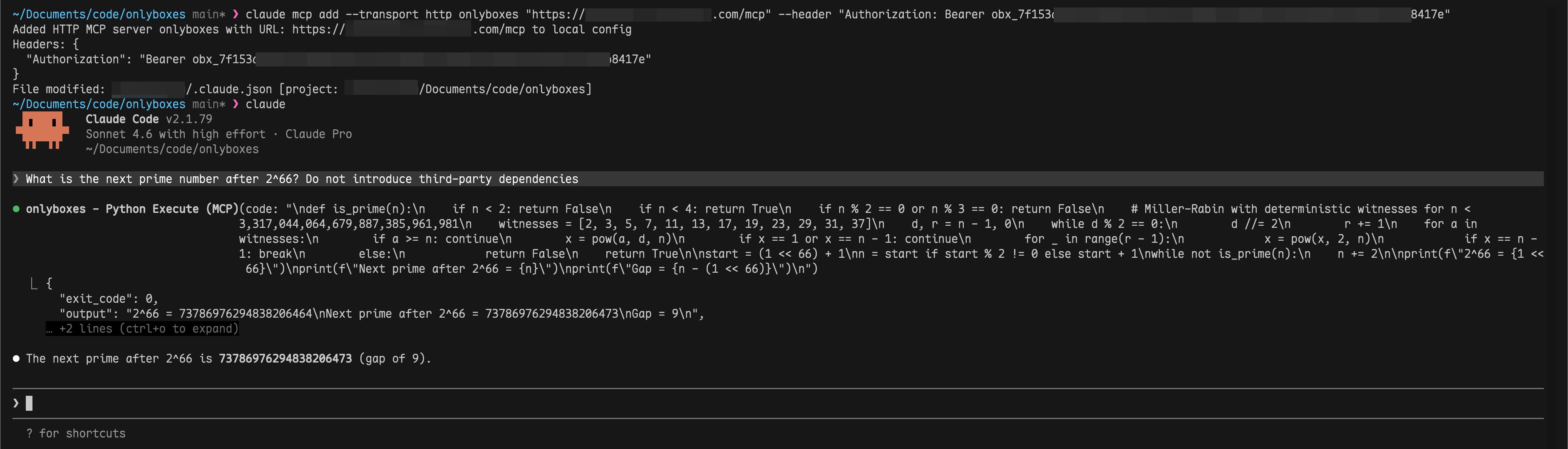
FAQ
-
Q: Worker stays
offlineafter starting? A: Check thatWORKER_CONSOLE_GRPC_TARGETpoints to the correct console gRPC address and verify network connectivity. -
Q: Can a worker be deployed on the same machine as the console? A: Yes.
-
Q: Can a worker run inside Docker? A: In theory, yes. However, it is not recommended because the worker needs access to the host Docker daemon. You would need to handle Docker-in-Docker yourself.
Production Checklist
- Replace all default credentials.
- Use a reverse proxy to enforce TLS for
:8089and:50051. - Persist and back up the SQLite data directory (
CONSOLE_DB_PATH). - Run workers on isolated hosts to avoid sharing the Docker daemon with the console.
- Read the
Configuration Referencebelow for all available options and adjust as needed.
Configuration Reference
Console (console)
| Environment Variable | Default | Notes |
|---|---|---|
CONSOLE_HTTP_ADDR |
:8089 |
Dashboard + REST API listen address |
CONSOLE_GRPC_ADDR |
:50051 |
Worker registry gRPC listen address |
CONSOLE_WORKER_CONNECTION_CONFLICT_POLICY |
REPLACE |
Duplicate Worker connection policy: REPLACE disconnects the existing connection; REJECT rejects the new connection |
CONSOLE_HASH_KEY |
(required) | HMAC key for hashing worker secrets and access tokens |
CONSOLE_DB_PATH |
./db/onlyboxes-console.db |
SQLite database path |
CONSOLE_DB_BUSY_TIMEOUT_MS |
5000 |
SQLite busy timeout |
CONSOLE_TASK_RETENTION_DAYS |
30 |
Retention for completed task records |
CONSOLE_ENABLE_REGISTRATION |
false |
Allow admin to register non-admin accounts |
CONSOLE_DASHBOARD_USERNAME |
(empty) | Used only for first admin initialization |
CONSOLE_DASHBOARD_PASSWORD |
(empty) | Used only for first admin initialization |
Worker (worker-docker)
| Environment Variable | Default | Notes |
|---|---|---|
WORKER_ID |
(required) | Issued by POST /api/v1/workers |
WORKER_SECRET |
(required) | Issued once by POST /api/v1/workers |
WORKER_CONSOLE_GRPC_TARGET |
127.0.0.1:50051 |
Console gRPC target |
WORKER_CONSOLE_INSECURE |
false |
false enforces TLS endpoint; set true only to allow plaintext console gRPC |
WORKER_HEARTBEAT_INTERVAL_SEC |
5 |
Worker heartbeat interval |
WORKER_HEARTBEAT_JITTER_PCT |
20 |
Heartbeat jitter percent |
WORKER_PYTHON_EXEC_DOCKER_IMAGE |
ghcr.io/astral-sh/uv:python3.12-bookworm-slim |
Runtime image for pythonExec |
WORKER_TERMINAL_EXEC_DOCKER_IMAGE |
coolfan1024/onlyboxes-runtime:default |
Runtime image for terminalExec |
WORKER_TERMINAL_OUTPUT_LIMIT_BYTES |
1048576 |
Per-stream output limit |
API Surfaces
- Authentication:
/api/v1/auth/* - Resource management:
/api/v1/accounts*,/api/v1/api-keys*,/api/v1/tokens*,/api/v1/sessions*,/api/v1/workers*,/api/v1/proxy-routes* - Command execution:
/api/v1/commands/* - Task execution:
/api/v1/tasks* - MCP (Streamable HTTP):
POST /mcp
Development
Local dev orchestration
scripts/dev.sh runs console / web / website in a tmux session. Every subcommand returns immediately, and logs land in scripts/.dev/<svc>.log.
scripts/dev.sh start              # start all three
scripts/dev.sh start console web  # console + web only
scripts/dev.sh status             # session, port listeners, window state
scripts/dev.sh logs console       # last 200 log lines
scripts/dev.sh creds              # console admin credentials
scripts/dev.sh stop               # stop everything
Web dev URL defaults to http://127.0.0.1:5178 and proxies /api/* and /mcp to http://127.0.0.1:8089.
Workers are not orchestrated — their startup arguments vary per implementation, so start them manually. Full usage: scripts/README.md.
Useful docs
- Unified API reference:
docs/API.md - Console internals:
console/README.md - Worker internals:
worker/worker-docker/README.md - API/proto guide:
api/README/proto.md - Web app guide:
web/README.md
Release & Images
- GitHub workflow:
.github/workflows/package-release.yml— run it manually from the Actions tab, pick the branch and enter the version (e.g.0.7.2); the tag is created from that branch. Turn offlatestwhen patching an older line so the newest release keeps the label - Website-only deploy:
.github/workflows/deploy-website.yml— manual, independent of a release - Console Docker image:
coolfan1024/onlyboxes:<version>andcoolfan1024/onlyboxes:latest - Terminal runtime images:
coolfan1024/onlyboxes-runtime:<version>-default,<version>-default-cn, and<version>-lobehub; stable aliases aredefault,default-cn,lobehub, andlatest(same asdefault) - Console binary includes embedded web assets
Security and Operational Notes
- Console does not provide built-in TLS/mTLS in this release;
worker-dockerrequires explicitWORKER_CONSOLE_INSECURE=trueto connect over plaintext. - Put console HTTP (
:8089) and gRPC (:50051) behind a reverse proxy/gateway and enforce TLS on public/external links. WORKER_SECRETand access token plaintext values are returned only at creation time.- Dashboard login sessions are in-memory and are invalidated when
consolerestarts.
Links
License
Onlyboxes MCP Fragen
Welche MCP Tools bietet Onlyboxes an?
Es stellt pythonExec für die Ausführung von Python-Code, terminalExec für stateful Terminal-Sessions und readImage für Modelle, um Bilder zu lesen, bereit.
Warum bleibt mein Worker nach dem Start offline?
Prüfe, ob WORKER_CONSOLE_GRPC_TARGET auf die korrekte gRPC-Adresse der Console zeigt, und verifiziere die Netzwerkverbindung.
Kann ein Worker auf derselben Maschine wie die Console bereitgestellt werden?
Ja, ein Worker kann auf derselben Maschine wie die Console laufen, obwohl für den Produktivbetrieb isolierte Hosts empfohlen werden.
Bietet Onlyboxes TLS out of the box an?
Nein, das aktuelle Release hat kein eingebautes TLS/mTLS auf der Console. Schalte sowohl die HTTP- als auch die gRPC-Endpoints der Console hinter einen Reverse Proxy oder ein Gateway, um dort TLS zu erzwingen.