
Ermöglicht es einem AI-Client, Substack-Entwürfe zu erstellen und zu verwalten, Notes zu veröffentlichen, Posts zu suchen, Analytics zu prüfen und zugewandte Abonnenten über verschiedene Publikationen hinweg zu verwalten.
Auch bekannt als conorbronsdon/substack-mcp, substack-mcp, @conorbronsdon/substack-mcp
- Stars
- 48
- Tools
- 42
- Downloads, 30 Tage
- 5.504
- Neueste Version
- 1.3.0
- Letzter Commit
- 14. Nov. 2026
- Lizenz
- MIT
Was ist Substack MCP?
Ermöglicht es einem AI-Client, Substack-Entwürfe zu erstellen und zu verwalten, Notes zu veröffentlichen, Posts zu suchen, Analytics zu prüfen und zugewandte Abonnenten über verschiedene Publikationen hinweg zu verwalten. Er stellt 42 Tools bereit, etwa get_subscriber_count, list_subscribers, search_subscribers.
Zusammenfassung generiert aus dem README des Projekts
Über Substack MCP server
Das Verwalten eines Substack-Newsletters über einen AI-Assistenten ist mit diesem MCP server möglich. Er erlaubt es Nutzern, umfangreiche Langform-Entwürfe vorzubereiten, in bestehenden Archiven zu suchen und die Analytics der Publikation zu prüfen. Während er kurze Notes verwalten kann, die sofort veröffentlicht werden, ist der Workflow für Langform-Inhalte auf Entwürfe beschränkt. Dies stellt sicher, dass Nutzer Posts manuell über den offiziellen Substack-Editor prüfen und veröffentlichen müssen, was eine menschliche Kontrolle für wichtige Inhalte bietet.
Entwickler können diesen Server über lokalen stdio oder selbst gehostete HTTP-Transports mit Clients wie Claude Desktop oder Claude Code verbinden. Die Einrichtung erfordert ein Substack-Konto und kann über Umgebungsvariablen oder einen browserbasierten Login via Playwright konfiguriert werden. Der Server unterstützt die Verwaltung mehrerer Publikationen durch benannte Profile und bietet sichere Optionen zur Speicherung von Zugangsdaten, einschließlich lokaler verschlüsselter Dateien oder OS-spezifischer Keychains wie dem macOS Keychain oder dem Windows Credential Manager. Er bietet zudem Tools zur Verwaltung von Abonnenten, die ihre Zustimmung gegeben haben, sofern der entsprechende Zugriff während des Logins gewährt wurde.
Was du damit machen kannst
- 1Entwürfe für Langform-Newsletter erstellenDu kannst eine AI anweisen, einen detaillierten Newsletter-Entwurf zu erstellen, zu aktualisieren und zu planen, den du später manuell überprüfst.
- 2Veröffentlichung von kurzen Social-UpdatesEin AI-Client kann kurze Notes direkt in deiner Substack-Publikation veröffentlichen.
- 3Analyse der PublikationsleistungBitte deinen AI-Assistenten, die Analytics deines Newsletters abzurufen, um deine Content-Strategie zu optimieren.
- 4Verwaltung von AbonnentendatenNutze den Assistenten, um deine Abonnentenzahlen zu prüfen oder Nutzer zu verwalten, die der Liste zugestimmt haben.
Geschrieben aus dem README des Projekts. Jeder Use Case wurde gegen ein Zitat daraus geprüft.
So installierst du Substack MCP
Formate geprüft am 10. Nov. 2026Zu Cursor hinzufügenZu Goose hinzufügenSubstack MCP in Claude Code installieren
$ claude mcp add --env 'SUBSTACK_SESSION_TOKEN=<YOUR_SUBSTACK_SESSION_TOKEN>' --env 'SUBSTACK_PUBLICATION_URL=<SUBSTACK_PUBLICATION_URL>' --env 'SUBSTACK_USER_ID=<SUBSTACK_USER_ID>' substack-mcp -- npx -y @conorbronsdon/substack-mcpSubstack MCP in Cursor installieren
~/.cursor/mcp.json
{
  "mcpServers": {
    "substack-mcp": {
      "command": "npx",
      "args": [
        "-y",
        "@conorbronsdon/substack-mcp"
      ],
      "env": {
        "SUBSTACK_SESSION_TOKEN": "<YOUR_SUBSTACK_SESSION_TOKEN>",
        "SUBSTACK_PUBLICATION_URL": "<SUBSTACK_PUBLICATION_URL>",
        "SUBSTACK_USER_ID": "<SUBSTACK_USER_ID>"
      }
    }
  }
}Substack MCP in VS Code installieren
.vscode/mcp.json
{
  "servers": {
    "substack-mcp": {
      "type": "stdio",
      "command": "npx",
      "args": [
        "-y",
        "@conorbronsdon/substack-mcp"
      ],
      "env": {
        "SUBSTACK_SESSION_TOKEN": "<YOUR_SUBSTACK_SESSION_TOKEN>",
        "SUBSTACK_PUBLICATION_URL": "<SUBSTACK_PUBLICATION_URL>",
        "SUBSTACK_USER_ID": "<SUBSTACK_USER_ID>"
      }
    }
  }
}Substack MCP in VS Code CLI installieren
$ code --add-mcp '{"name":"substack-mcp","type":"stdio","command":"npx","args":["-y","@conorbronsdon/substack-mcp"],"env":{"SUBSTACK_SESSION_TOKEN":"<YOUR_SUBSTACK_SESSION_TOKEN>","SUBSTACK_PUBLICATION_URL":"<SUBSTACK_PUBLICATION_URL>","SUBSTACK_USER_ID":"<SUBSTACK_USER_ID>"}}'Substack MCP in Claude Desktop installieren
claude_desktop_config.json
{
  "mcpServers": {
    "substack-mcp": {
      "command": "npx",
      "args": [
        "-y",
        "@conorbronsdon/substack-mcp"
      ],
      "env": {
        "SUBSTACK_SESSION_TOKEN": "<YOUR_SUBSTACK_SESSION_TOKEN>",
        "SUBSTACK_PUBLICATION_URL": "<SUBSTACK_PUBLICATION_URL>",
        "SUBSTACK_USER_ID": "<SUBSTACK_USER_ID>"
      }
    }
  }
}Substack MCP in Codex installieren
$ codex mcp add substack-mcp --env 'SUBSTACK_SESSION_TOKEN=<YOUR_SUBSTACK_SESSION_TOKEN>' --env 'SUBSTACK_PUBLICATION_URL=<SUBSTACK_PUBLICATION_URL>' --env 'SUBSTACK_USER_ID=<SUBSTACK_USER_ID>' -- npx -y @conorbronsdon/substack-mcpSubstack MCP in Codex config.toml installieren
~/.codex/config.toml
[mcp_servers.substack-mcp]
command = "npx"
args = ["-y", "@conorbronsdon/substack-mcp"]

[mcp_servers.substack-mcp.env]
SUBSTACK_SESSION_TOKEN = "<YOUR_SUBSTACK_SESSION_TOKEN>"
SUBSTACK_PUBLICATION_URL = "<SUBSTACK_PUBLICATION_URL>"
SUBSTACK_USER_ID = "<SUBSTACK_USER_ID>"
Substack MCP in Gemini CLI installieren
$ gemini mcp add -s user -e 'SUBSTACK_SESSION_TOKEN=<YOUR_SUBSTACK_SESSION_TOKEN>' -e 'SUBSTACK_PUBLICATION_URL=<SUBSTACK_PUBLICATION_URL>' -e 'SUBSTACK_USER_ID=<SUBSTACK_USER_ID>' substack-mcp npx -- -y @conorbronsdon/substack-mcpSubstack MCP in Gemini settings.json installieren
~/.gemini/settings.json
{
  "mcpServers": {
    "substack-mcp": {
      "command": "npx",
      "args": [
        "-y",
        "@conorbronsdon/substack-mcp"
      ],
      "env": {
        "SUBSTACK_SESSION_TOKEN": "<YOUR_SUBSTACK_SESSION_TOKEN>",
        "SUBSTACK_PUBLICATION_URL": "<SUBSTACK_PUBLICATION_URL>",
        "SUBSTACK_USER_ID": "<SUBSTACK_USER_ID>"
      }
    }
  }
}Braucht vor dem Start einen Schlüssel
Am 16. Nov. 2026 ohne Schlüssel gestartet, hat er angehalten und nach einem gefragt; ein Client sieht also keine Tools, bis du die Variablen oben setzt.
Substack MCP tools 42
Erkannt aus dem READMEget_subscriber_countlist_subscriberssearch_subscribersget_subscriberlist_published_postsget_publicationlist_publication_tagsget_post_tagssearch_postsplan_draft_updateexport_draftpreflight_draft
| get_subscriber_count | — | |
| list_subscribers | — | |
| search_subscribers | — | |
| get_subscriber | — | |
| list_published_posts | — | |
| get_publication | — | |
| list_publication_tags | — | |
| get_post_tags | — | |
| search_posts | — | |
| plan_draft_update | — | |
| export_draft | — | |
| preflight_draft | — |
Alle 42 Tools anzeigenWeniger Tools anzeigen
list_draftsget_postget_draftget_post_commentsget_sectionsget_post_analyticsrank_postsget_publication_statsget_growth_sourceslist_incoming_recommendationslist_outgoing_recommendationslist_outgoing_recommendation_statslist_scheduled_postsget_user_profileget_profile_feedget_note_threadlist_public_postsget_public_postcreate_draftupdate_draftupdate_draft_tagsupload_imagecreate_post_commentrestackcreate_notecreate_note_with_linkreview_draftwhat_workeddraft_from_ideaplan_notes
| list_drafts | — | |
| get_post | — | |
| get_draft | — | |
| get_post_comments | — | |
| get_sections | — | |
| get_post_analytics | — | |
| rank_posts | — | |
| get_publication_stats | — | |
| get_growth_sources | — | |
| list_incoming_recommendations | — | |
| list_outgoing_recommendations | — | |
| list_outgoing_recommendation_stats | — | |
| list_scheduled_posts | — | |
| get_user_profile | — | |
| get_profile_feed | — | |
| get_note_thread | — | |
| list_public_posts | — | |
| get_public_post | — | |
| create_draft | — | |
| update_draft | — | |
| update_draft_tags | — | |
| upload_image | — | |
| create_post_comment | — | |
| restack | — | |
| create_note | — | |
| create_note_with_link | — | |
| review_draft | — | |
| what_worked | — | |
| draft_from_idea | — | |
| plan_notes | — |
Konfiguration
SUBSTACK_SESSION_TOKENErforderlichSecretconnect.sid cookie value from your Substack session
SUBSTACK_PUBLICATION_URLErforderlichYour Substack publication URL (e.g., https://yourblog.substack.com)
SUBSTACK_USER_IDErforderlichYour Substack user ID
SUBSTACK_PUBLICATION_URLSUBSTACK_PUB_KEVIN_MULDOON_PUBLICATION_URLSUBSTACK_PUB_KEVIN_MULDOON_SESSION_TOKENSUBSTACK_PUB_KEVIN_MULDOON_USER_IDSUBSTACK_PUB_SAPERE_PUBLICATION_URLSUBSTACK_PUB_SAPERE_SESSION_TOKENSUBSTACK_PUB_SAPERE_USER_IDSUBSTACK_REQUEST_TIMEOUT_MSSUBSTACK_SESSION_TOKENSUBSTACK_USER_AGENTSUBSTACK_USER_ID
| Name | Beschreibung | Typ |
|---|---|---|
| SUBSTACK_SESSION_TOKEN | connect.sid cookie value from your Substack session | ErforderlichSecret |
| SUBSTACK_PUBLICATION_URL | Your Substack publication URL (e.g., https://yourblog.substack.com) | Erforderlich |
| SUBSTACK_USER_ID | Your Substack user ID | Erforderlich |
| SUBSTACK_PUBLICATION_URL | — | |
| SUBSTACK_PUB_KEVIN_MULDOON_PUBLICATION_URL | — | |
| SUBSTACK_PUB_KEVIN_MULDOON_SESSION_TOKEN | — | |
| SUBSTACK_PUB_KEVIN_MULDOON_USER_ID | — | |
| SUBSTACK_PUB_SAPERE_PUBLICATION_URL | — | |
| SUBSTACK_PUB_SAPERE_SESSION_TOKEN | — | |
| SUBSTACK_PUB_SAPERE_USER_ID | — | |
| SUBSTACK_REQUEST_TIMEOUT_MS | — | |
| SUBSTACK_SESSION_TOKEN | — | |
| SUBSTACK_USER_AGENT | — | |
| SUBSTACK_USER_ID | — |
Automatisierte Checks
Geluften am 12. Nov. 2026Vollständiger Bericht →Unsere automatisierten Checks bestanden. Das ist kein Security-Audit: Lies den Code und gib dem Server nur den minimal notwendigen Zugriff. Wie die Checks funktionieren

- Source Repository verknüpft und erreichbarBestanden
- Open Source Lizenz (OSI)Bestanden
- Commit oder Release im letzten JahrBestanden
- Package-Name ähnelt keinem populären PackageBestanden
- Remote Endpoint nutzt HTTPSNicht geprüft
- Destruktive Tools sind markiertBestanden
- Keine versteckten Anweisungen an das ModellBestanden
- Keine kritischen Advisories im Paket oder seinen AbhängigkeitenBestanden
README
Auf GitHub ansehensubstack-mcp
Create and manage your Substack newsletter from your AI assistant or terminal. Prepare rich drafts, search your archive, publish Notes, inspect analytics, and manage explicitly consented free subscribers across publications. Review and publish long-form posts in Substack.






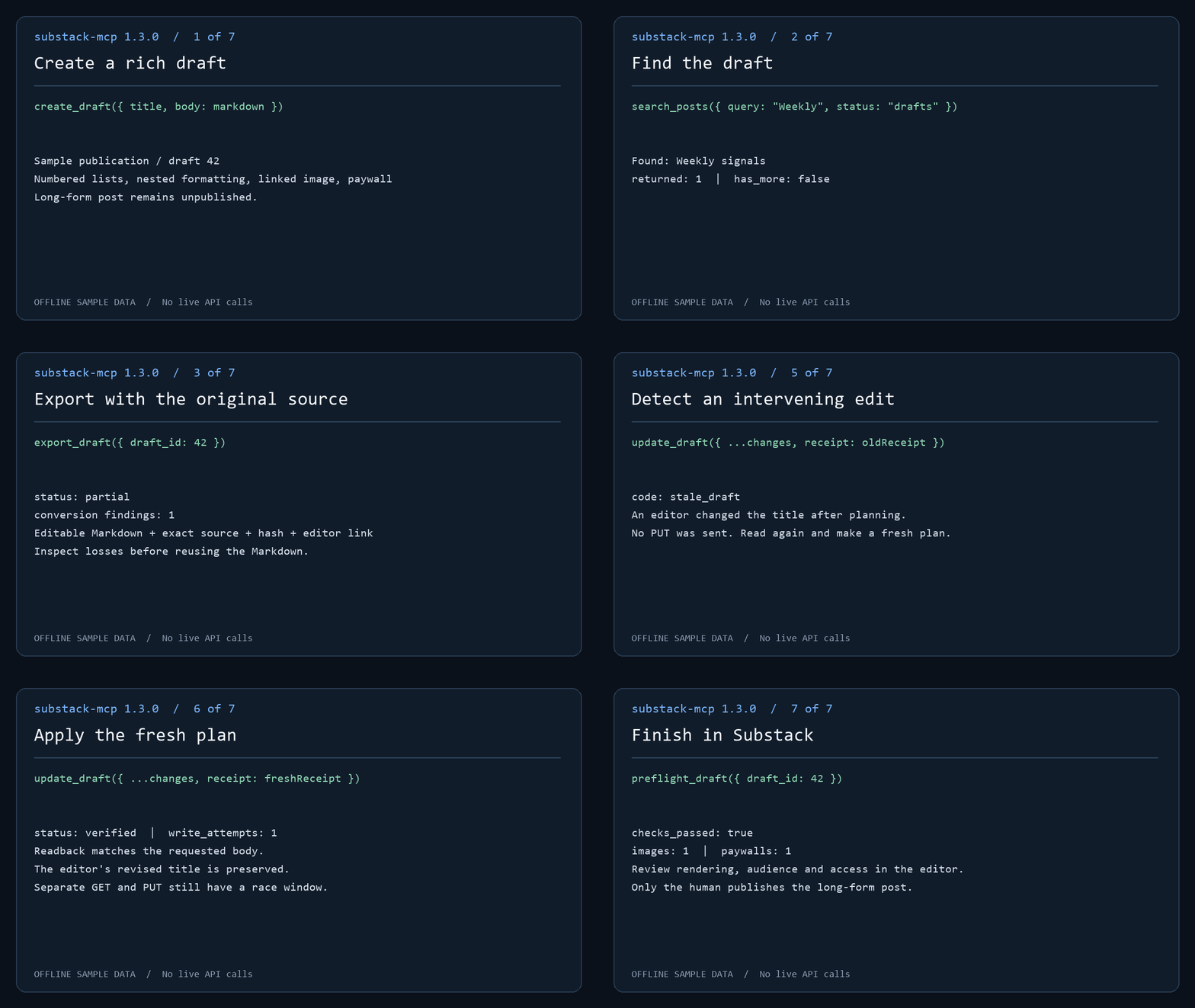
The demo runs actual MCP handlers against offline sample data. No live API calls or publication occur. Follow the draft workflow to create, find, export and review a post.
Draft-only long-form posts; explicit public actions: This server cannot publish or delete long-form posts. Post tools create and edit drafts only; you review and publish manually through Substack's editor. Public community comments/restacks are separately experimental and consent-gated. Substack Notes also publish publicly: create_note and create_note_with_link publish short-form Notes immediately, because Notes have no draft state on Substack. Treat the Note tools as public-publish actions — there is no preview step and no undo from this server. The split is proportionate review, the piece of trust infrastructure for agents this server cares most about: the high-stakes surface gets a human gate, and the exception is stated loudly.
This server imposes no Bestseller-status check. Use an authenticated account with permission to manage the publication; individual operations depend on your Substack access. Connect through local stdio or self-hosted HTTP.
For 1.0 setup coverage and account eligibility, see compatibility. Run substack-mcp compatibility report for an offline, shareable diagnostic report; reporting guide. Maintainers can use the release checklist and distribution inventory.
Contents: Quick start · Setup · Tools · Operator CLI · Draft workflow · Analytics to draft · Export · Markdown · Multiple publications · Transports · Compatibility
Quick start
-
Install and sign in. Browser login needs the optional Playwright dependency:
npm install @conorbronsdon/substack-mcp playwright
npx playwright install chromium
npx substack-mcp login https://yourblog.substack.com --user-id 12345
Use your own account's user ID (how to find it). The session is saved only after a bounded authenticated read succeeds. To paste credentials instead, see Option B.
-
Verify a read.
npx substack-mcp doctor --json --check-authmakes one bounded read per publication. It confirms read access, not your user ID or write permission. -
Connect your MCP client. Add the server to Claude Desktop or Claude Code, or use the Codex plugin. Environment variables take precedence; omit them to use the stored browser-login session. Then ask your assistant: "How many Substack subscribers do I have?"
-
Prepare a draft for review. Follow the draft workflow:
create_draft,search_posts,export_draft,preflight_draft, thenplan_draft_updateandupdate_draft. Long-form posts stay unpublished drafts until you publish them in Substack's editor.create_noteandcreate_note_with_linkpublish immediately.
Community walkthrough
Jonathan Price's I used Codex to connect ChatGPT to Substack. Then it drafted this post. walks through using Codex to install the MCP locally, connecting ChatGPT through OpenAI's Secure MCP Tunnel, and creating a private draft for manual publication. He used the connection to create the draft of the guide itself.
The guide documents his September 18, 2026 setup with version 1.2.0. Its reported
get_post 404 is fixed in 1.2.1. Client interfaces and access requirements can
change; use the setup instructions below for this package's current
configuration. This is a community walkthrough, not a hosted service provided
by this project.
Setup
Requires Node.js 22 or newer (CI covers Node 22 and 24). Browser login additionally requires Playwright.
You can supply credentials two ways: paste them as env vars (below), or run the optional browser login which captures and stores them for you.
Option A — Browser login (optional, no manual cookie copying)
Install the server and optional Playwright dependency together in a local tools directory, then sign in:
npm install @conorbronsdon/substack-mcp playwright
npx playwright install chromium
npx substack-mcp login https://yourblog.substack.com --user-id 12345
substack-mcp-login remains a supported alias. Missing publication URL and user
ID are prompted. Supply your own account's user ID (steps below); a post author's byline does
not verify your identity. The browser opens for sign-in, including any CAPTCHA.
Login then opens <publication>/publish/home and waits for the publication
session cookie; on custom domains this is connect.sid on the custom domain.
A bounded authenticated read must succeed before saving. The default flow verifies
read access, not the configured user ID or permission to write.
To derive your ID from the selected publication's authenticated session instead of entering it manually, use:
npx substack-mcp login https://yourblog.substack.com --verify-identity --profile work
--verify-identity reads the publication-host /api/v1/user/profile/self with
that host's cookie, requires a positive safe integer top-level ID, and then
performs the existing authenticated draft-list check before saving. Supplying
--user-id as well turns it into an assertion: a mismatch stops without saving
or replacing a profile, even with --force. No public profile, post byline,
other-host cookie or other-host endpoint is used as a fallback. The verified
mode's JSON result reports user_identity: "verified" and
identity_source: "authenticated_publication_self_profile"; it prints no ID.
This is an observation at login time, not a persisted identity attestation or
proof of write permission. Ordinary doctor continues to report identity as
unverified.
For subscriber tools or the calendar opt-in sync, add --subscriber-access.
Substack asks for a one-time "Confirm it's you" code (by email or authenticator
app) before it allows subscriber reads, and login prompts for it. See
docs/subscriber-step-up.md.
Self-profile support on publication hosts has not been live-verified for every Substack/custom-domain configuration. If the endpoint is unavailable, expired, redirected or malformed, verified mode fails closed and saves nothing. The existing manually configured-ID flow remains available and explicitly unverified. A real browser run is still needed for #150; fixture tests are not evidence about the current sign-in UI.
Without --profile, login saves ~/.substack-mcp/session.json (directory override:
SUBSTACK_MCP_HOME). The server uses this legacy session when publication
credential environment variables and SUBSTACK_PROFILES are unset.
Default storage (SUBSTACK_CREDENTIAL_STORE=file): sessions use AES-256-GCM with a key derived from the OS account and
machine. File permissions request 0600; Windows access also depends on directory
ACLs. This is a machine-bound file, not an OS keychain or secret vault. Code
running as your OS user can derive the key. Use environment credentials if your
MCP client manages secrets for you.
Optional OS keychain: set SUBSTACK_CREDENTIAL_STORE=keychain in both the
login process and the MCP client's environment. macOS uses Keychain via
/usr/bin/security; Linux needs libsecret and secret-tool plus an unlocked Secret
Service; Windows uses Credential Manager through PowerShell's PasswordVault. All
three are exercised with synthetic credentials by the keychain CI workflow on
GitHub-hosted runners (an unlocked temporary macOS keychain and a gnome-keyring
session on Linux); desktop setups with locked keychains may still prompt. Login writes the selected account to the keychain, and the
server reads it there. Explicit keychain selection never reads the encrypted
file as a fallback. The keychain helps against other OS users, copied disks,
and some malware limited to file access. Code running as your user can usually
query the keychain. Keep the OS account and running code trusted.
On Linux, secret-tool lookup can exit 1 without an error message for either
an absent entry or a locked keyring. Named writes without --force search and
unlock first, and refuse overwrites when an entry is found.
Named profiles and migration
npx substack-mcp login https://yourblog.substack.com --user-id 12345 --profile work
npx substack-mcp profiles list
# Copy an existing legacy session without changing its file:
npx substack-mcp profiles migrate --name personal
# Copy a file session or named file profile into the keychain; source remains:
npx substack-mcp profiles migrate --to keychain
npx substack-mcp profiles migrate --to keychain --name work
Keys start with a lowercase ASCII letter and contain only lowercase letters,
digits and hyphens, up to 64 characters. Existing profiles require explicit
--force to replace. List output contains keys, readability status, publication origins and file save
times; it excludes cookies and user IDs. Unreadable profiles remain visible but
cannot be selected. Save time records local persistence, including migration; it
is not token issuance or expiration time. Listing is bounded to 32 profiles.
Profile storage requires a local filesystem supporting hard links (such as NTFS
or a typical Linux filesystem), so creation can install a complete encrypted file
without overwriting an existing name. FAT/exFAT and some network mounts are not
supported: set SUBSTACK_MCP_HOME to a suitable local directory. Do not use
--force to work around an unsupported filesystem.
Set SUBSTACK_PROFILES=work,personal in your MCP client's environment to select
up to 32 distinct profiles. Remove all publication credential variables first:
combining profile selection with legacy or named credential variables is an
error, including empty variables. Missing, corrupt or invalid selected profiles
stop startup; they never fall back to another account. Profiles on disk are
never activated by discovery. With multiple profiles, tools require an explicit
publication key and CLI reads require --publication.
To roll back, unset SUBSTACK_PROFILES and restore your previous environment
configuration. Migration preserves the legacy session byte-for-byte. These files
use the existing encryption format. profiles list lists file profiles; select
keychain profiles explicitly with SUBSTACK_PROFILES after migration or login.
Run substack-mcp status --json for offline configuration diagnostics or
substack-mcp doctor --check-auth --json for a bounded read per selected account.
Option B — Get your credentials manually
Open your Substack in a browser, then:
- Session token: For custom domains, open DevTools → Application → Cookies →
https://your-custom-domainand copyconnect.sidfrom the publication's own domain (URL-encoded string starting withs%3A). Do not copysubstack.sidfrom substack.com: it is a different session that the custom domain's admin API rejects with 403. For*.substack.compublications, useconnect.sidon that host orsubstack.sidon.substack.com. The token must match the host ofSUBSTACK_PUBLICATION_URL, with the.substack.comfallback only for Substack-hosted publications. - User ID: Follow Find your account user ID. Do not use a publication post's byline ID: publications can have multiple authors. This server does not independently verify the supplied ID.
- Publication URL: Your Substack URL, including custom domain if you have one (e.g.,
https://newsletter.yourdomain.comorhttps://yourblog.substack.com)
Find your account user ID
- In Substack, open your own account profile and copy its handle (the part after
@inhttps://substack.com/@your-handle). A publication URL or another author's profile is not your account handle. - Open
https://substack.com/api/v1/user/your-handle/public_profilewith that handle substituted. Read the top-level numericidin the JSON response; do not use an ID nested under a publication or post byline. This public profile endpoint is also used by this server's anonymous profile lookup. - Confirm that the response's
handleand name match the account you will sign in with. Supply the top-levelidtologin --user-idorSUBSTACK_USER_ID. A public profile lookup identifies the handle you entered; the browser-login read check does not prove that the cookie belongs to that ID. Recheck the account before any write operation.
2. Configure your MCP client
Claude Desktop
Add to your claude_desktop_config.json:
{
  "mcpServers": {
    "substack": {
      "command": "npx",
      "args": ["-y", "@conorbronsdon/substack-mcp"],
      "env": {
        "SUBSTACK_PUBLICATION_URL": "https://yourblog.substack.com",
        "SUBSTACK_SESSION_TOKEN": "your-session-token",
        "SUBSTACK_USER_ID": "your-user-id"
      }
    }
  }
}
Claude Code and Codex plugin setup is available alongside manual MCP configuration. The repository marketplace and local plugin are separate from curated-directory acceptance or hosted ChatGPT support.
Claude Code
Add to your .mcp.json:
{
  "mcpServers": {
    "substack": {
      "command": "npx",
      "args": ["-y", "@conorbronsdon/substack-mcp"],
      "env": {
        "SUBSTACK_PUBLICATION_URL": "https://yourblog.substack.com",
        "SUBSTACK_SESSION_TOKEN": "your-session-token",
        "SUBSTACK_USER_ID": "your-user-id"
      }
    }
  }
}
3. Verify
Ask your AI assistant: "How many Substack subscribers do I have?"
Tool output compatibility, response limits and versioning are documented in the tool contract.
Operator diagnostics
The CLI exposes operator commands and configuration checks through the same MCP
handlers and credential resolution as the server. drafts create writes one
private draft; the other operator commands read:
substack-mcp status --json
substack-mcp doctor --json --check-auth
substack-mcp drafts list --limit 10
Commands, the JSON envelope, exit codes, request deadlines and response limits are documented in operator CLI and diagnostics.
Tools
Every tool declares explicit MCP side-effect annotations; see tool annotations. Tool descriptions carry the authoritative wording.
Read
| Tool | Description |
|---|---|
get_subscriber_count |
Get your publication's current subscriber count |
list_subscribers |
Read a bounded page of private subscriber records |
search_subscribers |
Filter and page private subscriber records; optional activity, date, flags and revenue fields |
get_subscriber |
Look up membership by exact email; reconcile pending additions |
list_published_posts |
List published posts with pagination |
get_publication |
Read projected publication identity/settings, verify the configured host, and report missing fields; does not verify account identity or role |
list_publication_tags |
Read tag definitions, including hidden tags by default, with bounded local pagination |
get_post_tags |
Resolve post tag associations; preserves unresolved IDs and reports empty-result identity uncertainty. Draft coverage is currently live-verified only for empty responses |
search_posts |
Search a publication archive by query and status; bounded pages with continuation metadata |
plan_draft_update |
Review proposed changes, preflight and a receipt for best-effort stale detection; no writes |
export_draft |
Editable Markdown, exact original body, conversion diagnostics, preflight and editor link |
preflight_draft |
Read-only checks for title, audience, body structure, images, and paywalls, with an editor link; optionally adds Substack's own prepublish errors and suggestions |
list_drafts |
List draft posts |
get_post |
Get full content of a published post by ID |
get_draft |
Get full content of a draft by ID |
get_post_comments |
Get comments on a published post |
get_sections |
List your publication's sections (categories) with their IDs |
get_post_analytics |
Get a published post's stats (views, opens, signups, subscribes, reactions) by ID |
rank_posts |
Rank posts by views, opens, sends, rates, signups, subscribes, estimated value or date, keeping null and missing values distinct |
get_publication_stats |
Read dashboard summary and ranged publication metrics, with missing and unavailable states |
get_growth_sources |
Read bounded growth source attribution and optional events |
list_incoming_recommendations |
List publications that recommend yours, with start date, active state and dashboard-attributed subscribers |
list_outgoing_recommendations |
List whom your publication recommends (can be partial). This is not who recommends it; use list_incoming_recommendations for that |
list_outgoing_recommendation_stats |
List subscribers your publication has sent to the publications it recommends |
list_scheduled_posts |
List posts scheduled for future publication (read-only; scheduling stays in Substack's editor) |
get_user_profile |
Read a minimal public user profile by handle, anonymously |
get_profile_feed |
Read one public profile feed page with cursor continuation, anonymously |
get_note_thread |
Read a public Note, ancestors and one replies page, anonymously |
list_public_posts |
Read a bounded public archive page, anonymously |
get_public_post |
Read an anonymous public post by URL with body status and truncation flags |
Public reading
These five tools use a separate anonymous reader. It sends only User-Agent and
Accept, never the configured publication cookie or other credentials. The
configured publication selects the default archive origin; callers may supply an
allowlisted HTTPS publication origin. Allowed hosts are substack.com, one-label
*.substack.com, configured publication origins, and exact origins in
SUBSTACK_PUBLIC_READ_ORIGINS (comma-separated HTTPS origins without ports,
paths or userinfo). Redirects are rejected. A *.substack.com publication may
redirect to its custom domain (for example, lenny.substack.com); JSON reads do
not follow that redirect. Add the custom HTTPS origin to
SUBSTACK_PUBLIC_READ_ORIGINS and read through that origin. With multiple
publications, the publication key remains required for every publication tool.
Profile feed pages are upstream-sized; has_more: null means the upstream omitted
continuation metadata. Thread pages can omit replies when more_branches or
next_cursor is present; completeness: "unknown" means continuation metadata
was omitted.
Archive full pages have has_more: null because no total is returned. Public
post body_status is a heuristic based on audience and body presence; it does
not establish full access. The anonymous reader does not use subscription
entitlements. Reader subscriptions and inbox are unsupported: the configured
publication session received 401 on the substack.com reader-account routes,
which require a separate reader session this server does not manage.
Archive search and draft review
search_posts accepts query (1–500 characters), status (published, drafts,
or scheduled, default published), offset (default 0), and limit (1–50,
default 25). It makes one authenticated archive request and returns projected
metadata, returned, total, has_more, and next_offset. Continue with
next_offset and the same query/status. When Substack omits the total and a
page is full, has_more is null (unknown); another page may be empty. Substack
controls matching and indexing: this is not a guaranteed full-text scan. Use
get_post or get_draft to retrieve full content. Pagination is not a snapshot;
concurrent edits can move results between pages.
preflight_draft accepts draft_id, reads it once, and returns checks_passed,
findings with severity/code/message, content counts and an editor link. It checks title,
audience, JSON/body shape, image wrappers and HTTPS sources, and paywall count
and edge placement. Unknown nodes and external images produce review warnings.
Bodies over two million characters, 10,000 nodes, or depth 100 are not fully
checked; counts.complete is false and aggregate checks are skipped after a
scan limit. Unknown-node warnings name up to five types for editor review.
With substack_check: true, it also makes one more read: Substack's own
prepublish validator (GET /api/v1/drafts/{id}/prepublish, the check the editor
runs before its publish dialog). The result comes back separately as
substack_check with errors and suggestions (up to 50 each, 300 characters
each) and never changes checks_passed or findings. The endpoint is
undocumented and its response shape is not yet live-verified: any failure or
unexpected shape returns substack_check.status: "unavailable" with a reason, and
the static checks still return. A clean result is not publish approval.
This is a focused static check, not full ProseMirror validation or
publish approval. It does not fetch links/images, verify access settings, or
prove final rendering. Review the draft in Substack; no content is modified.
Both tools require publication when multiple publications are configured.
Substack MCP Fragen
Wie füge ich Substack MCP zu Claude Code hinzu?
Führe claude mcp add --env 'SUBSTACK_SESSION_TOKEN=<YOUR_SUBSTACK_SESSION_TOKEN>' --env 'SUBSTACK_PUBLICATION_URL=<SUBSTACK_PUBLICATION_URL>' --env 'SUBSTACK_USER_ID=<SUBSTACK_USER_ID>' substack-mcp -- npx -y @conorbronsdon/substack-mcp in deinem Terminal aus. Füge --scope user hinzu, damit der Server in jedem Projekt verfügbar ist.
Wie füge ich Substack MCP zu Cursor hinzu?
Öffne ~/.cursor/mcp.json und füge den Server unter mcpServers hinzu, mit der Cursor-Config aus dem Installationsabschnitt oben.
Welche Tools bietet Substack MCP?
Er stellt 42 Tools bereit, darunter get_subscriber_count, list_subscribers, search_subscribers, get_subscriber, list_published_posts.
Kann der Substack MCP server meine Langform-Posts veröffentlichen?
Nein. Die Tools für Langform-Posts können nur Entwürfe erstellen und bearbeiten; du musst diese manuell über den Substack-Editor prüfen und veröffentlichen.
Werden Notes, die über den Server erstellt werden, sofort veröffentlicht?
Ja. Notes haben auf Substack keinen Entwurfsstatus, daher werden die Note-Tools sofort öffentlich veröffentlicht, ohne Vorschau oder Rückgängigmachen-Option.
Wie authentifiziere ich den Substack MCP server?
Du kannst Zugangsdaten als Umgebungsvariablen einfügen oder den optionalen Browser-Login nutzen, der die Session für die spätere Verwendung speichert.
Funktioniert es mit mehreren Substack-Publikationen?
Ja. Über benannte Profile kannst du separate Sessions speichern und diese mit der Umgebungsvariable SUBSTACK_PROFILES auswählen.
Was benötige ich, um den Substack MCP server auszuführen?
Node.js 22 oder neuer ist erforderlich, und für den Browser-Login wird zusätzlich Playwright benötigt.