
Bietet eine Local-first-Memory- und Continuity-Layer, die es verschiedenen AI Coding Agents ermöglicht, Kontext zu teilen und die Arbeit genau dort fortzusetzen, wo ein anderer aufgehört hat.
Auch bekannt als Coder8124/logos, @noeton/logos
- Stars
- 4
- Tools
- —
- Downloads, 30 Tage
- —
- Neueste Version
- —
- Letzter Commit
- 9. Nov. 2026
- Lizenz
- Apache-2.0
Was ist Logos MCP?
Logos ist ein MCP server. Bietet eine Local-first-Memory- und Continuity-Layer, die es verschiedenen AI Coding Agents ermöglicht, Kontext zu teilen und die Arbeit genau dort fortzusetzen, wo ein anderer aufgehört hat.
Zusammenfassung generiert aus dem README des Projekts
Über Logos MCP server
Entwickler, die mehrere AI Coding Agents nutzen, können logos verwenden, um Kontinuität über verschiedene Sessions und Tools hinweg zu gewährleisten. Es fungiert als Local-first-Memory-Layer, in dem Agents wie Claude Code, Cursor und Codex einen gemeinsamen Vault aus Markdown-Dateien teilen. Dieses Setup ermöglicht es einem Agent, seinen Fortschritt zu checkpointen, sodass ein anderes Modell oder Tool die Arbeit exakt dort wieder aufnehmen kann, wo das vorherige aufgehört hat.
Das System läuft vollständig auf deiner Maschine, was den Datenschutz garantiert, da der Vault lokal bleibt. Es nutzt einen SQLite-Index für das Caching, der mit dem logos index command ohne Datenverlust neu aufgebaut werden kann. Nutzer können es via Homebrew auf macOS und Linux oder über npm auf Windows installieren. Der Server unterstützt verschiedene Hosts wie Claude Desktop, Cline, Devin und GitHub Copilot und bietet ein CLI für Agents, die nur Shell-Zugriff haben.
Über das einfache Fortsetzen hinaus hilft der Server durch das before_you_try Tool dabei, zu verhindern, dass Agents erfolglose Ansätze wiederholen. Zudem können Entwickler mit dem why command die Logik hinter spezifischen Code-Änderungen abfragen. Du kannst bestehende Projekt-Historien aus Quellen wie Git-History, Cursor Rules oder CLAUDE.md importieren, um den Memory Vault zu füllen.
Was du damit machen kannst
- 1Unterbrochene Coding-Tasks fortsetzenÜbergib ein Projekt von einem AI Agent an einen anderen, indem du den letzten bekannten Status und offene Tasks abrufst.
- 2Repetitive Coding-Fehler vermeidenVerhindere, dass ein neuer Agent versucht, eine Lösung zu implementieren, die sich bereits als erfolglos erwiesen hat.
- 3Historische Code-Entscheidungen verstehenFrage die KI nach der Begründung für die aktuelle Implementierung einer bestimmten Datei.
- 4Bestehende Agent-Memories migrierenVerschiebe deinen bisherigen Brain Vault in das neue logos System.
Geschrieben aus dem README des Projekts. Jeder Use Case wurde gegen ein Zitat daraus geprüft.
So installierst du Logos MCP
Formate geprüft am 10. Nov. 2026Zu Cursor hinzufügenZu Goose hinzufügenLogos MCP in Claude Code installieren
$ claude mcp add logos -- npx -y @noeton/logosLogos MCP in Cursor installieren
~/.cursor/mcp.json
{
  "mcpServers": {
    "logos": {
      "command": "npx",
      "args": [
        "-y",
        "@noeton/logos"
      ]
    }
  }
}Logos MCP in VS Code installieren
.vscode/mcp.json
{
  "servers": {
    "logos": {
      "type": "stdio",
      "command": "npx",
      "args": [
        "-y",
        "@noeton/logos"
      ]
    }
  }
}Logos MCP in VS Code CLI installieren
$ code --add-mcp '{"name":"logos","type":"stdio","command":"npx","args":["-y","@noeton/logos"]}'Logos MCP in Claude Desktop installieren
claude_desktop_config.json
{
  "mcpServers": {
    "logos": {
      "command": "npx",
      "args": [
        "-y",
        "@noeton/logos"
      ]
    }
  }
}Logos MCP in Codex installieren
$ codex mcp add logos -- npx -y @noeton/logosLogos MCP in Codex config.toml installieren
~/.codex/config.toml
[mcp_servers.logos]
command = "npx"
args = ["-y", "@noeton/logos"]
Logos MCP in Gemini CLI installieren
$ gemini mcp add -s user logos npx -- -y @noeton/logosLogos MCP in Gemini settings.json installieren
~/.gemini/settings.json
{
  "mcpServers": {
    "logos": {
      "command": "npx",
      "args": [
        "-y",
        "@noeton/logos"
      ]
    }
  }
}Automatisierte Checks
Geluften am 14. Nov. 2026Vollständiger Bericht →Unsere automatisierten Checks bestanden. Das ist kein Security-Audit: Lies den Code und gib dem Server nur den minimal notwendigen Zugriff. Wie die Checks funktionieren

- Source Repository verknüpft und erreichbarcoder8124/logos is public and reachablegithub.com/coder8124/logos ↗Bestanden
- Paket nennt dieses Repository als Quelle@noeton/logos names coder8124/logos as sourcenpmjs.com/package/@noeton/logos ↗Bestanden
- Build-Provenienz (Sigstore-Attestierung)Sigstore attestation for @noeton/logosnpmjs.com/package/@noeton/logos/v/0.5.8#provenance ↗Bestanden
- Open Source Lizenz (OSI)Apache-2.0spdx.org/licenses/Apache-2.0.html ↗Bestanden
- Commit oder Release im letzten JahrLast commit or release 2026-11-09github.com/coder8124/logos ↗Bestanden
- OpenSSF ScorecardNicht geprüft
- Package-Name ähnelt keinem populären PackageNo popular package one edit away from @noeton/logosBestanden
- Keine kritischen Advisories im Paket oder seinen AbhängigkeitenNicht geprüft
- Keine versteckten Anweisungen an das Modell0 tool descriptions and the README read; no override phrases, credential paths or hidden charactersBestanden
- Destruktive Tools sind markiertNicht geprüft
- Remote-Endpoint beantwortet den MCP-HandshakeNicht geprüft
README
Auf GitHub ansehenLogos
When one coding agent stops, the next one continues the work.











Docs · Quick Start · Benchmark · Site · Issues
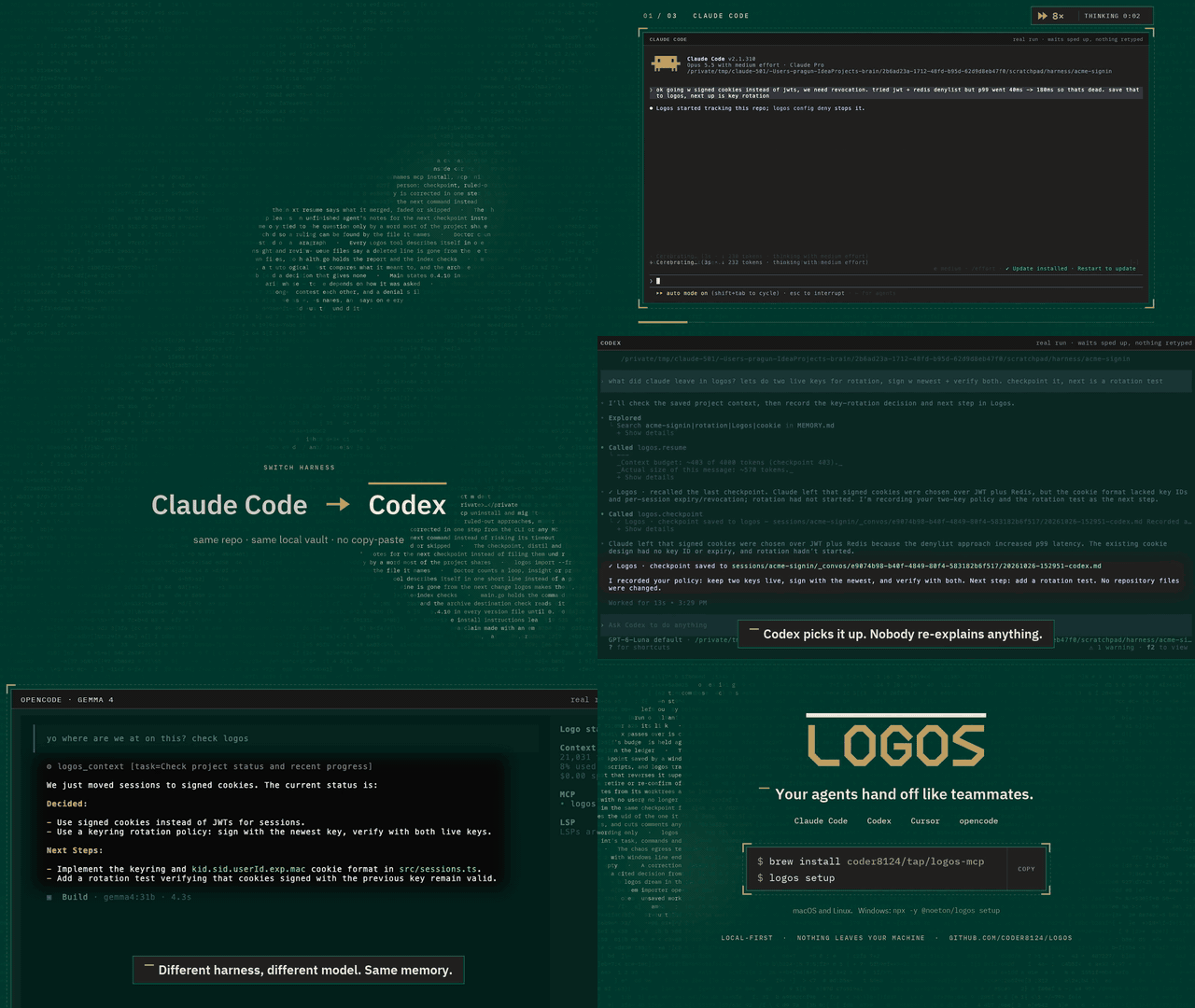
Logos is a local-first memory and continuity layer for coding agents. Claude Code, Codex, Cursor and your own agents share one vault over MCP. An agent checkpoints what it did, and the next one resumes where it stopped, even if it is a different model, in a different tool, on a different day.
Claude Code  ──▶  checkpoint  ──▶  Logos  ──▶  resume  ──▶  Cursor
                                (your vault)
The vault is a folder of markdown files on your machine. Nothing is uploaded,
and the SQLite index beside it is a cache: delete it, run logos index, and you
lose nothing.
Quick start
brew install coder8124/tap/logos-mcp && logos setup    # macOS and Linux
npm i -g @noeton/logos && logos setup                  # Windows
setup picks a vault, shows which agents it would wire, and asks before
touching any of them (--dry-run writes nothing). For Claude Code it also
installs the plugin, so the last handoff is in front of the model before it does
anything.
The formula is logos-mcp: a bare brew install logos installs Logos Bible
Software. Building from source, hand-wiring a host and the one-click buttons are
in Installation.
What it does
- Resume where the last agent stopped.
resumeshows what was done, what was verified and what is still open. - Stop the next agent repeating a dead end. Ruled-out approaches are their
own field, and
before_you_trychecks a plan against them. - Keep "verified" apart from "claimed". Resume marks another agent's verified items as its claim, and flags a command the activity log never saw.
- Answer "why is this code like this?"
why <path>shows what was being decided when a file was last worked on. - Remember what lasts. Decisions, constraints and procedures, reviewed before they become project memory.
- Bring your history. Import CLAUDE.md, AGENTS.md, Cursor rules, claude-mem, Claude Code's auto memory, transcripts or git history.
Every write returns a receipt, so you can see it working. The Handoff Loop shows how an agent uses it, step by step.
Works with
Claude Code, Codex, Cursor, Claude Desktop, Cline, Devin, GitHub Copilot, opencode, Amp, Grok Build, and anything else that speaks MCP. Agents with only a shell get a CLI command for every tool. See Agent Hosts.
Does it work?
On a handoff suite built for this (32 scenarios, nine memory systems, one machine), Logos passes 84.4%. The next best system passes 46.9%.
Every real system retrieves about equally well. What separates them is whether the agent that resumes gets the current answer, or gets it next to the stale one it replaced. Method, per-scenario scores and the cases Logos loses are in the benchmark.
Local, private and durable
- No model required. Search falls back from local embeddings (Ollama) to full-text search, and nothing breaks.
- Nothing is observed. Logos does not watch your screen, browser or files. The vault holds what agents wrote there, plus the Claude Code plugin's activity log, which you can turn off.
- Nothing leaves.
logos doctor --egresslists every address Logos can contact, and when. - Hard to break. It survives SIGKILL mid-write, a full disk, sync-client
conflict copies and two worktrees racing on one vault (
chaos/).
Exactly what is recorded, and every switch for it, is in Settings and Privacy.
Documentation
Everything lives in the wiki.
| Start | Use | Look up |
|---|---|---|
| Installation | The Handoff Loop | CLI Reference |
| Quick Start | Memory | MCP Tools Reference |
| Core Concepts | Importing History | Agent Hosts |
| Troubleshooting | The Vault | Embedding in Go |
Contributing
Contributions are welcome. CONTRIBUTING.md covers the build,
the test tiers and the two load-bearing conventions: the vault is the truth, and
every feature announces itself. Agents working here get the context-connect
and continuity skills from the plugin (plugin/skills/); this repository
dogfoods its own plugin.
Coming from brain? Since 0.5.0 the old names are not read. logos migrate
moves a ~/brain vault; see
Moving a 0.4 vault.
License
Apache 2.0. See LICENSE. Git history satisfies §4(b), so there are no change notices to add and no CLA (details). Prior work that shaped the ideas is in systemmd/CREDITS.md.
Logos MCP Fragen
Wie füge ich Logos MCP zu Claude Code hinzu?
Führe claude mcp add logos -- npx -y @noeton/logos in deinem Terminal aus. Füge --scope user hinzu, damit der Server in jedem Projekt verfügbar ist.
Wie füge ich Logos MCP zu Cursor hinzu?
Öffne ~/.cursor/mcp.json und füge den Server unter mcpServers hinzu, mit der Cursor-Config aus dem Installationsabschnitt oben.
Wie geht Logos mit dem Datenschutz um?
Logos ist Local-first; der Vault ist ein Ordner mit Markdown-Dateien auf deinem Rechner und es wird nichts hochgeladen.
Kann ich Logos mit verschiedenen AI Agents nutzen?
Ja, es funktioniert mit Claude Code, Codex, Cursor, Claude Desktop, Cline, Devin, GitHub Copilot und jedem anderen Tool, das MCP unterstützt.
Was passiert, wenn ich die Index-Datei lösche?
Du verlierst nichts; du kannst einfach den index command ausführen, um sie neu aufzubauen.
Ist ein LLM für die Funktion erforderlich?
Für die Grundfunktionen ist kein Modell erforderlich; die Suche fällt auf eine Volltextsuche zurück, falls lokale Embeddings nicht verfügbar sind.