
fusionwright MCP server
Commit 27. Okt. 2026Verbindet einen KI-Assistenten mit Autodesk Fusion, um 3D-Modellierung, Verifizierung, Rendering und Dateiexport durch einen Validierungs-Loop zu automatisieren.
Auch bekannt als Cocoloco20/fusionwright
- Stars
- 2
- Tools
- 10
- Downloads, 30 Tage
- —
- Neueste Version
- —
- Letzter Commit
- 27. Okt. 2026
- Lizenz
- MIT
Was ist fusionwright MCP?
Verbindet einen KI-Assistenten mit Autodesk Fusion, um 3D-Modellierung, Verifizierung, Rendering und Dateiexport durch einen Validierungs-Loop zu automatisieren. Er stellt 10 Tools bereit, etwa fusion_status, fusion_api, fusion_run.
Zusammenfassung generiert aus dem README des Projekts
Über fusionwright MCP server
fusionwright ermöglicht es Ingenieuren und Designern, die 3D-Modellierung und mechanische Verifizierung innerhalb von Autodesk Fusion zu automatisieren. Durch die Verbindung eines KI-Assistenten wie Claude oder Cursor mit einer Live-Fusion-Session können Nutzer komplexe Bauteile beschreiben, woraufhin der Assistent den notwendigen Python-Code schreibt, ausführt und validiert. Dieses Setup funktioniert auf macOS oder Windows über ein lokales Bridge-Add-in und erfordert Python 3.10 oder höher.
Im Gegensatz zu einfachen Scripting-Bridges implementiert dieser Server einen Validierungs-Loop, um die Genauigkeit zu gewährleisten. Er nutzt Tools wie fusion_run zur Codeausführung, fusion_check zur Überprüfung von Volumina und Interferenzen gegen den Fusion-Kernel sowie fusion_look, um Screenshots aus verschiedenen Winkeln aufzunehmen. Das System kann zudem fotorealistische Renderings via fusion_render erstellen und Dateien in Formaten wie STEP, STL oder OBJ exportieren. Dieser Ansatz erlaubt es der KI, Geometriefehler zu identifizieren und zu beheben, bevor das finale Design fertiggestellt ist.
Was du damit machen kannst
- 1Gehäuse generieren und exportierenBitte die KI, ein spezifisches PCB-Gehäuse mit Lüftungsschlitzen zu erstellen und es als STEP-Datei zu exportieren.
- 2Mechanische Genauigkeit verifizierenLass den Assistenten ein Bauteil auf ungültige Bodies oder Interferenzen prüfen und diese automatisch reparieren.
- 3Ästhetisches Finishing automatisierenFordere das Hinzufügen von Fillets an allen Außenkanten und ein Rendering mit einem spezifischen Material an.
- 4Geometrie mittels Arithmetik validierenStelle sicher, dass das generierte 3D-Volumen mithilfe des Fusion-Kernels einem spezifischen berechneten Wert entspricht.
Geschrieben aus dem README des Projekts. Jeder Use Case wurde gegen ein Zitat daraus geprüft.
fusionwright MCP tools 10
Erkannt aus dem READMEfusion_statusfusion_apifusion_runfusion_rollbackfusion_inspectfusion_checkfusion_lookfusion_renderfusion_exportfusion_ui_command
| fusion_status | — | |
| fusion_api | — | |
| fusion_run | — | |
| fusion_rollback | — | |
| fusion_inspect | — | |
| fusion_check | — | |
| fusion_look | — | |
| fusion_render | — | |
| fusion_export | — | |
| fusion_ui_command | — |
Automatisierte Checks
Geluften am 14. Nov. 2026Vollständiger Bericht →Noch nicht verifiziert. Ein Server benötigt einen Score von 80, keine kritischen Befunde und genug Daten für unsere Prüfung. Wie die Checks funktionieren · Was du für mehr Punkte verbessern kannst

- Source Repository verknüpft und erreichbarcocoloco20/fusionwright is public and reachablegithub.com/cocoloco20/fusionwright ↗Bestanden
- Paket nennt dieses Repository als QuelleNicht geprüft
- Build-Provenienz (Sigstore-Attestierung)Nicht geprüft
- Open Source Lizenz (OSI)MITspdx.org/licenses/MIT.html ↗Bestanden
- Commit oder Release im letzten JahrLast commit or release 2026-10-27github.com/cocoloco20/fusionwright ↗Bestanden
- OpenSSF ScorecardNicht geprüft
- Package-Name ähnelt keinem populären PackageNicht geprüft
- Keine kritischen Advisories im Paket oder seinen AbhängigkeitenNicht geprüft
- Keine versteckten Anweisungen an das Modell10 tool descriptions and the README read; no override phrases, credential paths or hidden charactersBestanden
- Destruktive Tools sind markiertNo tool named like delete, drop or execBestanden
- Remote-Endpoint beantwortet den MCP-HandshakeNicht geprüft
README
Auf GitHub ansehenfusionwright
Let an AI build in Autodesk Fusion for you.
An open-source MCP server that connects an AI assistant (Claude, ChatGPT, Cursor, anything that speaks MCP) to your live Fusion session. You describe what you want; the AI writes the Fusion code, looks at the result from several angles, measures and verifies it with Fusion's own kernel, fixes its mistakes, then renders it and exports files you can print, machine or send on. It is not tied to any kind of object: brackets, enclosures, gears, jigs, furniture, product mock-ups, anything solid.
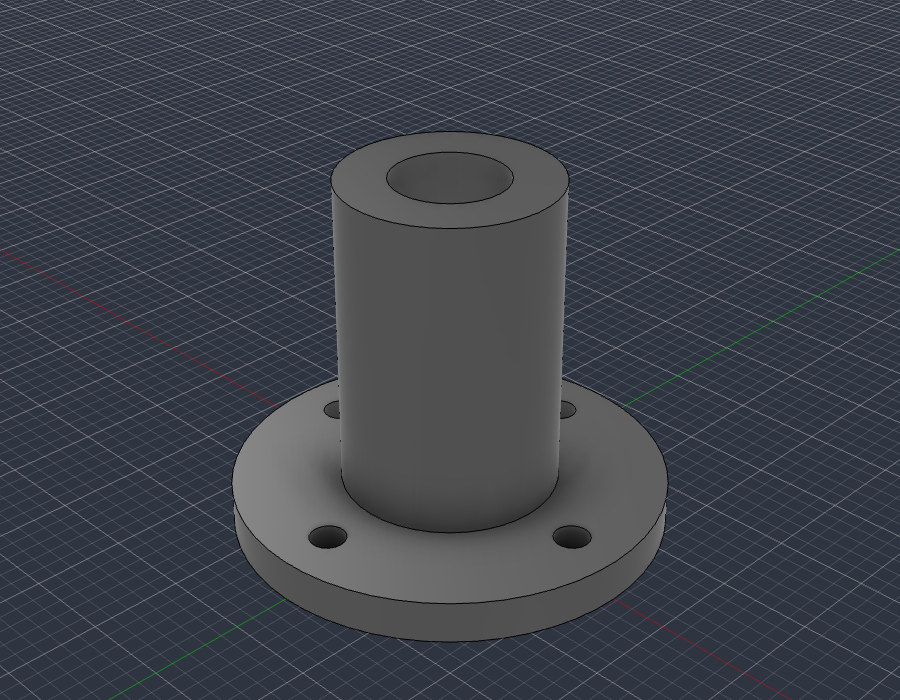
examples/flange_fusion_run.py, run through fusion_run in a live Fusion document: sketch, extrude, join, cut. The script checks Fusion's volume (37.542 cm3) against the hand-computed value (37.542 cm3), then fusion_look took this picture.
What you can ask for
- "Make an 80 x 50 x 25 mm enclosure for a PCB with four screw posts and vent slots, then export a STEP and an STL."
- "Model an M6 flange bracket with a 4-hole bolt circle, check it, and show me from the front."
- "Take the part open in Fusion, find any invalid bodies or interferences and fix them."
- "Add a 2 mm fillet to every outside edge and render it in brushed aluminium."
- "Build a 24-inch bookcase from 3/4 inch plywood and give me every part as its own component."
The loop that makes it dependable: write code, look at it, measure it against the arithmetic, repair, repeat. Executable CAD is often not correct CAD (research), and a validation loop sharply improves results, so the tools are built around checking the work.
Requirements
- Autodesk Fusion on macOS (tested) or Windows (untested). The free Personal-use tier works.
- Python 3.10+ and an MCP client.
It only uses Autodesk's documented public API and a legitimately licensed Fusion; it does not touch licensing.
Quick start
-
Install the bridge add-in (once): run
./scripts/install_addin.sh, then in Fusion pressShift+S, pick FusionBridge, click Run (tick Run on Startup to make it automatic). -
Register the server with your client.
Claude Desktop (
claude_desktop_config.json):{ "mcpServers": { "fusionwright": { "command": "uvx", "args": ["--from", "git+https://github.com/Cocoloco20/fusionwright", "fusionwright"] } } }Claude Code:
claude mcp add fusionwright -- uvx --from git+https://github.com/Cocoloco20/fusionwright fusionwright -
Ask. Exports land in
~/fusionwright-projects/(override withFUSIONWRIGHT_HOME).
Tools (10)
A small surface on purpose: fewer, higher-level tools beat dozens of thin wrappers.
| Tool | Purpose |
|---|---|
fusion_status |
Is Fusion reachable? Which document is open? |
fusion_api |
Look up the real Fusion API (class members with docs) before writing code |
fusion_run |
Run Python inside Fusion (helpers predefined); returns a rollback checkpoint |
fusion_rollback |
Undo everything after a checkpoint |
fusion_inspect |
Compact design state: sizes, volume, invalid bodies, timeline problems |
fusion_check |
Kernel validation: body validity, timeline health, interference, expected size |
fusion_look |
Screenshots from iso / front / back / left / right / top / bottom |
fusion_render |
Photoreal render with Fusion's local renderer |
fusion_export |
STEP, STL, F3D, OBJ, 3MF, IGES, SAT (local files only) |
fusion_ui_command |
Run any of Fusion's ~3,000 UI commands by id, or search them |
Inside fusion_run the names app, ui, design, root, adsk, P3, VI, FO, IN, coll() and board() are predefined; assign your answer to result. Fusion works in centimetres internally.
Examples
| File | What it shows |
|---|---|
examples/flange_fusion_run.py |
sketches, extrude / join / cut, picking profiles by area, checking against hand arithmetic |
Contributions of more examples (enclosures, gears, sheet metal, assemblies, anything) are welcome.
How it compares
- Autodesk's official Fusion MCP (announced May 2026) is a thin scripting bridge: read / screenshot, run a script, undo / redo. fusionwright adds a verification layer (kernel checks, multi-angle images, rollback checkpoints, an API lookup, UI-command access).
- Community Fusion MCPs expose dozens of low-level CAD operations (the biggest lists 89 tools) and mostly stop there. fusionwright is deliberately small and runs its bridge on an authenticated loopback port.
Safety
See SECURITY.md. In short: loopback only, bearer token (~/.fusion-bridge-token, mode 0600), Host-header guard, request-size cap; fusion_run blocks file deletion, network access and cloud saves by default and returns a rollback checkpoint. It is a safety net, not a sandbox: code you let an AI run inside Fusion is powerful. Save your work first.
What's tested
- 9 unit tests: the add-in's HTTP layer with a stubbed Fusion (token, host guard, size cap, error tracebacks) and a real stdio MCP round trip (tool list, safety guard, error messages).
- Live tests against a real Fusion (
pytest tests/integration): build a part and verify sizes, volume and interference with the kernel, views that must differ from each other, 5 export formats, a real render, rollback, API lookup, UI-command search, and a full MCP client round trip that returns images. - A 30-case capability suite (
tests/integration/capability_suite.py) covering sketches, constraints, extrude / cut / revolve / sweep / loft, fillet / shell / chamfer / hole, patterns, booleans, components and joints, parameters, timeline edits, materials, measurement, 8 export formats, STEP re-import, CAM setup creation, configurations, rendering and more.
See docs/COVERAGE.md for what the Fusion API can and cannot do and docs/GOTCHAS.md for API traps found along the way.
Known limitations
- Fusion-native drawings (
adsk.drawing) can only be created from a design saved to your Autodesk cloud, so they are not automated here. Verify every dimension before cutting, printing or machining. - "Everything a human can do in Fusion" is not literally achievable through its API.
fusion_ui_commandandfusion_runcover a great deal, but some interactions (some drag gestures, cloud workflows) remain manual.
Roadmap
Adapter for Autodesk's official Fusion MCP as an alternative transport · more verified examples · driving models from Fusion user parameters · MCP Apps live 3D preview · MCP Tasks for long renders · a cross-model evaluation suite.
Not affiliated
fusionwright is an independent project, not affiliated with or endorsed by Autodesk, Anthropic or OpenAI. "Autodesk" and "Fusion" are trademarks of Autodesk, Inc.
MIT licensed. Contributions welcome.
fusionwright MCP Fragen
Welche Tools bietet fusionwright MCP?
Er stellt 10 Tools bereit, darunter fusion_status, fusion_api, fusion_run, fusion_rollback, fusion_inspect.
Welche Betriebssysteme werden unterstützt?
Es wurde auf macOS getestet und ist für Windows derzeit noch nicht getestet.
Ist ein kostenpflichtiges Autodesk-Abonnement erforderlich?
Nein, die kostenlose Personal-use-Version von Autodesk Fusion funktioniert mit diesem Server.
Wie wird sichergestellt, dass die Designs der KI korrekt sind?
Es wird ein Validierungs-Loop genutzt, der Code schreibt, das Design mit dem Fusion-Kernel inspiziert, es gegen arithmetische Werte prüft und Fehler korrigiert.
Welche Dateiformate können exportiert werden?
Du kannst Dateien in den Formaten STEP, STL, F3D, OBJ, 3MF, IGES und SAT exportieren.