
Delegiert Coding-Aufgaben an lokale Qoder-Agenten von jedem MCP-Client wie Claude Code oder Cursor aus.
Auch bekannt als cantbeblank96/qodercli-mcp
- Stars
- 0
- Tools
- 21
- Downloads, 30 Tage
- —
- Neueste Version
- 0.4.3
- Letzter Commit
- 20. Aug. 2026
- Lizenz
- MIT
Was ist qodercli MCP?
Delegiert Coding-Aufgaben an lokale Qoder-Agenten von jedem MCP-Client wie Claude Code oder Cursor aus. Er stellt 21 Tools bereit, etwa prompt, cwd, model.
Zusammenfassung generiert aus dem README des Projekts
Über qodercli MCP server
Dieser Server ermöglicht es, Coding-Aufgaben direkt aus MCP-Clients wie Claude Code, Cursor oder der Qoder IDE an lokale Qoder-Agenten zu delegieren. Er fungiert als schlanker Wrapper um das qodercli Command Line Interface und erlaubt es jedem kompatiblen Client, Qoder als Sub-Agenten für komplexe Programmieraufgaben zu nutzen. Nutzer können Aufgaben über drei primäre Tools verwalten: ask-qoder zum Ausführen von Prompts, list-sessions zum Finden früherer Arbeiten und list-models zur Entdeckung verfügbarer KI-Modelle zur Laufzeit.
Das Setup ist mit npx unkompliziert und erfordert lediglich Node.js sowie eine angemeldete qodercli-Installation auf deinem lokalen Rechner. Der Server bietet granulare Sicherheitskontrolle durch Sandbox-Level wie read-only, workspace-write und danger-full-access. Er unterstützt zudem strukturierte JSON-Ausgaben, die Session-IDs, Dauer und Credit-Verbrauch enthalten, was Multi-Turn-Konversationen durch das Fortsetzen spezifischer Sessions ermöglicht. Entwickler können Umgebungsvariablen für Proxy-Support konfigurieren oder benutzerdefinierte Pfade zur qodercli-Binary angeben, um eine zuverlässige Ausführung in ihrer bevorzugten Entwicklungsumgebung zu gewährleisten.
Was du damit machen kannst
- 1Multi-Turn Refactoring durchführenEin Entwickler kann ein Refactoring starten und anschließend die Session ID nutzen, um in einem neuen Turn Folgeanweisungen zu geben.
- 2Sichere Code-Audits durchführenDu kannst eine Sicherheitsüberprüfung eines Codebase anfordern und gleichzeitig sicherstellen, dass der Agent keine Dateien modifizieren kann.
- 3Verfügbare KI-Modelle entdeckenEin KI-Client kann prüfen, welche Modelle aktuell vom CLI unterstützt werden, um die Verwendung veralteter Namen zu vermeiden.
- 4Dateiänderungen automatisierenNutzer können dem Agenten die Erlaubnis erteilen, Dateien innerhalb eines spezifischen Arbeitsverzeichnisses automatisch zu erstellen oder zu bearbeiten.
Geschrieben aus dem README des Projekts. Jeder Use Case wurde gegen ein Zitat daraus geprüft.
So installierst du qodercli MCP
Formate geprüft am 10. Nov. 2026Zu Cursor hinzufügenZu Goose hinzufügenqodercli MCP in Claude Code installieren
$ claude mcp add qodercli-mcp -- npx -y qodercli-mcpqodercli MCP in Cursor installieren
~/.cursor/mcp.json
{
  "mcpServers": {
    "qodercli-mcp": {
      "command": "npx",
      "args": [
        "-y",
        "qodercli-mcp"
      ]
    }
  }
}qodercli MCP in VS Code installieren
.vscode/mcp.json
{
  "servers": {
    "qodercli-mcp": {
      "type": "stdio",
      "command": "npx",
      "args": [
        "-y",
        "qodercli-mcp"
      ]
    }
  }
}qodercli MCP in VS Code CLI installieren
$ code --add-mcp '{"name":"qodercli-mcp","type":"stdio","command":"npx","args":["-y","qodercli-mcp"]}'qodercli MCP in Claude Desktop installieren
claude_desktop_config.json
{
  "mcpServers": {
    "qodercli-mcp": {
      "command": "npx",
      "args": [
        "-y",
        "qodercli-mcp"
      ]
    }
  }
}qodercli MCP in Codex installieren
$ codex mcp add qodercli-mcp -- npx -y qodercli-mcpqodercli MCP in Codex config.toml installieren
~/.codex/config.toml
[mcp_servers.qodercli-mcp]
command = "npx"
args = ["-y", "qodercli-mcp"]
qodercli MCP in Gemini CLI installieren
$ gemini mcp add -s user qodercli-mcp npx -- -y qodercli-mcpqodercli MCP in Gemini settings.json installieren
~/.gemini/settings.json
{
  "mcpServers": {
    "qodercli-mcp": {
      "command": "npx",
      "args": [
        "-y",
        "qodercli-mcp"
      ]
    }
  }
}qodercli MCP tools 21
Erkannt aus dem READMEpromptcwdmodelreasoning_effortpermission_modeapproval_policysandboxsystem_promptappend_system_promptresume_session_idoutput_formatextra_args
| prompt | — | |
| cwd | — | |
| model | — | |
| reasoning_effort | — | |
| permission_mode | — | |
| approval_policy | — | |
| sandbox | — | |
| system_prompt | — | |
| append_system_prompt | — | |
| resume_session_id | — | |
| output_format | — | |
| extra_args | — |
Alle 21 Tools anzeigenWeniger Tools anzeigen
timeout_msread-onlyworkspace-writedanger-full-accessdont_askaccept_editsbypass_permissionsautodefault
| timeout_ms | — | |
| read-only | — | |
| workspace-write | — | |
| danger-full-access | — | |
| dont_ask | — | |
| accept_edits | — | |
| bypass_permissions | — | |
| auto | — | |
| default | — |
Konfiguration
HTTPS_PROXYHTTPS proxy injected into qodercli subprocesses (optional)
HTTP_PROXYHTTP proxy injected into qodercli subprocesses (optional)
QODERCLI_DEFAULT_PERMISSION_MODEDefault permission mode when callers omit permission params: dont_ask (default, read-only) | accept_edits | bypass_permissions | auto | default
QODERCLI_PATHAbsolute path to the qodercli binary (defaults to `qodercli` on PATH)
| Name | Beschreibung | Typ |
|---|---|---|
| HTTPS_PROXY | HTTPS proxy injected into qodercli subprocesses (optional) | |
| HTTP_PROXY | HTTP proxy injected into qodercli subprocesses (optional) | |
| QODERCLI_DEFAULT_PERMISSION_MODE | Default permission mode when callers omit permission params: dont_ask (default, read-only) | accept_edits | bypass_permissions | auto | default | |
| QODERCLI_PATH | Absolute path to the qodercli binary (defaults to `qodercli` on PATH) |
Automatisierte Checks
Geluften am 14. Nov. 2026Vollständiger Bericht →Unsere automatisierten Checks bestanden. Das ist kein Security-Audit: Lies den Code und gib dem Server nur den minimal notwendigen Zugriff. Wie die Checks funktionieren

- Source Repository verknüpft und erreichbarcantbeblank96/qodercli-mcp is public and reachablegithub.com/cantbeblank96/qodercli-mcp ↗Bestanden
- Paket nennt dieses Repository als Quelleqodercli-mcp names cantbeblank96/qodercli-mcp as sourcenpmjs.com/package/qodercli-mcp ↗Bestanden
- Build-Provenienz (Sigstore-Attestierung)No build attestation published for this releaseNicht geprüft
- Open Source Lizenz (OSI)MITspdx.org/licenses/MIT.html ↗Bestanden
- Commit oder Release im letzten JahrLast commit or release 2026-08-20github.com/cantbeblank96/qodercli-mcp ↗Bestanden
- OpenSSF ScorecardNicht geprüft
- Package-Name ähnelt keinem populären PackageNo popular package one edit away from qodercli-mcpBestanden
- Keine kritischen Advisories im Paket oder seinen Abhängigkeiten99 resolved dependencies checked; no critical advisoryosv.dev ↗Bestanden
- Keine versteckten Anweisungen an das Modell21 tool descriptions and the README read; no override phrases, credential paths or hidden charactersBestanden
- Destruktive Tools sind markiertNo tool named like delete, drop or execBestanden
- Remote-Endpoint beantwortet den MCP-HandshakeNicht geprüft
README
Auf GitHub ansehenqodercli-mcp
English | 简体中文





The missing MCP server mode for Qoder CLI — delegate coding tasks to local Qoder agents from any MCP client (Qoder IDE, Claude Code, Cursor…).
A minimal MCP server that wraps the local qodercli (Qoder CLI) as MCP tools, letting any MCP client (Qoder IDE, Claude Code, Cursor, …) call Qoder like a sub-agent.
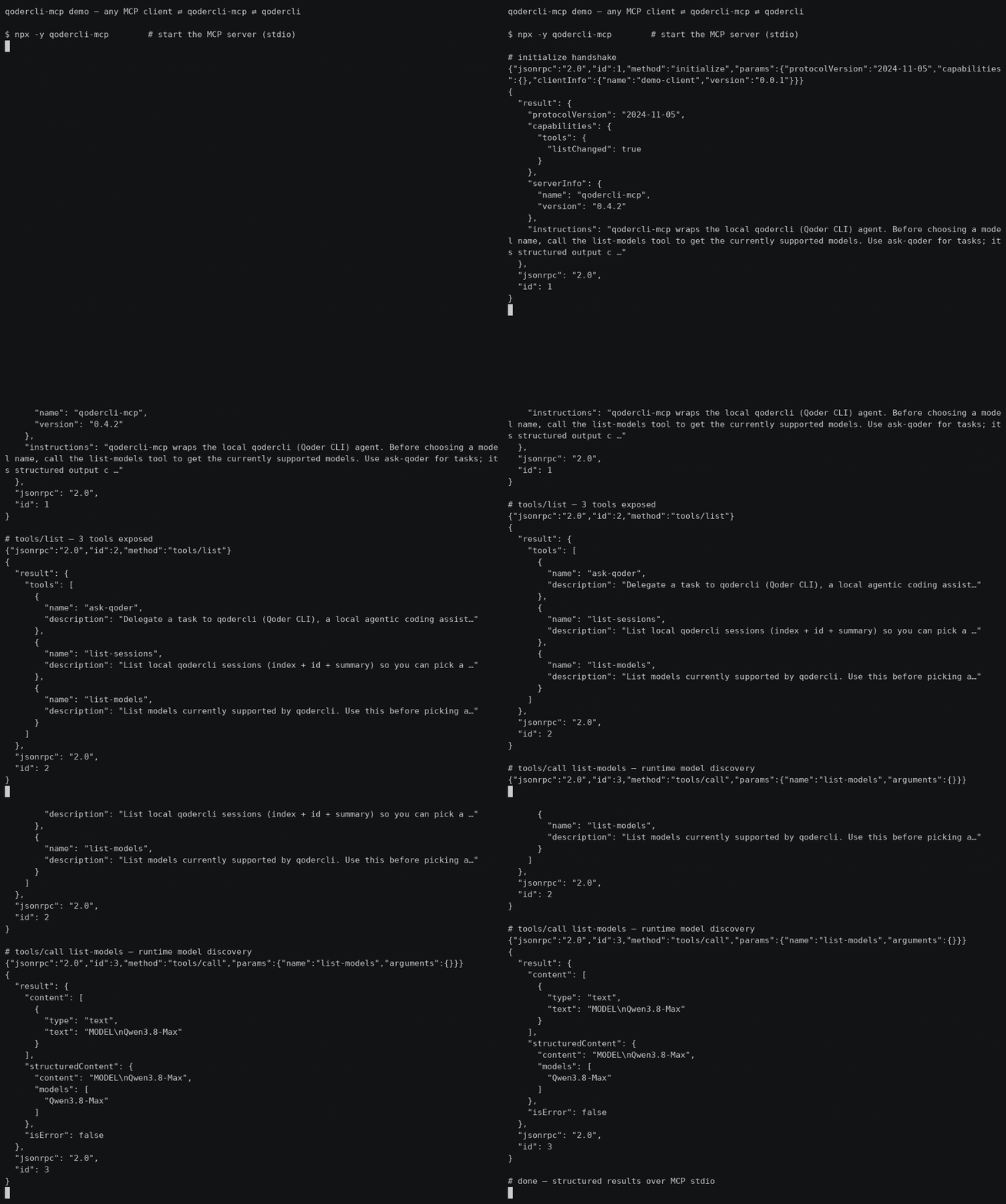
30s demo: MCP client ⇄ qodercli-mcp ⇄ qodercli — initialize → tools/list → list-models (real output, not sped up)
Quick start
Zero-config via npx — add this to your MCP client config (~/.qoder/mcp.json, claude_desktop_config.json, …):
{ "mcpServers": { "qodercli-mcp": { "command": "npx", "args": ["-y", "qodercli-mcp"] } } }
Three tools are exposed:
| Tool | Purpose |
|---|---|
ask-qoder |
Delegate a task to qodercli |
list-sessions |
Discover resumable sessions |
list-models |
Runtime model discovery |
Highlights: verified permission semantics (see below — e.g. dont_ask is read-only),
codex-style sandbox/approval_policy, structured output (session_id/duration_ms/total_credits).
Full configuration options are in Install.
Why
Some CLI agents ship an official MCP server mode (e.g. codex mcp-server), but qodercli currently only acts as an MCP client. This project fills that gap with a thin wrapper: it spawns qodercli -p <prompt> under the hood and streams the result back over MCP stdio.
Features
ask-qodertool — delegate a prompt to qodercli- Structured output (
session_id,is_error,duration_ms,total_credits,num_turns) via-o jsonparsing list-sessionstool to discover resumable sessionslist-modelstool for runtime model discovery (no stale model lists)reasoning_effortparameter (--reasoning-effort)- Server
instructionsin the MCP initialize result guide clients on usage - Codex-style
sandboxlevels (read-only/workspace-write/danger-full-access) - System prompt injection (
system_prompt/append_system_prompt) - Working directory, model, permission mode, output format control
- Session resume (
resume_session_id) for multi-turn delegation - Timeout protection with SIGKILL fallback
- Proxy quota support (
HTTP_PROXY/HTTPS_PROXYinjection) - Zero build step — plain ESM JavaScript, Node.js >= 18
Prerequisites
- Node.js >= 18
qodercliinstalled and signed in (qodercli login)
Install
Option A — npx (recommended): no clone needed, the MCP client downloads the package on first use.
"command": "npx", "args": ["-y", "qodercli-mcp"]
Option B — from source (for development):
git clone https://github.com/cantbeblank96/qodercli-mcp.git
cd qodercli-mcp
npm install
MCP client configuration
Qoder IDE
Add to ~/.qoder/mcp.json. Prefer the absolute path of node and set QODERCLI_PATH explicitly (nvm-managed binaries are often missing from the PATH seen by MCP child processes):
Proxy Support: To use your Qoder CLI proxy quota, add
HTTP_PROXYand/orHTTPS_PROXYto the server's environment. When these are set at the MCP server level, they will be passed to all qodercli subprocesses.
{
  "mcpServers": {
    "qodercli-mcp": {
      "command": "npx",
      "args": ["-y", "qodercli-mcp"],
      "env": {
        "QODERCLI_PATH": "/absolute/path/to/qodercli",
        "PATH": "/usr/local/bin:/usr/bin:/bin"
      }
    },
    "qodercli-mcp-with-proxy": {
      "command": "npx",
      "args": ["-y", "qodercli-mcp"],
      "env": {
        "QODERCLI_PATH": "/absolute/path/to/qodercli",
        "HTTP_PROXY": "http://127.0.0.1:39900",
        "HTTPS_PROXY": "http://127.0.0.1:39900",
        "PATH": "/usr/local/bin:/usr/bin:/bin"
      }
    }
  }
}
Developers running a local checkout instead of the published package (Option B) should replace command/args with the absolute node path and /path/to/qodercli-mcp/src/index.js (nvm-managed node is often missing from the PATH seen by MCP child processes).
Claude Code / Claude Desktop
{
  "mcpServers": {
    "qodercli-mcp": {
      "command": "node",
      "args": ["/absolute/path/to/qodercli-mcp/src/index.js"],
      "env": {
        "QODERCLI_PATH": "/absolute/path/to/qodercli"
      }
    }
  }
}
Tool: ask-qoder
| Parameter | Type | Description |
|---|---|---|
prompt |
string (required) | The task or question for qodercli |
cwd |
string | Working directory |
model |
string | Model for this session; call list-models to discover available names |
reasoning_effort |
string | Reasoning effort level (--reasoning-effort), e.g. low/medium/high; depends on the model |
permission_mode |
enum | dont_ask (default, read-only) | accept_edits (auto-approve file edits) | bypass_permissions (full access incl. shell) | auto | default; mutually exclusive with approval_policy, prefer sandbox |
approval_policy |
enum | codex-style: untrusted→read-only | on-request→auto | never→full access |
sandbox |
enum | read-only | workspace-write | danger-full-access (codex-style; controls the effective permission mode) |
system_prompt |
string | Replace the default system prompt |
append_system_prompt |
string | Append instructions to the default system prompt |
resume_session_id |
string | Resume a previous session |
output_format |
string | Passed to -o (default json). Note: non-json formats degrade structured output (session_id etc. become unavailable) |
extra_args |
string[] | Raw CLI args appended before the prompt; reserved flags (permission mode, system prompt, model, -o, -r, -w...) are rejected |
timeout_ms |
number | Timeout in ms, default 600000 |
Structured output
ask-qoder declares an MCP outputSchema and returns, in addition to the
human-readable text, a structuredContent object:
{
  "session_id": "77826b5c-...",   // pass back as resume_session_id
  "content": "OK",
  "is_error": false,
  "exit_code": 0,
  "duration_ms": 1280,
  "total_credits": 0.53,
  "num_turns": 1,
  "timed_out": false,
  "truncated": false
}
Sandbox mapping
| sandbox | Effective permission mode | Effect on qodercli |
|---|---|---|
| (omitted) | dont_ask |
Read-only: permission-requiring tools are silently denied |
read-only |
dont_ask |
Plus --disallowed-tools write_file,replace,run_shell_command as defense in depth |
workspace-write |
accept_edits |
Agent can create/modify files in cwd |
danger-full-access |
bypass_permissions |
Full access including shell |
Explicit permission_mode or approval_policy always wins over sandbox.
Permission modes (verified semantics)
| Mode | Behavior |
|---|---|
dont_ask |
Read-only: silently denies every tool call that requires permission. Headless-safe default |
accept_edits |
Auto-approves file edits; shell still governed by policy |
bypass_permissions |
Auto-approves everything including shell |
auto |
qodercli's own automatic policy |
default |
Interactive confirmation — not headless-friendly, avoid in MCP calls |
Tool: list-sessions
Lists local qodercli sessions (index, summary, session id) so a client can
pick a resume_session_id. Takes no arguments.
Tool: list-models
Lists models currently supported by qodercli (via --list-models), so a
client can pick a valid model value at runtime instead of relying on
stale knowledge. Returns both a text list and a structured models array.
Takes no arguments.
Usage Examples
Example 1: Simple code explanation
{ "name": "ask-qoder", "arguments": {
  "prompt": "Explain what main.py does",
  "cwd": "/path/to/project",
  "timeout_ms": 180000
}}
Example 2: Ask a second opinion
{ "name": "ask-qoder", "arguments": {
  "prompt": "@src/service.py Review this file for security issues and suggest improvements",
  "model": "qwen-plus",
  "permission_mode": "dont_ask",
  "timeout_ms": 300000
}}
Example 3: Multi-turn conversation via resume
// First call — session_id comes back in structuredContent
{ "name": "ask-qoder", "arguments": {
  "prompt": "Help me refactor this module to improve readability",
  "cwd": "/projects/backend",
  "timeout_ms": 300000
}}
// Then reuse structuredContent.session_id:
{ "name": "ask-qoder", "arguments": {
  "prompt": "Now add error handling for database timeouts",
  "resume_session_id": "77826b5c-cd6b-4213-b423-d95b4e1deab0"
}}
// Or discover ids with list-sessions
{ "name": "list-sessions", "arguments": {} }
Example 4: Code review with specific focus
{ "name": "ask-qoder", "arguments": {
  "prompt": "Analyze performance bottlenecks in utils.py",
  "model": "qwen-max",
  "permission_mode": "default",
  "output_format": "text",
  "timeout_ms": 240000
}}
Example 5: Read-only analysis
{ "name": "ask-qoder", "arguments": {
  "prompt": "Audit this codebase for security issues; do not modify anything",
  "cwd": "/workspaces/repo",
  "sandbox": "read-only",
  "timeout_ms": 300000
}}
read-only disables write/shell tools — good for audits and reviews.
Example 6: Project-wide analysis
{ "name": "ask-qoder", "arguments": {
  "prompt": "Summarize the architecture of this project and identify key modules",
  "cwd": "/workspaces/repo",
  "timeout_ms": 420000,
  "model": "qwen-plus"
}}
Best Practices
- Specify working directory — Always pass
cwdwhen operating on a specific project - Use timeout protection — For complex prompts, set explicit
timeout_msshorter than 60min - Resume for multi-turn — Chain follow-ups via
resume_session_idinstead of repeating context - Model selection — Call
list-modelsfirst to discover currently supported models; larger models are better for deep analysis - Permission mode — The server default is read-only (
dont_ask); setQODERCLI_DEFAULT_PERMISSION_MODE=bypass_permissionsto make full (YOLO) access the default for personal deployments. Per-call: tasks that must create/modify files needsandbox: "workspace-write"; shell access needsdanger-full-access. Do not combinesandboxwith an explicitpermission_mode(the latter wins)
Environment variables
| Variable | Default | Description |
|---|---|---|
QODERCLI_PATH |
qodercli |
Path to the qodercli binary |
QODERCLI_TIMEOUT_MS |
600000 |
Default timeout |
QODERCLI_MAX_OUTPUT_MB |
50 |
Per-call stdout/stderr cap in MB (OOM protection) |
QODERCLI_DEFAULT_PERMISSION_MODE |
dont_ask |
Default permission mode when the caller omits permission_mode/approval_policy/sandbox; set bypass_permissions for full (YOLO) access |
HTTP_PROXY |
- | HTTP proxy URL for qodercli |
HTTPS_PROXY |
- | HTTPS proxy URL for qodercli |
Development
npm test        # smoke test: protocol handshake + tool invocation
node src/index.js   # run the server manually (stdio)
Disclaimer
This is an unofficial, third-party tool. It is not affiliated with, endorsed, or sponsored by Qoder. Use permission_mode: bypass_permissions with care — delegated prompts may modify files in the target working directory.
Product Hunt Gallery
Main gallery image (1270×760, dark tech theme): ph-gallery.png. Optional demo video can be converted from the GIF (docs/demo.gif).
License
MIT
qodercli MCP Fragen
Wie füge ich qodercli MCP zu Claude Code hinzu?
Führe claude mcp add qodercli-mcp -- npx -y qodercli-mcp in deinem Terminal aus. Füge --scope user hinzu, damit der Server in jedem Projekt verfügbar ist.
Wie füge ich qodercli MCP zu Cursor hinzu?
Öffne ~/.cursor/mcp.json und füge den Server unter mcpServers hinzu, mit der Cursor-Config aus dem Installationsabschnitt oben.
Welche Tools bietet qodercli MCP?
Er stellt 21 Tools bereit, darunter prompt, cwd, model, reasoning_effort, permission_mode.
Welche Tools stellt dieser MCP server bereit?
Er stellt drei Tools bereit: ask-qoder zum Delegieren von Aufgaben, list-sessions zum Finden von fortsetzbaren Sessions und list-models zur Entdeckung von Modellen zur Laufzeit.
Wie kann ich einen Proxy mit qodercli-mcp nutzen?
Du kannst dein Qoder CLI Proxy-Kontingent nutzen, indem du HTTP_PROXY und/oder HTTPS_PROXY zu den Umgebungsvariablen des Servers hinzufügst.
Kann ich eine vorherige Coding-Session fortsetzen?
Ja, du kannst die session_id aus einer vorherigen Aufgabe als resume_session_id in einem neuen Aufruf verwenden, um Multi-Turn-Delegierungen zu ermöglichen.
Gibt es eine Möglichkeit, dies ohne Build-Schritt auszuführen?
Ja, es ist ein reines ESM JavaScript-Paket, das via npx ohne Build-Schritte ausgeführt werden kann.