
Bietet Jetpack Compose UI-Feedback und Source-Context-Handoff für AI Coding Agents via einem lokalen MCP server.
Auch bekannt als beyondwin/FixThis, @beyondwin/fixthis
- Stars
- 5
- Tools
- —
- Downloads, 30 Tage
- 357
- Neueste Version
- 1.5.0
- Letzter Commit
- 28. Okt. 2026
- Lizenz
- MIT
Was ist FixThis MCP?
FixThis ist ein MCP server. Bietet Jetpack Compose UI-Feedback und Source-Context-Handoff für AI Coding Agents via einem lokalen MCP server.
Zusammenfassung generiert aus dem README des Projekts
Über FixThis MCP server
Android-Entwickler, die mit Jetpack Compose arbeiten, können FixThis nutzen, um die Lücke zwischen visuellen UI-Bugs und dem Source-Code-Kontext zu schließen. Durch das Anbinden eines Debug-Sidekicks an eine Compose-App ermöglicht das Tool es Nutzern, auf spezifische UI-Elemente in einer lokalen Browser-Konsole zu zeigen und gewünschte Änderungen zu annotieren. Dieser Prozess generiert einen kompakten Handoff, der Screenshot-Bounds, Semantics und Source-Candidates enthält, die direkt an Coding Agents gesendet werden können.
Dieser lokale MCP server läuft über ADB und localhost, wodurch sichergestellt wird, dass keine Daten an externe APIs gesendet werden. Er ist für die Nutzung mit Agents wie Claude Code oder Codex konzipiert, die die Installation des Gradle-Plugins und die MCP-Konfiguration automatisieren können. Nutzer können wählen, ob sie Prompts manuell für Chat-Interfaces kopieren oder die Save to MCP Funktion nutzen möchten, um anonymisierte Android-Diagnosedaten an ihre Requests anzuhängen. Das System liefert spezifische technische Details wie Zeilennummern und editSurface-Hints, um Agents dabei zu helfen, die korrekten Composable-Komponenten zu identifizieren.
Was du damit machen kannst
- 1Automatisierte Agent-InstallationEin AI Agent kann ein Jetpack Compose Projekt automatisch konfigurieren, indem er den install-agent Befehl ausführt und das notwendige Gradle-Plugin anwendet.
- 2Visuelles UI-DebuggingEntwickler können spezifische Komponenten auswählen oder Bereiche in einer browserbasierten Konsole markieren, um Layout- oder Abstandsänderungen zu beschreiben.
- 3Kontextueller Code-HandoffAnstatt einfacher Screenshots liefert das Tool den Agents die besten Source-Candidates und Zeilennummern für präzise Edits.
- 4Anhängen von DiagnosedatenNutzer können begrenzte und anonymisierte Android-Diagnosedaten mit speichern, wenn sie eine Session in einem MCP Client sichern.
Geschrieben aus dem README des Projekts. Jeder Use Case wurde gegen ein Zitat daraus geprüft.
So installierst du FixThis MCP
Formate geprüft am 10. Nov. 2026Zu Cursor hinzufügenZu Goose hinzufügenFixThis MCP in Claude Code installieren
$ claude mcp add fixthis -- npx -y @beyondwin/fixthisFixThis MCP in Cursor installieren
~/.cursor/mcp.json
{
  "mcpServers": {
    "fixthis": {
      "command": "npx",
      "args": [
        "-y",
        "@beyondwin/fixthis"
      ]
    }
  }
}FixThis MCP in VS Code installieren
.vscode/mcp.json
{
  "servers": {
    "fixthis": {
      "type": "stdio",
      "command": "npx",
      "args": [
        "-y",
        "@beyondwin/fixthis"
      ]
    }
  }
}FixThis MCP in VS Code CLI installieren
$ code --add-mcp '{"name":"fixthis","type":"stdio","command":"npx","args":["-y","@beyondwin/fixthis"]}'FixThis MCP in Claude Desktop installieren
claude_desktop_config.json
{
  "mcpServers": {
    "fixthis": {
      "command": "npx",
      "args": [
        "-y",
        "@beyondwin/fixthis"
      ]
    }
  }
}FixThis MCP in Codex installieren
$ codex mcp add fixthis -- npx -y @beyondwin/fixthisFixThis MCP in Codex config.toml installieren
~/.codex/config.toml
[mcp_servers.fixthis]
command = "npx"
args = ["-y", "@beyondwin/fixthis"]
FixThis MCP in Gemini CLI installieren
$ gemini mcp add -s user fixthis npx -- -y @beyondwin/fixthisFixThis MCP in Gemini settings.json installieren
~/.gemini/settings.json
{
  "mcpServers": {
    "fixthis": {
      "command": "npx",
      "args": [
        "-y",
        "@beyondwin/fixthis"
      ]
    }
  }
}Automatisierte Checks
Geluften am 14. Nov. 2026Vollständiger Bericht →Unsere automatisierten Checks bestanden. Das ist kein Security-Audit: Lies den Code und gib dem Server nur den minimal notwendigen Zugriff. Wie die Checks funktionieren

- Source Repository verknüpft und erreichbarbeyondwin/fixthis is public and reachablegithub.com/beyondwin/fixthis ↗Bestanden
- Paket nennt dieses Repository als Quelle@beyondwin/fixthis names beyondwin/fixthis as sourcenpmjs.com/package/@beyondwin/fixthis ↗Bestanden
- Build-Provenienz (Sigstore-Attestierung)Sigstore attestation for @beyondwin/fixthisnpmjs.com/package/@beyondwin/fixthis/v/1.5.0#provenance ↗Bestanden
- Open Source Lizenz (OSI)MITspdx.org/licenses/MIT.html ↗Bestanden
- Commit oder Release im letzten JahrLast commit or release 2026-10-28github.com/beyondwin/fixthis ↗Bestanden
- OpenSSF ScorecardNicht geprüft
- Package-Name ähnelt keinem populären PackageNo popular package one edit away from @beyondwin/fixthisBestanden
- Keine kritischen Advisories im Paket oder seinen Abhängigkeiten1 resolved dependencies checked; no critical advisoryosv.dev ↗Bestanden
- Keine versteckten Anweisungen an das Modell0 tool descriptions and the README read; no override phrases, credential paths or hidden charactersBestanden
- Destruktive Tools sind markiertNicht geprüft
- Remote-Endpoint beantwortet den MCP-HandshakeNicht geprüft
README
Auf GitHub ansehenFixThis for Android Compose


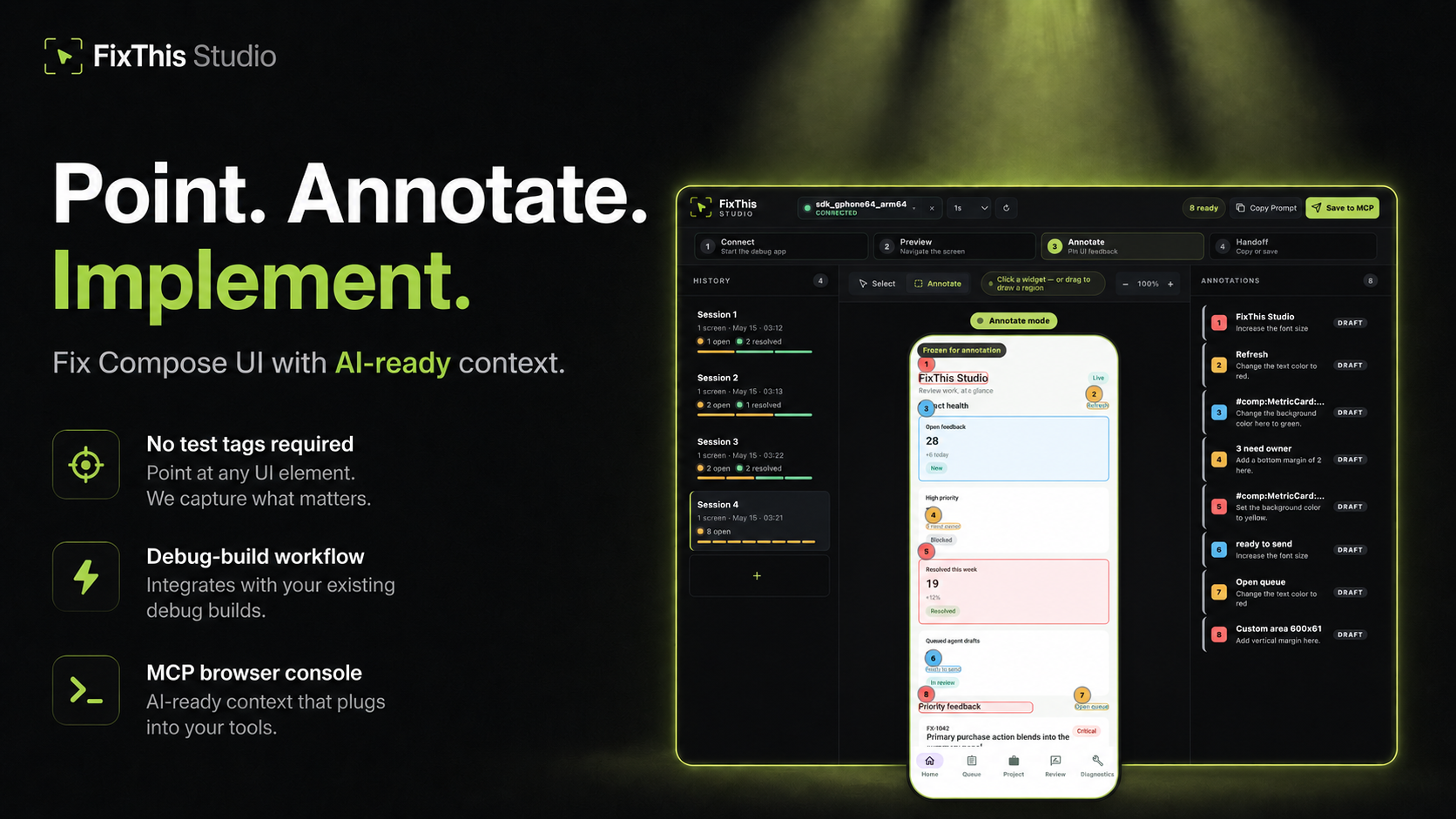
Point at a Jetpack Compose UI, write the change, and hand Claude, Codex, Cursor, or another coding agent the source context it needs.
FixThis is debug-only. It attaches a sidekick to a Compose debug app, mirrors the screen into a local browser console, and turns annotations into a compact handoff: screenshot bounds, semantics, source candidates, and confidence warnings.
Click a component to select it. Drag when the target is spacing, empty room, or something that is not a clean Compose node.
Works Today
- Try the sample app in about five minutes.
- Install the desktop CLI/MCP with Homebrew, npm, or GitHub Releases.
- Add it to an external app with the Gradle plugin
io.github.beyondwin.fixthis.compose. - Let Claude Code or Codex configure the sample with
./scripts/bootstrap-mcp.sh --sample. - Let an agent configure your app with
fixthis install-agent. - Use Copy Prompt with Cursor, ChatGPT, or any chat agent.
- Use Save to MCP with Claude Code or Codex.
- Save to MCP can attach a bounded, redacted Android diagnostics baseline. Switch the session to Manual or Off if you do not want that. Copy Prompt never starts collection.
- Runs locally over ADB and
127.0.0.1. No external API calls.
Quick Start: Agent Installs FixThis in Your App
Claude Code / Codex Bootstrap Prompt
Paste this into Claude Code or Codex from the root of a Jetpack Compose Android app:
Install FixThis in this project and configure it for this agent.

Use this order:
1. Run `fixthis install-agent --project-dir . --target all --verify --json`.
2. Use the JSON `readiness.state` and `actions[]` as the source of truth.
3. If `requiresUserAction` is true, tell me the exact blocking action.
4. Do not call `fixthis_open_feedback_console` until `readyForMcpTooling` is true, or until the report's `agent_after_restart` action is reached after restart.

Restart Claude Code or Codex if the report asks for it.
Do not configure release builds. Do not commit `.fixthis/`.
The agent should run:
# macOS
brew install beyondwin/tools/fixthis

# Node
npm install -g @beyondwin/fixthis

# macOS/Linux fallback
curl -fsSL https://raw.githubusercontent.com/beyondwin/FixThis/main/scripts/install-fixthis.sh \
  | bash -s -- --version v1.5.0

fixthis install-agent --project-dir . --target all --verify --json
If Homebrew already has it, run
brew update && brew upgrade beyondwin/tools/fixthis and check
fixthis --version.
fixthis install-agent applies the Gradle plugin, writes MCP config, and
writes .fixthis/project.json plus .fixthis/agent-setup.*. If doctor
reports NEEDS_INSTALL or metadata is missing, run ./gradlew fixthisSetup
and rerun fixthis install-agent --project-dir . --target all --verify --json.
Restart Claude Code or Codex when the report asks, then call
fixthis_open_feedback_console. For a manual check, use
fixthis doctor --project-dir . --json.
Published plugin:
plugins {
    id("io.github.beyondwin.fixthis.compose") version "1.5.0"
}
The plugin adds the debug-only sidekick and keeps release builds out.
Quick Start: Sample App to Agent Handoff
git clone <this-repo> && cd FixThis
./gradlew :fixthis-cli:installDist :fixthis-mcp:installDist
fixthis-cli/build/install/fixthis/bin/fixthis doctor --package io.github.beyondwin.fixthis.sample
fixthis-cli/build/install/fixthis/bin/fixthis run --package io.github.beyondwin.fixthis.sample
fixthis run installs the sample debug APK, launches it, and opens FixThis
Studio at http://127.0.0.1:<port>.
In the console:
- Click Annotate.
- Click a UI element, or drag an area.
- Type the change you want.
- Repeat for other spots on this screen.
- Copy Prompt for a chat agent, or Save to MCP for Claude Code / Codex.
You are done when a numbered annotation is visible and you have copied Markdown or saved a local MCP handoff.
Maintainers can prove that Copy Prompt path on a connected device:
npm run real-copy-prompt:smoke -- --strict
Pick Your Path
| Goal | Start here |
|---|---|
| Try it without touching your app | Sample quick start |
| Add it to your debug build | Add to your app |
| Connect an agent | Connect your agent |
| Bootstrap MCP from this repo | MCP.md |
| Use the console | Console tour |
| Understand the product | Product |
| Diagnose a failure | Troubleshooting |
| Inspect contracts | Docs index |
| Contribute | CONTRIBUTING.md |
| Reader | Start here |
|---|---|
| First-time user | Sample quick start |
| External app developer | Add to your app |
| Agent in this repo | AGENTS.md and project map |
| Maintainer | Docs index and project map |
| Contract or CLI change | Reference contracts |
Why not just a screenshot?
A screenshot is enough when the target is obvious. FixThis helps when the UI is dense, list-rendered, or named mostly by composable:
- Top-3 source candidates with line numbers and match reasons
editSurfacehints for call site vs component vs copy vs layout vs interop- Instance grouping so identical cards stay distinct
- Screen fingerprint so a rotated or changed screen cannot sneak into a save
- Honest confidence: visual-only, stale, or possible AndroidView/WebView
- Bounded runtime diagnostics on Save to MCP
- Retry-safe batches that do not duplicate work
Modules
| Module | Role |
|---|---|
:app (sample/) |
Validation sample |
:fixthis-compose-core |
Pure Kotlin domain |
:fixthis-compose-sidekick |
Debug Android runtime |
:fixthis-gradle-plugin |
Source index and debug wiring |
:fixthis-cli |
Desktop CLI |
:fixthis-mcp |
MCP server and local console |
More: Product, decisions, architecture.
Status
Public install paths:
- Gradle plugin
io.github.beyondwin.fixthis.compose - Maven
io.github.beyondwin:fixthis-compose-sidekickandfixthis-compose-core - Homebrew
brew install beyondwin/tools/fixthis - GitHub Release
fixthis-cli-mcp-vX.Y.Z.tar.gz - npm
@beyondwin/fixthis - MCP Registry
io.github.beyondwin/fixthis
Live dashboard: Release readiness.
main may be ahead of the latest tag. See CHANGELOG
and release notes.
Agents in this repo should read AGENTS.md.
Trust
FixThis stays on your machine. The sidekick talks over ADB, the console binds
to localhost, and Save to MCP writes under .fixthis/. Screenshots can
still contain sensitive pixels. Review them before sharing. Do not commit
.fixthis/.
Details: Privacy, Security, Threat model.
V1 stays narrow: Compose debug builds, local ADB, MCP-first handoff, best-effort source candidates, no cloud upload. See Roadmap.
License
FixThis MCP Fragen
Wie füge ich FixThis MCP zu Claude Code hinzu?
Führe claude mcp add fixthis -- npx -y @beyondwin/fixthis in deinem Terminal aus. Füge --scope user hinzu, damit der Server in jedem Projekt verfügbar ist.
Wie füge ich FixThis MCP zu Cursor hinzu?
Öffne ~/.cursor/mcp.json und füge den Server unter mcpServers hinzu, mit der Cursor-Config aus dem Installationsabschnitt oben.
Sendet FixThis Daten in die Cloud?
Nein, es läuft lokal über ADB und localhost ohne externe API-Aufrufe.
Wie kann ich FixThis mit Claude Code oder Codex nutzen?
Du kannst die 'Save to MCP' Funktion nutzen oder den bereitgestellten Bootstrap-Prompt verwenden, um den Agent zu konfigurieren.