
Ermöglicht Retrieval Practice für Coding Agents durch Multiple-Choice-Fragen zu kürzlich vorgenommenen Code-Änderungen, um das Lernen zu verstärken.
Auch bekannt als atomicreps/cli, cli
- Stars
- 0
- Tools
- —
- Downloads, 30 Tage
- —
- Neueste Version
- 0.1.0
- Letzter Commit
- 6. Okt. 2026
- Lizenz
- MIT
Was ist atomicreps MCP?
atomicreps ist ein MCP server. Ermöglicht Retrieval Practice für Coding Agents durch Multiple-Choice-Fragen zu kürzlich vorgenommenen Code-Änderungen, um das Lernen zu verstärken.
Zusammenfassung generiert aus dem README des Projekts
Über atomicreps MCP server
Atomic Reps ist ein Tool, das Entwicklern helfen soll, ihr Coding-Wissen durch Retrieval Practice zu festigen. Es funktioniert, indem dem Nutzer unmittelbar nachdem ein Coding Agent eine Aufgabe mit Dateiänderungen abgeschlossen hat, Multiple-Choice-Fragen präsentiert werden. Dieser Prozess verwandelt aktive Entwicklungssessions in Lernmöglichkeiten, indem das Gedächtnis bezüglich kürzlich vorgenommener Code-Modifikationen getestet wird.
Der Server lässt sich in verschiedene MCP Clients integrieren, darunter Claude Code, GitHub Copilot, Cursor, Windsurf und Codex. Nutzer richten den Server über einen Terminal-Wizard mit Node 24 oder höher ein, was die Erstellung eines kostenlosen Accounts und die Authentifizierung über einen Webbrowser erfordert. Sobald die Verbindung steht, verwaltet der Server die Häufigkeit, den Schwierigkeitsgrad und die spezifischen Themen der Fragen, um ein kontrolliertes Lerntempo beizubehalten.
Entwickler können ihre Erfahrung mit Tools wie rep, answer, me und settings anpassen. Das System verfolgt den Fortschritt durch Streaks und Zusammenfassungen, während Nutzer spezifische Themen stummschalten oder die Intensität anpassen können. Der Datenschutz hat Priorität, da nur Catalog Handles und Metadaten statt tatsächlicher Codeinhalte oder Prompts gesendet werden.
Was du damit machen kannst
- 1Kürzliche Code-Änderungen festigenLass die KI eine Multiple-Choice-Frage zu einem gerade abgeschlossenen Bugfix oder einer Code-Modifikation stellen.
- 2Lernfortschritt trackenSieh dir deine aktuelle Lern-Streak, deine Skills und Session-Zusammenfassungen an, um deine Fortschritte zu überwachen.
- 3Lerninhalte anpassenSchalte spezifische Programmierthemen oder Sub-Skills, die du nicht üben möchtest, stumm.
- 4Schwierigkeit und Häufigkeit verwaltenPasse an, wie oft Fragen erscheinen und wie hoch der Schwierigkeitsgrad für das Retrieval Practice sein soll.
Geschrieben aus dem README des Projekts. Jeder Use Case wurde gegen ein Zitat daraus geprüft.
So installierst du atomicreps MCP
Formate geprüft am 10. Nov. 2026Zu Cursor hinzufügenZu Goose hinzufügenatomicreps MCP in Claude Code installieren
$ claude mcp add cli -- npx -y atomicrepsatomicreps MCP in Cursor installieren
~/.cursor/mcp.json
{
  "mcpServers": {
    "cli": {
      "command": "npx",
      "args": [
        "-y",
        "atomicreps"
      ]
    }
  }
}atomicreps MCP in VS Code installieren
.vscode/mcp.json
{
  "servers": {
    "cli": {
      "type": "stdio",
      "command": "npx",
      "args": [
        "-y",
        "atomicreps"
      ]
    }
  }
}atomicreps MCP in VS Code CLI installieren
$ code --add-mcp '{"name":"cli","type":"stdio","command":"npx","args":["-y","atomicreps"]}'atomicreps MCP in Claude Desktop installieren
claude_desktop_config.json
{
  "mcpServers": {
    "cli": {
      "command": "npx",
      "args": [
        "-y",
        "atomicreps"
      ]
    }
  }
}atomicreps MCP in Codex installieren
$ codex mcp add cli -- npx -y atomicrepsatomicreps MCP in Codex config.toml installieren
~/.codex/config.toml
[mcp_servers.cli]
command = "npx"
args = ["-y", "atomicreps"]
atomicreps MCP in Gemini CLI installieren
$ gemini mcp add -s user cli npx -- -y atomicrepsatomicreps MCP in Gemini settings.json installieren
~/.gemini/settings.json
{
  "mcpServers": {
    "cli": {
      "command": "npx",
      "args": [
        "-y",
        "atomicreps"
      ]
    }
  }
}Automatisierte Checks
Geluften am 15. Nov. 2026Vollständiger Bericht →Unsere automatisierten Checks bestanden. Das ist kein Security-Audit: Lies den Code und gib dem Server nur den minimal notwendigen Zugriff. Wie die Checks funktionieren

- Source Repository verknüpft und erreichbaratomicreps/cli is public and reachablegithub.com/atomicreps/cli ↗Bestanden
- Paket nennt dieses Repository als Quelleatomicreps names atomicreps/cli as sourcenpmjs.com/package/atomicreps ↗Bestanden
- Build-Provenienz (Sigstore-Attestierung)No build attestation published for this releaseNicht geprüft
- Open Source Lizenz (OSI)MITspdx.org/licenses/MIT.html ↗Bestanden
- Commit oder Release im letzten JahrLast commit or release 2026-10-06github.com/atomicreps/cli ↗Bestanden
- OpenSSF ScorecardNicht geprüft
- Package-Name ähnelt keinem populären PackageNo popular package one edit away from atomicrepsBestanden
- Keine kritischen Advisories im Paket oder seinen Abhängigkeiten1 resolved dependencies checked; no critical advisoryosv.dev ↗Bestanden
- Keine versteckten Anweisungen an das Modell0 tool descriptions and the README read; no override phrases, credential paths or hidden charactersBestanden
- Destruktive Tools sind markiertNicht geprüft
- Remote-Endpoint beantwortet den MCP-HandshakeHTTPS endpoint answered 401 (sign-in required)Bestanden
README
Auf GitHub ansehenatomicreps


One short question about the thing you just built. Works inside Claude Code, GitHub Copilot, Cursor, Windsurf, Codex, or any MCP client.
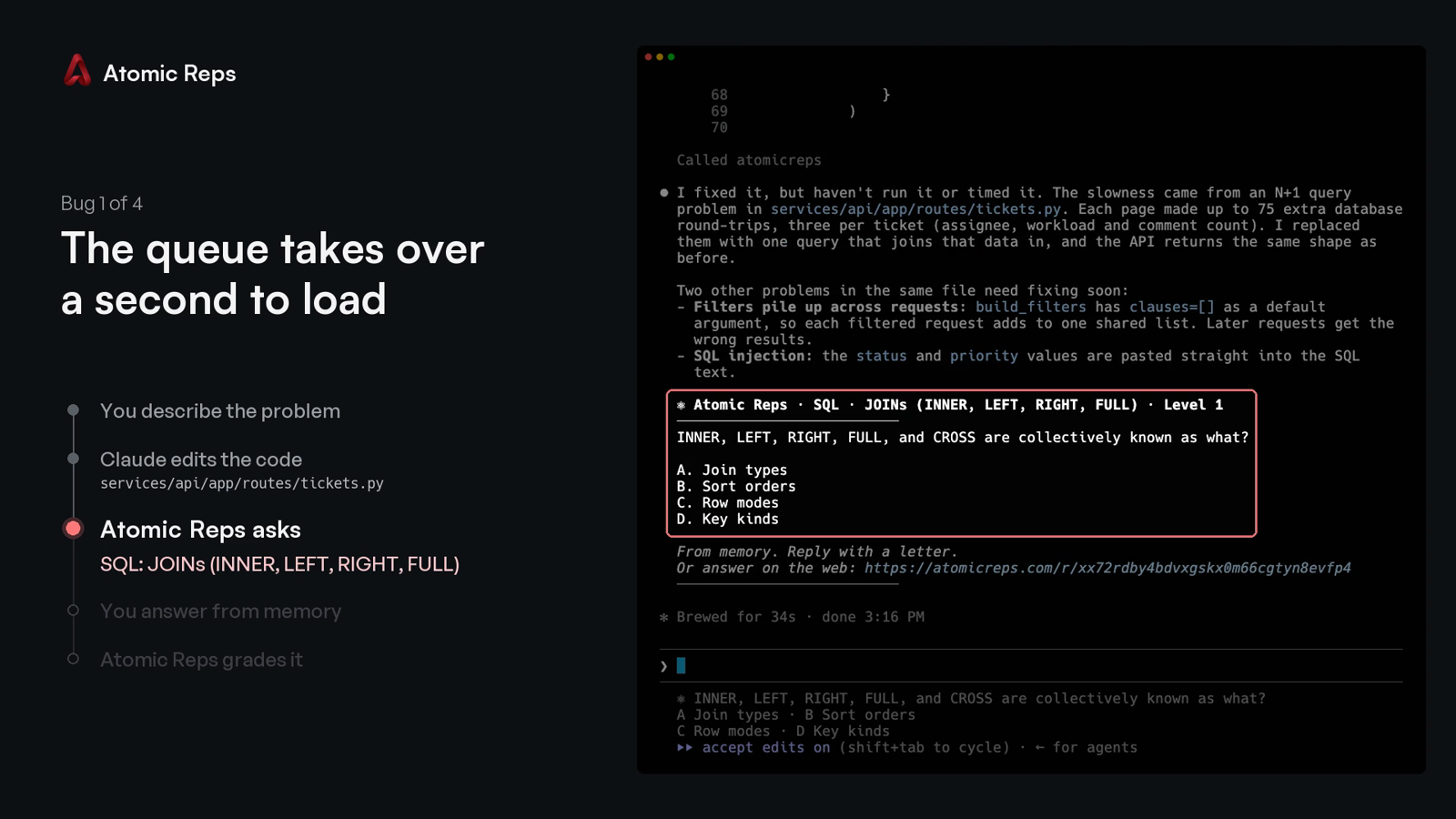
You describe a bug, your coding agent changes the code, and Atomic Reps asks you one multiple-choice question about that change. You answer with a letter, from memory, and the server grades it.
The two-minute demo: four bugs fixed in Claude Code, one question after each.
https://github.com/user-attachments/assets/521c1bb3-9f75-4c25-8b71-ed763de7debc
Quick start
Requires Node 24+ and a free account. On an older Node, every command prints the version it needs instead of starting.
npx atomicreps
The first run is a setup wizard:
- Pick what to practise, how often, and how hard.
- Sign in: the terminal prints a code, and you type it at atomicreps.com/connect.
- Pick your editors.
connectwrites only the entries you tick.
Then go back to work. When your agent finishes a task that changed files, the question appears after its answer:
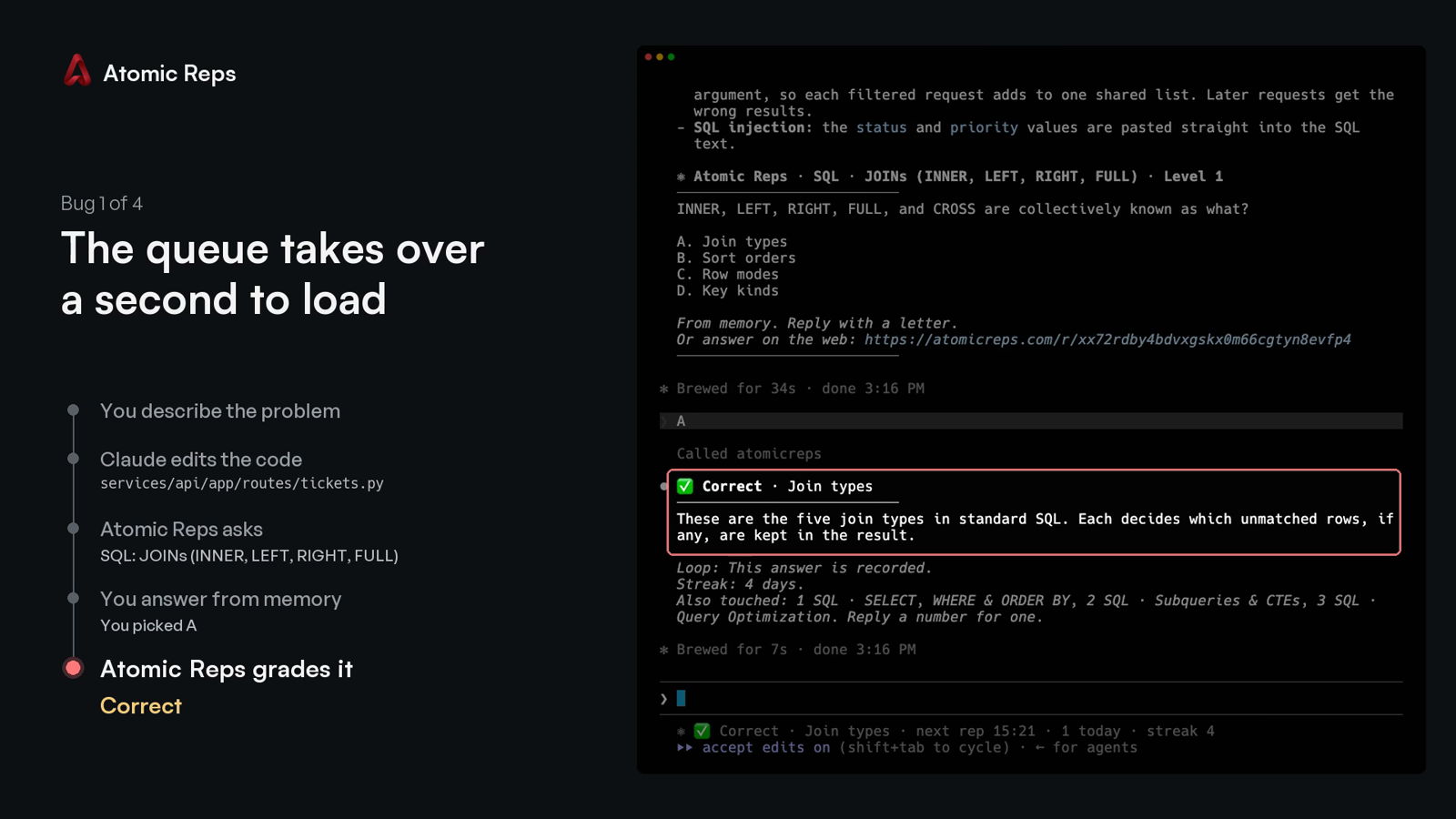
Type the letter. The verdict comes back with a one-line explanation, and the next line names up to three other topics the session touched:
Every run after the first opens the terminal screen: your streak, this session, your topics, mutes and rate.
Commands
npx atomicreps            the terminal screen; the setup wizard on the first run
npx atomicreps setup      the setup wizard again: areas, topics, how often, how hard
npx atomicreps login      sign in from a browser with a typed code
npx atomicreps connect    register the server with your editor
npx atomicreps connect --pin   pin the launch args to this installed version, for a command you can commit
npx atomicreps mcp        the stdio MCP server process (what the editor launches)
npx atomicreps doctor     token, server ping, version, when the next rep may come, allowlist
npx atomicreps why        the last ten times a question could have appeared, and why it did or did not
npx atomicreps logout     forget the token on this machine
npx atomicreps logout --purge   also forget your reps and status, and offer to undo connect
Add --alpha to any command to use staging. It keeps its own token and cache,
so you can be signed in to both staging and production at once.
Plain connect writes npx -y atomicreps mcp, which always resolves to
whatever is latest at launch. connect --pin writes npx -y atomicreps@<version> mcp instead, the version this CLI is running, so an
organisation can review one exact command and commit it rather than trusting
npx to fetch the same thing twice.
Claude Code
npx atomicreps connect offers four Claude Code rows:
- Claude Code registers the server at user scope.
- …and a question at the end of each turn adds a
Stophook and aUserPromptSubmithook to~/.claude/settings.json. When Claude finishes a turn that changed files, the question prints in your terminal without Claude taking an extra turn, and the letter you type next is graded. Hooks you already have stay. - …and allow its four tools adds
rep,answer,meandsettingstopermissions.allow, so the first question does not stop on a permission prompt. - …and a Claude Code status line shows the open question under the prompt. A status line you already have keeps printing first.
Without connect, the server alone:
claude mcp add --scope user atomicreps -- npx -y atomicreps mcp
GitHub Copilot
npx atomicreps connect offers VS Code and Copilot CLI as rows. Without it:
code --add-mcp '{"name":"atomicreps","type":"stdio","command":"npx","args":["-y","atomicreps","mcp"]}'
copilot mcp add atomicreps -- npx -y atomicreps mcp
Copilot in JetBrains, Visual Studio, Xcode and Eclipse reads the same entry
from its own mcp.json (Settings, then MCP). A team can
commit it as .vscode/mcp.json so every clone has it:
{
  "servers": {
    "atomicreps": { "type": "stdio", "command": "npx", "args": ["-y", "atomicreps", "mcp"] }
  }
}
Copilot reads the server's instructions and calls rep when a task ends,
the same as Cursor and Codex. Approve the four tools once and they stay
approved.
Cursor, Windsurf, Codex and other clients
connect adds one entry to ~/.cursor/mcp.json or
~/.codeium/windsurf/mcp_config.json, and runs codex mcp add for Codex.
Anything already in those files stays. By hand:
codex mcp add atomicreps -- npx -y atomicreps mcp
{
  "mcpServers": {
    "atomicreps": { "command": "npx", "args": ["-y", "atomicreps", "mcp"] }
  }
}
Any other MCP client takes the same command: npx -y atomicreps mcp. The
"I'll set it up myself" row in connect prints it and writes nothing.
How a rep is served
When your coding agent finishes a task, it calls rep once with a few words
for what changed. The server picks one question, or nothing, and your agent
shows it to you unchanged. Reply with a letter, or ignore it.
Under the verdict, one line names up to three other things the session touched. A number asks about one of them. "Never Swift" mutes a topic permanently. "Not this topic" mutes it for thirty days. "Unmute Swift" removes the mute. "How am I doing" prints your summary.
The server enforces the pace, not the agent. It sets a minimum gap between
automatic reps, a daily cap, and mute and off. It refuses an answer typed
within seconds of the question. It never includes the answer key in a rep.
Every failure returns no rep rather than an error; doctor says why.
Tools
| tool | what it does |
|---|---|
rep({ touched?, ask?, topic?, kind?, exclude? }) |
one question, one insight, or nothing; ask takes a handle from an offer |
answer({ pick, id? }) |
the verdict, the explanation, and the offer line |
me({ show? }) |
summary, skills, reps, streak or mutes |
settings({ intensity?, topics?, levels?, prefer?, mute?, muteMinutes?, days?, unmute?, dialog? }) |
the rate, the pinned topics, the difficulty range, the preferred areas, mutes, the dialog |
Handles are topic or topic.subskill (react.hooks_core). Fifty sub-skill
slugs repeat across topics, so the topic is always part of the name.
settings({ dialog: true }) asks for the letter in your editor's native
dialog instead of the chat. It blocks the turn, so it is a setting, never the
default.
Privacy
What leaves your machine on a rep call: catalog handles with small weights.
Also package, file extension and folder names the public catalog already
knows. Your agent's touched words are matched to handles on your machine;
the words themselves are never sent. An unknown package name is dropped. A
private name (@acme/react-internal) is sent as its public alias (react).
We never send your code, a file's contents, or a prompt. npx atomicreps setup prints the exact payload for your repo, before you sign in.
npx atomicreps mcp forwards each JSON-RPC message from your editor to the
Atomic Reps server with your token. The answer comes back the same way.
ATOMICREPS_API is honoured only for an Atomic Reps or loopback address,
since your token goes wherever it points. Anything else is ignored and
reported by doctor; set ATOMICREPS_UNSAFE_ORIGIN=1 to override.
Login
npx atomicreps prints a code. Type it at atomicreps.com/connect while
signed in; a forwarded link approves nothing. The token is saved in
~/.config/atomicreps/config.json (mode 0600), prefixed arep_ so secret
scanners find it. You can revoke it from your account page. logout forgets
it; logout --purge also deletes the reps and status this machine cached, then
lists every editor entry connect wrote (both channels) and removes the ones you
leave ticked.
The trust boundary, and how to report a vulnerability: SECURITY.md.
Check it yourself
dist/cli.js is built from these files and nothing else. The package has no
runtime dependencies.
npm install
npm run build    # writes dist/cli.js from src
npm test         # the behaviour described above, as tests
To compare with what npm serves: npm pack atomicreps, then read its
dist/cli.js beside the one you just built. Everything the client sends is in
src/api.ts. Everything it reads from your repository is in src/infer.ts.
MIT.
atomicreps MCP Fragen
Wie füge ich atomicreps MCP zu Claude Code hinzu?
Führe claude mcp add cli -- npx -y atomicreps in deinem Terminal aus. Füge --scope user hinzu, damit der Server in jedem Projekt verfügbar ist.
Wie füge ich atomicreps MCP zu Cursor hinzu?
Öffne ~/.cursor/mcp.json und füge den Server unter mcpServers hinzu, mit der Cursor-Config aus dem Installationsabschnitt oben.
Wie funktioniert Atomic Reps mit meinem Coding Agent?
Wenn dein Agent Code ändert, stellt der Server eine Multiple-Choice-Frage zu dieser Änderung. Du antwortest aus dem Gedächtnis mit einem Buchstaben und der Server bewertet die Antwort.
Sendet der Server meinen eigentlichen Code an den Service?
Nein, der Server sendet niemals deinen Code, Dateiinhalte oder Prompts. Er nutzt lediglich Catalog Handles und Package-/Ordnernamen, um Themen zuzuordnen.
Welche Editoren und AI Clients werden unterstützt?
Es funktioniert mit Claude Code, GitHub Copilot, Cursor, Windsurf, Codex und jedem anderen MCP Client.
Wie richte ich Atomic Reps ein?
Du kannst mit dem Befehl npx atomicreps starten, der einen Setup-Wizard öffnet, mit dem du Lernbereiche, Häufigkeit und Schwierigkeitsgrad auswählen kannst.