
Ermöglicht React-Entwicklern, typisierte App-Funktionalitäten als WebMCP-Tools bereitzustellen, die von AI Agents entdeckt und aufgerufen werden können.
Auch bekannt als agentcathq/webmcp-react
- Stars
- 92
- Tools
- —
- Downloads, 30 Tage
- —
- Neueste Version
- —
- Letzter Commit
- 27. Okt. 2026
- Lizenz
- MIT
Was ist webmcp-react MCP?
webmcp-react ist ein MCP server. Ermöglicht React-Entwicklern, typisierte App-Funktionalitäten als WebMCP-Tools bereitzustellen, die von AI Agents entdeckt und aufgerufen werden können.
Zusammenfassung generiert aus dem README des Projekts
Über webmcp-react MCP server
webmcp-react ermöglicht es, Teile einer React-App als aufrufbare Tools für AI Agents bereitzustellen. Dies geschieht über Hooks, die jedes Tool auf document.modelContext registrieren. React-Entwickler umschließen ihre App mit einem WebMCPProvider und deklarieren Tools mit useMcpTool, wobei sie jeweils einen Namen, eine Beschreibung, einen Input und einen async Handler angeben. Inputs werden mit Zod für die Typinferenz in den Handlern definiert oder mit rohem JSON Schema via inputSchema, wenn Zod nicht verwendet wird. React 18 oder neuer ist erforderlich, und Zod 3.25 oder neuer bzw. Zod 4 ist eine Peer Dependency, wenn Zod genutzt wird.
Die Library installiert ein leichtgewichtiges Polyfill, wenn der Browser keine native WebMCP-Unterstützung bietet, ansonsten wird die native API verwendet. Sie ist SSR-safe und liefert ein "use client" Banner mit, sodass Next.js und Remix keine zusätzliche Konfiguration benötigen, und sie schützt vor doppelten Registrierungen unter StrictMode. Tools registrieren sich beim Mounten und melden sich beim Unmounten ab, sodass das bedingte Rendering steuert, was Agents sehen können. useMcpTool gibt den Execution State zurück (isExecuting, lastResult, error), jeder Aufruf erhält sein eigenes AbortSignal, und onSuccess sowie onError Callbacks führen Side Effects aus. Vier Annotationen (readOnlyHint, untrustedContentHint, consequentialHint, debugging) beschreiben das Verhalten gegenüber den Agents.
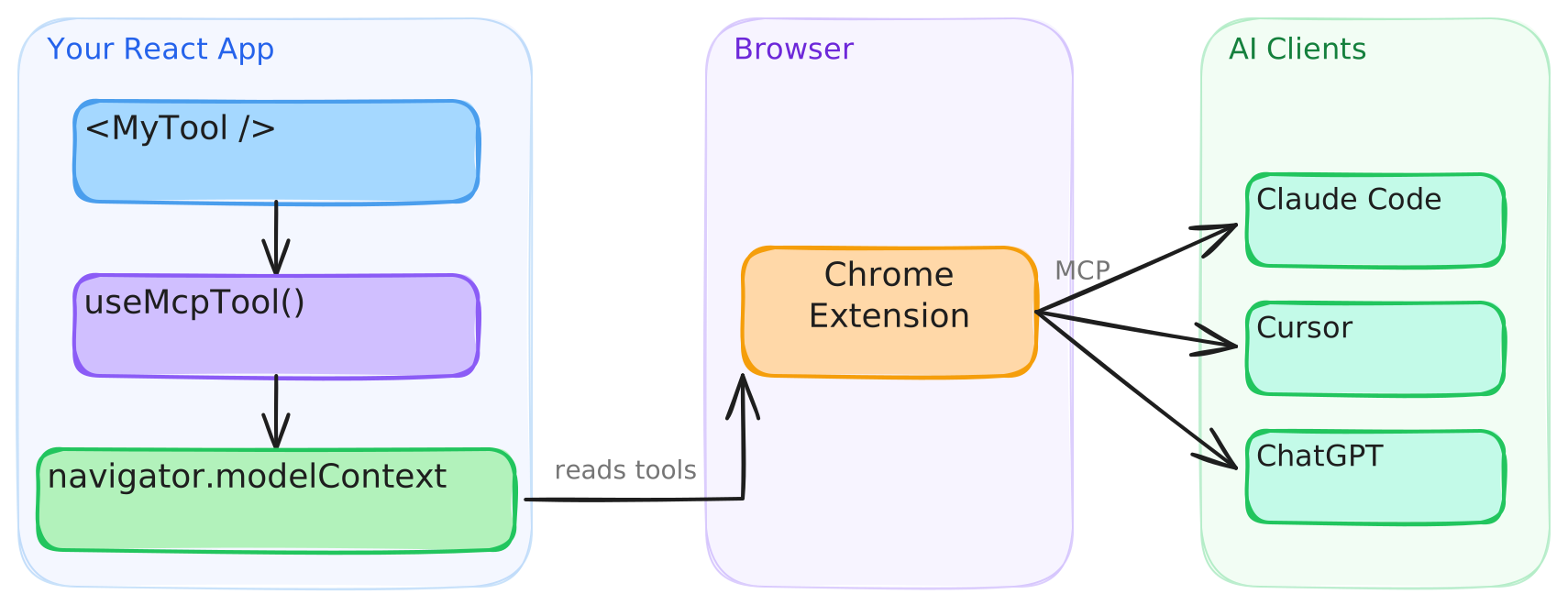
Agents mit nativer WebMCP-Unterstützung wie Codex rufen Tools direkt von der Seite auf; Claude Code, Cursor und andere MCP Clients verbinden sich über eine Bridge Browser-Extension. Ein Wordle-Playground und mit dem skills CLI installierte Agent Skills dienen dazu, Tools zu demonstrieren und zu scaffolden.
Was du damit machen kannst
- 1Katalog-Suchtool für AgentsRegistriere ein Suchtool, das einen Query-String entgegennimmt und passende Katalogergebnisse zurückgibt, damit ein AI Client diese aufrufen kann.
- 2Abbrechbares Abrufen von BerichtenErlaube einem Agent, einen Bericht per ID abzurufen, während das bereitgestellte AbortSignal in den fetch eingebunden wird, damit ein abgebrochener Aufruf die Anfrage stoppt.
- 3Bestätigung für BestellungenMarkiere ein Checkout-Tool mit einem Hint, damit Agents wissen, dass sie beim Nutzer nachfragen müssen, bevor sie etwas ausführen, das schwer rückgängig zu machen ist.
- 4Admin-Tools hinter conditional RenderStelle Admin-only Tools nur dann bereit, wenn der aktuelle Nutzer ein Admin ist, und nutze Mount und Unmount für die Registrierung.
- 5Tool Execution State in der UISteuere den disabled-Status und die Nachricht eines Buttons über den Execution State, der von einem Translation-Tool-Hook zurückgegeben wird.
Geschrieben aus dem README des Projekts. Jeder Use Case wurde gegen ein Zitat daraus geprüft.
So installierst du webmcp-react MCP
Formate geprüft am 10. Nov. 2026Zu Cursor hinzufügenZu Goose hinzufügenwebmcp-react MCP in Claude Code installieren
$ claude mcp add webmcp-react -- npx -y webmcp-reactwebmcp-react MCP in Cursor installieren
~/.cursor/mcp.json
{
  "mcpServers": {
    "webmcp-react": {
      "command": "npx",
      "args": [
        "-y",
        "webmcp-react"
      ]
    }
  }
}webmcp-react MCP in VS Code installieren
.vscode/mcp.json
{
  "servers": {
    "webmcp-react": {
      "type": "stdio",
      "command": "npx",
      "args": [
        "-y",
        "webmcp-react"
      ]
    }
  }
}webmcp-react MCP in VS Code CLI installieren
$ code --add-mcp '{"name":"webmcp-react","type":"stdio","command":"npx","args":["-y","webmcp-react"]}'webmcp-react MCP in Claude Desktop installieren
claude_desktop_config.json
{
  "mcpServers": {
    "webmcp-react": {
      "command": "npx",
      "args": [
        "-y",
        "webmcp-react"
      ]
    }
  }
}webmcp-react MCP in Codex installieren
$ codex mcp add webmcp-react -- npx -y webmcp-reactwebmcp-react MCP in Codex config.toml installieren
~/.codex/config.toml
[mcp_servers.webmcp-react]
command = "npx"
args = ["-y", "webmcp-react"]
webmcp-react MCP in Gemini CLI installieren
$ gemini mcp add -s user webmcp-react npx -- -y webmcp-reactwebmcp-react MCP in Gemini settings.json installieren
~/.gemini/settings.json
{
  "mcpServers": {
    "webmcp-react": {
      "command": "npx",
      "args": [
        "-y",
        "webmcp-react"
      ]
    }
  }
}Automatisierte Checks
Geluften am 13. Nov. 2026Vollständiger Bericht →Unsere automatisierten Checks bestanden. Das ist kein Security-Audit: Lies den Code und gib dem Server nur den minimal notwendigen Zugriff. Wie die Checks funktionieren

- Source Repository verknüpft und erreichbarBestanden
- Open Source Lizenz (OSI)Bestanden
- Commit oder Release im letzten JahrBestanden
- Package-Name ähnelt keinem populären PackageBestanden
- Remote Endpoint nutzt HTTPSNicht geprüft
- Destruktive Tools sind markiertNicht geprüft
- Keine versteckten Anweisungen an das ModellBestanden
- Keine kritischen Advisories im Paket oder seinen AbhängigkeitenNicht geprüft
README
Auf GitHub ansehenwebmcp-react
React hooks for exposing typed tools on document.modelContext, aligned with the current WebMCP specification.




- Zod-first. Define inputs with Zod and get full type inference in handlers
- JSON Schema support. Pass raw JSON Schema when you do not use Zod
- Built-in polyfill. Installs a lightweight polyfill when native WebMCP is unavailable
- SSR-safe. Works with Next.js, Remix, and other server-rendering frameworks
- StrictMode-safe. Prevents duplicate registrations and orphaned tools
- Spec-aligned. Tracks the WebMCP specification and native Chrome behavior release by release
Requirements
- React 18 or later
- Zod 3.25 or later, or Zod 4, as a peer dependency. Tools can also be defined with JSON Schema.
Install
npm install webmcp-react zod
Quick start
Wrap your app in <WebMCPProvider> and register tools with useMcpTool:
import { WebMCPProvider, useMcpTool } from "webmcp-react";
import { z } from "zod";

function SearchTool() {
  useMcpTool({
    name: "search",
    description: "Search the catalog",
    input: z.object({ query: z.string() }),
    handler: async ({ query }) => ({
      content: [{ type: "text", text: `Results for: ${query}` }],
    }),
  });
  return null;
}

export default function App() {
  return (
    <WebMCPProvider name="my-app" version="1.0">
      <SearchTool />
    </WebMCPProvider>
  );
}
The tool is now registered on document.modelContext and any WebMCP-compatible agent can call it.
Agent skills
This repository ships agent skills that install webmcp-react and scaffold tools for you. Install them with the skills CLI:
npx skills add agentcathq/webmcp-react
The skills work with Cursor, Claude Code, GitHub Copilot, Cline, and 18+ other agents.
Playground
Try it live: WebMCP Wordle Demo
The playground is a fully playable Wordle clone built on webmcp-react hooks. Tools register and unregister as the game moves through its phases (idle, playing, won, lost). You can make guesses with the keyboard or through an AI agent. A DevPanel shows the current tool state, and an easy-mode toggle enables a hint tool.
To play with an AI agent:
- Codex. Open the demo in Codex and ask it to play. Codex discovers and calls the page's WebMCP tools directly.
- Claude, Cursor, and other MCP clients. Install the WebMCP Bridge extension, open the demo in Chrome, and activate the extension for the page.
How it works
WebMCP is a proposed web standard from the W3C Web Machine Learning Community Group. It adds document.modelContext to the browser, an API that lets any page expose typed, callable tools to AI agents. Chrome ships the API in Early Preview.
This library provides the React bindings for that API. <WebMCPProvider> installs a polyfill when native support is absent, and each useMcpTool call registers a tool that agents can discover and execute.
Connect to AI clients
Agents with built-in WebMCP browser support, such as Codex, discover and call tools directly from the page. Clients that cannot access document.modelContext directly, such as Claude Code and Cursor, connect through the WebMCP Bridge extension, which exposes your registered tools to any MCP client.
- Install the extension from the Chrome Web Store.
- Configure your MCP client. See the extension setup guide for details.
The extension will be deprecated when Chrome provides native bridging to desktop clients.
Testing in Chrome
Google's WebMCP extension lists a page's tools and runs an agent against them from a side panel, which is handy while building tools. It only sees tools registered through Chrome's native API, so on a page running the polyfill it finds nothing. Turn on chrome://flags/#enable-webmcp-testing (the extension needs Chrome 155 or newer) and <WebMCPProvider> will use the native API instead of the polyfill.
Usage
Execution state
useMcpTool returns reactive state you can use to build UI around tool execution:
function TranslateTool() {
  const { state, execute } = useMcpTool({
    name: "translate",
    description: "Translate text to Spanish",
    input: z.object({ text: z.string() }),
    handler: async ({ text }) => {
      const result = await translate(text, "es");
      return { content: [{ type: "text", text: result }] };
    },
  });

  return (
    <div>
      <button onClick={() => execute({ text: "Hello" })} disabled={state.isExecuting}>
        {state.isExecuting ? "Translating..." : "Translate"}
      </button>
      {state.lastResult && <p>{state.lastResult.content[0].text}</p>}
      {state.error && <p className="error">{state.error.message}</p>}
    </div>
  );
}
Cancellation
Each execution receives its own AbortSignal. Pass it to fetch and other cancellable work. Chrome 153+ aborts the signal when the agent cancels the call. On older browsers the library substitutes a never-aborting signal, so the second argument is always safe to use:
useMcpTool({
  name: "fetch_report",
  description: "Fetch a report by ID",
  input: z.object({ id: z.string() }),
  handler: async ({ id }, { signal }) => {
    const res = await fetch(`/api/reports/${id}`, { signal });
    return { content: [{ type: "text", text: await res.text() }] };
  },
});
Title and annotations
Give a tool a human-friendly display title, and describe its behavior to agents with annotations. The current WebMCP specification defines four annotations: readOnlyHint, untrustedContentHint, consequentialHint and debugging. Set consequentialHint on tools that do something hard to undo, like placing an order, so agents know to check with the user first.
useMcpTool({
  name: "search_users",
  title: "Search users",
  description: "Find users by name or email",
  input: z.object({ query: z.string() }),
  annotations: {
    readOnlyHint: true,
  },
  handler: async ({ query }) => { /* ... */ },
});
Dynamic tools
Tools register on mount and unregister on unmount. Render them conditionally like any React component:
function App({ user }) {
  return (
    <WebMCPProvider name="app" version="1.0">
      <PublicTools />
      {user.isAdmin && <AdminTools />}
    </WebMCPProvider>
  );
}
Callbacks
Run side effects on success or failure:
useMcpTool({
  name: "checkout",
  description: "Complete a purchase",
  input: z.object({ cartId: z.string() }),
  handler: async ({ cartId }) => { /* ... */ },
  onSuccess: (result) => analytics.track("checkout_complete"),
  onError: (error) => toast.error(error.message),
});
onError fires when the handler throws. A handler that returns { isError: true } on its own still counts as a success, so onSuccess fires for it.
JSON Schema
Pass inputSchema directly to define a tool without Zod:
useMcpTool({
  name: "calculate",
  description: "Basic arithmetic",
  inputSchema: {
    type: "object",
    properties: {
      a: { type: "number" },
      b: { type: "number" },
      op: { type: "string", enum: ["add", "subtract", "multiply", "divide"] },
    },
    required: ["a", "b", "op"],
  },
  handler: async (args) => {
    const { a, b, op } = args as { a: number; b: number; op: string };
    const result = { add: a + b, subtract: a - b, multiply: a * b, divide: a / b }[op];
    return { content: [{ type: "text", text: String(result) }] };
  },
});
TypeScript
webmcp-react already types document.modelContext, so theres no need to add Google's webmcp-types as well. The two packages declare the same global differently and clash if you install both, see TypeScript and webmcp-types for details and a workaround.
SSR
The library works with Next.js, Remix, and any server-rendering framework. The build includes a "use client" banner, so no extra configuration is needed.
Browser support
| Environment | Behavior |
|---|---|
Chrome with native document.modelContext |
The library uses the native API. The polyfill is not installed. |
| All other browsers | The library installs its polyfill, which implements the registration and consumer APIs. |
The polyfill follows native Chrome behavior. See the polyfill section of the API reference for the exact Chrome versions each behavior tracks.
Versioning and stability
webmcp-react follows Semantic Versioning. Breaking changes to the public API bump the major version. Every release is documented in the changelog, including the WebMCP specification and Chrome changes it tracks.
outputSchema and structuredContent are documented library extensions to the WebMCP specification. They are part of the public API and follow the same versioning policy.
API
See the full API reference.
Contributing
Bug reports, feature requests, and pull requests are welcome. Read the contributing guide before you open a pull request. This project follows the Contributor Covenant Code of Conduct.
License
webmcp-react MCP Fragen
Wie füge ich webmcp-react MCP zu Claude Code hinzu?
Führe claude mcp add webmcp-react -- npx -y webmcp-react in deinem Terminal aus. Füge --scope user hinzu, damit der Server in jedem Projekt verfügbar ist.
Wie füge ich webmcp-react MCP zu Cursor hinzu?
Öffne ~/.cursor/mcp.json und füge den Server unter mcpServers hinzu, mit der Cursor-Config aus dem Installationsabschnitt oben.
Wofür wird webmcp-react verwendet?
Es bietet React Hooks, um typisierte Tools auf document.modelContext zu registrieren, damit AI Agents die Funktionalität deiner Web-App aufrufen können.
Funktioniert webmcp-react auch ohne native WebMCP-Unterstützung im Browser?
Ja. Es installiert ein leichtgewichtiges Polyfill, wenn native WebMCP-Unterstützung nicht verfügbar ist, und nutzt die native API, wenn sie vorhanden ist.
Kann ich Tools mit JSON Schema statt Zod definieren?
Ja, übergib inputSchema direkt, um ein Tool ohne Zod zu definieren.
Ist webmcp-react SSR-safe?
Ja, es funktioniert mit Next.js, Remix und anderen Server-Rendering-Frameworks, und der Build enthält ein "use client" Banner.
Wie werden Tools wieder abgemeldet?
Tools registrieren sich beim Mounten und melden sich beim Unmounten ab, sodass du sie wie jede andere React-Komponente bedingt rendern kannst.