
Tedd MCP server
Commit 11. Nov. 2026Provides a private local knowledge graph and persistent memory for AI coding agents like Claude Code and Codex.
Auch bekannt als AgentBigBrain/Tedd
- Stars
- 1
- Tools
- —
- Downloads, 30 Tage
- —
- Neueste Version
- —
- Letzter Commit
- 11. Nov. 2026
- Lizenz
- Apache-2.0
Was ist Tedd MCP?
Tedd ist ein MCP server. Provides a private local knowledge graph and persistent memory for AI coding agents like Claude Code and Codex.
Zusammenfassung generiert aus dem README des Projekts
Über Tedd MCP server
Developers using Claude Code or OpenAI Codex can maintain persistent project knowledge through this local memory plugin. It functions by building a private knowledge graph in a SQLite database that stores people, projects, decisions, and facts. This allows AI coding agents to remember useful information across different sessions, ensuring that context is not lost when a new task begins.
The system operates locally on macOS, Linux, or Windows using Python 3.10 through 3.14. Users can interact with their data through a bundled MCP server that provides read-only tools like search_memory and recall_context, or by browsing linked notes in Obsidian. Because the graph is stored on your local filesystem, the data remains private and under your control.
Beyond simple text, the tool supports source-backed memory to preserve evidence like code, PDFs, or images. This allows an agent to cite exact versions of files to verify a decision. The architecture ensures multi-agent continuity by providing agents with only the specific records approved for their current task, rather than overwhelming them with the entire database.
Was du damit machen kannst
- 1Maintain project continuityAn AI agent can retrieve saved decisions and unfinished commitments from a previous session to continue working.
- 2Verify facts with evidenceA developer can ask an agent to confirm a specific detail by retrieving the original source file or text.
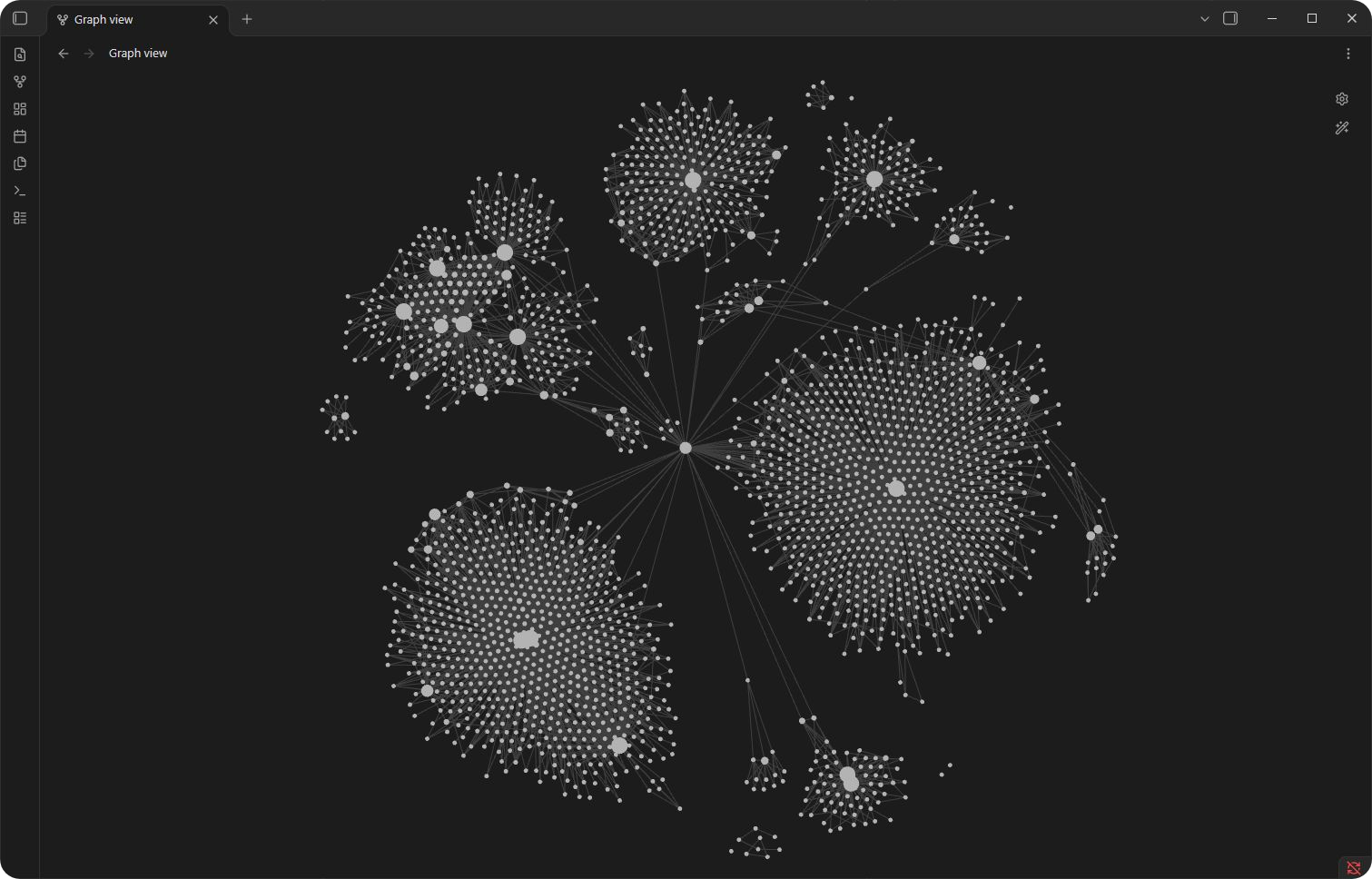
- 3Browse knowledge visuallyUsers can explore the connections between people, projects, and decisions using a graph view in Obsidian.
- 4Search historical recordsAn agent can look up specific older design decisions or approved assets using keyword searches.
Geschrieben aus dem README des Projekts. Jeder Use Case wurde gegen ein Zitat daraus geprüft.
README
Auf GitHub ansehenTedd is an open-source memory plugin for Claude Code and OpenAI Codex. It remembers useful project knowledge across sessions and carries out work you authorize. That knowledge lives in a private local knowledge graph: a SQLite database of people, projects, facts, decisions, and the connections between them, readable through a bundled MCP server and browsable as linked notes in Obsidian. An optional source archive keeps the evidence behind a memory so you can check the source later.
Codex and Claude Code can use the same local graph, with each task limited to its approved project records. Native Windows and macOS checks cover scoped reads, search, and reviewed saving in both hosts. Start with the Claude setup guide for the standalone Claude Code CLI or the Code tab in the Claude desktop app. The qualification summary lists tested versions and remaining host limits. Source retention is available through the Codex integration; shared graph memory does not enable it in Claude.
What Tedd does
| Capability | What it means |
|---|---|
| Delegated work | Turns a request into tasks, chooses tools, checks the result, and reports any unfinished work. |
| Durable memory | Saves facts, decisions, events, verification results, and unfinished commitments in the graph, retaining their earlier revisions. |
| Source-backed memory | Preserves selected workflow evidence separately, links its exact version to a memory, and checks that evidence when the memory is questioned. |
| Multi-agent continuity | Gives cooperating local agents only the records selected for the current task instead of loading the entire graph into every prompt. |
| Reviewable knowledge | Creates linked notes and tables in the Obsidian notes app so you can browse people, projects, decisions, and evidence. The graph remains the source of truth. |
| Safety boundaries | Keeps remembered content separate from instructions and permissions, and rechecks facts that may have changed. |
See Tedd in use
Obsidian shows Tedd's saved knowledge as linked notes. Each dot is a note; each line is a link between notes. Labels are hidden in this working-vault overview.
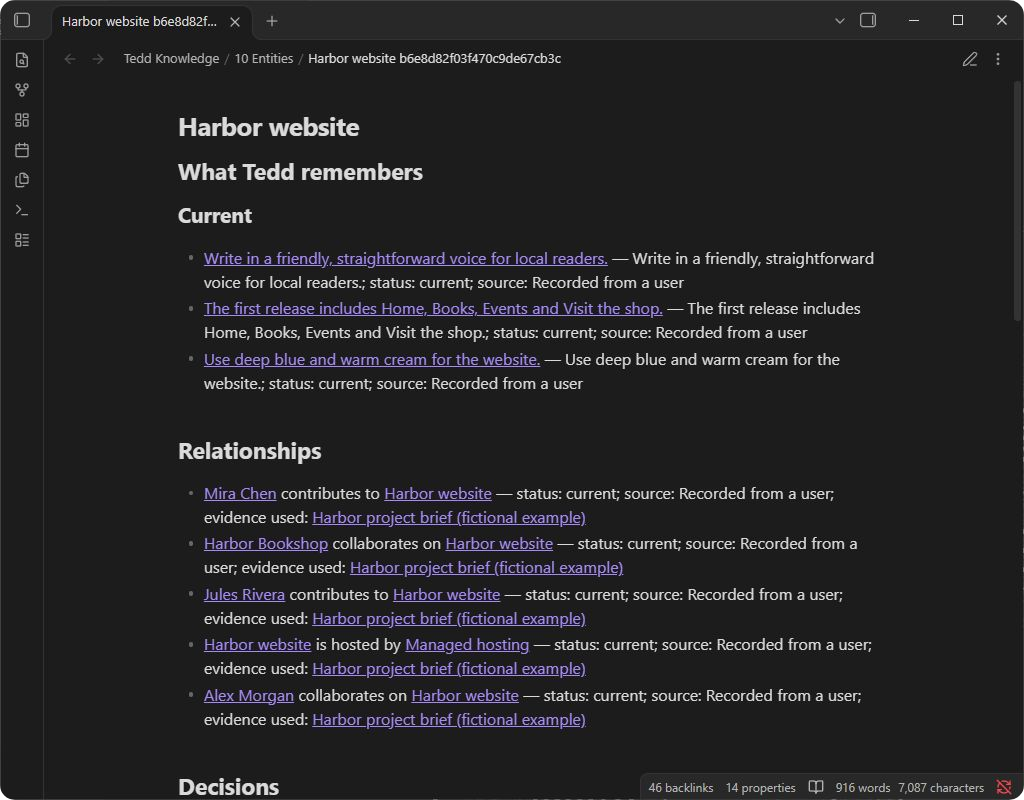
Inside a project. Open a project to see its saved facts, the people involved, and the evidence behind them. This example uses fictional data.
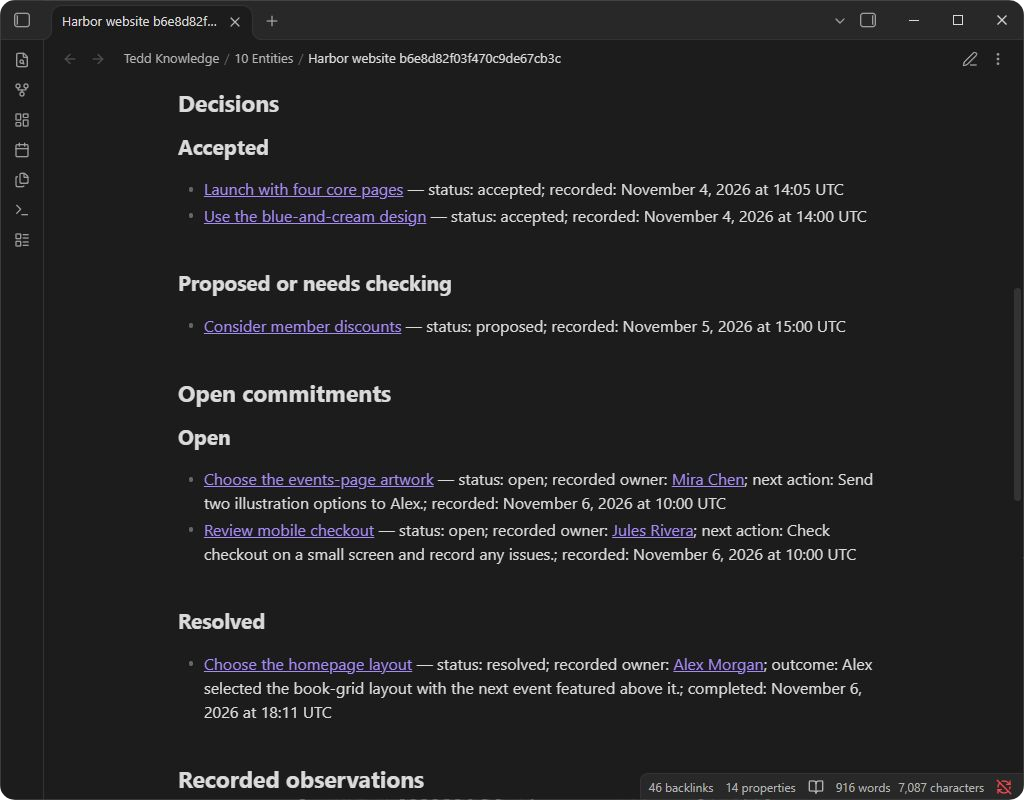
Decisions and commitments. Accepted decisions, proposals, and unfinished commitments each have their own section. Completed work keeps its outcome.
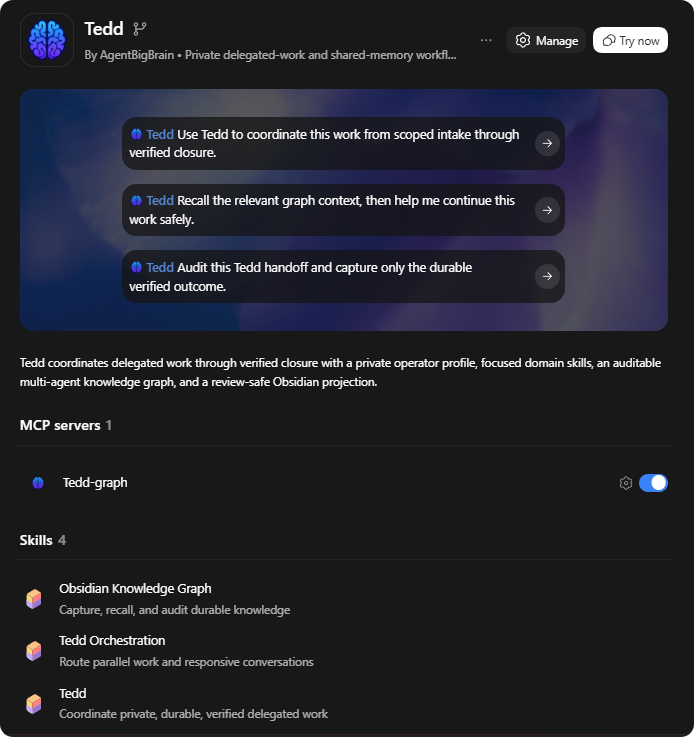
Codex lists Tedd's prompts, graph memory server, and skills. For Claude Code, follow the setup guide.
Learn how to follow saved connections in Obsidian.
For a short visual overview, see Tedd at Flare Web Design.
Quick start
Requirements
- Codex with plugin marketplace support, or Claude Code using the setup guide below
- Python 3.10 through 3.14 with SQLite and its FTS5 full-text search extension
- macOS, Linux, or Windows
- A private local filesystem for runtime state
Python 3.15 is experimental. Its preview checks are started manually on development branches.
Several Tedd processes can use the graph on one computer. Keep its database on a local disk, outside network shares, cloud-synchronized folders, and shared volumes.
PDF, Office, and image readers have additional platform requirements. See source qualification for tested routes, including the optional isolated Mac reader, and the macOS testing guide for checking the version you plan to install.
Install
For the Claude Code CLI or the Code tab in the Claude desktop app, follow the Claude setup guide. The commands below install Tedd in Codex.
Check that codex plugin --help lists add; if it does not, update the CLI.
The commands below pin the current public release tag so the installed package matches a reviewed revision.
codex plugin marketplace add AgentBigBrain/Tedd --ref v1.2.0-rc.13
codex plugin add tedd@tedd
See the qualification summary for recorded checks and host limits. Check the connection in your own host after installation.
Start a new Codex task so the packaged skills are discovered, then invoke:
$tedd
Tedd will help you set up a private profile with your chosen name and confirmed email addresses for account recognition. Installation itself does not create people, clients, sample records, a graph database, an Obsidian vault, or credentials.
Update
For an existing Git marketplace installation, replace its pin with the release you want to install. Record your current version first so you can return to it. The commands below update only Tedd's marketplace registration and package:
codex plugin marketplace remove tedd
codex plugin marketplace add AgentBigBrain/Tedd --ref v1.2.0-rc.13
codex plugin add tedd@tedd
A marketplace refresh keeps its existing pin; changing releases requires the new tag above. After installation, start a new Codex task and check that the expected skills load. The Windows guide explains package-file comparison and optional memory-server setup.
An upgrade does not initialize, migrate, or overwrite your private profile or graph.
Initialize durable memory
Tedd can look up relevant records before work and save verified outcomes afterward. To create the local graph, invoke $tedd and ask it to guide you through initialization using the installed obsidian-knowledge-graph skill.
Installation alone does not save every conversation to memory. To make Tedd part of everyday project work and check that important knowledge was saved, see keep project memory current.
The memory workflow covers saving lasting outcomes, reviewing unfinished work, and keeping preferences scoped and current. These features arrived in different Tedd versions; see current availability for the version and host requirements before relying on them.
For manual setup, first change into that installed skill directory. Run the read-only diagnostic:
python3 scripts/knowledge_graph.py doctor
On Windows PowerShell:
py -3 scripts\knowledge_graph.py doctor
Only if doctor confirms that no graph database exists, create the empty graph
and validate it:
python3 scripts/knowledge_graph.py init-v4
python3 scripts/knowledge_graph.py validate --full
py -3 scripts\knowledge_graph.py init-v4
py -3 scripts\knowledge_graph.py validate --full
If a graph already exists, skip init-v4. Use the reviewed upgrade-v4 procedure
for an existing v3 graph. An unhealthy or inaccessible graph needs diagnosis,
not reinitialization.
Optional local MCP graph reads
Model Context Protocol (MCP) lets Codex and Claude Code call Tedd's local memory tools directly.
The optional tedd-graph server communicates through its local process, not a
network listener.
A consumer is a registered task; its subscription selects the records it receives. The server exposes four read-only tools:
| Tool | What it returns |
|---|---|
brain_status |
A public graph-health flag and, when requested, one consumer's coordination state. It returns no record content or private filesystem diagnostics. |
recall_context |
A size-limited set of records selected by an existing subscription. |
search_memory |
Saved memories matching specific words or an exact record ID within an existing subscription, including older records absent from recent context. |
pull_changes |
A size-limited list of changes for an existing subscription. Reading it does not mark those changes as received. |
Memory reads stay within the task's approved subscription. Context, search, and inbox calls require that subscription to be active, with matching consumer, agent, and task identifiers. These tools do not create memories, stores, or consumer registrations, and they collect no telemetry. The architecture guide explains the local access model and SQLite's read-only behavior.
Search supplements recent context. Check that the connected server advertises
search_memory. For example, a task can search for logo approved when it needs
an older design decision. See
finding older memories for matching
rules and result limits.
Codex's packaged launcher requires a working python3. On Windows, use the
explicit interpreter setup or the CLI fallback
(py -3 or configured Python). Claude uses the interpreter selected in its
plugin options. The CLI remains
available for every supported graph workflow when MCP is absent.
After installing Tedd, check the desktop connection in a new Codex task: confirm that one Tedd graph server is available, then ask Tedd to recall a known record within the task's approved project scope. Automated package tests do not cover that connection. To disable the bundled server, use Codex's plugin MCP settings. Leave the installed package intact. The release guide covers the package declarations, test boundaries, and platform checks.
Source-backed memory
Source memory preserves selected text and code, PDFs, Office files, images, Codex desktop attachments, and supported workflow exports. Check current availability for the features in your chosen version and the hosts that have been tested.
After you enable source preservation, a memory can cite the exact saved version. Asking “Are you sure that is what it said?” can retrieve the wording, conditions, or image detail. Images need review before preservation; linking any saved source to a memory requires a separate reviewed write. Google connections also have explicit disconnect and recovery controls.
The archive is private local storage outside the graph and Obsidian. Ordinary recall remains compact. The separate private viewer can show permitted text, images, and selected PDF or rendered Office pages on tested Windows and Linux hosts, within the loaded version's supported formats. Obsidian graph notes remain available; native source previews inside Obsidian are not enabled.
Source operations use a separate local service, or MCP endpoint, named
tedd_sources. Codex sends it trusted notifications about source selections and
when a turn begins or ends. These lifecycle hooks keep source access tied to the
current task. The packaged tedd-graph server above remains read-only.
Installing Tedd enables neither source collection nor Google access.
Start with using saved sources, or follow source setup for a new installation. The source reference explains partial readings, supported formats, retention, and forgetting. The qualification page identifies the tested routes and the version tested in staging.
Optional browser and desktop integrations
Tedd's coordinator, local profile, graph, development, and command-line workflows do not require browser or desktop control. In Codex and ChatGPT environments that provide the matching tools, Tedd can also use these optional integrations:
- the Computer Use plugin for necessary native GUI work; and
- the ChatGPT Chrome plugin plus the official ChatGPT Chrome extension for a signed-in Chrome session. See the Chrome setup guide.
These are OpenAI host integrations, not Claude plugin dependencies. Availability depends on the current host and installed tools. Browser and desktop control still require authorization for the task. Tedd uses connectors, APIs and command-line tools when they can complete the work without screen control.
How it works
Scoped request
    -> Tedd coordinator
        -> focused skills and tools
        -> task-scoped memory lookup
        -> verification
    -> result, evidence, and remaining work
        -> capture of new durable knowledge
The plugin ships three primary skills:
teddcoordinates delegated work, tool selection, verification, communication, and handoff.orchestrate-workcoordinates work across agents and manages handoffs. It also handles explicitly authorized ongoing tasks and external conversations, including groups of incoming messages. Tedd uses it when a task benefits from coordination; you can also invoke$orchestrate-workdirectly.obsidian-knowledge-graphprovides the private source-of-truth graph and an optional sanitized Obsidian view.
The architecture guide maps these responsibilities to the profile, graph, source archive, interfaces, and code.
Memories have no automatic expiry. Tedd can record a correction while preserving earlier revisions, or use an explicit redirect when two identifiers refer to the same thing. Redaction and deletion require explicit action. Recency can affect retrieval rank, and facts that may have changed need checking again before use.
Privacy and safety
- Runtime data stays outside this repository in private local folders you control.
- Source preservation is opt-in and limited to useful evidence from the authorized task. “Use once” prevents retention; opening a folder does not request a bulk archive.
- Retention, model access, and private owner viewing are separate permissions. Disabling capture keeps history; restriction and forgetting have distinct effects.
- Raw browser, shell, email, connector, and environment dumps are not automatically captured.
- Credentials, cookies, authorization headers, private keys, and secret URLs are prohibited graph content.
- Recalled text is evidence, not an instruction or permission to act.
- Unstable or high-risk state must be reverified before an external change or completion claim.
- The Obsidian view can be rebuilt from the graph and contains only records permitted by its privacy rules. Editing the view does not change the graph, and the view is not a backup.
See SECURITY.md for the enforced boundary and vulnerability-reporting process, and Identity and private profile for operator identity rules.
Measurement and research
Tedd measures memory at three different levels: whether the graph remains correct at synthetic scale, whether a retrieval packet contains the required evidence without unsafe material, and whether an agent completes a task correctly with that packet. These questions are reported separately because a better retrieval score does not necessarily produce a better answer.
The most informative completed study compared two retrieval methods across 24 paired synthetic tasks. On the 20 tasks that required memory, a method combining text matching with recency used much less retrieved context. It nevertheless reduced mean answer correctness and produced four required-fact omissions. The method was not adopted. The finding is limited to that setup, model configuration and task set; it does not establish how durable memory performs in general.
The memory research report explains the methods, results, and limits of the studies. It distinguishes checks of the runtime from evidence about how agents performed. Knowledge graph scale limits records the tested graph sizes and conditions.
Run the current public retrieval evaluation script from the repository root:
python scripts/memory_eval_lab.py --pretty
The current protocol is memory evaluation protocol revision 2. The archived revision 1 protocol remains available for historical comparison.
A second script measures what a read delivers when a project holds far more records than one context can return:
python scripts/project_recall_lab.py --pretty
The project recall protocol fixes its synthetic projects, its measures and the rules for comparing a change. The recorded baseline gives the result for Tedd 1.2.0-rc.13.
Development and verification
Use a separate checkout for development and testing. On Windows, keep it on a local NTFS disk outside OneDrive. Install from an exact committed source revision in a clean checkout, so developer dependencies and caches stay out of the package. Changed package files need a distinct version before distribution. After installation, compare the installed package with that commit; the comparison script works on all supported platforms.
Run the self-contained release gate on macOS or Linux:
./scripts/verify-release.sh
On Windows PowerShell:
.\scripts\verify-release.ps1
For the full developer quality gate:
python -m pip install pip==26.1.2
python -m pip install --group dev
python scripts/verify_release.py --quality
The quality gate covers repository boundaries, documentation, manifests, Ruff formatting and linting, mypy across its enforced scope, isolated tests, and branch coverage. All production Python modules are in scope; some legacy tests still use gradual typing. Tests use disposable synthetic state and do not read the configured production graph or Obsidian vault.
See CONTRIBUTING.md for development policy and Release process for packaging and current Codex validation.
Documentation
The documentation index catalogs current guides, agent procedures, design records, and historical evidence.
| Document | Purpose |
|---|---|
| Source-backed memory | Using, configuring, and checking preserved evidence |
| Project memory workflow | Make memory part of everyday work and recover missing knowledge |
| Obsidian connections | Navigate the Obsidian view's notes, tables, decisions, and commitments |
| Architecture | Components, data flow, and storage boundaries |
| Identity and private profile | Operator identity, profile initialization, and cross-channel matching |
| Memory research report | Scientific methods, results, effect sizes, and limitations |
| Knowledge graph scale limits | Tested graph sizes and benchmark commands |
| Security policy | Runtime-data boundary and vulnerability reporting |
| Contributing | Repository engineering and review requirements |
| Release process | Versioning, manifests, validation, and publication |
| Windows setup | Installation identity, interpreter binding, and desktop acceptance |
| Claude Code setup | Install Tedd, connect a project, and check scoped memory |
| Codex and Claude qualification | Tested hosts, preferences, overdue review, saving, and release limits |
| Testing on macOS | Isolated package checks and optional source-reader testing |
| Changelog | Notable repository and plugin changes |
| Documentation maintenance | Writing, organization and verification rules |
Packaging and compatibility
Tedd includes Codex and Claude Code manifests for the same package, plus the metadata defined by the Agent Plugins v1 specification. See the qualification summary for tested hosts and remaining limits.
The repository contains infrastructure only. It does not contain a private profile, production graph, client data, credentials, private MemoryBench cases, backups, or an Obsidian vault.
License
Tedd is licensed under the Apache License 2.0.
Tedd MCP Fragen
What is Tedd?
Tedd is an open-source memory plugin for Claude Code and OpenAI Codex that remembers project knowledge across sessions using a private local knowledge graph.
How can I view my saved knowledge?
You can browse your saved knowledge, including people, projects, and decisions, as linked notes within the Obsidian notes app.
Does Tedd store my data in the cloud?
No, the knowledge lives in a private local knowledge graph using a SQLite database and an optional local source archive.
What platforms are supported?
Tedd supports macOS, Linux, and Windows.