
fullstack-langgraph-nextjs-agent MCP server
Commit 4. Sept. 2026Ein produktionsreifes Next.js-Template zum Erstellen von AI Agents mit LangGraph.js, inklusive MCP-Integration und Human-in-the-loop Tool-Approval.
Auch bekannt als agentailor/fullstack-langgraph-nextjs-agent
- Stars
- 135
- Tools
- —
- Downloads, 30 Tage
- —
- Neueste Version
- —
- Letzter Commit
- 4. Sept. 2026
- Lizenz
- MIT
Was ist fullstack-langgraph-nextjs-agent MCP?
fullstack-langgraph-nextjs-agent ist ein MCP server. Ein produktionsreifes Next.js-Template zum Erstellen von AI Agents mit LangGraph.js, inklusive MCP-Integration und Human-in-the-loop Tool-Approval.
Zusammenfassung generiert aus dem README des Projekts
Über fullstack-langgraph-nextjs-agent MCP server
Entwickler, die anspruchsvolle AI Agents bereitstellen möchten, können dieses Next.js-Template nutzen, um produktionsreife Anwendungen mit LangGraph.js zu bauen. Es bietet ein vollständiges Gerüst für die Erstellung von Agents, die über ein PostgreSQL-Backend über persistente Conversation Memory verfügen und Echtzeit-Streaming-Responses via Server-Sent Events ermöglichen. Die Architektur ist darauf ausgelegt, komplexe Workflows zu bewältigen, einschließlich multimodaler Datei-Uploads für Bilder und PDFs unter Verwendung von S3-kompatiblem Storage wie MinIO oder AWS S3.
Ein herausragendes Feature ist die Model Context Protocol Integration, die ein dynamisches Tool-Management über ein Web-UI ermöglicht, ohne dass Code-Änderungen erforderlich sind. Dies unterstützt sowohl stdio als auch HTTP MCP server. Um die Sicherheit zu gewährleisten, enthält das Template einen Human-in-the-loop-Mechanismus, bei dem Nutzer Tool-Calls genehmigen, ablehnen oder modifizieren können, bevor diese ausgeführt werden. Das System integriert sich zudem in Langfuse für eine End-to-End Observability von Agent-Runs, Tool-Invocations und Token-Usage, was es ideal für Teams macht, die ernsthafte, skalierbare AI-Services entwickeln.
Was du damit machen kannst
- 1Dynamische Agent-Tools verwaltenFüge deinem Agent über ein Web-Interface mittels MCP neue Fähigkeiten hinzu, ohne den zugrunde liegenden Quellcode ändern zu müssen.
- 2Sichere Tool-Execution implementierenErfordere manuelle Eingriffe, um Tool-Parameter zu prüfen und zu bearbeiten, bevor ein AI Agent eine Aktion ausführt.
- 3Langfristige Chat-Historie beibehaltenStelle sicher, dass Nutzer Gespräche über verschiedene Sessions hinweg fortsetzen können, indem eine persistente Datenbank genutzt wird.
Geschrieben aus dem README des Projekts. Jeder Use Case wurde gegen ein Zitat daraus geprüft.
Konfiguration
ANTHROPIC_API_KEYDATABASE_URLDEFAULT_MODELGOOGLE_API_KEYOPENAI_API_KEY
| Name | Beschreibung | Typ |
|---|---|---|
| ANTHROPIC_API_KEY | — | |
| DATABASE_URL | — | |
| DEFAULT_MODEL | — | |
| GOOGLE_API_KEY | — | |
| OPENAI_API_KEY | — |
Automatisierte Checks
Geluften am 14. Nov. 2026Vollständiger Bericht →Noch nicht verifiziert. Ein Server benötigt einen Score von 80, keine kritischen Befunde und genug Daten für unsere Prüfung. Wie die Checks funktionieren · Was du für mehr Punkte verbessern kannst

- Source Repository verknüpft und erreichbaragentailor/fullstack-langgraph-nextjs-agent is public and reachablegithub.com/agentailor/fullstack-langgraph-nextjs-agent ↗Bestanden
- Paket nennt dieses Repository als QuelleNicht geprüft
- Build-Provenienz (Sigstore-Attestierung)Nicht geprüft
- Open Source Lizenz (OSI)MITspdx.org/licenses/MIT.html ↗Bestanden
- Commit oder Release im letzten JahrLast commit or release 2026-09-04github.com/agentailor/fullstack-langgraph-nextjs-agent ↗Bestanden
- OpenSSF ScorecardNicht geprüft
- Package-Name ähnelt keinem populären PackageNicht geprüft
- Keine kritischen Advisories im Paket oder seinen AbhängigkeitenNicht geprüft
- Keine versteckten Anweisungen an das Modell0 tool descriptions and the README read; no override phrases, credential paths or hidden charactersBestanden
- Destruktive Tools sind markiertNicht geprüft
- Remote-Endpoint beantwortet den MCP-HandshakeNicht geprüft
README
Auf GitHub ansehenLangGraph.js AI Agent Template
A production-ready Next.js template for building AI agents with LangGraph.js, featuring Model Context Protocol (MCP) integration, human-in-the-loop tool approval, and persistent memory.
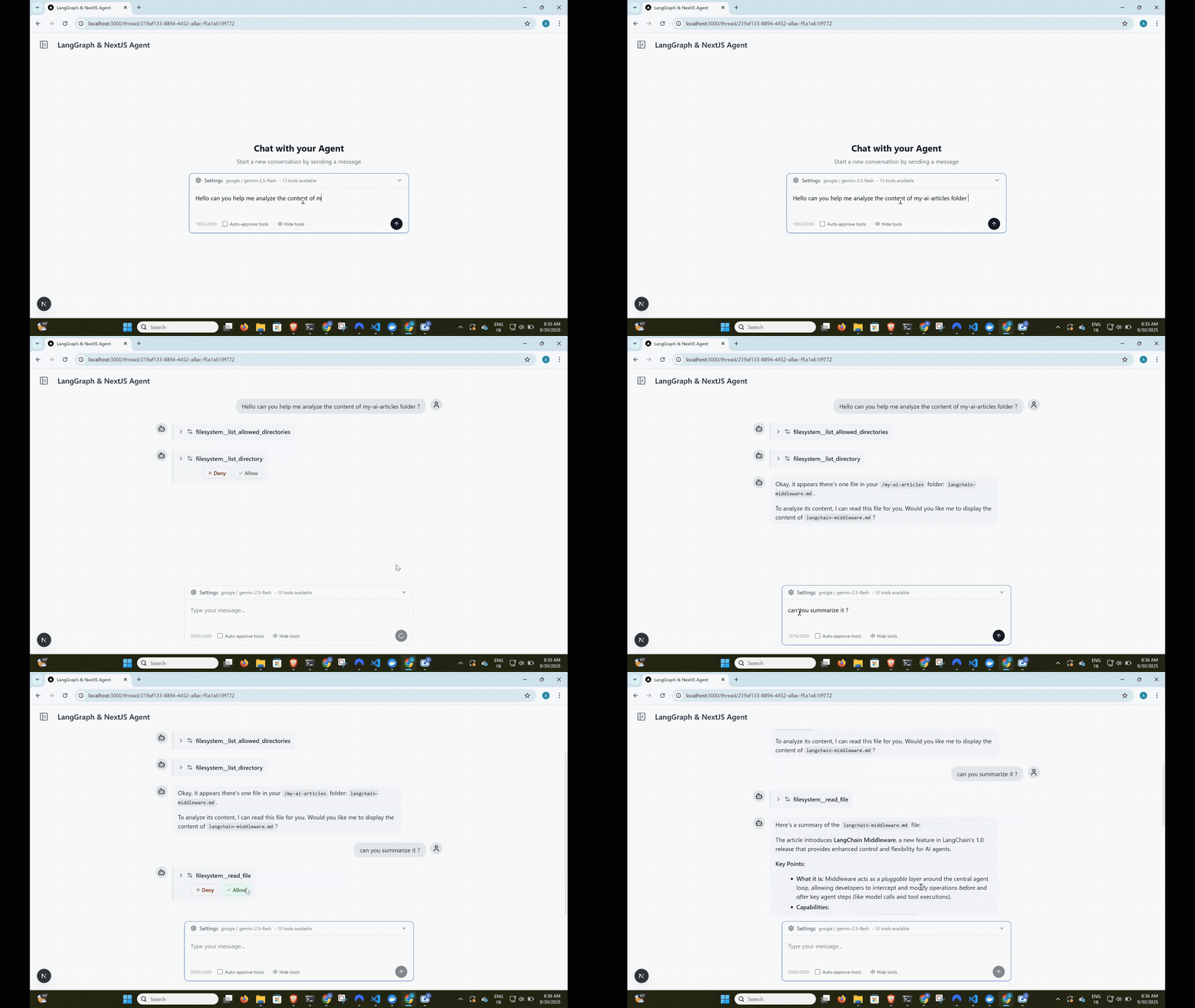
Complete agent workflow: user input → tool approval → execution → streaming response





Built with this template: Cameron
Cameron is a personal finance agent that started from this template and was built in public, one tagged release per article. If you want to see where this scaffold goes once it becomes a real agent — human-in-the-loop approval on every money-moving action, self-hosted data, a full LangGraph workflow — read its source as a worked example.
Need help taking this to production?
I help teams design and optimize LangGraph-based AI agents (RAG, memory, latency, architecture).
If you're building something serious on top of this template and want hands-on help:
Happy to jump on a short call.
Features
Dynamic Tool Loading with MCP
- Model Context Protocol integration for dynamic tool management
- Add tools via web UI - no code changes required
- Support for both stdio and HTTP MCP servers
- Tool name prefixing to prevent conflicts
Human-in-the-Loop Tool Approval
- Interactive tool call approval before execution
- Granular control with approve/deny/modify options
- Optional auto-approval mode for trusted environments
- Real-time streaming with tool execution pauses
Persistent Conversation Memory
- LangGraph checkpointer with PostgreSQL backend
- Full conversation history preservation
- Thread-based organization
- Seamless resume across sessions
Multimodal File Uploads
- Upload images, PDFs, and text files with messages
- S3-compatible storage (MinIO for development)
- Automatic file processing for AI consumption
- Production-ready with AWS S3, Cloudflare R2 support
Real-time Streaming Interface
- Server-Sent Events (SSE) for live responses
- Optimistic UI updates with React Query
- Type-safe message handling
- Error recovery and graceful degradation
Persistent Model Settings
- Provider and model selection saved to
localStorageautomatically - Settings survive page reloads and thread navigation
- No backend required — zero latency reads on startup
LLM Observability with Langfuse
- End-to-end tracing of agent runs, LLM calls, tool invocations, and token usage
- Works with Langfuse Cloud or a self-hosted instance
- Toggle via
LANGFUSE_ENABLEDenv var — zero overhead when disabled - See docs/OBSERVABILITY.md for setup instructions
Modern Tech Stack
- Frontend: Next.js 15, React 19, TypeScript, Tailwind CSS
- Backend: Node.js, Prisma ORM, PostgreSQL, MinIO/S3
- AI: LangGraph.js, OpenAI/Google/Anthropic models
- UI: shadcn/ui components, Lucide icons
Quick Start
Prerequisites
- Node.js 18+ and pnpm
- Docker (for PostgreSQL and MinIO)
- OpenAI API key, Google AI API key, or Anthropic API key
1. Clone and Install
git clone https://github.com/IBJunior/fullstack-langgraph-nextjs-agent.git
cd fullstack-langgraph-nextjs-agent
pnpm install
2. Environment Setup
cp .env.example .env.local
Edit .env.local with your configuration:
# Database
DATABASE_URL="postgresql://user:password@localhost:5434/agent_db"

# AI Models (choose one or more)
OPENAI_API_KEY="sk-..."
GOOGLE_API_KEY="..."
ANTHROPIC_API_KEY="sk-ant-..."

# Optional: Default model
DEFAULT_MODEL="gpt-4o-mini"  # or "gemini-1.5-flash" or "claude-sonnet-4-5"
3. Start Services
docker compose up -d # Starts PostgreSQL and MinIO
4. Database Setup
pnpm prisma:generate
pnpm prisma:migrate
5. Run Development Server
pnpm dev
# Or use custom port
pnpm dev --port=3005
Visit http://localhost:3000 to start chatting with your AI agent!
Screenshots
Usage Guide
Adding MCP Servers
- Navigate to Settings - Click the gear icon in the sidebar
- Add MCP Server - Click "Add MCP Server" button
- Configure Server:
- Name: Unique identifier (e.g., "filesystem")
- Type: Choose
stdioorhttp - Command: For stdio servers (e.g.,
npx @modelcontextprotocol/server-filesystem) - Args: Command arguments (e.g.,
["/path/to/allow"]) - URL: For HTTP servers
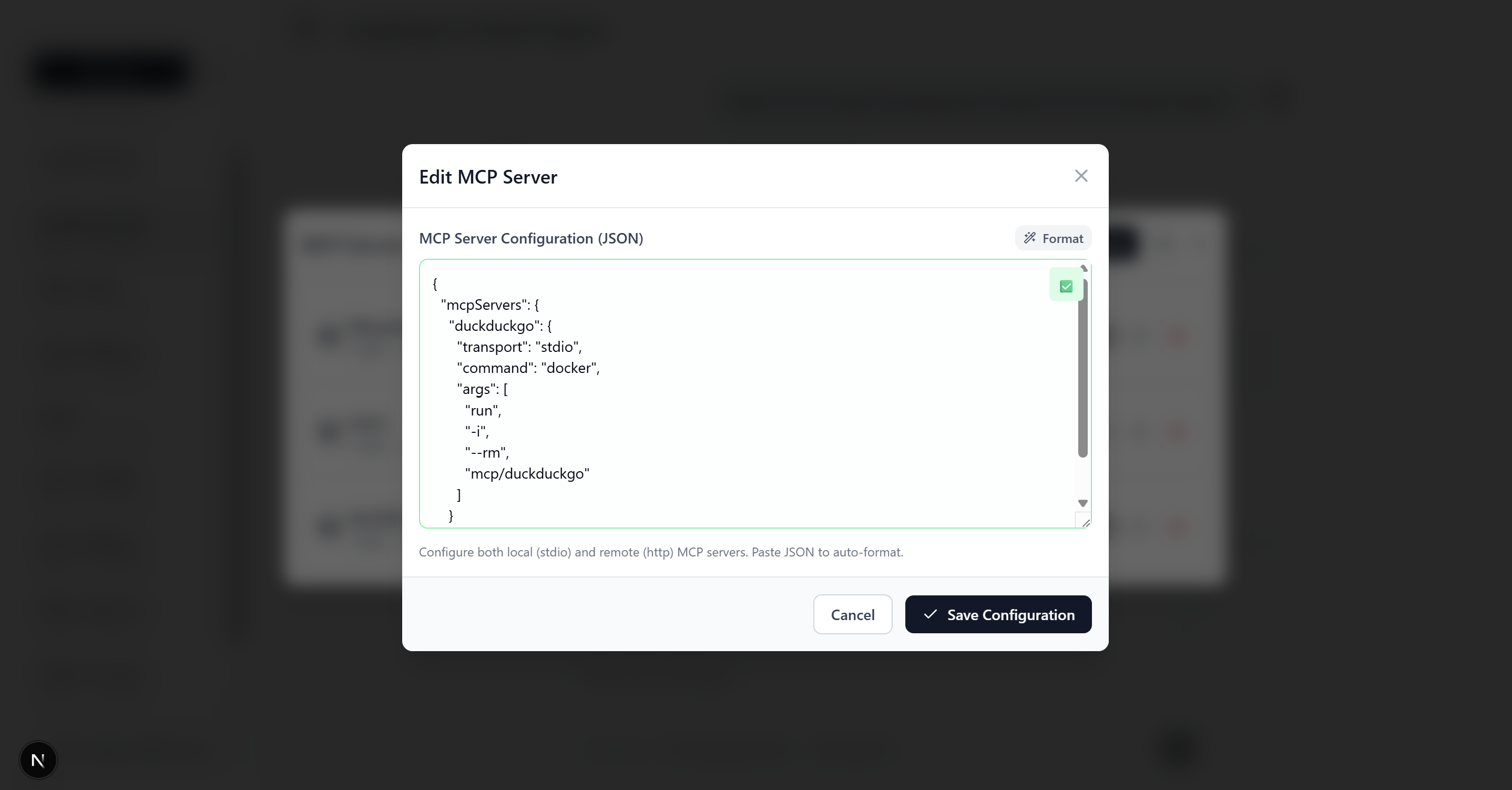 MCP server configuration form with example filesystem server setup
Want to build your own MCP server? Check out create-mcp-server - scaffold production-ready MCP servers in seconds with TypeScript, multiple frameworks (MCP SDK or FastMCP), and built-in debugging tools.
Example MCP Server Configurations
Filesystem Server (stdio)
{
  "name": "filesystem",
  "type": "stdio",
  "command": "npx",
  "args": ["@modelcontextprotocol/server-filesystem", "/Users/yourname/Documents"]
}
HTTP API Server
{
  "name": "web-api",
  "type": "http",
  "url": "http://localhost:8080/mcp",
  "headers": {
    "Authorization": "Bearer your-token"
  }
}
Note: Some HTTP MCP servers require OAuth 2.0 authentication. See OAuth Documentation for details.
Tool Approval Workflow
- Agent Requests Tool - AI suggests using a tool
- Approval Prompt - Interface shows tool details and asks for approval
- User Decision:
- ✅ Allow: Execute tool as requested
- ❌ Deny: Skip tool execution
- ✏️ Modify: Edit tool parameters before execution
- Continue Conversation - Agent responds with tool results
Architecture
High-Level Overview
┌─────────────────┐    ┌──────────────────┐    ┌─────────────────┐
│   Next.js UI   │◄──►│  Agent Service   │◄──►│  LangGraph.js   │
│   (React 19)   │    │  (SSE Streaming) │    │    Agent        │
└─────────────────┘    └──────────────────┘    └─────────────────┘
         │                       │                       │
         ▼                       ▼                       ▼
┌─────────────────┐    ┌──────────────────┐    ┌─────────────────┐
│   React Query   │    │     Prisma       │    │  MCP Clients    │
│   (State Mgmt)  │    │   (Database)     │    │   (Tools)       │
└─────────────────┘    └──────────────────┘    └─────────────────┘
                                │
                                ▼
                  ┌──────────────────────────────┐
                  │   PostgreSQL  │  MinIO/S3    │
                  │  (Persistence)│ (File Store) │
                  └──────────────────────────────┘
Core Components
Agent Builder (src/lib/agent/builder.ts)
- Creates StateGraph with agent→tool_approval→tools flow
- Handles tool approval interrupts
- Manages model binding and system prompts
MCP Integration (src/lib/agent/mcp.ts)
- Dynamic tool loading from database-stored MCP servers
- Support for stdio and HTTP transports
- Tool name prefixing for conflict prevention
Streaming Service (src/services/agentService.ts)
- Server-Sent Events for real-time responses
- Message processing and chunk aggregation
- Tool approval workflow handling
Chat Hook (src/hooks/useChatThread.ts)
- React Query integration for optimistic UI
- Stream management and error handling
- Tool approval user interface
File Storage (src/lib/storage/)
- S3-compatible storage with MinIO (development) or AWS S3 (production)
- File validation, upload, and content processing for AI
- Multimodal message building with base64 conversion
For detailed architecture documentation, see docs/ARCHITECTURE.md.
API Documentation
The app serves an interactive OpenAPI 3.1 explorer at /api-docs and the raw spec at
/api/openapi — generated from per-route Zod schemas. See docs/API.md for how
it works and how to document new routes.
Development
Available Scripts
pnpm dev                 # Start development server with Turbopack
pnpm build              # Production build
pnpm start              # Start production server
pnpm lint               # Run ESLint
pnpm format             # Format with Prettier
pnpm format:check       # Check formatting

# Database
pnpm prisma:generate    # Generate Prisma client (after schema changes)
pnpm prisma:migrate     # Create and apply migrations
pnpm prisma:studio      # Open Prisma Studio (database UI)
Agent Skills
This repo ships Agent Skills in .agents/skills/,
pinned by skills-lock.json. They give any skill-aware coding agent (Claude Code and friends) the
conventions for working on an agent codebase like this one:
| Skill | Use it when |
|---|---|
agent-prompt-engineering |
Writing or auditing the agent’s system prompt |
tool-design |
Adding or reviewing a tool / MCP server the agent calls |
agent-eval-cases |
Deciding what agent behavior deserves an eval case, and writing it |
Agent guidance for this repo lives in AGENTS.md (with CLAUDE.md pointing to it).
Project Structure
src/
├── app/                 # Next.js App Router
│   ├── api/            # API routes (stream, upload, mcp-servers)
│   └── thread/         # Thread-specific pages
├── components/         # React components
├── hooks/              # Custom React hooks
├── lib/                # Core utilities
│   ├── agent/          # Agent-related logic
│   └── storage/        # File upload & S3 utilities
├── services/           # Business logic
└── types/              # TypeScript definitions

prisma/
├── schema.prisma       # Database schema
└── migrations/         # Database migrations
Key Files
- Agent Configuration:
src/lib/agent/builder.ts,src/lib/agent/mcp.ts - API Endpoints:
src/app/api/agent/stream/route.ts,src/app/api/agent/upload/route.ts - File Storage:
src/lib/storage/(validation, upload, content processing) - Database Models:
prisma/schema.prisma - Main Chat Interface:
src/components/Thread.tsx,src/components/MessageInput.tsx - Streaming Logic:
src/hooks/useChatThread.ts
Contributing
We welcome contributions! This project is designed to be a community resource for LangGraph.js development.
Getting Started
- Fork the repository
- Create a feature branch:
git checkout -b feature/amazing-feature - Make your changes and add tests
- Commit:
git commit -m 'Add amazing feature' - Push:
git push origin feature/amazing-feature - Open a Pull Request
Development Guidelines
- Follow TypeScript strict mode
- Use Prettier for formatting
- Add JSDoc comments for public APIs
- Test MCP server integrations thoroughly
- Update documentation for new features
Learning Resources
LangGraph.js
Model Context Protocol (MCP)
Next.js & React
License
This project is licensed under the MIT License - see the LICENSE file for details.
Acknowledgments
- LangChain for the incredible AI framework
- Model Context Protocol for the tool integration standard
- Next.js team for the amazing React framework
Ready to build your next AI agent?
If this repo helped you and you’d like guidance implementing it in production, feel free to reach out on LinkedIn.
fullstack-langgraph-nextjs-agent MCP Fragen
Welche Dateitypen kann der Agent verarbeiten?
Der Agent unterstützt multimodale Datei-Uploads, einschließlich Bildern, PDFs und Textdateien.