
client-cli MCP server
Ein Command-Line Interface, das als MCP Client fungiert, um LLM-Prompts auszuführen und mit kompatiblen Servern zu interagieren.
Auch bekannt als adhikasp/mcp-client-cli
- Stars
- 675
- Tools
- —
- Downloads, 30 Tage
- —
- Neueste Version
- —
- Letzter Commit
- 2. Dez. 2025
- Lizenz
- MIT
Was ist client-cli MCP?
client-cli ist ein MCP server. Ein Command-Line Interface, das als MCP Client fungiert, um LLM-Prompts auszuführen und mit kompatiblen Servern zu interagieren.
Zusammenfassung generiert aus dem README des Projekts
Über client-cli MCP server
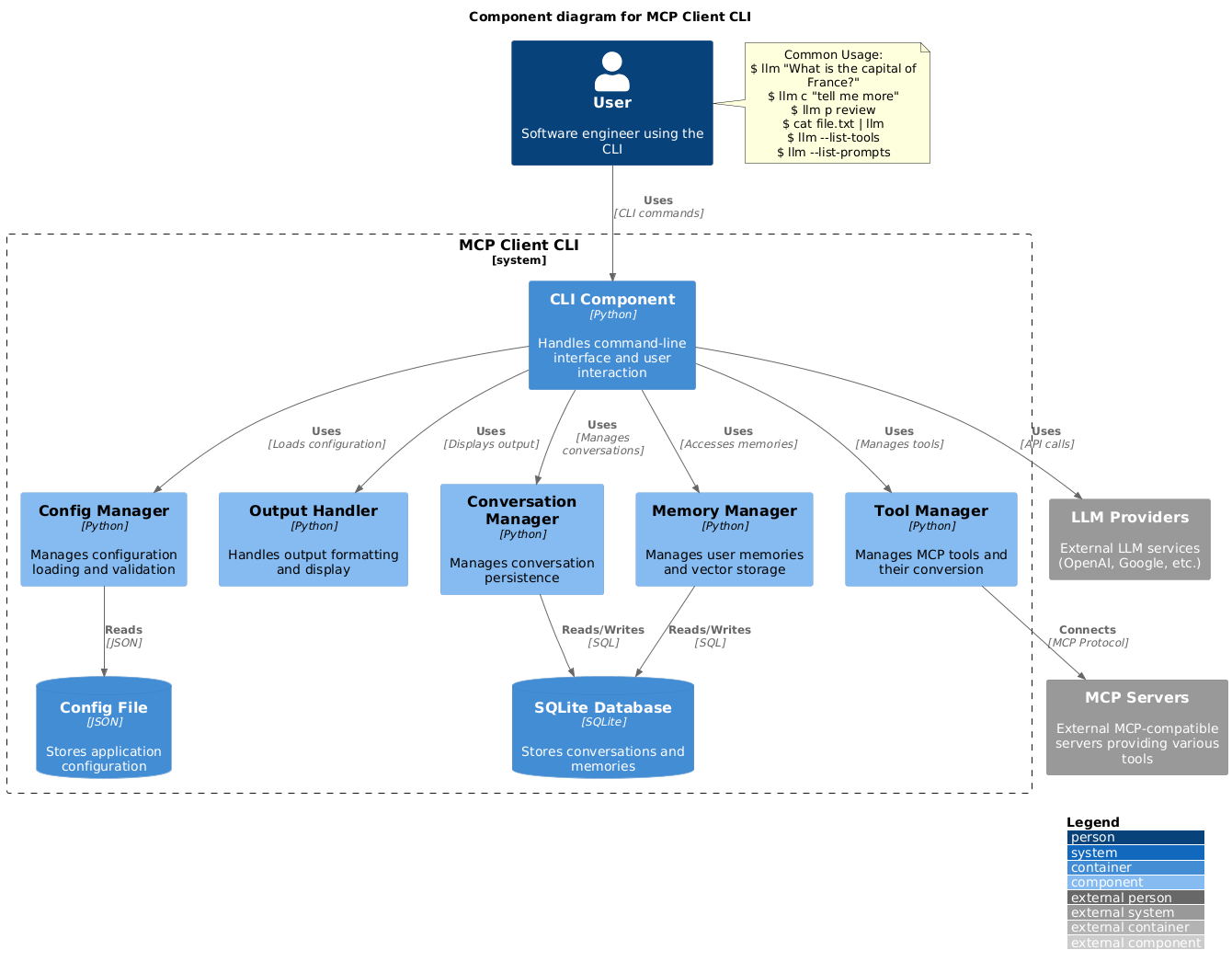
Dieses Command-Line Interface ermöglicht es dir, LLM-Prompts auszuführen und direkt über dein Terminal mit Model Context Protocol Servern zu interagieren. Es dient als flexible Alternative zu Claude Desktop und erlaubt es Entwicklern, sich mit jedem kompatiblen MCP server zu verbinden. Nutzer können ihre Umgebung über eine JSON-Datei konfigurieren, um LLM-Provider wie OpenAI, Groq oder lokale Modelle via llama.cpp festzulegen.
Das Tool unterstützt eine Vielzahl von Workflows, einschließlich des Pipens von Command-Outputs oder Bilddateien direkt in Prompts zur Analyse. Es bietet integrierten Support für Clipboard-Inhalte unter Windows, macOS und Linux, was eine schnelle Verarbeitung von kopiertem Text oder Screenshots ermöglicht. Entwickler können die Tool-Ausführung über Bestätigungsaufforderungen steuern oder diese für automatisierte Skripte mittels spezifischer Flags umgehen.
Über einfache Abfragen hinaus enthält der Client Prompt-Templates für gängige Aufgaben, wie das Reviewen von Git-Changes oder das Zusammenfassen von YouTube-Videos. Zudem wird der Gesprächszustand beibehalten, sodass Nutzer vorherige Dialoge mit einem einfachen Präfix fortsetzen können. Dieses Setup bietet eine hochgradig anpassbare Möglichkeit, externe Tools wie brave-search oder fetch in einen terminalbasierten KI-Workflow zu integrieren.
Was du damit machen kannst
- 1Clipboard-Daten sofort verarbeitenSende Text oder Bilder, die sich aktuell in deiner System-Zwischenablage befinden, direkt zur Verarbeitung an das LLM.
Geschrieben aus dem README des Projekts. Jeder Use Case wurde gegen ein Zitat daraus geprüft.
Konfiguration
BRAVE_API_KEY
| Name | Beschreibung | Typ |
|---|---|---|
| BRAVE_API_KEY | — |
Automatisierte Checks
Geluften am 15. Nov. 2026Vollständiger Bericht →Noch nicht verifiziert. Ein Server benötigt einen Score von 80, keine kritischen Befunde und genug Daten für unsere Prüfung. Wie die Checks funktionieren · Was du für mehr Punkte verbessern kannst

- Source Repository verknüpft und erreichbaradhikasp/mcp-client-cli is public and reachablegithub.com/adhikasp/mcp-client-cli ↗Bestanden
- Paket nennt dieses Repository als QuelleNicht geprüft
- Build-Provenienz (Sigstore-Attestierung)Nicht geprüft
- Open Source Lizenz (OSI)MITspdx.org/licenses/MIT.html ↗Bestanden
- Commit oder Release im letzten JahrLast commit or release 2025-12-02github.com/adhikasp/mcp-client-cli ↗Bestanden
- OpenSSF ScorecardNicht geprüft
- Package-Name ähnelt keinem populären PackageNicht geprüft
- Keine kritischen Advisories im Paket oder seinen AbhängigkeitenNicht geprüft
- Keine versteckten Anweisungen an das Modell0 tool descriptions and the README read; no override phrases, credential paths or hidden charactersBestanden
- Destruktive Tools sind markiertNicht geprüft
- Remote-Endpoint beantwortet den MCP-HandshakeNicht geprüft
README
Auf GitHub ansehenMCP CLI client
A simple CLI program to run LLM prompt and implement Model Context Protocol (MCP) client.
You can use any MCP-compatible servers from the convenience of your terminal.
This act as alternative client beside Claude Desktop. Additionally you can use any LLM provider like OpenAI, Groq, or local LLM model via llama.
Setup
-
Install via pip:
pip install mcp-client-cli -
Create a
~/.llm/config.jsonfile to configure your LLM and MCP servers:{ "systemPrompt": "You are an AI assistant helping a software engineer...", "llm": { "provider": "openai", "model": "gpt-4", "api_key": "your-openai-api-key", "temperature": 0.7, "base_url": "https://api.openai.com/v1" // Optional, for OpenRouter or other providers }, "mcpServers": { "fetch": { "command": "uvx", "args": ["mcp-server-fetch"], "requires_confirmation": ["fetch"], "enabled": true, // Optional, defaults to true "exclude_tools": [] // Optional, list of tool names to exclude }, "brave-search": { "command": "npx", "args": ["-y", "@modelcontextprotocol/server-brave-search"], "env": { "BRAVE_API_KEY": "your-brave-api-key" }, "requires_confirmation": ["brave_web_search"] }, "youtube": { "command": "uvx", "args": ["--from", "git+https://github.com/adhikasp/mcp-youtube", "mcp-youtube"] } } }Note:
- See CONFIG.md for complete documentation of the configuration format
- Use
requires_confirmationto specify which tools need user confirmation before execution - The LLM API key can also be set via environment variables
LLM_API_KEYorOPENAI_API_KEY - The config file can be placed in either
~/.llm/config.jsonor$PWD/.llm/config.json - You can comment the JSON config file with
//if you like to switch around the configuration
-
Run the CLI:
llm "What is the capital city of North Sumatra?"
Usage
Basic Usage
$ llm What is the capital city of North Sumatra?
The capital city of North Sumatra is Medan.
You can omit the quotes, but be careful with bash special characters like &, |, ; that might be interpreted by your shell.
You can also pipe input from other commands or files:
$ echo "What is the capital city of North Sumatra?" | llm
The capital city of North Sumatra is Medan.

$ echo "Given a location, tell me its capital city." > instructions.txt
$ cat instruction.txt | llm "West Java"
The capital city of West Java is Bandung.
Image Input
You can pipe image files to analyze them with multimodal LLMs:
$ cat image.jpg | llm "What do you see in this image?"
[LLM will analyze and describe the image]

$ cat screenshot.png | llm "Is there any error in this screenshot?"
[LLM will analyze the screenshot and point out any errors]
Using Prompt Templates
You can use predefined prompt templates by using the p prefix followed by the template name and its arguments:
# List available prompt templates
$ llm --list-prompts

# Use a template
$ llm p review  # Review git changes
$ llm p commit  # Generate commit message
$ llm p yt url=https://youtube.com/...  # Summarize YouTube video
Triggering a tool
$ llm What is the top article on hackernews today?

================================== Ai Message ==================================
Tool Calls:
  brave_web_search (call_eXmFQizLUp8TKBgPtgFo71et)
 Call ID: call_eXmFQizLUp8TKBgPtgFo71et
  Args:
    query: site:news.ycombinator.com
    count: 1
Brave Search MCP Server running on stdio

# If the tool requires confirmation, you'll be prompted:
Confirm tool call? [y/n]: y

================================== Ai Message ==================================
Tool Calls:
  fetch (call_xH32S0QKqMfudgN1ZGV6vH1P)
 Call ID: call_xH32S0QKqMfudgN1ZGV6vH1P
  Args:
    url: https://news.ycombinator.com/
================================= Tool Message =================================
Name: fetch

[TextContent(type='text', text='Contents [REDACTED]]
================================== Ai Message ==================================

The top article on Hacker News today is:

### [Why pipes sometimes get "stuck": buffering](https://jvns.ca)
- **Points:** 31
- **Posted by:** tanelpoder
- **Posted:** 1 hour ago

You can view the full list of articles on [Hacker News](https://news.ycombinator.com/)
To bypass tool confirmation requirements, use the --no-confirmations flag:
$ llm --no-confirmations "What is the top article on hackernews today?"
To use in bash scripts, add the --no-intermediates, so it doesn't print intermediate messages, only the concluding end message.
$ llm --no-intermediates "What is the time in Tokyo right now?"
Continuation
Add a c prefix to your message to continue the last conversation.
$ llm asldkfjasdfkl
It seems like your message might have been a typo or an error. Could you please clarify or provide more details about what you need help with?
$ llm c what did i say previously?
You previously typed "asldkfjasdfkl," which appears to be a random string of characters. If you meant to ask something specific or if you have a question, please let me know!
Clipboard Support
You can use content from your clipboard using the cb command:
# After copying text to clipboard
$ llm cb
[LLM will process the clipboard text]

$ llm cb "What language is this code written in?"
[LLM will analyze the clipboard text with your question]

# After copying an image to clipboard
$ llm cb "What do you see in this image?"
[LLM will analyze the clipboard image]

# You can combine it with continuation
$ llm cb c "Tell me more about what you see"
[LLM will continue the conversation about the clipboard content]
The clipboard feature works in:
- Native Windows/macOS/Linux environments
- Windows: Uses PowerShell
- macOS: Uses
pbpastefor text,pngpastefor images (optional) - Linux: Uses
xclip(required for clipboard support)
- Windows Subsystem for Linux (WSL)
- Accesses the Windows clipboard through PowerShell
- Works with both text and images
- Make sure you have access to
powershell.exefrom WSL
Required tools for clipboard support:
- Windows: PowerShell (built-in)
- macOS:
pbpaste(built-in) for textpngpaste(optional) for images:brew install pngpaste
- Linux:
xclip:sudo apt install xclipor equivalent
The CLI automatically detects if the clipboard content is text or image and handles it appropriately.
Additional Options
$ llm --list-tools                # List all available tools
$ llm --list-prompts              # List available prompt templates
$ llm --no-tools                  # Run without any tools
$ llm --force-refresh             # Force refresh tool capabilities cache
$ llm --text-only                 # Output raw text without markdown formatting
$ llm --show-memories             # Show user memories
$ llm --model gpt-4               # Override the model specified in config
Contributing
Feel free to submit issues and pull requests for improvements or bug fixes.
client-cli MCP Fragen
Kann ich lokale LLMs mit diesem Client nutzen?
Ja, du kannst lokale LLM-Modelle über llama.cpp verwenden.
Wie kann ich die Bestätigungsaufforderungen für Tools umgehen?
Nutze das --no-confirmations Flag, um die manuelle Bestätigung vor der Tool-Ausführung zu überspringen.
Wird Bildeingabe unterstützt?
Ja, du kannst Bilddateien an das CLI pipen, um sie mit multimodalen LLMs zu analysieren.
Kann ich Inhalte aus meiner Zwischenablage verwenden?
Ja, der cb Befehl ermöglicht es dir, Text oder Bilder direkt aus deiner Zwischenablage zu verarbeiten.