
Erstellt schreibgeschützte Akzeptanzberichte für Git-Änderungen, um zu verifizieren, was modifiziert wurde und welche Checks von einem AI Agent ausgeführt wurden.
Auch bekannt als 2648782102/proofpack-cli, proofpack-cli
- Stars
- 1
- Tools
- —
- Downloads, 30 Tage
- —
- Neueste Version
- 0.3.2
- Letzter Commit
- 9. Nov. 2026
- Lizenz
- MIT
Was ist Proofpack MCP?
Erstellt schreibgeschützte Akzeptanzberichte für Git-Änderungen, um zu verifizieren, was modifiziert wurde und welche Checks von einem AI Agent ausgeführt wurden.
Zusammenfassung generiert aus dem README des Projekts
Über Proofpack MCP server
Proofpack bietet Entwicklern einen Beleg (Evidence Receipt) für Code-Änderungen, die von AI Agents vorgenommen wurden. Es generiert schreibgeschützte Akzeptanzberichte, die detailliert aufzeigen, was Git sieht, welche spezifischen Checks ausgeführt wurden und welche Aufgaben noch unverifiziert sind. Dieses Tool hilft Einzelpersonen dabei, genau zu bestätigen, was nach Abschluss einer Coding-Aufgabe modifiziert wurde und welche Tests tatsächlich stattgefunden haben.
Der Server läuft lokal als vom Host gestarteter Subprocess über den proofpack-mcp stdio Entrypoint und benötigt keine Accounts, Cloud-Services oder Model APIs. Wenn er über einen MCP Host genutzt wird, stellt er ein einzelnes proofpack_check Tool bereit, das eine schreibgeschützte Git-Inspektion durchführt, um Markdown- oder JSON-Berichte zu generieren, ohne Projekt-Befehle auszuführen oder Dateien zu schreiben. Für Nutzer, die das CLI direkt ausführen, kann das Tool über das --run Flag spezifische Befehle unter Verwendung der lokalen Shell und der Benutzerrechte ausführen.
Im Gegensatz zu automatisierten Testern behauptet Proofpack nicht, dass eine Änderung korrekt oder sicher zum Mergen ist. Der Fokus liegt darauf, beobachtete Fakten von heuristischen Prompts und ungeprüfter Arbeit zu trennen, damit Entwickler die Grenzen der durchgeführten Verifizierung kennen.
Was du damit machen kannst
- 1AI Code-Änderungen verifizierenGeneriere einen Bericht, um zu sehen, welche Dateien modifiziert wurden und wie die Diff-Zusammenfassung aussieht, nachdem ein Agent eine Aufgabe abgeschlossen hat.
- 2Ausgeführte Test-Befehle dokumentierenFühre spezifische Test-Suites aus und zeichne deren Exit-Status und Laufzeit in einem formalen Akzeptanzbericht auf.
- 3Ungetestete Code-Bereiche identifizierenErmittle, welche Teile des Entwicklungsprozesses, wie z. B. Linting oder Dependency-Audits, während der Session übersprungen wurden.
- 4Bereinigte Verifizierungsergebnisse teilenErstelle eine sichere Version eines Berichts, die sensible Pfade und Befehlstexte entfernt, bevor du ihn mit anderen teilst.
Geschrieben aus dem README des Projekts. Jeder Use Case wurde gegen ein Zitat daraus geprüft.
So installierst du Proofpack MCP
Formate geprüft am 10. Nov. 2026Zu Cursor hinzufügenZu Goose hinzufügenProofpack MCP in Claude Code installieren
$ claude mcp add proofpack-cli -- npx -y proofpack-cliProofpack MCP in Cursor installieren
~/.cursor/mcp.json
{
  "mcpServers": {
    "proofpack-cli": {
      "command": "npx",
      "args": [
        "-y",
        "proofpack-cli"
      ]
    }
  }
}Proofpack MCP in VS Code installieren
.vscode/mcp.json
{
  "servers": {
    "proofpack-cli": {
      "type": "stdio",
      "command": "npx",
      "args": [
        "-y",
        "proofpack-cli"
      ]
    }
  }
}Proofpack MCP in VS Code CLI installieren
$ code --add-mcp '{"name":"proofpack-cli","type":"stdio","command":"npx","args":["-y","proofpack-cli"]}'Proofpack MCP in Claude Desktop installieren
claude_desktop_config.json
{
  "mcpServers": {
    "proofpack-cli": {
      "command": "npx",
      "args": [
        "-y",
        "proofpack-cli"
      ]
    }
  }
}Proofpack MCP in Codex installieren
$ codex mcp add proofpack-cli -- npx -y proofpack-cliProofpack MCP in Codex config.toml installieren
~/.codex/config.toml
[mcp_servers.proofpack-cli]
command = "npx"
args = ["-y", "proofpack-cli"]
Proofpack MCP in Gemini CLI installieren
$ gemini mcp add -s user proofpack-cli npx -- -y proofpack-cliProofpack MCP in Gemini settings.json installieren
~/.gemini/settings.json
{
  "mcpServers": {
    "proofpack-cli": {
      "command": "npx",
      "args": [
        "-y",
        "proofpack-cli"
      ]
    }
  }
}Automatisierte Checks
Geluften am 14. Nov. 2026Vollständiger Bericht →Unsere automatisierten Checks bestanden. Das ist kein Security-Audit: Lies den Code und gib dem Server nur den minimal notwendigen Zugriff. Wie die Checks funktionieren

- Source Repository verknüpft und erreichbar2648782102/proofpack-cli is public and reachablegithub.com/2648782102/proofpack-cli ↗Bestanden
- Paket nennt dieses Repository als Quelleproofpack-cli names 2648782102/proofpack-cli as sourcenpmjs.com/package/proofpack-cli ↗Bestanden
- Build-Provenienz (Sigstore-Attestierung)No build attestation published for this releaseNicht geprüft
- Open Source Lizenz (OSI)MITspdx.org/licenses/MIT.html ↗Bestanden
- Commit oder Release im letzten JahrLast commit or release 2026-11-09github.com/2648782102/proofpack-cli ↗Bestanden
- OpenSSF ScorecardNicht geprüft
- Package-Name ähnelt keinem populären PackageNo popular package one edit away from proofpack-cliBestanden
- Keine kritischen Advisories im Paket oder seinen Abhängigkeiten1 resolved dependencies checked; no critical advisoryosv.dev ↗Bestanden
- Keine versteckten Anweisungen an das Modell0 tool descriptions and the README read; no override phrases, credential paths or hidden charactersBestanden
- Destruktive Tools sind markiertNicht geprüft
- Remote-Endpoint beantwortet den MCP-HandshakeNicht geprüft
README
Auf GitHub ansehenProofpack
An evidence receipt for AI-assisted code changes.
After a coding agent says "done", Proofpack shows what Git can see, which checks actually ran, and what remains unchecked. It runs locally, needs no account, and never gives a "safe to merge" verdict.
npx -y --package=proofpack-cli@0.3.2 proofpack check --run "npm test"
The command prints a Markdown report to stdout. Default inspection is read-only; npm test runs only because it was explicitly supplied with --run.
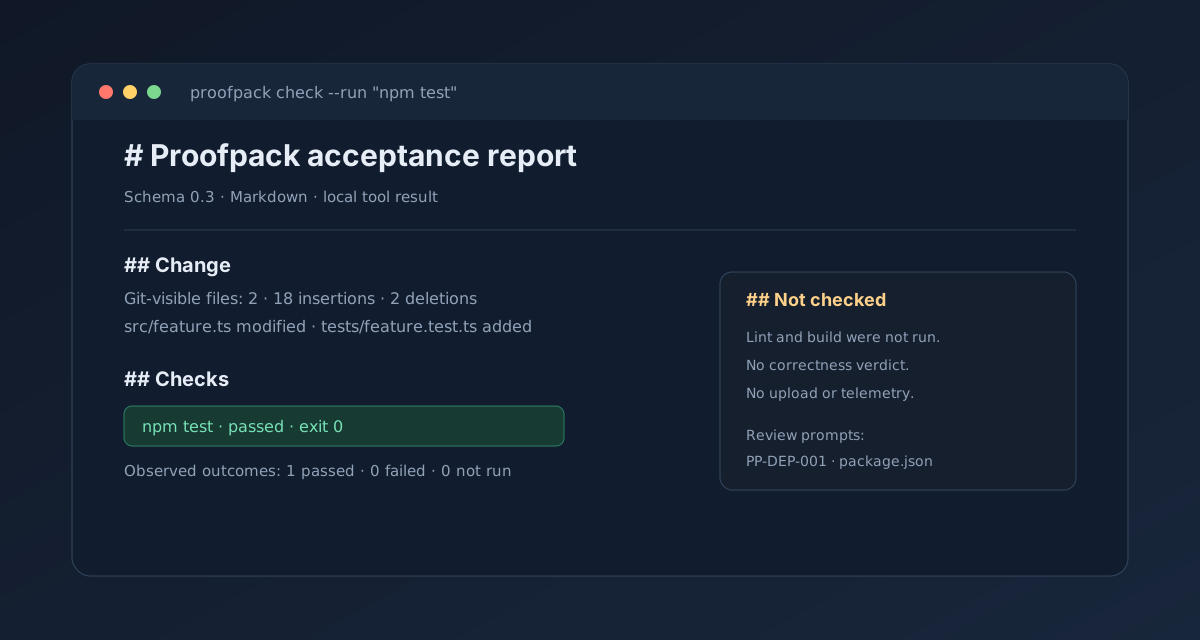
## Change
- Git-visible files: 2
- Diff summary: 18 insertions · 2 deletions

## Checks
- Explicit commands requested: 1
- Observed outcomes: 1 passed · 0 failed · 0 not run
- npm test: passed · exit 0

## Not checked
- Lint, build, dependency audits, and runtime behavior were not run.
Repository: 2648782102/proofpack-cli · npm: proofpack-cli · Release: v0.3.2
What it is for
Proofpack helps an individual developer answer three questions after a coding task: what changed, what checks actually ran, and what remains unchecked. It records Git change facts, explicit command evidence, and heuristic review prompts; it does not claim that a change is correct.
The report separates observed facts, heuristic prompts, and unchecked work. A passing command is evidence of that invocation only.
Product principles
- One command, one readable report.
- Local by default; no account, daemon, model API, or upload.
- Observed facts, heuristic prompts, and unchecked work are separated.
- No project command runs unless the user explicitly supplies
--run. - Git inspection is read-only; explicitly run commands use the user's shell and privileges without a sandbox.
Current distribution shapes
The 0.3.2 package contains both the proofpack CLI and the proofpack-mcp stdio entrypoint. MCP is a host-launched local subprocess, not a cloud service or a host plugin. See docs/MCP.md for the protocol contract and host configuration.
MCP quick start
After installing the package in a project, configure an MCP host to launch the local binary:
{
  "mcpServers": {
    "proofpack": {
      "command": "npx",
      "args": ["-y", "--package=proofpack-cli@0.3.2", "proofpack-mcp"]
    }
  }
}
The host then sees one read-only proofpack_check tool. It generates a Markdown or JSON acceptance report without executing project commands or writing files.
Install and first use
Use npm without a global install:
npx -y --package=proofpack-cli@0.3.2 proofpack check
Or install the package in a project:
npm install --save-dev proofpack-cli@0.3.2
npx proofpack check
The CLI binary is named proofpack; the MCP binary is named proofpack-mcp.
This prints a Markdown report to stdout without changing the working tree, running project commands, or making network requests. To save it, pass an explicit path:
npx -y --package=proofpack-cli@0.3.2 proofpack check --output .proofpack/review.md
Explicit checks
npx -y --package=proofpack-cli@0.3.2 proofpack check --run "npm test" --run "npm run lint"
npx -y --package=proofpack-cli@0.3.2 proofpack check --run "npm test" --format json
npx -y --package=proofpack-cli@0.3.2 proofpack check --run "npm test" --format markdown,json --output .proofpack/review.md
Each command is previewed before execution, run sequentially from the repository root through the user's shell, and recorded with timing, exit status, bounded stdout/stderr, truncation, and best-effort redaction. --timeout <seconds> defaults to 120 and applies per command. Multiple formats require --output and write sibling .md / .json files.
Commands are not sandboxed and can modify the working tree. Review every command and its output before sharing a report. Passing checks are evidence of those invocations only, not proof of correctness or security.
Branch/base and sharing
npx -y --package=proofpack-cli@0.3.2 proofpack check --base main
npx -y --package=proofpack-cli@0.3.2 proofpack check --run "npm test" --share-safe --output .proofpack/share.md
npx -y --package=proofpack-cli@0.3.2 proofpack check --output .proofpack/review.md --open
To render the report in Simplified Chinese, pass --lang zh-CN or set PROOFPACK_LANG=zh-CN. The default is English. This changes Markdown and JSON text fields only; schema keys, status values, paths, command stdout, and rule IDs stay unchanged.
npx -y --package=proofpack-cli@0.3.2 proofpack check --lang zh-CN
--base compares committed, staged, and working-tree changes against a resolved Git ref and excludes untracked files from that view. --share-safe omits branch, HEAD, base commit, file paths, output destination, command text, command output, and prompt evidence from both Markdown and JSON; status, counts, timings, and limitations remain. --open is opt-in, requires a written Markdown report, and uses the system opener. It never uploads the report.
Review even share-safe reports before sharing: omission is best-effort and aggregate metadata may still be sensitive.
What it does not do
Proofpack does not discover or run package scripts automatically, infer test or build results, review code with an AI, assign a correctness score, approve changes, upload reports, collect telemetry, or sandbox explicit --run commands. Commands supplied with --run use the current user's shell and privileges.
The MCP adapter is narrower still: its single proofpack_check tool performs read-only Git inspection and does not execute project commands, write report files, open applications, make network requests, or invoke a model.
Early development: repository-local init, sandboxed execution, CI-result import, and agent-trace import are not implemented. See roadmap and MCP contract.
Development
Requirements: Node.js 24 or newer.
npm install
npm run dev -- check
npm run check
npm test
npm run build
Documents
- Product requirements
- User experience
- CLI contract
- MCP contract
- Architecture
- Security and privacy
- Open-source references
- Roadmap
- Development handoff
- Release checklist
- 0.3.1 release notes
- 0.3.2 release notes
- Distribution and promotion
- 30-second demo script
- Changelog
- Decisions
License
MIT. See LICENSE.
Proofpack MCP Fragen
Wie füge ich Proofpack MCP zu Claude Code hinzu?
Führe claude mcp add proofpack-cli -- npx -y proofpack-cli in deinem Terminal aus. Füge --scope user hinzu, damit der Server in jedem Projekt verfügbar ist.
Wie füge ich Proofpack MCP zu Cursor hinzu?
Öffne ~/.cursor/mcp.json und füge den Server unter mcpServers hinzu, mit der Cursor-Config aus dem Installationsabschnitt oben.
Führt Proofpack Projekt-Befehle über MCP aus?
Nein, der MCP Adapter ist auf eine schreibgeschützte Git-Inspektion beschränkt und führt keine Projekt-Befehle aus, schreibt keine Dateien und stellt keine Netzwerkverbindungen her.
Ist Proofpack ein Cloud-Service?
Nein, es ist ein lokales Tool, das als vom Host gestarteter Subprocess läuft und keinen Account oder eine Cloud-Verbindung benötigt.
Garantiert Proofpack, dass Code-Änderungen korrekt sind?
Nein, es liefert lediglich Belege darüber, was sich geändert hat und welche Befehle ausgeführt wurden; es behauptet keine Korrektheit und gibt kein Verdict ab, ob der Code sicher zu mergen ist.
Kann ich mit Proofpack spezifische Tests ausführen?
Ja, du kannst das --run Flag nutzen, um explizit Befehle wie npm test anzugeben, die dann im Bericht aufgezeichnet werden.