
Bir AI istemcisi kullanarak Whimsical çalışma alanınızda doğrudan akış şemaları, zihin haritaları, wireframe'ler ve dokümantasyonlar oluşturun ve düzenleyin.
Ayrıca bilinen adı WhimsicalCode/mcp-server-guide, mcp-server-guide
- Yıldızlar
- 11
- Araçlar
- 14
- İndirmeler, 30 gün
- —
- En son sürüm
- 1.1.0
- Son commit
- 14 Eki 2026
- Lisans
- MIT
Whimsical MCP nedir?
Whimsical bir MCP sunucusudur. Bir AI istemcisi kullanarak Whimsical çalışma alanınızda doğrudan akış şemaları, zihin haritaları, wireframe'ler ve dokümantasyonlar oluşturun ve düzenleyin. 14 araç sunar; örneğin search, fetch, file_tree.
Özet, projenin README dosyasından oluşturuldu
Whimsical MCP sunucusu hakkında
Bu resmi Whimsical MCP server, doğal dil komutlarından düzenlenebilir akış şemaları, zihin haritaları ve wireframe'ler oluşturmanıza olanak tanır. Kullanıcılar statik görseller almak yerine, ekip üyelerinin açabileceği, düzenleyebileceği ve yorum yapabileceği gerçek ve etkileşimli dosyaları Whimsical çalışma alanlarında elde ederler. Bu araç, Whimsical tarafından barındırılan uzak bir uç noktaya bağlanarak Claude, ChatGPT, Cursor ve GitHub Copilot ile birlikte VS Code dahil çeşitli AI istemcileriyle çalışır.
Geliştiriciler ve tasarımcılar; karmaşık mimari diyagramlar, sekans diyagramları ve teknik dokümantasyon oluşturmak için bu aracı kullanabilirler. Oluşturma işleminin ötesinde server, mevcut çalışma alanlarında arama yapabilir, board'ları okuyabilir, dosyaları klasörler arasında taşıyabilir ve yorum dizilerini yönetebilir. Kimlik doğrulama için PKCE ile OAuth 2.1 kullanır, yani manuel API key yönetimi gerektirmez. Ücretsiz plan ayda 50 board nesnesine kadar izin verirken, ücretli planlar sınırsız nesne oluşturma imkanı sunar.
Neler yapabilirsiniz
- 1Kullanıcı kimlik doğrulama akışlarını görselleştirinAI istemcinizden, karar düğümleri ve etiketlenmiş bağlantılar içeren bir giriş sürecini temsil eden ayrıntılı bir akış şeması oluşturmasını isteyin.
- 2Etkileşimli UI wireframe'leri tasarlayınBir agent'a, flexbox yapısını takip eden konteynerlar, inputlar ve butonlar kullanarak bir ayarlar sayfası düzeni oluşturması talimatını verin.
- 3Proje özelliklerini beyin fırtınası yaparak planlayınMobil uygulama özelliklerini belirli dallara ayırarak organize etmek için yapılandırılmış bir zihin haritası oluşturmak üzere server'ı kullanın.
- 4Mevcut çalışma alanı içeriğini yönetinAI'dan mevcut board'larınız içinde belirli bilgileri bulmasını ve bulguları özetlemesini isteyin.
Projenin README dosyasından alınmıştır. Her kullanım durumu, oradaki bir alıntı ile kontrol edilir.
Whimsical MCP nasıl yüklenir
Biçimler 10 Kas 2026 tarihinde doğrulandıCursor'a ekleGoose'a ekleWhimsical MCP'yi Claude Code içine yükleyin
$ claude mcp add --transport http mcp-server-guide https://mcp.whimsical.com/mcpWhimsical MCP'yi Cursor içine yükleyin
~/.cursor/mcp.json
{
  "mcpServers": {
    "mcp-server-guide": {
      "url": "https://mcp.whimsical.com/mcp"
    }
  }
}Whimsical MCP'yi VS Code içine yükleyin
.vscode/mcp.json
{
  "servers": {
    "mcp-server-guide": {
      "type": "http",
      "url": "https://mcp.whimsical.com/mcp"
    }
  }
}Whimsical MCP'yi VS Code CLI içine yükleyin
$ code --add-mcp '{"name":"mcp-server-guide","type":"http","url":"https://mcp.whimsical.com/mcp"}'Whimsical MCP'yi Codex içine yükleyin
$ codex mcp add mcp-server-guide --url https://mcp.whimsical.com/mcpWhimsical MCP'yi Codex config.toml içine yükleyin
~/.codex/config.toml
[mcp_servers.mcp-server-guide]
url = "https://mcp.whimsical.com/mcp"
Whimsical MCP'yi Gemini CLI içine yükleyin
$ gemini mcp add -s user --transport http mcp-server-guide https://mcp.whimsical.com/mcpWhimsical MCP'yi Gemini settings.json içine yükleyin
~/.gemini/settings.json
{
  "mcpServers": {
    "mcp-server-guide": {
      "url": "https://mcp.whimsical.com/mcp",
      "type": "http"
    }
  }
}Whimsical MCP araçları 14
README dosyasından algılandısearchfetchfile_treehow_tocreate_fileadd_board_contentadd_doc_contenteditwireframe_editauto_layoutdeletemove
| search | — | |
| fetch | — | |
| file_tree | — | |
| how_to | — | |
| create_file | — | |
| add_board_content | — | |
| add_doc_content | — | |
| edit | — | |
| wireframe_edit | — | |
| auto_layout | — | |
| delete | — | |
| move | — |
14 aracın tümünü gösterDaha az araç göster
comment_readcomment_edit
| comment_read | — | |
| comment_edit | — |
Otomatik kontroller
Çalıştırıldı 13 Kas 2026Tam rapor →Otomatik kontrollerimizden geçti. Bu bir güvenlik denetimi değildir: kodu okuyun ve sunucuya ihtiyaç duyduğu en dar erişimi verin. Kontroller nasıl çalışır

- Kaynak deposu bağlantılı ve erişilebilirGeçti
- Açık kaynak lisansı (OSI)Geçti
- Son bir yıl içinde commit veya sürüm mevcutGeçti
- Paket adı popüler bir pakete yakın değilKontrol edilmedi
- Uzak uç nokta HTTPS kullanıyorGeçti
- Yıkıcı araçlar etiketlenmişKontrol edilmedi
- Modele yönelik gizli talimat yokGeçti
- Pakette veya bağımlılıklarında kritik uyarı yokKontrol edilmedi
Whimsical MCP Server
The official Whimsical MCP server. Ask Claude, ChatGPT, Cursor or any MCP client for a flowchart, mind map, sequence diagram, wireframe or architecture diagram, and it builds an editable Whimsical board in your workspace. You get a real file your team can open, edit and comment on, not a static image. The server can also search, read, edit and comment on the boards and docs you already have.
- Endpoint:
https://mcp.whimsical.com/mcp(hosted by Whimsical, Streamable HTTP, nothing to install) - Authentication: OAuth 2.1 with PKCE. There's no API key to manage.
- Plan: every tool works on the free plan, which includes up to 50 board objects a month. Paid plans have no object limit.
- Clients: Claude, Claude Code, ChatGPT, Cursor, VS Code with GitHub Copilot, Grok, Codex, and any client that supports remote MCP servers.

Quick start
In Claude Code:
claude mcp add --transport http whimsical https://mcp.whimsical.com/mcp
In other clients that support remote MCP servers, add a server with this URL and sign in to Whimsical when prompted:
https://mcp.whimsical.com/mcp
Then try: "Create a flowchart in Whimsical of our user signup flow." Setup steps for each client are below.
What you can build
Each example below is a prompt you can try. The agent creates the file in your Whimsical workspace and replies with a link. Clients that support it also show a preview in the chat.
Flowcharts
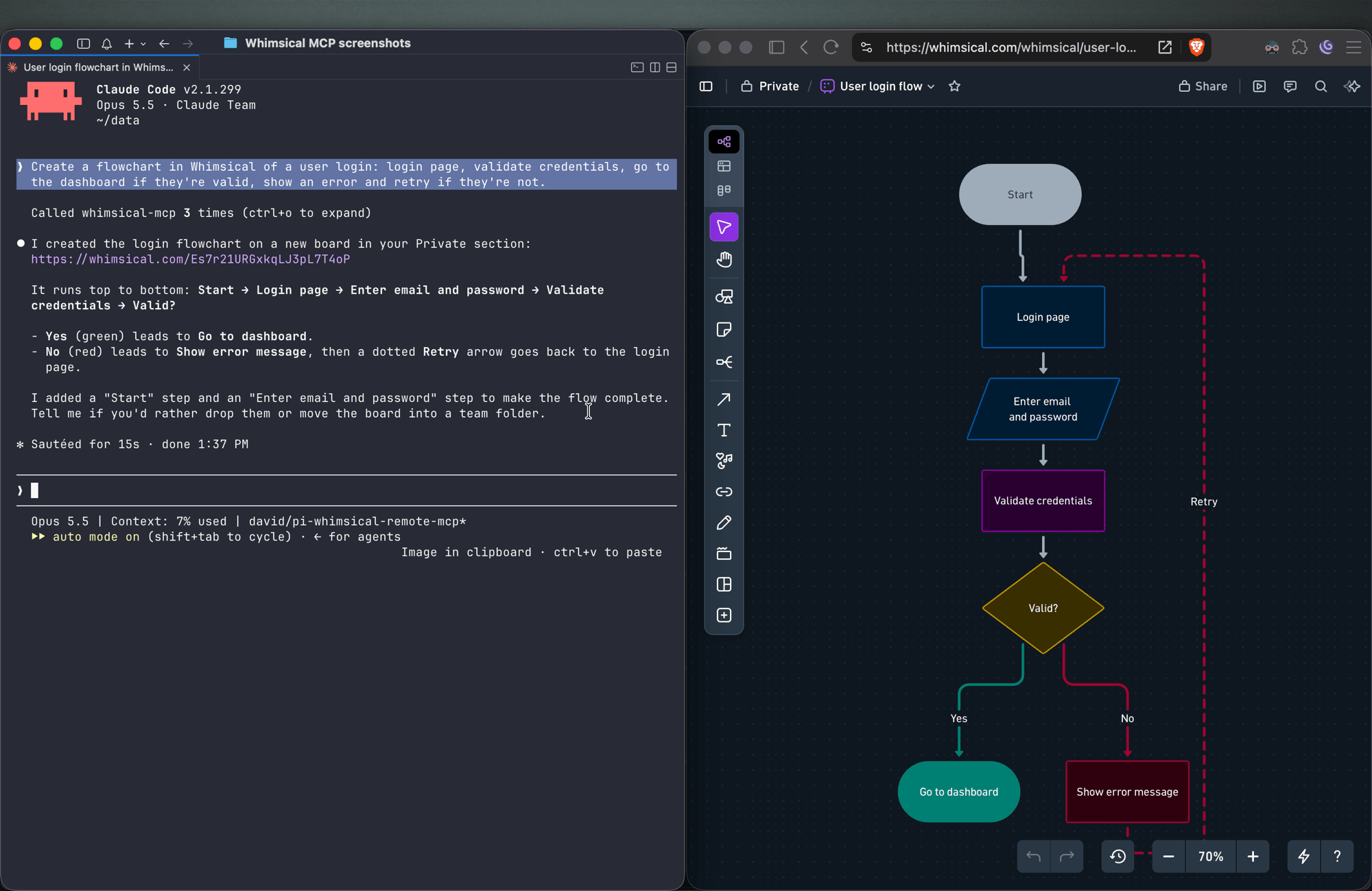
Create a flowchart in Whimsical of a user login: login page, validate credentials, go to the dashboard if they're valid, show an error and retry if they're not.
You get an auto-laid-out flowchart with decision nodes, labeled connectors and a clean top-to-bottom layout. Ask for left-to-right and the agent re-runs the layout.
Sequence diagrams
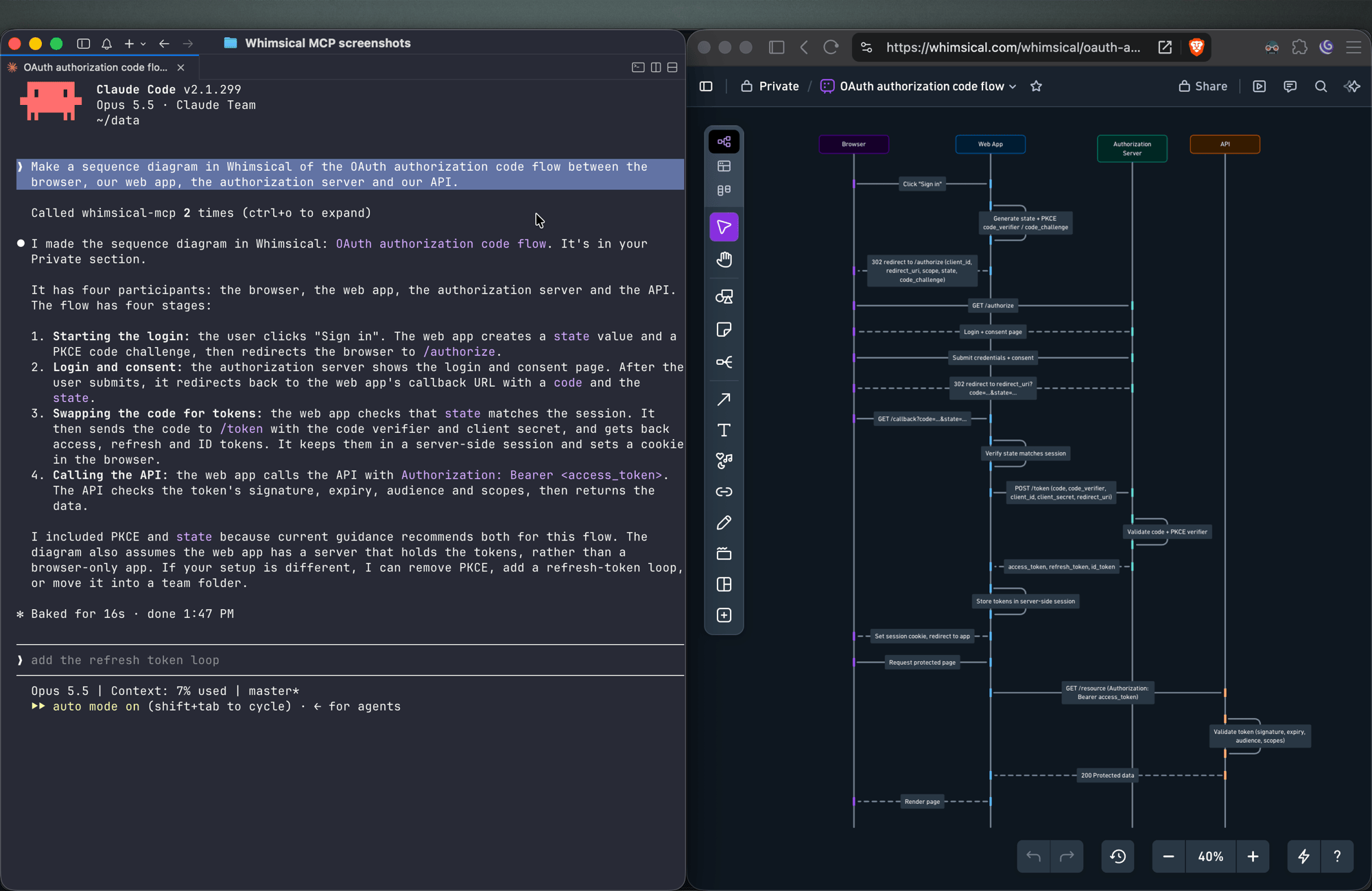
Make a sequence diagram in Whimsical of the OAuth authorization code flow between the browser, our web app, the authorization server and our API.
The agent creates a sequence diagram with one lifeline per actor and the messages between them in order.
Architecture diagrams
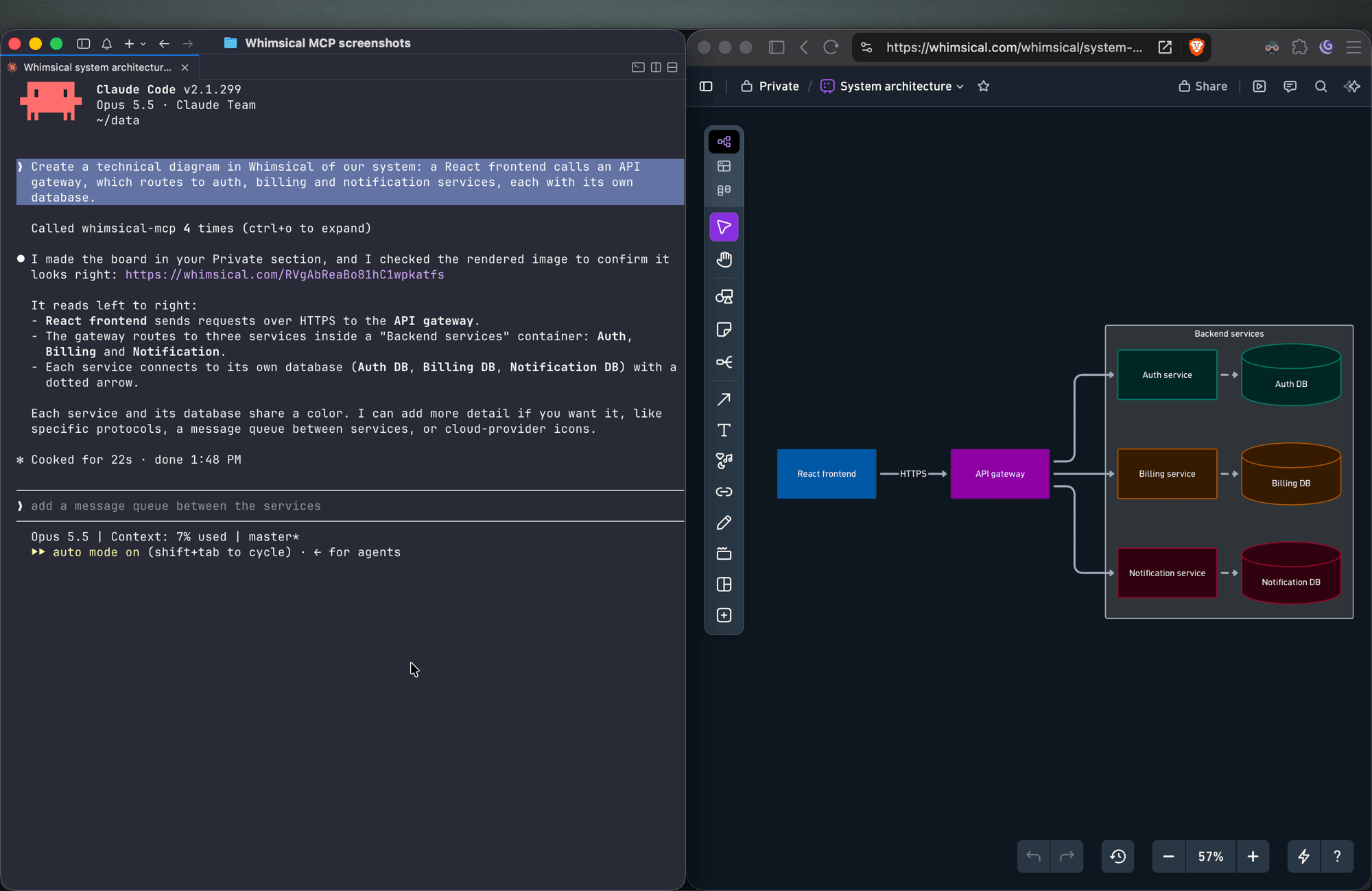
Create a technical diagram in Whimsical of our system: a React frontend calls an API gateway, which routes to auth, billing and notification services, each with its own database.
The agent lays out the components on a board with service boundaries and connectors showing how requests and data move between them.
Mind maps
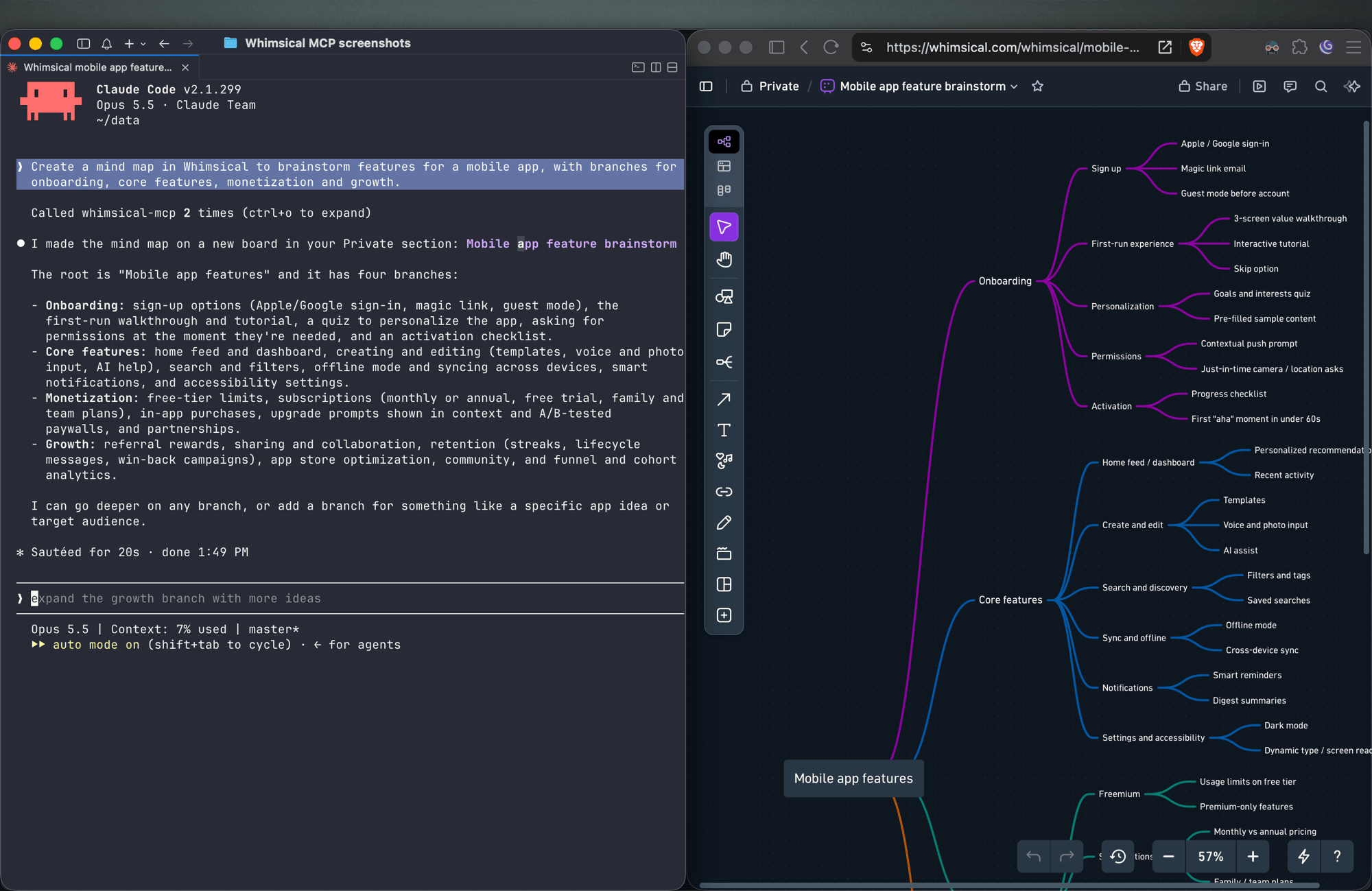
Create a mind map in Whimsical to brainstorm features for a mobile app, with branches for onboarding, core features, monetization and growth.
You get a mind map with the central topic and its branches, laid out horizontally. Ask for a vertical layout to get a top-down tree.
Wireframes
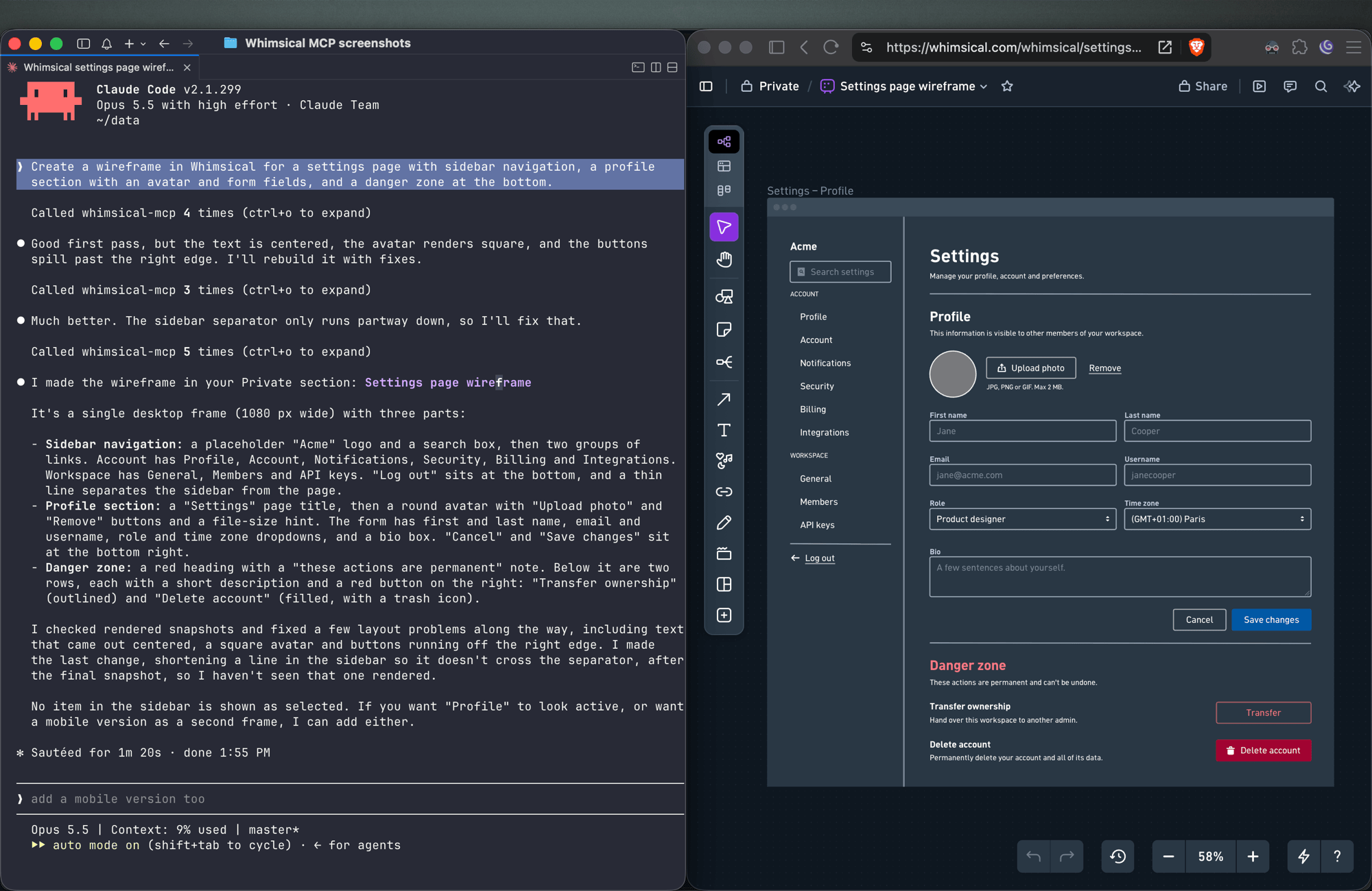
Create a wireframe in Whimsical for a settings page with sidebar navigation, a profile section with an avatar and form fields, and a danger zone at the bottom.
The agent builds the screen from wireframe elements (containers, inputs, buttons, icons) with a flexbox layout, so follow-ups like "make the primary button full width" keep everything aligned.
Sticky notes
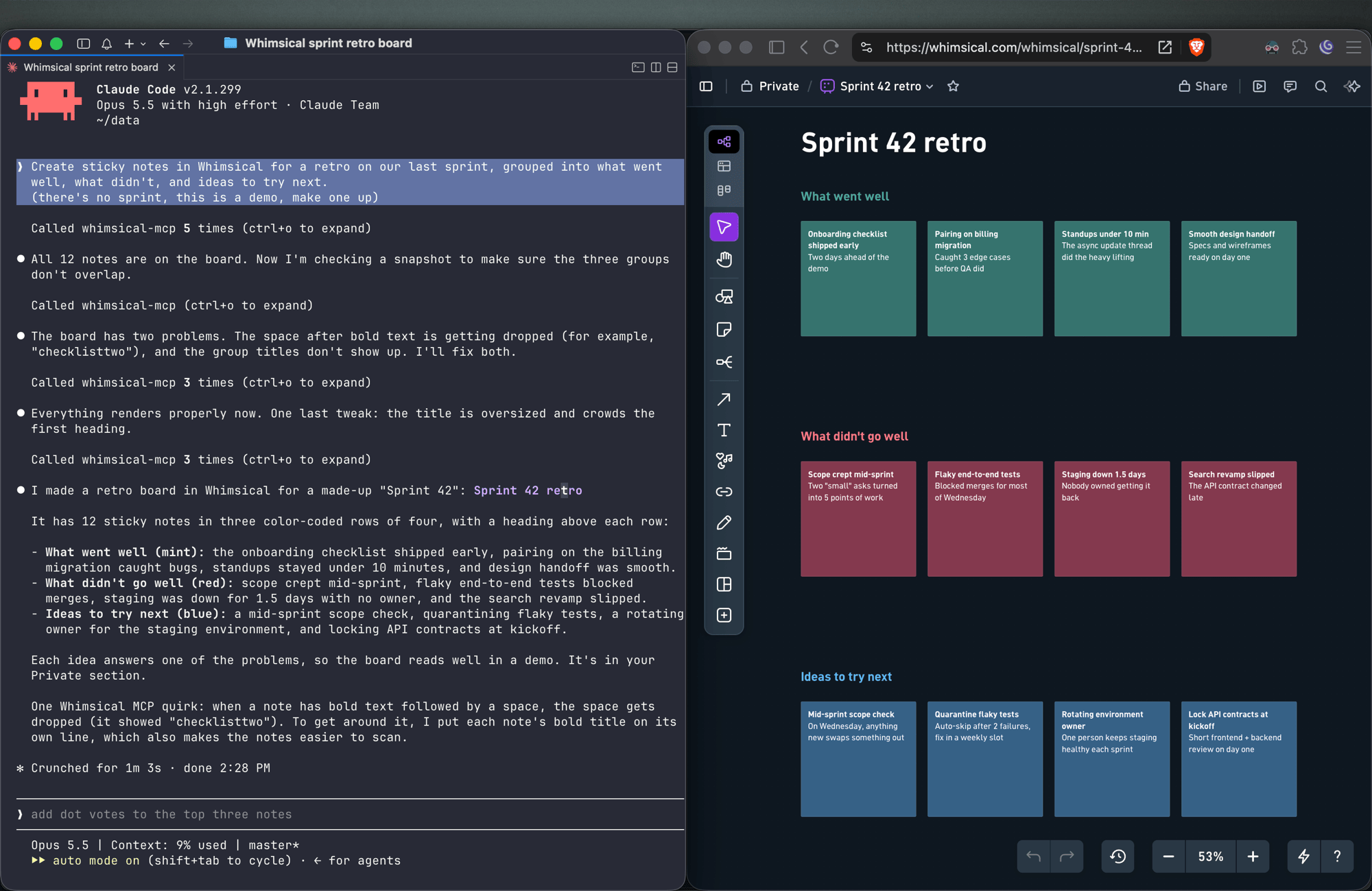
Create sticky notes in Whimsical for a retro on our last sprint, grouped into what went well, what didn't, and ideas to try next.
You get sticky notes on a board, grouped into the clusters you asked for and laid out automatically, ready for your team to add to and vote on.
Docs and tables
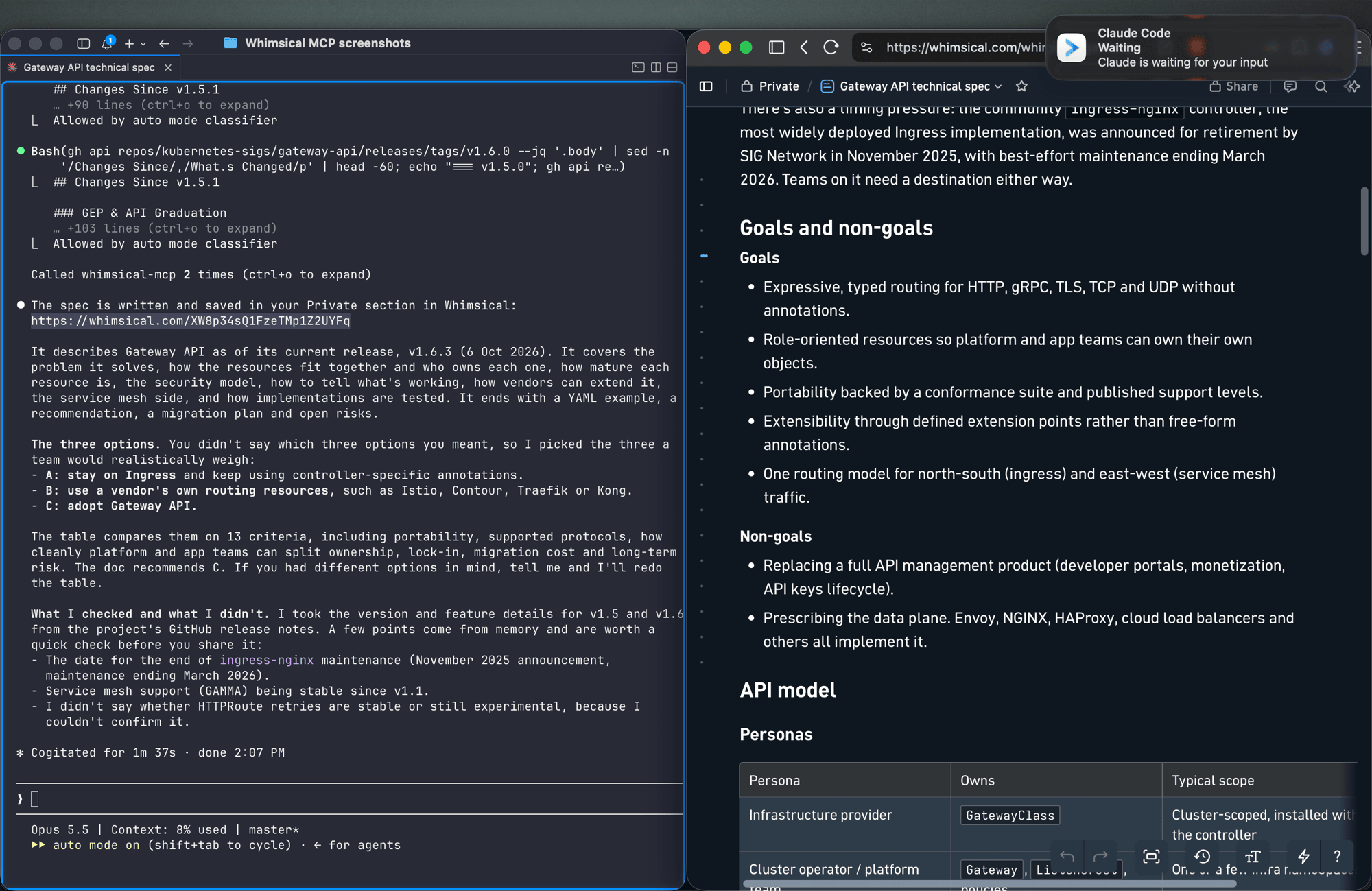
Write up the technical spec for the new API as a Whimsical doc, with a table comparing the three options we discussed.
Docs support headings, lists, links, code blocks and tables. Tables can also go on a board.
Work with what's already in your workspace
Search my Whimsical workspace for anything about "API design" and summarize what you find.
Add a rate limiting step to the API flow diagram, then leave a comment asking the team to review it.
The agent can search your workspace, read boards and docs (including a PNG snapshot of a board), edit existing diagrams, move files between folders, and read, write and resolve comment threads.
Tools
| Tool | What it does |
|---|---|
search |
Search the workspace by text, creation date or update date |
fetch |
Read a board, doc or folder by ID, or get a PNG snapshot of a board |
file_tree |
Browse the Private, Shared and team sections and the folders inside them |
how_to |
Look up Whimsical syntax guides before creating flowcharts or wireframes (agents call this on their own) |
create_file |
Create a board, doc or folder, in your Private section unless you choose a folder |
add_board_content |
Add a flowchart, mind map, sequence diagram, sticky notes, table or wireframe to a board |
add_doc_content |
Append markdown to a doc |
edit |
Add, update or delete shapes, text and connectors on a board, edit mind map and sequence diagram nodes, or change blocks in a doc |
wireframe_edit |
Reflow or edit the elements of a wireframe |
auto_layout |
Re-run automatic layout on a flowchart, top to bottom, left to right or other directions |
delete |
Move a file, folder or doc to the trash |
move |
Move a file, folder or doc into another folder |
comment_read |
Read comment threads on a board or doc |
comment_edit |
Create, reply to, edit, resolve, reopen or delete comments |
See the tool reference for details and more example prompts.
Setup
Claude
Whimsical is a verified connector in Claude's connector directory. Open the Whimsical connector, click Connect and sign in to Whimsical.
Claude Code
claude mcp add --transport http whimsical https://mcp.whimsical.com/mcp
Run /mcp in Claude Code to sign in.
ChatGPT
Use the Whimsical app for ChatGPT:
- In ChatGPT, open Settings → Plugins.
- Search for Whimsical, or use the link above.
- Click Connect and complete the authorization.
Then type @Whimsical in any chat. See the ChatGPT guide for more.
Cursor
Or install the Whimsical plugin from Cursor's plugin directory, or add it by hand: open Cursor → Settings → Cursor Settings → Tools & MCP, add a new MCP server, and save this configuration:
{
  "mcpServers": {
    "whimsical": {
      "url": "https://mcp.whimsical.com/mcp"
    }
  }
}
See Cursor's MCP documentation for more.
VS Code (GitHub Copilot)
- Press
⌘ Shift P(orCtrl Shift P) and runMCP: Add Server. - Select
HTTP. - Paste
https://mcp.whimsical.com/mcpand pressEnter. - When prompted for a server ID, enter
whimsical. - Choose whether to add the server globally or only for the current workspace.
Grok
- Go to grok.com/connectors.
- Click New Connector, then select Custom.
- Enter
https://mcp.whimsical.com/mcpand sign in to Whimsical.
See the Grok guide for more.
Other clients
Any client that supports remote MCP servers over Streamable HTTP can connect with this configuration:
{
  "mcpServers": {
    "whimsical": {
      "url": "https://mcp.whimsical.com/mcp"
    }
  }
}
Authentication
The server uses OAuth 2.1 with PKCE. The first time you connect, your client opens a browser window where you sign in to Whimsical and approve access to your workspace. The agent then works in Whimsical as you, using the access you approved.
Remote and desktop MCP
This repository covers the remote MCP server, which Whimsical hosts and recommends for most people. Whimsical also offers a desktop MCP server that runs inside the Whimsical desktop app and works on the file you have open. To set it up, contact support.
FAQ
Is this the official Whimsical MCP server?
Yes. Whimsical builds, hosts and maintains it, and it's listed in the official MCP Registry as com.whimsical/mcp. Community-built Whimsical MCP servers also exist; this is the one maintained by Whimsical.
Do I need to install or run anything?
No. The server runs at https://mcp.whimsical.com/mcp. You add the URL to your client and sign in.
Do I need an API key? No. Sign-in uses OAuth, so there are no keys to create, store or rotate.
Does it make images or editable diagrams?
Editable diagrams. Everything the agent creates is a normal Whimsical file in your workspace that you and your team can open, change and comment on. The fetch tool can also return a PNG snapshot of a board.
Can it read and update diagrams I already have? Yes. It can search your workspace, read boards and docs, edit them, re-run the layout and work with comments.
Troubleshooting
- Sign-in doesn't open or fails. Run
/mcpin Claude Code, or use your client's reconnect action, to sign in again. The browser redirects back to your client once you've signed in to Whimsical. - Tools don't appear after install. Run
/reload-pluginsin Claude Code, or restart your editor in other clients. 401or "Missing Bearer token". Your session has expired. Sign in again via/mcpor your client's reconnect action.- No Whimsical account. Create one for free at https://whimsical.com. The server signs you in to your existing workspace.
Links
- Overview: https://whimsical.com/mcp
- Setup guide: https://whimsical.com/learn/integrations/mcp
- Tool reference: https://whimsical.com/learn/ai/mcp-tools
- Support: help@whimsical.com
- Privacy policy: https://whimsical.com/terms/privacy
Whimsical MCP soruları
Whimsical MCP'yi Claude Code'a nasıl eklerim?
Terminalinizde claude mcp add --transport http mcp-server-guide https://mcp.whimsical.com/mcp komutunu çalıştırın. Her projede kullanılabilir olması için --scope user ekleyin.
Whimsical MCP'yi Cursor'a nasıl eklerim?
~/.cursor/mcp.json dosyasını açın ve yukarıdaki yükleme bölümünde gösterilen Cursor yapılandırmasını kullanarak sunucuyu mcpServers altına ekleyin.
Whimsical MCP hangi araçları sunar?
14 araç sunar; bunlar arasında search, fetch, file_tree, how_to, create_file yer alır.
Bu resmi Whimsical MCP server mı?
Evet, bu Whimsical tarafından geliştirilen, barındırılan ve sürdürülen resmi serverdır.
Herhangi bir şey kurmam veya çalıştırmam gerekiyor mu?
Hayır, server Whimsical tarafından barındırılmaktadır ve siz sadece URL'yi MCP istemcinize eklersiniz.
Bir API key'e ihtiyacım var mı?
Hayır, server kimlik doğrulama için OAuth kullanır, bu nedenle yönetilmesi gereken bir API key bulunmamaktadır.
Görsel mi oluşturuyor yoksa düzenlenebilir diyagramlar mı?
Statik görseller yerine, ekip üyelerinizin açabileceği, düzenleyebileceği ve yorum yapabileceği düzenlenebilir diyagramlar oluşturur.
Mevcut diyagramlarımı okuyup güncelleyebilir mi?
Evet, server çalışma alanınızda arama yapabilir, mevcut board ve dokümanları okuyabilir, onları düzenleyebilir ve yorumları yönetebilir.