
Vithanco Graph Language metinlerinden IBIS haritaları, kavram haritaları ve nedensel döngü diyagramları gibi yapılandırılmış diyagramlar oluşturur.
Ayrıca bilinen adı Vithanco/VGraph, vgraph, @vithanco/vgraph-mcp
- Yıldızlar
- 0
- Araçlar
- —
- İndirmeler, 30 gün
- —
- En son sürüm
- 1.0.9
- Son commit
- 13 Kas 2026
- Lisans
- Apache-2.0
VGraph MCP nedir?
VGraph bir MCP sunucusudur. Vithanco Graph Language metinlerinden IBIS haritaları, kavram haritaları ve nedensel döngü diyagramları gibi yapılandırılmış diyagramlar oluşturur.
Özet, projenin README dosyasından oluşturuldu
VGraph MCP sunucusu hakkında
vgraph-mcp, metni yapılandırılmış görsel diyagramlara dönüştürmeyi geliştiriciler ve düşünürler için mümkün kılar. Kullanıcılar, Vithanco Graph Language (VGL) kullanarak her düğümün ve kenarın belirli bir anlam taşıdığı tür tanımlı ağ grafikleri oluşturabilirler. Bu, basit bir metin formatı aracılığıyla IBIS haritaları, nedensel döngü diyagramları ve C4 modelleri gibi karmaşık akıl yürütme araçlarının oluşturulmasına olanak tanır.
Kullanıcılar bu sunucuyu npx @vithanco/vgraph-mcp kullanarak yerel olarak çalıştırabilir veya barındırılan bir sürüme bağlanabilirler. Motor, bu tanımları SVG formatında işleyerek diyagramların farklı ortamlarda tutarlı kalmasını sağlar. Etki Haritalama, Karar Ağaçları, Zaman Çizelgesi ve Saldırı-Savunma Ağaçları dahil olmak üzere çok çeşitli yerleşik gösterimleri desteklerken, aynı zamanda özel gösterim tanımlamalarına da izin verir.
Neler yapabilirsiniz
- 1Karar akıl yürütme haritaları oluşturunBelirli bir ürün kararı için soruları, cevapları, avantajları ve dezavantajları görselleştirmek amacıyla bir IBIS haritası oluşturun.
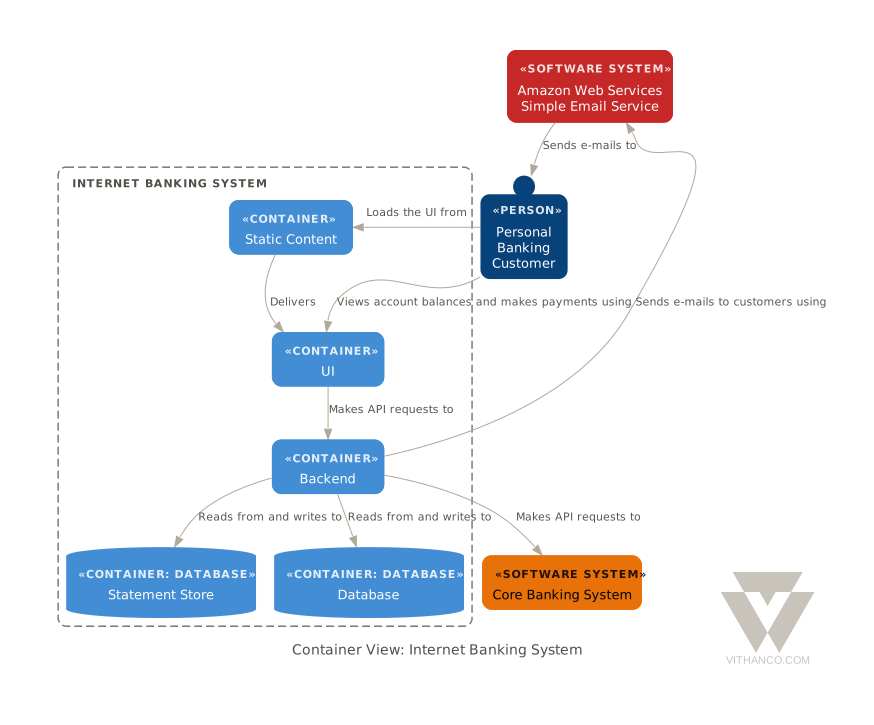
- 2Sistem mimarilerini görselleştirinYazılım mimarisini temsil etmek için metin açıklamalarını C4 diyagramlarına dönüştürün.
- 3Nedensel ilişkileri modelleyinNedensel döngü diyagramlarını kullanarak karmaşık geri bildirim döngülerini haritalandırın.
Projenin README dosyasından alınmıştır. Her kullanım durumu, oradaki bir alıntı ile kontrol edilir.
VGraph MCP nasıl yüklenir
Biçimler 10 Kas 2026 tarihinde doğrulandıVGraph MCP'yi Claude Code içine yükleyin
$ claude mcp add vgraph -- npx -y @vithanco/vgraph-mcpVGraph MCP'yi Cursor içine yükleyin
~/.cursor/mcp.json
{
  "mcpServers": {
    "vgraph": {
      "command": "npx",
      "args": [
        "-y",
        "@vithanco/vgraph-mcp"
      ]
    }
  }
}VGraph MCP'yi VS Code içine yükleyin
.vscode/mcp.json
{
  "servers": {
    "vgraph": {
      "type": "stdio",
      "command": "npx",
      "args": [
        "-y",
        "@vithanco/vgraph-mcp"
      ]
    }
  }
}VGraph MCP'yi Claude Desktop içine yükleyin
claude_desktop_config.json
{
  "mcpServers": {
    "vgraph": {
      "command": "npx",
      "args": [
        "-y",
        "@vithanco/vgraph-mcp"
      ]
    }
  }
}VGraph MCP'yi Codex içine yükleyin
~/.codex/config.toml
[mcp_servers.vgraph]
command = "npx"
args = ["-y", "@vithanco/vgraph-mcp"]
VGraph MCP'yi Gemini CLI içine yükleyin
~/.gemini/settings.json
{
  "mcpServers": {
    "vgraph": {
      "command": "npx",
      "args": [
        "-y",
        "@vithanco/vgraph-mcp"
      ]
    }
  }
}Otomatik kontroller
Çalıştırıldı 14 Kas 2026Tam rapor →Otomatik kontrollerimizden geçti. Bu bir güvenlik denetimi değildir: kodu okuyun ve sunucuya ihtiyaç duyduğu en dar erişimi verin. Kontroller nasıl çalışır

- Kaynak deposu bağlantılı ve erişilebilirvithanco/vgraph is public and reachablegithub.com/vithanco/vgraph ↗Geçti
- Paket bu depoyu kaynak olarak gösteriyor@vithanco/vgraph-mcp names vithanco/vgraph as sourcenpmjs.com/package/@vithanco/vgraph-mcp ↗Geçti
- Derleme kaynağı (Sigstore onayı)No build attestation published for this releaseKontrol edilmedi
- Açık kaynak lisansı (OSI)Apache-2.0spdx.org/licenses/Apache-2.0.html ↗Geçti
- Son bir yıl içinde commit veya sürüm mevcutLast commit or release 2026-11-13github.com/vithanco/vgraph ↗Geçti
- OpenSSF ScorecardKontrol edilmedi
- Paket adı popüler bir pakete yakın değilNo popular package one edit away from @vithanco/vgraph-mcpGeçti
- Pakette ve bağımlılıklarında kritik uyarı yok101 resolved dependencies checked; no critical advisoryosv.dev ↗Geçti
- Modele yönelik gizli talimat yok0 tool descriptions and the README read; no override phrases, credential paths or hidden charactersGeçti
- Yıkıcı araçlar etiketlenmişKontrol edilmedi
- Uzak endpoint MCP el sıkışmasına yanıt veriyorEndpoint did not answer initialize: HTTP 200Bulgu
VGraph
Vithanco stands for Visual Thinking and Communication. It helps you think in a structured way by drawing typed network graphs. In a typed graph every node and every edge has a meaning of its own: in an IBIS map a Question, an Answer, a Pro and a Con are different things, and the notation says how they may be connected. The drawing becomes a way of reasoning, and a way of explaining that reasoning to someone else.
VGraph is the open-source engine behind it. It lays a typed graph out and draws it as SVG. The Vithanco Graph Language (VGL) is only the how: a small text format in which these diagrams are written down, stored and shared. The same Swift code runs natively and, compiled to WebAssembly, in the browser, in Obsidian, in VS Code and behind an MCP server, so a diagram looks the same everywhere.
vgraph decision: IBIS "Should we ship the plugin?" {
  node q1: Question "Should we ship?";
  node a1: Answer "Yes, soon";
  node p1: Pro "Users have asked for it";
  node c1: Con "Docs are still thin";
  edge q1 -> a1;
  edge a1 -> p1;
  edge a1 -> c1;
}
A notation is the vocabulary of a diagram: it fixes the node and edge types and how they look. Every document names one. These ship with VGraph: IBIS, BBS, Impact Mapping, Concept Map, Current Reality Tree, Evaporating Cloud, Future Reality Tree, Prerequisite Tree, Transition Tree, Attack-Defense Tree, Goal Tree, Causal Loop Diagram, Decision Tree, Timeline, C4 and Arithmetic. A document can also declare notations of its own. The VGL guide has the whole language.
Ways to use it
| Web editor | vithanco.com/editor: write VGL, see the diagram, edit it on the canvas |
| Obsidian | obsidian-vithanco: a vgl code block becomes a diagram |
| VS Code | vscode-vithanco |
| MCP server | npx @vithanco/vgraph-mcp runs it locally; https://mcp.vithanco.com/mcp is hosted. Details |
| Command line | vgraph-cli, built from this repository |
| Swift package | the VGraph, VGLanguage and VGraphSVG libraries |
Building
Two tiers, so a parser fix does not send you through a toolchain install:
- Native only.
swift buildandswift testneed nothing but a Swift 6.4 toolchain. - With the wasm build.
just build,just test, the wasm smoke tests and the editor's browser tests also need Node,jq,binaryen,wabt,justand the Embedded Swift SDK that matches.swift-version.
Install the toolchain with swiftly, then
the SDK. One bundle holds both the plain and the -embedded SDK, and its version
must equal .swift-version. The checksum is per release; take it from
swift.org's WebAssembly guide.
V=$(cat .swift-version)
swiftly install "$V" && swiftly use "$V"
swift sdk install "https://download.swift.org/swift-$V-release/wasm-sdk/swift-$V-RELEASE/swift-$V-RELEASE_wasm.artifactbundle.tar.gz" \
    --checksum <checksum for $V from the guide>
just doctor lists what is missing; a missing SDK is reported but does not fail
it.
just build     # compile everything: wasm, command line, MCP server
just test      # build, then the full suite: Swift, wasm smoke tests, editor browser tests
just           # everything else
For most changes swift test is the quick loop. The Obsidian and VS Code
plugins are separate repositories; just plugins-setup clones them next to this
one, and the build and test recipes use them when they are there.
How it is organised
VGraph is built as hexagons: a pure domain at the centre, ports that name each conversation with the outside, and adapters at the edge. The parser, the SVG renderer and the Graphviz layout are separate targets that know only the core. Why it is shaped this way and where a change goes are written down, as are the decisions behind the design (ADRs) and the visual rules (design guide).
Contributing
Pull requests are welcome, and so are issues. Start with CONTRIBUTING.md.
Licence
Apache-2.0, see LICENSE. Third-party works, among them Graphviz and the DM Sans typeface, are listed in NOTICE. The Vithanco name and logo are not covered by the licence: the artwork is all rights reserved, and a fork should use a name and a logo of its own. See graphics/README.md for what is allowed.
VGraph MCP soruları
VGraph MCP'yi Claude Code'a nasıl eklerim?
Terminalinizde claude mcp add vgraph -- npx -y @vithanco/vgraph-mcp komutunu çalıştırın. Her projede kullanılabilir olması için --scope user ekleyin.
VGraph MCP'yi Cursor'a nasıl eklerim?
~/.cursor/mcp.json dosyasını açın ve yukarıdaki yükleme bölümünde gösterilen Cursor yapılandırmasını kullanarak sunucuyu mcpServers altına ekleyin.
VGraph ne tür diyagramlar oluşturabilir?
IBIS, Kavram Haritaları, Nedensel Döngü Diyagramları, Zaman Çizelgeleri, C4 ve Karar Ağaçları dahil olmak üzere çok çeşitli gösterimleri destekler.
VGraph dili nasıl yapılandırılmıştır?
Vithanco Graph Language (VGL), diyagramları yazmak, depolamak ve paylaşmak için kullanılan küçük bir metin formatıdır.
VGraph'ı yerel olarak çalıştırabilir miyim?
Evet, npx aracılığıyla veya bir komut satırı aracı olarak yerel olarak çalıştırabilirsiniz.