
Kompl MCP sunucusu
Commit 14 Kas 2026Kaydedilen bağlantıları, dosyaları ve thread'leri, AI agent'ların MCP üzerinden okuyup araştırma yapabileceği, kendi kendini güncelleyen ve atıflı bir wiki haline getirir.
Ayrıca bilinen adı tuirk/Kompl
- Yıldızlar
- 85
- Araçlar
- —
- İndirmeler, 30 gün
- —
- En son sürüm
- —
- Son commit
- 14 Kas 2026
- Lisans
- Apache-2.0
Kompl MCP nedir?
Kompl bir MCP sunucusudur. Kaydedilen bağlantıları, dosyaları ve thread'leri, AI agent'ların MCP üzerinden okuyup araştırma yapabileceği, kendi kendini güncelleyen ve atıflı bir wiki haline getirir.
Özet, projenin README dosyasından oluşturuldu
Kompl MCP sunucusu hakkında
Bir bağlantıyı, PDF'i, thread'i, videoyu veya yer imi dışa aktarımını kaydedip bunlardan bağlantılı ve atıflı bir wiki sayfası elde etmek, Kompl'ın manuel olarak yönetemeyeceği kadar çok materyal toplayan kişiler için sunduğu çözümdür. Kendi sunucunuzda barındırılabilir (self-hosted): bir Docker stack ve bir CLI'dan oluşur; kendi DeepSeek veya Gemini anahtarınız ve URL'leri kazımak için bir Firecrawl anahtarı ile çalışır; video meta verileri için isteğe bağlı YouTube Data API v3 desteği sunar. Hesap veya telemetri yoktur.
Derleme işlemi, soru sorulduğu anda değil, kaydetme sırasında gerçekleşir. Yerel NLP önce varlıkları ve anahtar kelimeleri çıkarır, ardından tek bir LLM çağrısı iddiaları ve çelişkileri çeker, varlık çözümleme (entity resolution) takma adları birleştirir ve model, numaralandırılmış atıflarla etkilenen her sayfayı taslak haline getirir veya yeniden yazar. Birbiriyle uyuşmayan sayfalar her iki tarafı da kaydeder ve bir iddiayı değiştiren yeni kaynaklar, onaylamanız veya reddetmeniz için işaretlenir. Bir konu haritası, her bağlantıyı belirten cümlelerle sayfaların nasıl bağlandığını gösterir.
Kompl'ın kendine ait bir sohbet arayüzü yoktur. Claude Code, Codex, Claude Desktop, Cursor, Gemini CLI, VS Code, Pi veya Hermes Agent'ı; search_wiki, research_topic, read_page, read_source, list_sources, recent_changes ve wiki_status gibi salt okunur araçları sunan yerel stdio server'ına bağlarsınız. add_source varsayılan olarak kapalıdır ve günlük 20 kullanım ile sınırlandırılmıştır. Örnek tek kiracılıdır ve çok kullanıcılı kimlik doğrulaması yoktur, bu nedenle internete bir proxy olmadan açılmamalıdır.
Neler yapabilirsiniz
- 1Bir agent'ı bir konu hakkında bilgilendirinAI istemcinizden bir konu hakkında tek bir özet isteyin; böylece tek bir çağrıda ana sayfaları, atıflı satırları, anlaşmazlıkları ve eksiklikleri geri döndürsün.
- 2Bir cümlenin kaynağını kontrol edinAgent'ın belirli bir numaralı atıfın arkasındaki orijinal metni çekmesini sağlayın, böylece kelimeleri kendiniz doğrulayabilirsiniz.
- 3Bir derlemenin neleri değiştirdiğini görünAgent'a belirli bir tarihten bu yana veya tek bir derleme içinde hangi sayfaların ve bölümlerin değiştiğini sorun.
- 4Wiki içinde anlam ile arama yapınAgent'a bulanık (fuzzy) bir açıklama verin ve tam başlıklar yerine anahtar kelimeler ve semantik ile eşleşen sayfaları bulmasını sağlayın.
- 5Agent'ların yeni kaynaklar eklemesine izin verinKaynak eklemeyi etkinleştirin; böylece agent beş bağlantıya veya bir nota kadar kayıt yapabilir ve günlük sınırınızı kullanarak derleme işlemini başlatabilir.
Projenin README dosyasından alınmıştır. Her kullanım durumu, oradaki bir alıntı ile kontrol edilir.
Yapılandırma
KOMPL_URL
| Ad | Açıklama | Sunucu |
|---|---|---|
| KOMPL_URL | — |
Otomatik kontroller
Çalıştırıldı 13 Kas 2026Tam rapor →Henüz doğrulanmadı. Bir sunucunun 80 puana, ciddi bir bulgu olmamasına ve kontrol edebilmemiz için yeterli veriye ihtiyacı vardır. Kontroller nasıl çalışır · Daha fazla puan için nelerin düzeltileceği

- Kaynak deposu bağlantılı ve erişilebilirtuirk/kompl is public and reachablegithub.com/tuirk/kompl ↗Geçti
- Paket, bu depoyu kaynağı olarak gösteriyorKontrol edilmedi
- Derleme kökeni (Sigstore onayı)Kontrol edilmedi
- Açık kaynak lisansı (OSI)Apache-2.0spdx.org/licenses/Apache-2.0.html ↗Geçti
- Son bir yıl içinde commit veya sürüm mevcutLast commit or release 2026-11-04github.com/tuirk/kompl ↗Geçti
- OpenSSF ScorecardKontrol edilmedi
- Paket adı popüler bir pakete yakın değilKontrol edilmedi
- Pakette veya bağımlılıklarında kritik uyarı yokKontrol edilmedi
- Modele yönelik gizli talimat yok0 tool descriptions and the README read; no override phrases, credential paths or hidden charactersGeçti
- Yıkıcı araçlar etiketlenmişKontrol edilmedi
- Uzak uç nokta MCP el sıkışmasına yanıt veriyorKontrol edilmedi
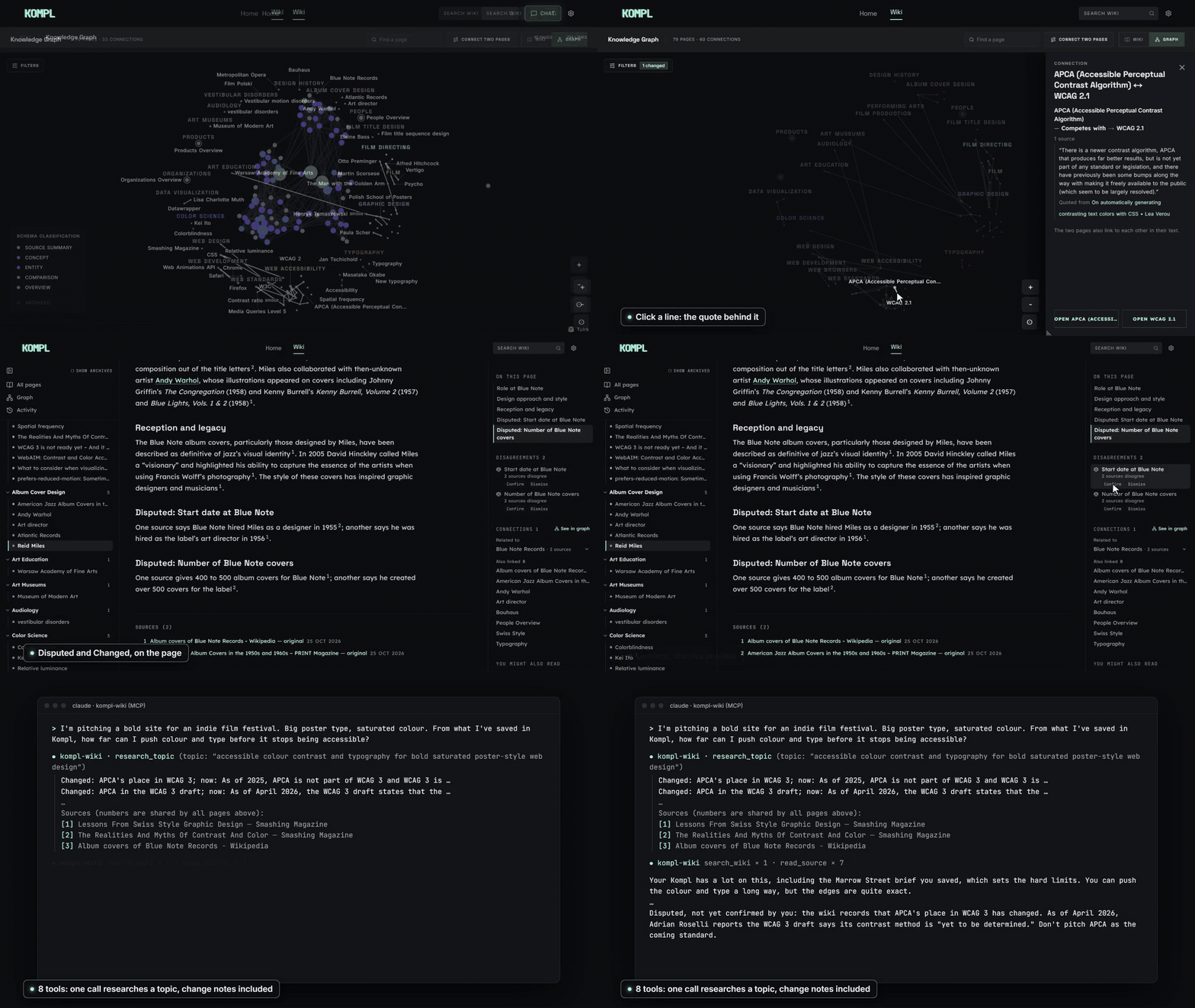
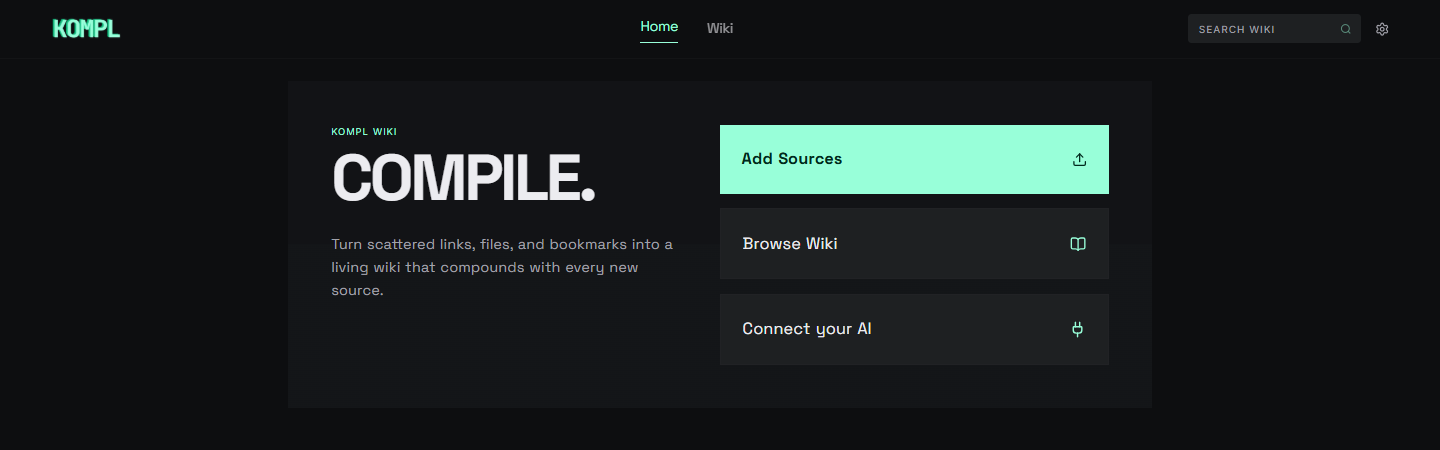
Save anything (a link, a PDF, a thread, a YouTube video, a bookmark export) and Kompl reads it as it arrives, pulls out the people, ideas and arguments inside, and writes them into wiki pages that link to each other. Save more on the same topic and the existing pages update. Save a tenth and Kompl already sees the pattern across all ten without you having to ask.
- Compiles at save time, not at question time. Source #50 doesn't just become page #51: it rewrites the pages it touches, so the wiki never needs upkeep.
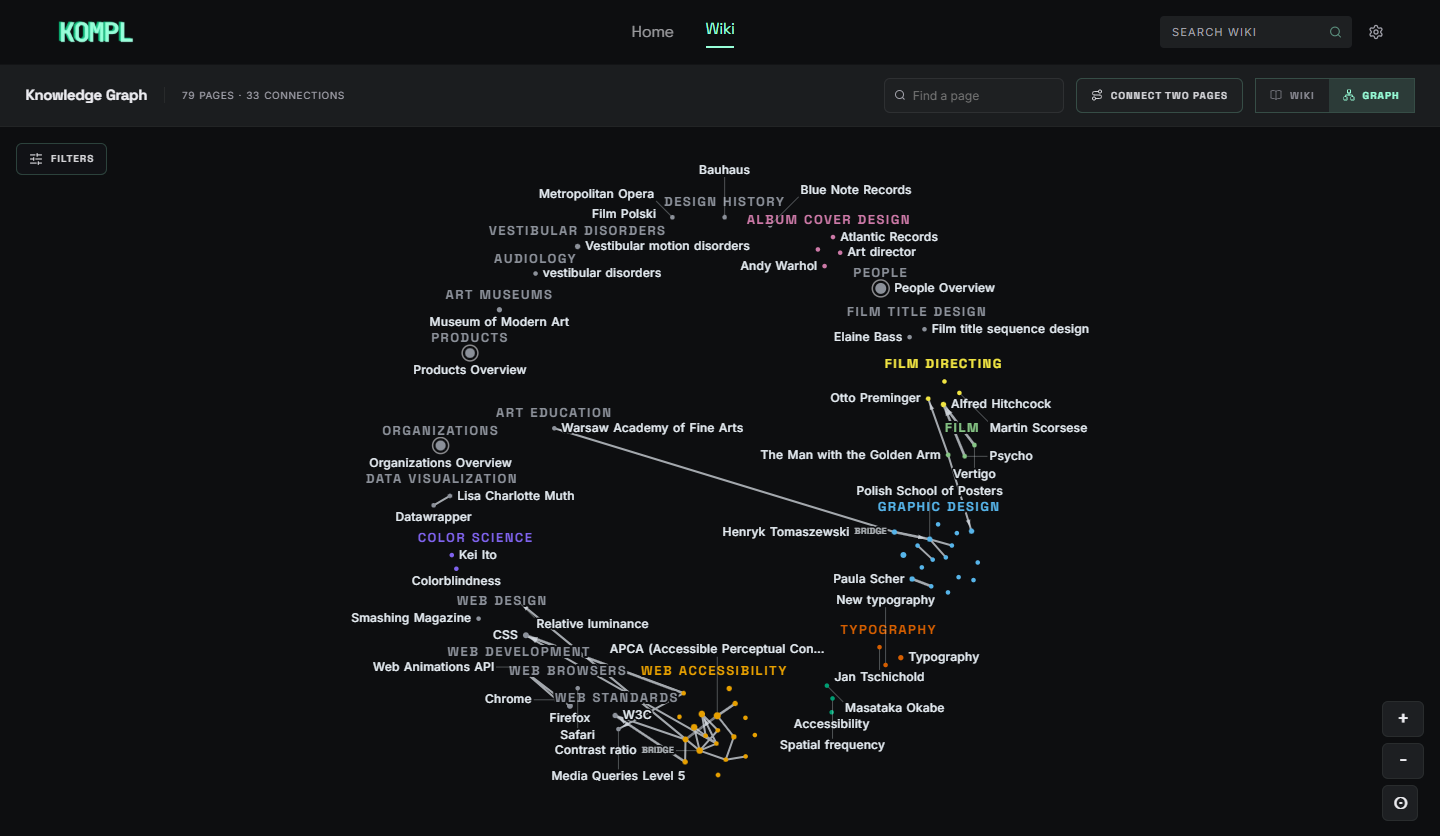
- Grows its own structure. Entities and concepts that keep showing up get their own pages, and a topic map shows how they connect, each connection with the sentence that states it.
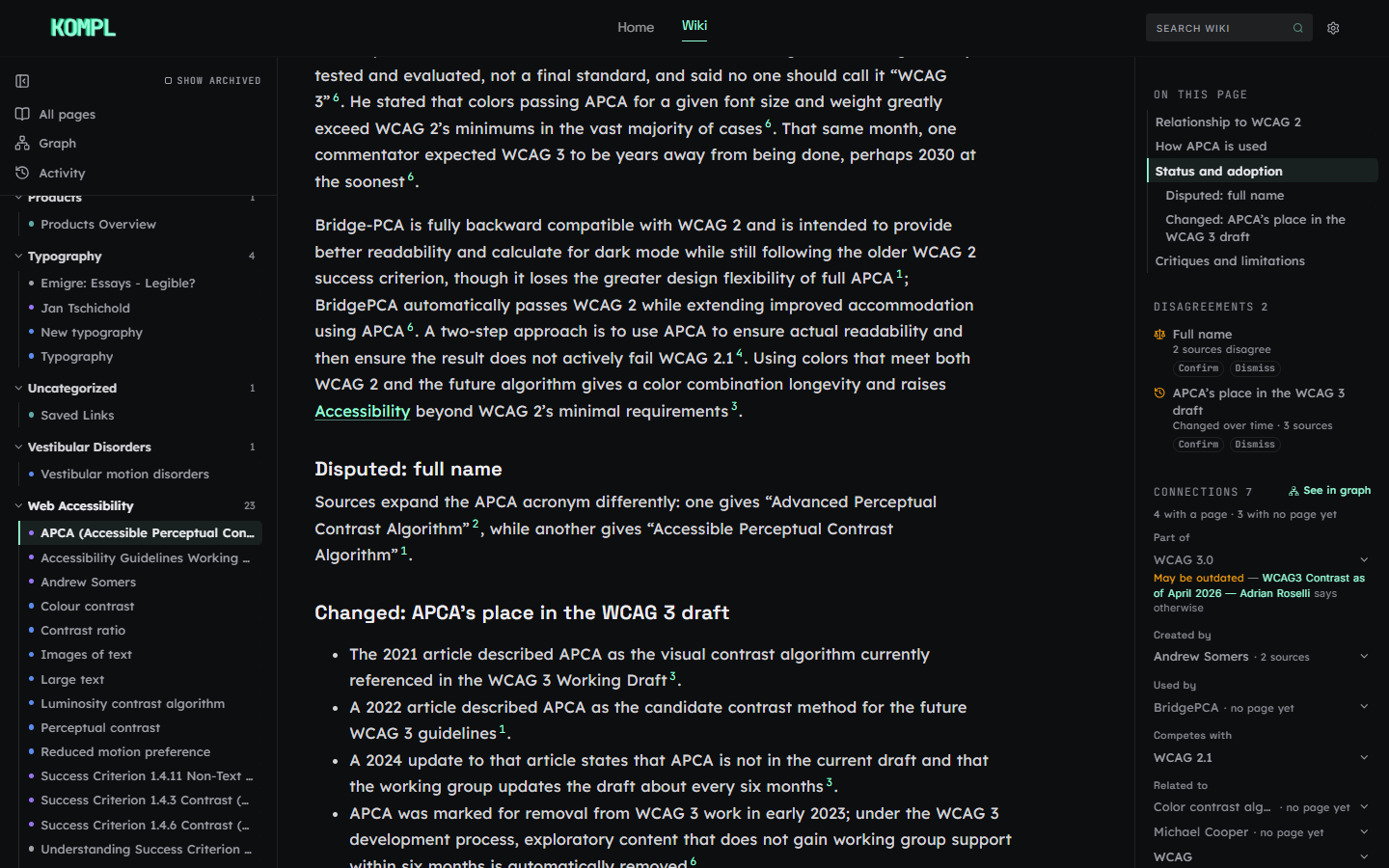
- Says when sources disagree. A page records a disputed claim with both sides cited, and a claim that a newer source changed with its dates. You confirm or dismiss each finding.
- Shows its sources. Claims carry numbered citations that link to the sources each page was built from, so you can check any sentence.
- Answers through the agent you already use. Claude Code, Claude Desktop, Cursor or any MCP client reads the compiled pages through Kompl's MCP server.
- Runs on your machine, with your keys. One Docker stack, a CLI, and your own DeepSeek or Gemini key. No accounts, no telemetry.
▶ Watch the 1-minute demo: Kompl, an open source LLM-wiki your AI agent can read
| Dashboard | Compiled wiki page |
|---|---|
 |
 |
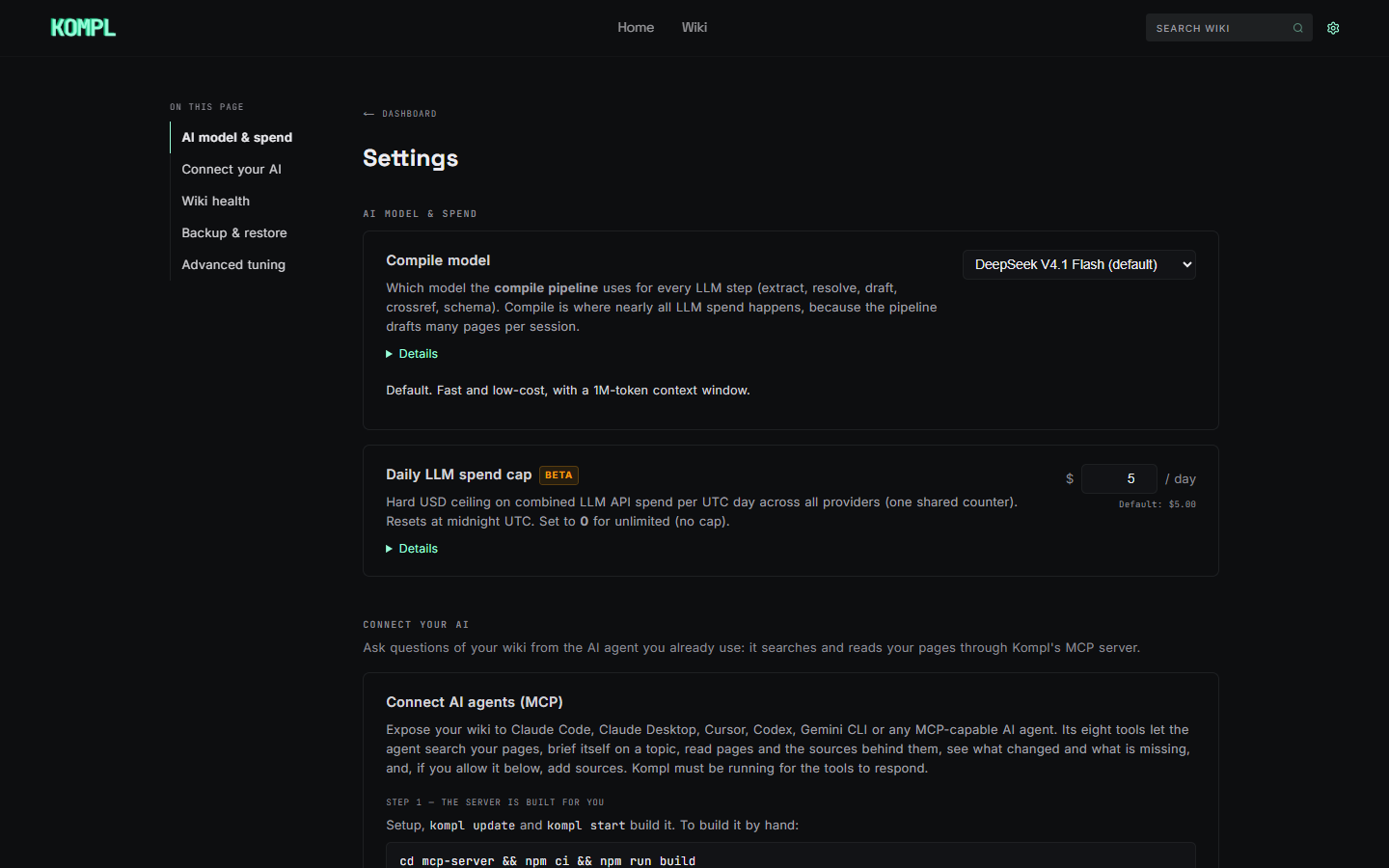
| Topic map | Settings: model, spend cap and MCP |
 |
 |
How it works
flowchart LR
    A["Save a source<br/>URL · file · thread · video · bookmarks"] --> B["Local NLP<br/>entities · keyphrases · TF-IDF"]
    B --> C["One LLM call<br/>extracts entities, claims, contradictions"]
    C --> D["Entity resolution<br/>alias → fuzzy → embeddings → LLM"]
    D --> E["Page plan<br/>ranked by TF-IDF, confirmed by triage"]
    E --> F["LLM drafts and rewrites pages<br/>with citations"]
    F --> X["Claim check<br/>disputed · changed"]
    X --> G[("Your wiki")]
    G --> H["Your AI agent<br/>via MCP"]
Local work comes first on purpose: an LLM shouldn't be paid to do a librarian's job. The model's real job is writing, drafting or rewriting each affected page with the new source woven in. Details are in Under the hood.
Quick start
You need Docker (Desktop on Windows/macOS, Engine + Compose v2 on Linux) running, Node.js 24+, about 5 GB disk and 4 GB free RAM, and the API keys below.
macOS / Linux / WSL / Git Bash
curl -fsSL https://raw.githubusercontent.com/tuirk/Kompl/main/install.sh | bash
Windows (PowerShell)
irm https://raw.githubusercontent.com/tuirk/Kompl/main/install.ps1 | iex
The installer checks Docker, Node 24, disk and RAM, clones the repo and hands off
to setup.js, which asks for your keys, writes .env (gitignored, along with your
detected timezone as KOMPL_TIMEZONE), installs the kompl CLI and starts the
stack. If anything is missing it stops with a copy-paste fix. Prefer to read the
script first? Download it with curl -fsSLO (or iwr -OutFile), then run
bash install.sh (or .\install.ps1).
git clone https://github.com/tuirk/Kompl.git kompl
cd kompl
node setup.js
The first start takes 5–10 minutes while Docker builds the images (~2 GB) and downloads the local embedding model. Later starts take about 15 seconds.
kompl status     # wait until the app reports healthy
kompl open       # or visit http://localhost:3000
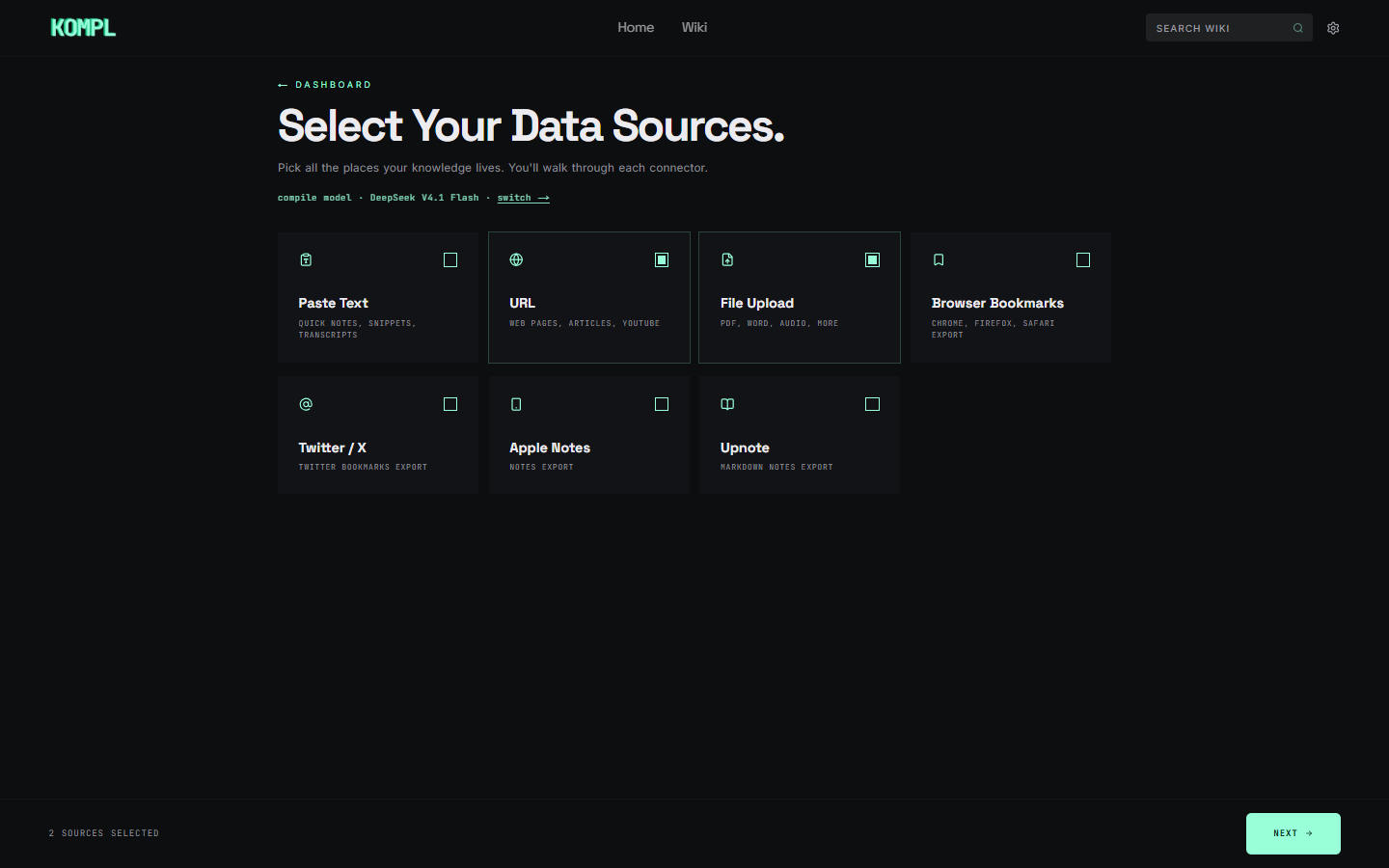
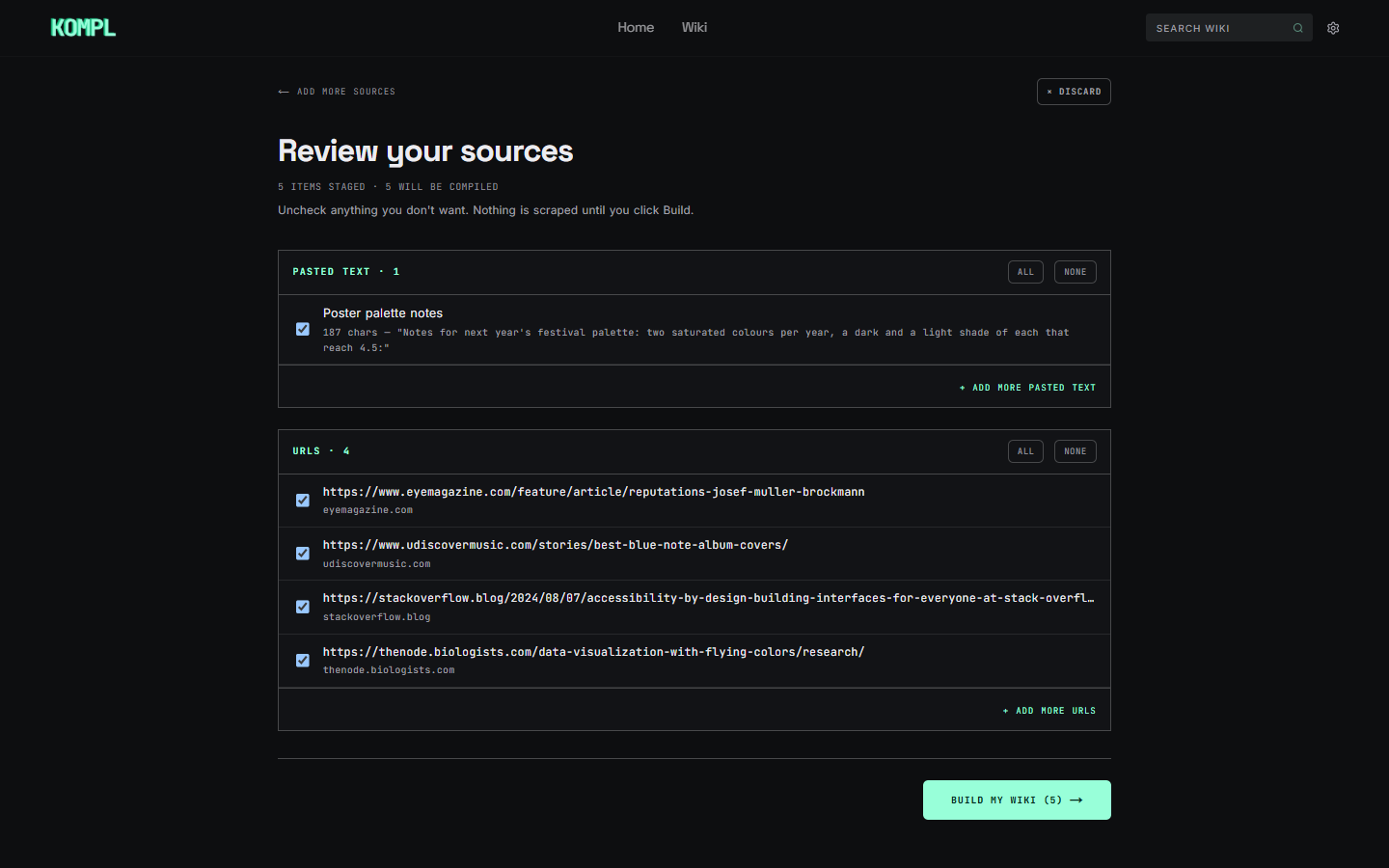
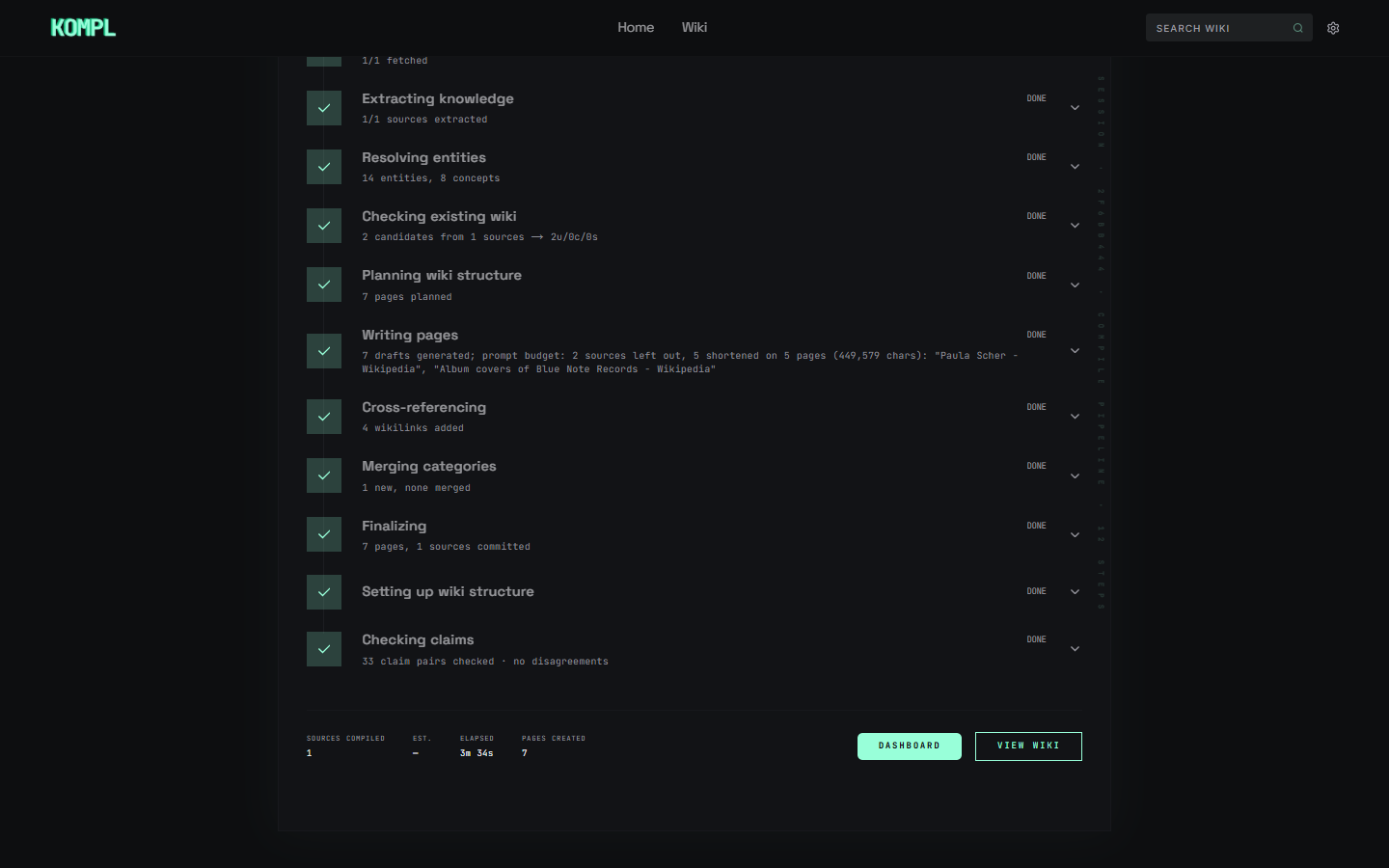
The onboarding wizard walks you through your first sources: paste a URL, drop a PDF, or import a bookmark or Twitter export.
| 1. Choose your sources | 2. Review before compiling | 3. Watch it compile |
|---|---|---|
 |
 |
 |
API keys
Firecrawl and at least one compile provider (DeepSeek or Gemini) are required; YouTube is optional. Pick or change the compile model any time in Settings → AI model & spend.
| Key | Needed for | Get it | Notes |
|---|---|---|---|
| Firecrawl | URL scraping. Required. | firecrawl.dev | Free tier (500 scrapes/month) covers normal personal use. |
| DeepSeek | Compilation (one of two*) | api-docs.deepseek.com | Default for new installs: DeepSeek V4.1 Flash. V4 Pro is also selectable and was validated on long academic sources (~200K characters). Pay-as-you-go. |
| Gemini | Compilation (one of two*) | aistudio.google.com/apikey | Gemini 3.8 Flash, 3.5 Flash-Lite and 3.1 Pro (preview). Gemini 2.5 still works, but Google only serves it to API projects that used it before. Paid Tier 1 is strongly recommended: free-tier rate limits throttle a normal ingest. |
| YouTube Data API v3 | YouTube metadata. Optional. | console.cloud.google.com | 10,000 units/day free (1 unit per video). Captions use youtube-transcript-api (no key). Without this key, YouTube URLs land on Saved Links (youtube_metadata_unavailable) instead of being compiled. Restrict the key to YouTube Data API v3. |
*At least one of DeepSeek or Gemini. If you only set a Gemini key, choose a Gemini model in Settings before your first compile.
Installs from before DeepSeek became the default keep the model they were already using; nothing switches providers on update.
Ask your wiki from your AI (MCP)
Kompl has no built-in chat. Your agent asks the questions and Kompl serves the compiled pages, with provenance back to the originals instead of raw chunks. Settings → Connect your AI has the same steps.
Build. Setup and kompl update build the MCP server for you, and
kompl start rebuilds it when its build is older than its source. To build it
by hand: cd mcp-server && npm ci && npm run build. Restart your agent after
an update to load the new tools.
Connect your agent. The server is a local process that your agent starts:
node <KOMPL_INSTALL_PATH>/mcp-server/dist/index.js, with <KOMPL_INSTALL_PATH>
replaced by the absolute path to your Kompl folder. It talks to Kompl at
KOMPL_URL (default http://localhost:3000).
| Agent | Setup |
|---|---|
| Claude Code | claude mcp add --scope user kompl-wiki -- node <KOMPL_INSTALL_PATH>/mcp-server/dist/index.js |
| Codex (CLI, IDE extension, ChatGPT desktop app) | codex mcp add kompl-wiki -- node <KOMPL_INSTALL_PATH>/mcp-server/dist/index.js |
| Claude Desktop, Cursor, Gemini CLI | the block below in claude_desktop_config.json, ~/.cursor/mcp.json or ~/.gemini/settings.json |
| Pi | the block below in ~/.pi/agent/mcp.json, read by the pi-mcp-adapter extension |
| VS Code | the block below in .vscode/mcp.json, with "servers" in place of "mcpServers" |
| Hermes Agent | under mcp_servers: in ~/.hermes/config.yaml: kompl-wiki: { command: node, args: ["<KOMPL_INSTALL_PATH>/mcp-server/dist/index.js"] } |
{
  "mcpServers": {
    "kompl-wiki": {
      "type": "stdio",
      "command": "node",
      "args": ["<KOMPL_INSTALL_PATH>/mcp-server/dist/index.js"],
      "env": { "KOMPL_URL": "http://localhost:3000" }
    }
  }
}
Pi and Hermes run tools without asking you first. If you turn on Let AI agents add sources, they can add sources and start compiles (which count toward your daily spend cap) on their own. Leave it off unless you're comfortable with that.
Tools. All but add_source only read. Kompl must be running
(kompl start) for them to answer.
| Tool | What it does |
|---|---|
search_wiki |
Finds pages by keywords and meaning; without a query, lists pages newest first |
research_topic |
One-call brief on a topic: key pages, their cited lines, how they connect, one source list numbered across them, disputes, gaps |
read_page |
A page with [n] citations, its numbered sources (address and date), how it connects to other pages (each relation with its source), and the disagreements recorded on it |
read_source |
The original text behind a source or a page's citation [n], or just the passages that match a query |
list_sources |
What you've added, searchable by title or address |
recent_changes |
What changed since a date, in one compile, or on one page (with the sections that changed) |
wiki_status |
Size, a running compile, what waits for you, gaps worth filling, topic clusters and bridge pages |
add_source |
Saves links (up to 5 at a time) or a note and compiles them. Off until you turn it on in Settings → Connect your AI; at most 20 a day |
Not using MCP? The same data is on plain HTTP: /api/pages/search?mode=hybrid,
/api/wiki/research, /api/wiki/{page_id}/data, /api/sources,
/api/sources/{id}/content, /api/wiki/changes, /api/wiki/status and
/api/wiki/index.
⚠ Single-tenant. There is no multi-user auth. Don't expose your instance to the internet without putting your own auth in front of it. Kompl answers only to
localhost, IP addresses and its own service names (app,nlp-service,n8n), and refuses any change a page on another site asks for. If your proxy serves Kompl under its own host name, or an agent in a container reaches it ashost.docker.internal, list that name inKOMPL_ALLOWED_HOSTSin.env, or every request to it gets403 unknown_host.
Everyday use
| Command | What it does |
|---|---|
kompl start |
Start Kompl (also saves a local backup if the last one is more than 36 hours old) |
kompl stop / kompl restart |
Stop, or stop and start |
kompl open |
Open the app in your browser |
kompl status |
Health check: app, database, NLP service, vector index |
kompl logs |
Stream service logs |
kompl update |
Pull the latest source, rebuild images and restart (~5–10 min) |
kompl backup |
Save a full backup to ~/.kompl/backups/kompl-backup.kompl.zip |
kompl init |
Re-run the first-time setup wizard (rarely needed) |
If something looks stuck, start with kompl status and kompl logs. The usual
first-run causes are Docker not running, port 3000 already in use, or the first
image build still downloading.
Updating
kompl backup     # optional, recommended before major upgrades
kompl update
What changed in each release: CHANGELOG.md.
kompl update pulls the source, refreshes the CLI, pulls registry images,
rebuilds app and nlp-service and waits for /api/health. Your wiki is safe
on a normal update: pages live on the Docker volume kompl-data, which
rebuilds don't touch. kompl start and kompl restart only restart existing
images; they don't rebuild after a git pull, so new UI won't appear until you
run kompl update.
cd <projectDir>    # path in ~/.kompl/config.json
git pull --ff-only
cd cli && npm install && npm link    # npm install also builds the CLI
cd ..
docker compose pull
docker compose up --build -d
⚠ Never run
docker compose down -vunless you mean to delete everything:-vremoves the volumes.bash scripts/integration-test.shis destructive too.
Backup and restore
Settings → Backup & restore → Kompl Backup downloads a .kompl.zip with your
entire wiki: sources, compiled pages, provenance, extractions and settings. API
keys and third-party secrets are excluded, and restoring needs no LLM calls.
To restore on a fresh instance, run setup, skip onboarding, then upload the
.kompl.zip under Settings → Backup & restore → Import wiki. Pages are
browsable and searchable immediately; the search index rebuilds in the
background. Backups from older Kompl versions import too.
kompl start also saves a local backup to ~/.kompl/backups/kompl-backup.kompl.zip
at most once every 36 hours.
kompl backup                                        # save to ~/.kompl/backups/ (overwrites)
kompl backup --output ~/Desktop/my-wiki.kompl.zip   # save to a custom path
kompl backup --schedule                             # weekly backup, Monday 11:30
--schedule is idempotent. Windows registers a Task Scheduler entry (needs
Admin; runs at next login if the machine was off). Linux and macOS add a
crontab entry (30 11 * * 1 kompl backup); cron does not catch up if the machine
was off. Tested on Windows and Linux only — please
open an issue if you hit anything on
macOS.
Your data
Your wiki lives in Docker volumes on your machine. Outbound calls fall into three groups.
Calls you trigger, which send content to a third party:
- DeepSeek (
api.deepseek.com) or Gemini (generativelanguage.googleapis.com): compilation, whichever provider your compile model uses. Your source text is sent to that provider. - Firecrawl (
api.firecrawl.dev): URL scraping fallback. The URL you pasted is sent to Firecrawl. - GitHub public API (
api.github.com): README and metadata when you paste a GitHub repo URL. - YouTube (
youtube.com,youtube.googleapis.com): captions throughyoutube-transcript-api, then metadata through the YouTube Data API. - Link previews: pasted URLs are fetched once with
User-Agent: KomplBot/1.0for their title and description.
Once, on first use: HuggingFace Hub (huggingface.co), a ~90 MB download of
the all-MiniLM-L6-v2 embedding model on the first compile.
Build time only: image builds pull from PyPI, npm, Docker Hub and apt mirrors.
Kompl sends no analytics, error reports or version pings. The bundled n8n
container's telemetry, version checks, templates and personalization are disabled
in docker-compose.yml.
Under the hood
Three containers: a Next.js app (UI, API and the only process that writes the SQLite database), an NLP service (FastAPI with spaCy, YAKE/RAKE/KeyBERT/TextRank, TF-IDF, local sentence-transformer embeddings and Chroma, plus the LLM calls), and n8n for orchestration. A source goes through these steps:
- Local NLP first. spaCy handles named entities, and a router picks keyphrase methods based on how long and how entity-dense the text is, with TF–IDF overlap against your existing pages once there is a wiki to compare against. These outputs go into the prompt as context, narrowing what the model has to work out.
- One LLM call extracts the typed entities, concepts, claims, relationships, contradictions and summary for that source.
- Entity resolution runs as a cascade: alias and exact-title lookup, then name rules (spellings, plurals, abbreviations), then local embeddings, including each name's closest names and pages by meaning, with an LLM check reserved for the doubtful pairs. Two names become one page only when a rule or that check says so.
- Page targeting is ranked, not generated. TF–IDF ranks which pages a source should touch and a small triage call confirms them. The page plan (source summaries, entity, concept and comparison pages) stays deterministic.
- The LLM's real job is writing: drafting or rewriting each affected page with the new source's contribution and citation woven in. Sources are cited with short labels that Kompl stores as references to the source records, and wikilinks are injected by deterministic regex afterwards.
- Labels are merged once per compile: one LLM call folds near-duplicate categories into one.
- A claim check compares sources: likely claim pairs from different sources are judged by the LLM, and source dates tell a claim that changed over time from a live dispute.
- Commits go through an outbox. A source is either fully written or left for the reconciler at boot. The last two versions of every page are kept, so you can see what changed and restore one.
Upkeep. Settings → Wiki health runs checks on request, updates pages written under older rules, and runs Repair wiki: a backup first, the plan and cost shown, then all or none (it re-checks names merged before, rebuilds connections and tidies links and labels). A compile's progress page offers Retry failed and Redo from the plan, writing or saving step, with a preview and cost.
A daily spend cap (Settings → AI model & spend) stops LLM calls for the rest of the UTC day once the estimated spend reaches your limit.
Known limitations
- Single-tenant only: no user accounts or access control.
- Dense, long sources on Gemini 2.5: structured-output truncation on inputs
above ~50K characters (often academic PDFs and surveys) causes
extract_llm_failed. Switch to DeepSeek V4 Pro for that material; it handled up to ~200K characters cleanly in testing. Kompl does not auto-chunk long sources. Tracked in issue #7. - Connectors: URLs (including YouTube transcripts and GitHub READMEs), file uploads (PDF, DOCX, PPTX, XLSX, TXT, MD, HTML), browser bookmarks, Twitter JSON export, Upnote and Apple Notes.
- Desktop browser only. There is no mobile app, and the web UI isn't built for small screens.
- Two names for one thing can stay two pages when their descriptions don't read alike (a rename, a translation, a nickname). Merging is careful on purpose: a wrong merge is worse than a duplicate.
Security
Kompl is built to run on a personal computer behind loopback or a LAN, and its security posture is calibrated for that.
Known security debt:
- Markdown HTML output is not sanitized yet, so Firecrawl-scraped content can carry XSS payloads. Even on a single-user install an ingested bookmark can deliver one; the fix is DOMPurify in the render pipeline.
CodeQL alerts. Some py/path-injection and js/path-injection alerts re-fire
on every push because CodeQL's taint tracker doesn't follow cross-function
sanitizers. They are dismissed one by one (rather than silenced in config) so any
genuinely new sink surfaces for review. Reasoning per alert:
docs/security/codeql-false-positives.md.
Reporting an issue: please open a GitHub Security Advisory rather than a public issue.
License
Kompl's source is Apache-2.0 (LICENSE): use, modify, fork and redistribute it freely under those terms.
One caveat about the bundled n8n container. Kompl runs n8nio/n8n unmodified
as a runtime dependency for workflow orchestration. n8n is licensed under the
Sustainable Use License, which is
not OSI-approved. In practice:
- Self-hosting Kompl for personal or internal use is fully fine.
- Forking and redistributing Kompl source is fine (Apache-2.0 covers Kompl; n8n is a runtime dependency users pull themselves).
- Offering Kompl as a hosted service to third parties is the line: n8n's SUL restricts hosting n8n as a service for others. If your offering bundles n8n, contact n8n first.
See NOTICE for full attribution.
Kompl MCP soruları
Kompl, kaydettiğim kaynaklarla ne yapar?
Her kaynaktan varlıkları (entities) ve iddiaları (claims) çıkarır ve bunları birbirine bağlı wiki sayfalarına yazar; siz daha fazla kaynak kaydettikçe etkilenen sayfaları yeniden düzenler.
AI agent'ım Kompl wiki'sine sorgu gönderebilir mi?
Evet, Kompl; Claude Code, Claude Desktop, Cursor ve diğer MCP istemcilerinin başlatıp sorgulayabileceği yerel bir MCP server içerir.
Kompl'ın çalışması için API anahtarlarına ihtiyacı var mı?
Evet, URL kazıma (scraping) için bir Firecrawl anahtarına ve en az bir derleme sağlayıcısı anahtarına (DeepSeek veya Gemini) ihtiyaç duyar; YouTube anahtarı isteğe bağlıdır.
Kompl hangi MCP araçlarını sunar?
Araçlar arasında search_wiki, research_topic, read_page, read_source, list_sources, recent_changes, wiki_status ve add_source bulunur. add_source dışındakiler sadece okuma yetkisine sahiptir.
Kompl çok kullanıcılı mıdır yoksa internete açmak güvenli midir?
Kompl, yerleşik bir çok kullanıcılı kimlik doğrulama mekanizması olmayan tek kiracılı (single-tenant) bir yapıdır; bu nedenle halka açmadan önce önüne kendi kimlik doğrulamanızı koymalısınız.