
Yazım kalitesini artırmak için metinleri edilgen çatı, belirsiz ifadeler (weasel words) ve yapay zeka tarafından oluşturulmuş kalıplar gibi üslup sorunları açısından analiz eder.
Ayrıca bilinen adı theserverlessdev/wsc, wsc, wsc-mcp
- Yıldızlar
- 9
- Araçlar
- 4
- İndirmeler, 30 gün
- —
- En son sürüm
- 2.2.2
- Son commit
- 11 Kas 2026
- Lisans
- MIT
Writing Style Checker MCP nedir?
Writing Style Checker bir MCP sunucusudur. Yazım kalitesini artırmak için metinleri edilgen çatı, belirsiz ifadeler (weasel words) ve yapay zeka tarafından oluşturulmuş kalıplar gibi üslup sorunları açısından analiz eder. 4 araç sunar; örneğin check_text, fix_duplicates, list_word_lists.
Özet, projenin README dosyasından oluşturuldu
Writing Style Checker MCP sunucusu hakkında
Writing Style Checker, yapay zeka tarafından oluşturulan metinlerde sıkça rastlanan belirli yazım sorunlarını ve kalıpları belirlemek için tasarlanmış bir üslup linter'ı gibi çalışır. Yazarların; edilgen çatı, belirsiz ifadeler, dolgu zarfları, kaçamak cevaplar (hedging), nominalizasyonlar ve uzun cümleleri işaretleyerek kaliteyi artırmalarına yardımcı olur. Ayrıca, makine tarafından üretilen içeriklerde aşırı görülen belirli kelimeleri ve yapısal kalıpları tanımlayan özel bir yapay zeka belirtisi dedektörü içerir.
Geliştiriciler bu servisi, Streamable HTTP transport kullanarak uzak bir MCP server aracılığıyla entegre edebilir veya wsc-mcp npm paketi üzerinden yerel stdio tabanlı server'ı kurabilirler. Yerel sürüm, dosyaları doğrudan diskinizden analiz etmek için ek bir check_file aracı sağlar. Kullanıcılar, belirli kelime listelerini ve eşik değerlerini etkinleştirmek, devre dışı bırakmak veya değiştirmek için .wscrc.json yapılandırma dosyasını kullanarak tespit kurallarını özelleştirebilirler.
Neler yapabilirsiniz
- 1Yapay zeka tarafından oluşturulan yazım kalıplarını tespit edinAsistandan, bir metnin yapay zeka tarafından yazıldığını düşündüren belirli kelimeleri veya cümle yapılarını tanımlamasını isteyin.
- 2Tekrar eden kelimeleri temizleyinİstemciye, bir metin bloğundaki yan yana gelen tekrar eden kelimeleri kaldırması talimatını verin.
- 3Yerel markdown dosyalarını denetleyinYapay zekanın, bilgisayarınızdaki belirli bir dosyayı üslup sorunları açısından okumasını ve analiz etmesini sağlayın.
- 4Genel üslup kalitesini inceleyinEdilgen çatı, belirsiz ifadeler ve dolgu zarflarını kontrol etmek için bir paragraf gönderin.
Projenin README dosyasından alınmıştır. Her kullanım durumu, oradaki bir alıntı ile kontrol edilir.
Writing Style Checker MCP nasıl yüklenir
Biçimler 10 Kas 2026 tarihinde doğrulandıCursor'a ekleGoose'a ekleWriting Style Checker MCP'yi Claude Code içine yükleyin
$ claude mcp add wsc -- npx -y wsc-mcpWriting Style Checker MCP'yi Cursor içine yükleyin
~/.cursor/mcp.json
{
  "mcpServers": {
    "wsc": {
      "command": "npx",
      "args": [
        "-y",
        "wsc-mcp"
      ]
    }
  }
}Writing Style Checker MCP'yi VS Code içine yükleyin
.vscode/mcp.json
{
  "servers": {
    "wsc": {
      "type": "stdio",
      "command": "npx",
      "args": [
        "-y",
        "wsc-mcp"
      ]
    }
  }
}Writing Style Checker MCP'yi VS Code CLI içine yükleyin
$ code --add-mcp '{"name":"wsc","type":"stdio","command":"npx","args":["-y","wsc-mcp"]}'Writing Style Checker MCP'yi Claude Desktop içine yükleyin
claude_desktop_config.json
{
  "mcpServers": {
    "wsc": {
      "command": "npx",
      "args": [
        "-y",
        "wsc-mcp"
      ]
    }
  }
}Writing Style Checker MCP'yi Codex içine yükleyin
$ codex mcp add wsc -- npx -y wsc-mcpWriting Style Checker MCP'yi Codex config.toml içine yükleyin
~/.codex/config.toml
[mcp_servers.wsc]
command = "npx"
args = ["-y", "wsc-mcp"]
Writing Style Checker MCP'yi Gemini CLI içine yükleyin
$ gemini mcp add -s user wsc npx -- -y wsc-mcpWriting Style Checker MCP'yi Gemini settings.json içine yükleyin
~/.gemini/settings.json
{
  "mcpServers": {
    "wsc": {
      "command": "npx",
      "args": [
        "-y",
        "wsc-mcp"
      ]
    }
  }
}Writing Style Checker MCP araçları 4
README dosyasından algılandıcheck_textfix_duplicateslist_word_listscheck_file
| check_text | — | |
| fix_duplicates | — | |
| list_word_lists | — | |
| check_file | — |
Otomatik kontroller
Çalıştırıldı 12 Kas 2026Tam rapor →Otomatik kontrollerimizden geçti. Bu bir güvenlik denetimi değildir: kodu okuyun ve sunucuya ihtiyaç duyduğu en dar erişimi verin. Kontroller nasıl çalışır

- Kaynak deposu bağlantılı ve erişilebilirGeçti
- Açık kaynak lisansı (OSI)Geçti
- Son bir yıl içinde commit veya sürüm mevcutGeçti
- Paket adı popüler bir pakete yakın değilGeçti
- Uzak uç nokta HTTPS kullanıyorGeçti
- Yıkıcı araçlar etiketlenmişGeçti
- Modele yönelik gizli talimat yokGeçti
- Pakette veya bağımlılıklarında kritik uyarı yokGeçti
Writing Style Checker


A prose linter and AI-slop detector. WSC finds AI tells — words, phrases, and sentence structures overrepresented in AI-generated text, each flag backed by a published corpus study. It also catches classic writing issues: weasel words, passive voice, duplicate words, long sentences, nominalizations, hedging, and filler adverbs. Available as a web editor, HTTP API, MCP server, CLI, and GitHub Action.
Features
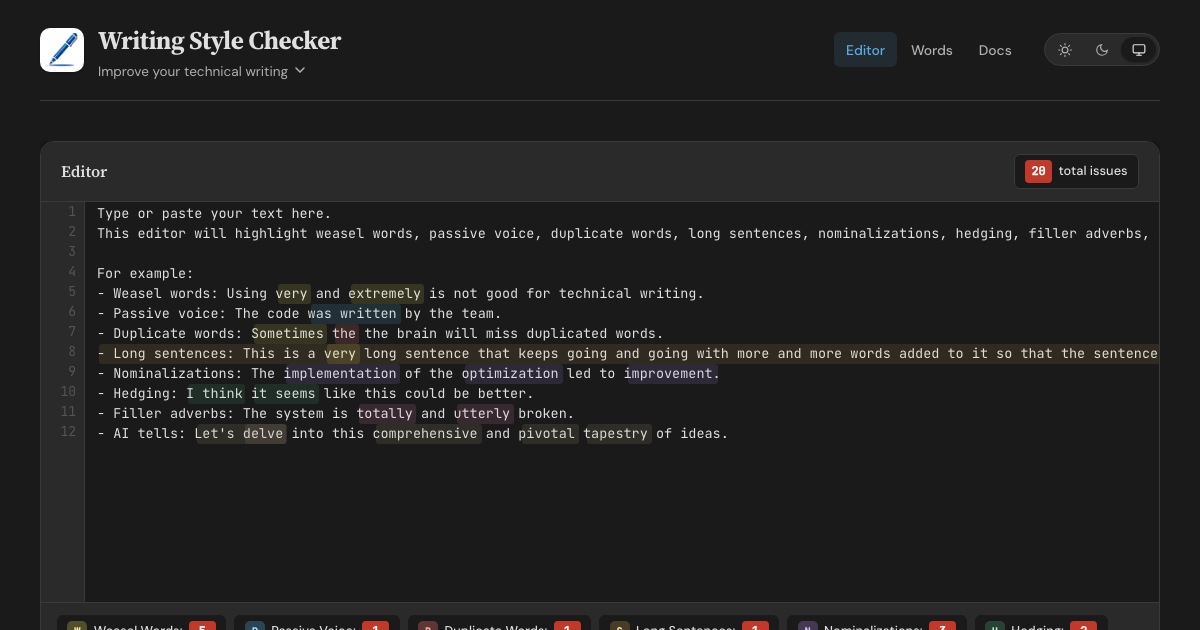
- Web Editor - Real-time highlighting with inline fix buttons for all 8 detectors
- HTTP API - POST text with optional config, retrieve structured JSON responses
- MCP Server (Remote) - Connect AI assistants via Streamable HTTP transport
- MCP Server (Local) - Stdio-based server via
wsc-mcpon npm - CLI - Check files from the command line via
wsc-lint - GitHub Action - Run checks in CI with
::warningannotations - Configurable - Customize detectors with
.wscrc.jsonfiles
What WSC is (and isn't)
WSC flags patterns that research on AI-generated text finds overrepresented, and cites a source for every flag. It does not, and cannot, prove authorship. Classifier-based detectors carry a documented false-accusation risk: a Stanford study found that seven of them misflagged 61% of essays written by non-native English speakers. WSC avoids that trap by design — every flag is a specific, explainable edit that improves the text no matter who, or what, wrote it.
Detection Rules
| Detector | Items | Description |
|---|---|---|
| Weasel Words | 95 words/phrases | Vague terms like "very", "basically", "arguably", "numerous" |
| Passive Voice | 260 irregular verbs | Auxiliary verbs + past participles (regular -ed + irregular) |
| Duplicate Words | — | Adjacent repeated words across whitespace, case-insensitive |
| Long Sentences | threshold: 30 words | Sentences exceeding a configurable word count |
| Nominalizations | 245 word pairs | Nouns replaceable with verbs ("utilization" → "use") |
| Hedging | 100 phrases | Phrases that weaken assertions ("I think", "it seems") |
| Filler Adverbs | 139 words | Adverbs adding emphasis without substance ("totally", "utterly") |
| AI Tells | 98 words (+111 inflected forms) + 83 phrases + 12 structural patterns | Words, phrases, and sentence constructions overrepresented in AI-generated text (delve, rich tapestry, It's not just X — it's Y) |
Word lists sourced from Matt Might's shell scripts and expanded with additional entries. AI tells draw on published corpus studies: Kobak et al. 2025 (Science Advances), Juzek & Ward 2025 (COLING), Liang et al. 2024 (Stanford), and Reinhart et al. 2025 (PNAS). Wikipedia's editor-maintained Signs of AI writing catalogue and AI-detection vendor reports round out the sources.
Configuration
Create a .wscrc.json to customize detectors. All tools (API, MCP, CLI) support it.
{
  "$schema": "https://wsc.theserverless.dev/schema.json",
  "ignore": ["CHANGELOG.md", "docs/vendor/**"],
  "detectors": {
    "weaselWords": {
      "enabled": true,
      "add": ["synergy", "leverage"],
      "remove": ["very"]
    },
    "longSentences": { "maxWords": 25 },
    "adverbs": { "enabled": false }
  }
}
Every field is optional. Missing fields use defaults. JSON Schema provides autocompletion in VS Code.
ignore is an array of glob patterns relative to the working directory. The GitHub Action uses the repository root. The CLI adds these patterns to its built-in **/node_modules/** and **/.git/** skips, together with the Action exclude input and the CLI --ignore flag.
API Usage
POST /api/check
Analyze text for writing style issues. Accepts optional config object.
curl -X POST https://wsc.theserverless.dev/api/check \
  -H "Content-Type: application/json" \
  -d '{"text":"The code was written very quickly."}'
Response:
{
  "summary": {
    "total": 2,
    "weaselWords": 1,
    "passiveVoice": 1,
    "duplicateWords": 0,
    "longSentences": 0,
    "nominalizations": 0,
    "hedging": 0,
    "adverbs": 0
  },
  "issues": {
    "weaselWords": [{ "word": "very", "index": 21, "line": 1, "column": 22, "context": "..." }],
    "passiveVoice": [{ "phrase": "was written", "index": 9, "line": 1, "column": 10, "context": "..." }],
    "duplicateWords": [],
    "longSentences": [],
    "nominalizations": [],
    "hedging": [],
    "adverbs": []
  },
  "meta": { "characterCount": 34, "wordCount": 6, "sentenceCount": 1, "processingTimeMs": 2 }
}
With config:
curl -X POST https://wsc.theserverless.dev/api/check \
  -H "Content-Type: application/json" \
  -d '{"text":"The code was written very quickly.", "config":{"detectors":{"weaselWords":{"enabled":false}}}}'
GET /api/check
Returns API documentation as JSON.
GET /api/detectors
Returns the list of all 8 detectors with descriptions, configurability, and word counts.
GET /health
Runs a smoke test with known text and returns {"status":"healthy"} or 503.
Limits: Max 100,000 characters per request. CORS enabled for all origins.
MCP Server
The Writing Style Checker is available as an MCP server, letting AI assistants check your writing directly.
Tools
| Tool | Description |
|---|---|
check_text |
Analyze text for all 8 writing style issues. Accepts optional config. |
fix_duplicates |
Remove duplicate adjacent words and return cleaned text |
list_word_lists |
Return info about all detector word lists |
check_file |
(Local only) Read a file from disk and analyze it. Auto-discovers .wscrc.json. |
Remote MCP Server
Connect any MCP client to the hosted server - no installation required.
{
  "mcpServers": {
    "writing-style-checker": {
      "type": "url",
      "url": "https://wsc.theserverless.dev/mcp"
    }
  }
}
Local MCP Server (stdio)
Install via npm for local usage. Includes check_file for analyzing files on disk with auto-discovery of .wscrc.json.
npx wsc-mcp
Claude Desktop / Claude Code config:
{
  "mcpServers": {
    "writing-style-checker": {
      "command": "npx",
      "args": ["wsc-mcp"]
    }
  }
}
See the wsc-mcp npm page for full documentation.
CLI
Check files from the command line.
# Check all markdown files
npx wsc-lint check "**/*.md"

# Read from stdin
echo "The code was written very quickly." | npx wsc-lint check --stdin

# JSON output for scripting
npx wsc-lint check "**/*.md" --format json

# GitHub Actions annotations
npx wsc-lint check "**/*.md" --format github

# Create a config file
npx wsc-lint init
See the wsc-lint README for full documentation.
GitHub Action
- uses: theserverlessdev/wsc@v1
  with:
    files: '**/*.md'
    max-warnings: 20
    exclude: |
      CHANGELOG.md
      vendor/**
| Input | Default | Description |
|---|---|---|
files |
**/*.md |
Glob pattern for files to check |
config |
— | Path to .wscrc.json config file |
max-warnings |
unlimited | Max warnings before failing |
only-changed |
false |
On a pull request, check changed files that match files. If none match, skip the check. Other events check files. |
exclude |
— | Glob patterns to skip. Separate with a comma or a new line. Adds to config ignore. |
Privacy
The web editor runs in your browser - we never send text to any server. The API and MCP endpoints only process text you explicitly send to them.
Project Structure
.
├── src/
│   ├── core/                    # Shared detection engine
│   │   ├── detector.ts          # 8 detection algorithms
│   │   ├── words.ts             # Word/phrase lists (800+ entries)
│   │   ├── config.ts            # Config types, merging, validation
│   │   ├── config-node.ts       # Node-only: file loading, discovery
│   │   ├── analyzer.ts          # Unified analyzeText() entry point
│   │   └── index.ts             # Public API exports
│   ├── docs/                    # Documentation content (Markdown files)
│   ├── mcp/
│   │   └── handler.ts           # MCP JSON-RPC 2.0 handler
│   ├── lib/
│   │   ├── App.svelte           # Main editor page component
│   │   ├── stores/theme.ts      # Theme store (light/dark/system)
│   │   └── components/          # UI components (StatsBar, ConfigPanel, etc.)
│   ├── routes/
│   │   ├── +layout.svelte       # Shared layout (header, nav, footer)
│   │   ├── api/check/+server.ts # HTTP API endpoint
│   │   ├── mcp/+server.ts       # MCP endpoint
│   │   ├── health/+server.ts    # Health check endpoint
│   │   ├── docs/+page.svelte    # Documentation page
│   │   └── words/+page.svelte   # Word library browser
│   └── styles/
│       └── main.scss            # Global styles (light + dark themes)
├── mcp-server/                  # Standalone stdio MCP server (npm: wsc-mcp)
├── cli/                         # CLI tool (npm: wsc-lint)
├── action/                      # GitHub Action (composite)
├── tests/                       # 341 tests across 18 files
├── static/
│   ├── schema.json              # JSON Schema for .wscrc.json
│   ├── llms.txt                 # AI/LLM discovery file
│   └── llms-full.txt            # Detailed LLM context
├── wrangler.toml                # Cloudflare Workers config
└── svelte.config.js             # SvelteKit configuration
Local Development
git clone https://github.com/theserverlessdev/wsc.git
cd wsc
npm install
npm run dev
Visit http://localhost:5173. The API is at /api/check, MCP at /mcp, health at /health.
Commands
| Command | Description |
|---|---|
npm run dev |
Start dev server |
npm run build |
Build for production |
npm run check |
Type check with svelte-check |
npm test |
Run all 341 tests |
npm run test:coverage |
Coverage report |
Deployment
Deployed as a Cloudflare Worker at wsc.theserverless.dev.
npm run build
npx wrangler deploy
Contributing
See CONTRIBUTING.md for development setup, testing, and pull request guidelines.
For substantial changes, please open an issue first.
Acknowledgements
- Matt Might for the original shell scripts
- Built with SvelteKit and Svelte 5, deployed on Cloudflare Workers
- Logo made with DiffusionBee
License
Writing Style Checker MCP soruları
Writing Style Checker MCP'yi Claude Code'a nasıl eklerim?
Terminalinizde claude mcp add wsc -- npx -y wsc-mcp komutunu çalıştırın. Her projede kullanılabilir olması için --scope user ekleyin.
Writing Style Checker MCP'yi Cursor'a nasıl eklerim?
~/.cursor/mcp.json dosyasını açın ve yukarıdaki yükleme bölümünde gösterilen Cursor yapılandırmasını kullanarak sunucuyu mcpServers altına ekleyin.
Writing Style Checker MCP hangi araçları sunar?
4 araç sunar; bunlar arasında check_text, fix_duplicates, list_word_lists, check_file yer alır.
Bu araç bir metnin yapay zeka tarafından yazıldığını kanıtlar mı?
Hayır, yazarlığı kanıtlamaz. Bunun yerine, açıklanabilir düzenlemeler sunmak amacıyla yapay zeka tarafından oluşturulan metinlerde aşırı temsil edilen belirli kalıpları ve kelimeleri işaretler.
Tespit kurallarını özelleştirebilir miyim?
Evet, .wscrc.json yapılandırma dosyasını kullanarak dedektörleri özelleştirebilirsiniz.
Web editörünü kullanırken metnim gizli kalır mı?
Evet, web editörü tamamen tarayıcınızda çalışır, bu nedenle metin hiçbir zaman bir sunucuya gönderilmez.