
Ternimal MCP sunucusu
Commit 14 Kas 2026Model Context Protocol aracılığıyla yapay zeka ajanlarının uzak sunucularda komut çalıştırmasına ve dosya yönetmesine olanak tanıyan güvenli bir uzak terminal sağlar.
Ayrıca bilinen adı ternimal/tern
- Yıldızlar
- 1
- Araçlar
- —
- İndirmeler, 30 gün
- —
- En son sürüm
- —
- Son commit
- 14 Kas 2026
- Lisans
- AGPL-3.0
Ternimal MCP nedir?
Ternimal bir MCP sunucusudur. Model Context Protocol aracılığıyla yapay zeka ajanlarının uzak sunucularda komut çalıştırmasına ve dosya yönetmesine olanak tanıyan güvenli bir uzak terminal sağlar.
Özet, projenin README dosyasından oluşturuldu
Ternimal MCP sunucusu hakkında
Ternimal ile uzak sunucuları bir yapay zeka arayüzü üzerinden yönetmek mümkündür. Bu araç, Model Context Protocol kullanarak yapay zeka ajanlarının uzak ana bilgisayarlarda komut çalıştırmasına ve dosya yönetmesine olanak tanıyan güvenli bir uzak terminal sağlar. Claude Desktop, Claude Code veya Cursor gibi yapay zeka istemcilerine sistemlerine kontrollü erişim yetkisi vermek isteyen yöneticiler için tasarlanmıştır.
Kurulum, uzak ana bilgisayarda ternd agent çalıştırılmasını ve tern client aracılığıyla bağlanılmasını içerir. Kullanıcılar yerel ağ üzerinden doğrudan bağlanabilir veya gelen portlara ihtiyaç duymadan NAT üzerinden geçmek için bir ternr relay kullanabilirler. Güvenlik, uçtan uca TLS şifrelemesi ve OpenSSH anahtarları veya paylaşılan tokenlar kullanılarak yapılan zorunlu kimlik doğrulama ile sağlanır.
Yetkisiz eylemleri önlemek için MCP server belirli bir politika altında çalışır ve varsayılan olarak salt okunur moddadır. Her çağrının denetim kaydını tutar ve seçilen eylemleri gerçekleştirmeden önce manuel onay gerektirir. Bu sayede, bir yapay zeka ajanı shell, exec, port forwarding ve dosya kopyalama araçlarıyla etkileşime girebilse de, insan kullanıcının uzak ortam üzerindeki kontrolü korunmuş olur.
Neler yapabilirsiniz
- 1Yapay zeka aracılığıyla uzak komut çalıştırmaMCP arayüzü üzerinden bir yapay zeka ajanından uzak bir ana bilgisayarda belirli shell komutlarını çalıştırmasını isteyin.
- 2Yapay zeka yönetimsel eylemlerini denetlemeBir yapay zeka ajanı tarafından sisteminizde gerçekleştirilen tüm komutların ve etkileşimlerin tam günlüğünü inceleyin.
Projenin README dosyasından alınmıştır. Her kullanım durumu, oradaki bir alıntı ile kontrol edilir.
Yapılandırma
TERN_TOKEN
| Ad | Açıklama | Sunucu |
|---|---|---|
| TERN_TOKEN | — |
Otomatik kontroller
Çalıştırıldı 15 Kas 2026Tam rapor →Henüz doğrulanmadı. Bir sunucunun 80 puana, ciddi bir bulgu olmamasına ve kontrol edebilmemiz için yeterli veriye ihtiyacı vardır. Kontroller nasıl çalışır · Daha fazla puan için nelerin düzeltileceği

- Kaynak deposu bağlantılı ve erişilebilirternimal/tern is public and reachablegithub.com/ternimal/tern ↗Geçti
- Paket, bu depoyu kaynağı olarak gösteriyorKontrol edilmedi
- Derleme kökeni (Sigstore onayı)Kontrol edilmedi
- Açık kaynak lisansı (OSI)AGPL-3.0spdx.org/licenses/AGPL-3.0.html ↗Geçti
- Son bir yıl içinde commit veya sürüm mevcutLast commit or release 2026-11-14github.com/ternimal/tern ↗Geçti
- OpenSSF ScorecardKontrol edilmedi
- Paket adı popüler bir pakete yakın değilKontrol edilmedi
- Pakette veya bağımlılıklarında kritik uyarı yokKontrol edilmedi
- Modele yönelik gizli talimat yok0 tool descriptions and the README read; no override phrases, credential paths or hidden charactersGeçti
- Yıkıcı araçlar etiketlenmişKontrol edilmedi
- Uzak uç nokta MCP el sıkışmasına yanıt veriyorKontrol edilmedi
Ternimal
+------------------------------------------------------------------+
| \\\_\                                                            |
| \\\( ^>     t e r n                                              |
|  \\\=/      A minimal, portable, secure remote terminal with MCP |
|  ~~~~~                                                           |
+------------------------------------------------------------------+


Ternimal (terminal + minimal) is a minimal, portable, secure remote terminal: SSH-style shells, command exec, port forwarding and file copy over end-to-end TLS, reached directly or through a relay for NAT traversal. One project, four small binaries:
| binary | role |
|---|---|
tern |
client: shells, exec, port forwarding, file copy, REST gateway, MCP server for AI agents |
ternd |
agent: hosts sessions for authenticated clients; listens directly or dials a relay |
ternr |
relay: bridges clients to agents behind NAT; a public rendezvous that only forwards opaque bytes |
rtern |
combined relay + client: catches an agent that dials in and drops you into its shell; one process instead of ternr + tern |
Client-to-agent traffic is end-to-end TLS (clients pin the agent's certificate) and authentication to the agent is mandatory. This is an administration tool, not a stealth tool: connections are logged and the agent has no unauthenticated mode. Only use it on systems you own or are authorized to access.
Installation
Download the zip for your OS and architecture from the
latest release, check it
against SHA256SUMS and, with the GitHub CLI, its
build provenance attestation, and put the four binaries on your PATH:
curl -LO https://github.com/ternimal/tern/releases/latest/download/ternimal-linux-amd64.zip
curl -LO https://github.com/ternimal/tern/releases/latest/download/SHA256SUMS
sha256sum --ignore-missing -c SHA256SUMS
gh attestation verify ternimal-linux-amd64.zip -R ternimal/tern
mkdir -p ~/.local/bin
unzip ternimal-linux-amd64.zip tern ternd ternr rtern -d ~/.local/bin
Or build them with Go 1.21 or later:
go install github.com/ternimal/tern/cmd/...@latest
Notes for macOS and Windows, building from source and the supported platforms are in docs/install.md.
Quick start
# agent: zero-config, listens on port 2222 on every IPv4 and IPv6 address,
# mints a token, prints its fingerprint
ternd

# client: connect by IP with the agent's fingerprint and token
TERN_TOKEN=<token> tern connect -a AGENT_IP:2222 -f <agent-fp>
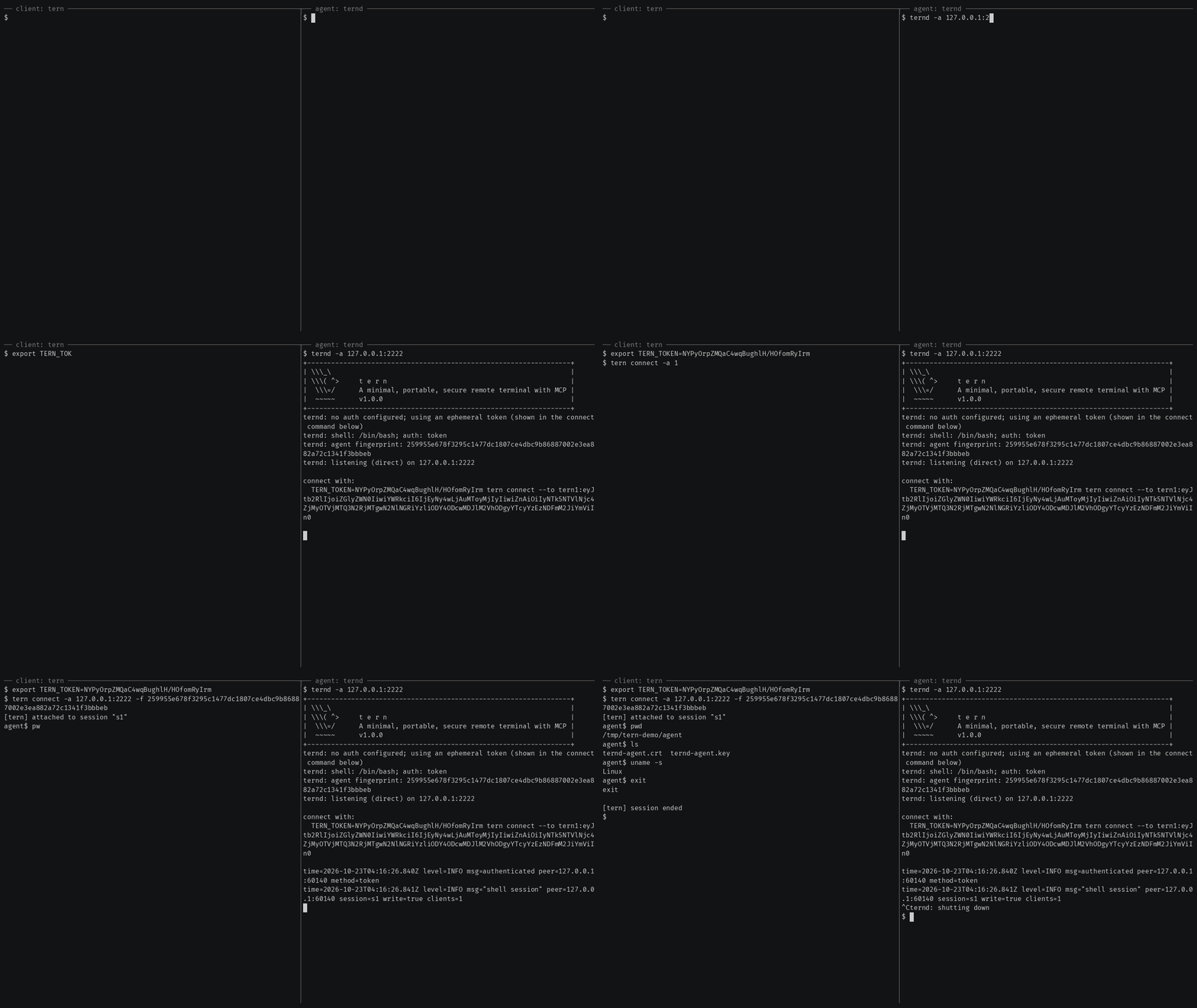
Getting started also covers reaching an agent
behind NAT through a relay, catching one with rtern and logging in with
OpenSSH keys instead of a token.
AI agents (tern mcp)
tern mcp lets an AI client such as Claude Code, Claude Desktop or Cursor work
on your agents through the
Model Context Protocol, under a policy you
set and with an audit log of every call. It is read-only by default, and asks
you before the actions you choose.
In Claude Code, install tern first, then the Ternimal plugin:
claude plugin marketplace add ternimal/tern
claude plugin install ternimal@ternimal
The plugin starts tern from your PATH and reads your hosts from a config
file, ~/.config/tern/mcp.json by default; its ternimal:setup skill walks
you through writing one. plugin/README.md says what it
runs and what it sends. Other clients, a one-line setup without a config
file, the tools and the safety model are in docs/mcp.md.
Features
- Direct or relay: reach an agent on your LAN directly, or reach one behind NAT through a relay, so that agent needs no inbound port.
- End-to-end encryption: TLS and authentication run between client and agent, so a relay only forwards ciphertext.
- Keys or tokens: OpenSSH public keys in
authorized_keysformat, or a shared token. - Resumable sessions:
tern connectreconnects on its own after a drop and resumes the session with scrollback replay; others can join it as read-only viewers. - One connection, many channels: one authenticated connection can carry a
shell,
exec, port forwards and file copy at once. - REST gateway and MCP server: run commands over HTTP, or let AI agents work under a policy.
- Recording: with
ternd --record-dir, the agent saves each session as an asciicast, playable withasciinema play. - Zero-config: run
terndwith no flags on a terminal and it mints a token and prints the line to connect with. - Portable: Linux, macOS, Windows and Android on amd64 and arm64.
All of them in detail: docs/features.md.
Documentation
- Getting started: direct, through a relay, with
rtern, with OpenSSH keys and the insecure flags for testing - Commands: every
terncommand, sharing and resuming sessions, copying files, port forwards - REST gateway: run commands on an agent over HTTP
- AI agents over MCP: the config file, profiles, tools, approvals and the audit log
- Install and build: checking a release, building from source, supported platforms
- Keys, tokens and files: the rules for the files tern reads
- Operating notes: listeners, shutdown, recordings and other details
- Security: the threat model, the dangerous flags and how to report a vulnerability
- Contributing: license terms, the CLA, development and the code layout
License
Ternimal is licensed under the GNU Affero General Public License v3.0 only (AGPL-3.0-only); see LICENSE. Running a modified version to provide a network service requires offering that version's source to its users.
A separate commercial license is available for uses that cannot comply with the AGPL, for example embedding Ternimal in a proprietary or hosted service; see NOTICE. Contributions are welcome; see CONTRIBUTING for the license terms and the CLA.
"Ternimal", the binary names (tern, ternd, ternr, rtern) and the
project logo are project trademarks and are not licensed under the AGPL; see
NOTICE.
Ternimal MCP soruları
Yapay zeka ajanları Ternimal'ı nasıl kullanabilir?
Claude Code veya Cursor gibi yapay zeka istemcileri, tern mcp komutunu kullanarak Model Context Protocol (MCP) üzerinden ajanlarınızla çalışabilirler.
Bağlantı güvenli mi?
Evet, istemciden ajana giden trafik, rölelerin yalnızca şifrelenmiş metin (ciphertext) iletmesini sağlayan zorunlu kimlik doğrulamalı uçtan uca TLS kullanır.
NAT arkasındaki bir makineye erişmek için Ternimal kullanabilir miyim?
Evet, bağlantıyı köprülemek için bir röle kullanarak NAT arkasındaki bir ajana erişebilirsiniz.
Yapay zeka ajanları için varsayılan izinler nelerdir?
Varsayılan olarak MCP server salt okunur moddadır ve seçilen eylemleri gerçekleştirmeden önce onayınızı ister.