
tty-table MCP sunucusu
Commit 13 Eki 2026Bir AI istemcisinin verileri README dosyalarında ve diğer metin dosyalarında kullanılmak üzere ASCII veya Unicode terminal tabloları olarak işlemesini sağlar.
Ayrıca bilinen adı tecfu/tty-table
- Yıldızlar
- 311
- Araçlar
- 4
- İndirmeler, 30 gün
- —
- En son sürüm
- —
- Son commit
- 13 Eki 2026
- Lisans
- MIT
tty-table MCP nedir?
tty-table bir MCP sunucusudur. Bir AI istemcisinin verileri README dosyalarında ve diğer metin dosyalarında kullanılmak üzere ASCII veya Unicode terminal tabloları olarak işlemesini sağlar. 4 araç sunar; örneğin render_table, header, rows.
Özet, projenin README dosyasından oluşturuldu
tty-table MCP sunucusu hakkında
tty-table, ham verilerin biçimlendirilmiş ASCII veya Unicode terminal tablolarına dönüştürülmesini AI istemcileri için mümkün kılar. Claude, Cursor veya diğer IDE agent'larını kullanan geliştiriciler, yapılandırılmış bilgileri okunabilir metin düzenlerine dönüştürmek için npx kullanarak bu server'ı stdio üzerinden bağlayabilirler. Bu özellik, doğrudan bir AI sohbetinden temiz dokümantasyonlar, README dosyaları veya terminal uyumlu raporlar oluşturmak için özellikle kullanışlıdır.
render_table aracı; kullanıcıların başlıkları, satırları ve genişlik, borderStyle, hizalama veya kompakt mod gibi belirli yapılandırma seçeneklerini iletmesine olanak tanıyan birincil arayüz olarak hizmet eder. Server, tabloların terminal ortamında doğru görünmesini sağlamak için Unicode genişlik ölçümleri ve metin kaydırma dahil olmak üzere karmaşık biçimlendirme mantığını yönetir. MCP uygulamasını çalıştırmak için Node.js 22 veya üzeri bir sürüm gereklidir.
Projenin README dosyasından alınmıştır. Her kullanım durumu, oradaki bir alıntı ile kontrol edilir.
tty-table MCP araçları 4
README dosyasından algılandırender_tableheaderrowsoptions
| render_table | — | |
| header | — | |
| rows | — | |
| options | — |
Otomatik kontroller
Çalıştırıldı 13 Kas 2026Tam rapor →Henüz doğrulanmadı. Bir sunucunun 80 puana, ciddi bir bulgu olmamasına ve kontrol edebilmemiz için yeterli veriye ihtiyacı vardır. Kontroller nasıl çalışır · Daha fazla puan için nelerin düzeltileceği

- Kaynak deposu bağlantılı ve erişilebilirtecfu/tty-table is public and reachablegithub.com/tecfu/tty-table ↗Geçti
- Paket, bu depoyu kaynağı olarak gösteriyorKontrol edilmedi
- Derleme kökeni (Sigstore onayı)Kontrol edilmedi
- Açık kaynak lisansı (OSI)MITspdx.org/licenses/MIT.html ↗Geçti
- Son bir yıl içinde commit veya sürüm mevcutLast commit or release 2026-10-13github.com/tecfu/tty-table ↗Geçti
- OpenSSF ScorecardOpenSSF Scorecard 4.8 / 10; weakest: Code-Review 0, Pinned-Dependencies 0, CII-Best-Practices 0scorecard.dev/viewer/?uri=github.com/tecfu/tty-table ↗Kısmi 7/15
- Paket adı popüler bir pakete yakın değilKontrol edilmedi
- Pakette veya bağımlılıklarında kritik uyarı yokKontrol edilmedi
- Modele yönelik gizli talimat yok4 tool descriptions and the README read; no override phrases, credential paths or hidden charactersGeçti
- Yıkıcı araçlar etiketlenmişNo tool named like delete, drop or execGeçti
- Uzak uç nokta MCP el sıkışmasına yanıt veriyorKontrol edilmedi
tty-table
A TypeScript-first terminal table renderer with a compatibility-oriented factory API.
Examples
See here for complete example list
To view all example output:
$ git clone https://github.com/tecfu/tty-table && cd tty-table && npm i
$ npm run view-examples
Terminal (Static)
examples/styles-and-formatting.js

Terminal (Streaming)
$ node examples/data/fake-stream.js | tty-table --format json --header examples/config/header.js
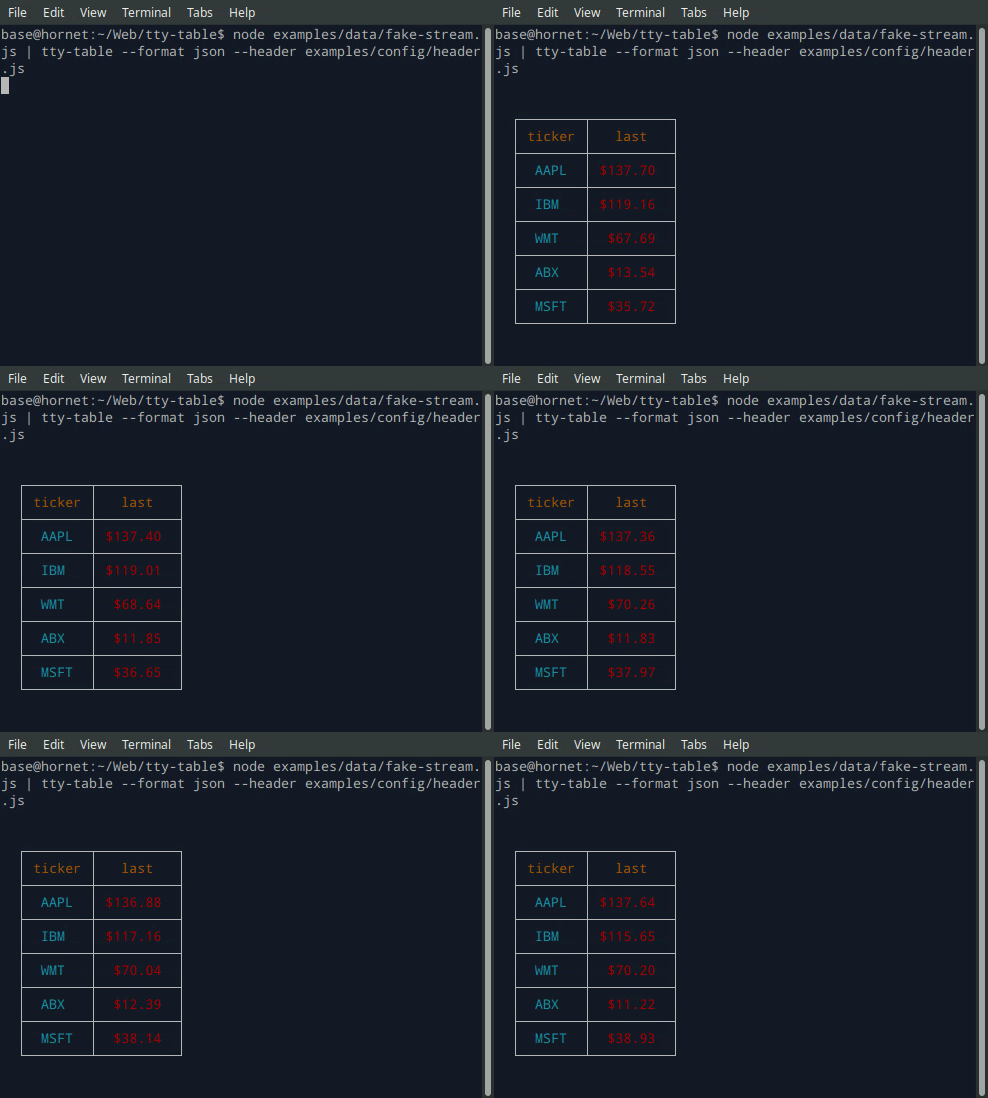
- See the built-in help for the terminal version of tty-table with:
$ tty-table -h
MCP server
Expose tty-table to MCP clients (Claude, IDE agents, Cursor, etc.) over stdio.
Client configuration
{
  "mcpServers": {
    "tty-table": {
      "command": "npx",
      "args": ["-y", "--package=tty-table", "tty-table-mcp"]
    }
  }
}
Tools
| Tool | Description |
|---|---|
render_table |
Render data as an ASCII/Unicode terminal table. Accepts header, rows, and any tty-table options; returns the rendered table as text. |
Arguments for render_table:
| Name | Type | Required | Description |
|---|---|---|---|
header |
(string | {value, align?, width?})[] |
no | Column definitions |
rows |
(unknown[] | Record<string, unknown>)[] |
yes | Row data (arrays of cells, or objects keyed by column name) |
options |
object |
no | Any tty-table option (e.g. width, borderStyle, align, compact) |
Example tool call:
{
  "header": [{ "value": "name" }, { "value": "score", "align": "right" }],
  "rows": [["Ada", 100], ["Grace", 98]],
  "options": { "width": 40 }
}
Rendered result:
  ┌───────┬───────┐
  │ name  │ score │
  ├───────┼───────┤
  │  Ada  │   100 │
  ├───────┼───────┤
  │ Grace │    98 │
  └───────┴───────┘
Additional tools may be added in future releases under the same MCP server.
Browser & Browser Console
The published package ships a standalone IIFE bundle that exposes a TtyTable global. Load it directly from a CDN — no install or build step required:
<script src="https://cdn.jsdelivr.net/npm/tty-table@7/dist/browser/tty-table.global.js"></script>
<script>
  const Table = TtyTable.default
  console.log(Table([{ value: "name" }, { value: "score" }], [["Ada", 100]], null).render())
</script>
- Try it online before installing: live example on JSFiddle
- View the full example locally in Chrome or Chromium by opening examples/browser-example.html (e.g. served with
npx serve .or any static file server). - source: examples/browser-example.html

Compatibility
Node.js
Current releases require Node.js 22 or newer. This is a breaking change from the Node 20 baseline used by early v6 releases (and from the v5 line, which supported older Node.js releases). The floor was raised to match smartwrap@4 / breakword@2.1.0. If your application must remain on Node 20, stay on a prior tty-table release until you can upgrade.
The published package provides both ESM and CommonJS entry points for Node.js. The CLI requires Node.js 22+ as well.
API
import Table from "tty-table"

const table = Table(
  [{ value: "name" }, { value: "score", align: "right" }],
  [
    { name: "Ada", score: 100 },
    { name: "Grace", score: 98 }
  ],
  { borderStyle: "solid" }
)

console.log(table.render())
Legacy Table(header, rows, footer, options) and Table(rows, options) construction remains supported.
Formatter context
New code can use the explicit context form:
const formatter = (value: unknown) => String(value).toUpperCase()
The compatibility callback signature is still accepted. New integrations should prefer a formatter that accepts the documented context object and avoid relying on dynamic this mutation.
Width semantics
Widths are measured in terminal display columns, not JavaScript string length. ANSI escape sequences are ignored for measurement; Unicode code points are counted using breakword.width() (Unicode 18.0.0 East Asian Width + UAX #51 Emoji_Presentation). Wrapping and truncation operate on the same display-width semantics.
Compared with older releases that used wcwidth, some symbols that were previously treated as 1 cell are now 2 cells (for example ⚡ U+26A1). Tables containing those characters may reflow slightly; measurement is now aligned with the same library used for wrapping.
Development
npm install
npm run typecheck
npm run build
npm test
npm run test:unit
npm run lint
tty-table MCP soruları
tty-table MCP hangi araçları sunar?
4 araç sunar; bunlar arasında render_table, header, rows, options yer alır.
tty-table'ı Claude veya Cursor ile nasıl kullanabilirim?
İstemci yapılandırmanızdaki mcpServers ayarlarını yapılandırarak, stdio üzerinden Claude, IDE agent'ları veya Cursor gibi MCP istemcilerine erişim sağlayabilirsiniz.
MCP server içerisinde hangi araçlar mevcuttur?
Server, başlıkları, satırları ve çeşitli tty-table seçeneklerini kabul ederek işlenmiş bir ASCII/Unicode tablo döndüren render_table aracını sunar.
Hangi Node.js sürümü gereklidir?
Güncel sürümler Node.js 22 veya üzerini gerektirir.