
SyncSo MCP sunucusu
Commit 16 Eki 2026Yapay zeka ajanlarına canlı müzik, tiyatro, kurslar, pazarlar ve gece hayatı dahil olmak üzere New York City etkinliklerine gerçek zamanlı erişim sağlar.
Ayrıca bilinen adı SyncSo-Inc/syncso
- Yıldızlar
- 2
- Araçlar
- —
- İndirmeler, 30 gün
- —
- En son sürüm
- 2.0.0
- Son commit
- 16 Eki 2026
- Lisans
- MIT
SyncSo MCP nedir?
SyncSo bir MCP sunucusudur. Yapay zeka ajanlarına canlı müzik, tiyatro, kurslar, pazarlar ve gece hayatı dahil olmak üzere New York City etkinliklerine gerçek zamanlı erişim sağlar.
Özet, projenin README dosyasından oluşturuldu
SyncSo MCP sunucusu hakkında
SyncSo, yapay zeka ajanlarına New York City'deki yerel etkinlikler hakkında gerçek zamanlı veri sağlar. Standart dil modelleri bir rehber gibi işlev gören statik eğitim verilerine dayanırken, bu MCP server ajanları müzik, tiyatro, komedi, pazarlar, kurslar ve gece hayatına dair canlı bir veri tabanına bağlar. Geleneksel veri setlerinde yer almayabilecek etkinlikler için tarih, saat, fiyat ve rezervasyon bağlantıları gibi spesifik detaylar sunar.
Geliştiriciler bu hizmeti Claude Desktop, Claude Code, Cursor, Windsurf ve VS Code dahil olmak üzere çeşitli ortamlara entegre edebilirler. Bağlantı, uzak bir MCP URL'si aracılığıyla veya bir skill dosyası eklenerek kurulur. Kullanıcıların kimlik doğrulaması yapmak için syncso.com adresinden giriş yapmaları gerekir ve her hesap aylık ücretsiz bir arama kotası içerir. Sistem, bilgi çekmek için find_things_to_do ve get_details adlı iki ana araç kullanır. Şu anda kapsam New York City ile sınırlıdır ancak hizmet gelecekte daha fazla şehre yayılacak şekilde tasarlanmıştır.
Neler yapabilirsiniz
- 1Ziyaretçiler için yerel aktiviteler planlayınBir ajandan, ziyarete gelen bir ebeveyn için Salı günü yapılabilecek belirli aktiviteleri bulmasını isteyin.
- 2Anlık yerel eğlence bulunÖnümüzdeki dört saat içinde gerçekleşecek ücretsiz açık hava etkinliklerinin bir listesini talep edin.
- 3Gelecekteki sosyal etkinlikleri planlayınBir ajandan, bir çiftin üç hafta öncesinden rezerve edebileceği aktiviteleri aramasını isteyin.
- 4Niş yerel etkinlikleri keşfedinSeramik kursları veya gece pazarları gibi küçük ölçekli etkinlikleri arayın.
Projenin README dosyasından alınmıştır. Her kullanım durumu, oradaki bir alıntı ile kontrol edilir.
SyncSo MCP nasıl yüklenir
Biçimler 10 Kas 2026 tarihinde doğrulandıCursor'a ekleGoose'a ekleSyncSo MCP'yi Claude Code içine yükleyin
$ claude mcp add --transport http syncso https://rtdb.syncso.com/partner/mcpSyncSo MCP'yi Cursor içine yükleyin
~/.cursor/mcp.json
{
  "mcpServers": {
    "syncso": {
      "url": "https://rtdb.syncso.com/partner/mcp"
    }
  }
}SyncSo MCP'yi VS Code içine yükleyin
.vscode/mcp.json
{
  "servers": {
    "syncso": {
      "type": "http",
      "url": "https://rtdb.syncso.com/partner/mcp"
    }
  }
}SyncSo MCP'yi VS Code CLI içine yükleyin
$ code --add-mcp '{"name":"syncso","type":"http","url":"https://rtdb.syncso.com/partner/mcp"}'SyncSo MCP'yi Codex içine yükleyin
$ codex mcp add syncso --url https://rtdb.syncso.com/partner/mcpSyncSo MCP'yi Codex config.toml içine yükleyin
~/.codex/config.toml
[mcp_servers.syncso]
url = "https://rtdb.syncso.com/partner/mcp"
SyncSo MCP'yi Gemini CLI içine yükleyin
$ gemini mcp add -s user --transport http syncso https://rtdb.syncso.com/partner/mcpSyncSo MCP'yi Gemini settings.json içine yükleyin
~/.gemini/settings.json
{
  "mcpServers": {
    "syncso": {
      "url": "https://rtdb.syncso.com/partner/mcp",
      "type": "http"
    }
  }
}Otomatik kontroller
Çalıştırıldı 14 Kas 2026Tam rapor →Henüz doğrulanmadı. Bir sunucunun 80 puana, ciddi bir bulgu olmamasına ve kontrol edebilmemiz için yeterli veriye ihtiyacı vardır. Kontroller nasıl çalışır · Daha fazla puan için nelerin düzeltileceği

- Kaynak deposu bağlantılı ve erişilebilirsyncso-inc/syncso is public and reachablegithub.com/syncso-inc/syncso ↗Geçti
- Paket, bu depoyu kaynağı olarak gösteriyorKontrol edilmedi
- Derleme kökeni (Sigstore onayı)Kontrol edilmedi
- Açık kaynak lisansı (OSI)MITspdx.org/licenses/MIT.html ↗Geçti
- Son bir yıl içinde commit veya sürüm mevcutLast commit or release 2026-10-16github.com/syncso-inc/syncso ↗Geçti
- OpenSSF ScorecardKontrol edilmedi
- Paket adı popüler bir pakete yakın değilKontrol edilmedi
- Pakette veya bağımlılıklarında kritik uyarı yokKontrol edilmedi
- Modele yönelik gizli talimat yok0 tool descriptions and the README read; no override phrases, credential paths or hidden charactersGeçti
- Yıkıcı araçlar etiketlenmişKontrol edilmedi
- Uzak uç nokta MCP el sıkışmasına yanıt veriyorHTTPS endpoint answered 401 (sign-in required)Geçti
SyncSo
Let your agents understand what's happening locally, in real time.
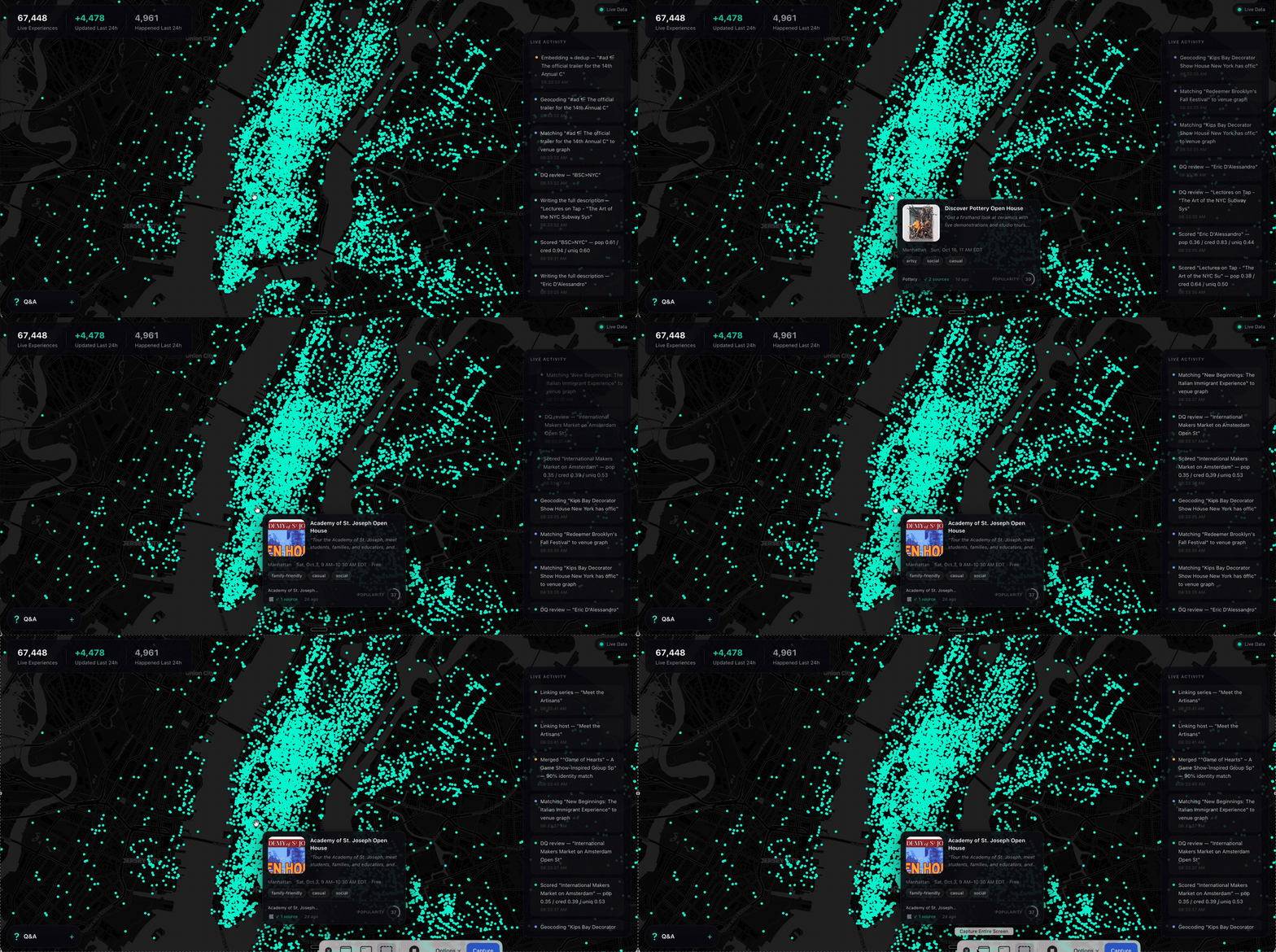
Ask a model what to do in New York and it names the Whitney. It is not wrong. It is just answering from a guidebook, because that is what it has — a city as a list of places, frozen whenever the training run ended.
What it does not have is everything going on inside those places, and the thousand rooms that never make a guidebook. The Tuesday gig. The pottery class with two seats left. The night market under the bridge. Your model has never heard of any of it.
SyncSo is that missing half: live music, theater, comedy, film, art, sports, festivals, markets, food and drink, classes, tours, nightlife — the whole surface of a city, each thing carrying its dates, times, prices, booking links and images. Not one category. Not the famous parts.
Which means your agent can finally take the questions it used to hand back. Where to take a visiting parent on a Tuesday. What a couple could book three weeks out. What is free, outdoors, and happening in the next four hours. Real answers, with a link to book them.
Install
One catalogue, two doors. Assistants that speak MCP connect to
https://rtdb.syncso.com/partner/mcp. Anything else reads the skill file at
https://syncso.com/SKILL.md. Both open the same account: the first search
asks the person to sign in once at syncso.com, and every account starts with
a free monthly allowance of searches.
Claude
In Claude.ai or the Claude desktop app: Settings → Connectors → Add custom connector, paste the MCP URL, and ask. Claude also lists SyncSo in its directory, where it is one click.
In Claude Code, connect the MCP server:
claude mcp add --transport http syncso https://rtdb.syncso.com/partner/mcp
or install the skill as a plugin, which keeps itself current:
claude plugin marketplace add SyncSo-Inc/syncso
claude plugin install syncso@syncso
ChatGPT
Coming to the ChatGPT app directory. Until it is listed: Settings → Apps & Connectors → Advanced → Developer mode, add a connector, paste the MCP URL. Developer mode is not available on every plan.
Cursor, Windsurf, VS Code and other MCP clients
Add SyncSo to the client's MCP configuration:
{
  "mcpServers": {
    "syncso": { "url": "https://rtdb.syncso.com/partner/mcp" }
  }
}
OpenClaw
openclaw skills install @liangstl/syncso
Also on ClawHub, where
clawhub install syncso does the same.
Coding agents that read skill folders
Claude Code, Codex, Cursor, Copilot and the rest, one command:
npx skills add SyncSo-Inc/syncso
Anything else
Tell your assistant:
Set up SyncSo from https://syncso.com/SKILL.md
The file carries the guidance and the tool definitions, works with anything that can call a tool and make an HTTPS request, and the copy at that URL is always the current one. A person using it gets their sign-in code at syncso.com/connect.
Two tools do the work, find_things_to_do and get_details. That is the
whole surface.
Coverage
New York only, for now. More cities over the coming months.
Within it, everything: every category above, from the institutions down to the one-night thing in a room above a bar. Ask about anywhere else and the skill tells your model to say so rather than invent an answer — the same refusal to guess that makes the New York answers worth trusting.
Links
- syncso.com — what SyncSo is
- syncso.com/connect — where your user gets their code
- syncso.com/SKILL.md — the skill itself, always the current copy (also in this repo)
Questions
Something missing, wrong, or not working the way this page says? Open an issue, or email hello@syncso.com. And if there is a city you want open, tell us.
License
MIT. See LICENSE.
SyncSo MCP soruları
SyncSo MCP'yi Claude Code'a nasıl eklerim?
Terminalinizde claude mcp add --transport http syncso https://rtdb.syncso.com/partner/mcp komutunu çalıştırın. Her projede kullanılabilir olması için --scope user ekleyin.
SyncSo MCP'yi Cursor'a nasıl eklerim?
~/.cursor/mcp.json dosyasını açın ve yukarıdaki yükleme bölümünde gösterilen Cursor yapılandırmasını kullanarak sunucuyu mcpServers altına ekleyin.
SyncSo hangi bölgeleri kapsıyor?
Şu anda hizmet yalnızca New York'u kapsamaktadır; önümüzdeki aylarda daha fazla şehir eklenmesi planlanmaktadır.
Kullanım ücreti nedir?
Her hesap, aylık ücretsiz bir arama kotası içerir.
Ne tür bilgiler bulabilirim?
Canlı müzik, tiyatro, komedi, film, sanat, spor, festivaller, pazarlar, yiyecek, içecek, kurslar, turlar ve gece hayatı hakkında detaylar bulabilirsiniz.