
Bir yapay zeka istemcisinin, yerleşik bir inceleme iş akışına sahip, sayfa ve tablolardan oluşan kendi sunucunuzda barındırılan bir ekip wikisini yazmasına, güncellemesine ve sorgulamasına olanak tanır.
Ayrıca bilinen adı stuga-dev/stuga, @stuga/mcp
- Yıldızlar
- 6
- Araçlar
- —
- İndirmeler, 30 gün
- —
- En son sürüm
- 0.2.1
- Son commit
- 12 Kas 2026
- Lisans
- AGPL-3.0
Stuga MCP nedir?
Stuga bir MCP sunucusudur. Bir yapay zeka istemcisinin, yerleşik bir inceleme iş akışına sahip, sayfa ve tablolardan oluşan kendi sunucunuzda barındırılan bir ekip wikisini yazmasına, güncellemesine ve sorgulamasına olanak tanır.
Özet, projenin README dosyasından oluşturuldu
Stuga MCP sunucusu hakkında
Stuga, agent'ların sayfa ve tabloları yazmasına, güncellemesine ve sorgulamasına izin vererek bir ekip wikisini yapay zeka istemcisi üzerinden yönetmenizi sağlar. Bu self-hosted çözüm, Apple silicon içeren bir Mac üzerinde veya bir sunucuda Docker aracılığıyla çalışır. Claude Desktop, Cursor ve VS Code gibi çeşitli MCP istemcilerine bağlanır ve agent'ın kendi modelini kullandığı için node'un kendisi için ayrı yapay zeka anahtarlarına ihtiyaç duyulmaz.
Kullanıcılar, bilginin nasıl güncelleneceğini üç farklı inceleme seviyesiyle kontrol edebilirler. Değişiklikler, değişikliği talep eden kişi tarafından incelenebilir, bir iş arkadaşının onayını gerektirebilir veya doğrudan wiki'ye uygulanabilir. Sistem, bilgileri kaydetmek için Save to Stuga, onaylanmış içerikleri sorgulamak için Ask Stuga ve güncelliğini yitirmiş sayfaları veya bozuk bağlantıları tespit etmek için Check Stuga gibi araçlar kullanır. Veriler Postgres ve SQLite kullanılarak yerel olarak saklanır, böylece ekip dokümantasyonunuzun kontrolünüz altında kalması sağlanır.
Neler yapabilirsiniz
- 1Otomatik wiki dokümantasyonuBir yapay zeka agent'ı, toplantı notlarını veya e-posta maddelerini doğru wiki sayfalarına veya tablo satırlarına otomatik olarak kaydedebilir.
- 2İş birliğine dayalı içerik doğrulamaEkipler, yapay zekanın önerdiği düzenlemelerin farklı bir ekip üyesi tarafından onaylanması gereken bir iş akışı kurabilirler.
- 3Doğrulanmış bilgileri sorgulamaGeliştiriciler, bir yapay zekadan yalnızca resmi olarak onaylanmış bilgilere dayanarak soruları yanıtlamasını isteyebilirler.
- 4Wiki bakımı ve temizliğiBir yapay zeka, yetim sayfaları veya bozuk bağlantıları bulmak ve düzeltme önermek için dokümantasyonu tarayabilir.
Projenin README dosyasından alınmıştır. Her kullanım durumu, oradaki bir alıntı ile kontrol edilir.
Stuga MCP nasıl yüklenir
Biçimler 10 Kas 2026 tarihinde doğrulandıCursor'a ekleGoose'a ekleStuga MCP'yi Claude Code içine yükleyin
$ claude mcp add --env 'STUGA_URL=<STUGA_URL>' stuga -- npx -y @stuga/mcpStuga MCP'yi Cursor içine yükleyin
~/.cursor/mcp.json
{
  "mcpServers": {
    "stuga": {
      "command": "npx",
      "args": [
        "-y",
        "@stuga/mcp"
      ],
      "env": {
        "STUGA_URL": "<STUGA_URL>"
      }
    }
  }
}Stuga MCP'yi VS Code içine yükleyin
.vscode/mcp.json
{
  "servers": {
    "stuga": {
      "type": "stdio",
      "command": "npx",
      "args": [
        "-y",
        "@stuga/mcp"
      ],
      "env": {
        "STUGA_URL": "<STUGA_URL>"
      }
    }
  }
}Stuga MCP'yi VS Code CLI içine yükleyin
$ code --add-mcp '{"name":"stuga","type":"stdio","command":"npx","args":["-y","@stuga/mcp"],"env":{"STUGA_URL":"<STUGA_URL>"}}'Stuga MCP'yi Claude Desktop içine yükleyin
claude_desktop_config.json
{
  "mcpServers": {
    "stuga": {
      "command": "npx",
      "args": [
        "-y",
        "@stuga/mcp"
      ],
      "env": {
        "STUGA_URL": "<STUGA_URL>"
      }
    }
  }
}Stuga MCP'yi Codex içine yükleyin
$ codex mcp add stuga --env 'STUGA_URL=<STUGA_URL>' -- npx -y @stuga/mcpStuga MCP'yi Codex config.toml içine yükleyin
~/.codex/config.toml
[mcp_servers.stuga]
command = "npx"
args = ["-y", "@stuga/mcp"]

[mcp_servers.stuga.env]
STUGA_URL = "<STUGA_URL>"
Stuga MCP'yi Gemini CLI içine yükleyin
$ gemini mcp add -s user -e 'STUGA_URL=<STUGA_URL>' stuga npx -- -y @stuga/mcpStuga MCP'yi Gemini settings.json içine yükleyin
~/.gemini/settings.json
{
  "mcpServers": {
    "stuga": {
      "command": "npx",
      "args": [
        "-y",
        "@stuga/mcp"
      ],
      "env": {
        "STUGA_URL": "<STUGA_URL>"
      }
    }
  }
}Yapılandırma
STUGA_URLGerekliThe address you open Stuga at.
| Ad | Açıklama | Sunucu |
|---|---|---|
| STUGA_URL | The address you open Stuga at. | Gerekli |
Otomatik kontroller
Çalıştırıldı 12 Kas 2026Tam rapor →Otomatik kontrollerimizden geçti. Bu bir güvenlik denetimi değildir: kodu okuyun ve sunucuya ihtiyaç duyduğu en dar erişimi verin. Kontroller nasıl çalışır

- Kaynak deposu bağlantılı ve erişilebilirGeçti
- Açık kaynak lisansı (OSI)Geçti
- Son bir yıl içinde commit veya sürüm mevcutGeçti
- Paket adı popüler bir pakete yakın değilGeçti
- Uzak uç nokta HTTPS kullanıyorGeçti
- Yıkıcı araçlar etiketlenmişKontrol edilmedi
- Modele yönelik gizli talimat yokGeçti
- Pakette veya bağımlılıklarında kritik uyarı yokGeçti
Stuga
Your AI writes the team wiki. A colleague approves.
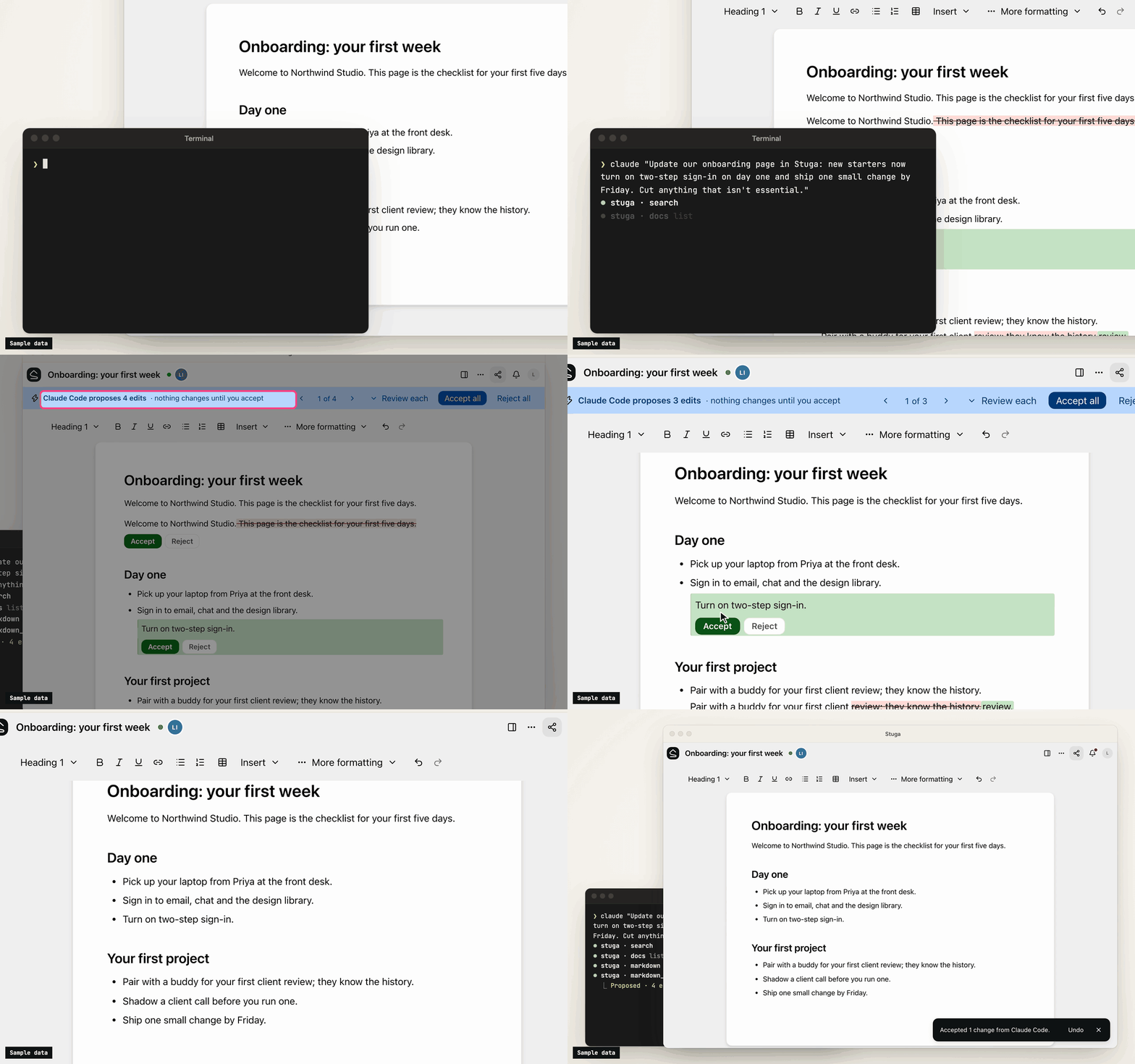
A team wiki of pages and tables, on a Mac or server you run. Say Save to Stuga to Claude, Codex or any MCP client, and it files each point on the right page or in the right table row. By default a change to the wiki waits for whoever asked the AI; set a folder to Reviewed by a colleague and someone else approves it. Ask Stuga answers from what is approved, and says what still waits.
Download for Mac (Apple silicon, macOS 15+) · Install with Docker
Install, then create your account and workspace and connect your AI. Help for people using Stuga: stuga.dev/docs.
How the wiki stays right
- Save to Stuga. Your AI finds the page and section a point belongs in, or the row a fact fills, and corrects the sentence it changes rather than adding another. It cites the meeting or email a point came from, and tells you what it saved where and what waits. A point no page is about starts a page in the folder it belongs in, or goes in your own My notes.
- Three review levels. In Who reviews AI edits…, a folder, page or database is Reviewed by whoever asked the AI (the default), Reviewed by a colleague (someone else who can edit it, from the folder's approver group if it names one, never the person who asked), or AI edits apply directly (recorded, attributed and revertible). People's own edits go straight in.
- One card per change. Filing a meeting across several pages is one change, reviewed on one card laid out for a phone: each edit in its paragraph, with the sources it cites. Approve all, Ask for changes… or Decline… with a note the AI reads. A folder can post each change that waits for a colleague to a Slack channel.
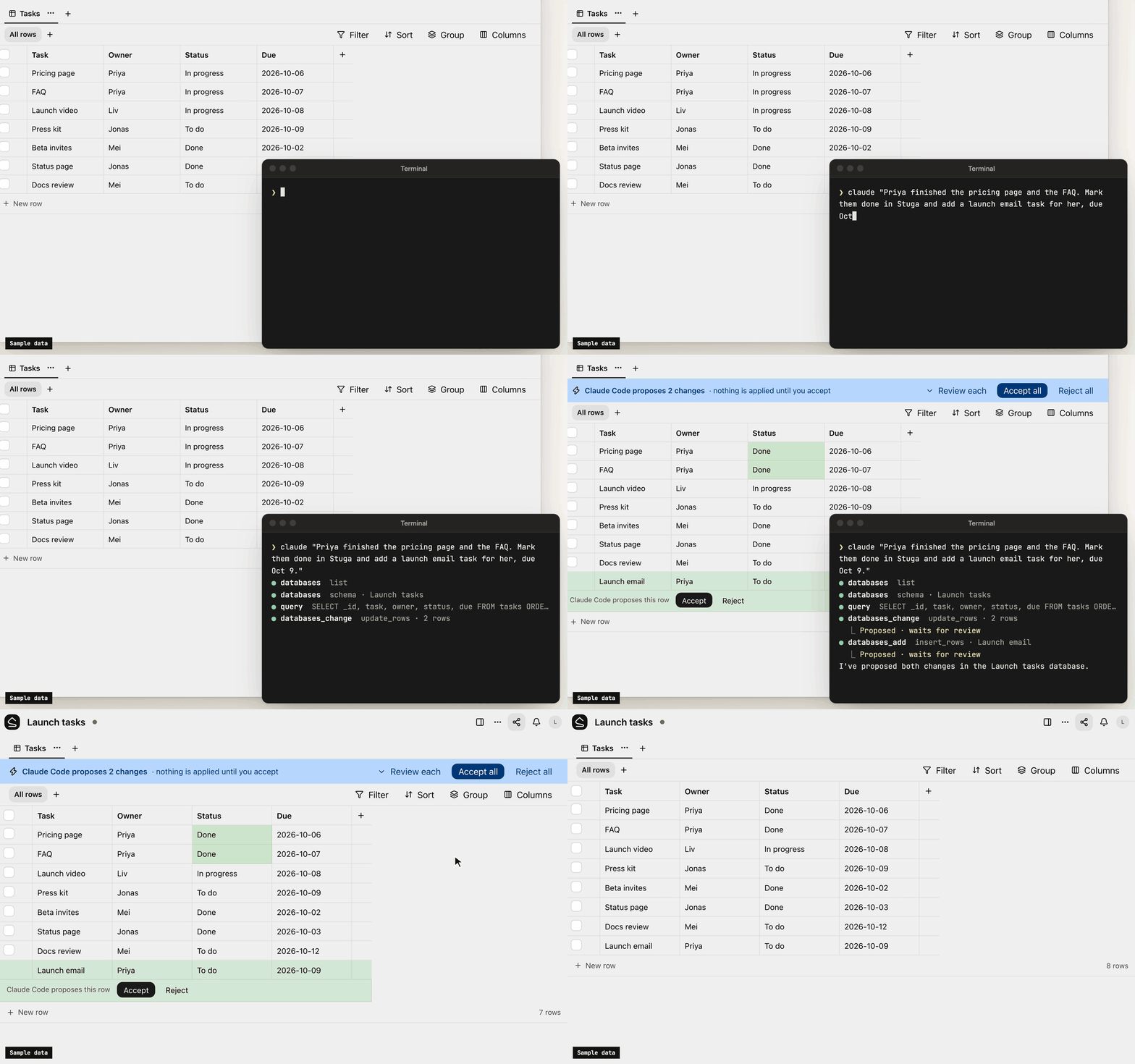
- Ask Stuga. Your AI answers from the pages and tables, with who last changed each one and when, and what waits: "the page says 14 days; a change to 30 days waits for a colleague".
- Check Stuga. Linked from under each page, Needs checking when a page it cites changes, and Wiki → Index and Wiki → Log. Say Check Stuga and your AI finds stale pages, orphans and broken links, and proposes the fixes as one change.
- Instructions that stack. The workspace, folders, pages and databases can each tell agents what goes where. They advise the model; permissions and review decide what a write does.
What's in it
- Pages written together. Real-time editing (Tiptap over a Yjs CRDT) with presence, comments, @mentions and version history.
- Tables beside the pages. Typed tables, each database its own SQLite file, with saved views, row pages and CSV import. Agents, Ask and the REST API run read-only SQL on them.
- Search that follows permissions. Keyword (BM25 over Postgres full-text search) and semantic (pgvector) search in one SQL statement, with access checked inside it. Chinese, Japanese, Korean and Thai work without setup.
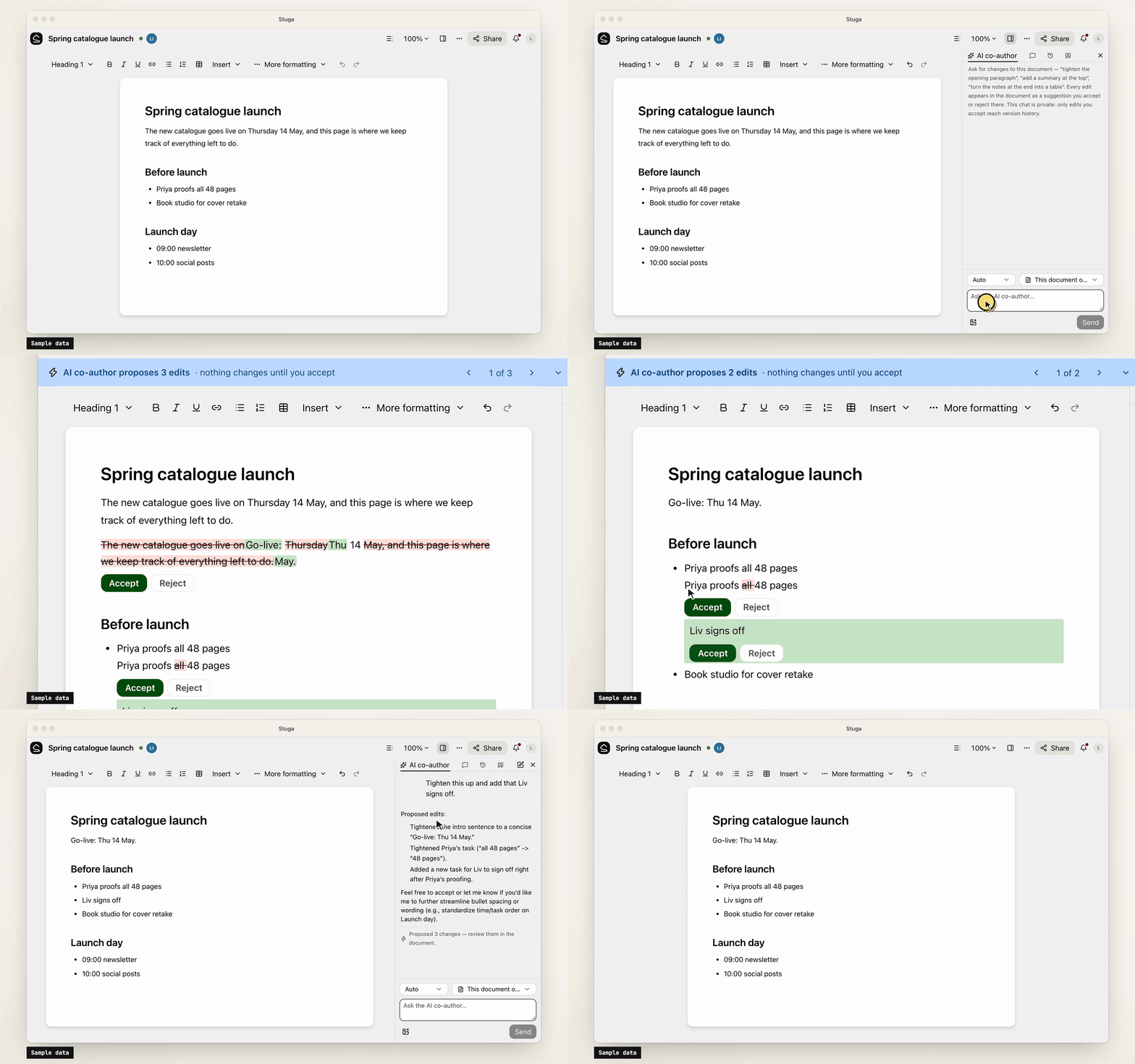
- Built-in AI, off until set up. A co-author and a table assistant, whose edits are reviewed like an agent's, and Ask, which cites sources. OpenAI, Anthropic, Gemini, DeepSeek and more, or Ollama.
- Sharing and sign-in. Workspaces, folders, per-page sharing, groups and guests. People join by invite link and sign in with a password or your OpenID Connect provider.
- Import and export. A Notion export, or a zipped Obsidian vault or folder of Markdown, becomes a
workspace; a workspace exports as one
.stuga.zipof Markdown, JSON Lines and its files.
Connect your AI
Agents connect over MCP. Settings → Your AI agents gives the setup for Claude Code, Claude Desktop, Codex, Antigravity, Cursor, VS Code, Kiro, Goose, LM Studio, DeepSeek Harness and Pi, with your node's address filled in, and the URL any other MCP client needs (docs/agents.md). Each agent brings its own model, so the node needs no AI key.
- Scoped sign-in. Most clients sign in through the browser, where you tick the workspaces an app may use and choose Read only or Read and suggest changes. Revoke ends its access.
- Narrow keys. A client without sign-in uses an API key, which can be confined to folders, made read-only or given an expiry.
- Content only. Agents change documents and databases. Renaming, moving, deleting, sharing and the review setting stay with people.
- Full audit. Every MCP call, reads included, is in the workspace's audit log. An event feed and signed webhooks report what changed.
Your data
Stuga sends no telemetry, and nothing reaches us unless a node admin turns on remote access. The node makes outbound requests only for features in use, such as an AI provider, and asks GitHub once a day for the list of releases unless a node admin turns that off. docs/privacy.md lists what the node sends and stores.
Install
-
A Mac with Apple silicon, on macOS 15 or later: open the package, or
Stuga-<version>.pkgfrom the latest release. It carries its own Postgres and Node.js (docs/install/macos.md). -
Docker on x86-64 or arm64, such as a Linux server or a NAS:
install.shstarts Postgres and the node with Compose (docs/install/docker.md):curl -fsSL https://github.com/stuga-dev/stuga/releases/latest/download/install.sh | bash
A node is one Node.js process and Postgres with pgvector; people open it in a browser. It backs itself up every day by default and before every upgrade (docs/operations.md). docs/getting-started.md walks through the first hour.
Questions and feedback
Ask a question or share an idea in Discussions; report a bug as an issue.
Contributing
Issues and pull requests are welcome. CONTRIBUTING.md covers running Stuga from source, the tests and the conventions, and RELEASING.md how a release is cut. Contributions are accepted under a Contributor License Agreement (CLA.md); a bot asks on your first pull request. Report a vulnerability privately, as SECURITY.md describes.
License
AGPL-3.0-only, except integrations/, which is MIT; copyright notice in NOTICE. If you modify Stuga and offer it to others over a network, you share your changes under the same terms. The name and logo are not covered by the license: TRADEMARKS.md says how you may use them.
Stuga MCP soruları
Stuga MCP'yi Claude Code'a nasıl eklerim?
Terminalinizde claude mcp add --env 'STUGA_URL=<STUGA_URL>' stuga -- npx -y @stuga/mcp komutunu çalıştırın. Her projede kullanılabilir olması için --scope user ekleyin.
Stuga MCP'yi Cursor'a nasıl eklerim?
~/.cursor/mcp.json dosyasını açın ve yukarıdaki yükleme bölümünde gösterilen Cursor yapılandırmasını kullanarak sunucuyu mcpServers altına ekleyin.
Yapay zeka wiki içeriğini nasıl günceller?
Yapay zeka güncellenecek doğru sayfayı, bölümü veya tablo satırını bulur ve sadece yeni bilgiler eklemek yerine mevcut cümleleri düzeltir.
Sunucunun kendi yapay zeka anahtarına ihtiyacı var mı?
Hayır, her agent kendi modelini getirdiği için node için ayrı bir yapay zeka anahtarı gerekmez.
Mevcut notlarımı nasıl içe aktarabilirim?
Bir Notion dışa aktarımını veya zıplanmış bir Obsidian vault/Markdown klasörünü bir çalışma alanına içe aktarabilirsiniz.