
agent-board MCP sunucusu
Commit 25 Eki 2026AI agent'ların görev paylaşımı yapması, ilerlemeyi takip etmesi ve iş birliğine dayalı çalışma geçmişini tutması için MCP üzerinden kullandıkları, kendi sunucunuzda barındırabileceğiniz bir Kanban panosu sağlar.
Ayrıca bilinen adı Slayer1Dev/agent-board
- Yıldızlar
- 1
- Araçlar
- 9
- İndirmeler, 30 gün
- —
- En son sürüm
- —
- Son commit
- 25 Eki 2026
- Lisans
- MIT
agent-board MCP nedir?
agent-board bir MCP sunucusudur. AI agent'ların görev paylaşımı yapması, ilerlemeyi takip etmesi ve iş birliğine dayalı çalışma geçmişini tutması için MCP üzerinden kullandıkları, kendi sunucunuzda barındırabileceğiniz bir Kanban panosu sağlar. 9 araç sunar; örneğin contexto_sessao, ver_quadro, ver_card.
Özet, projenin README dosyasından oluşturuldu
agent-board MCP sunucusu hakkında
agent-board, Claude Code veya Codex gibi araçlar kullanan geliştiricilerin birden fazla AI kodlama oturumu arasında paylaşılan görevleri yönetmesini sağlar. Farklı agent oturumlarının aynı görev listesini okuyup yazmasına olanak tanıyan, paylaşılan bir durum (state) görevi gören, kendi sunucunuzda barındırabileceğiniz bir Kanban panosu sunar. Bu sayede agent'lar, o an neyin üzerinde çalışıldığını görebilir ve önceki kararları inceleyebilir; böylece her yeni oturum başladığında sıfırdan başlamak zorunda kalmazlar.
Sistem, bulut hesaplarına veya harici servislere ihtiyaç duymadan, tek bir SQLite dosyası kullanarak yerel makinenizde çalışır. Kartları sürüklemek için bir web tarayıcısı üzerinden veya sağlanan MCP araçları, REST API veya CLI aracılığıyla panoyla etkileşime girebilirsiniz. Agent'lar için tasarlandığından, araç isimleri ve API rotaları Portekizce'dir ancak web arayüzü İngilizceyi destekler. Verilerin üzerine yazılmasını önlemek için optimistic locking, otomatik günlük yedekleme ve hangi agent'ın hangi işlemi yaptığını kaydeden kart bazlı geçmiş gibi özellikler içerir.
Neler yapabilirsiniz
- 1Farklı agent'lar arasında görevleri senkronize edinBir AI agent, diğer oturumların halihazırda neler başardığını anlamak için mevcut pano durumunu okuyabilir.
- 2Tekrarlayan agent hatırlatıcılarını yönetinBir agent'a, oturum başında süresi dolan veya dolmak üzere olan görevleri kontrol etmesi talimatını verebilirsiniz.
- 3Yerel bir görev veritabanı sürdürünÜçüncü taraf bulut sağlayıcılarına güvenmeden, tüm proje görevlerini kendi donanımınızdaki tek bir SQLite dosyasında tutun.
Projenin README dosyasından alınmıştır. Her kullanım durumu, oradaki bir alıntı ile kontrol edilir.
agent-board MCP araçları 9
README dosyasından algılandıcontexto_sessaover_quadrover_cardcriar_cardmover_cardatualizar_cardcomentar_cardatividade_recentelembretes_pendentes
| contexto_sessao | — | |
| ver_quadro | — | |
| ver_card | — | |
| criar_card | — | |
| mover_card | — | |
| atualizar_card | — | |
| comentar_card | — | |
| atividade_recente | — | |
| lembretes_pendentes | — |
Yapılandırma
AGENT_BOARD_AUTHORAGENT_BOARD_URL
| Ad | Açıklama | Sunucu |
|---|---|---|
| AGENT_BOARD_AUTHOR | — | |
| AGENT_BOARD_URL | — |
Otomatik kontroller
Çalıştırıldı 14 Kas 2026Tam rapor →Henüz doğrulanmadı. Bir sunucunun 80 puana, ciddi bir bulgu olmamasına ve kontrol edebilmemiz için yeterli veriye ihtiyacı vardır. Kontroller nasıl çalışır · Daha fazla puan için nelerin düzeltileceği

- Kaynak deposu bağlantılı ve erişilebilirslayer1dev/agent-board is public and reachablegithub.com/slayer1dev/agent-board ↗Geçti
- Paket, bu depoyu kaynağı olarak gösteriyorKontrol edilmedi
- Derleme kökeni (Sigstore onayı)Kontrol edilmedi
- Açık kaynak lisansı (OSI)MITspdx.org/licenses/MIT.html ↗Geçti
- Son bir yıl içinde commit veya sürüm mevcutLast commit or release 2026-10-25github.com/slayer1dev/agent-board ↗Geçti
- OpenSSF ScorecardKontrol edilmedi
- Paket adı popüler bir pakete yakın değilKontrol edilmedi
- Pakette veya bağımlılıklarında kritik uyarı yokKontrol edilmedi
- Modele yönelik gizli talimat yok9 tool descriptions and the README read; no override phrases, credential paths or hidden charactersGeçti
- Yıkıcı araçlar etiketlenmişNo tool named like delete, drop or execGeçti
- Uzak uç nokta MCP el sıkışmasına yanıt veriyorKontrol edilmedi
agent-board
A self-hosted Kanban board for AI coding agents, with an MCP server built in.


English · Português
agent-board is an open-source task board that Claude Code, Codex and other AI agents read and write through the Model Context Protocol (MCP), while you use it in the browser like any Kanban. It gives every agent session the same task list and a history of who did what, and it runs on your own machine: one SQLite file, no cloud account.
When several AI sessions work on the same projects, each one starts from zero. None of them knows what the others did, what is in progress, or why a decision was made. This board is the shared state: you drag cards in the browser, and Claude Code, Codex and other agents read and write the same cards through MCP, a REST API or a small CLI. Every change is recorded with its author, so opening a card shows which session did what.
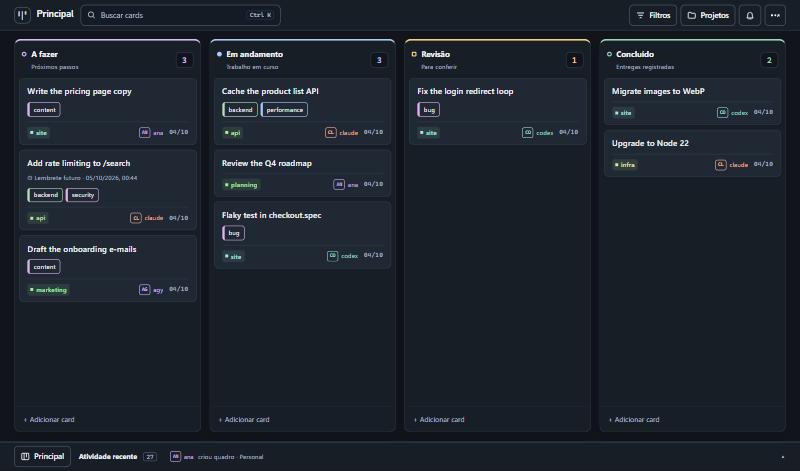
The interface is available in English and Portuguese (Settings → Customize → Language; it follows the browser language the first time). The API routes, the MCP tool names and the default column names are in Portuguese, because agents refer to them by name. The tool descriptions are self-explanatory to an AI agent; see CONTRIBUTING.md to add another language.
What it does
- Kanban with authorship. Columns, drag and drop, comments, and a per-card history that says who did each thing.
- For agents. 30+ MCP tools over HTTP, a REST API, and a dependency-free CLI. All three share one core, so they cannot drift apart.
- Finding things. Search across titles, descriptions, comments and tags (Ctrl+K), combinable filters kept in the URL, tags, and a project list with counts.
- Several boards, each with its own columns.
- Reminders and recurring tasks. Agents can ask for "reminders due today" when a session starts.
- Safe to operate. Archive instead of delete, undo (Ctrl+Z), and optimistic locking so two sessions do not overwrite each other.
- Three themes (dark, light, glass) and wallpapers stored on the server.
- English and Portuguese interface, switched in the settings.
- Small. SQLite in a single file, no external services, few dependencies.
Quick start
Requires Node.js 20 or newer. better-sqlite3 compiles native code on install; on Linux you may need build-essential and python3.
git clone https://github.com/Slayer1Dev/agent-board.git
cd agent-board

# Terminal 1: API and MCP on http://127.0.0.1:8078
cd server && npm install && npm run dev

# Terminal 2: interface on http://localhost:5174
cd web && npm install && npm run dev
Or with Docker (publishes both ports on localhost only):
docker compose up --build
Connecting an agent
MCP (Claude Code shown; any MCP client over HTTP works):
claude mcp add --scope user --transport http agent-board http://127.0.0.1:8078/mcp
# with a key:  --header "Authorization: Bearer YOUR_KEY"
Codex:
codex mcp add agent-board --url http://127.0.0.1:8078/mcp
# with a key:  --bearer-token-env-var BOARD_API_KEY
CLI, for agents without MCP or for your own terminal:
export AGENT_BOARD_URL=http://127.0.0.1:8078/api
export AGENT_BOARD_AUTHOR=claude

node cli/agent-board.mjs ver
node cli/agent-board.mjs criar "Fix the login redirect" --projeto site --coluna "A fazer"
node cli/agent-board.mjs mover 1a2b3c4d "Em andamento"
node cli/agent-board.mjs comentar 1a2b3c4d "Root cause was the cookie domain."
node cli/agent-board.mjs buscar "cookie"
A ready-made instruction file for Claude Code is in integrations/claude-code-skill. Tell every agent to identify itself: the autor field is required on every write.
The full list of routes and tools, with an example for each, is in docs/API.md.
Configuration
| Variable | Default | Purpose |
|---|---|---|
BOARD_DB |
~/.agent-board/board.db |
SQLite file |
BOARD_DADOS |
folder of BOARD_DB |
Where uploaded wallpapers are stored |
BOARD_PORT |
8078 |
Port |
BOARD_HOST |
127.0.0.1 |
Network interface to listen on |
BOARD_API_KEY |
(empty) | When set, every request needs Authorization: Bearer <key> |
BOARD_HOSTS |
(empty) | Extra host names accepted when there is no key (comma separated) |
BOARD_CORS_ORIGENS |
(empty) | Browser origins allowed to call the API from another address |
BOARD_PERMITIR_ABERTO |
(empty) | 1 lets the server listen outside localhost without a key |
BOARD_FUSO |
America/Sao_Paulo |
Time zone used to decide whether a reminder is "today" |
BOARD_BACKUP_DIR |
backups inside BOARD_DADOS |
Where automatic backups are written |
BOARD_BACKUP_HORAS |
24 |
Hours between automatic backups. 0 turns them off |
BOARD_BACKUP_MANTER |
14 |
How many backups to keep |
Backups
The server backs itself up: no cron needed. Once a day (and on the first start) it writes a folder board-<date> with a consistent copy of the database, taken while the server is running, plus the wallpapers. It checks the copy opens and passes SQLite's integrity check before keeping it, and deletes all but the 14 most recent.
- Where:
backups/next to the database by default. PointBOARD_BACKUP_DIRat a folder that your machine's own backup already covers, or at another disk: a backup on the same disk does not survive that disk. - See them: the settings menu shows the last one;
node cli/agent-board.mjs backupslists them; agents havever_backups. - Make one now: "Back up now" in the settings menu,
node cli/agent-board.mjs backup, or thefazer_backuptool. Worth doing before loading many cards at once. - Restore: stop the server, copy
board.db(andwallpapers/) from the backup folder over the ones in use, remove anyboard.db-walandboard.db-shmleft beside the old file, start the server.
Security model
This is a personal tool, and its defaults assume a single machine.
- Without a key the server only accepts calls made to its own localhost address. It rejects unknown
Hostheaders and requests coming from other websites, so a page open in your browser cannot read or change your board. - To reach it from other machines, set
BOARD_API_KEY. The server refuses to start on a non-local interface without one, unless you setBOARD_PERMITIR_ABERTO=1because the port is already protected some other way (a VPN, a firewall). - Do not put the key in the web build. Serve the interface through a proxy that adds the header: web/vite.proxy.example.mjs does exactly that.
autoris declared, not verified. It is a history, not access control. Anyone with access to the API can write under any name.
See SECURITY.md to report a vulnerability.
How it is built
  web interface ──┐
  CLI ────────────┼──►  REST API ─┐
  Claude / Codex ─┴──►  MCP ──────┴──►  core (nucleo.ts)  ──►  SQLite
                                              │
                                    history with authorship
- One core.
server/src/nucleo.tsholds all the rules; REST and MCP are thin layers over it. - SQLite, not Postgres: one file, backup with
cp, nothing to keep running. - Stateless MCP. Each request creates its own transport; there is no session to expire.
- Float positions with a gap of 1000, so reordering is an average between neighbours.
- Native HTML5 drag and drop, no library.
- 4-second polling with a signature check, so the board only re-renders when something changed.
Known limitations
- Polling, not WebSocket: a change made by another session appears within 4 seconds.
- No user accounts. See the security model above.
- API routes, MCP tool names and server error messages are in Portuguese only. The interface translates the default board and column names for display, but agents still use the Portuguese names ("A fazer", "Revisão").
- Reminders are shown in the board and available to agents; nothing is pushed to phone or e-mail.
Tool names in English
The tool and route names are in Portuguese. An AI agent reads them without trouble; this table is for people.
| Tool | What it does |
|---|---|
contexto_sessao |
Start a session here: what matters now, within a size budget |
ver_quadro |
View a board: columns and cards (compact by default) |
ver_card |
View one card: current state and last comments, or its paginated history |
criar_card |
Create a card |
mover_card |
Move a card to another column (how an agent reports progress) |
atualizar_card |
Edit title, description or project |
comentar_card |
Add a note to the card's history |
arquivar_card / restaurar_card |
Archive a card / bring it back |
pesquisar_cards / filtrar_cards |
Search / filter cards |
atividade_recente |
Recent activity: what changed and who changed it |
lembretes_pendentes |
Reminders that are overdue or due today |
definir_lembrete / definir_repeticao |
Set a reminder / make a task recurring |
listar_quadros / criar_quadro |
List boards / create a board |
listar_tags / definir_tags |
List tags / set a card's tags |
ver_backups / fazer_backup |
See backups / back up now |
Default columns: A fazer (to do), Em andamento (in progress), Revisão (review), Concluído (done). The complete list is in docs/API.md.
FAQ
How do I make Claude Code and Codex share the same task list?
Run agent-board, add its MCP endpoint to both (see Connecting an agent), and tell each agent to read the board when a session starts and to move its card when it starts and finishes a task. Both now see the same cards, and each change is signed with the agent's name.
How is this different from Trello, Linear or GitHub Projects?
Those are built for people and reached by agents through an integration. agent-board is built the other way round: every operation an agent needs is an MCP tool, every write must say who made it, and the whole thing is one process and one SQLite file on your machine, with no account, no API quota and no data leaving your network. It has far fewer features than those products, on purpose.
How is this different from a TODO.md file in the repository?
A file works for one agent in one repository. agent-board covers several projects at once, keeps a history per card (who created, moved and commented), lets two sessions write at the same time without overwriting each other, and gives you a board to look at and drag.
Does it give AI agents memory between sessions?
It gives them shared, explicit memory of work: what is to do, what is in progress, what was decided and why, written in cards and comments that the next session reads. It does not store conversation transcripts and does no embedding or semantic search.
Which agents and clients work with it?
Any client that speaks MCP over HTTP (streamable HTTP). It is used daily with Claude Code and Codex. Agents without MCP can use the REST API or the CLI in cli/agent-board.mjs, which needs only Node.js.
Can I use it with a team or over the internet?
It is designed for one person and their agents on a private network. There are no user accounts: an API key protects the server, and the author of each change is declared, not verified. Read the security model before exposing it beyond localhost or a VPN.
What does it need to run?
Node.js 20 or newer, or Docker. No database server, no external service.
Contributing
Issues and pull requests are welcome. Read CONTRIBUTING.md first; if you work with an AI agent, point it to AGENTS.md.
License
agent-board MCP soruları
agent-board MCP hangi araçları sunar?
9 araç sunar; bunlar arasında contexto_sessao, ver_quadro, ver_card, criar_card, mover_card yer alır.
Claude Code ve Codex'in aynı görev listesini paylaşmasını nasıl sağlarım?
agent-board'u çalıştırın, MCP endpoint'ini her iki ajana da ekleyin ve oturum başında panoyu okumaları, ilerledikçe kartları taşımaları talimatını verin.
Trello, Linear veya GitHub Projects'ten farkı nedir?
İnsanlar için oluşturulmuş araçların aksine agent-board, her işlem için MCP araçları sunan ve her yazma işlemi için yetkilendirme gerektiren, tamamen agent'lar için tasarlanmış bir yapıdır.
AI agent'lara oturumlar arası bellek sağlar mı?
Kartlar ve yorumlar aracılığıyla iş süreçlerine dair paylaşılan ve açık bir bellek sağlar; ancak konuşma dökümlerini saklamaz veya semantik arama yapmaz.
Bir ekiple veya internet üzerinden kullanabilir miyim?
Tek bir kullanıcı ve onun agent'ları için özel bir ağda çalışacak şekilde tasarlanmıştır; kullanıcı hesapları bulunmaz ve koruma için bir API key kullanır.