
ArchScript MCP sunucusu
Commit 11 Kas 2026ArchScript for Mac uygulamasında architecture-as-code yaklaşımını kullanarak bir AI istemcisinin yazılım mimarisi diyagramlarını planlamasına, düzenlemesine ve incelemesine olanak tanır.
Ayrıca bilinen adı schlummer13/archscript-mcp, archscript-mcp
- Yıldızlar
- 0
- Araçlar
- —
- İndirmeler, 30 gün
- —
- En son sürüm
- 1.0.0
- Son commit
- 11 Kas 2026
- Lisans
- MIT
ArchScript MCP nedir?
ArchScript bir MCP sunucusudur. ArchScript for Mac uygulamasında architecture-as-code yaklaşımını kullanarak bir AI istemcisinin yazılım mimarisi diyagramlarını planlamasına, düzenlemesine ve incelemesine olanak tanır.
Özet, projenin README dosyasından oluşturuldu
ArchScript MCP sunucusu hakkında
ArchScript MCP; Claude Desktop ve Claude Code gibi AI istemcilerini ArchScript for Mac uygulamasına bağlar. Bir AI asistanının, architecture-as-code yaklaşımıyla yazılım mimarisini yönetmesini sağlar. Asistan, tüm dosyaları yeniden yazmak yerine; cluster, server ve container gibi öğeleri eklemek, yeniden adlandırmak veya taşımak için yapılandırılmış operasyonlar kullanır. Bu yöntem, mevcut yorumlarınızı ve biçimlendirmenizi korurken, oluşturulan diyagramda canlı güncellemeler sağlar.
Bu yalnızca yerel sunucuyu kullanmak için kullanıcıların macOS 14+ üzerinde ArchScript for Mac yüklü olması gerekir. Kurulum, kimlik doğrulama için kişisel bir erişim token'ı oluşturmak amacıyla uygulama içindeki AI asistanı ayarının etkinleştirilmesini gerektirir. Sunucu localhost üzerinde çalışır ve telemetri toplamaz, böylece mimari verilerinizin gizli kalmasını sağlar. Araç seti; modelleri kurallara göre doğrulamak, mimari puanlarını incelemek ve tasarımları Terraform, Mermaid veya PlantUML gibi formatlara aktarmak için özel fonksiyonlar içerir.
Neler yapabilirsiniz
- 1Otomatik Mimari İncelemesiBelirlenmiş mimari kuralların ihlal edilip edilmediğini tespit etmek için mevcut sistem tasarımınızı analiz etmesini AI'dan isteyin.
- 2Yinelemeli Sistem GenişletmeMevcut altyapınıza background worker veya belirli container'lar gibi yeni bileşenler eklemesi için asistana talimat verin.
- 3Altyapı Kodu OluşturmaGörsel mimari modelinizin bulut dağıtımı için işlevsel Terraform koduna dönüştürülmesini talep edin.
- 4Hızlı PrototiplemeBasit bir metin açıklamasından tam bir event-driven veya microservices mimarisi oluşturması için AI'yı kullanın.
Projenin README dosyasından alınmıştır. Her kullanım durumu, oradaki bir alıntı ile kontrol edilir.
Yapılandırma
ARCHSCRIPT_TOKENGerekliGizliAccess token from ArchScript → Settings → AI
| Ad | Açıklama | Sunucu |
|---|---|---|
| ARCHSCRIPT_TOKEN | Access token from ArchScript → Settings → AI | GerekliGizli |
Otomatik kontroller
Çalıştırıldı 14 Kas 2026Tam rapor →Henüz doğrulanmadı. Bir sunucunun 80 puana, ciddi bir bulgu olmamasına ve kontrol edebilmemiz için yeterli veriye ihtiyacı vardır. Kontroller nasıl çalışır

- Kaynak deposu bağlantılı ve erişilebilirschlummer13/archscript-mcp is public and reachablegithub.com/schlummer13/archscript-mcp ↗Geçti
- Paket bu depoyu kaynak olarak gösteriyorKontrol edilmedi
- Derleme kaynağı (Sigstore onayı)Kontrol edilmedi
- Açık kaynak lisansı (OSI)MITspdx.org/licenses/MIT.html ↗Geçti
- Son bir yıl içinde commit veya sürüm mevcutLast commit or release 2026-11-11github.com/schlummer13/archscript-mcp ↗Geçti
- OpenSSF ScorecardKontrol edilmedi
- Paket adı popüler bir pakete yakın değilKontrol edilmedi
- Pakette ve bağımlılıklarında kritik uyarı yokKontrol edilmedi
- Modele yönelik gizli talimat yok0 tool descriptions and the README read; no override phrases, credential paths or hidden charactersGeçti
- Yıkıcı araçlar etiketlenmişKontrol edilmedi
- Uzak endpoint MCP el sıkışmasına yanıt veriyorKontrol edilmedi
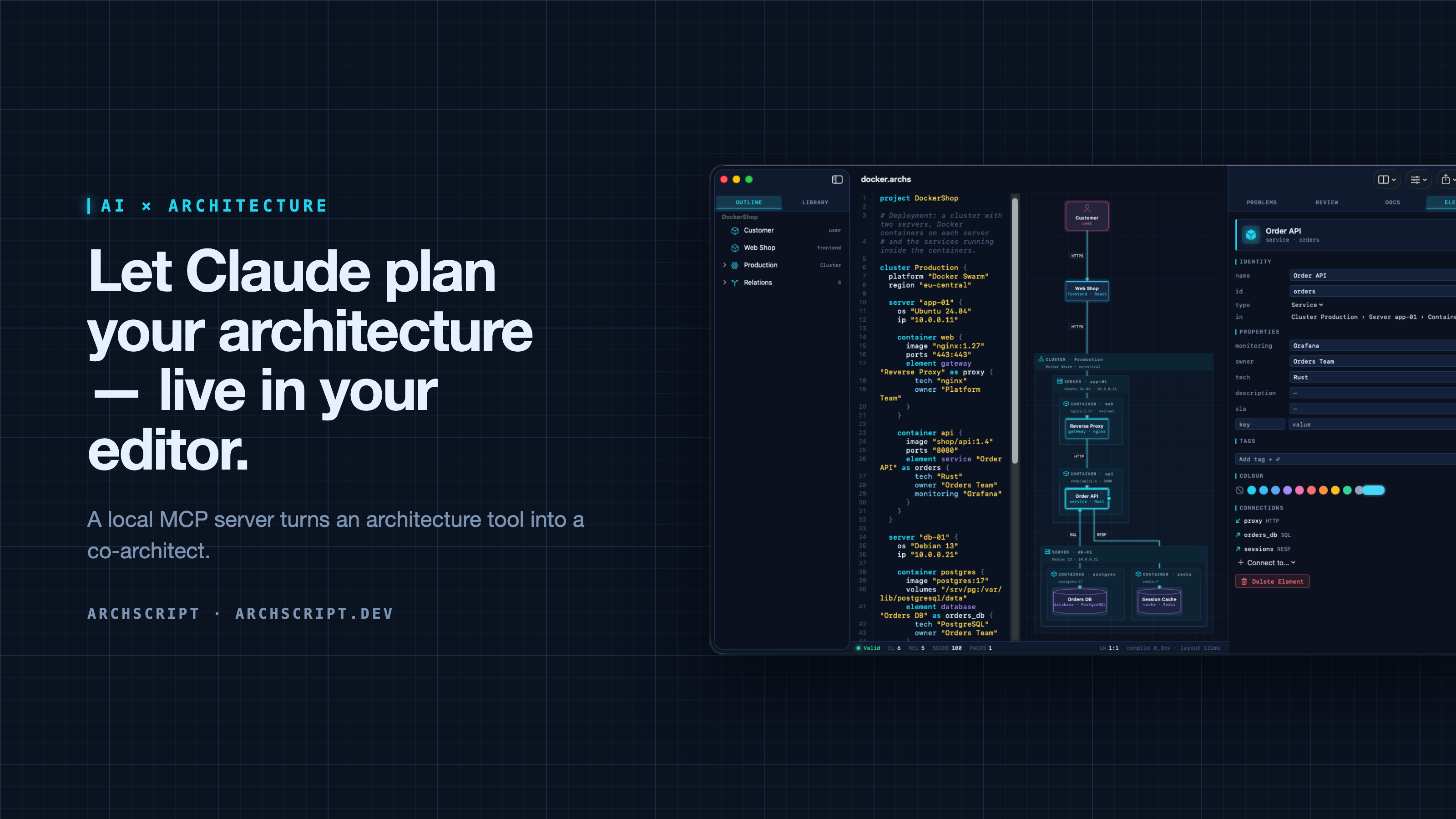
ArchScript is an architecture-as-code tool. You describe a system — domains, services, databases, queues, and deployments as cluster → server → Docker container — in a small language. ArchScript draws the diagram, checks the model against architecture rules and exports documentation, a PDF report, Mermaid, PlantUML and Terraform.
ArchScript for Mac includes an MCP server. Claude Desktop, Claude Code and other MCP clients can read the architectures you have open, change them with precise, structured edits, validate them and look at the rendered diagram. Every change appears live in the window and can be undone.
This repository contains the documentation, configuration examples, example models and a small open-source stdio bridge (
server/) for the ArchScript MCP server. ArchScript itself is a closed-source app, available on the Mac App Store. The browser Playground is free.
What Claude can do
| Tool | What it does |
|---|---|
archscript_guide |
Learns the language, element types and rules |
list_documents |
Lists the open documents (id, name, validity) |
get_document |
Reads a document with line numbers and a structure outline |
create_document |
Creates a new architecture from ArchScript source |
set_document_source |
Replaces a document's source |
edit_document |
Structured edits: add, rename, move and delete elements, relations and containers, and set properties, tags and colours |
validate |
Returns diagnostics |
review |
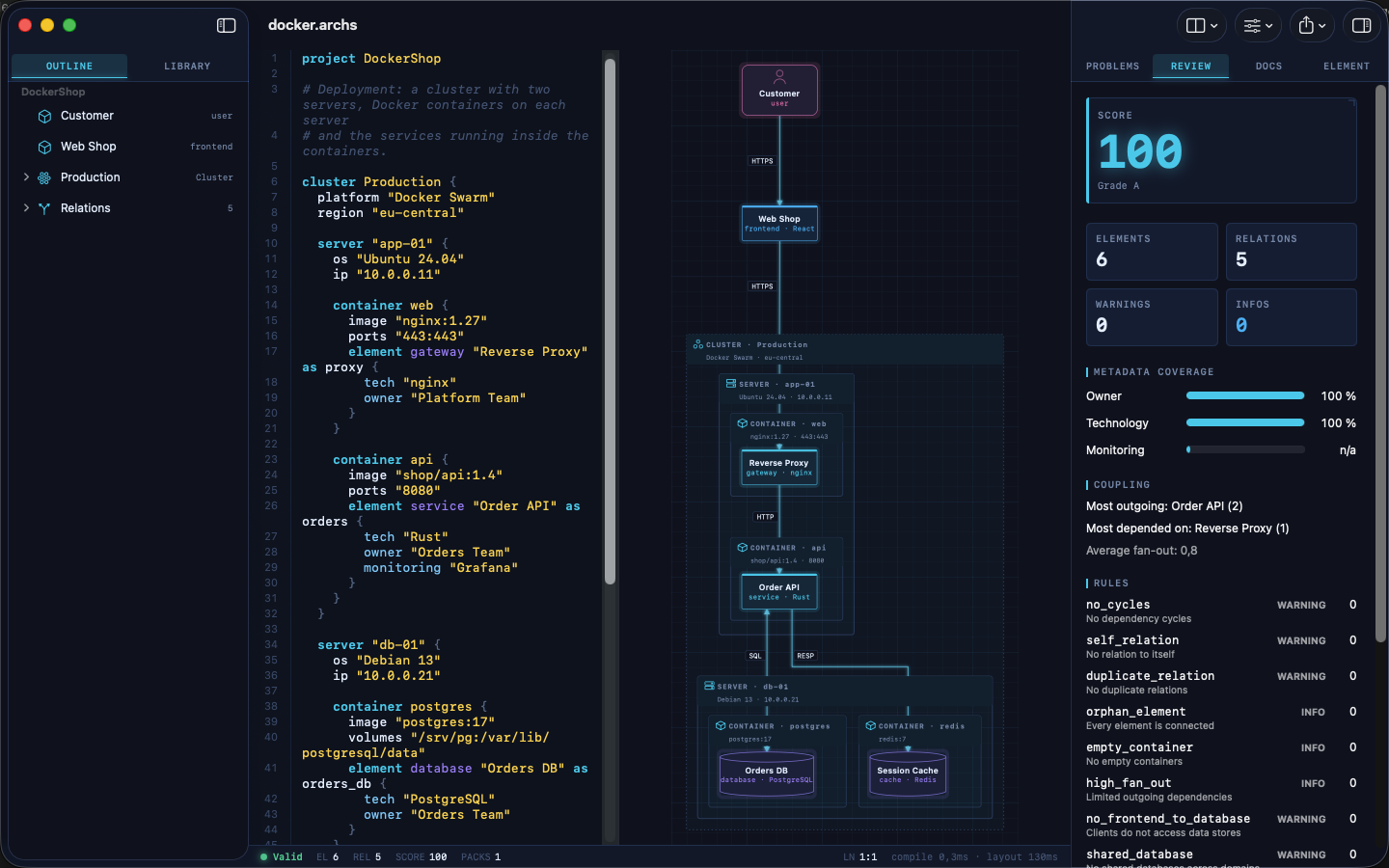
Returns the review score, grade and rule findings |
render_diagram |
Returns the diagram as an image, so the assistant can see the result |
export |
Exports Mermaid, PlantUML, Markdown, JSON or Terraform |
The assistant doesn't rewrite your file. It sends small operations (for example
add_element into cluster:Production/server:app-01/container:api). The
ArchScript core turns those into minimal text edits, so comments and formatting
stay intact. After each change the assistant gets the validation result and
review score back, the same feedback loop a human architect uses.
Example prompts
- "Read my architecture and tell me which rules it violates."
- "Add a background worker that sends order emails. Put it in its own container on app-01 and connect the Order API to it."
- "Create an event-driven architecture for a ticket shop with a payment provider and a read model."
- "Export the current model as Terraform for AWS and list what wasn't mapped."
Setup
Requirements: ArchScript for Mac (macOS 14+) with ArchScript Pro (14-day free trial).
- Open ArchScript → Settings → AI and turn on Allow AI assistants (MCP).
- Copy the snippet for your client from that screen. It already contains your personal access token.
Claude Desktop: one-click install (recommended)
- Download archscript.mcpb from the latest release.
- Double-click it, or drag it into Claude Desktop → Settings → Extensions.
- Paste the access token from ArchScript → Settings → AI.
The extension contains no ArchScript code. It holds a manifest and a small
launcher script (mcpb/server/archscript-mcp)
that finds ArchScript for Mac and starts its bundled helper.
Claude Code
claude mcp add --transport http archscript http://127.0.0.1:47621/mcp \
  --header "Authorization: Bearer <token from Settings → AI>"
Claude Desktop (manual)
Add the snippet to claude_desktop_config.json, then restart Claude:
{
  "mcpServers": {
    "archscript": {
      "command": "/Applications/ArchScript.app/Contents/MacOS/archscript-mcp",
      "args": ["--token", "<token from Settings → AI>", "--port", "47621"]
    }
  }
}
The bundled archscript-mcp helper bridges stdio to the app and starts
ArchScript when Claude needs it.
Other MCP clients
Any client that supports Streamable HTTP can connect to
http://127.0.0.1:47621/mcp with the header Authorization: Bearer <token>.
Clients that only support stdio can use the helper as shown above, or the
open-source Node bridge in server/ (Node 18+, no dependencies):
{
  "mcpServers": {
    "archscript": {
      "command": "node",
      "args": ["/path/to/archscript-mcp/server/index.js"],
      "env": { "ARCHSCRIPT_TOKEN": "<token from Settings → AI>" }
    }
  }
}
Privacy and security
- Local only. The server listens on
127.0.0.1and is never reachable from the network. - Token required. Every request needs your access token. You can regenerate it at any time in Settings → AI.
- Off by default. Nothing runs until you turn it on.
- No telemetry. ArchScript collects no data and sends nothing anywhere. Your AI client only sees what it reads through the tools.
- The helper is sandboxed and only forwards stdio to the local server.
Screenshots
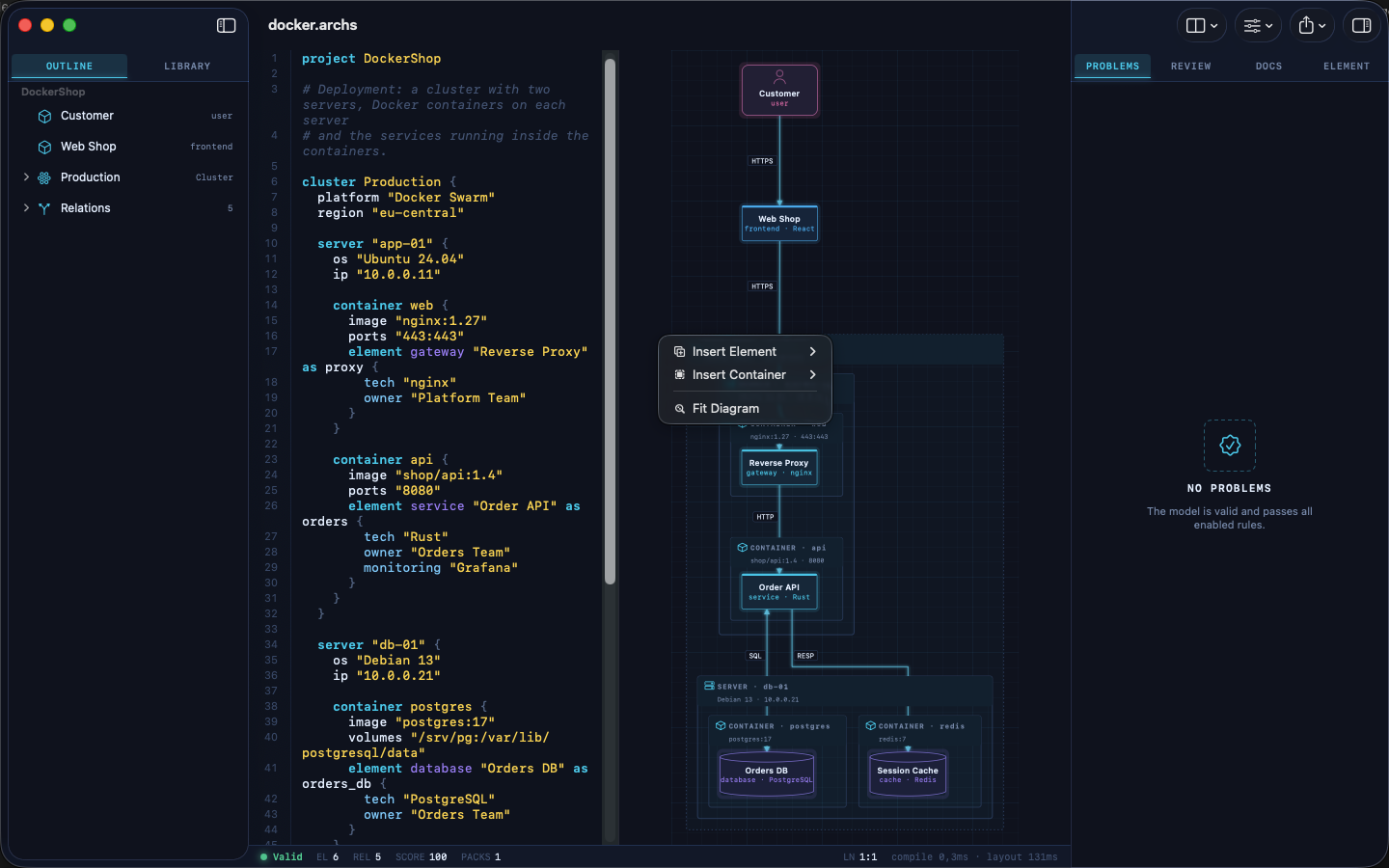
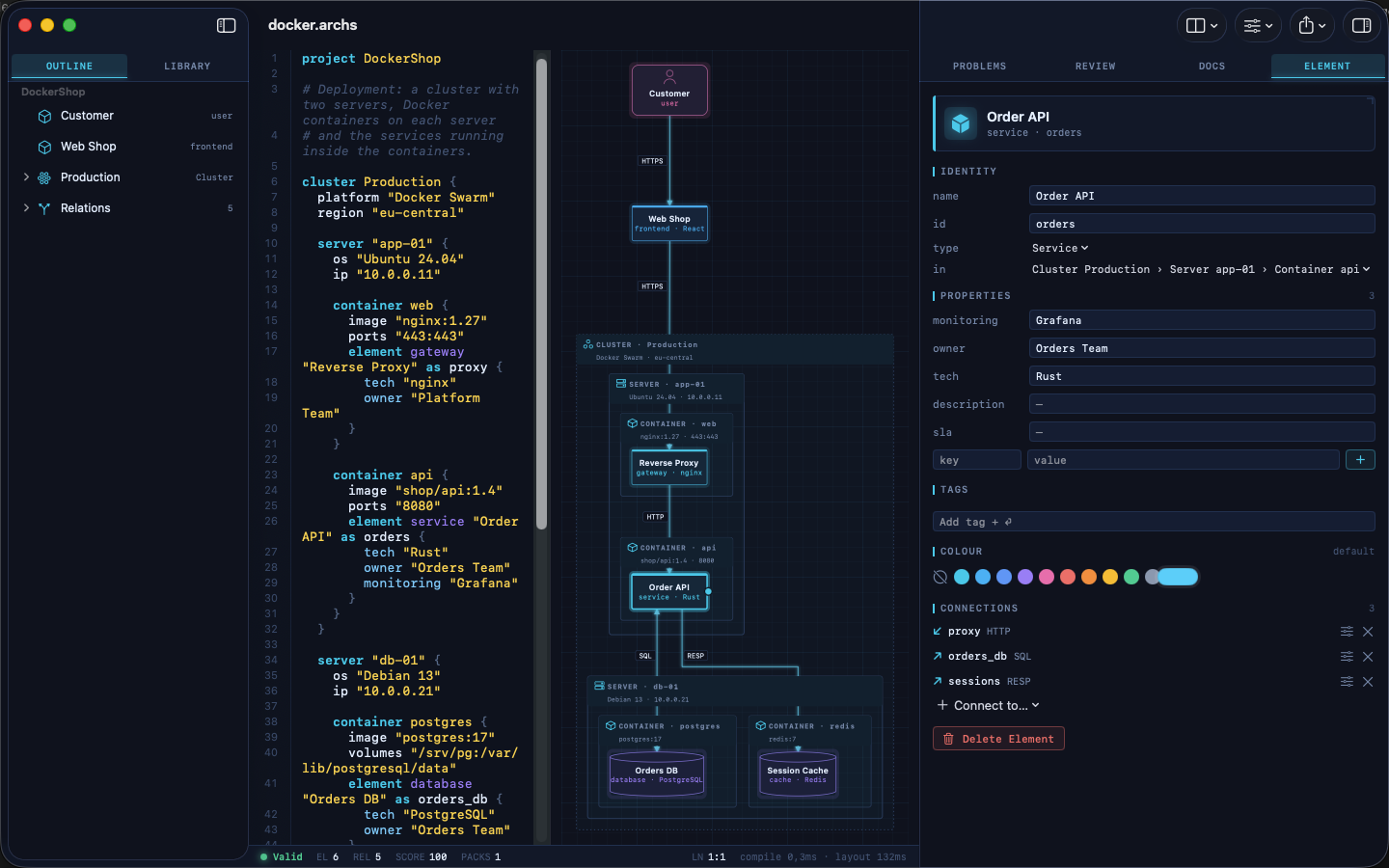
| Visual editing | Review and rules |
|---|---|
 |
 |
| Inspector | Element library |
 |
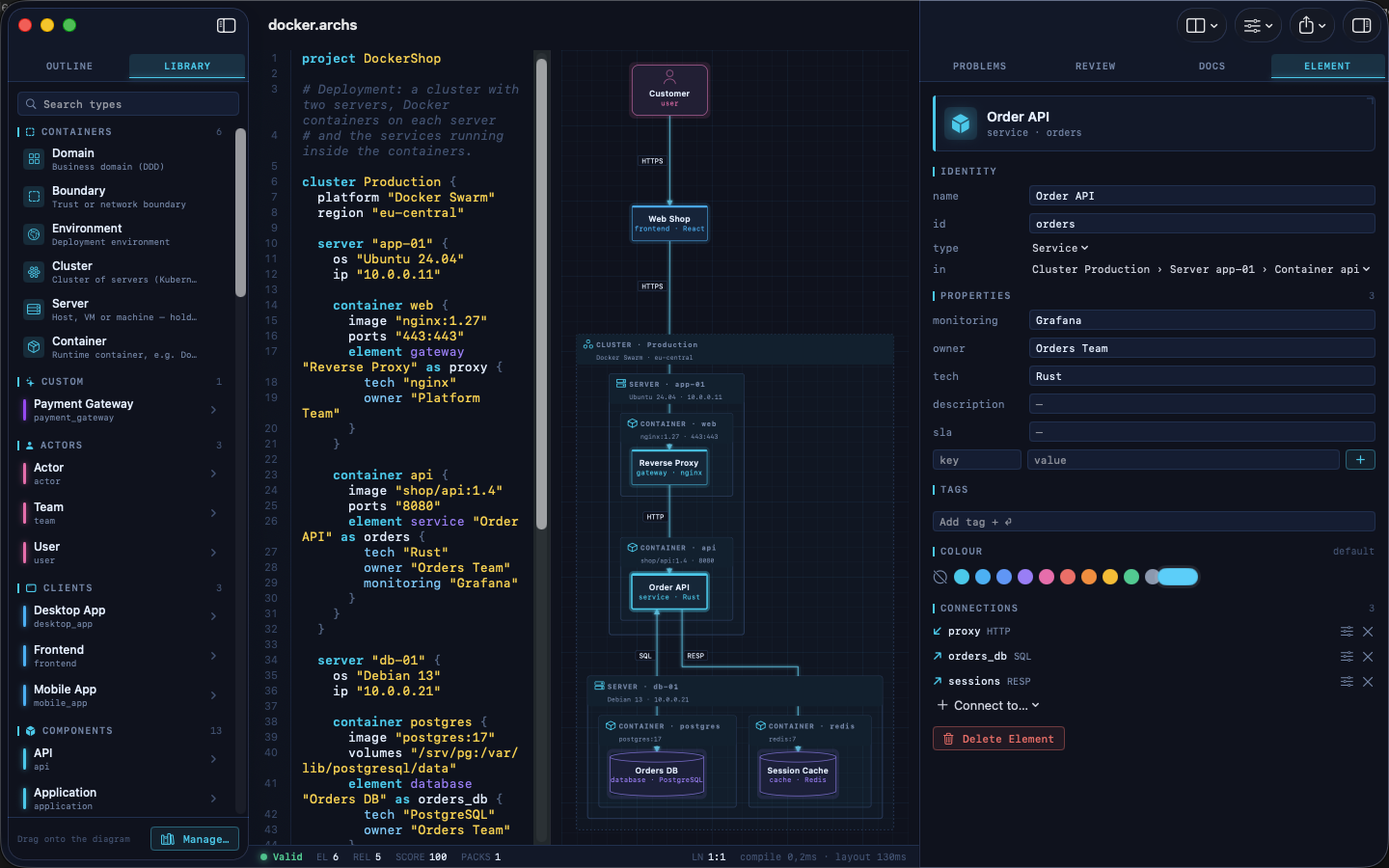 |
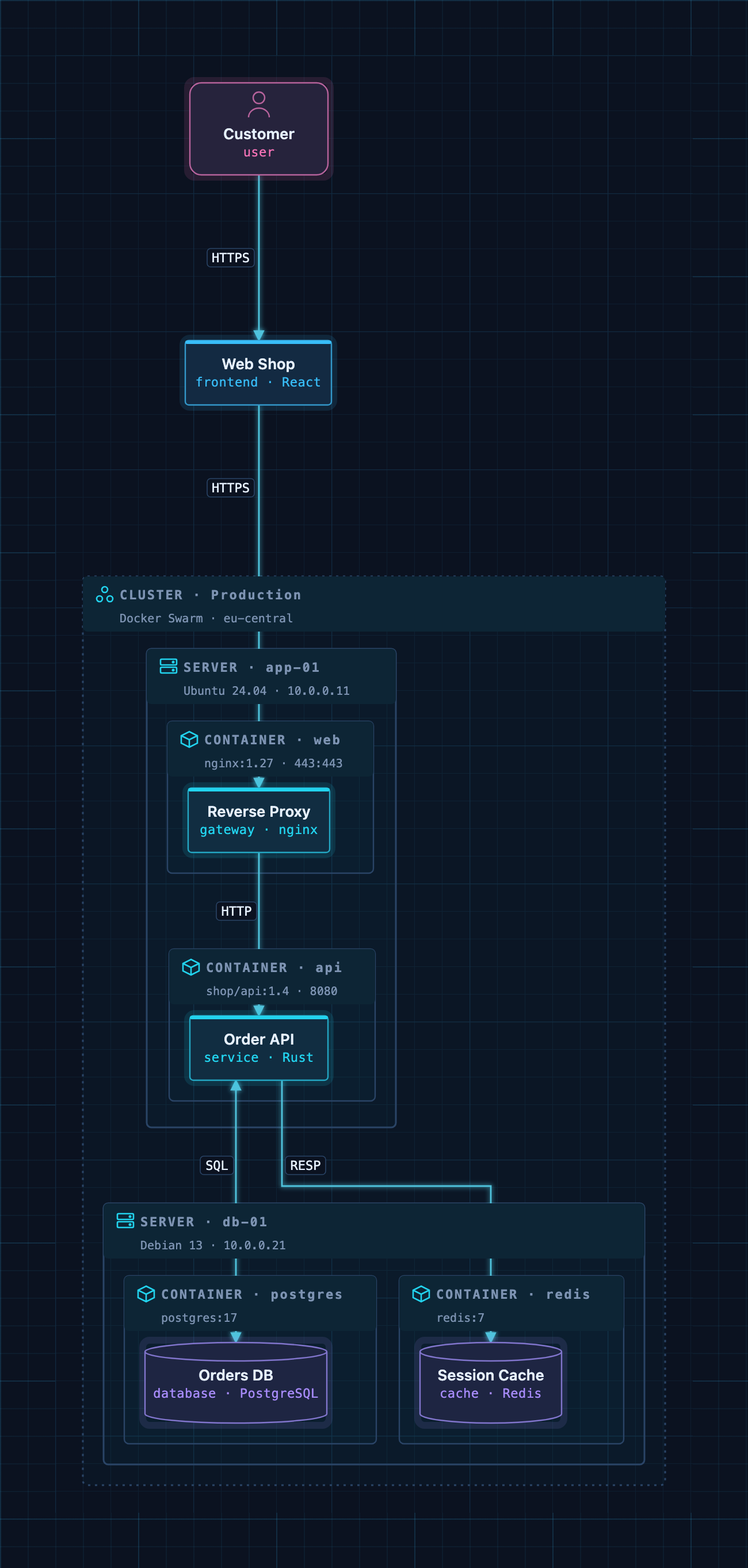
A Docker deployment as code: cluster → servers → containers → services.
Example models
The examples/ folder contains ready-to-use architectures. Open one
in ArchScript for Mac, or paste it into the
Playground:
| File | Architecture |
|---|---|
basic.archs |
The smallest useful model |
customer-management.archs |
One domain with web app, API and database |
webapp.archs |
Classic web application with boundaries |
microservices.archs |
Services with their own databases and an event bus |
ddd.archs |
Bounded contexts (domain-driven design) |
event.archs |
Event-driven, CQRS-style flow |
saas.archs |
Production SaaS with gateway and identity provider |
docker.archs |
Docker Swarm cluster, servers and containers |
A taste of the language:
project DockerShop

cluster Production {
  platform "Docker Swarm"

  server "app-01" {
    container api {
      image "shop/api:1.4"
      element service "Order API" as orders { tech "Rust"; owner "Orders Team" }
    }
  }
}

element frontend "Web Shop" as shop
relation shop -> orders : HTTPS
The full language reference is at archscript.dev/docs.
Feedback
Found a bug in the MCP integration or have an idea for a tool? Please open an issue. Feature requests for ArchScript itself are welcome too.
License
The documentation, configuration snippets, example models and the bridge in
server/ are available under the MIT License. ArchScript for Mac and the
ArchScript core are proprietary software.
ArchScript MCP soruları
Claude, ArchScript ile neler yapabilir?
Claude açık mimarileri okuyabilir, öğe ekleme veya yeniden adlandırma gibi yapılandırılmış düzenlemeler yapabilir, modelleri kurallara göre doğrulayabilir, mimari puanlarını inceleyebilir ve diyagramları Terraform veya Mermaid gibi formatlara aktarabilir.
ArchScript MCP server kullanırken verilerim gizli mi kalır?
Evet, sunucu yalnızca yerel çalışır, 127.0.0.1 üzerinden dinleme yapar, telemetri toplamaz ve verileri hiçbir yere göndermez.
Kurulum için sistem gereksinimleri nelerdir?
macOS 14+ üzerinde çalışan ArchScript Pro yüklü bir ArchScript for Mac uygulamanızın olması gerekir.