
Görevleri, notları ve belgeleri diskinizdeki Markdown dosyaları olarak yöneterek yapay zeka ajanlarına yerel bellek ve bağlam sağlar.
Ayrıca bilinen adı rgdevment/mcp-plugins, tisty-mcp
- Yıldızlar
- 1
- Araçlar
- —
- İndirmeler, 30 gün
- —
- En son sürüm
- —
- Son commit
- 14 Kas 2026
- Lisans
- Apache-2.0
Tisty MCP nedir?
Görevleri, notları ve belgeleri diskinizdeki Markdown dosyaları olarak yöneterek yapay zeka ajanlarına yerel bellek ve bağlam sağlar.
Özet, projenin README dosyasından oluşturuldu
Tisty MCP sunucusu hakkında
mcp-plugins, yapay zeka ajanlarına yerel Markdown dosyaları aracılığıyla kalıcı bir bellek kazandırmayı sağlar. Geliştiriciler, Tisty eklentisini kullanarak asistanların oturumlar arasında bağlamı unutmasını engelleyebilirler. Sistem; görevleri belirli adımlarla, tarihli günlüklerle ve konu bazlı belgelerle doğrudan Windows veya macOS diskinizde yönetir. Bu kurulum, bir ajanın ilk planlamadan son kararlara kadar her çalışma aşamasının bir sohbet geçmişinde kaybolması yerine denetlenebilir bir formatta kaydedilmesini sağlar.
Bunu kullanmak için bilgisayarınızda Tisty uygulaması ve Node.js kurulu olmalıdır. Claude Code, Gemini CLI veya Cursor üzerinden bağlantı kurabilirsiniz. Tisty eklentisi, asistanınızı yerel uygulamaya bağlamak için küçük bir başlatıcı kullanır; böylece sunucunun her zaman verilerinizle eşleşmesini sağlar. Hesap, abonelik veya telemetri olmadan çalışarak tüm bilgileri kendi donanımınızda özel tutar. Ajan, uzun belgeleri bölümler halinde okuyabilir, görevleri klasörlere ayırabilir ve fikirleri organize etmek için Brainstorm içindeki yapışkan notları yönetebilir.
Neler yapabilirsiniz
- 1Uzun vadeli proje bağlamını korumaYapay zeka ajanınızdan, saklanan Markdown belgelerine erişerek önceki oturumlardan bilgi getirmesini isteyin.
- 2Yapılandırılmış görev iş akışlarını yönetmeBir asistanın karmaşık işleri belirli adımlara bölmesini ve tarihli görevleri kullanarak ilerlemeyi takip etmesini sağlayın.
- 3Büyük dosyaları verimli okumaBir ajana, tüm dosyayı tek seferde işlemek yerine bir belgenin belirli bölümlerini analiz etmesi talimatını verin.
- 4Anlık fikirleri organize etmeDaha sonra resmi görevlere veya belgelere dönüştürülebilecek hızlı düşünceleri yakalamak için Brainstorm özelliğini kullanın.
Projenin README dosyasından alınmıştır. Her kullanım durumu, oradaki bir alıntı ile kontrol edilir.
Tisty MCP nasıl yüklenir
Biçimler 10 Kas 2026 tarihinde doğrulandıCursor'a ekleGoose'a ekleTisty MCP'yi Claude Code içine yükleyin
$ claude mcp add mcp-plugins -- npx -y tisty-mcpTisty MCP'yi Cursor içine yükleyin
~/.cursor/mcp.json
{
  "mcpServers": {
    "mcp-plugins": {
      "command": "npx",
      "args": [
        "-y",
        "tisty-mcp"
      ]
    }
  }
}Tisty MCP'yi VS Code içine yükleyin
.vscode/mcp.json
{
  "servers": {
    "mcp-plugins": {
      "type": "stdio",
      "command": "npx",
      "args": [
        "-y",
        "tisty-mcp"
      ]
    }
  }
}Tisty MCP'yi VS Code CLI içine yükleyin
$ code --add-mcp '{"name":"mcp-plugins","type":"stdio","command":"npx","args":["-y","tisty-mcp"]}'Tisty MCP'yi Claude Desktop içine yükleyin
claude_desktop_config.json
{
  "mcpServers": {
    "mcp-plugins": {
      "command": "npx",
      "args": [
        "-y",
        "tisty-mcp"
      ]
    }
  }
}Tisty MCP'yi Codex içine yükleyin
$ codex mcp add mcp-plugins -- npx -y tisty-mcpTisty MCP'yi Codex config.toml içine yükleyin
~/.codex/config.toml
[mcp_servers.mcp-plugins]
command = "npx"
args = ["-y", "tisty-mcp"]
Tisty MCP'yi Gemini CLI içine yükleyin
$ gemini mcp add -s user mcp-plugins npx -- -y tisty-mcpTisty MCP'yi Gemini settings.json içine yükleyin
~/.gemini/settings.json
{
  "mcpServers": {
    "mcp-plugins": {
      "command": "npx",
      "args": [
        "-y",
        "tisty-mcp"
      ]
    }
  }
}Otomatik kontroller
Çalıştırıldı 14 Kas 2026Tam rapor →Otomatik kontrollerimizden geçti. Bu bir güvenlik denetimi değildir: kodu okuyun ve sunucuya ihtiyaç duyduğu en dar erişimi verin. Kontroller nasıl çalışır

- Kaynak deposu bağlantılı ve erişilebilirrgdevment/mcp-plugins is public and reachablegithub.com/rgdevment/mcp-plugins ↗Geçti
- Paket, bu depoyu kaynağı olarak gösteriyortisty-mcp names rgdevment/mcp-plugins as sourcenpmjs.com/package/tisty-mcp ↗Geçti
- Derleme kökeni (Sigstore onayı)Sigstore attestation for tisty-mcpnpmjs.com/package/tisty-mcp/v/1.3.1#provenance ↗Geçti
- Açık kaynak lisansı (OSI)Apache-2.0spdx.org/licenses/Apache-2.0.html ↗Geçti
- Son bir yıl içinde commit veya sürüm mevcutLast commit or release 2026-11-12github.com/rgdevment/mcp-plugins ↗Geçti
- OpenSSF ScorecardKontrol edilmedi
- Paket adı popüler bir pakete yakın değilNo popular package one edit away from tisty-mcpGeçti
- Pakette veya bağımlılıklarında kritik uyarı yokKontrol edilmedi
- Modele yönelik gizli talimat yok0 tool descriptions and the README read; no override phrases, credential paths or hidden charactersGeçti
- Yıkıcı araçlar etiketlenmişKontrol edilmedi
- Uzak uç nokta MCP el sıkışmasına yanıt veriyorKontrol edilmedi
mcp-plugins
Plugins that connect assistants to apps by rgdevment. Each plugin brings an app's MCP server and a skill that teaches the assistant how to work with it. The apps run on your own computer; the plugins only tell your assistant how to reach them.
Install
Claude Code, in one step:
/plugin install tisty --marketplace rgdevment/mcp-plugins
Or add the marketplace first and install from it:
/plugin marketplace add rgdevment/mcp-plugins
/plugin install tisty@rgdevment
Gemini CLI:
gemini extensions install https://github.com/rgdevment/mcp-plugins
Cursor: install from the Cursor Directory, or add this repository as a plugin source in Cursor's settings.
Plugins
Tisty
Local memory and context for you and your AI agent. Your agent forgets everything when the session ends; Tisty keeps it. Tasks with steps and a dated journal, and documents one per subject, as plain Markdown on your own disk, for Windows and macOS. Ideas caught on the fly wait as sticky notes in Brainstorm, to become a task or go into a document later. No account, no subscription, no telemetry, no server. With the plugin, your assistant picks up where it left off by asking what moved since last time, reads a long document by its outline and one section instead of the whole file, files tasks with steps and dates, sets reminders, writes and edits documents passage by passage, files them into folders, jots and sorts ideas with you and searches open and archived work. It never closes or deletes anything: it says a task is done and you confirm it.
Your agents' work, in the open. Through Tisty, an agent plans in documents and works in tasks: it writes the plan, what it found and what it decided as Markdown, breaks the work into tasks with steps and ticks them off as it goes. Nothing stays buried in a chat: every stage lands in Tisty, on your computer, where you can follow it as it happens and audit it later. When it says a task is done, you are the one who closes it.
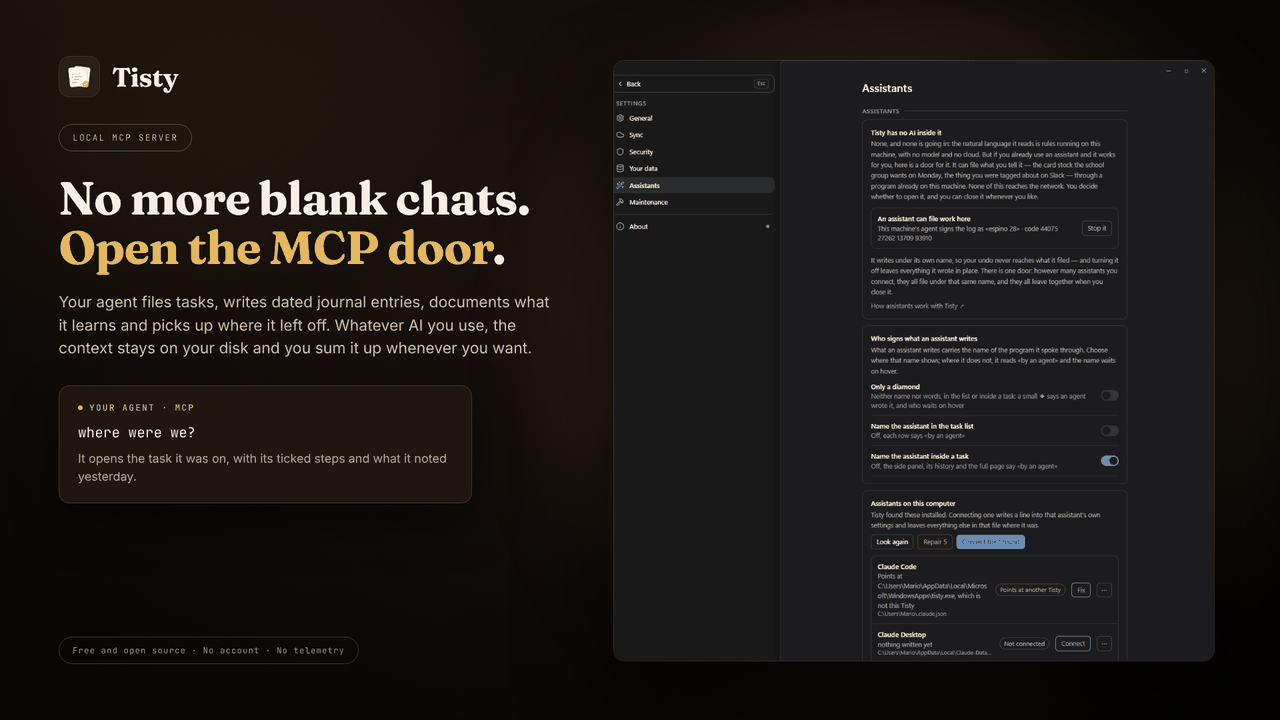
Requires the Tisty app and Node.js. A small launcher finds the Tisty
installed on your computer and starts its own MCP server, so the server always
matches the app and your data. Without Tisty, it tells your assistant how to
install it. Other assistants, such as GitHub Copilot in VS Code, take the same
launcher from npm: npx -y tisty-mcp. More in the plugin's readme.
| Install Tisty | |
|---|---|
| Windows | Microsoft Store or winget install rgdevment.Tisty |
| macOS | brew tap rgdevment/tap && brew trust rgdevment/tap && brew install --cask tisty |
| Every way | Installation guide |
If your assistant does not see Tisty's tools, restart it after installing Tisty. Connect Tisty either with this plugin or from Tisty's Settings › Assistants, not both, so the assistant does not run Tisty's server twice.
| Learn more | |
|---|---|
| Website | https://www.tisty.app/ |
| Documentation | https://www.tisty.app/docs/ |
| Assistants and MCP | https://www.tisty.app/docs/assistants-and-mcp/ |
| What an assistant may do | https://www.tisty.app/docs/mcp-permissions/ |
| MCP tools | https://www.tisty.app/docs/mcp-tools/ |
| Writing in Tisty | https://markdown.tisty.app |
| Privacy | https://www.tisty.app/privacy/ |
| Official MCP Registry | io.github.rgdevment/tisty |
| Source | https://github.com/rgdevment/Tisty |
| Issues | https://github.com/rgdevment/Tisty/issues |
Layout
.claude-plugin/marketplace.json   Claude Code marketplace
.cursor-plugin/marketplace.json   Cursor marketplace
gemini-extension.json             Gemini CLI extension (the Tisty plugin)
plugins/<app>/                    one folder per plugin, with each host's manifest,
                                  its MCP config, its skills and its launcher
test/                             tests for the launchers
listings/                         manifests some directories publish from
Licence
Apache-2.0. Each app keeps its own licence: Tisty is AGPL-3.0. Report a problem with an app in that app's own issues.
Tisty MCP soruları
Tisty MCP'yi Claude Code'a nasıl eklerim?
Terminalinizde claude mcp add mcp-plugins -- npx -y tisty-mcp komutunu çalıştırın. Her projede kullanılabilir olması için --scope user ekleyin.
Tisty MCP'yi Cursor'a nasıl eklerim?
~/.cursor/mcp.json dosyasını açın ve yukarıdaki yükleme bölümünde gösterilen Cursor yapılandırmasını kullanarak sunucuyu mcpServers altına ekleyin.
Tisty gizliliği ve verileri nasıl yönetir?
Tisty; hesap, abonelik, telemetri veya sunucu gerektirmeden bilgisayarınızda yerel olarak çalışır.
Tisty için sistem gereksinimleri nelerdir?
Tisty eklentisini kullanmak için bilgisayarınızda Tisty uygulamasının ve Node.js'in kurulu olması gerekir.
Tisty'yi VS Code ile kullanabilir miyim?
Evet, VS Code içindeki GitHub Copilot gibi diğer asistanlar, npm aracılığıyla Tisty başlatıcısını kullanabilir.