
Bir Markdown vault'unu yerel bir SQLite RAG deposuna indeksleyerek AI istemcilerinin notları aramasına, bağlantı grafiklerinde gezinmesine ve anılar kaydetmesine olanak tanır.
Ayrıca bilinen adı raphasouthall/neurostack
- Yıldızlar
- 47
- Araçlar
- —
- İndirmeler, 30 gün
- —
- En son sürüm
- 0.12.0
- Son commit
- 9 Kas 2026
- Lisans
- Apache-2.0
NeuroStack MCP nedir?
NeuroStack bir MCP sunucusudur. Bir Markdown vault'unu yerel bir SQLite RAG deposuna indeksleyerek AI istemcilerinin notları aramasına, bağlantı grafiklerinde gezinmesine ve anılar kaydetmesine olanak tanır.
Özet, projenin README dosyasından oluşturuldu
NeuroStack MCP sunucusu hakkında
NeuroStack; araştırmacılar, yazarlar ve geliştiriciler için mevcut Markdown bilgi tabanınızı yerel bir SQLite veritabanına indekslemenizi sağlar. Claude, Cursor ve Windsurf gibi AI istemcilerinin Obsidian veya Logseq vault'ları içinde arama yapmasına, wiki-link grafiklerinde gezinmesine ve semantik embedding'lere erişmesine olanak tanıyan bir geri çağırma (retrieval) katmanı oluşturur. Sistem, dosyalarınızın kontrolünüz altında kalmasını sağlamak için yerel olarak çalışır; yalnızca özetleme işlemleri için yapılandırma yaparsanız verileri üçüncü taraf sağlayıcılara gönderir.
Kullanıcılar, anahtar kelime araması için Lite modu ile Ollama üzerinden semantik arama için Full modu arasında seçim yapabilirler. Sunucu varsayılan olarak salt okunur olsa da, bir AI istemcisinin git geçmişiniz aracılığıyla notları düzenlemesine izin vermek için vault_write_file gibi yazma araçlarını kullanmayı seçebilirsiniz. Sistem ayrıca, AI oturumlarından kararları ve öğrenimleri toplayan, tekrarlanan anıları kalıcı notlara dönüştürürken artık bağlamınıza uymayan güncelliğini yitirmiş bilgileri işaretleyen bir optimizasyon döngüsüne de sahiptir.
Neler yapabilirsiniz
- 1Kişisel bilgi tabanlarında sorgulama yapmaYüzlerce araştırma makalesi veya kişisel not arasında belirli bilgileri veya bağlantıları bulması için bir AI'dan talepte bulunun.
- 2Dünya kurma (world-building) tutarlılığını korumaBir kurgu yazarının AI asistanının karakter geçmişlerini ve önceki hikaye kararlarını hatırlamasını sağlayın.
- 3Git aracılığıyla not güncellemelerini otomatize etmeBir AI agent'ın sürüm kontrollü bir depo içindeki Markdown dosyalarını doğrudan yazmasına veya düzenlemesine izin verin.
- 4Güncelliğini yitirmiş bilgileri tespit etmeGüncelliğini yitirmiş olan veya artık kullanılmayan teknik detaylara atıfta bulunan notları otomatik olarak tespit edin ve işaretleyin.
Projenin README dosyasından alınmıştır. Her kullanım durumu, oradaki bir alıntı ile kontrol edilir.
NeuroStack MCP nasıl yüklenir
Biçimler 10 Kas 2026 tarihinde doğrulandıCursor'a ekleGoose'a ekleNeuroStack MCP'yi Claude Code içine yükleyin
$ claude mcp add neurostack -- npx -y neurostackNeuroStack MCP'yi Cursor içine yükleyin
~/.cursor/mcp.json
{
  "mcpServers": {
    "neurostack": {
      "command": "npx",
      "args": [
        "-y",
        "neurostack"
      ]
    }
  }
}NeuroStack MCP'yi VS Code içine yükleyin
.vscode/mcp.json
{
  "servers": {
    "neurostack": {
      "type": "stdio",
      "command": "npx",
      "args": [
        "-y",
        "neurostack"
      ]
    }
  }
}NeuroStack MCP'yi VS Code CLI içine yükleyin
$ code --add-mcp '{"name":"neurostack","type":"stdio","command":"npx","args":["-y","neurostack"]}'NeuroStack MCP'yi Claude Desktop içine yükleyin
claude_desktop_config.json
{
  "mcpServers": {
    "neurostack": {
      "command": "npx",
      "args": [
        "-y",
        "neurostack"
      ]
    }
  }
}NeuroStack MCP'yi Codex içine yükleyin
$ codex mcp add neurostack -- npx -y neurostackNeuroStack MCP'yi Codex config.toml içine yükleyin
~/.codex/config.toml
[mcp_servers.neurostack]
command = "npx"
args = ["-y", "neurostack"]
NeuroStack MCP'yi Gemini CLI içine yükleyin
$ gemini mcp add -s user neurostack npx -- -y neurostackNeuroStack MCP'yi Gemini settings.json içine yükleyin
~/.gemini/settings.json
{
  "mcpServers": {
    "neurostack": {
      "command": "npx",
      "args": [
        "-y",
        "neurostack"
      ]
    }
  }
}Yapılandırma
NEUROSTACK_VAULT_ROOTPath to your Markdown vault (e.g. ~/brain, ~/notes)
| Ad | Açıklama | Sunucu |
|---|---|---|
| NEUROSTACK_VAULT_ROOT | Path to your Markdown vault (e.g. ~/brain, ~/notes) |
Otomatik kontroller
Çalıştırıldı 14 Kas 2026Tam rapor →Otomatik kontrollerimizden geçti. Bu bir güvenlik denetimi değildir: kodu okuyun ve sunucuya ihtiyaç duyduğu en dar erişimi verin. Kontroller nasıl çalışır · Daha fazla puan için nelerin düzeltileceği

- Kaynak deposu bağlantılı ve erişilebilirraphasouthall/neurostack is public and reachablegithub.com/raphasouthall/neurostack ↗Geçti
- Paket, bu depoyu kaynağı olarak gösteriyorneurostack names raphasouthall/neurostack as sourcenpmjs.com/package/neurostack ↗Geçti
- Derleme kökeni (Sigstore onayı)No build attestation published for this releaseKontrol edilmedi
- Açık kaynak lisansı (OSI)Apache-2.0spdx.org/licenses/Apache-2.0.html ↗Geçti
- Son bir yıl içinde commit veya sürüm mevcutLast commit or release 2026-11-09github.com/raphasouthall/neurostack ↗Geçti
- OpenSSF ScorecardKontrol edilmedi
- Paket adı popüler bir pakete yakın değilNo popular package one edit away from neurostackGeçti
- Pakette veya bağımlılıklarında kritik uyarı yok1 resolved dependencies checked; no critical advisoryosv.dev ↗Geçti
- Modele yönelik gizli talimat yok0 tool descriptions and the README read; no override phrases, credential paths or hidden charactersGeçti
- Yıkıcı araçlar etiketlenmişKontrol edilmedi
- Uzak uç nokta MCP el sıkışmasına yanıt veriyorEndpoint did not answer initialize: HTTP 525Bulgu


A local retrieval layer and optimizer for the Markdown knowledge base you already have.
NeuroStack indexes a folder of .md files (Obsidian, Logseq, Notion exports, plain Markdown) into one SQLite database with full-text search, embeddings and a wiki-link graph. Any MCP client can then search it, walk the graph and save memories. A query returns ranked evidence with note paths, and your AI does the reasoning, so no model runs while you wait. Between queries NeuroStack keeps the knowledge base accurate. It flags notes that have gone stale, harvests decisions and root causes from your AI sessions, merges recurring memories into learnings, and queues the proven ones to become notes. Indexing never changes your files, and optional MCP write tools let a client edit notes through your git history.
Works with Claude, Cursor, Windsurf, Gemini CLI, VS Code, Codex and any other client that supports MCP.
60-second start
npm install -g neurostack          # install
neurostack init                    # pick your notes folder, press Enter for the rest
/save                              # in omp or Claude Code, keep what this session learned
neurostack doctor                  # check that everything works
The steps below explain each part and how to connect other AI clients.
Your notes, in your control
By default, NeuroStack is a read-only indexing layer:
- Indexing, search, summaries, and graph analysis never modify your Markdown files
- All index data lives in NeuroStack's own separate database
- To remove it completely, run
neurostack uninstall. Your notes stay untouched. - Nothing ever leaves your machine, unless you configure a third-party LLM provider for summaries and embeddings
If your vault is a git repo, four opt-in MCP write tools let an AI client author and edit notes for you: vault_write_file, vault_delete_file, plus vault_read_file / vault_list_files. Every write commits and pushes to your git remote with a descriptive message, so every change is visible in git log, revertable with git revert, and serialised under a per-vault lock. Writes hard-reject invalid frontmatter, paths outside the vault, and hidden directories (.git, .obsidian, …). Because the tools are exposed to any client talking to neurostack serve, gate them at the transport (auth, tunnel, LAN only) if you put the MCP endpoint on the public internet.
Who this is for
You do not need to be a developer. If you take notes in Markdown, or can export your notes as Markdown from Obsidian, Notion, Bear, or Roam, NeuroStack works for you.
| If you are... | NeuroStack helps you... |
|---|---|
| A researcher | Ask your AI "what do my notes say about X?" across hundreds of papers. Get warned when a note references a retracted finding or superseded paper before your AI cites it confidently. |
| A fiction writer | Your AI knows your world-building bible, character histories, and chapter decisions. It remembers that you agreed in session 4 that Elena's backstory changes in act 2. |
| A student | Ask your AI to explain connections across all your course notes. When a syllabus topic changes, stale revision notes are flagged automatically. |
| A professional | Your AI remembers client context, project decisions, and meeting notes session-to-session. No more re-pasting the same background every time. |
| A developer or DevOps engineer | Notes that reference deprecated APIs or reversed architecture decisions get flagged before your AI cites them as current. |
Get started in three steps
You will need Node.js installed (most computers already have it). The npm package handles the Python setup for you.
Step 1. Install
npm install -g neurostack
Step 2. Set up (takes about two minutes)
neurostack init
The setup wizard asks which vault folder to index, which mode to run (Lite or Full), and which profession pack to apply. Then it finishes the install for you. It adds the NeuroStack hook to omp or Claude Code if you have them, so /save keeps what a session learned. It sets up the AI that turns saved sessions into memories, using the same model as your summaries. If no model answers yet, it leaves that off and tells you so. It also installs one background timer that keeps the index tidy, and a failed background job shows up as a desktop notification. Press Enter at each question to take the default. At the end it runs neurostack doctor and shows what to try first.
Step 3. Connect to your AI
For Claude Desktop:
neurostack setup-desktop
For Claude Code:
claude mcp add neurostack -- neurostack serve
For Cursor, Windsurf, Gemini CLI, or VS Code:
neurostack setup-client cursor # or: windsurf, gemini, vscode
Done. Open a new conversation and ask your AI about something from your notes.
Everything runs on your machine. Choose a tier during neurostack init:
- Lite (~130 MB) gives you keyword search, link-based connections between notes, stale detection and the MCP server. No GPU or Ollama required.
- Full (~560 MB) adds semantic search by meaning, AI-generated summaries, connections between notes, and topic clustering via local Ollama. GPU or 6+ core CPU recommended.
Non-interactive setup takes every default:
neurostack init --mode lite ~/my-notes --yes    # lite mode
neurostack init --mode full ~/my-notes --yes    # full mode
--no-hooks, --no-schedule and --checkpoint none turn off the hook, the timer and the checkpoint AI.
# PyPI
pipx install neurostack
pip install neurostack        # inside a venv
uv tool install neurostack

# One-line script
curl -fsSL https://raw.githubusercontent.com/raphasouthall/neurostack/main/install.sh | bash

# Lite mode (no ML deps)
curl -fsSL https://raw.githubusercontent.com/raphasouthall/neurostack/main/install.sh | NEUROSTACK_MODE=lite bash
On Ubuntu 23.04+, Debian 12+, and Fedora 38+, bare pip install outside a virtual environment is blocked by the operating system. Use npm, pipx, or uv tool install instead.
To uninstall: neurostack uninstall
What it does
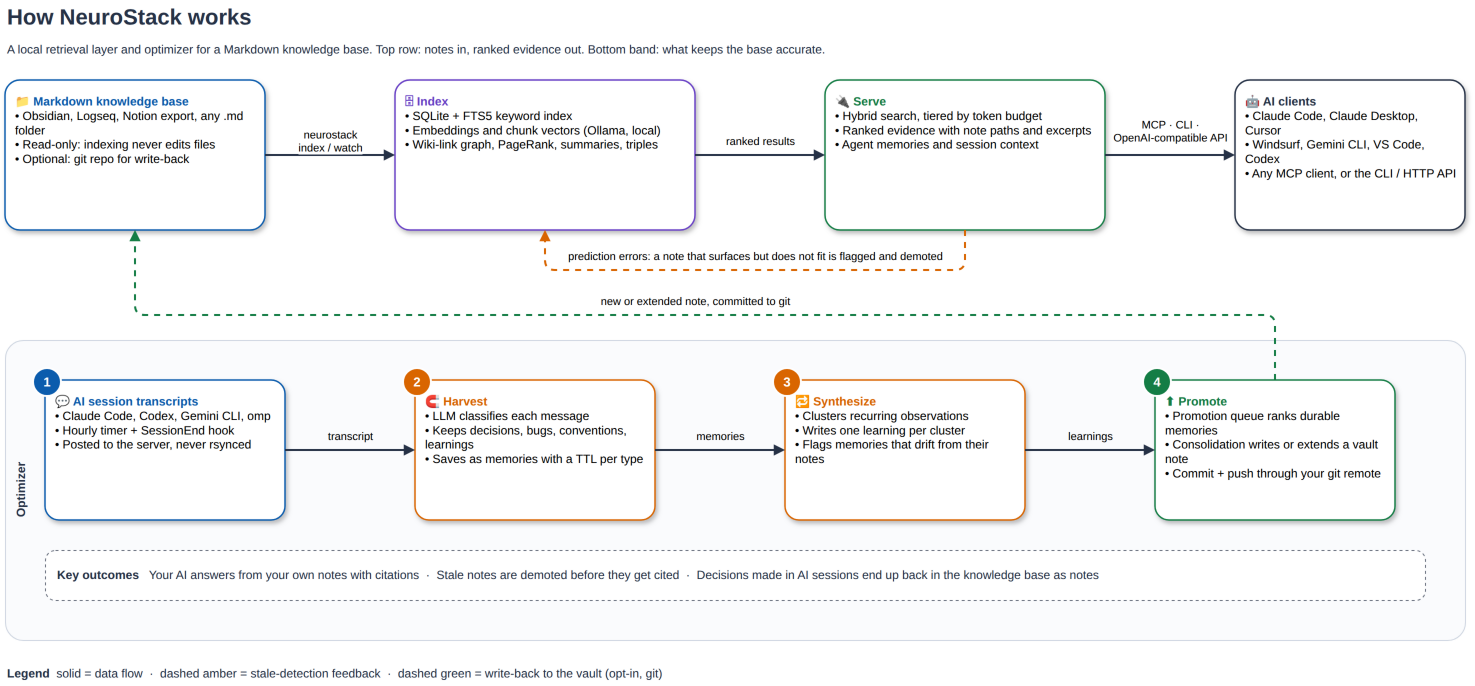
- Hybrid search (FTS5 keyword + semantic) with tiered depth, so a client can fetch triples, summaries or full notes by token budget.
- Ranked evidence with note paths and excerpts over the CLI, MCP, or an OpenAI-compatible API, for your AI to cite and reason over.
- Stale detection. A note that keeps surfacing in contexts where it no longer fits is flagged and demoted in later results.
- Session harvest. A timer scans Claude Code, Codex, Gemini and omp transcripts and saves decisions, bugs, conventions and learnings as memories with TTLs.
- Synthesis and promotion. Recurring memories become learnings; a promotion queue lists which ones are ready to become notes.
- Wiki-link graph with PageRank, community detection, gap and bridge analysis.
- Read-only by default. Opt-in write tools commit and push every change to your git remote.
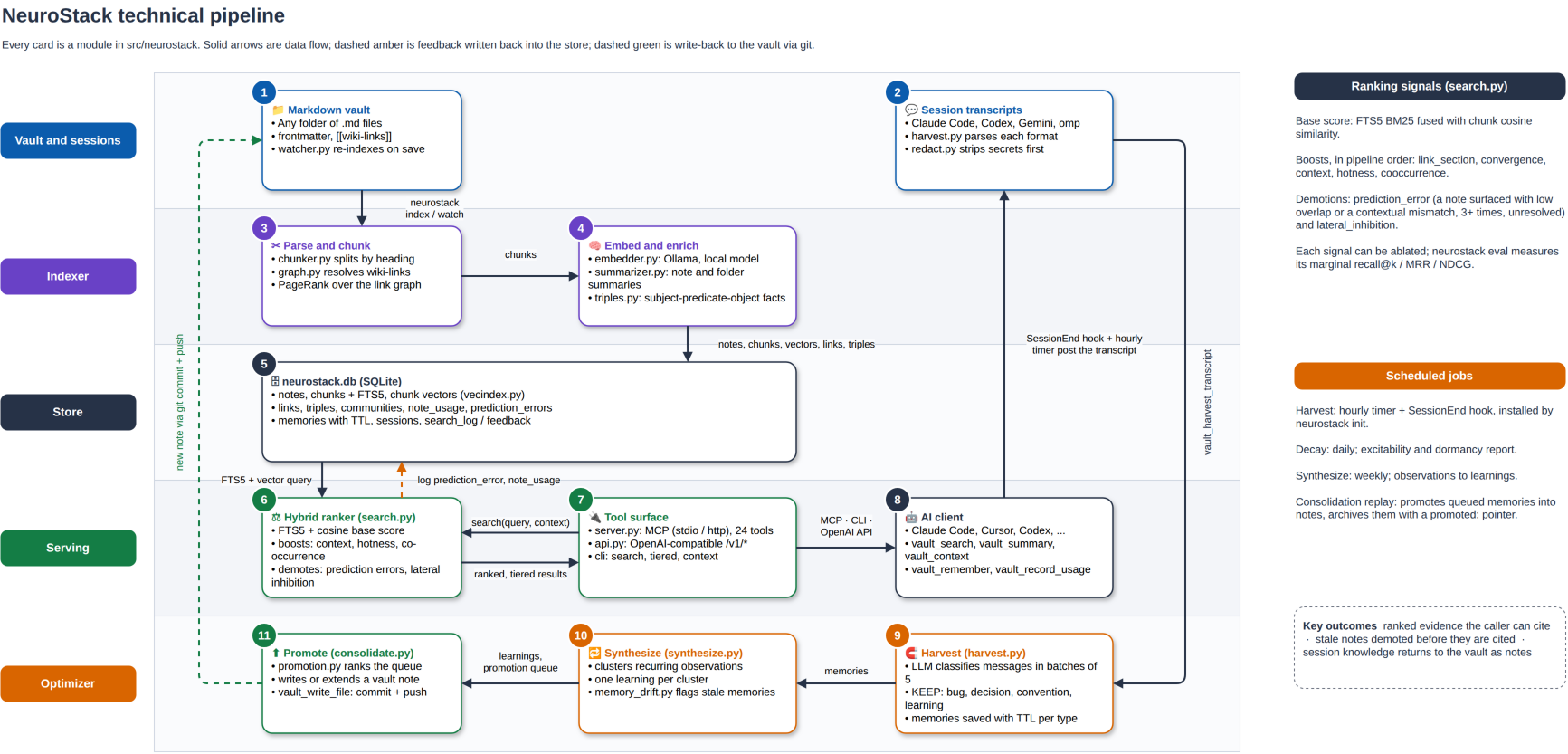
Editable sources live in the .drawio files next to the images.
Design
Philosophy
- Your files stay yours. The index lives in its own database, so deleting it leaves your notes exactly as they were.
- NeuroStack returns evidence and your AI reasons over it. No tool answers questions, and
tests/test_no_answering.pykeeps it that way. - Removing a memory moves it to an archive that search cannot reach, and you can restore it later.
- NeuroStack redacts secrets from text a model wrote, such as harvested summaries. It stores what you or your agent saved on purpose word for word.
- Ranking changes get measured first.
neurostack evalswitches off usage learning while it runs, so one pass cannot skew the next.
Mental model
NeuroStack holds two layers and one loop.
The vault is your Markdown. NeuroStack reads it, splits it into chunks, embeds them, summarises each note, extracts facts as triples and builds the link graph. Note status and tags live in NeuroStack's own note_metadata table, so it never needs to edit your frontmatter.
The memory layer holds what agents learn, typed as observations, decisions, conventions, learnings, bugs or context. These rows belong to NeuroStack and carry an optional workspace and an optional expiry.
The optimizer loop runs on a timer and connects the two. A memory usually starts in an AI session, becomes a learning when it keeps recurring, and becomes a note once no existing note covers it.
Architecture
flowchart LR
    V[/"Markdown vault<br/>never modified"/] --> IX["index<br/>chunk, embed, summarise,<br/>triples, link graph"]
    IX --> DB[("neurostack.db<br/>SQLite + FTS5")]
    S[/"AI session transcripts"/] --> H["harvest"]
    A["MCP client or CLI"] -->|vault_remember| DB
    H --> DB
    DB --> R["search, tiered, context,<br/>graph, brief"]
    R --> A
    DB --> J["timer jobs<br/>synthesize, promotion,<br/>decay, communities"]
    J --> DB
    J -->|opt-in, git commit| V
    DB --> UI["neurostack ui<br/>read-only dashboard"]
One OS timer runs neurostack run-due every minute, and that command runs each due job in turn. neurostack serve exposes 33 MCP tools over stdio or HTTP, and neurostack api serves the same retrieval as an OpenAI-compatible API.
Data model
| Area | Tables | Purpose |
|---|---|---|
| Vault index | notes, chunks + chunks_fts, summaries, triples + triples_fts, graph_edges, note_metadata |
Searchable copy of your notes. Deleting a note cascades to its chunks, summaries and triples. |
| Topics | communities, community_members, folder_summaries |
Topic clusters and folder summaries for broad questions. |
| Memories | memories + memories_fts, memories_archive, memory_sessions |
Live memories and their embeddings. The archive has no full-text index and no embedding, so search cannot reach it. |
| Quality signals | prediction_errors, trigger_log, memory_coverage, note_usage |
Stale notes, memories that drifted from the notes they cite, ignored reminders, cached coverage verdicts, and usage for hotness. |
| Feedback and jobs | search_log, search_feedback, job_runs, job_queue |
Implicit search feedback (opt-in), job history, and queued checkpoint work. |
A memory row stores its content, tags, type, workspace, source agent, embedding and expiry. It also records embed_pending when the embedder was down, so neurostack backfill can embed it later, plus revision_count and merged_from for edits and merges. A second database, sessions.db, indexes raw session transcripts for neurostack sessions search.
Write mechanics
- Deliberate saves.
vault_rememberandneurostack memories addstore the text as written, embed it once, then report any near-duplicate above 0.85 similarity without refusing the save. If embedding fails, the row still saves and gets flagged for backfill. - Harvest. The index LLM reads each session message and keeps decisions, root causes, rules and facts. A second pass reads the session as a whole and saves up to 3 final conclusions tagged
session-verdict. The judge model then picks each memory's type. Harvest redacts secrets, skips anything above 0.88 similarity to a live memory, and records how many messages of each session it has read. - Synthesis. Observations at least 7 days old that cluster at 0.75 similarity or higher (one anchor plus 3 or more others) become one learning. The originals stay, tagged
superseded_by:<id>. - Removal. Forget, the losing side of a merge, expiry and prune all go through one helper that copies the row into
memories_archivewith a reason and a timestamp, then deletes it from the live table. Search checks expiry before it runs, so an expired memory never shows up. - Vault writes. Only the opt-in tools (
vault_write_file,vault_delete_file) and the promotion job touch the vault, and each one commits and pushes to git.
Read mechanics
- Hybrid search. NeuroStack runs keyword search and embedding search separately, takes the top 50 chunks from each, and merges the two lists by reciprocal rank (k = 60). A chunk found by only one search still competes. It then adds a convergence bonus, a 1.4× boost for the caller's context, usage hotness and co-occurrence, and demotes notes flagged as stale.
- Diversity. Results keep one chunk per note, and similar notes suppress each other, so one long note cannot fill the result list.
- Tiered depth. A client asks for triples (about 15 tokens), summaries (about 75) or full notes (about 300), or lets
autoescalate only when the cheaper tier misses. - Context assembly.
vault_contextsplits its token budget into 40% memories, 20% triples, 30% summaries and 10% sessions, so no single source crowds out the rest. - Hard limits. Every search returns at most
top_kresults. No retrieval path calls an LLM unless you passrerank=True(see below).
Optional reranking. vault_search(rerank=True) asks the judge model to score each whole-note result against your query and returns the judge's order. On 76 real search clicks it raised MRR from 0.503 to 0.652, top-1 hits from 34% to 49% and top-3 hits from 57% to 75% (paired permutation p=0.004). Each search costs about $0.0004 and adds about 0.4 s. It works with depth="full" or reference_only=True and raises an error at the other depths. If the judge fails, you get the normal order back.
Usage makes a note easier to find again. It never marks a note as true.
Known limits
- Harvested memories do not record their workspace yet, so a workspace-scoped search misses them.
- A harvested memory does not link back to the session and message it came from.
- A forgotten memory can come back if a later session says the same thing, because the duplicate check reads only live memories.
- Editing a memory replaces its text, and only
revision_countshows that it changed.
External services
Lite mode needs none of these. Everything below is opt-in and set in ~/.config/neurostack/config.toml, and each one has a matching NEUROSTACK_* env var. When a service is missing, the feature that needs it switches off and the rest keeps working.
| Service | Config keys | Default | What uses it | Without it |
|---|---|---|---|---|
Embedder, any OpenAI-compatible /v1/embeddings |
embed_url, embed_model, embed_api_key, embed_timeout_s |
Local Ollama, nomic-embed-text |
Semantic search, memory similarity, duplicate checks, synthesis clusters | Keyword search only. New memories get flagged for neurostack backfill. |
| Index LLM, Ollama or any OpenAI-compatible chat API | index_llm_url, index_llm_model, index_llm_api_key, or index_llm_command for a CLI such as claude -p |
Local Ollama, phi3.5 |
Note summaries, triples, topic labels, harvest extraction, synthesis | No summaries or triples. Harvest cannot extract memories. |
| Judge model, OpenRouter decisions API | judge_url, judge_model, judge_api_key |
~typesafe/jev-latest on OpenRouter, fails without a key |
Harvest memory types, rerank=True, the promotion queue's "uncovered" check |
Harvest keeps the index LLM's type, rerank returns the normal order, and uncovered memories are counted as pending. |
Agent, Pi (@earendil-works/pi-coding-agent) on OpenRouter or a compatible proxy |
agent_provider, agent_model, agent_api_key, agent_base_url |
anthropic/claude-sonnet-5, needs Node 22.19+ |
neurostack agent promotion, which writes notes from the promotion queue, and neurostack agent vault-save, which writes one session transcript into the notes |
The promotion job shows as blocked. The queue still builds. |
| Checkpoint command, any shell command that answers a prompt on stdin | checkpoint_command |
Off | Server workers that turn queued /save checkpoints and harvest jobs into memories |
Queued checkpoints wait. Local harvest still runs. |
| Notify command, any shell command | notify_command |
Off | Receives a failed job run as JSON, for example ntfy publish mytopic |
Failures show only in neurostack jobs and the dashboard. |
| Git remote on your vault | Your vault's git config | None | vault_write_file, vault_delete_file and promotion commit and push each change |
A write rolls back when the push fails. Reading never needs git. |
Only the embedder and the index LLM see your note text. The judge sees queries, memories and the notes being ranked or checked. Point every URL at localhost to keep all data on your machine.
What makes it different
NeuroStack is not a replacement for Obsidian, Notion, or any note-taking app. It sits on top of what you already use and adds what they don't have.
| Capability | Note apps | Basic RAG | NeuroStack |
|---|---|---|---|
| Stores your notes | Yes | No | No (read-only by default; opt-in git-backed write tools) |
| AI can search your notes | Some | Yes | Yes |
| Detects stale/outdated notes | No | No | Yes |
| AI memories persist across sessions | No | No | Yes |
| Works with any MCP-compatible AI | No | Varies | Yes |
| Tiered retrieval (saves 80-95% tokens) | No | No | Yes |
| Profession-specific workflows | No | No | Yes |
| Open source, self-hostable | Varies | Varies | Yes (Apache 2.0) |
Stale detection is the part other tools lack. When a note keeps appearing in contexts where it no longer fits, such as a deprecated API or a superseded paper, NeuroStack flags it and demotes it in later results.
Profession packs
When you run neurostack init, you choose a profession pack. Each one configures NeuroStack with templates, folder structures, and AI guidance suited to how your profession actually uses notes.
| Pack | Built for |
|---|---|
researcher |
Literature review, citation tracking, evolving arguments, stale paper detection |
writer |
Character sheets, world-building, chapter outlines, continuity tracking |
student |
Course notes, spaced repetition, exam prep, syllabus change detection |
developer |
Code decisions, architecture notes, runbooks, deprecated API detection |
devops |
Infrastructure runbooks, incident notes, change logs |
data-scientist |
Experiment tracking, model notes, dataset documentation |
Apply a pack to an existing vault without losing any notes:
neurostack scaffold researcher ~/my-notes # or: writer, student, developer, devops, data-scientist
You can also import an existing Markdown directory:
neurostack onboard ~/my-notes
How retrieval works
Most memory tools give your AI a wall of text and let it figure out what's relevant. NeuroStack is tiered. It starts with the cheapest retrieval that answers the question and escalates only when it needs to.
| Level | Tokens | What your AI gets |
|---|---|---|
| Quick facts | ~15 | Structured facts extracted from your notes: experiment-3 used learning-rate 0.001 |
| Summaries | ~75 | AI-generated overview of a note |
| Full content | ~300 | Actual Markdown content |
| Auto (default) | Varies | Starts at quick facts, escalates only if the answer isn't there |
Simple factual questions resolve at ~15 tokens. Deep dives get full context. Your AI spends its attention budget where it matters.
Your AI remembers decisions
Across sessions, your AI can save and retrieve typed memories: observations, decisions, conventions, learnings, bugs. When you start a new session, those memories are surfaced automatically.
"We decided to keep authentication stateless." "The thesis framing shifted from consolidation to complementary learning systems." "Elena's surname changed from Vasquez to Reyes in the chapter 7 revision."
These aren't just notes. They're things your AI remembers you decided together. They survive /clear. They survive closing the terminal. They survive switching machines.
neurostack memories add "revised thesis framing to CLS, not just consolidation" --type decision --tags "thesis,neuroscience"
neurostack memories search "thesis direction"
Learns from your AI sessions
NeuroStack scans your past AI conversations on a timer, extracts the decisions, observations and learnings, and saves them as memories. You do not have to write them down yourself.
neurostack harvest --sessions 5          # extract insights from last 5 sessions
neurostack schedule install              # one timer runs due jobs every minute
Supports Claude Code, VS Code, Codex CLI, Aider, and Gemini CLI session formats.
Keeps itself current
Your vault changes. NeuroStack watches it.
neurostack watch # auto-index on vault changes
The index updates as you write and stale detection runs continuously, so you do not maintain it by hand.
Scheduling
NeuroStack runs its background jobs from one OS timer. The timer calls neurostack run-due once a minute, and run-due works out which jobs are due and runs them one at a time. neurostack init installs the timer for you. Installing it records each daily job as just run, so the jobs start at their next scheduled time instead of all at once. The commands below manage it by hand.
neurostack schedule install   # install or overwrite the timer
neurostack schedule status    # show whether the timer is active
neurostack schedule remove    # remove the timer
schedule install uses the scheduler your OS already ships:
| OS | Backend | What it writes |
|---|---|---|
| Linux | systemd user timer | ~/.config/systemd/user/neurostack.timer and neurostack.service |
| macOS | launchd agent | ~/Library/LaunchAgents/io.neurostack.run-due.plist |
| Windows | Task Scheduler | a task named NeuroStackRunDue |
The timer calls the neurostack executable it finds on your PATH at install time, so run schedule install again after you move or reinstall NeuroStack. All three subcommands accept --json.
A systemd user timer runs only while you have a login session. On a headless Linux server, or when you run NeuroStack as root, enable lingering for that user so the timer keeps running after you log out:
sudo loginctl enable-linger <user>
neurostack doctor shows when each job last ran.
NeuroStack MCP soruları
NeuroStack MCP'yi Claude Code'a nasıl eklerim?
Terminalinizde claude mcp add neurostack -- npx -y neurostack komutunu çalıştırın. Her projede kullanılabilir olması için --scope user ekleyin.
NeuroStack MCP'yi Cursor'a nasıl eklerim?
~/.cursor/mcp.json dosyasını açın ve yukarıdaki yükleme bölümünde gösterilen Cursor yapılandırmasını kullanarak sunucuyu mcpServers altına ekleyin.
NeuroStack Markdown dosyalarımı değiştirir mi?
Hayır. İndeksleme, arama ve grafik analizi varsayılan olarak salt okunur moddadır; yazma araçları isteğe bağlıdır ve bir git reposu gerektirir.
Hangi AI istemcileri NeuroStack'e bağlanabilir?
Claude, Cursor, Windsurf, Gemini CLI, VS Code, Codex ve MCP yeteneğine sahip diğer tüm istemcilerle çalışır.
Makinemden dışarı herhangi bir veri çıkıyor mu?
Özetler ve embedding işlemleri için üçüncü taraf bir LLM sağlayıcısı yapılandırmadığınız sürece makinenizden hiçbir şey dışarı çıkmaz.
NeuroStack'i nasıl kurarım?
npm üzerinden kurun, ardından not klasörünüzü ve modunuzu seçmek için init sihirbazını çalıştırın; pipx ve uv de desteklenmektedir.
Lite ve Full mod arasındaki fark nedir?
Lite (~130 MB) GPU gerektirmeden anahtar kelime araması ve güncelliğini yitirmiş içerik tespiti sunar; Full (~560 MB) ise yerel Ollama aracılığıyla semantik arama, özetleme ve konu kümeleme özelliklerini ekler.