
Turns web and document sources into versioned, cited context that AI clients can query, diff, and export.
Ayrıca bilinen adı raintree-technology/docpull
- Yıldızlar
- 29
- Araçlar
- —
- İndirmeler, 30 gün
- 762
- En son sürüm
- 6.10.0
- Son commit
- 13 Kas 2026
- Lisans
- MIT
DocPull MCP nedir?
DocPull bir MCP sunucusudur. Turns web and document sources into versioned, cited context that AI clients can query, diff, and export.
Özet, projenin README dosyasından oluşturuldu
DocPull MCP sunucusu hakkında
Transforming web pages and documents into cited, versioned context for AI agents is what DocPull enables. It allows developers to capture public web sources, such as documentation, GitHub repositories, or policy pages, and turn them into reproducible archives that an AI can query with exact source spans. This process helps ensure that an agent's answers are backed by specific, verifiable evidence rather than shifting web content.
Running locally via a Python stdio server, the tool requires no paid accounts or hosted services to function. Users can manage sources through a CLI or integrate the functionality into applications using a Python or TypeScript SDK. When connected to an MCP client like Claude Code, it provides the agent with tools to fetch, sync, and diff content. The system uses a lockfile mechanism to track content hashes and source URLs, making it easy to detect when documentation has drifted from previous versions.
Neler yapabilirsiniz
- 1Detecting documentation changesCompare current web documentation against previously saved versions to identify updates or drifts.
- 2Providing cited context to agentsRetrieve specific, deduplicated passages from a locked archive to answer questions with precise citations.
- 3Exporting context for development toolsPrepare and move gathered documentation into specialized formats for use in different AI environments.
- 4Automating documentation quality checksRun automated gates to ensure that gathered context meets specific standards for citation coverage and freshness.
Projenin README dosyasından alınmıştır. Her kullanım durumu, oradaki bir alıntı ile kontrol edilir.
DocPull MCP nasıl yüklenir
Biçimler 10 Kas 2026 tarihinde doğrulandıDocPull MCP'yi Claude Code içine yükleyin
$ claude mcp add docpull -- uvx docpullDocPull MCP'yi Cursor içine yükleyin
~/.cursor/mcp.json
{
  "mcpServers": {
    "docpull": {
      "command": "uvx",
      "args": [
        "docpull"
      ]
    }
  }
}DocPull MCP'yi VS Code içine yükleyin
.vscode/mcp.json
{
  "servers": {
    "docpull": {
      "type": "stdio",
      "command": "uvx",
      "args": [
        "docpull"
      ]
    }
  }
}DocPull MCP'yi Claude Desktop içine yükleyin
claude_desktop_config.json
{
  "mcpServers": {
    "docpull": {
      "command": "uvx",
      "args": [
        "docpull"
      ]
    }
  }
}DocPull MCP'yi Codex içine yükleyin
~/.codex/config.toml
[mcp_servers.docpull]
command = "uvx"
args = ["docpull"]
DocPull MCP'yi Gemini CLI içine yükleyin
~/.gemini/settings.json
{
  "mcpServers": {
    "docpull": {
      "command": "uvx",
      "args": [
        "docpull"
      ]
    }
  }
}Otomatik kontroller
Çalıştırıldı 14 Kas 2026Tam rapor →Otomatik kontrollerimizden geçti. Bu bir güvenlik denetimi değildir: kodu okuyun ve sunucuya ihtiyaç duyduğu en dar erişimi verin. Kontroller nasıl çalışır

- Kaynak deposu bağlantılı ve erişilebilirraintree-technology/docpull is public and reachablegithub.com/raintree-technology/docpull ↗Geçti
- Paket bu depoyu kaynak olarak gösteriyordocpull names raintree-technology/docpull as sourcepypi.org/project/docpull/ ↗Geçti
- Derleme kaynağı (Sigstore onayı)Sigstore attestation for docpullpypi.org/project/docpull/ ↗Geçti
- Açık kaynak lisansı (OSI)MITspdx.org/licenses/MIT.html ↗Geçti
- Son bir yıl içinde commit veya sürüm mevcutLast commit or release 2026-11-13github.com/raintree-technology/docpull ↗Geçti
- OpenSSF ScorecardKontrol edilmedi
- Paket adı popüler bir pakete yakın değilNo popular package one edit away from docpullGeçti
- Pakette ve bağımlılıklarında kritik uyarı yokthe package checked; no critical advisoryosv.dev ↗Geçti
- Modele yönelik gizli talimat yok0 tool descriptions and the README read; no override phrases, credential paths or hidden charactersGeçti
- Yıkıcı araçlar etiketlenmişKontrol edilmedi
- Uzak endpoint MCP el sıkışmasına yanıt veriyorKontrol edilmedi
DocPull
Active open-source project · MIT License
DocPull turns changing public web sources into cited, reproducible context for AI agents and retrieval pipelines. Use it when your application needs to know which sources it used, whether they changed, and how to rebuild the same context later.


Install and sync your first source
pip install docpull
docpull init stripe-docs
docpull add https://docs.stripe.com
docpull sync
docpull query "retry policy" --max-tokens 4000
docpull diff
docpull export context-pack --target cursor
The project stores declared sources in docpull.yaml and resolved inputs in
.docpull/context.lock.json. Later syncs produce a hash-based diff while preserving
source URLs, content hashes, run IDs, citations, and export metadata.
docpull query retrieves deduplicated passages from locked archives with version
filters, a response budget, and exact source spans. The same query is available
through the Python SDK and MCP. See Query locked context
for budget semantics and queries across projects.
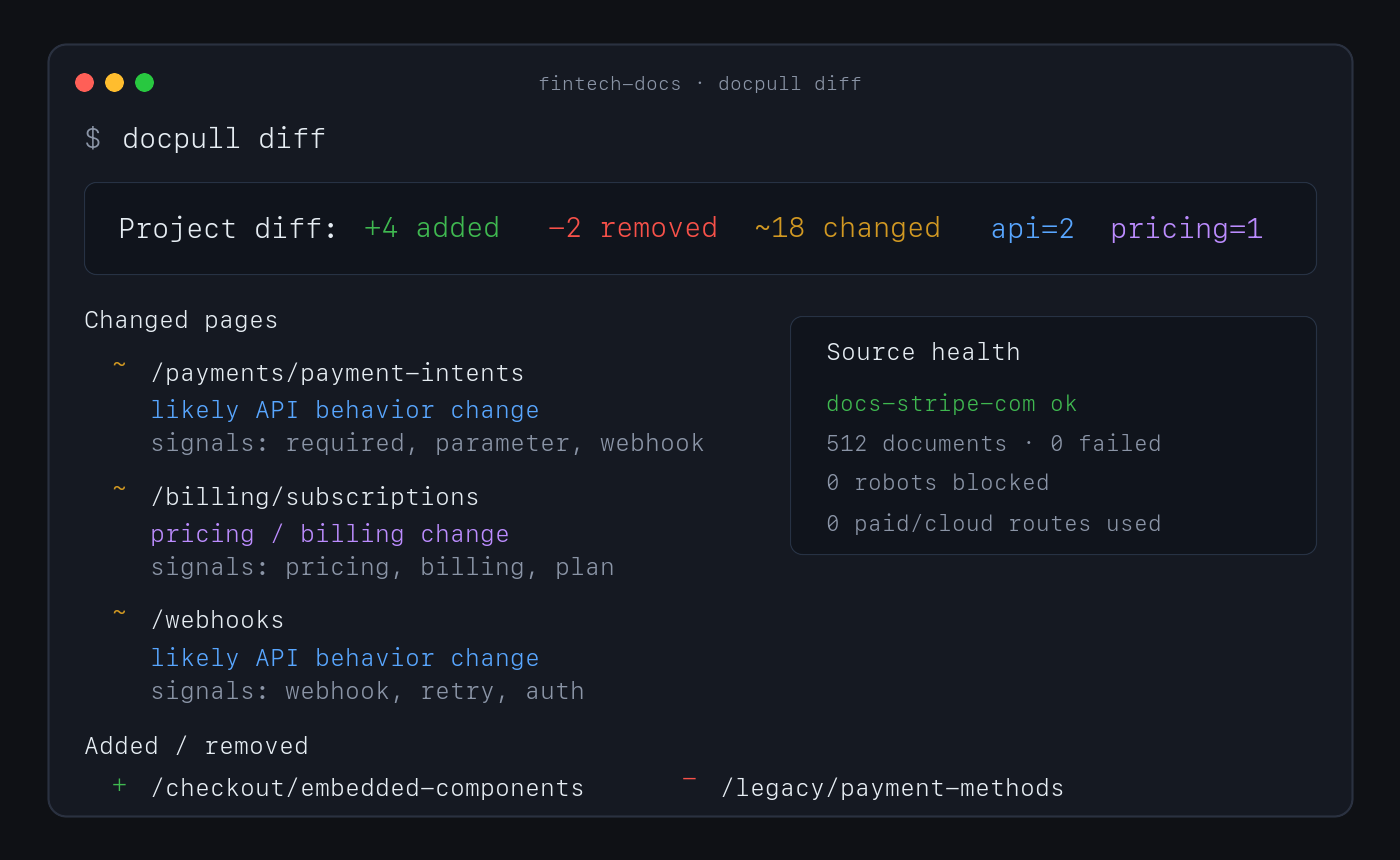
No account or paid API is required for this path. Direct fetching, discovery, extraction, indexing, pack analysis, and diffs run locally.
Why use DocPull
- Reproduce agent context. Stable IDs, hashes, manifests, and lockfiles show which source versions produced an answer or artifact.
- Detect source drift. Sync and diff documentation, product pages, policies, feeds, repositories, packages, standards, and local documents.
- Keep evidence inspectable. Markdown, NDJSON, SQLite, citations, and provenance sidecars remain readable without a hosted service.
- Choose the downstream surface. Export context for agent clients, vector import, data workflows, or a versioned context-pack release.
- Keep expensive routes explicit. Browser and cloud rendering require an explicit choice and can be blocked with a zero-dollar budget.
How it works
declared sources → local acquisition → versioned evidence → diff and validation → export
DocPull's v3 pack contract separates raw extraction, agent-ready context, and eval-grade evidence. Validate the level a downstream system requires:
docpull pack prepare packs/docs --eval-grade
docpull pack validate packs/docs --level eval
docpull ci --prepare
docpull ci checks freshness, citation coverage, pack quality, rights metadata, and
other configured gates. It writes context-ci.report.json and CONTEXT_CI.md, then
exits non-zero when a hard gate fails.
Supported surfaces
| Surface | Use it for | Start here |
|---|---|---|
| CLI | Fetch, sync, diff, validate, and export | docs/cli-recipes.md |
| Python SDK | Embed acquisition in Python applications | docs/surface-contract.md |
| MCP server | Give local agent clients source tools | MCP server |
| TypeScript SDK | Read local packs and invoke the CLI from Node or Bun | sdk/js/README.md |
| Agent plugin | Install the supported MCP workflow in an agent client | plugin/README.md |
Common source shapes include static and server-rendered websites, OpenAPI documents, feeds, papers, public GitHub repositories, npm and PyPI packages, standards, datasets, transcripts, Wikimedia pages, product and policy pages, and local PDF or office files. See context-pack workflows for the complete surface.
MCP server
pip install 'docpull[mcp]'
docpull mcp
Claude Code can register the same local server:
claude mcp add --transport stdio docpull -- docpull mcp
The Python stdio server is the supported MCP server.
Limits and security boundary
DocPull is an evidence-acquisition engine, not a hosted competitive-intelligence product. It owns fetching, explicit rendering adapters, versioning, citations, hashing, validation, replay, and export. Downstream products own scheduling, human review, approved claims, legal conclusions, accounts, and notifications.
The default path does not handle complex interactive browser workflows, CAPTCHAs, stealth scraping, or private dashboards. JavaScript rendering is explicit. Authenticated sources require environment-variable references; DocPull does not persist credential values in project artifacts.
Security defaults include HTTPS-only fetching, robots.txt compliance, SSRF and DNS rebinding protections, redirect guards, XXE protection, and path-traversal checks. Read the web-source boundary, security posture, and evidence-engine decision before extending acquisition behavior.
Documentation and evidence
- CLI recipes — Common commands and advanced workflows.
- Context dependencies — Project and lockfile model.
- Context Pack Contract v3 — Artifact levels and compatibility.
- Public contracts — Schemas and versioning rules.
- Alternatives — Browser automation and hosted extraction tradeoffs.
- JavaScript SDK and loaders — TypeScript client and LangChain/LlamaIndex loaders.
- Dependency security — Locked dependency sets and optional parser support.
- Evaluation lab — Reproducible methods, results, and claim boundaries.
- Changelog — Release history.
Raintree open-source system
DocPull owns evidence acquisition and reproducible agent context. It can be used independently; the sibling projects do not imply a required integration or shared release cycle.
| Project | Responsibility |
|---|---|
| Raintree Standards | Defines governed requirements and evidence. |
| Trellis | Enforces shared JavaScript and TypeScript code policy. |
| HIG Doctor | Audits interface source and provides HIG guidance. |
| PolicyStrata | Tests cross-layer policy behavior. |
See the Raintree open-source portfolio for current lifecycle and distribution links.
Raintree also builds BetterOff, which keeps a household's spending, investments, assets, debts, and net worth in one current record.
Project policies
Contributing · Code of Conduct · Security · Metrics and evidence limits · Source repository · MIT License
DocPull MCP soruları
DocPull MCP'yi Claude Code'a nasıl eklerim?
Terminalinizde claude mcp add docpull -- uvx docpull komutunu çalıştırın. Her projede kullanılabilir olması için --scope user ekleyin.
DocPull MCP'yi Cursor'a nasıl eklerim?
~/.cursor/mcp.json dosyasını açın ve yukarıdaki yükleme bölümünde gösterilen Cursor yapılandırmasını kullanarak sunucuyu mcpServers altına ekleyin.
How do I install and run the DocPull MCP server?
Install the MCP extra with pip and run docpull mcp, which starts the supported local stdio server. You can also register it with Claude Code using the claude mcp add command.
Does DocPull need an account or paid API?
No. The default path fetches, extracts, indexes, and diffs locally without an account or paid API.
Can DocPull detect when sources change?
Yes. Syncing again produces a hash-based diff that shows changed sources while preserving URLs, content hashes, run IDs, and citations.
What security protections does DocPull have?
It defaults to HTTPS-only fetching with robots.txt compliance, SSRF and DNS rebinding protections, redirect guards, XXE protection, and path-traversal checks.
How are authenticated sources handled?
Credentials must be supplied through environment-variable references and are not stored in project artifacts.