
Bir yapay zeka istemcisinin, kendi sunucunuzda barındırılan bir Document Engine aracılığıyla PDF belgelerinden metin çıkarmasını, belgeleri bölmesini, hassas verileri gizlemesini, filigran eklemesini, notlar düşmesini ve formları doldurmasını sağlar.
Ayrıca bilinen adı PSPDFKit/nutrient-document-engine-mcp-server, nutrient-document-engine-mcp-server, @nutrient-sdk/document-engine-mcp-server
- Yıldızlar
- 62
- Araçlar
- —
- İndirmeler, 30 gün
- —
- En son sürüm
- 0.0.3
- Son commit
- 4 Kas 2026
- Lisans
- MIT
Nutrient Document Engine MCP nedir?
Nutrient Document Engine bir MCP sunucusudur. Bir yapay zeka istemcisinin, kendi sunucunuzda barındırılan bir Document Engine aracılığıyla PDF belgelerinden metin çıkarmasını, belgeleri bölmesini, hassas verileri gizlemesini, filigran eklemesini, notlar düşmesini ve formları doldurmasını sağlar.
Özet, projenin README dosyasından oluşturuldu
Nutrient Document Engine MCP sunucusu hakkında
Bu server, özel belge iş akışları geliştiren geliştiriciler için PDF belgelerini doğal dil yoluyla işlemeyi mümkün kılar. Yapay zeka agent'larını kendi sunucunuzda barındırılan bir Document Engine'e bağlayarak, katı veri yerelliği kurallarını korumak adına yerel veya on-premise kurulum yapılmasına olanak tanır. Kullanıcılar, motoru Docker Compose üzerinden çalıştırarak Claude Desktop, LangGraph veya diğer MCP uyumlu platformlar aracılığıyla dosyalarıyla etkileşime girebilirler.
Server; içeriğe erişim, düzenleme ve güvenlik için bir araç seti sunar. Bir yapay zekanın metin çıkarmasına, dosyalar içinde arama yapmasına ve sayfaları görüntü olarak oluşturmasına olanak tanır. Belge modifikasyonu için dosyaları bölmeyi, filigran eklemeyi ve PDF formlarını doldurmayı destekler. Güvenlik özellikleri; sosyal güvenlik numaraları veya kredi kartı bilgileri gibi hassas bilgilerin önceden tanımlanmış kalıplar veya özel regex kullanılarak gizlenmesini içerir.
Kurulum için Node.js ve bir temel URL ile kimlik doğrulama token'ları aracılığıyla yerel bir örneğe bağlantı gereklidir. Varsayılan olarak bir değerlendirme lisansı ile çalışsa da, kullanıcılar bir aktivasyon anahtarı sağlayarak kısıtlamaları kaldırabilirler. Bu kurulum, belge işleme altyapıları üzerinde dağıtım kontrolü gerektirenler için özel olarak tasarlanmıştır.
Neler yapabilirsiniz
- 1İletişim bilgilerini çıkarmaBir yapay zeka agent'ından bir fatura koleksiyonundan isim ve telefon numarası gibi belirli ayrıntıları bulmasını isteyin.
- 2Hassas verileri gizlemeVergi belgelerinden sosyal güvenlik numaraları gibi özel bilgilerin kaldırılmasını otomatize edin.
- 3Büyük dosyaları bölmeBir agent'a uzun bir sözleşmeyi daha küçük, yönetilebilir bölümlere ayırması talimatını verin.
Projenin README dosyasından alınmıştır. Her kullanım durumu, oradaki bir alıntı ile kontrol edilir.
Nutrient Document Engine MCP nasıl yüklenir
Biçimler 10 Kas 2026 tarihinde doğrulandıCursor'a ekleGoose'a ekleNutrient Document Engine MCP'yi Claude Code içine yükleyin
$ claude mcp add --env 'DOCUMENT_ENGINE_API_AUTH_TOKEN=<YOUR_DOCUMENT_ENGINE_API_AUTH_TOKEN>' --env 'DOCUMENT_ENGINE_BASE_URL=<DOCUMENT_ENGINE_BASE_URL>' --env 'DASHBOARD_PASSWORD=<YOUR_DASHBOARD_PASSWORD>' nutrient-document-engine-mcp-server -- npx -y @nutrient-sdk/document-engine-mcp-serverNutrient Document Engine MCP'yi Cursor içine yükleyin
~/.cursor/mcp.json
{
  "mcpServers": {
    "nutrient-document-engine-mcp-server": {
      "command": "npx",
      "args": [
        "-y",
        "@nutrient-sdk/document-engine-mcp-server"
      ],
      "env": {
        "DOCUMENT_ENGINE_API_AUTH_TOKEN": "<YOUR_DOCUMENT_ENGINE_API_AUTH_TOKEN>",
        "DOCUMENT_ENGINE_BASE_URL": "<DOCUMENT_ENGINE_BASE_URL>",
        "DASHBOARD_PASSWORD": "<YOUR_DASHBOARD_PASSWORD>"
      }
    }
  }
}Nutrient Document Engine MCP'yi VS Code içine yükleyin
.vscode/mcp.json
{
  "servers": {
    "nutrient-document-engine-mcp-server": {
      "type": "stdio",
      "command": "npx",
      "args": [
        "-y",
        "@nutrient-sdk/document-engine-mcp-server"
      ],
      "env": {
        "DOCUMENT_ENGINE_API_AUTH_TOKEN": "<YOUR_DOCUMENT_ENGINE_API_AUTH_TOKEN>",
        "DOCUMENT_ENGINE_BASE_URL": "<DOCUMENT_ENGINE_BASE_URL>",
        "DASHBOARD_PASSWORD": "<YOUR_DASHBOARD_PASSWORD>"
      }
    }
  }
}Nutrient Document Engine MCP'yi VS Code CLI içine yükleyin
$ code --add-mcp '{"name":"nutrient-document-engine-mcp-server","type":"stdio","command":"npx","args":["-y","@nutrient-sdk/document-engine-mcp-server"],"env":{"DOCUMENT_ENGINE_API_AUTH_TOKEN":"<YOUR_DOCUMENT_ENGINE_API_AUTH_TOKEN>","DOCUMENT_ENGINE_BASE_URL":"<DOCUMENT_ENGINE_BASE_URL>","DASHBOARD_PASSWORD":"<YOUR_DASHBOARD_PASSWORD>"}}'Nutrient Document Engine MCP'yi Claude Desktop içine yükleyin
claude_desktop_config.json
{
  "mcpServers": {
    "nutrient-document-engine-mcp-server": {
      "command": "npx",
      "args": [
        "-y",
        "@nutrient-sdk/document-engine-mcp-server"
      ],
      "env": {
        "DOCUMENT_ENGINE_API_AUTH_TOKEN": "<YOUR_DOCUMENT_ENGINE_API_AUTH_TOKEN>",
        "DOCUMENT_ENGINE_BASE_URL": "<DOCUMENT_ENGINE_BASE_URL>",
        "DASHBOARD_PASSWORD": "<YOUR_DASHBOARD_PASSWORD>"
      }
    }
  }
}Nutrient Document Engine MCP'yi Codex içine yükleyin
$ codex mcp add nutrient-document-engine-mcp-server --env 'DOCUMENT_ENGINE_API_AUTH_TOKEN=<YOUR_DOCUMENT_ENGINE_API_AUTH_TOKEN>' --env 'DOCUMENT_ENGINE_BASE_URL=<DOCUMENT_ENGINE_BASE_URL>' --env 'DASHBOARD_PASSWORD=<YOUR_DASHBOARD_PASSWORD>' -- npx -y @nutrient-sdk/document-engine-mcp-serverNutrient Document Engine MCP'yi Codex config.toml içine yükleyin
~/.codex/config.toml
[mcp_servers.nutrient-document-engine-mcp-server]
command = "npx"
args = ["-y", "@nutrient-sdk/document-engine-mcp-server"]

[mcp_servers.nutrient-document-engine-mcp-server.env]
DOCUMENT_ENGINE_API_AUTH_TOKEN = "<YOUR_DOCUMENT_ENGINE_API_AUTH_TOKEN>"
DOCUMENT_ENGINE_BASE_URL = "<DOCUMENT_ENGINE_BASE_URL>"
DASHBOARD_PASSWORD = "<YOUR_DASHBOARD_PASSWORD>"
Nutrient Document Engine MCP'yi Gemini CLI içine yükleyin
$ gemini mcp add -s user -e 'DOCUMENT_ENGINE_API_AUTH_TOKEN=<YOUR_DOCUMENT_ENGINE_API_AUTH_TOKEN>' -e 'DOCUMENT_ENGINE_BASE_URL=<DOCUMENT_ENGINE_BASE_URL>' -e 'DASHBOARD_PASSWORD=<YOUR_DASHBOARD_PASSWORD>' nutrient-document-engine-mcp-server npx -- -y @nutrient-sdk/document-engine-mcp-serverNutrient Document Engine MCP'yi Gemini settings.json içine yükleyin
~/.gemini/settings.json
{
  "mcpServers": {
    "nutrient-document-engine-mcp-server": {
      "command": "npx",
      "args": [
        "-y",
        "@nutrient-sdk/document-engine-mcp-server"
      ],
      "env": {
        "DOCUMENT_ENGINE_API_AUTH_TOKEN": "<YOUR_DOCUMENT_ENGINE_API_AUTH_TOKEN>",
        "DOCUMENT_ENGINE_BASE_URL": "<DOCUMENT_ENGINE_BASE_URL>",
        "DASHBOARD_PASSWORD": "<YOUR_DASHBOARD_PASSWORD>"
      }
    }
  }
}Yapılandırma
DOCUMENT_ENGINE_API_AUTH_TOKENGerekliGizliAPI auth token for your Document Engine instance.
DOCUMENT_ENGINE_BASE_URLGerekliBase URL of your Nutrient Document Engine instance (e.g. http://localhost:5000).
DASHBOARD_PASSWORDGizliOptional: local status dashboard password.
DASHBOARD_PASSWORDDASHBOARD_USERNAMEDASHBOARD_USERNAMEOptional: enables the local status dashboard (Basic auth username).
DOCUMENT_ENGINE_API_AUTH_TOKENDOCUMENT_ENGINE_BASE_URLLOG_LEVELOptional log level (default info).
MCP_TRANSPORT
| Ad | Açıklama | Sunucu |
|---|---|---|
| DOCUMENT_ENGINE_API_AUTH_TOKEN | API auth token for your Document Engine instance. | GerekliGizli |
| DOCUMENT_ENGINE_BASE_URL | Base URL of your Nutrient Document Engine instance (e.g. http://localhost:5000). | Gerekli |
| DASHBOARD_PASSWORD | Optional: local status dashboard password. | Gizli |
| DASHBOARD_PASSWORD | — | |
| DASHBOARD_USERNAME | — | |
| DASHBOARD_USERNAME | Optional: enables the local status dashboard (Basic auth username). | |
| DOCUMENT_ENGINE_API_AUTH_TOKEN | — | |
| DOCUMENT_ENGINE_BASE_URL | — | |
| LOG_LEVEL | Optional log level (default info). | |
| MCP_TRANSPORT | — |
Otomatik kontroller
Çalıştırıldı 13 Kas 2026Tam rapor →Otomatik kontrollerimizden geçti. Bu bir güvenlik denetimi değildir: kodu okuyun ve sunucuya ihtiyaç duyduğu en dar erişimi verin. Kontroller nasıl çalışır

- Kaynak deposu bağlantılı ve erişilebilirpspdfkit/nutrient-document-engine-mcp-server is public and reachablegithub.com/pspdfkit/nutrient-document-engine-mcp-server ↗Geçti
- Paket, bu depoyu kaynağı olarak gösteriyor@nutrient-sdk/document-engine-mcp-server names pspdfkit/nutrient-document-engine-mcp-server as sourcenpmjs.com/package/@nutrient-sdk/document-engine-mcp-server ↗Geçti
- Derleme kökeni (Sigstore onayı)No build attestation published for this releaseKontrol edilmedi
- Açık kaynak lisansı (OSI)MITspdx.org/licenses/MIT.html ↗Geçti
- Son bir yıl içinde commit veya sürüm mevcutLast commit or release 2026-11-04github.com/pspdfkit/nutrient-document-engine-mcp-server ↗Geçti
- OpenSSF ScorecardKontrol edilmedi
- Paket adı popüler bir pakete yakın değilNo popular package one edit away from @nutrient-sdk/document-engine-mcp-serverGeçti
- Pakette veya bağımlılıklarında kritik uyarı yok128 resolved dependencies checked; no critical advisoryosv.dev ↗Geçti
- Modele yönelik gizli talimat yok0 tool descriptions and the README read; no override phrases, credential paths or hidden charactersGeçti
- Yıkıcı araçlar etiketlenmişKontrol edilmedi
- Uzak uç nokta MCP el sıkışmasına yanıt veriyorKontrol edilmedi
Nutrient Document Engine MCP Server
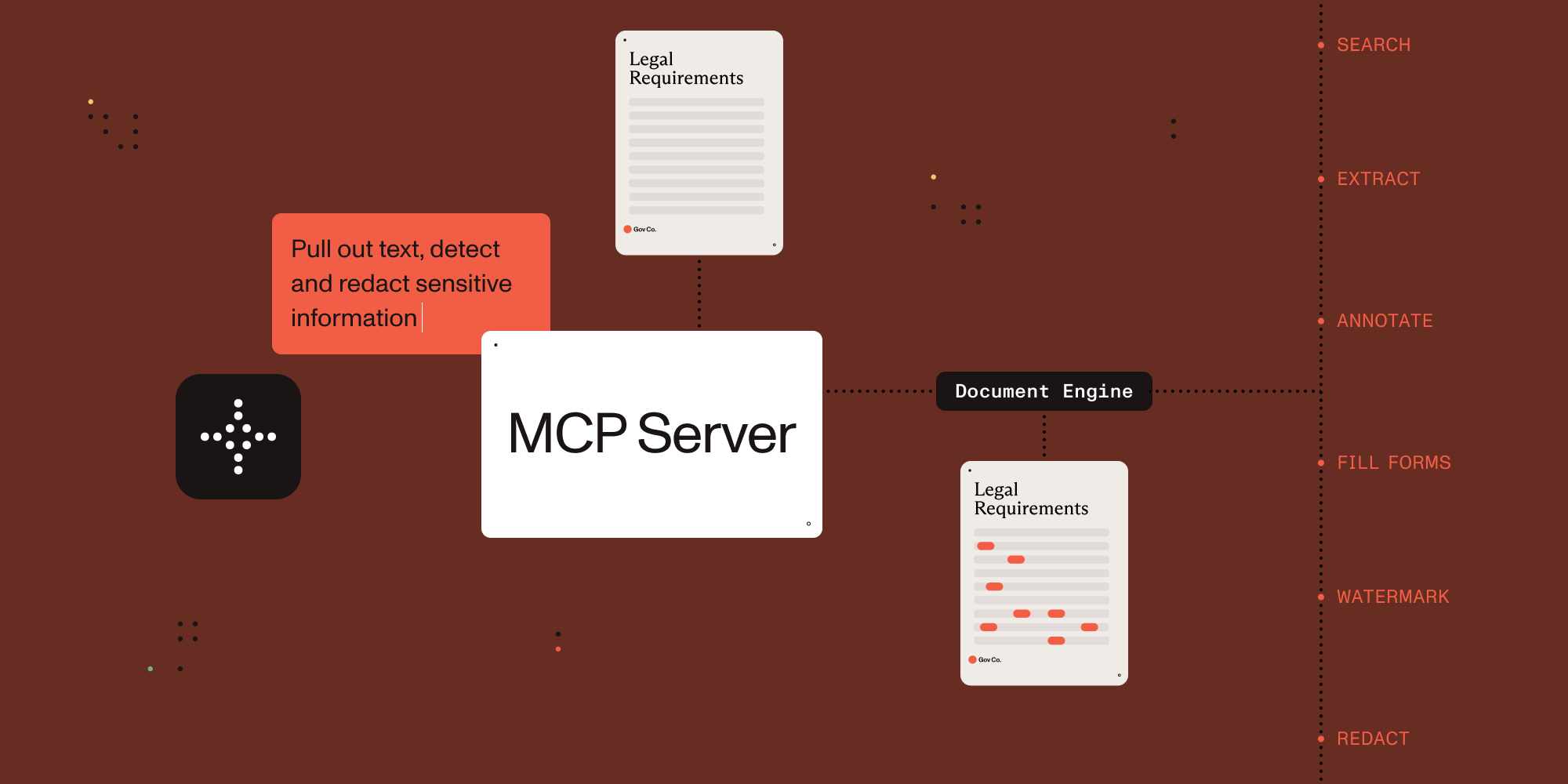

Connect AI agents to document processing.
This MCP server exposes document processing capabilities through natural language, supporting both direct human interaction and AI agent tool calling.
Which MCP Server Should I Use?
| Server | Best for | Deployment | Core capabilities |
|---|---|---|---|
| Nutrient DWS MCP Server | Cloud document workflows | Nutrient-hosted API (API key) | Convert, OCR, redact, sign, extract, watermark, automation |
| Nutrient Document Engine MCP Server | Self-hosted document workflows | On-prem/private cloud | Document processing with deployment control and data residency |
You are in the Document Engine MCP Server repo. Choose this when you need self-hosted/on-prem document workflows and deployment control.
- Ecosystem overview: Nutrient AI Infrastructure
- Product landing page: Nutrient MCP Server
Example Conversations
Once configured, you (or your agent) can interact with documents through natural language:
You: "What documents do I have available?"
AI: "I can see you have 3 documents: annual-report.pdf, contract-draft.pdf, and tax-form-2023.pdf. Would you like me to analyze any of these?"
You: "Extract all the names and phone numbers from these invoices"
AI: "I found 12 contacts: John Smith (555-0123), Sarah Johnson (555-0456)..."
You: "Redact all social security numbers from these tax forms"
AI: "I've identified and redacted 3 SSNs across 2 documents. The redacted versions are ready."
You: "Split this 50-page contract into separate sections"
AI: "I've split the contract into 5 sections: Terms (pages 1-8), Payment (pages 9-15)..."
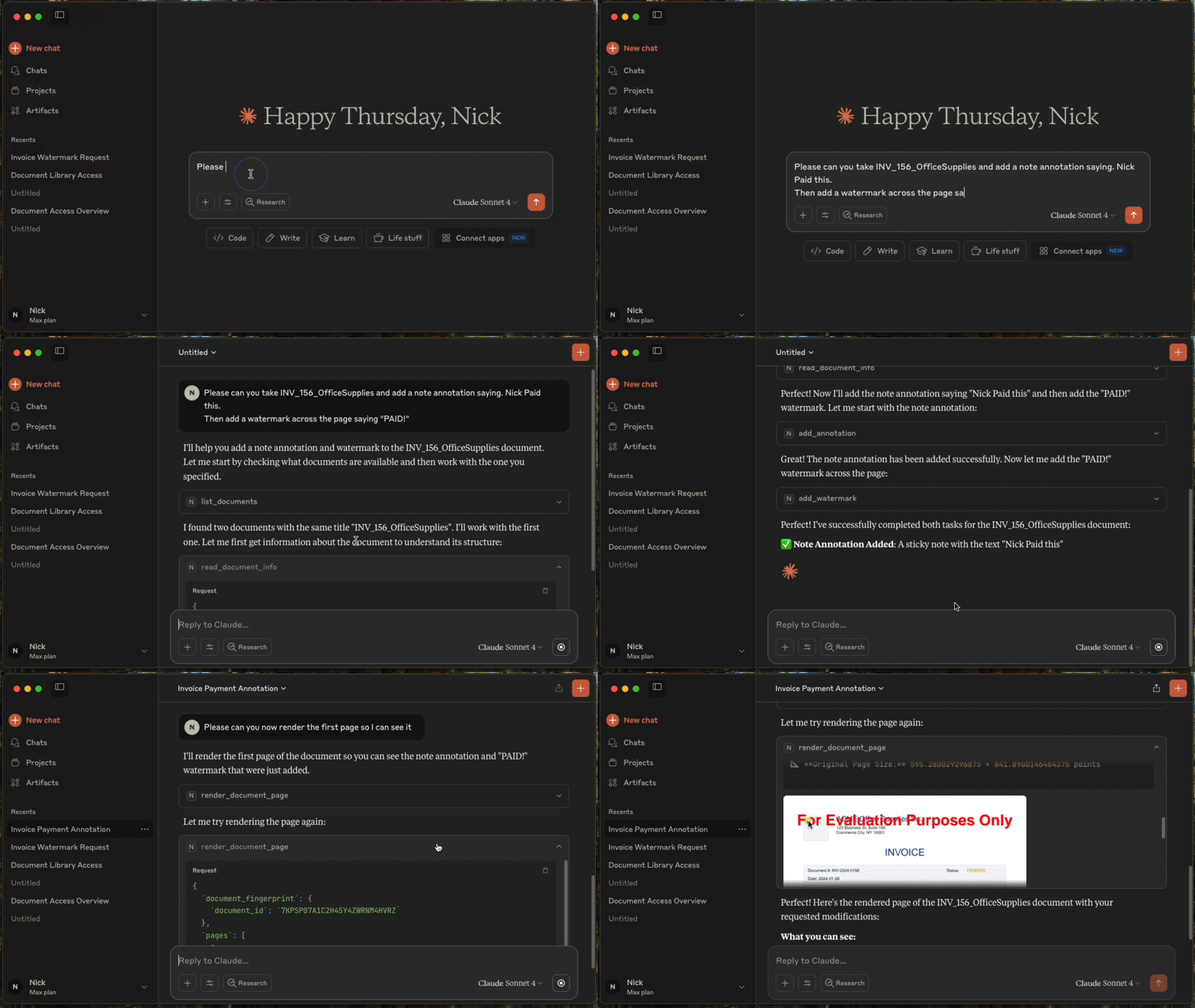
Setup with Claude Desktop
Prerequisites
- Claude Desktop - Download from Anthropic.
- Docker Compose - Download from Docker. For running Nutrient Document Engine locally.
- Node.js 22.x (22.23.4+), 24.x (24.22.1+), or 26.x (26.12.1+) - This MCP server runs via
npx.
Licensing
Nutrient Document Engine runs with an evaluation license by default. Please see Removing Evaluation Limitations section on how to remove the evaluation limitations.
1. Start Nutrient Document Engine
Open a terminal window, then run:
git clone https://github.com/PSPDFKit/nutrient-document-engine-mcp-server.git
cd nutrient-document-engine-mcp-server
docker-compose up -d
2. Connect Claude Desktop
Add this to your Claude Desktop config (Settings → Developer → Edit Config):
{
  "mcpServers": {
    "nutrient-document-engine": {
      "command": "npx",
      "args": ["-y", "@nutrient-sdk/document-engine-mcp-server"],
      "env": {
        "DASHBOARD_USERNAME": "admin",
        "DASHBOARD_PASSWORD": "password",
        "DOCUMENT_ENGINE_BASE_URL": "http://localhost:5000",
        "DOCUMENT_ENGINE_API_AUTH_TOKEN": "secret"
      }
    }
  }
}
3. Restart Claude Desktop
4. Upload and Process Documents
- Open your web browser and go to http://localhost:5100/dashboard.
- Upload the documents you want to work with by using the drag-and-drop interface.
- Switch back to Claude Desktop and ask questions like: "List my documents and extract text from the contract"
HTTP Transport Security
The optional HTTP transport binds to 127.0.0.1 by default. A non-loopback MCP_HOST requires
MCP_HTTP_AUTH_TOKEN; the server refuses to start without a nonempty token. Clients must send the
token on every /mcp request as Authorization: Bearer <token>. If a token is set for a loopback
HTTP server, /mcp requires it there too. This token does not protect /health or /dashboard;
dashboard access uses DASHBOARD_USERNAME and DASHBOARD_PASSWORD.
# Local-only HTTP transport; no MCP bearer token required.
MCP_TRANSPORT=http npx @nutrient-sdk/document-engine-mcp-server

# Network-accessible HTTP transport; bearer authentication is required.
MCP_TRANSPORT=http MCP_HOST=0.0.0.0 MCP_HTTP_AUTH_TOKEN=replace-with-a-secret \
  npx @nutrient-sdk/document-engine-mcp-server
The default stdio transport is unchanged and never requires MCP_HTTP_AUTH_TOKEN.
Features
This MCP server provides document processing tools in these areas:
Content Access: Extract text, search documents, render pages as images, extract form data and table structures.
Document Editing: Split documents, add watermarks, duplicate documents, fill PDF forms.
Security: Create and apply redactions for sensitive data using preset patterns (SSNs, credit cards, etc.) or custom regex.
Annotations: Add, read, and delete document annotations including highlights, notes, and stamps.
System: Document discovery, metadata retrieval, and health monitoring.
Use with Other AI Platforms
This MCP server works with any AI platform that supports the Model Context Protocol:
- Claude Desktop - Quick setup with the configuration above.
- LangGraph - Integrate with LangGraph agents for complex workflows.
- OpenAI APIs - Connect through MCP-compatible frameworks.
- Custom agents - Any MCP-compatible AI system.
Examples and Documentation
Examples
- LangGraph Document Processing - Workflow examples for contract processing, form filling, and report generation.
- OpenAI Agents SDK Document Processing - Workflow examples for contract processing, form filling, and report generation.
- Document Chat Interface - Web application with React and LangGraph.
- Procurement AI Agent - An AI Agent written with Langgraph.js, that classifies and collates POs, invoices, and payment documents into groups and flags for human review
Documentation
- Configuration Guide - Environment variables, transport modes, dashboard.
- Features Reference - Detailed description of all document processing tools.
- Evaluation Framework - Testing and benchmarking tools.
Removing Evaluation Watermarks and Limitations
Document Engine runs in evaluation mode with limitations by default. To remove them:
- Contact Sales to purchase a license from Nutrient
- Configure your license by setting the
ACTIVATION_KEYenvironment variable in your Docker Compose configuration or Document Engine setup - Restart Document Engine to apply the license
For detailed licensing configuration, see the Document Engine licensing guide.
Server Based Document Engine Setups
On-Premise Installation: Follow the Nutrient Document Engine installation guide.
Managed Cloud: Use a hosted Document Engine instance - setup guide.
Contributing
We welcome contributions! See CONTRIBUTING.md for development setup, testing guidelines, and how to submit pull requests.
License
MIT License - see LICENSE file for details.
Nutrient Document Engine MCP soruları
Nutrient Document Engine MCP'yi Claude Code'a nasıl eklerim?
Terminalinizde claude mcp add --env 'DOCUMENT_ENGINE_API_AUTH_TOKEN=<YOUR_DOCUMENT_ENGINE_API_AUTH_TOKEN>' --env 'DOCUMENT_ENGINE_BASE_URL=<DOCUMENT_ENGINE_BASE_URL>' --env 'DASHBOARD_PASSWORD=<YOUR_DASHBOARD_PASSWORD>' nutrient-document-engine-mcp-server -- npx -y @nutrient-sdk/document-engine-mcp-server komutunu çalıştırın. Her projede kullanılabilir olması için --scope user ekleyin.
Nutrient Document Engine MCP'yi Cursor'a nasıl eklerim?
~/.cursor/mcp.json dosyasını açın ve yukarıdaki yükleme bölümünde gösterilen Cursor yapılandırmasını kullanarak sunucuyu mcpServers altına ekleyin.
Nutrient Document Engine MCP server nasıl kurulur?
Depoyu klonlayın, Document Engine'i Docker Compose ile başlatın ve ardından Claude Desktop yapılandırmanızı Document Engine URL'niz ve kimlik bilgilerinizle birlikte npx komutuna yönlendirin. Bağlanmak için istemciyi yeniden başlatın.
Bu server ile sosyal güvenlik numaraları gibi hassas verileri gizleyebilir miyim?
Evet, server; SSN ve kredi kartı gibi önceden tanımlanmış kalıpları veya özel regex ifadelerini kullanarak gizleme işlemleri oluşturabilir ve uygulayabilir.
Nutrient Document Engine MCP server, Claude Desktop dışındaki yapay zeka platformlarıyla çalışır mı?
Evet; LangGraph, OpenAI API'leri ve özel agent'lar dahil olmak üzere MCP uyumlu tüm platformlarla çalışır.
Bir MCP HTTP kimlik doğrulama token'ı gerekli mi?
Sadece loopback olmayan HTTP host'ları için gereklidir; bu durumda server bir token olmadan başlatılmayı reddeder. Varsayılan stdio transport yöntemi hiçbir zaman token gerektirmez.