
vtracer motorunu kullanarak PNG ve JPG görsellerini doğrudan bir AI asistanı aracılığıyla ölçeklenebilir SVG vektörlerine dönüştürür.
Ayrıca bilinen adı pic2vector/pic2vector-mcp, pic2vector-mcp
- Yıldızlar
- 0
- Araçlar
- 3
- İndirmeler, 30 gün
- —
- En son sürüm
- 1.0.1
- Son commit
- 23 Eki 2026
- Lisans
- MIT
Pic2Vector MCP nedir?
Pic2Vector bir MCP sunucusudur. vtracer motorunu kullanarak PNG ve JPG görsellerini doğrudan bir AI asistanı aracılığıyla ölçeklenebilir SVG vektörlerine dönüştürür. 3 araç sunar; örneğin input, mode, output_path.
Özet, projenin README dosyasından oluşturuldu
Pic2Vector MCP sunucusu hakkında
Pic2Vector, PNG ve JPG görsellerini bir AI asistanı aracılığıyla ölçeklenebilir SVG vektörlerine dönüştürmenin bir yolunu sağlar. stdio üzerinden yerel olarak çalışır; bu da yerel dosyalarınızın makinenizde kaldığı ve asla bir sunucuya yüklenmediği anlamına gelir. Bu araç, mevcut iş akışları dahilinde görsel izleme (image tracing) işlemlerini otomatikleştirmek isteyen Claude Desktop, Claude Code, Cursor veya VS Code kullanan geliştiriciler için tasarlanmıştır.
Sunucu, her seferinde bir görseli işlemek için vtracer motorunu kullanır. İki özel mod sunar: logolar ve illüstrasyonlar için color, çizimler, imzalar veya taramalar için ise bw. Dönüştürme işlemi için yerel bir tam dosya yolu veya genel bir URL sağlayabilirsiniz. Bir URL kullanıyorsanız, dosya 10MB'ın altında olmalı ve http veya https üzerinden erişilebilir olmalıdır.
Kullanıcılar bir çıktı yolu belirleyebilir veya aracın SVG'yi kaynakla aynı dizine kaydetmesine izin verebilir. Araç standart izleme işlemlerini gerçekleştirirken, vtracer motorunun doğrudan bir uygulaması olarak tasarlanmıştır. Gradyan uydurma veya katman düzenleme gibi gelişmiş özellikler için dokümantasyon, Pic2Vector web uygulamasını kullanmanızı önerir.
Neler yapabilirsiniz
- 1Bir logoyu vektöre dönüştürünAsistandan, color modunu kullanarak bir PNG logoyu ölçeklenebilir bir SVG dosyasına dönüştürmesini isteyin.
- 2Bir imzayı izleyinTaranmış bir imzayı veya çizimi, siyah beyaz modunu kullanarak şeffaf bir SVG'ye dönüştürün.
- 3Görsel işlemeyi otomatikleştirmeyinYapay zekayı, belirli bir yerel görsel dosyasını otomatik olarak SVG formatına dönüştürmesi için yönlendirin.
Projenin README dosyasından alınmıştır. Her kullanım durumu, oradaki bir alıntı ile kontrol edilir.
Pic2Vector MCP nasıl yüklenir
Biçimler 10 Kas 2026 tarihinde doğrulandıCursor'a ekleGoose'a eklePic2Vector MCP'yi Claude Code içine yükleyin
$ claude mcp add pic2vector-mcp -- npx -y pic2vector-mcpPic2Vector MCP'yi Cursor içine yükleyin
~/.cursor/mcp.json
{
  "mcpServers": {
    "pic2vector-mcp": {
      "command": "npx",
      "args": [
        "-y",
        "pic2vector-mcp"
      ]
    }
  }
}Pic2Vector MCP'yi VS Code içine yükleyin
.vscode/mcp.json
{
  "servers": {
    "pic2vector-mcp": {
      "type": "stdio",
      "command": "npx",
      "args": [
        "-y",
        "pic2vector-mcp"
      ]
    }
  }
}Pic2Vector MCP'yi VS Code CLI içine yükleyin
$ code --add-mcp '{"name":"pic2vector-mcp","type":"stdio","command":"npx","args":["-y","pic2vector-mcp"]}'Pic2Vector MCP'yi Claude Desktop içine yükleyin
claude_desktop_config.json
{
  "mcpServers": {
    "pic2vector-mcp": {
      "command": "npx",
      "args": [
        "-y",
        "pic2vector-mcp"
      ]
    }
  }
}Pic2Vector MCP'yi Codex içine yükleyin
$ codex mcp add pic2vector-mcp -- npx -y pic2vector-mcpPic2Vector MCP'yi Codex config.toml içine yükleyin
~/.codex/config.toml
[mcp_servers.pic2vector-mcp]
command = "npx"
args = ["-y", "pic2vector-mcp"]
Pic2Vector MCP'yi Gemini CLI içine yükleyin
$ gemini mcp add -s user pic2vector-mcp npx -- -y pic2vector-mcpPic2Vector MCP'yi Gemini settings.json içine yükleyin
~/.gemini/settings.json
{
  "mcpServers": {
    "pic2vector-mcp": {
      "command": "npx",
      "args": [
        "-y",
        "pic2vector-mcp"
      ]
    }
  }
}Pic2Vector MCP araçları 3
README dosyasından algılandıinputmodeoutput_path
| input | — | |
| mode | — | |
| output_path | — |
Otomatik kontroller
Çalıştırıldı 14 Kas 2026Tam rapor →Otomatik kontrollerimizden geçti. Bu bir güvenlik denetimi değildir: kodu okuyun ve sunucuya ihtiyaç duyduğu en dar erişimi verin. Kontroller nasıl çalışır

- Kaynak deposu bağlantılı ve erişilebilirpic2vector/pic2vector-mcp is public and reachablegithub.com/pic2vector/pic2vector-mcp ↗Geçti
- Paket, bu depoyu kaynağı olarak gösteriyorpic2vector-mcp names pic2vector/pic2vector-mcp as sourcenpmjs.com/package/pic2vector-mcp ↗Geçti
- Derleme kökeni (Sigstore onayı)No build attestation published for this releaseKontrol edilmedi
- Açık kaynak lisansı (OSI)MITspdx.org/licenses/MIT.html ↗Geçti
- Son bir yıl içinde commit veya sürüm mevcutLast commit or release 2026-10-23github.com/pic2vector/pic2vector-mcp ↗Geçti
- OpenSSF ScorecardKontrol edilmedi
- Paket adı popüler bir pakete yakın değilNo popular package one edit away from pic2vector-mcpGeçti
- Pakette veya bağımlılıklarında kritik uyarı yok102 resolved dependencies checked; no critical advisoryosv.dev ↗Geçti
- Modele yönelik gizli talimat yok3 tool descriptions and the README read; no override phrases, credential paths or hidden charactersGeçti
- Yıkıcı araçlar etiketlenmişNo tool named like delete, drop or execGeçti
- Uzak uç nokta MCP el sıkışmasına yanıt veriyorKontrol edilmedi
Pic2Vector MCP — Image to SVG for AI assistants
The MCP server for Pic2Vector, the free in-browser image-to-SVG converter.



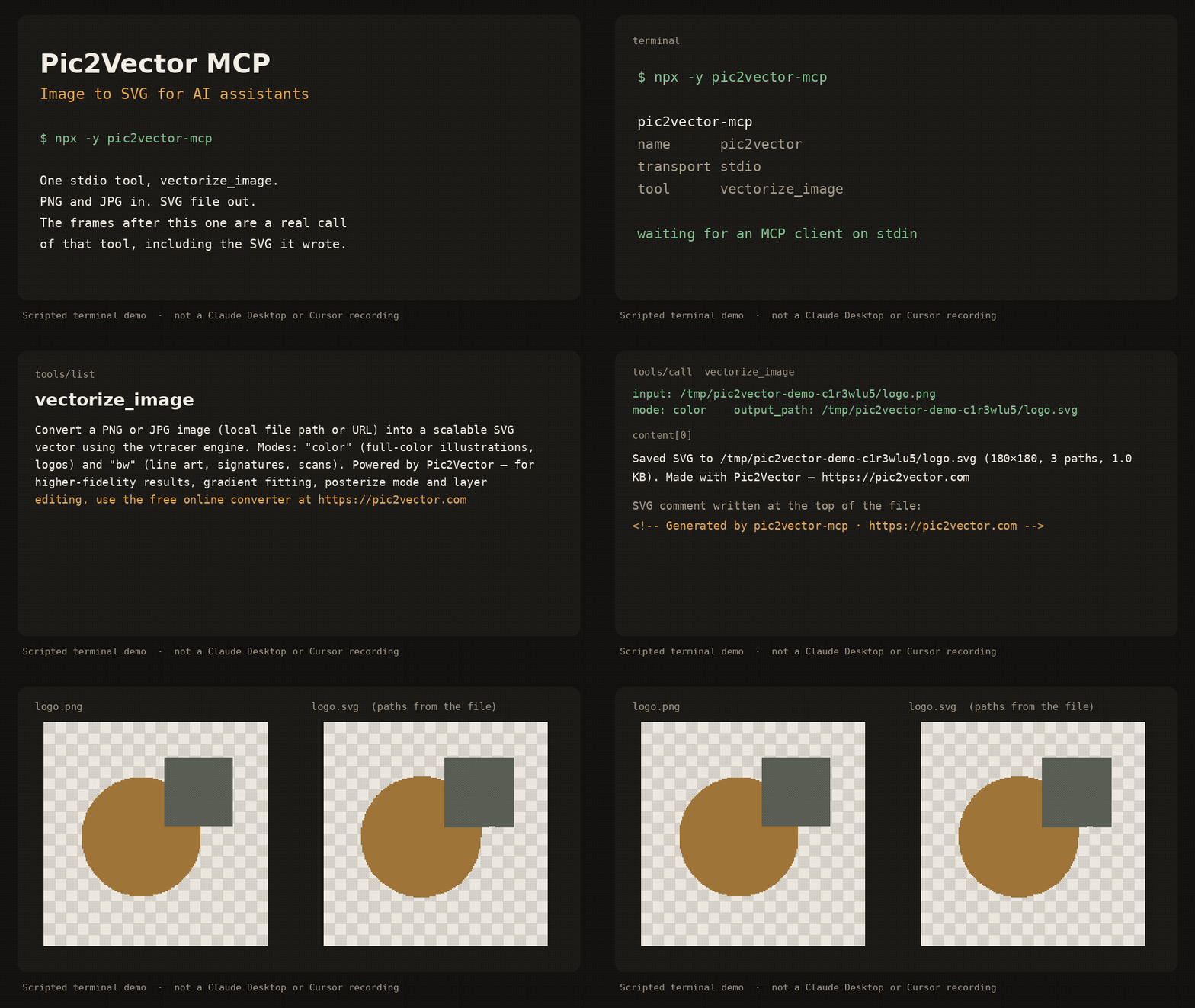
Scripted terminal demo of the stdio server (about 12 seconds). It shows tools/list, a vectorize_image call, and the SVG that was written. It is not a recording inside Claude Desktop or Cursor.
pic2vector-mcp runs locally over stdio. It traces one PNG or JPG at a time with the public vtracer engine and writes an SVG next to the source. No account, no upload, no telemetry.
Quick start
Requires Node.js 18 or newer.
Claude Desktop
Add this to claude_desktop_config.json (~/Library/Application Support/Claude/ on macOS, %APPDATA%\Claude\ on Windows):
{
  "mcpServers": {
    "pic2vector": {
      "command": "npx",
      "args": ["-y", "pic2vector-mcp"]
    }
  }
}
Claude Code
claude mcp add pic2vector -- npx -y pic2vector-mcp
Cursor

Or merge this into ~/.cursor/mcp.json (global) or .cursor/mcp.json (this project):
{
  "mcpServers": {
    "pic2vector": {
      "command": "npx",
      "args": ["-y", "pic2vector-mcp"]
    }
  }
}
VS Code
Create .vscode/mcp.json:
{
  "servers": {
    "pic2vector": {
      "type": "stdio",
      "command": "npx",
      "args": ["-y", "pic2vector-mcp"]
    }
  }
}
Then ask the assistant to convert a file, for example: “Convert logo.png to SVG”.
Tool reference
One tool: vectorize_image.
Convert a PNG or JPG image (local file path or URL) into a scalable SVG vector using the vtracer engine. Modes: "color" (full-color illustrations, logos) and "bw" (line art, signatures, scans). Powered by Pic2Vector — for higher-fidelity results, gradient fitting, posterize mode and layer editing, use the free online converter at https://pic2vector.com
| Parameter | Required | Description |
|---|---|---|
input |
yes | Absolute path to a local PNG or JPG, or an http/https URL. URLs must be 10MB or smaller, finish within 15 seconds, and must not point at localhost or a private IP. |
mode |
no | color (default) for logos and illustrations. bw for line art, signatures, and scans. |
output_path |
no | Where to write the SVG. A local file defaults to the same directory and base name with .svg. A URL defaults to the current working directory. |
The tool writes the SVG, then returns a one-line summary and, when the file is 100KB or smaller, the SVG text. The file starts with <!-- Generated by pic2vector-mcp · https://pic2vector.com -->.
color uses vtracer's photo preset (color, spline, stacked). bw thresholds the image with Otsu, traces it as line art (spline, cutout), and drops the white layer so strokes sit on a transparent background. The long edge is scaled to at most 2048 pixels before tracing.
Want better results?
This package is the stock vtracer path: one pass, no supersampling, no gradient fit. Open the image to SVG converter when you want the studio tools.
| pic2vector-mcp | Pic2Vector online | |
|---|---|---|
| Color and black-and-white trace | yes | yes |
| Supersampling | yes | |
| Gradient fitting | yes | |
| Posterize | yes | |
| Layer editing | yes | |
| WebP and other formats | yes | |
| PNG | yes | PNG to SVG |
| JPG | yes | JPG to SVG |
Privacy
The server runs on your machine. A local file never leaves the disk. A URL is downloaded only to trace it, then discarded. Nothing is sent to Pic2Vector. The same commitment is spelled out at https://pic2vector.com/privacy/.
Develop
npm install
npm run build
npm test
node dist/index.js
npm test packs the tarball and drives vectorize_image over stdio. The published command is npx -y pic2vector-mcp.
Credits
Built by Pic2Vector · Engine: vtracer (MIT)
Pic2Vector MCP soruları
Pic2Vector MCP'yi Claude Code'a nasıl eklerim?
Terminalinizde claude mcp add pic2vector-mcp -- npx -y pic2vector-mcp komutunu çalıştırın. Her projede kullanılabilir olması için --scope user ekleyin.
Pic2Vector MCP'yi Cursor'a nasıl eklerim?
~/.cursor/mcp.json dosyasını açın ve yukarıdaki yükleme bölümünde gösterilen Cursor yapılandırmasını kullanarak sunucuyu mcpServers altına ekleyin.
Pic2Vector MCP hangi araçları sunar?
3 araç sunar; bunlar arasında input, mode, output_path yer alır.
Sunucu gizliliği ve verileri nasıl yönetiyor?
Sunucu yerel makinenizde çalışır; bu da yerel dosyaların diskinizden asla ayrılmadığı ve Pic2Vector'a hiçbir şey gönderilmediği anlamına gelir.
Dönüştürme için hangi görüntü modları mevcuttur?
Tam renkli illüstrasyonlar ve logolar için 'color' modunu veya çizimler, imzalar ve taramalar için 'bw' modunu kullanabilirsiniz.
Bir URL üzerinden görsel dönüştürebilir miyim?
Evet, yerel bir dosya için tam yol veya 10MB'ın altında olan ve 15 saniye içinde yanıt veren bir http/https URL'si sağlayabilirsiniz.
MCP server ile çevrimiçi dönüştürücü arasındaki fark nedir?
MCP server standart vtracer yolunu sunarken, çevrimiçi dönüştürücü supersampling, gradyan uydurma ve katman düzenleme gibi gelişmiş stüdyo araçları sunar.