
Modları arayarak, bağımlılıkları çözerek ve r2modman profillerini dışa aktararak Thunderstore mod paketleri oluşturun ve yönetin.
Ayrıca bilinen adı packwarden-dev/packwarden, @packwarden-dev/thunderstore-mcp
- Yıldızlar
- 0
- Araçlar
- 5
- İndirmeler, 30 gün
- —
- En son sürüm
- 0.1.0
- Son commit
- 26 Eki 2026
- Lisans
- MIT
PackWarden MCP nedir?
Modları arayarak, bağımlılıkları çözerek ve r2modman profillerini dışa aktararak Thunderstore mod paketleri oluşturun ve yönetin. 5 araç sunar; örneğin list_communities, search_mods, resolve_dependencies.
Özet, projenin README dosyasından oluşturuldu
PackWarden MCP sunucusu hakkında
Packwarden, AI asistanları kullanan geliştiricilerin Lethal Company, Risk of Rain 2 veya Valheim gibi oyunlar için Thunderstore mod paketleri oluşturmasına ve bunları yönetmesine olanak tanır. Bu MCP server, kullanıcıların mod bulmasına, karmaşık bağımlılık ağaçlarını yönetmesine ve mevcut mod listelerini güncel olmayan sürümler veya eksik dosyalar gibi sorunlara karşı denetlemesine yardımcı olmak için halka açık Thunderstore API'sine bağlanır. Claude Desktop ve Cursor için Node.js aracılığıyla yerel olarak çalışır veya streamable HTTP modu kullanılarak uzak bir servis olarak çalıştırılabilir.
Kullanıcılar, içerikleri sahibine veya kategorisine göre bulmak için search_mods ve tam geçişli bağımlılık kümesini hesaplamak için resolve_dependencies gibi belirli araçlarla etkileşime girer. Sunucu ayrıca çakışmaları veya kullanımdan kaldırılmış paketleri belirlemek için check_pack_health işlemini de gerçekleştirebilir. Bir paket hazır olduğunda, export_r2modman_profile r2modman veya Thunderstore Mod Manager'da kullanılmak üzere bir .r2z dosyası oluşturur. Sistem hızı artırmak için yerel bir önbellek kullanır, ancak Lethal Company gibi büyük toplulukların yüklenmesi önemli miktarda başlangıç belleği ve zaman gerektirir.
Neler yapabilirsiniz
- 1Karmaşık bağımlılıkları çözünBelirli bir modun çalışması için gereken tüm paketleri ve sürümleri hesaplayın.
- 2Mod listesi sağlığını denetleyinGüncel olmayan sürümleri, eksik bağımlılıkları veya yinelenen girişleri bulmak için bir mod listesini kontrol edin.
- 3Topluluk içeriği arayınAnahtar kelimeler, sahipler veya kategoriler kullanarak belirli bir oyun topluluğundaki modları bulun.
Projenin README dosyasından alınmıştır. Her kullanım durumu, oradaki bir alıntı ile kontrol edilir.
PackWarden MCP nasıl yüklenir
Biçimler 10 Kas 2026 tarihinde doğrulandıCursor'a ekleGoose'a eklePackWarden MCP'yi Claude Code içine yükleyin
$ claude mcp add packwarden -- npx -y @packwarden-dev/thunderstore-mcpPackWarden MCP'yi Cursor içine yükleyin
~/.cursor/mcp.json
{
  "mcpServers": {
    "packwarden": {
      "command": "npx",
      "args": [
        "-y",
        "@packwarden-dev/thunderstore-mcp"
      ]
    }
  }
}PackWarden MCP'yi VS Code içine yükleyin
.vscode/mcp.json
{
  "servers": {
    "packwarden": {
      "type": "stdio",
      "command": "npx",
      "args": [
        "-y",
        "@packwarden-dev/thunderstore-mcp"
      ]
    }
  }
}PackWarden MCP'yi VS Code CLI içine yükleyin
$ code --add-mcp '{"name":"packwarden","type":"stdio","command":"npx","args":["-y","@packwarden-dev/thunderstore-mcp"]}'PackWarden MCP'yi Claude Desktop içine yükleyin
claude_desktop_config.json
{
  "mcpServers": {
    "packwarden": {
      "command": "npx",
      "args": [
        "-y",
        "@packwarden-dev/thunderstore-mcp"
      ]
    }
  }
}PackWarden MCP'yi Codex içine yükleyin
$ codex mcp add packwarden -- npx -y @packwarden-dev/thunderstore-mcpPackWarden MCP'yi Codex config.toml içine yükleyin
~/.codex/config.toml
[mcp_servers.packwarden]
command = "npx"
args = ["-y", "@packwarden-dev/thunderstore-mcp"]
PackWarden MCP'yi Gemini CLI içine yükleyin
$ gemini mcp add -s user packwarden npx -- -y @packwarden-dev/thunderstore-mcpPackWarden MCP'yi Gemini settings.json içine yükleyin
~/.gemini/settings.json
{
  "mcpServers": {
    "packwarden": {
      "command": "npx",
      "args": [
        "-y",
        "@packwarden-dev/thunderstore-mcp"
      ]
    }
  }
}PackWarden MCP araçları 5
README dosyasından algılandılist_communitiessearch_modsresolve_dependenciescheck_pack_healthexport_r2modman_profile
| list_communities | — | |
| search_mods | — | |
| resolve_dependencies | — | |
| check_pack_health | — | |
| export_r2modman_profile | — |
Yapılandırma
TEST_COMMUNITYTSMCP_EXPORT_DIR
| Ad | Açıklama | Sunucu |
|---|---|---|
| TEST_COMMUNITY | — | |
| TSMCP_EXPORT_DIR | — |
Otomatik kontroller
Çalıştırıldı 13 Kas 2026Tam rapor →Otomatik kontrollerimizden geçti. Bu bir güvenlik denetimi değildir: kodu okuyun ve sunucuya ihtiyaç duyduğu en dar erişimi verin. Kontroller nasıl çalışır

- Kaynak deposu bağlantılı ve erişilebilirGeçti
- Açık kaynak lisansı (OSI)Geçti
- Son bir yıl içinde commit veya sürüm mevcutGeçti
- Paket adı popüler bir pakete yakın değilGeçti
- Uzak uç nokta HTTPS kullanıyorKontrol edilmedi
- Yıkıcı araçlar etiketlenmişGeçti
- Modele yönelik gizli talimat yokGeçti
- Pakette veya bağımlılıklarında kritik uyarı yokGeçti
PackWarden — Thunderstore Mod-Pack MCP Server (v0.1.0)
PackWarden is not affiliated with or endorsed by Thunderstore. "Thunderstore" is used only to describe compatibility. Mod data comes from the public Thunderstore API (https://thunderstore.io).
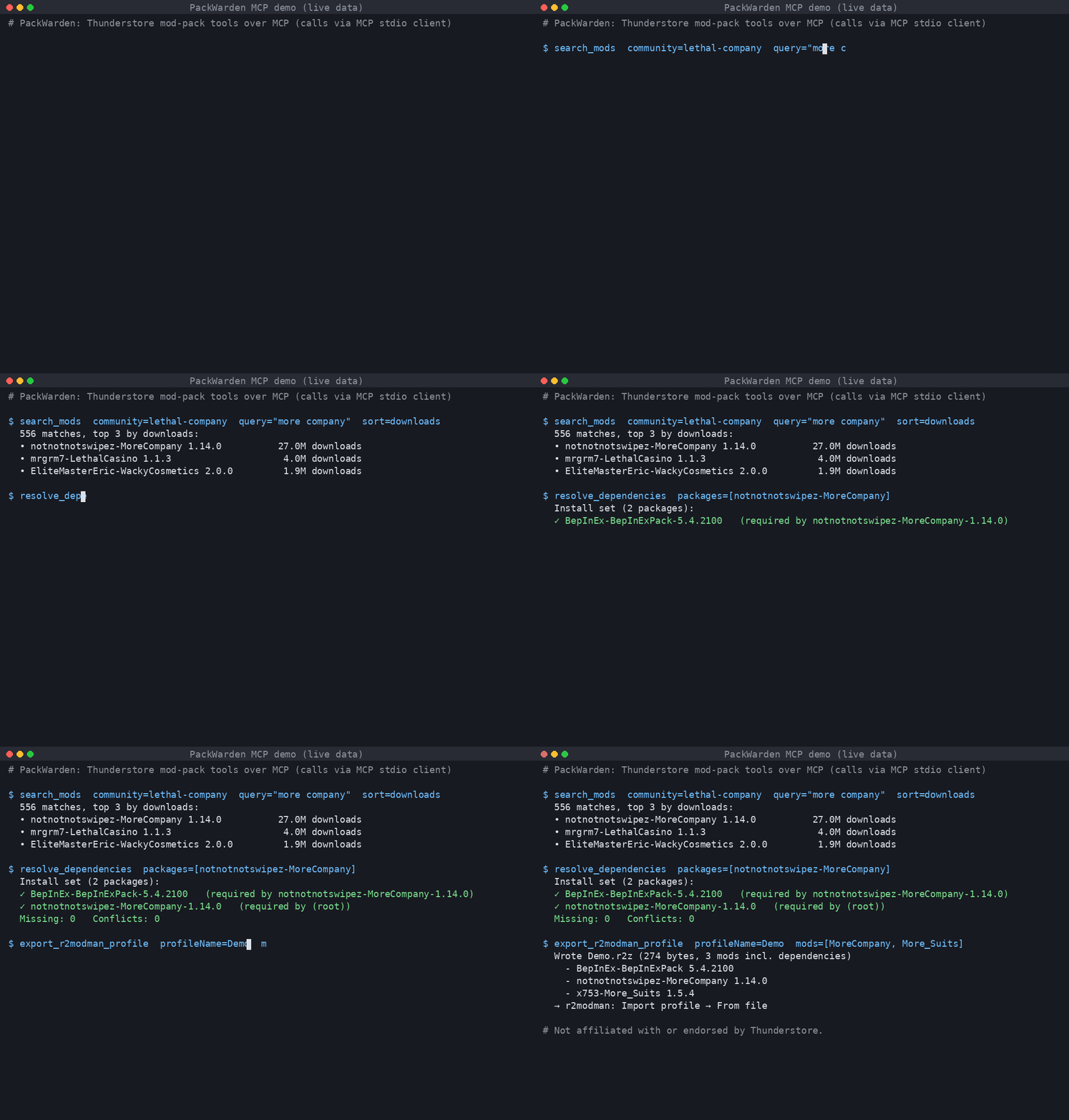
Live output: searching Lethal Company mods, resolving MoreCompany's dependencies, and exporting an r2modman .r2z profile.
An MCP server that helps AI assistants build and maintain Thunderstore mod packs (Lethal Company, Risk of Rain 2, Valheim, and every other Thunderstore community).
Tools
| Tool | What it does |
|---|---|
list_communities |
List Thunderstore game communities (identifier + name). |
search_mods |
Search a community by name/owner/description/category; sort by relevance, downloads, rating, updated. |
resolve_dependencies |
Full transitive dependency closure for one or more packages/versions; final install set, missing deps, multi-version pins, optional tree. |
check_pack_health |
Audit a mod list: not found, removed version, deprecated, outdated, missing deps, dependency version conflicts, duplicates, NSFW. |
export_r2modman_profile |
Write an .r2z profile (r2modman / Thunderstore Mod Manager "Import profile → From file"), optionally with deps and config files. Nothing is uploaded. |
Mods are referenced as Owner-Name (latest) or Owner-Name-1.2.3.
Install
Requires Node.js ≥ 18.17.
git clone <repo> thunderstore-mcp && cd thunderstore-mcp
npm install && npm run build
Claude Desktop
Edit claude_desktop_config.json (macOS: ~/Library/Application Support/Claude/, Windows: %APPDATA%\Claude\):
{
  "mcpServers": {
    "thunderstore": {
      "command": "node",
      "args": ["/absolute/path/to/thunderstore-mcp/dist/main.js"],
      "env": { "TSMCP_EXPORT_DIR": "/absolute/path/for/profiles" }
    }
  }
}
Restart Claude Desktop.
Cursor
~/.cursor/mcp.json (global) or .cursor/mcp.json (project):
{
  "mcpServers": {
    "thunderstore": {
      "command": "node",
      "args": ["/absolute/path/to/thunderstore-mcp/dist/main.js"]
    }
  }
}
Streamable HTTP (remote / self-hosted)
npm run start:http            # http://127.0.0.1:3333/mcp
PORT=8080 HOST=0.0.0.0 node dist/main.js --http
Cursor: { "mcpServers": { "thunderstore": { "url": "http://127.0.0.1:3333/mcp" } } }.
The HTTP mode is stateless (POST-only, JSON responses) and has no auth. Put it behind a reverse proxy with TLS and auth before exposing it.
Configuration (env)
| Var | Default | Meaning |
|---|---|---|
TSMCP_CACHE_DIR |
~/.cache/thunderstore-mcp |
Slim package-index cache |
TSMCP_LIST_TTL_MS |
3600000 (1h) |
Package-list freshness |
TSMCP_MIN_INTERVAL_MS |
1000 |
Minimum gap between outbound requests |
TSMCP_EXPORT_DIR |
./exports |
Where .r2z files are written |
TSMCP_CONTACT |
support@packwarden.dev |
Contact put in the User-Agent. Override if you run your own copy. |
TSMCP_BRAND |
PackWarden |
Brand in server name/User-Agent |
TSMCP_BASE_URL |
https://thunderstore.io |
API base |
Be a good API citizen
- One full package list download per community per TTL, then conditional requests (
If-Modified-Since). Results are cached on disk as a slim index. - Outbound requests are serialized (concurrency 1) and spaced ≥1s apart. On 429/5xx the client backs off and honours
Retry-After. - Identifying User-Agent with a contact address.
- If the network fails, the server keeps serving stale cache.
Tests (live API)
npm test                         # default community: valheim
TEST_COMMUNITY=valheim npm test
Tests cover stdio and streamable HTTP end-to-end against the live Thunderstore API.
Limitations
- Large communities are heavy. The first load of Lethal Company is about 330 MB of JSON, takes about 14 s, and uses about 1.4 GB of RAM. After that, loads from cache take about 3 s.
- Resolution follows r2modman behaviour (highest requested version wins). It does not do semver range solving, because Thunderstore pins exact versions.
- No profile code sharing, which would need an upload to Thunderstore. Only file export is supported.
- Search is local keyword scoring, not Thunderstore's own search ranking.
PackWarden MCP soruları
PackWarden MCP'yi Claude Code'a nasıl eklerim?
Terminalinizde claude mcp add packwarden -- npx -y @packwarden-dev/thunderstore-mcp komutunu çalıştırın. Her projede kullanılabilir olması için --scope user ekleyin.
PackWarden MCP'yi Cursor'a nasıl eklerim?
~/.cursor/mcp.json dosyasını açın ve yukarıdaki yükleme bölümünde gösterilen Cursor yapılandırmasını kullanarak sunucuyu mcpServers altına ekleyin.
PackWarden MCP hangi araçları sunar?
5 araç sunar; bunlar arasında list_communities, search_mods, resolve_dependencies, check_pack_health, export_r2modman_profile yer alır.
PackWarden hangi oyunları destekliyor?
Lethal Company, Risk of Rain 2 ve Valheim dahil olmak üzere tüm Thunderstore topluluklarını destekler.
Mod listemi nasıl dışa aktarabilirim?
Sunucu, r2modman veya Thunderstore Mod Manager içine aktarılabilen bir .r2z profili oluşturabilir.
Büyük topluluklar için donanım gereksinimleri nelerdir?
Lethal Company gibi büyük toplulukları yüklemek yaklaşık 1.4 GB RAM gerektirebilir ve ilk yüklemede yaklaşık 14 saniye sürebilir.